The best robot arms for students turn abstract coding and electronics lessons into hands-on projects. These kits let learners experiment with movement, servo control, programming, and mechanical design at a range of skill levels.
We selected 10 options spanning beginner-friendly wooden builds, Arduino and ESP32 platforms, wireless controls, and more advanced six-axis arms. Use the guide below to match the right kit to the student’s age, experience, and learning goals.
Best 10 Robot Arms for Students Picks for 2026
Best for Open-Source Learning
MaxArm Arduino/Python Robotic Arm

- Python and Arduino support
- ESP32 with Wi-Fi, Bluetooth, and sensor expansion
- Inverse kinematics and trajectory planning
Best For: Older students learning programming and robotics
Best Hands-On Build
VANLINNY All-Metal Mobile Robot Arm

- All-metal frame and gears
- Four-axis gripping arm
- Mecanum wheels for sideways movement
Best For: Ages 8–14 learning through assembly and remote control
Best for Beginners
Arduino 4-Axis Memorizing Robot Arm

- Step-by-step build and programming tutorials
- Records up to 170 actions
- Four-axis movement with joystick control
Best For: Teens and beginners learning electronics and automation
Best for Advanced Projects
Waveshare RoArm-M2-S ESP32 Kit
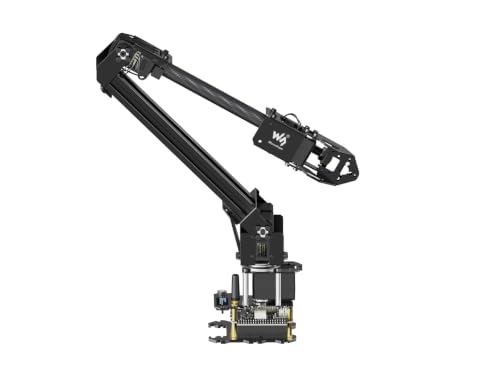
- Open-source ESP32 control platform
- ROS2 and wireless communication support
- Expansion plate for custom tooling
Best For: Advanced students building customizable robotics projects
Best Overall
Hiwonder-xArm1S 6DOF Robotic Arm
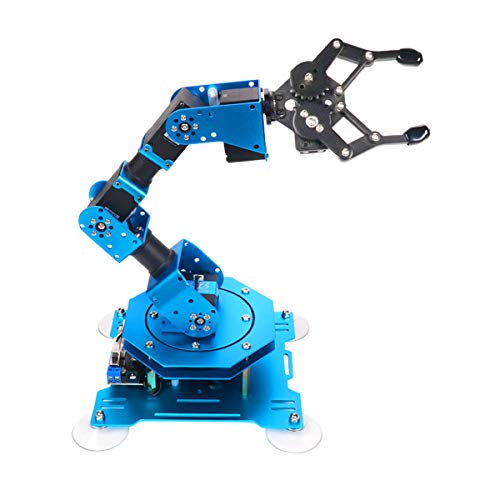
- Six-axis metal design with intelligent servos
- Multiple PC, app, mouse, and controller options
- Supports custom actions and loads up to 500g
Best For: Students exploring advanced robotics, coding, and STEM projects
Best DIY Starter

- Four degrees of freedom for flexible movement
- SG90 servos power each joint
- Lightweight design for hands-on assembly
Best For: Students and DIY learners building foundational robotics skills
Best Assembled Option
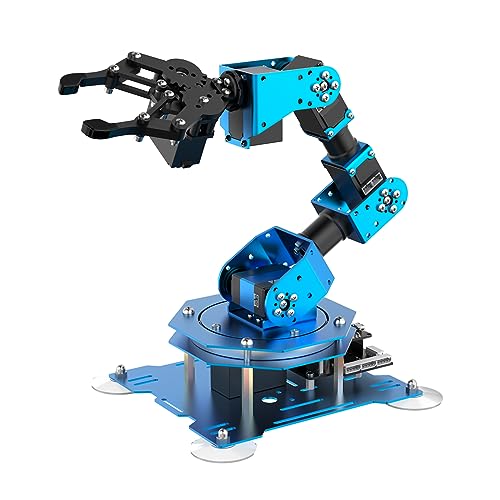
- Assembled and ready for STEM projects
- Six-axis metal arm with intelligent servos
- Supports app, PC, mouse, and wireless control
Best For: Students prioritizing programming and operation over assembly
Best Budget-Friendly Coding Kit
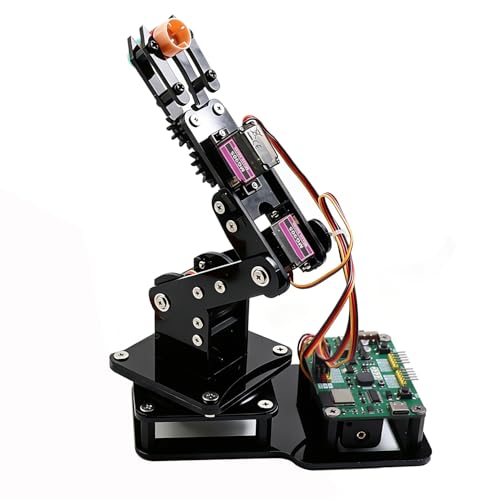
- Beginner-friendly pre-programmed ESP32-C3 board
- Joystick and web-app control
- Arduino, MicroPython, and motion playback support
Best For: Teens and beginners learning coding and robotics
Best Metal-Build Learning Arm

- Metal structure with reinforced base
- Six-degree-of-freedom movement
- PC, app, mouse, and wireless control
Best For: Older students and engineering courses
Best Advanced Open-Source Platform
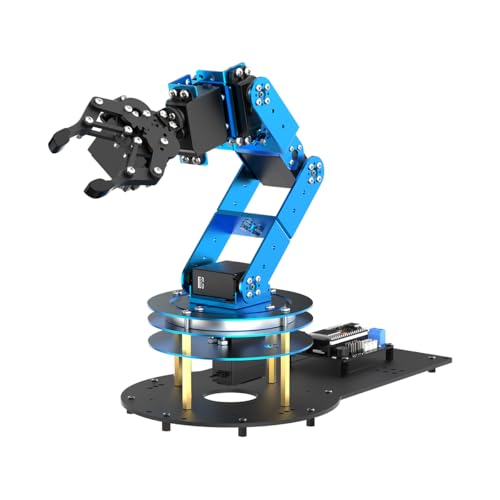
- ESP32 and Arduino-compatible controller
- Inverse kinematics with six smart servos
- 200-plus tutorials and sensor expansion support
Best For: University students and advanced robotics makers
Best for Open-Source Learning – MaxArm Arduino/Python Robotic Arm
For students seeking robot arms for students that can grow with their programming skills, the LewanSoul MaxArm offers a capable platform built around ESP32, Arduino, and Python. Its inverse-kinematics approach, wireless connectivity, and expansion ports make it suited to structured STEM projects and experimentation.
Best For: Older students and beginners moving into programming, robotics, and sensor-based projects.
Pros:
- Supports Python and Arduino programming with app, PC, mouse, and wireless-controller operation.
- Uses inverse kinematics to position the end effector along the x, y, and z axes.
- ESP32 controller includes Wi-Fi, Bluetooth, sensor ports, and additional expansion interfaces.
- Smart bus servos and trajectory planning support accurate programmed movement.
Cons:
- Recommended for ages 16 and up, so it may be too advanced for younger learners.
- Its aluminum construction and programming features make it more of a learning platform than a simple ready-to-play toy.
The MaxArm is a strong choice when the goal is hands-on coding and secondary development rather than basic remote control. Students can begin with guided movement and extend projects with sensors, wireless communication, and custom software.
Best Hands-On Build – VANLINNY All-Metal Mobile Robot Arm
The VANLINNY is a practical pick among robot arms for students who want to assemble, drive, and operate a physical machine. Its all-metal frame, four-axis gripping arm, and mecanum wheels turn the project into both a construction exercise and a remote-controlled STEM activity.
Best For: Students ages 8–14 who enjoy mechanical assembly, spatial reasoning, and hands-on play.
Pros:
- All-metal frame, alloy panels, and metal gears provide a sturdier build than hollow plastic kits.
- Four-axis arm can lift, lower, rotate, and clamp light objects.
- Mecanum wheels allow forward movement, sideways strafing, spinning, and tight-gap navigation.
- Includes numbered parts, hex tools, illustrated instructions, and a rechargeable robot battery.
Cons:
- Assembly takes about two hours and may require adult supervision for younger builders.
- The remote requires four AA batteries, which are not included.
- The arm is intended for light payloads; forcing oversized loads can wear the gears.
This model emphasizes mechanical confidence and interactive operation over text-based programming. It is a good introduction to robot construction for students who want a working vehicle and gripper after completing the build.
Best for Beginners – Arduino 4-Axis Memorizing Robot Arm
Students looking for approachable robot arms for students can start with this compact Arduino building kit. It combines step-by-step assembly and programming guidance with joystick control and a record-and-repeat function, providing a manageable way to explore electronics, movement, and basic automation.
Best For: Beginners and teens ages 13 and up learning foundational electronics, programming, math, and science concepts.
Pros:
- Four-axis design provides movement through the clip, wrist, elbow, and rotating base.
- Can record up to 170 actions and repeat the recorded sequence once.
- Includes assembly and programming tutorials, plus technical support.
- Compact acrylic design fits easily on a student’s desk.
Cons:
- Two batteries need to be prepared separately.
- The small acrylic build is more focused on learning than heavy-duty handling.
- Its stated age range begins at 13, limiting suitability for younger children.
The standout feature is the ability to see a physical sequence repeated after recording it. That makes the kit useful for introducing programming logic and automation without requiring an especially complex platform.
Best for Advanced Projects – Waveshare RoArm-M2-S ESP32 Kit
For advanced students comparing robot arms for students, the Waveshare RoArm-M2-S offers an open-source ESP32 platform with wireless control, a visual web application, and expansion options. Support for ROS2, multiple communication methods, and custom end-of-arm tooling gives it room for more ambitious robotics projects.
Best For: Students and makers working on open-source robotics, ROS2, wireless control, and custom tool designs.
Pros:
- Provides graphic and video tutorials alongside a cross-platform web application with coordinate control.
- Open-source control code and communication documentation support secondary development in multiple languages and devices.
- Expansion plate allows customized end-of-arm tooling.
- Four-DOF design combines a 360-degree base with a workspace approximately 1 meter in diameter.
Cons:
- Its open-source and ROS2 capabilities may be more than beginners need.
- The kit is designed for innovative applications rather than simple toy-style operation.
- Its effective payload is listed as 0.5 kg at 0.5 m, so project loads should stay within that specification.
The RoArm-M2-S is most compelling when students need a platform they can customize and integrate into broader systems. Its tutorials help with the initial setup, while the open interfaces and expansion plate support continued experimentation.
Best Overall – Hiwonder-xArm1S 6DOF Robotic Arm
For students seeking robot arms for students that support both hands-on experimentation and programming, the Hiwonder-xArm1S offers a capable desktop platform. Its six-axis design, intelligent servos, and several control options make it suitable for exploring grasping, motion, and custom robotic actions.
Best For: Students aged 14 and up who want a versatile platform for robotics, coding, and STEM projects.
Pros:
- Six-axis aluminum-alloy construction with a reinforced base for stability.
- Intelligent servos provide position, voltage, and temperature feedback.
- Supports PC, phone app, mouse, and wireless controller operation.
- Can grasp objects weighing up to 500g and supports custom action editing.
Cons:
- Its feature set may be more than beginners need for simple demonstrations.
- It is intended for indoor tabletop use rather than outdoor activity.
The xArm1S stands out as the most complete learning platform in this group. It combines physical manipulation with multiple programming and control methods, making it a strong choice for students ready to build more advanced robotics projects.
Best DIY Starter – 4DOF Wooden Robot Arm Kit
This wooden 4-DOF kit is a straightforward option for students looking for robot arms for students that emphasize assembly and mechanical basics. Each joint uses an SG90 servo, while the lightweight wood construction keeps the project approachable for DIY learning.
Best For: Middle school students, college students, and DIY enthusiasts interested in assembling a basic robotic arm.
Pros:
- Four degrees of freedom provide flexible arm movement.
- SG90 servos drive each joint for a hands-on introduction to actuation.
- Lightweight wood construction suits tabletop DIY projects.
- Designed for educational assembly and robotics learning.
Cons:
- It has fewer degrees of freedom than the six-axis alternatives.
- The supplied details do not list wireless, app, or PC control.
- Assembly is part of the experience, so it may require more setup time.
This kit is best viewed as an entry-level mechanical learning project rather than a feature-rich programmable arm. Its simple servo-driven layout can help students understand joints, structure, and basic robotic movement.
Best Assembled Option – LewanSoul xArm1S 6DOF
Students who want robot arms for students without starting with assembly may prefer this assembled LewanSoul xArm1S. It retains the six-axis metal structure, intelligent servos, and multi-method controls of the xArm1S platform, providing a ready-to-use route into coding and robotic manipulation.
Best For: Students aged 14 and up who want an assembled STEM robot arm for programming, grasping, and classroom projects.
Pros:
- Arrives as an assembled version for a quicker start.
- Six-axis aluminum and metal construction supports tabletop use.
- Offers PC, app, mouse, and PS2 wireless control methods.
- Supports graphical programming, action editing, grasping, and object transportation.
Cons:
- It is heavier than the wooden kit at 1.83 kg.
- Its DC power supply and indoor tabletop design limit portability.
- The assembled format provides less build experience than a DIY kit.
The assembled xArm1S is a practical pick when the learning goal is programming and operation rather than construction. It offers the same broad control and editing possibilities in a format that lets students begin experimenting sooner.
Best Budget-Friendly Coding Kit – ESP32 4DOF Robot Arm
For students looking for approachable robot arms for students, this 4DOF ESP32 kit combines hands-on assembly with joystick, web-app, Arduino, and MicroPython control. Its pre-programmed board lets beginners start experimenting without uploading code first.
Best For: Teens, beginners, classroom demonstrations, and DIY learners who want an expandable tabletop robotics project.
Pros:
- Includes the hardware needed to build a 4DOF robotic arm.
- Offers joystick and browser-based control without app installation.
- Supports motion recording, loop playback, Arduino, and MicroPython.
- Open-source code and tutorials support future projects.
Cons:
- Lightweight objects are the intended use for the claw.
- Batteries are not included.
- The manufacturer recommends it for ages 12 and up.
This is a practical entry point for students who want to learn by building and then gradually modify the software or hardware. It is less suited to users seeking a heavy-duty arm, but its accessible controls and expandable ESP32 platform make it a strong educational choice.
Best Metal-Build Learning Arm – LewanSoul LeArm 6DOF
Among robot arms for students, the LewanSoul LeArm stands out for its metal construction, six-degree-of-freedom movement, and broad control options. It is designed for assembly, programming practice, and tabletop demonstrations.
Best For: Older students, university courses, engineering learners, and makers who value a stable metal desktop platform.
Pros:
- Six degrees of freedom support more varied movements and projects.
- Metal brackets, high-torque servos, and bearings provide a stable structure.
- Can be controlled through PC software, an app, mouse, or wireless handle.
- Anti-stall protection helps protect the end servos.
Cons:
- The manufacturer recommends it for ages 14 and up, with an age range of 16 years and up listed.
- It requires an AC adapter rather than battery power.
- Its metal construction makes it heavier than simpler classroom kits.
The LeArm is a solid choice when build quality and movement range matter more than portability. Its tutorials and simple programming software make it approachable, while the metal frame gives advanced students a more substantial platform for creative projects.
Best Advanced Open-Source Platform – LeArm Open Source 6DOF
For advanced robot arms for students, the LeArm Open Source pairs an ESP32 controller with Arduino compatibility, inverse-kinematics software, and sensor expansion. It is built for learners ready to move from basic control into AI, programming, and secondary development.
Best For: University students, engineering learners, and experienced makers working on expandable robotics or sensor-based projects.
Pros:
- Six smart PWM servos and inverse kinematics support precise path planning.
- Built-in Bluetooth and expansion ports enable upgrades and secondary development.
- Supports app, PC software, and wireless-controller operation.
- Includes 200-plus tutorials, experiments, schematics, and open-source programs.
Cons:
- The manufacturer recommends it for ages 16 and up.
- Its advanced features may be more than beginners need.
- Sensor modules for vision, voice, or distance projects are supported but not specified as included.
This is the most development-focused option in the group. Its extensive learning resources and expansion support give students room to progress from assembly and programming to sensor-driven experiments, though younger or first-time learners may prefer a simpler kit.
How We Picked the Best Robot Arms for Students
We compared these kits by looking at programming support, controller compatibility, degrees of freedom, construction quality, included accessories, and the learning curve. Arduino and ESP32 compatibility can make a kit more useful for coding classes and independent projects, while open-source documentation and tutorials are especially valuable for beginners.
We also considered whether each arm supports practical experimentation, such as joystick control, web or app control, movement recording, suction or claw attachments, and wireless operation. Since student needs vary widely, the list includes both simple introductory builds and full-metal arms designed for more advanced robotics work.
Quick Comparison
| Best For | Recommended Type | What to Look For |
|---|---|---|
| Young beginners | Simple STEM or wooden kit | Clear instructions, manageable assembly, and basic servo control |
| Arduino learners | Arduino-compatible arm | Example code, accessible wiring, and expandable hardware |
| Python and ESP32 projects | Wi-Fi or MicroPython arm | Wireless control, open documentation, and app or web interfaces |
| Advanced students | 4-DOF or 6-DOF metal arm | Stronger servos, rigid construction, and broader programming control |
Key Buying Factors for Robot Arms for Students
Programming Platform
Check which boards and languages the arm supports before buying. Arduino is a common starting point, while ESP32 models may add Wi-Fi, Bluetooth, web control, or MicroPython support. A kit with sample code and tutorials can shorten setup time considerably.
Degrees of Freedom and Servos
More degrees of freedom provide more natural movement but usually increase assembly complexity and programming demands. Four-axis arms are often easier for first projects; six-axis models offer greater flexibility for students ready to explore coordinated motion.
Build Quality and Payload
Metal frames and higher-torque bus servos generally provide better rigidity and repeatability than lightweight plastic designs. However, confirm the stated payload and reach rather than assuming a larger arm can lift heavy objects.
Controls and Expansion
Hand controllers, joysticks, PC software, apps, suction nozzles, and interchangeable claws can make lessons more engaging. Expansion headers and accessible wiring matter if the student plans to add sensors or create custom projects.
Age, Assembly, and Support
Review the recommended age, required tools, power requirements, and assembly instructions. Younger students may need adult supervision, particularly with small parts, wiring, and external power supplies.
Who Should Buy Which Robot Arms for Students?
Choose a basic STEM or wooden arm for a first introduction to servos, mechanical movement, and simple programming. An Arduino kit is a strong choice for students learning electronics or working through classroom coding exercises.
For students interested in connected devices, select an ESP32 model with Wi-Fi, MicroPython, or web-app control. Learners building more ambitious robotics projects should consider a six-axis, full-metal arm with stronger servos and expansion support. If the goal is mainly demonstrations and guided activities, prioritize tutorials and ready-made controls over maximum articulation.