The best robot arms make programming, automation, and hands-on engineering easier to explore at home, in classrooms, and in research projects. This roundup compares beginner-friendly kits with open-source platforms designed for more advanced AI and robotics work.
We focused on build quality, control options, degrees of freedom, software support, and the learning curve so you can choose a robot arm that matches your skills and goals.
Best 10 Robot Arms Picks for 2026
Creative Learning Pick

- Six-degree-of-freedom desktop arm
- Multiple control methods and tutorials
- Metal construction with anti-stall protection
Best For: Students and hobbyists learning robotics
AI Development Starter

- Designed for LeRobot integration
- Improved wiring and leader-arm gearing
- Supports real-time leader-follower learning
Best For: Developers building AI robotics projects
Interactive STEM Choice
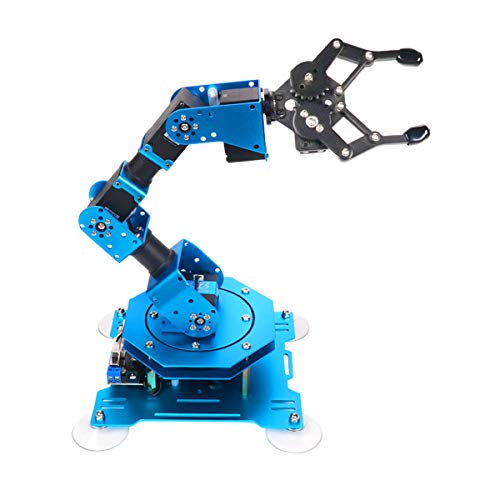
- Six intelligent feedback-enabled servos
- Multiple control and action-editing methods
- Listed grasping capacity up to 500g
Best For: STEM learning and coding demonstrations
Research-Ready Platform

- 6+1 DoF design with gripper
- Python SDK and ROS1/ROS2 compatibility
- Wi-Fi, Bluetooth, Ethernet, and USB connectivity
Best For: AI robotics research and development
Best Beginner Build

- Four-axis movement with joystick control
- Records and repeats up to 170 actions
- Guided assembly and programming tutorials
Best For: Beginners, teens, and adults learning robotics
Best for AI Experimentation

- Six-axis platform for imitation learning
- Dual cameras support vision-based tasks
- 12 high-torque bus servos with feedback
Best For: Adult developers, researchers, and advanced hobbyists
Best Family STEM Project

- Combines motors, circuits, and mechanical assembly
- No soldering required
- Designed for ages 8 and up
Best For: Kids, families, classrooms, and beginner STEM projects
Best AI Research Pick
Hiwonder SO-ARM101 6-Axis Robot Arm
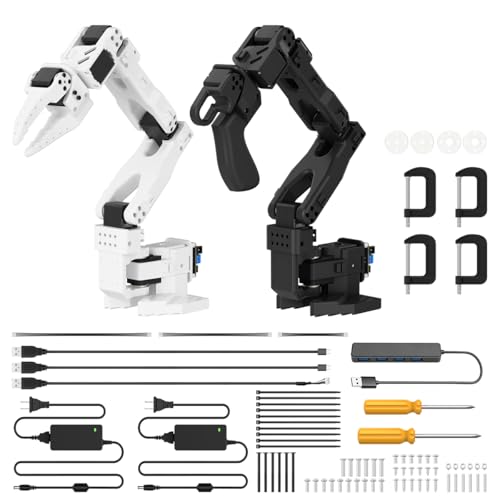
- LeRobot-compatible platform for imitation learning
- Dual-camera vision for manipulation and awareness
- 12 high-torque bus servos with magnetic feedback
Best For: Adult AI researchers, developers, and advanced robotics hobbyists
Best Building Set
3-in-1 Technical Robotic Arm Kit

- 975-piece tracked STEM building project
- Gripper, bucket, and drill attachments
- Remote control plus three app modes
Best For: Kids 8+, teens, and adults who enjoy building and STEM play
Best Arduino Learning Kit
LeArm 6DOF Programming Robot Arm
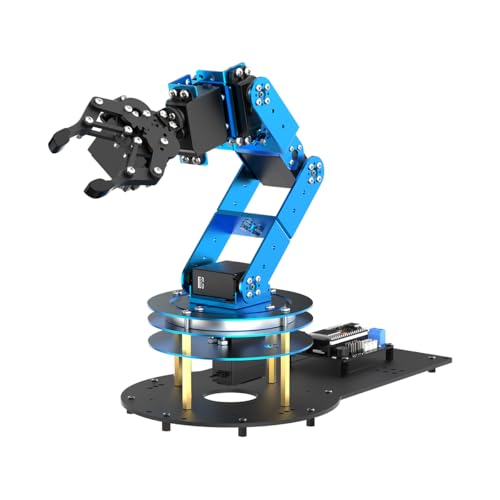
- ESP32 and Arduino-compatible controller
- Six smart servos with inverse kinematics
- 200+ tutorials, experiments, and open-source resources
Best For: Adult learners, students, engineers, and Arduino hobbyists
Creative Learning Pick – LewanSoul LeArm 6DOF Kit
The LewanSoul LeArm is one of the more approachable robot arms for learners who want to assemble, program, and control a desktop mechanical arm. Its six degrees of freedom, metal structure, graphical programming software, tutorials, and several control options make it a practical platform for introductory robotics projects.
Best For: Students, hobbyists, and first-time builders exploring programming, engineering, and tabletop robotics.
Pros:
- Six-degree-of-freedom design supports grasping, object transport, and custom actions.
- Metal brackets, high-torque servos, and industrial-grade bearings provide a stable base.
- Supports PC, app, mouse, and wireless handle control.
- Includes tutorials, simple programming software, and Arduino compatibility.
Cons:
- Recommended for older users, with a listed age range beginning around 14 to 16 years.
- Uses an AC adapter and does not include a battery-powered operating option.
Choose the LeArm if you want a hands-on kit that balances mechanical assembly with accessible programming. Its anti-stall protection and multiple control methods add useful durability and flexibility for indoor educational projects.
AI Development Starter – SO-ARM101 Assembled Kit
The SO-ARM101 is a low-cost option among robot arms for developers working with open-source AI robotics. Its assembled format, improved wiring, optimized leader-arm gear ratios, and direct integration with the LeRobot platform make it suited to experimentation with imitation learning and reinforcement learning.
Best For: AI robotics developers and advanced learners using Linux, LeRobot, PyTorch tools, or compatible Nvidia hardware.
Pros:
- Assembled version helps reduce initial mechanical build work.
- Improved wiring is designed to prevent disconnections at joint 3 and preserve joint movement.
- Supports real-time leader-follower operation for human intervention during reinforcement learning.
- Open-source resources include assembly, calibration, testing, data collection, training, and deployment guidance.
Cons:
- Its Linux-oriented, GPIO, I2C, and USB setup is better suited to technical users than casual beginners.
- Compatibility is specifically highlighted for the reComputer Mini J4012 Orin NX 16 GB rather than a broad range of devices.
This kit is a strong fit when the goal is AI experimentation rather than simple remote-controlled play. The LeRobot integration and leader-follower functionality give it a clear development focus, but expect a more technical setup than a conventional educational arm.
Interactive STEM Choice – Hiwonder xArm1S 6DOF Arm
The Hiwonder xArm1S is a versatile choice among robot arms for STEM learners who want both coding practice and hands-on control. Six intelligent serial bus servos provide position, voltage, and temperature feedback, while PC, app, mouse, and wireless-controller support makes testing and demonstrations straightforward.
Best For: STEM classrooms, makers, and learners who want feedback-rich servos and several ways to edit or control actions.
Pros:
- Six-axis aluminum-alloy arm uses intelligent servos with position, voltage, and temperature feedback.
- Listed grasping capacity reaches up to 500g.
- Supports PC, phone app, mouse, and PS2 wireless controller operation.
- Offers graphical, app-based, and offline manual action editing.
Cons:
- Its range of controls and editing features may be more than a very young or casual user needs.
- The supplied specifications contain inconsistent age information, so buyers should verify suitability before purchase.
The xArm1S stands out for interactive learning: users can control the arm in several ways while examining servo feedback and building custom sequences. It is a practical pick for coding demonstrations and tabletop STEM activities that benefit from a stated 500g grasping capacity.
Research-Ready Platform – reBot B601-DM Open-Source Arm
The reBot B601-DM targets advanced users who need robot arms for AI development, research, or ROS-based integration. With 6+1 degrees of freedom, a gripper, Python SDK, ROS1 and ROS2 compatibility, and support for multiple operating systems and connection methods, it is built for a broad development workflow.
Best For: Robotics researchers, AI developers, and education teams working with Python, ROS, LeRobot, or edge-computing hardware.
Pros:
- 6+1 DoF configuration includes a gripper kit for expanded manipulation work.
- Supports Python SDK, ROS1, ROS2, Linux, macOS, and Windows environments.
- Offers Bluetooth, Ethernet, USB, and Wi-Fi connectivity.
- Includes a two-year warranty and is positioned for AI robotics, STEM, research, and development.
Cons:
- The broad software and connectivity stack may require substantial technical knowledge.
- The supplied notes do not specify payload capacity or detailed control hardware.
Consider the B601-DM when software compatibility and research flexibility matter more than a beginner-friendly toy experience. Its gripper, Python and ROS support, and multi-platform connectivity make it the most development-oriented option in this roundup.
Best Beginner Build – Arduino Robot Arm Kit
This compact robot arm building kit is designed as a hands-on introduction to electronics, programming, math, and science. Its four-axis movement, joystick control, and guided tutorials make it a practical choice for learners who want to assemble and program a working desk robot.
Best For: Beginners, teens, and adults ages 13 and up learning basic robotics and Arduino-style programming.
Pros:
- Includes hardware and tools for step-by-step assembly.
- Four-axis arm provides flexible movement, with a gripper opening up to 260 degrees.
- Can record up to 170 actions and repeat them once.
- Includes assembly and programming tutorials plus technical support.
Cons:
- Two batteries must be prepared separately.
- Its small acrylic design is intended primarily for learning rather than heavy-duty work.
- The listed warranty is limited to 30 days.
Choose this robot arm if your priority is approachable construction and experimentation. It offers meaningful movement and repeat-action functions without the complexity of an advanced research platform.
Best for AI Experimentation – SO-ARM101 AI Robot Arm
This advanced robot arm is built for users exploring embodied AI, imitation learning, and computer vision. The assembled six-axis platform pairs 12 high-torque bus servos with dual cameras and compatibility with the open-source LeRobot framework.
Best For: Adult researchers, developers, and experienced hobbyists ages 16 and up working on AI and robotic manipulation projects.
Pros:
- Supports end-to-end imitation learning through the LeRobot open-source framework.
- Dual-camera setup combines gripper-mounted and external environmental views.
- Includes 12 high-torque bus servos with magnetic feedback for smooth, stable motion.
- BusLinker V3.0 and PC software support calibration, monitoring, scanning, and trajectory control.
Cons:
- Its advanced features and adult age recommendation may be excessive for casual beginners.
- The kit is comparatively large, measuring 20 by 9 by 9 inches.
- Its focus on open-source AI development assumes interest in programming and technical setup.
This is the strongest fit when a robot arm needs to serve as an AI development platform rather than a simple educational toy. The assembled format reduces mechanical build time while retaining substantial control and experimentation options.
Best Family STEM Project – Wooden Robotics Arm Kit
This wooden robot arm kit combines mechanical construction with basic circuits and motor control. With no soldering required, it offers children and families a structured STEM project that emphasizes assembly, problem-solving, and an introduction to engineering principles.
Best For: Kids ages 8 and up, teens, adults, classrooms, and families seeking a build-focused robotics activity.
Pros:
- Introduces electronic circuits, motors, PCB boards, and mechanical movement.
- Wooden pieces and an assembly tutorial create a hands-on engineering challenge.
- No soldering is required, making the project more accessible to younger builders.
- Supports creative, logical-thinking, motor-skill, and problem-solving practice.
Cons:
- Requires six AA batteries, which are not included.
- The wooden construction requires patience and careful assembly.
- Its educational focus is better suited to basic mechanical and circuit learning than advanced programming.
Consider this robot arm for a tactile STEM experience where the building process matters as much as the finished mechanism. It is a useful choice for gifts, school projects, and supervised family activities.
Best AI Research Pick – Hiwonder SO-ARM101 6-Axis Robot Arm
For shoppers seeking advanced robot arms for AI experimentation, the Hiwonder SO-ARM101 combines a six-axis design with imitation-learning support and open-source compatibility. Its assembled format, dual-camera vision system, and 12 high-torque bus servos make it a practical starting point for research, programming, and robotics development.
Best For: Adult researchers, hobbyists, and developers exploring LeRobot, imitation learning, and AI vision.
Pros:
- Compatible with the LeRobot open-source framework.
- Dual cameras support manipulation and environmental awareness.
- Includes 12 high-torque bus servos with magnetic feedback.
- BusLinker debugging hardware and PC software support calibration and monitoring.
Cons:
- Recommended for ages 16 and up, so it is not aimed at young beginners.
- The advanced AI and debugging features may require programming experience.
- Its 20-inch dimensions require dedicated tabletop space.
The SO-ARM101 is the strongest choice here for hands-on AI and embodied-learning projects. Choose it when open-source research features and vision capabilities matter more than simple recreational play.
Best Building Set – 3-in-1 Technical Robotic Arm Kit
This 3-in-1 kit is one of the most approachable robot arms for families and STEM learners who want to build before they operate. The 975-piece tracked model offers interchangeable gripper, bucket, and drill attachments, plus remote and app control for hands-on mechanical play.
Best For: Kids ages 8 and up, teens, and adults who enjoy construction, STEM activities, and programmable play.
Pros:
- Three interchangeable attachments provide gripping, scooping, and simulated drilling modes.
- Includes both a 2.4GHz remote and companion app control.
- Offers drag-and-drop programming, gyroscope control, and custom path drawing.
- Large 975-piece build encourages mechanical and problem-solving skills.
Cons:
- Made from plastic building blocks rather than metal construction materials.
- Assembly is a substantial project and may take patience.
- Its tracked design and simulated tools are intended for play and learning rather than industrial work.
Choose this kit if the building experience is as important as controlling the finished model. It offers more variety than a basic arm toy while keeping the focus on STEM construction and interactive play.
Best Arduino Learning Kit – LeArm 6DOF Programming Robot Arm
The LeArm Open Source is a versatile option for learners comparing programmable robot arms for Arduino and ESP32 projects. It combines six smart servos, inverse-kinematics support, several control methods, and sensor expansion with extensive tutorials and open-source materials.
Best For: Students, engineers, university courses, and adult hobbyists learning Arduino programming, robotic motion, and sensor integration.
Pros:
- ESP32 controller supports Arduino programming, Bluetooth, and expansion ports.
- Inverse-kinematics software enables path planning and smooth movements.
- Can be controlled through an app, PC software, or wireless controller.
- Includes more than 200 tutorials, experiments, code examples, and schematics.
Cons:
- Recommended for ages 16 and up.
- Sensor modules for capabilities such as vision or voice control may require additional expansion.
- The learning-oriented feature set may feel complex for users seeking a simple plug-and-play arm.
LeArm is a strong middle ground between a basic educational model and a more specialized AI research platform. Its Arduino compatibility, open-source design, and learning resources make it especially suitable for progressive experimentation.
How We Picked the Best Robot Arms
We evaluated these Robot Arms by looking at the features that matter most in real-world use: movement range, degrees of freedom, servo performance, gripper design, programming support, construction, and included accessories. We also considered whether each kit is better suited to casual building, structured STEM learning, Arduino experimentation, or advanced AI development.
Software compatibility was another important factor. Kits with PC applications, mobile control, Python SDKs, ROS support, or open-source documentation generally offer more room to grow than products limited to remote control. Assembly requirements also matter, particularly for younger users and first-time builders.
Quick Comparison
| Best For | Look For | Typical Strength |
|---|---|---|
| Young beginners | Building instructions and simple controls | Accessible hands-on learning |
| Arduino learners | Arduino compatibility and programmable servos | Low-cost coding practice |
| Advanced makers | Python, SDK, ROS, and open-source support | Flexible experimentation |
| AI robotics projects | Bus servos, vision support, and imitation learning | More capable automation research |
| Demonstrations | Reliable grippers and repeatable movements | Practical pick-and-place tasks |
Key Buying Factors for Robot Arms
Degrees of Freedom and Reach
A 6DOF arm can position its end effector with more flexibility than simpler designs, but additional joints also increase setup complexity and calibration needs. Check the working reach and payload rather than judging capability by axis count alone.
Programming and Connectivity
Choose a kit that supports the platform you already use. Arduino is useful for introductory electronics and motion control, while Python and ROS are better choices for software-heavy projects, simulation, and advanced robotics workflows. PC, app, USB, and wireless controls can each provide a different balance of convenience and flexibility.
Servos, Gripper, and Construction
Metal frames and higher-torque bus servos usually provide better durability and more consistent movement, though they can cost more. A gripper should open wide enough for your planned objects and hold them without excessive slipping. Confirm whether motors, controller boards, power supplies, and cables are included.
Assembly and Documentation
Preassembled models reduce setup time, while build-your-own kits can teach more about mechanics and electronics. Clear tutorials, example code, calibration tools, and an active user community are especially valuable for beginners.
Who Should Buy Which Robot Arms?
Beginners and younger learners should prioritize guided kits with simple app or remote controls, repeatable movement functions, and clear assembly instructions. These models make it easier to learn basic mechanics before adding code.
Arduino students and hobbyists should choose a programmable arm with accessible wiring, compatible libraries, and enough documentation to create custom sequences. A 6DOF design offers more room for experimentation as skills improve.
Makers and developers will benefit from open-source arms with Python SDKs, ROS1 or ROS2 compatibility, and replaceable components. These features make integration with cameras, sensors, and custom software more practical.
AI and embodied-learning researchers should look for high-torque bus servos, vision support, imitation-learning tools, and a platform with active software development. Before buying, verify computer requirements, supported operating systems, and whether the listed AI features require additional hardware.