The best robot arms for engineering projects turn mechanical concepts into practical experiments. They can help students learn linkage design and control, while giving hobbyists a platform for Arduino, ESP32, robotics, and AI development.
These 10 options range from simple hydraulic and building kits to programmable multi-axis arms with bus servos, vision features, and open-source software. The right choice depends on project complexity, payload expectations, programming support, and the builder’s experience level.
Best 10 Robot Arms for Engineering Projects Picks for 2026
Programmable Desktop Pick

- Six-degree-of-freedom desktop arm
- PC, app, mouse, and handle control
- Metal construction with tutorials
Best For: Students and hobbyists learning programmable robotics
Hydraulic STEM Build

- Water-powered hydraulic operation
- Six axes and 270-degree rotation
- Hands-on multi-hour assembly
Best For: Ages 12+ exploring mechanical engineering
AI Research Platform
Hiwonder SO-ARM101 Advanced Kit

- LeRobot-compatible open-source platform
- Dual-camera vision system
- 12 feedback-equipped bus servos
Best For: Advanced AI, vision, and imitation-learning projects
Mechanical Learning Choice

- Nearly 300-piece cable-driven build
- No motors, electricity, or batteries
- Joystick-controlled claw and arm
Best For: Family STEM learning and mechanical engineering basics
Best Beginner Build
Arduino Robot Arm Building Kit

- Four-axis acrylic arm with flexible movement
- Records and repeats up to 170 actions
- Includes assembly and programming tutorials
Best For: Introductory robotics learning and hands-on coding practice
Best for Advanced Prototyping
Waveshare RoArm-M2-S 4-DOF Kit
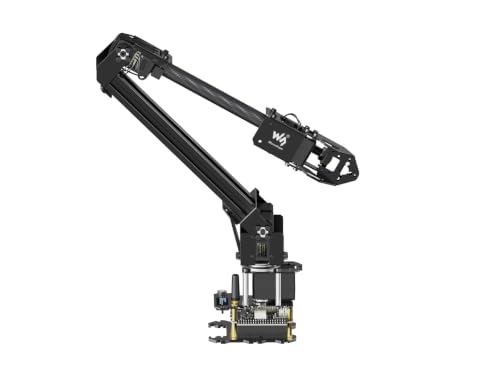
- ESP32-based wired and wireless control
- Open-source and ROS2-compatible development platform
- Expansion plate supports custom tooling
Best For: Expandable robotics prototypes and secondary development
Best Hydraulic Introduction
PATHFINDERS Hydraulic Robotic Arm
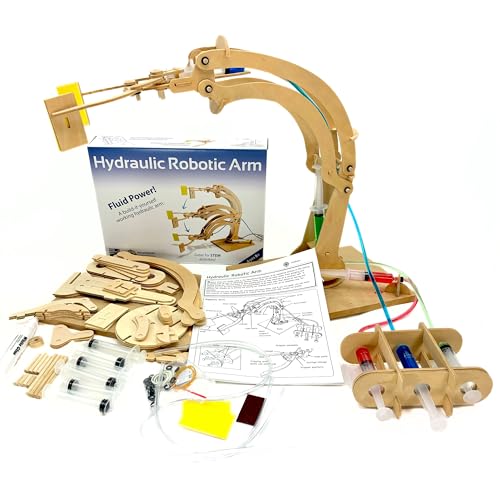
- Water-powered wooden robotic arm project
- Assembly takes about 45–60 minutes
- Introduces hydraulics and mechanical engineering
Best For: Young learners exploring hands-on fluid-power mechanics
Best Precision Pick
Hiwonder-xArm1S 6DOF Robotic Arm
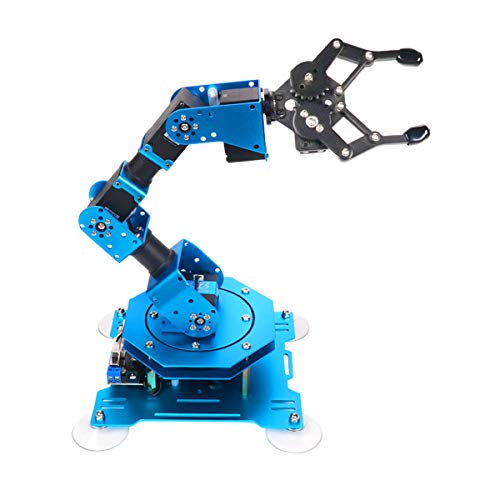
- Six-axis metal desktop arm
- Grasps objects up to 500g
- PC, app, controller, and manual editing
Best For: Programming-focused desktop robotics projects
Best Modular Learning Kit

- Four configurable robot builds
- ESP32 with Arduino and Scratch support
- Includes 16 guided tutorials
Best For: Mobile robotics and coding projects for ages 12+
Best Building-Block Project

- 1,468-piece powered construction set
- Remote-controlled tracked base
- 150g approximate gripping capacity
Best For: Hands-on mechanical building and introductory STEM play
Programmable Desktop Pick – LewanSoul LeArm 6DOF Kit
For shoppers comparing robot arms for engineering projects, the LewanSoul LeArm is a versatile desktop platform for learning robotics, programming, and mechanical assembly. Its six-degree-of-freedom design, metal structure, Arduino compatibility, and multiple control options support both guided lessons and creative builds.
Best For: Students, engineering learners, hobbyists, and tabletop robotics projects requiring programmable movement.
Pros:
- Six degrees of freedom with digital servos for varied movement.
- Supports PC, app, mouse, and wireless-handle control.
- Metal brackets, industrial-grade bearings, and a reinforced base add stability.
- Includes tutorials and simple programming software.
Cons:
- Recommended for ages 14 and up, so it may be too advanced for younger users.
- Requires an AC adapter and does not include battery operation.
- Assembly and programming may require more time than a preassembled arm.
Choose the LeArm when you want a hands-on engineering platform that combines construction, software control, and practical robotic-arm experimentation in a desktop format.
Hydraulic STEM Build – Teach Tech Hydrobot Arm
The Teach Tech Hydrobot offers a battery-free way to explore robot arms for engineering projects through hands-on hydraulic construction. Instead of motors or software, users fill and operate water-powered controls to learn about mechanical movement, rotation, and gripping.
Best For: Learners ages 12 and up who want an in-depth mechanical engineering and STEM building activity.
Pros:
- Uses water-powered hydraulics with no batteries required.
- Six axes and rotation up to 270 degrees provide broad movement.
- Levers control the gripper, with suction components also available.
- Step-by-step instructions support a multi-hour building experience.
Cons:
- It is a build-it-yourself project rather than a preassembled arm.
- Hydraulic operation requires careful assembly and water setup.
- It does not provide programmable or electronic control.
This is a strong choice for understanding physical mechanisms and hydraulics, especially when the goal is construction and problem-solving rather than coding or automation.
AI Research Platform – Hiwonder SO-ARM101 Advanced Kit
For advanced robot arms for engineering projects, the Hiwonder SO-ARM101 is designed around AI experimentation and embodied imitation learning. Its assembled format, dual-camera vision system, bus servos, debugging board, and LeRobot compatibility make it suited to programming and research-oriented workflows.
Best For: Adult developers, researchers, and experienced hobbyists exploring imitation learning, computer vision, and open-source robotics.
Pros:
- Compatible with the LeRobot open-source framework.
- Dual cameras support gripper-level manipulation and wider environmental awareness.
- Twelve high-torque bus servos include magnetic feedback for smoother motion.
- BusLinker software supports servo scanning, monitoring, calibration, and trajectory control.
Cons:
- Its advanced feature set may be excessive for beginners.
- The manufacturer recommends it for ages 16 and up.
- Plastic-and-metal construction may not suit projects requiring an all-metal arm.
Select this kit when your project depends on AI vision, imitation learning, or detailed servo debugging rather than simple manual demonstrations.
Mechanical Learning Choice – Thames & Kosmos Bionic Arm
The Thames & Kosmos Bionic Robotic Arm is a straightforward introduction to robot arms for engineering projects, using cable-driven mechanics instead of motors or electricity. Its nearly 300-piece construction and joystick controls let learners investigate movement, gripping, biomimicry, and basic mechanical engineering.
Best For: Children and families seeking a battery-free STEM construction challenge with practical mechanical experimentation.
Pros:
- Nearly 300 pieces provide an extensive assembly project.
- Requires no motors, electricity, or batteries.
- Joysticks control the arm, claw opening, closing, and rotation.
- Manual includes step-by-step guidance and real-world robotics information.
Cons:
- Plastic construction is less suitable for heavy-duty engineering applications.
- It does not offer electronic, programmable, or hydraulic control.
- Independent play is recommended for ages 14 and up; younger users may need help.
Consider this set when the priority is learning how a cable-driven mechanism works through assembly and direct control, rather than building a software-controlled robotic system.
Best Beginner Build – Arduino Robot Arm Building Kit
If you want robot arms for engineering projects that emphasize hands-on assembly and introductory coding, this Arduino-oriented kit is a practical starting point. It includes step-by-step building and programming tutorials, joystick control, and a record-and-repeat feature for experimenting with robotic motion.
Best For: Beginners, teens, and adults learning basic robotics, electronics, programming, math, and science.
Pros:
- Four-axis design offers flexible movement, including a 260-degree clip opening and rotating joints.
- Can memorize up to 170 actions and repeat them once.
- Includes assembly and programming tutorials plus technical support.
- Compact acrylic design measures approximately 3.2 x 3 x 9.6 inches.
Cons:
- Two batteries must be prepared separately.
- Small size may limit larger-object handling.
- Recommended for ages 13 and up.
This kit is a good fit when the learning process matters as much as the finished arm. Its movement range and repeat function provide accessible ways to explore programming and automation, though the compact build is better suited to demonstrations and light educational projects than demanding tasks.
Best for Advanced Prototyping – Waveshare RoArm-M2-S 4-DOF Kit
For robot arms for engineering projects that require expansion, wireless control, or software development, this Waveshare kit offers a more capable platform. Its ESP32 controller, open-source interfaces, ROS2 compatibility, and expansion plate make it suitable for experimentation beyond basic assembly.
Best For: Engineering students, makers, and developers building expandable robotic prototypes or integrating an arm with other devices.
Pros:
- Four degrees of freedom with a 360-degree omnidirectional base.
- Supports wired and wireless communication through the onboard ESP32.
- Open-source control code and communication documentation support secondary development.
- Expansion plate allows customized end-of-arm tooling.
Cons:
- Effective payload is limited to 0.5 kg at 0.5 m.
- Advanced features may be more than beginners need.
- Wireless, host-computer, and ROS2 integration may require additional development work.
With its lightweight frame, roughly 1-meter-diameter workspace, and flexible control options, this is the strongest choice here for iterative engineering work. Buyers should match the project to its stated payload and be prepared to spend time configuring software and communications.
Best Hydraulic Introduction – PATHFINDERS Hydraulic Robotic Arm
For younger learners exploring robot arms for engineering projects, this wooden hydraulic kit offers a straightforward introduction to mechanical movement and fluid power. The build takes about 45–60 minutes and produces an arm that can lift, manipulate, and rotate objects up to 90 degrees.
Best For: Children ages 8–14 learning hydraulics, mechanical engineering, assembly, and problem-solving through a hands-on project.
Pros:
- Demonstrates how water-powered hydraulics can move a robotic arm.
- Assembly typically takes about 45–60 minutes.
- Builds practical understanding of fluid dynamics and mechanical functions.
- Uses FSC natural untreated wood and complies with stated ASTM toy safety standards.
Cons:
- Movement is limited to rotating objects up to 90 degrees.
- Designed as an educational mechanical project rather than a programmable robot.
- Best suited to lightweight, hands-on demonstrations.
This kit is a strong choice when the goal is to make engineering concepts tangible without electronics or software. It offers an engaging introduction to hydraulics, but projects requiring automation, sensors, or programmable motion will need a different type of arm.
Best Precision Pick – Hiwonder-xArm1S 6DOF Robotic Arm
For engineering projects that emphasize programming, repeatable movement, and a sturdy desktop platform, the Hiwonder-xArm1S is a capable choice among robot arms for engineering projects. Its six-axis design, aluminum-alloy construction, and multiple control options support both experimentation and demonstrations.
Best For: Teens, educators, and hobbyists exploring robotics programming, servo feedback, object handling, and custom motion sequences.
Pros:
- Six intelligent serial-bus servos provide position, voltage, and temperature feedback.
- Strong torque supports grasping objects weighing up to 500g.
- Supports PC, app, mouse, wireless controller, and manual action editing.
- Metal construction and industrial-grade bearings provide a stable tabletop platform.
Cons:
- Its advanced controls may be more than younger beginners need.
- Designed for indoor tabletop use rather than mobile, all-terrain operation.
The xArm1S is the strongest fit here when your project requires a dedicated robotic arm rather than a vehicle-mounted build. Its feedback-enabled servos and flexible programming methods give engineering learners room to progress from remote control to custom robotic applications.
Best Modular Learning Kit – ACEBOTT 4-in-1 5DOF Robot Arm
If you want robot arms for engineering projects with a broader mechanical challenge, the ACEBOTT combines a programmable five-degree-of-freedom arm with a modular robot car and tank platform. Its ESP32 controller, guided tutorials, and Arduino and Scratch compatibility make it approachable for hands-on builds.
Best For: Kids and teens ages 12 and up who want to learn assembly, coding, electronics, mechanics, and mobile robot design.
Pros:
- Four-in-one modular format supports robot car, tank, arm car, and arm-tank configurations.
- Includes a programmable 5DOF arm powered by an ESP32 controller.
- Arduino and Scratch compatibility expands coding options.
- Sixteen tutorials and assembly videos provide structured guidance.
Cons:
- The kit is centered on a buildable vehicle platform, not a dedicated stationary arm.
- Assembly and coding require time and may be less suitable for very young children.
This is a versatile pick for learners who want their engineering project to move beyond arm articulation. The modular chassis, tank tracks, app, and remote control create more build variations, while the tutorials help beginners connect physical construction with programming.
Best Building-Block Project – UNCLE BRICK Tracked Robot Arm
For hands-on robot arms for engineering projects that begin with mechanical construction, the UNCLE BRICK tracked robotic arm offers a substantial 1,468-piece building-block challenge. Once assembled, it can be driven remotely and used to explore tracked movement, arm rotation, and gripper operation.
Best For: Building-block enthusiasts, families, and beginners ages 8 and up who want a remote-controlled construction and STEM activity.
Pros:
- Large 1,468-piece set provides an extensive assembly project.
- Four M-type motors, a battery box, and remote control enable powered operation.
- Tracked base supports forward, backward, turning, and tank-style U-turns.
- Arm swings 90 degrees and the gripper opens and closes more than 180 degrees.
Cons:
- Plastic building-block construction is less suited to precision engineering than a metal arm.
- Gripping capacity is limited to approximately 150g for suitable nonsmooth objects.
- Exceeding the stated load may damage the gears, although spare gears are included.
The UNCLE BRICK set is best viewed as a construction-led introduction to robotic mechanisms. It offers engaging movement after assembly, but its load limit and plastic gearing make it better for learning and imaginative scenarios than for demanding lifting or precision tasks.
How We Picked the Best Robot Arms for Engineering Projects
We focused on the features that matter when an arm is used for more than display: degrees of freedom, actuator capability, construction quality, control options, documentation, expandability, and the type of engineering work it supports. The selection includes mechanical building sets, beginner Arduino platforms, desktop arms, and advanced AI-oriented kits.
We also considered the likely learning curve. A kit with clear instructions and simple controls may be a better engineering starting point than a more capable arm with difficult setup requirements. Compatibility with Arduino, Scratch, ESP32, PC software, mobile apps, or open-source tools can significantly affect how easily a project moves from assembly to experimentation.
Quick Comparison
| Best For | Look For | Most Suitable Type |
|---|---|---|
| First robotics project | Guided assembly and simple controls | Hydraulic or building kit |
| Arduino and coding practice | Programmable servos and documented examples | Arduino-compatible arm |
| Desktop prototyping | Compact footprint, repeatable control, expansion options | ESP32 or serial-bus servo arm |
| Advanced robotics and AI | Six axes, high-torque actuators, vision, open software | AI or full-metal 6-axis platform |
Key Buying Factors for Robot Arms for Engineering Projects
Degrees of Freedom and Movement
More axes provide greater positioning flexibility, but they also add programming complexity and calibration work. Four-DOF arms can be easier to learn, while six-axis models are better for orientation control and more realistic manipulation experiments.
Actuators, Payload, and Precision
Check the servo type, torque, gear construction, and stated payload rather than judging capability by appearance. High-torque bus servos can offer better feedback and coordinated control, while basic hobby servos may be sufficient for lightweight objects and introductory exercises.
Software and Expandability
Confirm which operating systems, programming languages, boards, and interfaces are supported. App control is convenient for demonstrations, but PC software, Arduino compatibility, Scratch support, APIs, and open-source documentation are more valuable for repeatable engineering work. Expansion ports and interchangeable end effectors can extend a kit’s useful life.
Build Quality and Workspace
Metal frames generally tolerate more demanding use, while plastic, wooden, and construction-block designs make assembly and modification accessible. Measure the available workspace and consider cable routing, base stability, reach, and whether the arm can safely handle the objects used in your project.
Who Should Buy Which Robot Arms for Engineering Projects?
Choose a hydraulic or construction-based kit for younger learners, classroom demonstrations, and mechanical principles without electronics-heavy setup. Choose an Arduino-compatible arm for beginners and teens who want to practice sensors, coding, movement recording, and repeatable sequences.
Choose an ESP32 or serial-bus desktop arm for makers building compact prototypes that need more capable control and future expansion. Choose a six-axis or AI-focused kit for experienced students, developers, and engineering enthusiasts exploring imitation learning, computer vision, inverse kinematics, or advanced manipulation.
Before buying, match the arm’s complexity to the project timeline. A simpler platform that can be assembled, programmed, and modified quickly often teaches more than an advanced system that remains difficult to configure.