The best servo robot arms make robotics more approachable, combining programmable movement with practical lessons in mechanics, electronics, and automation.
This roundup compares 10 options for beginners, educators, makers, and developers—from compact ESP32 platforms to open-source AI arms with bus servos and vision support.
Best 10 Servo Robot Arms Picks for 2026
Best Open-Source Starter

- Python, Arduino, app, PC, and wireless control
- ESP32 Wi-Fi/Bluetooth and sensor expansion
- Inverse kinematics with aluminum construction
Best For: Students and makers learning programmable robotics
Best for LeRobot Learning

- Assembled low-cost AI arm for LeRobot
- Improved wiring and leader-arm gearing
- Supports imitation and reinforcement learning
Best For: Developers building AI robotics workflows
Best Six-Axis Teaching Arm
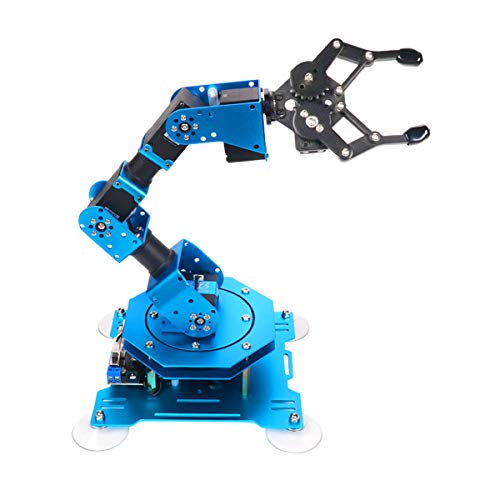
- Six intelligent serial bus servos
- Controls via PC, app, mouse, and controller
- Metal structure with up to 500 g stated payload
Best For: STEM projects and interactive programming practice
Best DIY AI Upgrade

- LeRobot and Hugging Face compatibility
- Six-DOF open-source AI robotics platform
- 3D-printed parts are not included
Best For: Experienced makers developing learning-based robotics
Best Creative Learning Kit
LeArm 6DOF Programmable Robot Arm

- Six-degree-of-freedom desktop design
- Multiple control methods and tutorials
- Metal structure with anti-stall protection
Best For: Students, hobbyists, and beginner robotics builders
Best for Embodied AI Development

- 500mm reach with 500g payload
- LeRobot and VLA model compatibility
- Built-in AI vision and voice interaction
Best For: University labs and advanced AI robotics developers
Best Build-Your-Own Option
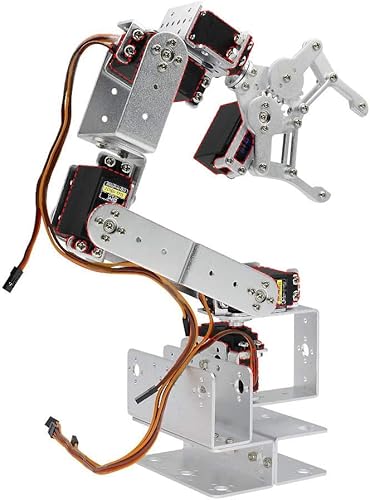
- Unassembled aluminum 6DOF platform
- Servos selected separately by the builder
- 355mm radius and 180-degree rotation
Best For: Experienced hobbyists customizing a servo arm build
Advanced AI Pick

- LeRobot-compatible imitation-learning platform
- Dual cameras and 12 magnetic-feedback bus servos
- Assembled kit with professional debugging hardware
Best For: Researchers and advanced robotics hobbyists
Flexible Desktop Choice
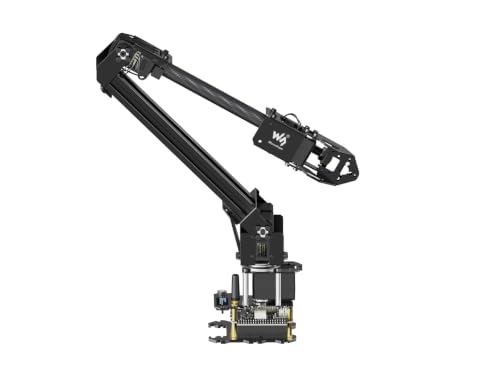
- ESP32-based wireless and wired control
- Open-source interfaces and custom tooling support
- Lightweight design with 360-degree base
Best For: STEM learners and makers
Entry AI Learning Pick
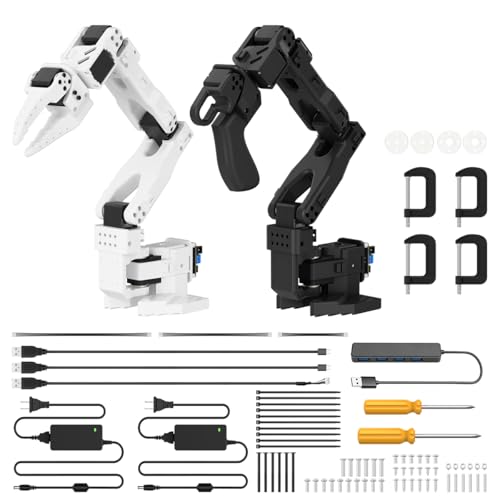
- Six-axis arm with dual-camera vision
- Compatible with LeRobot open-source tools
- Assembled with 12 high-torque bus servos
Best For: Beginners learning AI-assisted robotics
Best Open-Source Starter – LewanSoul MaxArm
The LewanSoul MaxArm is a versatile choice among servo robot arms for learners who want hands-on programming, wireless control, and room for sensor-based experimentation. Its aluminum construction, ESP32 controller, inverse-kinematics support, and multiple control methods make it suitable for tabletop robotics projects.
Best For: Beginners, students, and makers learning Arduino or Python robotics programming.
Pros:
- Supports Python and Arduino programming, plus app, PC, mouse, and wireless-controller operation.
- Uses inverse kinematics and trajectory planning to move the end effector along the X, Y, and Z axes.
- Offers ESP32 Wi-Fi and Bluetooth connectivity with expansion ports for sensors and execution modules.
- Includes precision smart bus servos and an aluminum body for educational tabletop projects.
Cons:
- The starter kit has three smart bus servos, so it may offer less articulation than six-axis arms.
- Its recommended age of 16 years and up may make it less suitable for young children.
Choose the MaxArm if flexible programming and future sensor expansion matter more than maximum degrees of freedom. It is a practical platform for building foundational robotics and mechanics skills.
Best for LeRobot Learning – SO-ARM101 Assembled Kit
The assembled SO-ARM101 is a strong option for users seeking servo robot arms designed around AI experimentation. It integrates with the LeRobot platform and provides improved wiring, optimized leader-arm gearing, and real-time leader-follower behavior for imitation and reinforcement-learning workflows.
Best For: AI robotics learners and developers using LeRobot, PyTorch tools, and compatible NVIDIA hardware.
Pros:
- Assembled design can help users get started without building the arm from scratch.
- Improved wiring addresses joint-three disconnections and avoids previous motion-range limitations.
- Supports LeRobot resources for data collection, simulation, training, and deployment.
- Real-time leader-follower operation supports human intervention during reinforcement-learning development.
Cons:
- Its platform focus and Linux connectivity may be more advanced than needed for basic STEM activities.
- Compatibility details specifically identify the reComputer Mini J4012 Orin NX 16 GB.
This model is best viewed as a practical entry point into open-source AI robotics rather than a general-purpose toy. The assembled format and LeRobot integration make it appealing for structured experimentation and model training.
Best Six-Axis Teaching Arm – Hiwonder xArm1S
The Hiwonder xArm1S is a capable choice among servo robot arms for classroom-style programming, object handling, and interactive demonstrations. Its six-axis metal structure, intelligent serial bus servos, and broad control options support both guided learning and custom project development.
Best For: STEM learners who want six-axis movement, remote grasping, and several ways to edit or control actions.
Pros:
- Six intelligent servos provide position, voltage, and temperature feedback.
- Designed to grasp objects weighing up to 500 g, according to the supplied specifications.
- Supports PC, phone app, mouse, wireless PS2 controller, and manual controls.
- Aluminum alloy construction, reinforced base, and industrial-grade bearings support stability.
Cons:
- Its many control and action-editing options may require more setup than a basic beginner kit.
- The supplied age information is inconsistent, so buyers should verify the appropriate user age.
Pick the xArm1S when six-axis articulation and hands-on object manipulation are priorities. It offers a broad, approachable feature set for programming practice, demonstrations, and creative robotics projects.
Best DIY AI Upgrade – SO-ARM101 Pro Servo Kit
The SO-ARM101 Pro is aimed at advanced makers comparing servo robot arms for open-source AI development. It supports LeRobot and Hugging Face workflows, includes upgraded servo and wiring configurations, and is compatible with specified NVIDIA Jetson hardware; however, 3D-printed parts are not included.
Best For: Developers and experienced makers assembling an AI-focused arm for imitation or reinforcement learning.
Pros:
- Supports LeRobot and Hugging Face projects for imitation learning and reinforcement learning.
- Improved wiring and optimized gear ratios address limitations associated with the SO-ARM100.
- Real-time leader-follower tracking can support human correction during RL training.
- Includes multiple STS3215 servos, adaptor boards, power cables, and USB-C cables.
Cons:
- 3D-printed parts are not included, adding a separate fabrication requirement.
- The kit is geared toward DIY assembly and AI development rather than plug-and-play use.
- Compatibility is specifically listed with the reComputer Mini J4012 Orin NX 16 GB.
This version makes sense when you want a component-rich, open-source platform and are prepared to handle fabrication and setup. Its strongest advantage is the combination of leader-follower control and LeRobot-oriented AI tooling.
Best Creative Learning Kit – LeArm 6DOF Programmable Robot Arm
For beginners comparing servo robot arms, the LewanSoul LeArm offers a hands-on desktop platform for assembly, programming, and remote-controlled manipulation. Its six-degree-of-freedom design, metal construction, and multiple control options make it suitable for learning-focused projects.
Best For: Students, hobbyists, and beginners who want a guided robotics-building and programming experience.
Pros:
- Six-degree-of-freedom arm supports grasping, transportation, and custom actions.
- Metal brackets, high-torque base servos, and industrial-grade bearings provide a stable structure.
- Supports PC, app, mouse, wireless handle, and Arduino-compatible control.
- Includes tutorials and simple graphical programming software.
Cons:
- Designed for indoor tabletop use rather than larger workspaces.
- Power comes through an AC adapter, with no battery included.
- Its recommended age range makes it less suited to young children.
LeArm is a practical entry point for servo robot arms when the priority is learning and creative experimentation. Anti-stall protection and varied controls add usability, while the included software helps reduce the setup barrier.
Best for Embodied AI Development – NexArm 6-Axis AI Robot Arm
Among advanced servo robot arms, the Hiwonder NexArm stands out as a development platform for vision, imitation learning, and multimodal AI. Its dual-chip architecture, magnetic encoder servos, and open-source ecosystem are aimed at serious experimentation rather than simple manual control.
Best For: University labs, developers, and advanced learners building AI, vision, or robotic manipulation projects.
Pros:
- Offers a 500mm reach, 500g payload, and ±2mm repeatability.
- Supports the LeRobot ecosystem, imitation learning, ACT, and VLA model deployment.
- Includes a K230 vision module with more than 30 built-in AI vision features.
- Provides PC, app, remote, voice, and Arduino programming control options.
Cons:
- Its AI and development features may be more complex than a beginner needs.
- The standard kit includes the NexArm robot arm but does not list additional expansion hardware.
- Recommended for ages 15 and up.
NexArm is the strongest choice here for users who want servo robot arms connected to modern AI workflows. The open-source code, vision hardware, and model compatibility offer substantial room for research and expansion.
Best Build-Your-Own Option – diymore ROT3U 6DOF Arm Kit
The diymore ROT3U is a mechanical starting point for shoppers who want to assemble their own servo robot arms. This aluminum 6DOF kit arrives without servos, allowing builders to select compatible components while taking on more of the design and setup work.
Best For: Experienced hobbyists who already understand servo selection and want an unassembled aluminum arm platform.
Pros:
- Six-degree-of-freedom aluminum design provides a configurable mechanical foundation.
- Offers a 355mm radius of gyration and 180-degree rotation angle.
- Mechanical clamp opens to a listed maximum width of 98mm.
- No soldering is required for assembly.
Cons:
- Servos are not included, so the arm is not ready to operate out of the box.
- Assembly is required, and the manufacturer recommends specific MG996R and MG995 servo types for different joints.
- A guide or manual may need to be requested if it is missing.
Choose the ROT3U when customization and mechanical assembly matter more than immediate operation. Its missing servos reduce the upfront completeness, but they also let experienced builders tailor the actuator setup to their project.
Advanced AI Pick – SO-ARM101 6-Axis Vision Arm
For developers and experienced makers shopping for servo robot arms, the assembled Hiwonder SO-ARM101 Advanced Kit combines six-axis movement, imitation-learning support, and AI vision hardware in one open-source platform.
Best For: Researchers, advanced hobbyists, and users exploring LeRobot-compatible imitation learning.
Pros:
- Supports the LeRobot open-source framework with access to shared code, templates, and pre-trained models.
- Uses dual cameras for gripper-level manipulation and broader environmental awareness.
- Includes 12 high-torque bus servos with magnetic feedback for smoother, more stable motion.
- Comes assembled with 3D-printed parts and BusLinker V3.0 debugging hardware.
Cons:
- Its advanced AI and debugging features may be more than beginners need.
- The manufacturer recommends it for ages 16 and up.
This is the most capable option here for vision-driven experimentation and open-source AI robotics. Choose it if you want a ready-to-use, six-axis platform rather than a simpler desktop arm.
Flexible Desktop Choice – RoArm-M2-S 4-DOF Arm
The Waveshare RoArm-M2-S is a practical choice among servo robot arms for STEM learning, wireless control, and custom development. Its ESP32 controller and open interfaces make it easy to connect with different devices and expand with custom tooling.
Best For: Students, makers, and developers who want a lightweight desktop arm with wireless and secondary-development options.
Pros:
- Offers a visual WEB control application plus graphic and video tutorials.
- Supports ROS2, multiple host computers, and wired or wireless communication.
- Includes an expansion plate for customized end-of-arm tooling.
- Provides a 360-degree omnidirectional base and a 0.5 kg payload at 0.5 m.
Cons:
- Its four degrees of freedom provide less articulation than six-axis alternatives.
- The listed workspace and payload may not suit heavier or larger tasks.
With a weight under 850 g, this arm is easy to place on a desktop or mobile platform. It stands out when expandability, wireless control, and approachable learning materials matter more than maximum articulation.
Entry AI Learning Pick – SO-ARM101 Starter Kit
The Hiwonder SO-ARM101 Starter Kit gives newcomers a more approachable entry into servo robot arms while retaining the platform’s six-axis design, dual-camera vision, and LeRobot compatibility. It arrives assembled with included 3D-printed parts.
Best For: Beginners and hobbyists who want to learn AI-assisted manipulation and programming on an assembled platform.
Pros:
- Supports end-to-end imitation learning through the LeRobot open-source framework.
- Dual cameras help with both precise gripper actions and environmental awareness.
- Includes 12 high-torque bus servos with magnetic feedback for stable movement.
- BusLinker V3.0 provides servo scanning, status monitoring, and trajectory control.
Cons:
- The manufacturer recommends the kit for users ages 16 and up.
- Its AI research features may require time to configure and learn.
This Starter Kit is a strong fit if you want the SO-ARM101 hardware and vision capabilities without assembling the arm yourself. It offers a substantial learning path for programming-focused users while remaining suitable for hobby projects.
How We Picked the Best Servo Robot Arms
We evaluated these Servo Robot Arms by looking at control options, degrees of freedom, servo architecture, construction, software support, expandability, and the amount of assembly required. We also considered whether each arm is better suited to basic Arduino exercises, structured STEM instruction, or advanced AI and imitation-learning experiments.
Because product configurations can vary, verify the included servos, controller, power supply, gripper, printed parts, and software before ordering. Several kits are sold in assembled and unassembled versions, while others may require separate 3D-printed components or accessories.
Quick Comparison
| Best For | Look For |
|---|---|
| Beginners and classroom projects | Clear tutorials, simple PC or app control, and manageable assembly |
| Arduino and ESP32 programming | Open documentation, accessible libraries, and flexible communication interfaces |
| Mechanical experimentation | Metal frames, replaceable grippers, and exposed servo control |
| AI and imitation learning | Open-source software, high-torque bus servos, camera compatibility, and supported datasets |
| Custom maker builds | Expansion ports, modular joints, and readily available spare parts |
Key Buying Factors for Servo Robot Arms
Degrees of Freedom and Reach
A 4-DOF arm is usually easier to operate and may be sufficient for pick-and-place demonstrations. Six-axis models provide more natural positioning and orientation, but they typically require more setup, calibration, and programming.
Servo Type and Control
Standard servos can be suitable for introductory projects, while serial bus servos offer feedback, addressable control, and easier multi-joint coordination. Check torque ratings and confirm that the controller and software support the programming environment you plan to use.
Software and Compatibility
Arduino, Python, ESP32, PC software, mobile apps, and robotics frameworks each provide a different learning path. Open-source platforms are especially useful when you want to modify motion planning, add sensors, or experiment with AI models.
Assembly and Included Hardware
Assembled kits reduce setup time, whereas unassembled versions can provide a better understanding of the mechanism. Confirm whether the kit includes a gripper, suction nozzle, power adapter, USB cables, batteries, and any required printed parts.
Power, Payload, and Safety
Servo arms can draw significant current when several joints move at once. Use the recommended power supply, avoid exceeding the stated payload, and keep fingers, cables, and loose clothing away from moving joints during testing.
Who Should Buy Which Servo Robot Arms?
Choose a tutorial-focused Arduino or ESP32 arm if you are learning robotics fundamentals or teaching programming. A full-metal 6DOF kit is a stronger choice for mechanical durability and repeated classroom demonstrations. For developers exploring imitation learning, embodied AI, or computer vision, prioritize an open-source SO-ARM101-style platform with high-torque bus servos and documented framework support. If you want to build and modify the mechanism yourself, an unassembled kit offers more hands-on value; if you want to start coding immediately, select an assembled model.