Robot arms for outdoor use can turn a coding exercise into a hands-on project involving sensors, tools, sorting, or light automation. The right model depends on more than degrees of freedom: enclosure, power delivery, control range, and mechanical durability matter just as much.
This roundup compares ten educational and programmable arms, from beginner-friendly kits to open-source platforms suited to Arduino, ESP32, Python, and MicroPython projects.
Best 10 Robot Arms for Outdoor Use Picks for 2026
Best for Programmable Learning

- Python, Arduino, and ESP32 programming support
- Sensor ports and wireless Wi-Fi/Bluetooth expansion
- Aluminum tabletop arm with inverse-kinematics control
Best For: Teens and adults learning robot-arm programming and robotics
Best Screen-Free STEM Build

- Nearly 300-piece mechanical construction set
- Cable-driven joysticks need no batteries or electricity
- Manual includes biomimicry and engineering lessons
Best For: Families and students learning mechanical robotics hands-on
Best Outdoor Mobility
VANLINNY Tracked Robot Arm Kit

- Rubber tracks handle grass, gravel, sand, and light snow
- 4-DOF claw converts to a shovel loader
- Metal build with rechargeable battery and remote control
Best For: Ages 8–14 wanting light-terrain robotic-arm play
Best for Advanced Research

- Assembled 6-DOF arm with 2.5 kg rated payload
- ±0.1 mm repeatability and approximately 754 mm reach
- Open-source ROS 2, simulation, and LeRobot workflows
Best For: Researchers and developers building controlled manipulation experiments
Best DIY Outdoor-Ready Learning Platform
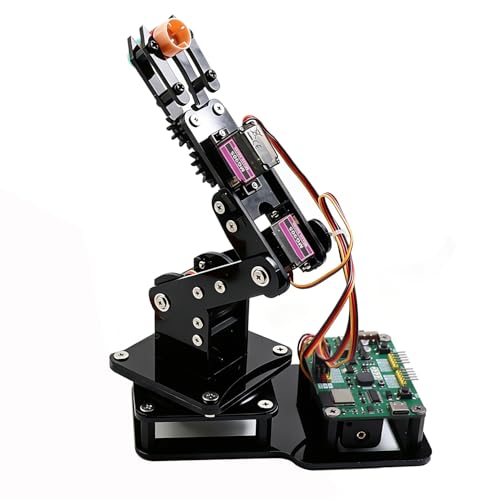
- Joystick and web-app control
- Motion recording and loop playback
- Arduino and MicroPython support
Best For: Teens, students, and makers learning programmable robotics
Best Beginner STEM Pick

- Ages 8–14
- Remote control and simple programming
- Metal structure with grab-and-lift functions
Best For: Children beginning hands-on robotics and STEM projects
Best Advanced Desktop Platform

- Six degrees of freedom
- Metal structure with anti-stall protection
- PC, app, mouse, and wireless control
Best For: Older students, engineers, and serious robotics learners
Arduino Learning Pick
miniArm 5DOF Open-Source Robot Arm

- Arduino-compatible and open source
- App, knob, and offline controls
- Expandable with sensors and modules
Best For: Adult makers building Arduino and sensor projects
Portable Expansion Choice
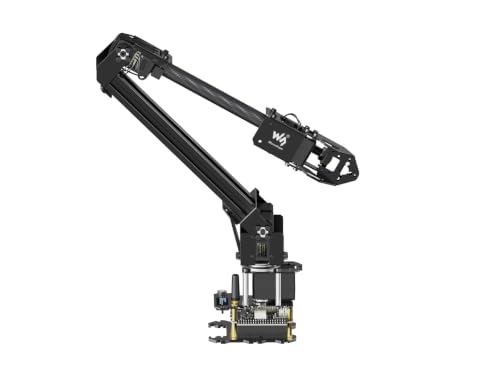
- Lightweight under-850g design
- 360-degree base and 1-meter workspace
- Wireless, ROS2, and open-source support
Best For: Developers building portable or mobile-platform projects
Multi-Control STEM Option
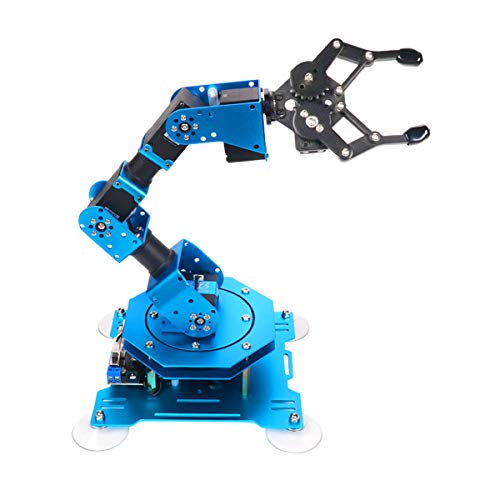
- Six intelligent feedback servos
- PC, app, mouse, and PS2 control
- Handles objects up to 500g
Best For: STEM learners practicing remote control and programming
Best for Programmable Learning – LewanSoul MaxArm Starter Kit
The LewanSoul MaxArm is a compact, aluminum robot arm for outdoor use only when protected from weather, with programming-focused controls suited to tabletop experimentation. Python, Arduino, ESP32, Wi-Fi, and Bluetooth support give learners several ways to build and test robotic applications.
Best For: Teens and adults learning robot-arm programming, inverse kinematics, and sensor integration.
Pros:
- Supports Python and Arduino programming with app, PC, mouse, and wireless-controller operation.
- Link mechanism and inverse kinematics enable movement along the x, y, and z axes.
- Includes sensor ports, expansion interfaces, and ESP32 Wi-Fi/Bluetooth connectivity.
- Aluminum construction and three smart bus servos support precise programmed movements.
Cons:
- Specified for indoor use, so it is not a weather-ready outdoor robot arm.
- Recommended for ages 16 and up and requires programming-oriented setup.
Choose the MaxArm when customization and coding matter more than outdoor mobility. It is a strong educational platform, but outdoor use should be limited to sheltered areas and supervised demonstrations.
Best Screen-Free STEM Build – Thames & Kosmos Bionic Arm
The Thames & Kosmos Bionic Robotic Arm is a mechanical construction set rather than a powered robot arm for outdoor use. Its cable-driven design needs no batteries or electricity, making it suitable for hands-on demonstrations on a covered patio, driveway table, or indoor workspace.
Best For: Kids and families exploring mechanical engineering, biomimicry, and manual robotic-arm control.
Pros:
- Nearly 300 pieces provide an engaging building and experimentation challenge.
- Joysticks control the arm and claw through an intuitive nylon-cable system.
- Requires no motors, batteries, or electricity.
- Includes a full-color manual with assembly steps and real-world robotics information.
Cons:
- Plastic construction and manual controls are less suitable for demanding outdoor tasks.
- Assembly may require help for ages 10 to 13; independent play is suggested from age 14.
- It is not programmable or motorized.
This kit is best viewed as a tactile STEM project, not an autonomous outdoor machine. Its battery-free operation is convenient, but the plastic parts and cable controls favor light-duty object handling.
Best Outdoor Mobility – VANLINNY Tracked Robot Arm Kit
The VANLINNY tracked kit is the clearest choice here for robot arms for outdoor use. Rubber tank tracks are designed to grip grass, gravel, sand, and light snow, while the 4-DOF arm can be switched between a gripping claw and a shovel bucket.
Best For: Kids ages 8–14 who want a remote-controlled STEM robot for garden, driveway, and light-terrain play.
Pros:
- Tracks spread weight and provide traction on grass, gravel, sand, and light snow.
- Two interchangeable configurations offer a gripping arm and shovel loader.
- All-metal chassis, alloy panels, and metal gears provide a sturdier build than typical plastic kits.
- Built-in rechargeable battery and 30–50 m remote-control range support outdoor play.
Cons:
- Remote control requires four AA batteries, which are not included.
- Payload is about 3 lb, and overloading can wear the gears.
- Assembly takes about two hours and includes small parts.
For genuine outdoor operation, this tracked design is the most practical option in the group. Keep loads light and use it on the listed terrain types rather than treating it as a full-scale utility excavator.
Best for Advanced Research – Seeed Studio reBot B601-RS
The Seeed Studio reBot B601-RS is an assembled 6-DOF research platform rather than a casual robot arm for outdoor use. Its open-source hardware, Linux-based environment, ROS 2 support, and documented manipulation workflows make it better suited to controlled labs or sheltered development areas.
Best For: Robotics researchers and advanced developers testing motion control, simulation, ROS 2, and physical-AI workflows.
Pros:
- Six degrees of freedom, a gripper, and a manufacturer-rated 2.5 kg payload support manipulation research.
- Manufacturer specifies approximately 754 mm reach and ±0.1 mm repeatability.
- Open-source hardware designs, BOM, Python code, and MotorBridge tools support customization.
- Supports ROS 2, Pinocchio, MuJoCo, NVIDIA Isaac Sim, and LeRobot workflows.
Cons:
- Power supply is not included.
- Leader arm, cameras, and computing hardware required for the demonstrated LeRobot setup are not included.
- Its research-oriented software and workspace limits require technical setup and validation.
This is the strongest choice for serious experimentation, not weather-exposed operation. Use it in a controlled environment where power, computing, safety, and manufacturer load limits can be managed properly.
Best DIY Outdoor-Ready Learning Platform – ESP32 4DOF Robot Arm
For shoppers comparing robot arms for outdoor use, this ESP32 kit is best viewed as a portable tabletop learning platform rather than a weatherproof machine. Its 4DOF design, joystick and web-app controls, and open-source programming support make it a practical choice for supervised demonstrations, coding practice, or sheltered outdoor STEM activities.
Best For: Teens, students, and makers who want a programmable arm for Arduino, MicroPython, motion recording, and loop playback.
Pros:
- Includes an ESP32-C3 control board with no code upload required to begin.
- Offers joystick and browser-based web-app control without app installation.
- Supports motion recording, loop playback, Arduino, and MicroPython projects.
- Open-source code, tutorials, and expandable hardware support encourage continued learning.
Cons:
- Listed for indoor use, so it is not presented as weatherproof or outdoor-rated.
- Batteries are not included.
- The 4DOF claw is intended for lightweight objects.
This is a flexible educational kit for sheltered environments and hands-on coding. If outdoor use means exposed conditions, look for a separately weather-protected setup; for a patio, classroom, or covered workbench, its controls and programming options are appealing.
Best Beginner STEM Pick – VANLINNY 4DOF Robotic Arm Kit
Among robot arms for outdoor use, this beginner-focused kit is better suited to supervised, sheltered activities than exposed outdoor operation. It combines a durable metal structure with simple programming, remote control, and grab-and-lift functions for introductory robotics projects.
Best For: Children ages 8–14 who are learning construction, coordination, programming, and basic STEM concepts.
Pros:
- Designed as an educational 4DOF building and programming kit.
- Metal construction is described as durable for prolonged use.
- Can move through multiple angles, raise and lower the arm, and grab objects.
- Includes a remote control and simulation sound effects for interactive play.
Cons:
- The supplied details do not identify it as weatherproof or outdoor-rated.
- Its recommended age range is 8–14, making it less suited to advanced robotics work.
- Programming features are described as simple rather than as an open development platform.
This kit offers an accessible way to introduce children to robotic movement and programming. Use it on a dry table or covered area, and choose it primarily for educational play rather than demanding outdoor automation.
Best Advanced Desktop Platform – LewanSoul LeArm 6DOF
For buyers researching robot arms for outdoor use, the LeArm is a powerful desktop learning platform but is explicitly listed for indoor operation. Its six degrees of freedom, metal construction, anti-stall protection, and multiple control methods make it a strong choice for sheltered demonstrations and advanced robotics practice.
Best For: Older students, engineers, university courses, and robotics enthusiasts building creative or educational projects.
Pros:
- Six degrees of freedom support remote grasping, transport, and custom actions.
- Metal brackets, high-torque servos, and industrial-grade bearings provide a stable structure.
- Offers PC, app, mouse, and wireless handle control.
- Anti-stall servos with gear clutches are designed to help extend servo life.
Cons:
- Listed for indoor use and not described as weatherproof.
- Requires an AC adapter rather than battery power for mobile outdoor use.
- Its recommended age is 14 years and up, so it may be too advanced for younger children.
The LeArm stands out when control flexibility, mechanical stability, and six-axis movement matter more than portability. It is well suited to a covered workspace or classroom, but outdoor users should protect it from moisture and rely on a suitable power source.
Arduino Learning Pick – miniArm 5DOF Open-Source Robot Arm
If you are comparing robot arms for outdoor use, the miniArm is best approached as a portable development and learning platform rather than a weatherproof machine. Its Arduino-compatible Atmega328 platform, open-source programs, and sensor expansion ports make it useful for experimenting with robotics in a protected outdoor setup.
Best For: Adult learners, makers, and STEM users who want Arduino programming, app or knob control, and room for sensor-based projects.
Pros:
- Arduino-compatible, open-source platform with tutorials and development examples.
- Includes app control, knob-based real-time control, and offline action editing.
- Supports expansion with sensors and modules such as an ESP32 Cam, accelerometer, and touch sensor.
- Aluminum construction and compact 13 x 5 x 8-inch dimensions make it relatively easy to position.
Cons:
- The Starter Kit does not include the listed optional sensors or ESP32 Cam module.
- The supplied information does not identify weatherproofing or outdoor-rated protection.
- Its recommended age is 17 years and up, so it is aimed at advanced learners.
The miniArm stands out for customization and coding practice. For outdoor demonstrations, plan to protect the electronics and use it in a controlled, dry environment.
Portable Expansion Choice – Waveshare RoArm-M2-S 4DOF Kit
For robot arms for outdoor use, the Waveshare RoArm-M2-S is a compelling option when portability and integration matter more than weather resistance. Its lightweight design, wireless ESP32 control, and mounting flexibility suit protected outdoor experiments or mobile-platform projects.
Best For: Developers who need a lightweight arm with wireless control, ROS2 compatibility, customizable tooling, and a broad working area.
Pros:
- Weighs less than 850g and supports mounting on various mobile platforms.
- Offers a 360-degree omnidirectional base and a workspace with a 1-meter diameter.
- ESP32 supports multiple wireless control modes and communication protocols.
- Open-source control code, interface documentation, ROS2 support, and tutorials aid development.
Cons:
- The effective payload is 0.5kg at 0.5m, which limits heavier outdoor tasks.
- The supplied details do not state that the arm is weatherproof or outdoor-rated.
- Its 4-DOF design may offer less articulation than more advanced arms.
This Waveshare kit is particularly practical for experimental installations and mobile robotics. Use appropriate protection for the electronics if deploying it outside, since outdoor durability is not specified.
Multi-Control STEM Option – Hiwonder-xArm1S 6DOF Arm
Among robot arms for outdoor use, the Hiwonder-xArm1S is best suited to supervised demonstrations in a sheltered setting. Its six intelligent servos, wireless and wired control options, and action-editing tools give learners a flexible way to practice programming and remote manipulation.
Best For: STEM learners and makers who want multiple control methods, graphical programming, and a metal desktop arm capable of grasping objects up to 500g.
Pros:
- Six-axis design provides a broad platform for robotics and programming projects.
- Intelligent servos provide position, voltage, and temperature feedback.
- Supports PC, phone app, mouse, and wireless PS2 controller operation.
- Aluminum alloy construction, high-torque servos, and industrial-grade bearings support stability.
Cons:
- The product details specifically list indoor usage, not outdoor operation.
- The supplied information does not mention weatherproofing or outdoor-rated components.
- Its 500g grasping capacity may not suit heavier materials or tools.
The xArm1S offers the most varied control and feedback features in this group, making it strong for hands-on STEM learning. Treat it as an indoor or sheltered-use platform rather than a permanently exposed outdoor arm.
How We Picked These Robot Arms for Outdoor Use
We focused on programmable desktop-scale arms that can support practical projects beyond a classroom or workshop. Selection criteria included controller compatibility, number of axes, gripper or tool options, programming access, assembly requirements, documentation, and the likelihood of finding replacement parts or community support.
Because most products in this category are not weatherproof industrial machines, outdoor use should generally mean supervised operation in a sheltered, dry environment. Users should protect electronics from rain, dust, condensation, direct sun, and unstable power.
Quick Comparison
| What to Compare | Why It Matters | Best Fit |
|---|---|---|
| 4-DOF models | Simpler programming and assembly | Beginners, classroom projects, basic pick-and-place tasks |
| 5- or 6-DOF models | More reach and wrist positioning | Advanced builds, camera-guided tasks, flexible manipulation |
| ESP32 and Wi-Fi control | Supports wireless interfaces and connected sensors | Remote experiments and IoT projects |
| Metal construction | Usually improves rigidity and resistance to accidental bumps | Frequent use and heavier attachments |
| Open-source support | Makes customization and troubleshooting easier | Makers, programmers, and long-term projects |
Key Buying Factors for Robot Arms for Outdoor Use
Weather Protection and Power
Check whether the arm has any stated protection rating; many educational kits have none. Plan a covered work area, sealed storage, cable protection, and a safe low-voltage power source. Avoid leaving servos, boards, or batteries outdoors between sessions.
Construction, Payload, and Stability
Metal frames can be more rigid, but they may also require stronger servos and a stable base. Compare the advertised payload with the actual tool, cable, and object weight. A wide mounting plate or weighted platform helps prevent tipping during movement.
Programming and Connectivity
Arduino, ESP32, Python, MicroPython, Wi-Fi, joystick, and web-app support offer different levels of flexibility. Choose the ecosystem that matches your existing skills and sensors. Confirm whether software, libraries, tutorials, and a USB or power cable are included.
Assembly and Maintenance
DIY kits vary considerably in setup time. Look for clear instructions, accessible fasteners, replaceable servos, and readily available mechanical parts. Outdoor dust makes regular cleaning and inspection especially important.
Who Should Buy Which Robot Arms for Outdoor Use?
Choose a beginner-oriented 4-DOF kit for younger learners, first-time builders, and simple demonstrations. Pick a metal-framed model when rigidity and repeated use matter more than portability. ESP32- and Wi-Fi-equipped arms suit makers building remote controls, sensor systems, or browser interfaces. For advanced users, a 5- or 6-DOF open-source arm provides more wrist orientation and room for custom tooling.
Whichever model you choose, treat outdoor operation as a controlled project environment rather than unrestricted exposure. A shelter, stable base, protected electronics, and realistic payload expectations will do more for reliability than degrees of freedom alone.