The best robot arms for teaching turn abstract programming and engineering concepts into hands-on projects. Students can explore motion control, sensors, kinematics, automation, and AI by building or programming a physical machine.
This roundup covers approachable Arduino and ESP32 kits alongside more capable open-source arms with Python, ROS, computer vision, and imitation-learning support. The right choice depends on learner age, classroom goals, assembly requirements, and budget.
Best 10 Robot Arms for Teaching Picks for 2026
Best Overall for Hands-On Learning
Hiwonder-xArm1S 6DOF Educational Arm
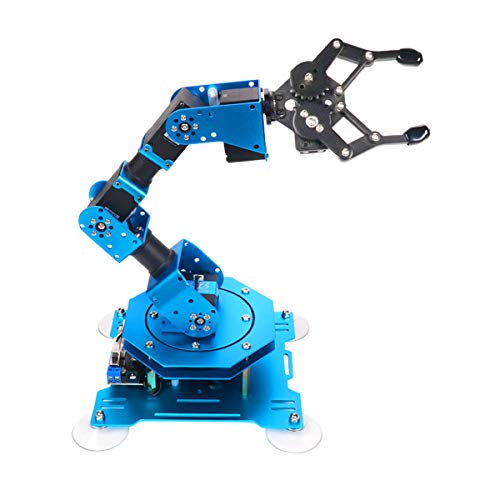
- Six-axis metal arm with intelligent feedback servos
- Multiple control methods for varied lessons
- Supports programming, action editing, and grasping
Best For: Students and makers learning robotics through practical projects
Best for AI Robotics Research

- Works with Python, ROS1, ROS2, and LeRobot
- Supports imitation and reinforcement learning
- Includes gripper and open-source learning resources
Best For: Advanced students, developers, and robotics research labs
Best Budget Coding Starter
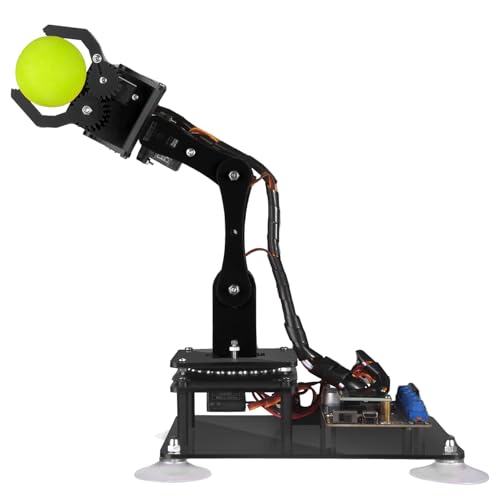
- Arduino IDE support with example code
- Manual and graphical PC control
- Includes drawing and imitation projects
Best For: Older beginners learning Arduino-based robotics
Best for Teleoperation Lessons
Synria Alicia-DLA Teaching Arm

- Low-latency wireless teleoperation control
- Compatible with Aloha, LeRobot, ROS, and MoveIt
- Supports imitation-learning data collection
Best For: Adult learners and researchers studying teleoperation and AI robotics
Best Open-Source Starter
MaxArm Arduino/Python Robot Arm

- Arduino and Python programming support
- ESP32 wireless and sensor expansion
- Inverse kinematics with smart bus servos
Best For: Older students and makers learning robotics programming
Best for Embodied AI

- LeRobot and VLA model compatibility
- K230 vision with 30+ AI features
- 500mm reach and 500g payload
Best For: University labs and advanced embodied-AI study
Best Beginner Build
SIYEENOVE ESP32 4DOF Robot Arm
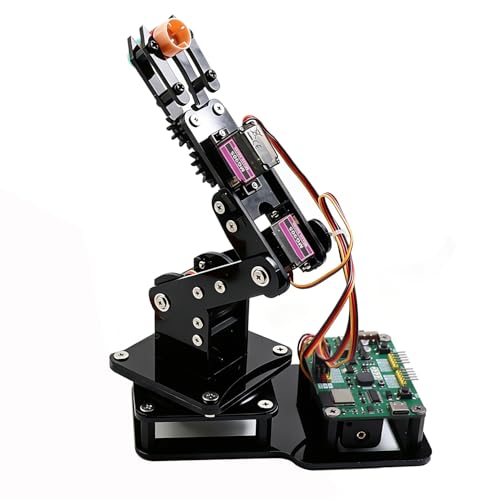
- Arduino and MicroPython support
- Joystick and browser-based control
- Motion recording with loop playback
Best For: Teens and beginners learning hands-on robotics
Advanced AI Learning Platform

- LeRobot-compatible imitation learning platform
- Dual cameras for manipulation and environment awareness
- Assembled kit with 12 high-torque bus servos
Best For: Advanced AI, vision, and open-source robotics instruction
Classroom-Friendly Programming Kit
LewanSoul LeArm 6DOF Robot Arm

- Six degrees of freedom for grasping and custom actions
- PC, app, mouse, and wireless handle control
- Metal tabletop design with tutorials and Arduino compatibility
Best For: Hands-on student robotics and programming courses
Open-Source Expansion Choice
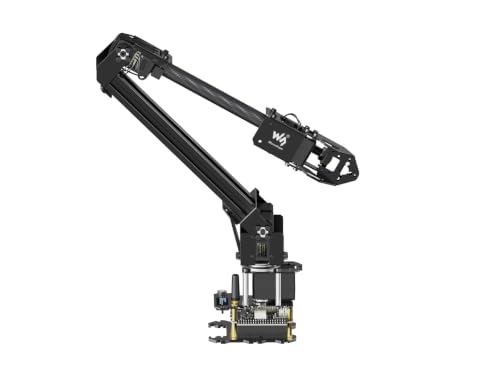
- ESP32 control with wired and wireless communication
- Open-source code and ROS2 compatibility
- Expansion plate for custom end-of-arm tooling
Best For: Wireless robotics, ROS2, and custom engineering projects
Best Overall for Hands-On Learning – Hiwonder-xArm1S 6DOF Educational Arm
For learners who want robot arms for teaching that support both physical experimentation and coding, the Hiwonder-xArm1S is a versatile desktop choice. Its six-axis metal design, intelligent servos, and multiple control options make it suitable for exploring grasping, movement, and custom programming projects.
Best For: Students and makers learning robotics, Arduino coding, and STEM concepts through hands-on projects.
Pros:
- Six-axis arm with intelligent servos that provide position, voltage, and temperature feedback.
- Supports PC, phone app, mouse, and wireless PS2 controller operation.
- Offers graphical programming, action editing, and offline manual editing.
- Metal construction and high-torque servos support loads up to 500g.
Cons:
- Its recommended age and education-focused features may make it less suitable for very young children.
- It is primarily designed for indoor tabletop use.
The xArm1S is a strong all-around teaching platform when you want students to move beyond simple assembly and experiment with programmed actions, remote control, and object handling.
Best for AI Robotics Research – reBot B601-DM Open-Source Arm
Among robot arms for teaching, the reBot B601-DM is aimed at advanced learners working with open-source AI robotics. Its Python SDK, ROS1 and ROS2 compatibility, gripper, and LeRobot and Hugging Face support provide a foundation for imitation learning, reinforcement learning, and research projects.
Best For: University labs, developers, and advanced students building AI robotics and machine-learning workflows.
Pros:
- Compatible with Python SDK, ROS1, ROS2, LeRobot, and Hugging Face frameworks.
- Supports imitation learning, reinforcement learning, and real-time leader-follower operation.
- Includes an assembled arm with gripper and improved joint wiring.
- Provides open-source assembly, calibration, testing, and deployment resources.
Cons:
- Its software ecosystem and AI focus may be demanding for beginners.
- 3D-printed parts are not included.
- The supplied dimensions indicate a relatively large setup for a classroom workspace.
This is the most research-oriented option in the group. Choose it when teaching goals include datasets, reinforcement learning, ROS integration, or deployment on compatible Nvidia Jetson devices rather than basic programming alone.
Best Budget Coding Starter – Adeept 5DOF Arduino Arm
The Adeept 5DOF arm is a straightforward entry point for robot arms for teaching, especially when Arduino programming is the main objective. It combines a DIY build with digital tutorials, code examples, manual controls, and activities such as drawing and imitation.
Best For: Older beginners and classroom makers learning Arduino IDE programming and basic robotic-arm control.
Pros:
- Designed for Arduino IDE and includes code routines and PDF tutorials.
- Offers both potentiometer-based manual control and graphical PC control.
- Supports self-learning, drawing, and imitation activities.
- Includes technical support and a one-year parts warranty.
Cons:
- The manufacturer recommends it for ages 16 and up.
- Its five-axis design is less capable than six-axis alternatives for more complex motion.
- Digital tutorials are provided instead of paper manuals.
Choose the Adeept when you want a compact, DIY-focused platform for learning programming fundamentals. Its manual controls and example projects can help students connect code with visible physical movement.
Best for Teleoperation Lessons – Synria Alicia-DLA Teaching Arm
The Synria Alicia-DLA is a specialized option for robot arms for teaching where the lesson centers on teleoperation and AI data collection. Its six-degree-of-freedom teaching design, wireless control, ROS compatibility, and low-latency operation are suited to imitation-learning and human-robot interaction work.
Best For: Adult learners, AI researchers, and robotics engineers teaching teleoperation, imitation learning, and ROS-based control.
Pros:
- Provides 0.8ms response time and stated 5–8mm control precision for teleoperation.
- Compatible with Aloha, LeRobot, ROS1, ROS2, and MoveIt.
- Supports 3-, 4-, 5-, and 6-axis teaching with synchronization and locking functions.
- Foldable 1430g design with 388mm reach is intended for portable use.
Cons:
- It is recommended for adults and may be too specialized for introductory classes.
- Optional force-feedback and vision modules are upgrades rather than stated standard features.
- The supplied size and weight make it less compact than a small tabletop coding kit.
The Alicia-DLA makes the most sense when teaching involves demonstrating motion through a physical pendant and collecting high-quality demonstrations. It is less of a beginner construction kit and more of a focused control and research tool.
Best Open-Source Starter – MaxArm Arduino/Python Robot Arm
The LewanSoul MaxArm is a versatile choice for learners comparing robot arms for teaching. Its aluminum construction, inverse-kinematics approach, and support for Arduino and Python make it useful for studying movement, programming, and basic robotics control.
Best For: Older students, makers, and classroom or home projects focused on programming practice and robotics fundamentals.
Pros:
- Supports Arduino and Python programming, plus app, PC, wireless-controller, and mouse control.
- Uses inverse kinematics and trajectory planning to move the end effector across the x, y, and z axes.
- Includes ESP32 Wi-Fi and Bluetooth support, sensor ports, and expansion interfaces for secondary development.
- Smart bus servos provide precise movement and support heavier payloads than a basic beginner arm.
Cons:
- Its recommended age is 16 years and up, so it may be too advanced for younger beginners.
- The range of features and expansion options may require extra programming time to use fully.
MaxArm offers a strong balance of guided learning and experimentation. Choose it when cross-platform coding, wireless projects, and sensor expansion matter more than a simple plug-and-play build.
Best for Embodied AI – NexArm 6DOF AI Robot Arm
The Hiwonder NexArm Advanced Kit is aimed at advanced learners seeking robot arms for teaching AI, vision, and imitation learning. It combines a full-metal 6DOF arm with a K230 vision module, open-source software, and compatibility with the LeRobot ecosystem.
Best For: University AI labs, advanced robotics courses, and developers exploring vision-language-action models and embodied AI.
Pros:
- Supports LeRobot, community datasets, simulations, and end-to-end imitation-learning models such as ACT and VLA.
- The K230 module provides 6 TOPS of processing and more than 30 built-in vision features, including object, color, gesture, and sorting recognition.
- Offers a 500mm reach, 500g payload, and ±2mm repeatability, with curve smoothing for steadier trajectories.
- Includes voice control, multimodal AI expansion, open-source code, schematics, tutorials, and several control methods.
Cons:
- Its advanced AI and development features may be excessive for introductory robotics lessons.
- The 15-years-and-up recommendation makes it less suitable for younger learners.
NexArm is the most capable option here for lessons that connect hardware with modern AI workflows. It makes the most sense when learners need vision, voice interaction, imitation learning, and multimodal experimentation in one platform.
Best Beginner Build – SIYEENOVE ESP32 4DOF Robot Arm
The SIYEENOVE ESP32 arm is a hands-on entry point for anyone comparing robot arms for teaching. Its 4DOF design, included joysticks, web control, and motion-recording feature create straightforward activities for learning assembly, electronics, coding, and basic automation.
Best For: Teens, beginners, classroom demonstrations, and DIY makers who want an approachable Arduino or MicroPython project.
Pros:
- Includes the hardware needed to build a 4DOF arm with four MG90S servos and a claw for lightweight objects.
- Supports joystick control and a browser-based web app without requiring an app installation.
- Records joystick movements step by step and plays routines back in a loop for demonstrations and automation exercises.
- Offers Arduino and MicroPython support, open-source code, tutorials, and expandable hardware.
Cons:
- Batteries are not included.
- The 4DOF design and lightweight-object focus provide less capability than a larger advanced arm.
- It uses manual operation by default, so more advanced behavior depends on programming changes.
This kit is a practical choice for learning by building and experimenting. Its joystick workflow and motion playback make it especially useful for early lessons before students move on to more complex robotics or AI platforms.
Advanced AI Learning Platform – SO-ARM101 6-Axis Robot Arm
For advanced robot arms for teaching, the Hiwonder SO-ARM101 stands out as a hands-on platform for imitation learning, computer vision, and open-source robotics development. Its assembled format and included 3D-printed parts let learners focus more quickly on programming and experimentation.
Best For: Adult learners, researchers, and advanced robotics students exploring AI, vision recognition, and LeRobot-compatible projects.
Pros:
- Supports end-to-end imitation learning through compatibility with the LeRobot open-source framework.
- Dual-camera setup combines gripper-level precision with broader environmental awareness.
- Includes 12 high-torque bus servos, magnetic feedback, and professional debugging software.
- Arrives assembled with included 3D-printed parts.
Cons:
- Its advanced AI and vision features may be more than beginners need.
- Recommended for ages 16 and up, so it is not aimed at younger students.
- The 20-inch dimensions require a reasonably spacious work area.
This is the most research-oriented option in the group. Choose it when your lessons or projects involve imitation learning, camera-guided manipulation, and open-source AI development rather than basic mechanical programming.
Classroom-Friendly Programming Kit – LewanSoul LeArm 6DOF Robot Arm
The LewanSoul LeArm is a practical choice for robot arms for teaching because it combines six degrees of freedom with tutorials, simple programming software, and several control methods. Students can assemble, operate, and program the arm while learning core robotics and engineering concepts.
Best For: Students, university courses, hobbyists, and classroom projects focused on mechanical construction, programming, and hands-on control.
Pros:
- Six-degree-of-freedom movement supports grasping, transporting objects, and custom actions.
- Offers PC, app, mouse, and wireless handle control.
- Metal construction, reinforced base, and industrial-grade bearings support tabletop stability.
- Includes tutorials, graphical programming, and Arduino compatibility.
Cons:
- Manual operation and setup may require more instructor guidance than an assembled platform.
- Uses an AC power adapter and does not include battery operation.
- Its recommended age range starts at roughly early teens to older learners.
LeArm is a balanced teaching kit for lessons that mix assembly, programming, and direct control. It is less focused on AI vision than the SO-ARM101, but its multiple input methods and accessible tutorials make demonstrations easy to vary.
Open-Source Expansion Choice – Waveshare RoArm-M2-S 4DOF Kit
The Waveshare RoArm-M2-S is a flexible option for robot arms for teaching, especially where wireless control, embedded programming, and custom hardware matter. Its ESP32 controller, open-source interfaces, and expansion plate support lessons that move beyond basic arm movement.
Best For: Makers, engineering students, and developers building wireless, ROS2-compatible, or customized robotic-arm projects.
Pros:
- ESP32-based control supports multiple wireless modes and communication protocols.
- Open-source control code and interface documentation support secondary development.
- Expansion plate allows customized end-of-arm tooling.
- Lightweight design weighs under 850g and provides a 360-degree workspace with a 1-meter diameter.
Cons:
- Four degrees of freedom offer less joint flexibility than six-axis alternatives.
- Its development-focused features may have a steeper learning curve for beginners.
- The stated effective payload is 0.5kg at 0.5m, which limits heavier-object projects.
This kit is a strong fit when the curriculum includes communication protocols, ROS2, wireless robotics, or custom tooling. Its lighter frame and expansion support also make it useful for experimental builds and mobile-platform projects.
How We Picked the Best Robot Arms for Teaching
We focused on platforms that support meaningful instruction rather than novelty alone. The selection includes different degrees of freedom, controller types, programming environments, assembly levels, and expansion options so educators can match a kit to a specific course or student group.
We also considered documentation, open-source access, compatibility with Arduino, MicroPython, Python, ROS, or related tools, and whether the arm can demonstrate practical topics such as teleoperation, machine vision, inverse kinematics, and imitation learning. Specifications and included accessories should still be verified before purchase, especially for classroom-wide deployments.
Quick Comparison
| Best For | Look For | Recommended Type |
|---|---|---|
| Young beginners | Simple controls, tutorials, protected electronics | 4DOF Arduino or ESP32 kit |
| Arduino and coding classes | Open programming, accessible libraries, manual control | DIY 5DOF or 6DOF kit |
| Python and robotics courses | SDK access, serial or wireless control, gripper support | Open-source programmable arm |
| ROS instruction | ROS1/ROS2 compatibility, Linux support, documentation | Advanced 6DOF platform |
| AI and research projects | Camera support, high-torque servos, teleoperation, imitation learning | Embodied-AI or ALOHA-compatible arm |
Key Buying Factors for Robot Arms for Teaching
Programming and Curriculum Fit
Choose an environment students already use, such as Arduino IDE for introductory embedded coding, MicroPython for quick experiments, or Python and ROS for advanced robotics. A kit with example code and a documented API can reduce setup time substantially.
Degrees of Freedom and Movement
More axes allow richer demonstrations of positioning and kinematics, but they also increase wiring, calibration, and programming complexity. Four degrees of freedom may be ideal for a first project, while five or six axes are more suitable for spatial manipulation and advanced control lessons.
Build Quality, Payload, and Safety
Metal frames and high-torque bus servos generally withstand repeated classroom use better than lightweight hobby mechanisms. Check the stated payload, reach, gripper design, power requirements, and whether the arm includes safeguards against stalled motors or unexpected movement. Supervision is essential during student operation.
Assembly and Support
DIY kits teach valuable mechanical skills but require time for assembly and troubleshooting. An assembled arm may be preferable when the learning objective is software, AI, or control theory. Prioritize clear manuals, active software support, replacement parts, and accessible firmware.
Who Should Buy Which Robot Arms for Teaching?
For elementary or introductory STEM activities, select a compact Arduino or ESP32 arm with joystick, web-app, or straightforward block-style control. For secondary-school coding, a 5DOF or 6DOF open kit offers a stronger balance of construction, programming, and experimentation.
College robotics courses should favor Python SDKs, ROS compatibility, precise servo feedback, and expansion ports. Instructors teaching computer vision, teleoperation, or embodied AI should choose a platform designed for cameras, wireless control, imitation learning, or modern large-model workflows. If several students will share one device, prioritize durability, documentation, and easy reset procedures over maximum feature count.