The best programmable robot arms make robotics easier to explore, whether you are learning Arduino, building an ESP32 project, or experimenting with AI and imitation learning. The models in this roundup range from compact four-axis kits to full-metal six-axis platforms.
Use the guide below to compare degrees of freedom, controller support, programming options, expansion potential, and the hardware included before choosing a kit for your workspace or classroom.
Best 10 Programmable Robot Arms Picks for 2026
Best Overall
Hiwonder-xArm1S 6DOF Robot Arm
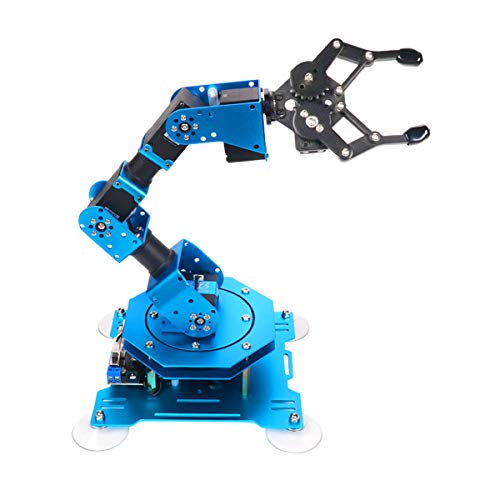
- Six-axis metal construction with intelligent servos
- Supports PC, app, mouse, and wireless control
- Handles objects up to 500g
Best For: STEM projects and versatile robotic-arm programming
Best DIY Starter Kit
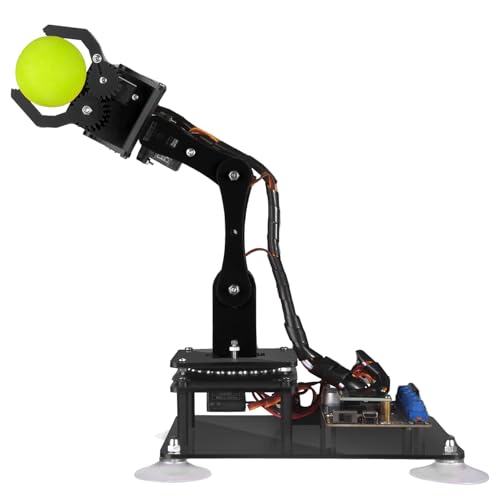
- Arduino IDE compatibility with sample routines
- Includes PDF tutorials and assembly guides
- Supports knob and graphical PC control
Best For: Arduino beginners and hands-on DIY learning
Best for Hands-On Building

- Metal six-DOF desktop robot arm
- Includes anti-stall protection and tutorials
- Offers PC, app, mouse, and handle control
Best For: Students and makers who enjoy assembling robot projects
Best for Open-Source Expansion

- Open-source Arduino programming platform
- Supports app, knob, and offline editing control
- Offers ports for sensor and module expansion
Best For: Makers developing custom Arduino and sensor projects
Best for Open-Source Development

- 5 + 1 DOF with 360° movement
- ESP32 wireless and wired control
- ROS2 and LeRobot compatible
Best For: Makers and researchers building expandable robotics projects
Best for AI Imitation Learning
Hiwonder SO-ARM101 AI Robot Arm

- Six-axis arm with dual-camera vision
- 12 high-torque feedback servos
- Assembled and compatible with LeRobot
Best For: AI research, imitation learning, and computer-vision projects
Best for Beginner STEM Projects
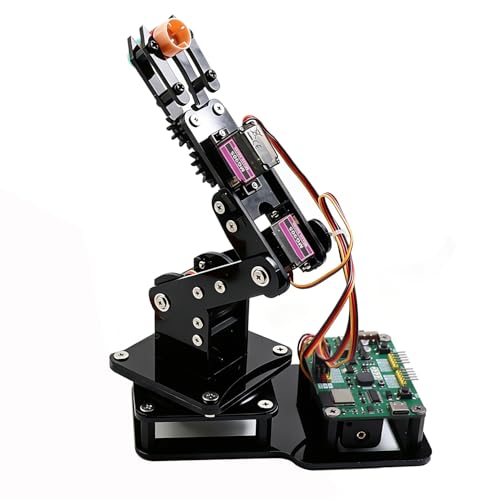
- DIY 4DOF kit for lightweight objects
- Joystick and Web app control
- Arduino and MicroPython support
Best For: Students and beginners learning coding and robotics
Best for Embodied AI

- LeRobot and VLA model compatibility
- K230 vision and voice interaction
- Open-source, metal construction
Best For: University labs and advanced AI robotics projects
Best for Flexible Desktop Projects
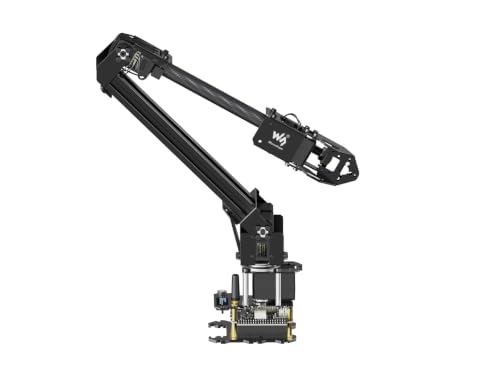
- ESP32-based 4-DOF design
- Open-source and ROS2 compatible
- Wireless control with expansion plate
Best For: STEM makers and mobile-platform projects
Best for Programming Practice

- Python and Arduino support
- Wi-Fi and Bluetooth via ESP32
- Sensor and actuator expansion ports
Best For: Students and hobbyists learning robotics fundamentals
Best Overall – Hiwonder-xArm1S 6DOF Robot Arm
If you want programmable robot arms with flexible controls and a sturdy desktop build, the Hiwonder-xArm1S is a strong all-around option. Its six intelligent serial-bus servos support feedback for position, voltage, and temperature, while PC, app, mouse, and wireless controller operation make experimentation accessible.
Best For: STEM learners, creative programmers, and users who want multiple ways to control and edit robotic-arm actions.
Pros:
- Six-axis metal design with high-torque servos and industrial-grade bearings
- Can grasp objects weighing up to 500g
- Supports PC, phone app, mouse, and wireless PS2 controller operation
- Offers graphical programming and offline manual action editing
Cons:
- Recommended for older learners, with listed age guidance of over 14 years
- Its many control options may require time to learn
The xArm1S balances programming flexibility, physical stability, and hands-on experimentation. It is a practical pick for projects involving grasping, object transport, and custom motion sequences.
Best DIY Starter Kit – Adeept 5DOF Arduino Robot Arm
The Adeept 5DOF kit is a practical choice among programmable robot arms for learners who want to build, code, and test an Arduino-compatible project. It includes digital assembly guides, sample Arduino routines, and both knob-based manual control and graphical PC control.
Best For: Older students, adult beginners, and DIY makers learning Arduino programming, assembly, and basic robotic-arm control.
Pros:
- Compatible with the Arduino IDE and supplied code routines
- Includes detailed PDF tutorials and digital assembly guidance
- Offers potentiometer control and graphical PC remote control
- Supports self-learning, drawing, and imitation features
Cons:
- Recommended for ages 16 and up
- Its polycarbonate construction is less substantial than metal-arm alternatives
With its documentation and coding examples, the Adeept kit emphasizes the learning process. It is well suited to users who value an approachable Arduino build over a more advanced six-axis platform.
Best for Hands-On Building – LewanSoul LeArm 6DOF Kit
For buyers seeking programmable robot arms that combine assembly with creative experimentation, the LewanSoul LeArm offers a six-degree-of-freedom desktop platform. Its metal structure, multiple control methods, graphical programming support, and included tutorials make it suitable for learning by building and testing.
Best For: Students, engineering learners, and robot enthusiasts who want a metal kit with PC, app, mouse, and handle control.
Pros:
- Six-DOF metal construction with high-torque servos and industrial-grade bearings
- Includes anti-stall protection on the arm end
- Supports PC, app, mouse, and wireless handle control
- Designed for assembly, custom actions, and graphical programming
Cons:
- Listed for users approximately 14 or 16 years and older, depending on the supplied guidance
- Requires an AC adapter and does not use included batteries
The LeArm is particularly appealing when the building experience matters as much as the finished robot. Its metal frame and anti-stall features add durability-focused design touches, while the control options leave room for varied projects.
Best for Open-Source Expansion – miniArm 5DOF Arduino Kit
The miniArm stands out among programmable robot arms for its open-source Arduino foundation and expansion-focused design. Built on the Atmega328 platform, it provides tutorials, secondary-development examples, a six-channel knob controller, Bluetooth, and ports for adding sensors and modules.
Best For: Advanced STEM learners and makers who want to develop custom robotic-arm projects with Arduino and optional sensor integration.
Pros:
- Open-source programs and Arduino-compatible Atmega328 platform
- Supports app control, knob control, and offline action editing
- Provides expansion ports for camera, motion, touch, and ultrasonic-related modules
- Includes high-precision digital servos and a Bluetooth module
Cons:
- Starter Kit does not include the listed optional sensors and ESP32-Cam module
- Recommended for users aged 17 and up
The miniArm is best viewed as a foundation for experimentation rather than a finished sensor-rich system. Check the kit contents carefully if your project depends on the optional expansion hardware.
Best for Open-Source Development – Waveshare RoArm-M3-Pro
The Waveshare RoArm-M3-Pro is a capable choice among programmable robot arms for developers who want wireless control, multiple communication options, and room for custom end-effectors. Its 5 + 1 degrees of freedom, ESP32 controller, ROS2 support, and LeRobot compatibility make it particularly suitable for experimentation and advanced robotics projects.
Best For: Makers, researchers, and developers exploring ROS2, LeRobot, AI, and custom robotic-arm applications.
Pros:
- 5 + 1 DOF design with a 360° omnidirectional movement range.
- ESP32 control module supports wireless and wired communication.
- Compatible with ROS2 and LeRobot, with Web app and coordinate-control options.
- All-metal ST3235 bus servos and direct-drive joints support reliable positioning.
Cons:
- Its broad development features may be more than beginners need.
- Custom end-effectors and advanced AI projects may require additional setup.
Choose this model if expandability and open-source integration matter more than a simple plug-and-play learning experience. The included tutorials and Wiki resources help, but its strongest appeal is to users ready to build and program beyond basic demonstrations.
Best for AI Imitation Learning – Hiwonder SO-ARM101 AI Robot Arm
The Hiwonder SO-ARM101 is one of the more research-focused programmable robot arms in this group, pairing a six-axis design with dual-camera vision and LeRobot compatibility. The assembled advanced kit is aimed at users who want to explore imitation learning, AI vision, and repeatable robotic manipulation.
Best For: AI researchers, advanced hobbyists, and learners working with imitation learning and computer vision.
Pros:
- Supports end-to-end imitation learning through the LeRobot framework.
- Dual-camera setup combines gripper-mounted and external environmental views.
- Twelve high-torque bus servos use magnetic feedback for smooth, stable motion.
- Includes BusLinker V3.0 tools for servo scanning, monitoring, calibration, and trajectory control.
Cons:
- The feature set and recommended 16+ age make it less suited to young beginners.
- Its focus on AI research may be excessive for basic arm-control projects.
Because this kit arrives assembled and includes professional debugging hardware, it can shorten the path from setup to experimentation. It is the strongest fit here for users prioritizing cameras, servo feedback, and AI-oriented development over a simple build-it-yourself introduction.
Best for Beginner STEM Projects – SIYEENOVE ESP32 Robot Arm
The SIYEENOVE ESP32 robot arm is a practical entry point for programmable robot arms, combining a DIY build with joystick control, a web app, and support for Arduino and MicroPython. Its four degrees of freedom and motion-recording feature make it useful for classroom demonstrations, home labs, and hands-on coding practice.
Best For: Teens, students, and beginners learning electronics, Arduino, MicroPython, and basic robotic-arm automation.
Pros:
- Includes hardware for a hands-on 4DOF robot-arm build.
- Offers joystick and browser-based Web app control without app installation.
- Can record motion sequences and replay them in a loop.
- Open-source code, tutorials, and expandable hardware support encourage continued learning.
Cons:
- Batteries are not included.
- The four-servo design is intended for lightweight objects rather than demanding tasks.
- Building and code modifications may require beginner troubleshooting.
This kit favors accessibility and experimentation over advanced reach or AI features. If the goal is to learn by building, control an arm from a joystick or browser, and create repeatable routines, it offers a straightforward foundation for STEM work.
Best for Embodied AI – NexArm 6-Axis AI Robotic Arm
For advanced programmable robot arms, the NexArm stands out as an open-source platform built for AI experimentation, imitation learning, and multimodal development. Its metal construction, encoder servos, vision module, and LeRobot compatibility make it suited to serious educational and lab projects.
Best For: University labs, embodied AI learners, and developers training or deploying vision-and-language robotics models.
Pros:
- ESP32 and AT32 dual-chip architecture with magnetic encoder servos
- Supports LeRobot, imitation learning, ACT, and VLA models
- K230 vision module offers built-in recognition features and voice interaction
- Includes open-source code, schematics, tutorials, and multiple control methods
Cons:
- Its advanced AI features may be more than beginners need
- Recommended for ages 15 and up, reflecting the technical learning curve
Choose the NexArm when your priority is an expandable research and learning platform rather than a simple desktop manipulator. Its 500mm reach, 500g payload, and stated ±2mm repeatability provide a useful foundation for programmed grasping and AI demonstrations.
Best for Flexible Desktop Projects – Waveshare RoArm-M2-S
The Waveshare RoArm-M2-S is a practical choice among programmable robot arms for STEM learning, wireless control, and custom end-effector projects. Its ESP32 controller, open software, and expansion plate make it approachable for experimentation while retaining compatibility with ROS2 and different host computers.
Best For: STEM learners, makers, and developers who want a lightweight 4-DOF arm with wireless control and expansion options.
Pros:
- Cross-platform WEB app provides visual coordinate control
- Open-source control code and communication documents support secondary development
- Supports ROS2 plus wired and wireless communication modes
- 360-degree base and three joints create a workspace about 1 meter in diameter
Cons:
- Four degrees of freedom may limit more complex motion compared with higher-DOF arms
- Custom tooling and advanced projects require additional development
RoArm-M2-S is especially appealing if you value portability and customization. Its sub-850g design and stated 0.5kg payload at 0.5m allow it to be mounted on mobile platforms, while the included tutorials help shorten the setup process.
Best for Programming Practice – LewanSoul MaxArm
The LewanSoul MaxArm is a beginner-friendly option for learning programmable robot arms through Arduino and Python. It combines inverse kinematics, wireless ESP32 connectivity, sensor expansion, and several control methods in a compact tabletop starter kit.
Best For: Students and hobbyists practicing programming, mechanics, inverse kinematics, and introductory robotics applications.
Pros:
- Supports both Python and Arduino programming
- Offers app, PC, wireless controller, and mouse control
- ESP32 provides Wi-Fi, Bluetooth, sensor ports, and expansion interfaces
- Link mechanism and trajectory planning support programmed x, y, and z movement
Cons:
- Its compact tabletop format is less suited to large workspaces
- It is recommended for ages 16 and up, so younger learners may need guidance
MaxArm makes sense for learners who want multiple ways to interact with a robot while gradually moving into code-based control. The included bus servos and reserved sensor connections also leave room for more advanced experiments as programming skills develop.
How We Picked These Programmable Robot Arms
We focused on kits that offer meaningful hands-on programming rather than simple remote-control toys. The selection covers Arduino and Python-compatible arms, ESP32 platforms, MicroPython projects, open-source designs, and newer AI-oriented systems. We also considered degrees of freedom, servo type, construction, control methods, documentation, and likely use cases.
Because kits vary widely in complexity, the right choice depends on whether you want an approachable STEM activity, a repeatable desktop manipulator, or a development platform for computer vision and embodied AI.
Quick Comparison
| Best For | Look For | Typical Configuration |
|---|---|---|
| Beginners and classrooms | Arduino support, tutorials, simple assembly | 4–6 DOF, standard servos |
| Wireless projects | ESP32, Wi-Fi, web or app control | 4–6 DOF, serial bus servos |
| Precision and repeatability | Metal frame, feedback-capable bus servos | 5–6 DOF |
| AI and imitation learning | Open-source software, camera support, high-torque servos | 6-axis configurations |
Key Buying Factors for Programmable Robot Arms
Degrees of Freedom
Four-DOF arms are generally easier to assemble and control, while five- and six-axis designs provide more flexible positioning and wrist movement. More axes can expand what the arm can do, but they also increase calibration and programming demands.
Controller and Programming Support
Check whether the kit supports the language and board you already use. Arduino is a practical starting point for servo control, while ESP32 adds wireless features and MicroPython support. Python, ROS-compatible tools, camera integration, or LeRobot support may matter more for advanced automation and AI work.
Mechanical Construction and Payload
Metal frames and high-torque bus servos usually provide better rigidity than lightweight hobby components. Still, payload claims depend on reach, arm position, power supply, and speed. A gripper or suction nozzle can also change the kit’s usefulness for sorting and pick-and-place tasks.
Documentation and Expansion
Clear assembly instructions, example code, wiring diagrams, and an active community can save substantial setup time. Look for replaceable end effectors, accessible mounting points, expansion ports, and compatibility with sensors or cameras if you plan to grow the project.
Who Should Buy Which Programmable Robot Arms?
Choose an Arduino-focused four- or five-axis kit for a first robotics project, classroom demonstrations, or basic servo programming. An ESP32 model is a better fit if wireless control, web interfaces, or MicroPython are priorities. Select a metal six-axis arm with bus servos when you need a more capable platform for coordinated motion, repeatable movements, or advanced gripper experiments.
For AI, vision, and imitation-learning development, prioritize open-source software, camera compatibility, high-torque actuators, and documented data or control workflows over the lowest purchase price. Before ordering, verify the included power supply, controller, gripper, software access, and assembly requirements—these details can differ substantially between otherwise similar Programmable Robot Arms.