The best desktop robot arms turn robotics concepts into hands-on projects. They can help students learn coding, makers test motion control, and developers explore AI, computer vision, and automation.
This roundup compares 10 options across degrees of freedom, controller support, construction, software compatibility, and expansion potential so you can choose a kit that matches your experience and goals.
Best 10 Desktop Robot Arms Picks for 2026
Advanced AI Desktop Arm

- 5+1 DOF with 2-DOF wrist
- ESP32 wireless and wired control
- ROS2 and LeRobot compatible
Best For: AI robotics, ROS2 learning, and expandable development projects
Educational All-Rounder

- Six-axis desktop robotic arm
- PC, app, and virtual controls
- Supports drawing, engraving, and handling
Best For: K–12 education, STEM training, and beginner automation projects
Open-Source AI Platform
LeRobot SO-ARM101 Pro Servo Kit

- Six-DOF LeRobot-compatible kit
- Supports imitation and reinforcement learning
- NVIDIA Jetson compatible
Best For: AI robotics developers and open-source training projects
Hands-On STEM Workhorse
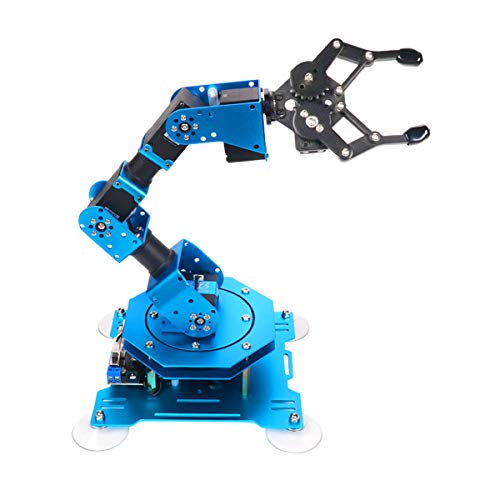
- Full-metal six-axis construction
- Feedback-enabled intelligent servos
- PC, app, mouse, and wireless control
Best For: STEM learning, Arduino coding, and tabletop grasping projects
Professional Learning Pick

- Six-axis arm with multiple control methods
- Includes Bluetooth controller and accessory modules
- Supports education, drawing, engraving, and handling projects
Best For: Students, teachers, and engineers exploring programmable robotics
Embodied AI Development Pick

- 500mm reach and 500g payload
- LeRobot-compatible open-source AI platform
- Includes vision features and voice interaction
Best For: University labs and advanced AI robotics developers
Beginner Maker Pick
SIYEENOVE ESP32 4DOF Robot Arm
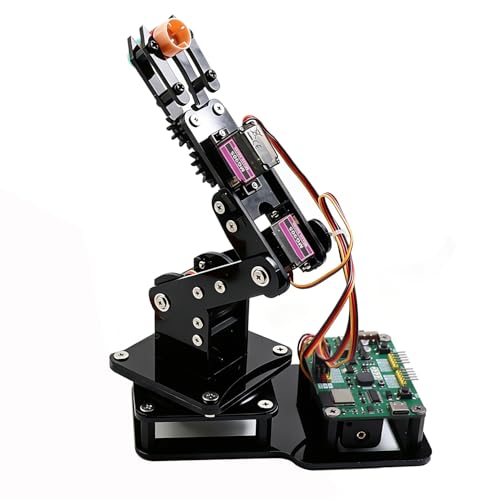
- DIY 4DOF kit with ESP32-C3 control board
- Joystick and browser-based web control
- Motion recording plus Arduino and MicroPython support
Best For: Teens, students, and DIY coding beginners
Best Overall for Learning
LeArm 6DOF Programmable Robot Arm

- Six degrees of freedom for varied movements
- PC, app, mouse, and wireless control
- Metal build with tutorials and Arduino compatibility
Best For: Students and beginners learning robotics through hands-on projects
Best for Open-Source Expansion
RoArm-M2-S 4DOF Desktop Robot Kit
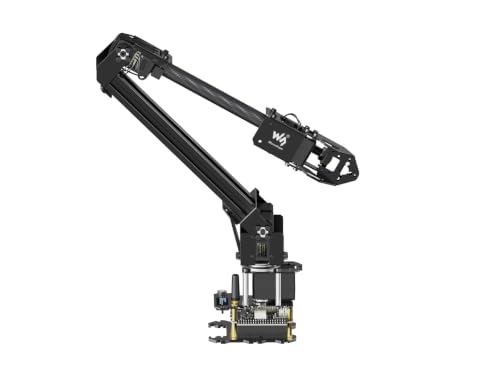
- ESP32 controller with wireless connectivity
- Open-source code and ROS2 compatibility
- Expansion plate for custom tooling
Best For: Makers and developers building expandable robotics projects
Best for Programming Practice

- Python and Arduino programming support
- ESP32 with WiFi, Bluetooth, and sensor ports
- Inverse kinematics and trajectory planning
Best For: Older learners and hobbyists developing robotics and coding skills
Advanced AI Desktop Arm – Waveshare RoArm-M3-Pro
The Waveshare RoArm-M3-Pro is a strong choice among desktop robot arms for builders who want wireless control, flexible mounting, and a pathway into ROS2 or AI robotics. Its ESP32 controller, 5+1 degrees of freedom, and included web-based coordinate control make it approachable while leaving room for advanced development.
Best For: AI robotics projects, ROS2 learners, and developers who want expandable hardware with LeRobot compatibility.
Pros:
- 5+1 DOF design with a 2-DOF wrist and 360° omnidirectional movement.
- ESP32 control supports wireless and wired communication methods.
- Compatible with ROS2 and LeRobot for imitation learning and other research applications.
- Direct-drive joints and all-metal ST3235 bus servos support repeatability and structural reliability.
Cons:
- The advanced feature set may require more setup than a basic educational arm.
- Custom end-effectors and expanded projects may involve additional components.
Choose this model if you want desktop robot arms that can grow from coordinate-based control into connected, AI-focused experimentation. Its documentation and cross-platform support further help with longer-term projects.
Educational All-Rounder – WLKATA Mirobot 6-Axis Arm
The WLKATA Mirobot is one of the more classroom-friendly desktop robot arms, combining six-axis movement with PC software, mobile control, and virtual simulation options. It is designed for hands-on education and supports activities such as drawing, writing, laser engraving, handling, and palletizing.
Best For: K–12 robotics education, STEM training, and learners exploring programming, automation, and accessory-based projects.
Pros:
- Six-axis design provides a broad platform for learning robotic-arm movement.
- Supports WLKATA Studio, mobile-app, terminal, and virtual-control methods.
- Includes or supports applications such as drawing, writing, engraving, handling, and palletizing.
- Reserved expansion interfaces support secondary development and added accessories.
Cons:
- Its educational focus may be less suited to users seeking a dedicated AI research platform.
- Some advanced activities require separate accessories or additional development.
For buyers comparing desktop robot arms for structured learning, the Mirobot stands out for its variety of control modes and teaching applications. It offers a practical way to introduce automation concepts without limiting projects to a single activity.
Open-Source AI Platform – LeRobot SO-ARM101 Pro Servo Kit
The LeRobot SO-ARM101 Pro is aimed at developers building AI-capable desktop robot arms rather than simply demonstrating motion. This six-DOF servo motor kit supports LeRobot and Hugging Face workflows, real-time leader-follower operation, and NVIDIA Jetson compatibility, but 3D-printed parts are not included.
Best For: Open-source robotics developers working on imitation learning, reinforcement learning, and Jetson-based deployment.
Pros:
- Designed for LeRobot and Hugging Face projects with imitation- and reinforcement-learning support.
- Improved wiring addresses disconnection concerns at joint 3 and removes range-of-motion limitations noted for the earlier model.
- Real-time leader-follower tracking supports human intervention during training.
- Compatible with NVIDIA Jetson devices and includes assembly, calibration, and deployment resources.
Cons:
- 3D-printed structural parts are not included.
- Its DIY assembly and AI-oriented workflow may be demanding for casual beginners.
- A compatible computing platform and additional build materials may be needed.
This kit makes the most sense when the goal is data collection, model training, or hands-on AI deployment. Buyers should account for the missing 3D-printed parts and the additional setup involved in an open-source build.
Hands-On STEM Workhorse – Hiwonder xArm1S 6-Axis Arm
The Hiwonder xArm1S is a full-metal six-axis option for users who want desktop robot arms with multiple ways to control and program motion. Its intelligent serial bus servos provide position, voltage, and temperature feedback, while the arm supports PC, app, mouse, and wireless-controller operation.
Best For: STEM learners, Arduino coding practice, and tabletop projects involving grasping, transport, and custom action sequences.
Pros:
- Six-axis full-metal construction with high-torque servos and industrial-grade bearings.
- Servos provide position, voltage, and temperature feedback.
- Offers PC, phone-app, mouse, and wireless PS2 controller options.
- Supports graphical programming, remote grasping, object transport, and editable actions.
Cons:
- Its recommended age and programming focus may make it less suitable for very young children despite inconsistent listing details.
- It is primarily an educational and hands-on platform rather than an explicitly AI-focused arm.
The xArm1S is a sensible pick for learners who value physical durability and flexible control over an AI software stack. Its feedback-enabled servos and action-editing tools create useful room for coding and robotics practice.
Professional Learning Pick – WLKATA Mirobot 6DoF Kit
The WLKATA Mirobot Professional Kit is a versatile choice for desktop robot arms used in classrooms, training labs, and hands-on prototyping. Its six-axis design, included Bluetooth controller, and support for software, mobile, and virtual controls give learners multiple ways to explore robotic motion and programming.
Best For: Students, teachers, and engineers who want a multi-function educational arm with room for hardware and software expansion.
Pros:
- Includes a robot arm, Bluetooth controller, gripper, pneumatic set, cables, and other accessories.
- Offers six degrees of freedom and supports writing, drawing, laser engraving, handling, and palletizing activities.
- Provides computer, mobile, Bluetooth, and virtual-control options, plus expansion interfaces.
Cons:
- Its broad feature set may require time to learn and configure.
- The 12.4-pound kit and roughly desktop-sized footprint may be less convenient for very compact workspaces.
With its included accessories and broad control options, the Mirobot is a strong teaching-oriented desktop robot arm for structured lessons and creative experimentation.
Embodied AI Development Pick – Hiwonder NexArm Standard Kit
The Hiwonder NexArm Standard Kit targets advanced desktop robot arms for programming, computer vision, and embodied-AI development. Its metal construction, magnetic-encoder servos, ESP32 and AT32 architecture, and LeRobot compatibility make it suited to serious experimentation with imitation learning and multimodal control.
Best For: University labs, adult learners, and developers building open-source AI and robotics projects.
Pros:
- Provides a 500mm reach, 500g payload, and stated ±2mm repeatability.
- Supports the LeRobot ecosystem, including community models, datasets, simulations, ACT, and VLA workflows.
- Includes a K230 vision module with 30-plus AI vision features, voice interaction, tutorials, and open-source resources.
Cons:
- Its recommended age of 15 years and up and advanced AI focus may be excessive for beginners.
- The Standard Kit listing identifies the NexArm arm as the included component, so additional scenario hardware may be needed for expanded setups.
The NexArm is the most development-focused option here, combining a capable six-axis platform with vision, voice, and open-source tools for ambitious AI robotics work.
Beginner Maker Pick – SIYEENOVE ESP32 4DOF Robot Arm
The SIYEENOVE ESP32 kit is a practical entry point for desktop robot arms, especially if you want to build, program, and control a compact educational project. It combines four servo-driven degrees of freedom with joystick control, a browser-based web app, motion recording, and Arduino and MicroPython support.
Best For: Teens, students, and DIY makers learning electronics, coding, and basic robotic-arm automation.
Pros:
- Includes the hardware needed to build a 4DOF arm and uses a pre-programmed ESP32-C3 board.
- Supports two joysticks and browser-based control without requiring an app installation.
- Records motion sequences for loop playback and supports Arduino and MicroPython programming.
Cons:
- Batteries are not included.
- Its 4DOF design and MG90S servos are intended for lightweight objects rather than heavier manipulation.
- The kit requires assembly, which may not suit buyers seeking a ready-to-use industrial-style arm.
This is a straightforward desktop robot arm for learning and experimentation, with accessible controls and programmable motion that can grow with a maker’s skills.
Best Overall for Learning – LeArm 6DOF Programmable Robot Arm
For shoppers comparing desktop robot arms, the LewanSoul LeArm is a versatile educational kit that combines six degrees of freedom with multiple control options. Its metal construction, tutorials, and graphical programming software make it a practical choice for learning robotics and building creative tabletop projects.
Best For: Students, beginners, engineers, and robotics enthusiasts who want a hands-on programmable arm with several control methods.
Pros:
- Six-degree-of-freedom design supports grasping, transporting objects, and custom movements.
- Supports PC, app, mouse, and wireless handle control.
- Metal brackets, high-torque servos, and industrial-grade bearings support stability.
- Includes tutorials, simple programming software, and Arduino compatibility.
Cons:
- Assembly and programming may be more involved than a ready-to-use desktop arm.
- Recommended for older learners, with manufacturer guidance starting at 14 years and up.
- Uses an AC adapter and does not include a battery.
LeArm stands out as a well-rounded desktop robot arm for structured learning and experimentation. Choose it when six-axis movement and broad control options matter more than a compact, lightweight design.
Best for Open-Source Expansion – RoArm-M2-S 4DOF Desktop Robot Kit
The Waveshare RoArm-M2-S is a strong option among desktop robot arms for makers who want wireless control, open-source development, and room to customize the end tooling. Its ESP32 controller, expansion plate, and ROS2 compatibility support projects that can grow beyond basic arm movement.
Best For: Makers, developers, and STEM learners interested in secondary development, wireless control, and custom end-of-arm tools.
Pros:
- ESP32-based control system supports multiple wireless and wired communication modes.
- Open-source control code and communication documentation support secondary development.
- Expansion plate allows customized end-of-arm tooling.
- 360-degree omnidirectional workspace and a stated 0.5 kg payload at 0.5 m.
Cons:
- Four degrees of freedom may provide less articulation than some larger robotic arms.
- Its development-focused features may be more than beginners need.
- The lightweight design prioritizes portability over heavier payload capacity.
RoArm-M2-S is best suited to users who want an expandable platform rather than a closed, beginner-only kit. Its web application and tutorials help with setup, while open-source support leaves room for more advanced experimentation.
Best for Programming Practice – MaxArm ESP32 Smart Robot Arm
The LewanSoul MaxArm is one of the more programming-oriented desktop robot arms in this group. With Python and Arduino support, an ESP32 open-source controller, wireless connectivity, sensor ports, and inverse-kinematics movement, it gives learners a foundation for coding and robotics experimentation.
Best For: Older students and hobbyists practicing programming, mechanics, sensor integration, and automated motion.
Pros:
- Supports Python, Arduino, app, PC, wireless controller, and mouse operation.
- Inverse kinematics enables movement along the x, y, and z axes.
- ESP32 board includes WiFi, Bluetooth, sensor expansion ports, and other interfaces.
- Trajectory planning and precision bus servos support programmed paths.
Cons:
- Its programming and expansion features may create a steeper learning curve.
- Manufacturer guidance recommends it for ages 16 and up.
- The tabletop aluminum arm weighs about 1.89 kg, making it less convenient to move frequently.
MaxArm is a compelling pick when the goal is to learn how software, sensors, and robotic motion work together. It offers more development flexibility than a simple remote-controlled arm, particularly for users ready to work with Python or Arduino.
How We Picked the Best Desktop Robot Arms
We focused on kits that offer a useful combination of programmable movement, accessible controls, and practical learning value. The selection includes compact educational arms, open-source platforms, ESP32-based kits, full-metal models, and systems designed for AI or imitation-learning experiments.
We also considered the number of axes, included grippers and accessories, programming support, wireless or app control, documentation, and whether the design can be expanded with tools such as suction nozzles, cameras, or custom end effectors. Because these products vary widely in scope, the best choice depends more on your intended project than on axis count alone.
Quick Comparison
| Best For | Look For | Typical Advantage |
|---|---|---|
| Beginners and younger students | Simple controls, tutorials, and sturdy construction | Shorter learning curve |
| Arduino or MicroPython projects | Accessible controller and documented interfaces | Flexible experimentation |
| Advanced programming | ESP32, Wi-Fi, open-source software, or serial bus servos | More control and customization |
| AI and imitation learning | Compatible frameworks, camera integration, and repeatable motion | Better development potential |
| Light automation tasks | Higher-torque servos and suitable tooling | Improved payload handling |
Key Buying Factors for Desktop Robot Arms
Degrees of Freedom and Reach
Four degrees of freedom can be sufficient for basic pick-and-place demonstrations, while five- or six-axis arms provide more natural positioning and orientation. Check the working envelope and payload rating, not just the axis count.
Controller and Software Support
Arduino, MicroPython, ESP32, PC software, mobile apps, and web interfaces each suit different users. Beginners may value a visual or app-based controller, while experienced makers often prefer open-source firmware, Python access, and documented serial protocols.
Build Quality and Included Hardware
Metal frames and high-torque bus servos generally provide better rigidity and repeatability than lightweight hobby construction, but they can cost more and require more careful setup. Confirm whether the kit includes a gripper, power supply, controller, cables, and any required 3D-printed parts.
Expansion and Compatibility
If you plan to add a camera, suction tool, custom gripper, or machine-learning workflow, verify compatibility before buying. Support for platforms such as LeRobot, Wi-Fi, or standard development boards can make future upgrades easier.
Who Should Buy Which Desktop Robot Arms?
Choose a simple 4DOF or entry-level kit for introductory STEAM activities, basic coding, and joystick-controlled demonstrations. These models are usually easier to assemble and troubleshoot.
Choose a six-axis educational arm for more realistic industrial-style movements, classroom programming, or 3D-printer-related projects. Look for strong tutorials and reliable PC or app control.
Choose an ESP32 or open-source arm if you want wireless control, Python development, custom firmware, or integration with other connected devices.
Choose an AI-focused or LeRobot-compatible platform for imitation learning, vision-guided manipulation, and embodied-AI development. These systems are better suited to advanced users who are comfortable configuring software and supplying missing components.
Before ordering, match the arm’s payload, workspace, power requirements, and software ecosystem to your project. A well-documented kit with room to expand is often a better long-term purchase than a more capable arm that is difficult to program.