A mini stream deck controller can turn repetitive clicks into one-tap actions for streaming, editing, calls, and creative work. The right model helps you move faster without cluttering your desk.
Below, we focus on compact controllers that balance programmable keys, software support, and ease of setup so you can choose the best fit for your workflow.
Best 10 Mini Stream Deck Controller Picks for 2026
Compact Starter Pick

- 6 LCD keys for quick actions
- Drag-and-drop setup is beginner-friendly
- Works with Zoom, Office, Adobe, and more
Best For: Small desks and users who want a simple shortcut controller
Macro-Rich Midrange Pick

- 15 customizable macro keys
- Works with OBS, Twitch, and YouTube
- Touchscreen feedback plus RGB lighting
Best For: Creators who want more buttons and visual macro control
Premium Control Surface

- LCD keys plus dials and touch strip
- Built for audio, video, and lighting control
- Supports smart profiles and multi-actions
Best For: Users who want tactile studio controls and app automation
Expanded Keypad Pick

- 18 keys with LCD and physical buttons
- Custom icons support JPG, PNG, and GIF
- Works with Windows 11+ and macOS 11.0+
Best For: Power users who want more programmable keys in a compact deck
Compact Animated Macro Deck
TreasLin N3 12-Key Stream Controller

- 12 customizable controls with LCD, tap, and rotary inputs
- Supports OBS, Twitch, YouTube, Discord, Spotify, and more
- Includes marketplace access for plugins, profiles, icons, and scenes
Best For: Streamers and creators who want compact controls with animated visuals
Space-Saving Stream Control
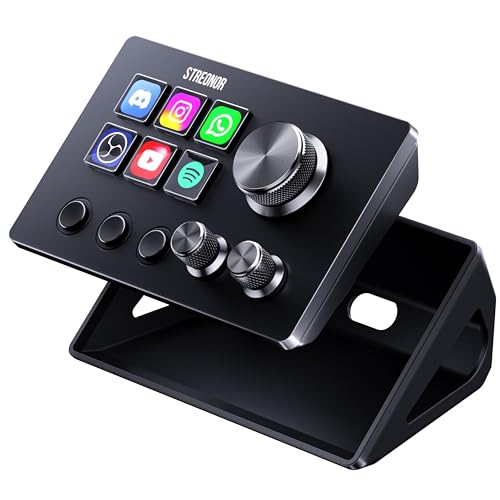
- 6 LCD keys, 3 scene keys, and 3 rotary knobs in a compact layout
- Works with streaming, editing, productivity, and media workflows
- Includes 100+ plugins plus icons, GIFs, scenes, and tutorials
Best For: Small desks and first-time users who want compact control with knobs
Multi-Mode Creator Deck
TreasLin N1 18-Key Stream Controller
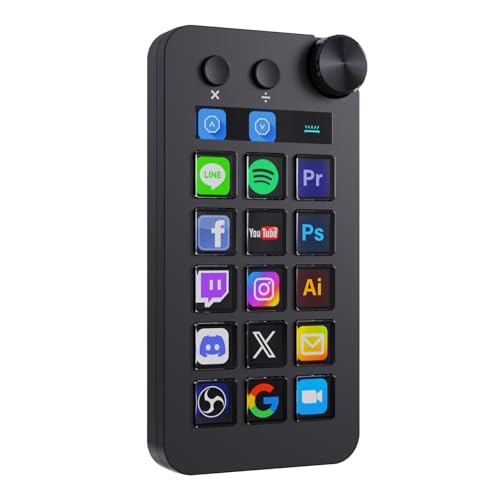
- 18 customizable controls with LCD buttons, click buttons, and a rotary knob
- Three modes include shortcut, calculator, and numeric keypad
- Built for streaming, work, media, and multi-scenario workflows
Best For: Creators who want more keys, numeric input, and multi-mode flexibility
Compact RGB Stream Pad
Mini Stream Controller with 6 LCD Keys

- 6 customizable LCD keys with image and GIF support
- One-touch macros for OBS, apps, media, and text
- Dual side RGB light bars for desktop ambiance
Best For: Streamers and gamers who want a compact shortcut pad with customizable visuals
Dial-Control Shortcut Hub
6-Key Stream Deck with 3 Dials

- Six customizable LCD keys with JPG, PNG, and GIF support
- Three dials for volume, fast forward, and rewind
- Action Flow for multi-step macro sequences
Best For: Users who want a shortcut keyboard with dial-based media control
Best Simple Pick
Mini Stream Controller with 6 LCD Keys
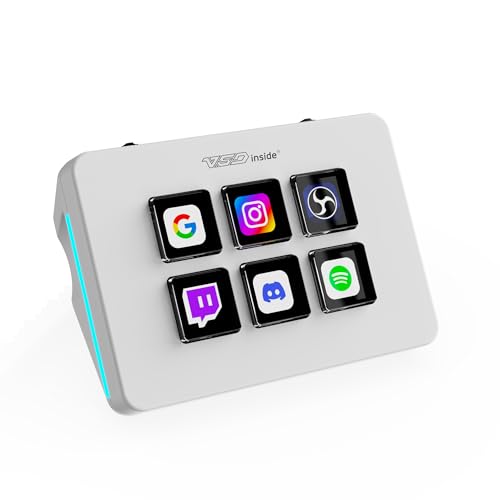
- 6 customizable LCD keys with image and GIF support
- One-touch macros for OBS, apps, media, and text
- Dual side RGB light bars for ambient lighting
Best For: Creators and office users who want a small programmable keypad with visual keys
Compact Starter Pick – Elgato Stream Deck Mini
If you want a mini stream deck controller that keeps the basics fast and simple, the Elgato Stream Deck Mini is built for exactly that. Its 6 customizable LCD keys let you trigger common actions, launch apps, and run multi-action sequences without hunting through menus or memorizing shortcuts.
Best For: Streamers, remote workers, and creators who want a compact, easy-to-learn shortcut pad for everyday app control.
Pros:
- 6 customizable LCD keys for one-tap actions and shortcuts
- Drag-and-drop setup makes programming straightforward
- Supports multi-action sequencing for timed workflows
- Compatible with many popular apps, including Zoom, Teams, Office, and Adobe tools
Cons:
- Smaller key count limits how many actions you can keep on the main page
- Micro USB connection is less modern than USB-C
- Best suited to simple setups rather than heavy control surfaces
As a mini stream deck controller, this model makes the most sense when desk space is tight and your workflow is built around a handful of repeat tasks. It is compact, easy to set up, and focused on speed over complexity.
Macro-Rich Midrange Pick – FIFINE AmpliGame D6
The FIFINE AmpliGame D6 is a mini stream deck controller aimed at users who want more assignable keys without stepping into a larger setup. With 15 customizable macro keys, visual feedback on the touchscreen, and broad compatibility with streaming apps, it is designed to streamline OBS, Twitch, YouTube, and office tasks.
Best For: Streamers and multitaskers who want more programmable buttons and visual control for content creation.
Pros:
- 15 customizable macro keys for a wider range of actions
- Works with OBS Studio, Streamlabs, Twitch, YouTube, and more
- Touchscreen visual feedback reduces screen clutter
- RGB ring adds adjustable lighting effects to a gaming setup
Cons:
- Requires firmware and software updates before first use
- Feature set may be more than casual users need
- Best value comes if you actually use the plugin and macro system
This is a practical choice if you want more room to build out scenes, shortcuts, and app controls than a 6-key unit offers. It balances useful macro depth with a compact footprint and visible, easy-to-hit controls.
Premium Control Surface – Elgato Stream Deck +
If you want a more advanced mini stream deck controller, the Elgato Stream Deck + adds dials and a touch strip alongside LCD keys. That makes it better suited to hands-on control of audio, video, lighting, and other creative tasks where a plain button grid may not be enough.
Best For: Creators who want an audio mixer and studio controller with tactile controls and deep app integration.
Pros:
- LCD keys, touch strip, and dials provide tactile, visual control
- Supports multi-actions and smart profiles for complex workflows
- Works with Elgato tools and major apps like OBS, Twitch, Spotify, and Discord
- USB-C connection and included cable simplify desk setup
Cons:
- Larger than a simple keypad-style controller
- Likely more device than someone only needing basic shortcuts
- Premium control features may be unnecessary for lightweight use
This model stands out when your workflow includes more than launching commands, especially if you want to mix audio or fine-tune production controls. It is a strong pick for users who value physical control and broad software support.
Expanded Keypad Pick – VSDINSIDE M18 Macro Keypad
The VSDINSIDE M18 is a mini stream deck controller built for users who want lots of programmable actions in a compact format. With 18 keys total, including LCD visual keys and physical buttons, it can handle macros, OBS scenes, media playback, and app launches from one small desktop device.
Best For: Power users, streamers, and PC/Mac setups that need more programmable keys and custom icon support.
Pros:
- 18 programmable keys with a mix of LCD and physical buttons
- Supports JPG, PNG, and GIF icons for visual organization
- Compatible with Windows 11+ and macOS 11.0+ plus popular apps
- Includes built-in tools like clock, weather, calendar, and reminders
Cons:
- Native Linux plug-and-play support is not available
- Some users may not need 18 keys for simple workflows
- Advanced setup may be better suited to experienced users
For shoppers who want a more expansive shortcut deck without moving to a larger control surface, this model offers strong flexibility. Its mix of visual keys, built-in plugins, and broad app support makes it a capable desktop command center.
Compact Animated Macro Deck – TreasLin N3 12-Key Stream Controller
If you want a mini stream deck controller that can handle streaming tasks without a lot of desk space, the TreasLin N3 is built around 12 customizable controls and a mix of LCD, tap, and rotary inputs. It’s designed for fast one-touch actions in OBS, Twitch, YouTube, and everyday apps, with USB-C setup and broad PC/Mac support.
Best For: Streamers, creators, and multitaskers who want customizable controls with animated icons.
Pros:
- 12 total customizable controls, including LCD keys, tap buttons, and rotary buttons
- Supports one-touch macros for OBS scenes, audio, mic muting, media, and app shortcuts
- Works with Windows and macOS, plus popular apps like OBS, Twitch, Discord, Spotify, and Photoshop
- Includes access to a marketplace with plugins, icons, profiles, and scenes
Cons:
- Spotify integration requires an active Spotify Premium account
- Some users may prefer a larger key count than 12 controls
- Advanced value depends on how much you use the included software and plugins
The N3 stands out if you want a compact controller with more visual customization than a basic macro keypad, especially since it supports animated icons. It’s a practical pick for creators who want quick access to common streaming and productivity actions.
Space-Saving Stream Control – Streonor S6 Mini Macro Deck
The Streonor S6 Mini is a mini stream deck controller made for smaller desks and simpler setups, pairing 6 customizable LCD keys with 3 scene keys and 3 rotary knobs. It’s aimed at users who want quick control over streaming, editing, and productivity tasks without giving up too much workspace.
Best For: First-time stream deck users, compact desk setups, and creators who want knobs plus scene keys.
Pros:
- Compact layout with 6 LCD keys, 3 scene keys, and 3 rotary knobs
- Supports shortcuts, hotkeys, app launches, media controls, and multi-action sequences
- Useful for OBS Studio, Twitch, YouTube, Streamlabs, editing, music, gaming, and office tasks
- Offers 100+ plugins plus icon packs, GIF icons, scenes, tutorials, and layouts
Cons:
- Linux is not supported
- Requires direct USB 3.0 connection for stable operation
- Some third-party integrations may need an active account or subscription
For buyers who want a small controller with both knobs and dedicated scene buttons, the S6 Mini keeps the layout simple while still covering the most common workflows. It’s a strong fit if you value desk space and easy setup over a larger key count.
Multi-Mode Creator Deck – TreasLin N1 18-Key Stream Controller
The TreasLin N1 is a mini stream deck controller with more room to grow, offering 18 customizable macro keys and three operating modes for shortcuts, calculator use, and numeric keypad input. If you want a control pad that can handle streaming, work, and left-hand number entry from one device, this model is built for that mix.
Best For: Users who want a larger compact deck with numeric keypad mode and multi-scenario workflows.
Pros:
- 18 customizable controls, including 15 visual LCD buttons, 2 clickable buttons, and 1 rotary knob
- Three modes: shortcut key, calculator, and numeric keypad
- Supports multi-scenario setups for daily use, work, live streaming, and media control
- Compatible with PC and Mac, with USB-C setup and VSD Craft software
Cons:
- Details indicate Windows/macOS support but the main compatibility note is PC-focused
- Some features depend on learning and configuring the included software
- Spotify integration still requires an active Spotify Premium account
The N1 is the most flexible option here if you want extra keys and a numeric keypad mode alongside streaming controls. It’s especially appealing for creators who also need a practical desk tool for everyday workflows and number entry.
Compact RGB Stream Pad – Mini Stream Controller with 6 LCD Keys
If you want a mini stream deck controller that keeps the desk footprint small while still giving you hands-on control, this compact 6-key pad is built around fast macros and visual button mapping. It lets you assign custom images or GIFs to each LCD key, then trigger OBS scenes, apps, media controls, and text actions with a single tap.
Best For: Streamers, gamers, and office users who want a compact shortcut pad with customizable LCD keys and RGB side lighting.
Pros:
- 6 fully customizable LCD keys support JPG, PNG, and GIF icons for quick recognition
- One-tap macros can launch apps, switch OBS scenes, open websites, and control media
- Dual side RGB light bars add ambient lighting with automatic cycling or custom colors
- Works with Windows and macOS, with Linux support possible through the open-source SDK
Cons:
- Requires the VSD Craft software for full setup, so it is not plug-and-play
- No built-in battery; it runs from USB power only
- Only 6 keys, so users needing many controls may outgrow it quickly
Overall, this is a practical mini stream deck controller for users who care about compact size, custom visuals, and simple one-touch workflow automation. It fits best if you want a streamlined desktop tool for streaming, editing, and everyday shortcuts.
Dial-Control Shortcut Hub – 6-Key Stream Deck with 3 Dials
This mini stream deck controller combines six customizable LCD keys with three physical dials, making it a flexible pick if you want both quick taps and fine-grained adjustment. It supports drag-and-drop action setup, animated key icons, and one-click macros for streaming, productivity, and media control.
Best For: Users who want a shortcut keyboard with extra dial control for volume and playback adjustments.
Pros:
- Six LCD keys can display JPG, PNG, or GIF icons for easier button recognition
- Three dials add practical control for volume, fast forward, and rewind
- Action Flow supports multi-step macro sequences in a specific order
- Compatible with Windows and macOS, and works with OBS, PowerPoint, Discord, Excel, Photoshop, and Premiere Pro
Cons:
- Setup is required through the software, so it is not an instant plug-and-play device
- The compact layout still limits you to 6 buttons, even with the dials
- Best suited to users who will take advantage of the dials; otherwise the extra controls may be unnecessary
As a mini stream deck controller, this model stands out for adding dials to the usual macro-key layout, which can make everyday media and stream adjustments feel more natural. It is a strong fit if you want a small control surface that goes beyond basic buttons.
Best Simple Pick – Mini Stream Controller with 6 LCD Keys
If you are shopping for a mini stream deck controller that keeps the same compact footprint but still handles streaming and productivity tasks, this model focuses on customizable LCD keys and simple one-tap actions. It supports custom icons or GIFs on each key, plus shortcut execution for OBS scenes, media, apps, and text entry.
Best For: Creators and office users who want a small programmable keypad with visual keys and RGB lighting.
Pros:
- 6 customizable LCD keys support JPG, PNG, and GIF visuals for easy identification
- One-tap macros can switch OBS scenes, launch apps, open websites, and control media
- Dual side RGB light bars add adjustable ambient lighting
- Compatible with Windows and macOS, with Linux adaptation possible through the open-source SDK
Cons:
- Requires VSD Craft software for full functionality
- No built-in battery; it is USB powered only
- Only 6 keys, so it may not suit users who want a larger control panel
This is a straightforward mini stream deck controller for people who value compact design, visual customization, and simple workflow shortcuts. The feature set is practical rather than flashy, which makes it a sensible fit for everyday streaming and desktop use.
How We Picked the Best Mini Stream Deck Controller
We focused on models that offer practical shortcut control in a compact footprint, with enough customization for streamers, editors, and multitaskers. Priority went to clear software workflows, flexible button mapping, and layouts that make everyday tasks easier rather than more complicated.
Quick Comparison
In this group, smaller key counts are best for simple, high-frequency actions, while larger decks suit users who want more direct access without paging through profiles. Models with dials or extra controls add value for audio, scene switching, and live adjustments. If you want the most polished ecosystem, premium options stand out; if you want more buttons for the money, budget-friendly decks usually win.
Key Buying Factors for a Mini Stream Deck Controller
Button Count and Layout
Think about how many actions you need visible at once. Six-key units are ideal for core commands, while 12- to 18-key layouts are better if you want fewer page switches. If you use lots of scenes, macros, or app shortcuts, more keys can reduce friction.
Software and Compatibility
Check support for your main apps, especially OBS, Twitch, YouTube, Zoom, Teams, and Adobe tools. A Mini Stream Deck Controller is most useful when the software is stable, easy to configure, and works well with profiles or multi-action routines.
Extra Controls
Dials, knobs, and touch strips are worth paying for if you manage audio or need fine-grained control during live work. For simpler shortcut use, they are helpful but not required.
Build, Display, and Customization
LCD keys with custom icons make it easier to memorize functions at a glance. Strong key feedback, readable screens, and reliable USB connectivity matter more than flashy extras.
Who Should Buy Which Mini Stream Deck Controller?
Choose a basic Mini Stream Deck Controller if you mainly need a few essential shortcuts for streaming, meetings, or editing. Pick a mid-size deck if you want a better balance of controls and simplicity. Go for a model with dials or extra macro capacity if you run OBS scenes, adjust audio often, or want one controller to handle more of your workflow.
If you are a beginner, start with the simplest layout that covers your must-have actions. If you are a power user, prioritize software depth, profile switching, and enough controls to avoid constant page changes.