If you stream regularly, a dedicated controller can save time, reduce mistakes, and keep your hands off the keyboard during live broadcasts. The best options make switching scenes, launching media, muting audio, and triggering macros feel instant.
Our roundup of the best stream controller for Twitch picks focuses on workflow speed, button quality, software compatibility, and overall value for different creator setups.
Best 10 Stream Controller for Twitch Picks for 2026
FIFINE D6 Macro Pad
15-Key Stream Controller for Twitch and OBS

- 15 customizable macro keys
- Works with OBS, Streamlabs, Twitch, YouTube
- RGB ring with 9 lighting modes
Best For: Creators who want a customizable shortcut pad for streaming and multitasking
Elgato Stream Deck+
Audio Mixer and Studio Controller

- LCD keys, dials, and touch strip
- Multi Actions and Smart Profiles
- Plugin support for OBS, Twitch, YouTube
Best For: Users who want premium tactile control for streaming, audio, and studio workflows
FIFINE D6 White
15 Shortcut Streaming Controller

- 15 customizable macro keys
- Built-in software with plugins
- Controllable RGB lighting
Best For: Streamers who want a white, easy-to-set-up macro keypad for gaming and work
ULANZI D200H Deck Hub
7-in-1 Stream Controller with Docking

- Streaming controls plus 7-in-1 hub
- USB-C, USB-A, SD/TF, and 100W PD
- Works with OBS, Twitch, and creative apps
Best For: Creators who want shortcut control and a multifunction desktop hub in one device
Compact Macro Control
SOOMFON 6-Key Stream Deck with 3 Dials

- 6 customizable LCD keys plus 3 dials
- Supports OBS, Twitch, YouTube, Discord, and more
- Includes stand, adhesive base, and plugin marketplace
Best For: Streamers who want a compact, easy-to-learn controller for quick actions
Feature-Rich Stream Dock

- 12 customizable controls with LCD, tap, and rotary buttons
- Supports dynamic animated icons for more visual setups
- Works with OBS, Twitch, YouTube, Discord, and Spotify
Best For: Content creators who want a versatile macro pad with animated icons
Large Workflow Deck
SOOMFON 15-Key Studio Control Deck

- 15 customizable LCD keys for broad control
- Works with OBS, Twitch, YouTube, Twitter, Spotify, and Philips Hue
- Built for streaming plus editing, music, and photo workflows
Best For: Streamers and creators who want a larger control surface for multitasking
Versatile Stream Dock with Mode Switching
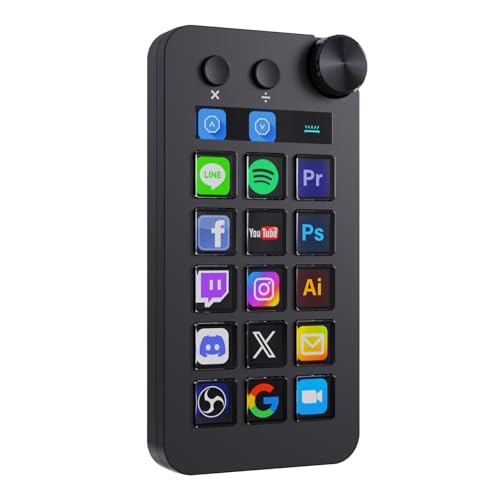
- 18 customizable macro inputs with LCD buttons and a rotary knob
- Shortcut, calculator, and numeric keypad modes
- Works with OBS, Streamlabs, Twitch workflows, and more
Best For: Streamers who want flexible control plus extra desktop utility
Compact 14-Key Creator Console

- 13 customizable LCD keys plus a dedicated status display
- Live CPU, GPU, and clock monitoring
- 10 pages and nested folders for expanded control
Best For: Creators who want a compact wired controller for streaming and editing
Small Deck, Big Control

- Six customizable LCD keys with images and animations
- Three dials for volume and playback control
- Action Flow for chained macro actions
Best For: Users who want a compact shortcut deck with physical dials
FIFINE D6 Macro Pad – 15-Key Stream Controller for Twitch and OBS
If you want a stream controller for twitch that keeps scene switching and shortcuts within easy reach, the FIFINE D6 is built around 15 customizable macro keys and visual touch control. It’s aimed at creators who want quick access to OBS, Streamlabs, Twitch, YouTube, and other tools without cluttering the desktop.
Best For: Streamers and creators who want a compact, customizable shortcut pad for live control, multitasking, and RGB-enhanced setups.
Pros:
- 15 customizable macro keys for scenes, audio control, and app launches
- Works with OBS Studio, Streamlabs, Twitch, YouTube, and more
- Visual touchscreen operation helps confirm commands at a glance
- RGB ring with 9 controllable lighting modes
Cons:
- Requires firmware and software updates before first use
- Best suited to users who will actually configure macros and plugins
Overall, the D6 is a practical choice if you want a flexible streaming keypad that can also handle gaming, editing, office tasks, and other multitasking workflows.
Elgato Stream Deck+ – Audio Mixer and Studio Controller
If you’re shopping for a stream controller for twitch with more hands-on control, the Elgato Stream Deck+ combines LCD keys, dials, and a touch strip for managing audio, video, lighting, and stream actions. It’s designed for creators who want tactile feedback and a highly expandable workflow.
Best For: Streamers and studio users who want a premium control surface for audio, scenes, plugins, and advanced automation.
Pros:
- LCD keys, dials, and touch strip provide tactile control and visual feedback
- Multi Actions and Smart Profiles support complex automation and app-based setups
- Broad plugin support including OBS, Twitch, YouTube, Discord, Spotify, and more
- Stream Deck app and store make setup and expansion straightforward
Cons:
- More expensive than basic macro keypads
- May be more control than casual streamers need
This is a strong fit if you want one device to handle streaming, audio mixing, and studio control with a polished ecosystem behind it.
FIFINE D6 White – 15 Shortcut Streaming Controller
The FIFINE D6 White is a straightforward stream controller for twitch if you want 15 customizable shortcuts for scene changes, chat actions, and everyday productivity. It focuses on simple plug-in setup, RGB lighting, and broad usefulness for gaming, office work, and content creation.
Best For: Streamers and PC users who want a white macro keypad with easy setup, RGB lighting, and flexible shortcuts.
Pros:
- 15 customizable macro keys for scenes, chat, and repetitive tasks
- USB plug-and-play style setup with built-in software and plugins
- Controllable RGB lighting to match a setup or stream theme
- Useful for gaming, streaming, office work, and multitasking
Cons:
- Performance note recommends a USB 3.0 connection
- Functionality depends on custom setup rather than out-of-the-box simplicity alone
If you want a clean-looking shortcut controller that can move between streaming and everyday computer tasks, this model covers the basics well.
ULANZI D200H Deck Hub – 7-in-1 Stream Controller with Docking
The ULANZI D200H is a stream controller for twitch that also works as a 7-in-1 hub, making it appealing if you want shortcuts and connectivity in one compact desktop tool. It supports streaming actions, content creation tasks, and office workflows, while adding card readers, USB ports, and 100W PD charging.
Best For: Creators who want a macro keypad plus a multifunction hub for streaming, storage transfer, and charging.
Pros:
- One-tap streaming control for scenes, presets, lights, and sound
- 7-in-1 hub adds USB-C, USB-A, SD/TF readers, and 100W PD charging
- Works with OBS, Twitch, YouTube, and creative apps like Photoshop and DaVinci Resolve
- Supports Windows and macOS with marketplace access for presets and plugins
Cons:
- 3-month warranty is shorter than many competing devices
- Best value depends on whether you’ll use the dock features, not just the keys
For creators who want their stream controller to double as a desktop dock, the D200H stands out for packing utility into a very small footprint.
Compact Macro Control – SOOMFON 6-Key Stream Deck with 3 Dials
If you want a simple stream controller for Twitch, the SOOMFON 6-key deck keeps the setup focused on the most-used actions. It combines six customizable LCD buttons with three flip-page buttons and three multifunction dials, so you can trigger scenes, adjust audio, and switch pages without crowding your desk.
Best For: Streamers who want a compact, easy-to-learn controller for OBS, Twitch, and quick desktop actions.
Pros:
- 6 fully customizable LCD keys for one-tap actions and shortcuts
- 3 knobs can handle controls like volume and brightness
- 3 page buttons help you move between setups without extra clicks
- Supports OBS, Twitch, YouTube, Discord, Spotify, and more
Cons:
- Only works on Windows 10 64-bit or higher and macOS Big Sur 11.0 or higher
- Linux is not supported
- Spotify integration requires a Premium account
Overall, this is a practical entry-level choice if you want tactile control and a smaller footprint. The included stand, adhesive base, and plugin marketplace make it easier to build a setup that fits your workflow.
Feature-Rich Stream Dock – TreasLin N3 12-Key Macro Pad
The TreasLin N3 is a strong stream controller for Twitch if you want more controls and more customization options in one deck. With 12 customizable macro keys across LCD buttons, tap buttons, and rotary buttons, it is built to trigger actions quickly without switching windows.
Best For: Content creators, streamers, and multitaskers who want a versatile macro pad with animated icons.
Pros:
- 12 customizable controls, including LCD, tap, and rotary buttons
- Supports dynamic animated icons, not just static images
- Works with OBS Studio, Streamlabs, Twitch, YouTube, Discord, Spotify, and more
- Includes access to a marketplace with plugins, profiles, icons, and scenes
Cons:
- Spotify integration requires an active Spotify Premium account
- Listed support is for PC, Windows, and macOS, so compatibility should be checked carefully
- Warranty is only 1 year
For buyers who want a more customizable dashboard experience, the N3 offers a lot of flexibility for streaming and productivity. Its dynamic icon support helps it stand out if you care about making the device feel more personalized.
Large Workflow Deck – SOOMFON 15-Key Studio Control Deck
This SOOMFON stream controller for Twitch is aimed at users who want more on-screen buttons and broader workflow control. Its 15 customizable LCD keys can launch actions, manage audio, mute a mic, and trigger lighting changes, making it useful for streaming and other creative tasks.
Best For: Streamers and creators who want a larger control surface for OBS, editing, and multitasking.
Pros:
- 15 customizable LCD keys for quick access to lots of actions
- Supports OBS Studio, Twitch, YouTube, Twitter, Spotify, and Philips Hue
- Removable stand plus rubber feet for flexible desk placement
- Useful for streaming, video editing, music production, photography, and more
Cons:
- Windows support is limited to 64-bit Windows 10 or higher; macOS requires Big Sur 11.0 or higher
- Spotify integration requires Spotify Premium
- Users are instructed to use the original cable and connect directly to a USB port, not a hub
If you need a bigger deck for more complex workflows, this model offers a lot of direct control without adding clutter to your mouse-and-keyboard routine. The larger button count makes it easier to build out dedicated pages for streaming and productivity.
Versatile Stream Dock with Mode Switching – TreasLin N1 Macro Keypad
If you want a stream controller for Twitch that also doubles as a desk-side productivity tool, the TreasLin N1 gives you a lot to work with. Its 18-key layout, rotary knob, and multiple operating modes make it useful for OBS control, quick app launches, media tweaks, and even numeric input when you’re not live.
Best For: Streamers and creators who want a flexible macro deck with mode switching, animated icons, and broad app support.
Pros:
- 18 macro inputs including 15 LCD buttons, 2 clickable buttons, and 1 rotary knob.
- Supports shortcut, calculator, and numeric keypad modes for more than just streaming.
- Works with OBS Studio, Streamlabs, Twitch-related workflows, Discord, and other apps through VSD Craft and the marketplace.
- Dynamic animated icons add more customization than basic static-key decks.
Cons:
- Spotify integration requires an active Spotify Premium account.
- Some advanced features depend on the included software and plugin ecosystem.
- The mode-heavy feature set may be more than some users need for simple streaming controls.
This is a strong pick if you want one device that can handle streaming, shortcuts, and desk utility without feeling locked into a single use case.
Compact 14-Key Creator Console – ULANZI D200 Macro Keyboard
The ULANZI D200 is a practical stream controller for Twitch if you want a compact setup with clear visual keys and straightforward control. With 13 customizable LCD buttons, a top status key, and easy drag-and-drop setup, it covers common streaming, editing, and productivity tasks without adding much desktop clutter.
Best For: Creators who want an affordable wired macro pad for streaming, editing, and everyday workflow shortcuts.
Pros:
- 14 total LCD keys, including 13 customizable buttons plus a dedicated status display.
- Real-time CPU, GPU, and clock monitoring on the top key.
- Supports up to 10 pages and nested folders for broader control in a small footprint.
- Free U-Studio software includes lifetime updates and access to community presets and plugins.
Cons:
- Requires a wired USB connection.
- Warranty coverage is listed as only 3 months.
- System support starts at Windows 10 and macOS 10.13, so older systems are not covered.
If you want an approachable macro deck that covers stream controls, status monitoring, and creator shortcuts, the D200 is easy to fit into a busy desk setup.
Small Deck, Big Control – ActionRing N3 Macro Keypad
If you need a stream controller for Twitch that stays compact but still covers the essentials, the ActionRing N3 focuses on fast one-click actions and tactile dial control. Its six LCD keys and three dials make it a good fit for switching OBS scenes, launching macros, and handling media adjustments from one small device.
Best For: Streamers and multitaskers who want a compact shortcut deck with LCD keys and physical dials.
Pros:
- Six customizable LCD keys support single actions, multi-actions, images, and animations.
- Three dials can handle volume and playback adjustments.
- Action Flow lets you run multiple macro actions in a set order.
- Compatible with Windows and macOS, plus OBS, Twitch-related use, Discord, Photoshop, and Premiere Pro.
Cons:
- Fewer keys than larger stream decks, so it is best for simpler layouts.
- Heavy users may need to lean on dials and macro layers to cover more functions.
- Most of the value comes from customizing the software workflow, not from a large number of physical buttons.
For a minimal desk footprint and quick-access streaming controls, this deck gives you useful inputs without overcomplicating the setup.
How We Picked the Best Stream Controller for Twitch
We looked for controllers that make live production simpler without adding a steep learning curve. Priority went to reliable software integration, responsive LCD keys or buttons, useful dial controls, and strong support for OBS, Twitch workflows, streaming software, and common creator apps.
We also considered how flexible each Stream Controller for Twitch is for both new streamers and experienced creators. That means checking macro depth, profile switching, customization, layout size, and whether the device fits a desk-friendly setup.
Quick Comparison: What Matters Most
Smaller controllers are usually best for basic scene switching, sound effects, and a few repeated actions. Larger decks are better if you want more custom shortcuts, more complex multitasking, or dedicated controls for audio and production tools.
Dials and touch strips can be especially valuable if you want fast volume changes or precise adjustments while live. If your workflow is mostly simple, a compact macro pad may be the better buy than a larger all-in-one unit.
Key Buying Factors for a Stream Controller for Twitch
Button Count and Layout
More keys are not automatically better. Choose the number of controls that matches your actual stream tasks so the deck stays easy to memorize and operate under pressure.
Compatibility and Software Support
Check that the controller works with your streaming stack, especially OBS, Twitch-related tools, and any audio or media apps you use. The best devices support flexible app mapping and profile changes.
Macros, Multi-Actions, and Profiles
If you run recurring stream routines, look for multi-action support and multiple profiles. These features let one key launch a sequence of actions, which is one of the biggest reasons to buy a Stream Controller for Twitch in the first place.
Build Quality and Controls
LCD keys, tactile switches, dials, and touch inputs all change the experience. Pick the control style that feels fastest to you, especially if you plan to use it for long sessions.
Who Should Buy Which Stream Controller for Twitch?
New streamers often do best with a compact controller that covers scenes, mic mute, and a few essential shortcuts. Mid-level creators may want more keys plus a dial or two for audio and production control. Advanced users should look at larger decks with deeper customization, more pages, and better handling for complex live workflows.
If you want a simple path to faster, cleaner streams, choose the controller that matches your current workflow first, then scale up only if you outgrow it.