A good macro pad for streaming can speed up scene changes, audio control, chat actions, and app shortcuts without cluttering your desk.
Below, we’ve rounded up 10 options that fit different budgets, button counts, and creator workflows so you can choose the right fit faster.
Best 10 Macro Pad for Streaming Picks for 2026
FIFINE Stream Deck
15-Key Macro Controller for OBS

- 15 customizable LCD macro keys
- Supports OBS, Twitch, YouTube, and Streamlabs
- RGB ring with 9 lighting modes
Best For: Streamers who want visual, touch-friendly scene and audio control
LUKCOZMO Macro Pad

- 12 programmable non-conflict keys
- Onboard memory for saved shortcuts
- RGB backlighting and knob control
Best For: Portable one-handed macro control for gaming, work, and light streaming
TreasLin Stream Controller
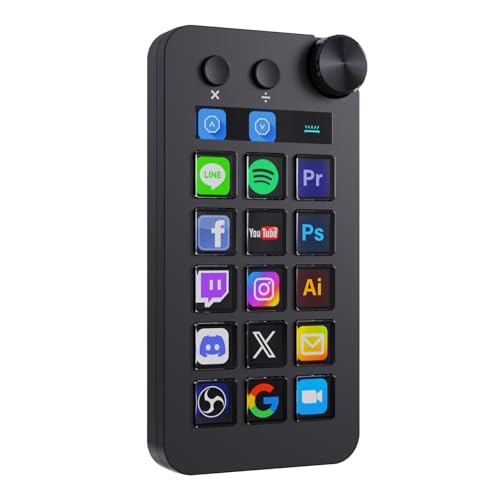
- 18 total controls with LCD buttons and a rotary knob
- Three modes: shortcut, calculator, and numeric keypad
- Supports plugins, icons, profiles, and scenes
Best For: Creators who want a versatile controller for streaming and desktop workflows
Ulanzi Pick
14-Key Macro Pad for Streaming and Editing

- 14 LCD keys with one dedicated system-status display
- 10-page profiles plus nested folders for different workflows
- U-Studio software with plug-ins and community presets
Best For: Creators who want a flexible, compact deck for streaming and editing
Feature-Rich Deck
Macro Pad with Knobs, Touch Bar, and USB Dock

- 10 LCD keys, 4 RGB knobs, and an interactive touch bar
- USB soundboard support with 500+ expandable plugins
- Built-in USB dock plus foldable 60° ergonomic stand
Best For: Streamers who want tactile controls and soundboard functions in one deck
Compact Control Pick
6-Key Stream Controller with Three Dials

- Six customizable LCD keys with image and GIF support
- Three dials for volume and playback control
- Works with OBS, YouTube, Discord, and productivity apps
Best For: Anyone wanting a small stream controller with physical dials
Editor’s Pick
18-Key Visual Macro Pad for Streaming

- 15 LCD keys plus 3 physical buttons
- Custom images and GIFs on keys
- Works with OBS, YouTube, and office apps
Best For: Streamers who want maximum customization and broad desktop use
Value Choice

- 6 LCD keys and 3 adjustable dials
- Supports one-click macros and Action Flow
- Compatible with OBS, YouTube, and macOS
Best For: Users who want a smaller deck with dial controls
Budget-Friendly Pick

- 15 LCD keys and 3 physical buttons
- One-touch macros for OBS and media tasks
- USB-C support for Windows and Mac
Best For: Buyers wanting a larger macro deck with simple streaming control
FIFINE Stream Deck – 15-Key Macro Controller for OBS
If you want a macro pad for streaming that keeps OBS, Twitch, YouTube, and Streamlabs controls within easy reach, the FIFINE AmpliGame D6 is built around quick visual access. Its 15 customizable LCD macro keys let you launch apps, switch scenes, adjust audio, and trigger actions without digging through windows on your PC.
Best For: Streamers and creators who want a visual, button-based controller for OBS workflows, scene switching, and quick multitasking on PC or Mac.
Pros:
- 15 customizable LCD macro keys for streaming and multitasking
- Works with OBS Studio, Streamlabs, Twitch, YouTube, and more
- Touchscreen-style visual feedback makes assigned actions easy to recognize
- RGB ring with 9 lighting modes for a more customizable setup
Cons:
- Firmware and software should be updated before first use
- Best suited to Windows-based workflow support in the supplied details
Overall, this is a strong pick if you want a dedicated streaming controller with a clear visual layout and broad app support. It focuses on convenience and scene control more than minimalism, which makes it especially useful for live production setups.
LUKCOZMO Macro Pad – 12-Key Mini Mechanical Keypad
This macro pad for streaming and everyday shortcuts is designed for users who want a compact programmable keypad with flexible setup options. The LUKCOZMO 12-key model adds a knob, RGB backlighting, and memory support, so once your macros are set on Windows, you can carry the keypad between compatible machines without redoing everything.
Best For: Gamers, streamers, and productivity users who want a portable 12-key macro keypad with onboard memory and a knob.
Pros:
- 12 programmable non-conflict keys with macro support
- Onboard memory lets saved settings travel with the keypad
- Works with Windows, Mac OS, Linux, Pi, and more after setup
- RGB backlighting can be adjusted in the configuration software
Cons:
- Setup software must be copied and extracted before use
- Windows is required for initial configuration
- Compact layout may feel limited if you want more keys for streaming
This is a practical choice if portability and repeatable shortcuts matter more than a larger control surface. It gives you the essentials for macros, quick actions, and one-handed control in a small footprint.
TreasLin Stream Controller – 18-Key Macro Dock with Knob
If you want a macro pad for streaming with more control options than a basic keypad, the TreasLin N1 offers 18 customizable inputs plus a rotary knob. It is built to manage OBS, Twitch, YouTube, and other creator workflows, while also adding shortcut, calculator, and numeric keypad modes for broader desktop use.
Best For: Content creators who want a versatile stream dock with LCD buttons, a knob, and extra modes for work and media control.
Pros:
- 18 customizable macro keys including 15 LCD buttons, 2 buttons, and 1 knob
- Three operation modes: shortcut, calculator, and numeric keypad
- Compatible with PC, Windows, macOS, OBS Studio, and Streamlabs
- Includes marketplace access for plugins, icons, profiles, and scenes
Cons:
- Spotify integration requires an active Spotify Premium account
- Software and setup may be more involved than a basic keypad
For buyers who want a more feature-rich stream dock, this model stands out for its mix of streaming controls and productivity modes. The added knob and marketplace support make it a flexible option for creators who switch between live production, media, and office tasks.
SIKAI CASE Macro Keypad – 6-Key Hot-Swappable Controller
The SIKAI CASE programmable macro keyboard is a compact macro pad for streaming, gaming, and office shortcuts when you only need a few highly useful commands. With six programmable keys, onboard memory, and Windows-based setup, it is designed to store simple macros and then work across other compatible systems.
Best For: Users who want a tiny, easy-to-store macro keypad for simple shortcuts, text snippets, and quick actions.
Pros:
- Six programmable keys with onboard memory
- Hot-swappable design adds flexibility
- Can be programmed on Windows and then used on Mac, Linux, and more
- Supports multimedia controls, shortcuts, text snippets, and app launches
Cons:
- Macro configuration requires Windows
- Only six keys, so it is less expandable than larger stream controllers
- Simple programming is limited to short macros per the supplied notes
This model is best if you want a low-profile macro device for a few core tasks rather than a full streaming control surface. It keeps setup straightforward and offers enough flexibility for basic creator, office, and gaming workflows.
Ulanzi Pick – 14-Key Macro Pad for Streaming and Editing
If you want a macro pad for streaming that feels compact but still gives you room to grow, the ULANZI D200 is built around quick one-tap control. Its 14 LCD keys, page switching, and software plug-ins make it easy to manage OBS scenes, chat macros, editing shortcuts, and even system monitoring without digging through menus.
Best For: Streamers, editors, and Mac/PC users who want a compact programmable deck with lots of layout flexibility.
Pros:
- 14 LCD keys, including a dedicated status key for CPU, GPU, and clock info
- Up to 10 secondary pages plus nested folders for multiple workflows
- U-Studio software includes plug-ins and community presets with lifetime updates
- Plug-and-play USB support for Windows 10+ and macOS 10.13+
Cons:
- Only 13 keys are customizable because one key is reserved for status display
- Wired USB design may not suit users wanting a wireless setup
- Warranty is listed as 3 months
This is a practical choice if you want a flexible streaming controller that can also handle editing, photography, and office tasks from the same compact device. The balance of LCD keys, page layers, and built-in monitoring makes it especially useful for creators who like staying organized.
Feature-Rich Deck – Macro Pad with Knobs, Touch Bar, and USB Dock
The VSDINSIDE N4 Pro is a feature-heavy macro pad for streaming that blends LCD keys, rotary controls, and a touch bar into one desktop controller. It is aimed at creators who want quick access to OBS actions, soundboard controls, and multi-step workflows, while also adding a built-in USB dock for desk convenience.
Best For: Streamers and power users who want knobs, a touch bar, and soundboard-style control in one device.
Pros:
- 10 customizable LCD keys plus 4 RGB knobs and an interactive touch bar
- Supports one-tap multi-step macros with no coding required
- USB soundboard features and 500+ expandable plugins
- Built-in passive USB dock and adjustable 60° stand
Cons:
- Windows support is listed for Windows 10+, while macOS support starts at 11.0+
- It sends audio control commands rather than producing sound from built-in speakers
- Some users may not need the extra complexity of knobs, touch bar, and dock features
If you want more than a basic shortcut pad, this model stands out for giving you tactile controls and expandable software support in one package. It looks especially appealing for streamers who manage audio, scenes, and desk accessories from the same controller.
Compact Control Pick – 6-Key Stream Controller with Three Dials
The ActionRing N3 V3 is a compact macro pad for streaming that focuses on essentials: six customizable LCD keys and three dials. It is a straightforward option if you want quick access to OBS scenes, media controls, app launches, and macro chains without a large desktop footprint.
Best For: Users who want a smaller streaming controller with dials for volume and playback control.
Pros:
- Six customizable LCD keys with support for JPG, PNG, and GIF icons
- Three dials for volume adjustment and playback control
- Action Flow supports multi-step macro actions in sequence
- Compatible with Windows and macOS, plus many common creator apps
Cons:
- Fewer keys than larger stream decks, so it may feel limited for heavy multi-scene setups
- Listed compatibility is for PC, which may matter to buyers comparing broader device support
- Features are simpler than more advanced decks with built-in docks or larger displays
This is a sensible pick if you care more about a compact, easy-to-use control surface than maximum button count. The included dials and macro support make it practical for streaming, media, and everyday productivity.
Editor’s Pick – 18-Key Visual Macro Pad for Streaming
If you want a macro pad for streaming that also works well for office tasks, this 18-key VSDINSIDE deck is built around speed and visibility. It combines 15 LCD visual keys with 3 physical buttons, plus USB-C connectivity and broad app support for OBS, Streamlabs, YouTube, Discord, Excel, Word, and Photoshop.
Best For: Streamers and multitaskers who want lots of programmable keys with visual labels and desktop utility features.
Pros:
- 18 programmable controls, including 15 LCD keys and 3 physical buttons
- Custom images and animations supported on LCD keys with JPG, PNG, and GIF files
- Supports one-tap macros, multi-step actions, and OBS scene switching
- Built-in plugins like clock, stopwatch, weather, calendar, and reminders
Cons:
- Native Linux plug-and-play support is not available
- Custom RGB tones require a firmware upgrade
- Feature set may be more than casual users need
Overall, this is a flexible streaming shortcut keyboard if you value a large key count and visual customization. It is especially appealing for users who want the same device to handle streaming, productivity, and quick desktop actions.
Value Choice – Compact Macro Pad with Dials
This macro pad for streaming keeps things compact with 6 customizable LCD keys and 3 dials, making it a good fit when you want quick controls without a larger deck. It supports drag-and-drop setup, one-click actions, and compatibility with Windows, macOS, OBS, PowerPoint, YouTube, Discord, Excel, Word, Photoshop, and Adobe Premiere Pro.
Best For: Users who want a smaller streaming controller with handy dial-based adjustments and easy macro access.
Pros:
- 6 customizable LCD keys plus 3 dials for extra control
- Supports images and animations on keys for easier recognition
- Action Flow lets you run multiple macro steps in order
- Includes plugin options like reminders, clocks, weather, and calendars
Cons:
- Fewer keys than larger macro decks
- Dials may not matter if you only need button shortcuts
- Best suited to users comfortable with software-based setup
For streamers who want a streamlined desktop controller, this model stands out for its dials and compact layout. It balances creative shortcuts with practical controls for media, scenes, and everyday workflows.
Budget-Friendly Pick – 18-Key Stream Controller Deck
If you need a macro pad for streaming with a full 18-key layout, this VSDINSIDE deck delivers the same core shortcut features in a straightforward package. It offers 15 visual LCD keys and 3 buttons, one-touch macros, custom images and animations, and USB-C connectivity for Windows 11+ and macOS 11.0+ setups.
Best For: Budget-conscious buyers who want a feature-rich streaming shortcut keyboard with visual keys and easy desktop automation.
Pros:
- 18 programmable controls with 15 LCD keys and 3 physical buttons
- One-touch operation for macros, text input, file launches, and OBS scenes
- Supports JPG, PNG, and GIF key artwork for quick identification
- Includes utility plugins like clock, stopwatch, weather, and calendar
Cons:
- No native Linux plug-and-play support
- Very similar feature set to other 18-key models
- Custom RGB colors depend on firmware upgrade support
This is a practical pick if you want the larger key count and visual workflow tools without adding extra hardware complexity. It is well suited to stream control, media shortcuts, and general productivity on a PC or Mac.
How We Picked the Best Macro Pad for Streaming
We focused on controls that matter most for creators: reliable shortcut triggering, easy software setup, clear button labeling, and enough customization to handle live production tasks. For a Macro Pad for Streaming, the best choice is usually the one you can set up quickly and use without looking away from your content for long.
We also considered button layout, tactile feel, display or icon support, knob and dial usefulness, and how well each option suits OBS, Twitch, YouTube, and common audio or editing workflows.
Quick Comparison
Higher button counts are best for creators who want dedicated controls for scenes, overlays, sound effects, and chat actions. Smaller pads with knobs or dials work well when you want fewer keys but more precision for volume, media, or timeline adjustments. LCD key models are easier to memorize at a glance, while mechanical-key options can feel faster and more durable for frequent use.
Key Buying Factors for a Macro Pad for Streaming
Button Count and Layout
Think about how many actions you actually use during a stream. If you only need scene switching and mic control, a compact model may be enough. If you manage multiple apps, overlays, and soundboard actions, choose a larger deck with more programmable keys.
Software and Platform Compatibility
Check that the pad works well with the apps you use most, especially OBS, Twitch tools, YouTube workflows, and stream management software. Good software support usually matters more than raw key count.
Visual Feedback and Customization
LCD keys, customizable icons, and on-screen labels help reduce mistakes during live use. A Macro Pad for Streaming should make it easy to identify the right action instantly, especially under pressure.
Knobs, Dials, and Extras
Rotary controls are useful for volume, gain, zoom, and timeline navigation. Hot-swappable switches, wireless support, and compact footprints can also be important if you stream from a small desk or want a quieter setup.
Who Should Buy Which Macro Pad for Streaming?
If you are a beginner, pick a simple, mid-size pad with straightforward software and enough keys for core stream actions. If you run complex productions, choose a larger deck with visual keys and more room for expansion. If your focus is audio control or editing as much as live streaming, prioritize models with knobs or dials. The best Macro Pad for Streaming is the one that matches your workflow, not just the one with the most features.