If you want faster control over streaming, editing, or productivity apps, the right macro pad can save time every day.
This roundup of stream deck alternative hardware focuses on practical features, setup ease, and the kinds of creators who will benefit most.
Best 10 Stream Deck Alternative Hardware Picks for 2026
Core Stream Deck Pick
Elgato Stream Deck MK.2 15-Key Controller

- 15 customizable LCD keys
- Broad plugin support for major creator apps
- USB-C Mac and PC compatibility
Best For: Creators who want a dependable all-around streaming controller
Budget-Friendly Custom Pad
Jiawu 15-Key Stream Controller

- 15 customizable LCD keys
- Single-touch workflow actions
- Stable feel for long sessions
Best For: Users who want affordable basic macro control for streaming
Most Versatile Docking Deck
ULANZI D200X Creative Deck with Dock

- 14 LCD keys and 3 encoder knobs
- Built-in 8-in-1 dock with HDMI and card readers
- Works with editing, streaming, and smart home apps
Best For: Creators who want a control surface with built-in docking features
High-Capacity Pro Control
Elgato Stream Deck XL 32-Key Controller

- 32 customizable LCD keys
- Strong integrations across creator apps
- Large layout for power users
Best For: Power users who want the most buttons in one controller
Hybrid Creator Controller
Stream Controller with 14 LCD Keys and 3 Knobs
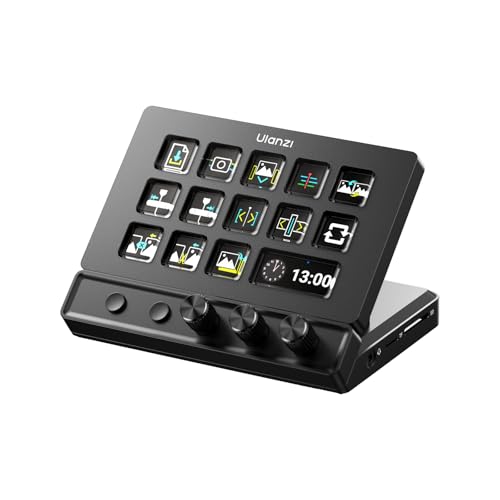
- 14 LCD keys plus 3 knobs and page switching
- 8-in-1 USB-C hub with 4K HDMI and 100W PD
- Works with OBS, editing apps, and more
Best For: Creators who want stream controls and desk hub features in one unit
Premium Studio Controller
Stream Deck + Audio Mixer and Studio Controller

- LCD keys, dials, and a touch strip
- Multi Actions and Smart Profiles for automation
- Deep plugin support for streaming and lighting
Best For: People who want a polished, software-rich control surface
Compact Macro Pad
Compact Stream Controller with 6 LCD Keys

- 6 LCD keys with 3 knobs and 3 scene buttons
- Smart scene recognition for automatic interface switching
- Small 13 x 8 x 6 cm footprint
Best For: Compact control on a small desk
Compact Starter Pick
Elgato Stream Deck Mini, 6-Key Macro Control

- 6 customizable LCD keys
- Drag-and-drop setup
- Multi-action sequencing
Best For: Small-footprint macro control for productivity and light streaming
Feature-Rich Desktop Pick
TreasLin N1 18-Key Stream Controller
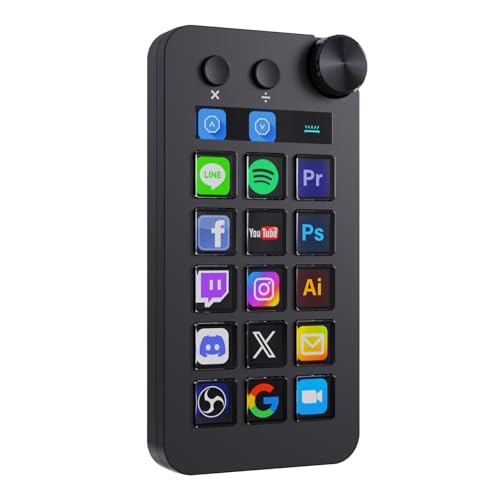
- 18 total controls with a rotary knob
- Three modes including numeric keypad
- Large plugin marketplace support
Best For: Power users who want extra controls and mode switching
Balanced Mid-Range Pick
VSDINSIDE M18 18-Key Macro Keypad

- 18 programmable keys with LCD visuals
- Supports JPG, PNG, and GIF icons
- Built-in desktop tools like calendar and clock
Best For: Versatile macro control for streaming, gaming, and office work
Core Stream Deck Pick – Elgato Stream Deck MK.2 15-Key Controller
If you want a proven stream deck alternative hardware option, the Elgato Stream Deck MK.2 stays close to the classic formula with 15 customizable LCD keys and broad app support. It is built for creators who want quick one-touch control over streaming, audio, lighting, and other repeat actions without digging through menus.
Best For: Streamers and creators who want a reliable, plugin-rich control pad for OBS, Twitch, YouTube, and more.
Pros:
- 15 customizable LCD keys with visual feedback
- One-touch actions for scenes, audio, lights, and hotkeys
- Works with popular plugins like OBS, Twitch, YouTube, Discord, Spotify, and Philips Hue
- USB-C connection with Mac and PC compatibility
Cons:
- Plastic enclosure
- Standard 15-key layout may feel limiting for users who want more controls
For users who want a straightforward studio controller and value app ecosystem over experimentation, this is the safest pick in the group. It is a familiar, flexible tool for everyday streaming and creative workflows.
Budget-Friendly Custom Pad – Jiawu 15-Key Stream Controller
This stream deck alternative hardware option focuses on the essentials: 15 customizable LCD keys, single-touch actions, and workflow shortcuts for streaming and content creation. It is aimed at users who want a compact control pad for hotkeys and app actions without adding extra complexity to the desk.
Best For: Budget-minded streamers and creators who want basic macro control with customizable LCD keys.
Pros:
- 15 customizable LCD keys with image and title support
- Single-touch controls for social posts, audio, and lighting
- Compatible with plugins for apps like OBS and Discord
- Designed for a stable, comfortable clicking experience
Cons:
- Limited product details compared with larger ecosystem controllers
- 90-day manufacturer warranty is relatively short
- App/plugin support is described more broadly than specifically
If you mainly need a simple macro pad for streaming tasks, this model covers the basics well. It makes sense when you want customizable keys and practical control without paying for a more premium feature set.
Most Versatile Docking Deck – ULANZI D200X Creative Deck with Dock
For buyers looking at stream deck alternative hardware with more built-in utility, the ULANZI D200X combines 14 LCD keys, 3 encoder knobs, and an 8-in-1 docking station. That makes it a strong fit for creators who want control over editing, streaming, and connected peripherals from a single compact device.
Best For: Video editors, streamers, and smart home users who want a control surface plus a built-in dock.
Pros:
- 14 customizable LCD keys plus 3 encoder knobs for precise control
- Built-in 8-in-1 hub with HDMI, audio, card readers, USB-A, USB-C, and PD passthrough
- Supports creative apps like Premiere Pro, DaVinci Resolve, Photoshop, and Lightroom Classic
- Includes streaming and smart home integrations for OBS, Twitch, Home Assistant, Hue, and more
Cons:
- Fewer keys than 15-key and 32-key alternatives
- Heavier, more feature-packed design may be more than some users need
- Warranty is only 3 months
This is the most feature-dense option here if your desk setup needs both control shortcuts and connectivity. It stands out when you want one device to handle creative work, streaming, and dock duties at once.
High-Capacity Pro Control – Elgato Stream Deck XL 32-Key Controller
If your workflow needs more room than a standard control pad, this stream deck alternative hardware option gives you 32 customizable LCD keys and the same one-touch style of operation Elgato is known for. It is designed for live production, fast scene changes, and creators who want a larger command surface for frequently used actions.
Best For: Power users who want maximum on-device buttons for streaming, production, and quick shortcuts.
Pros:
- 32 customizable LCD keys for a large action library
- Strong integrations with OBS, Twitch, YouTube, Discord, Spotify, Philips Hue, and more
- Visual feedback confirms commands at a glance
- USB-powered and compatible with Mac and PC
Cons:
- Larger footprint than smaller control pads
- Plastic enclosure
Choose this if you frequently run out of buttons and want a more expansive control layout. It is the most capable pick in the group for users who prefer more actions visible and ready at once.
Hybrid Creator Controller – Stream Controller with 14 LCD Keys and 3 Knobs
If you want a stream deck alternative hardware option that does more than trigger hotkeys, the ULANZI D200X is built around creator workflow. It combines 14 LCD keys, 3 knobs, and 2 page-turning keys for access to 42+ functions, while also adding a built-in 8-in-1 USB-C hub with 4K HDMI, card readers, audio, and 100W PD charging.
Best For: Streamers, editors, and creators who want physical controls plus a desk hub in one device.
Pros:
- 14 LCD keys, 3 precision knobs, and 2 page-turning keys for flexible control
- Built-in 8-in-1 USB-C hub with 4K HDMI, SD/TF reader, audio, and 100W PD charging
- Works with OBS, Twitch, YouTube, Discord, Premiere Pro, Final Cut Pro, DaVinci Resolve, and more
- Supports online and offline modes with free presets, plugins, and lifetime software updates
Cons:
- More of a desk hub/controller hybrid than a simple macro pad
- Best fit for users who will actually use the extra ports and display output
The D200X makes sense if you want one device to handle stream control, editing shortcuts, and desktop connectivity. It is especially appealing for creators who prefer knobs and a built-in hub over a basic button-only layout.
Premium Studio Controller – Stream Deck + Audio Mixer and Studio Controller
For buyers comparing stream deck alternative hardware, the Elgato Stream Deck + stands out if you care most about tactile control and software depth. It combines LCD keys, dials, and a touch strip with Multi Actions, Smart Profiles, and a wide plugin ecosystem for streaming, audio, lighting, and production work.
Best For: Users who want a polished control surface for streaming, audio mixing, and app automation.
Pros:
- LCD keys, touch strip, and dials give hands-on control with clear feedback
- Multi Actions and Smart Profiles automate complex workflows and app switching
- Strong plugin support for Wave Link, OBS, Twitch, YouTube, Discord, Spotify, Philips Hue, and more
- Drag-and-drop setup with access to icons, tracks, SFX, and frequent updates
Cons:
- Less of an all-in-one hub than some creator-focused alternatives
- Most compelling if you plan to use the Elgato software ecosystem
This is the most mature option here for users who want a refined control panel rather than extra hardware ports. If your priority is reliable stream and studio automation, it remains an easy recommendation.
Compact Macro Pad – Compact Stream Controller with 6 LCD Keys
If you want stream deck alternative hardware in a smaller footprint, the VBESTLIFE customizable stream controller focuses on the essentials. It offers 6 LCD keys, 3 metal knobs, and 3 scene switch buttons, plus smart scene recognition for automatically matching the active interface.
Best For: Users who want a compact macro controller for media, gaming, or streaming tasks.
Pros:
- Compact layout with 6 LCD keys, 3 knobs, and 3 scene buttons
- Knobs handle volume, brightness, timeline navigation, and parameter changes
- Smart scene recognition helps switch the interface based on what you are doing
- Type-C connection and small size make it easy to place on a crowded desk
Cons:
- Only 6 LCD keys, so it offers less direct access than larger controllers
- Compatibility is limited to newer Windows and macOS versions in the supplied notes
The VBESTLIFE unit is a sensible pick if you want quick access to macros without committing to a large controller. It is best viewed as a compact productivity and media control tool rather than a full-featured studio hub.
Compact Starter Pick – Elgato Stream Deck Mini, 6-Key Macro Control
If you’re shopping for stream deck alternative hardware, this compact macro pad is a simple way to replace repeated keyboard shortcuts with one-tap actions. It offers six customizable LCD keys, drag-and-drop setup, and multi-action sequencing, so it works well for everyday productivity as well as lighter streaming control.
Best For: Users who want a small, easy-to-set-up macro pad for Zoom, Office apps, and basic streaming tasks.
Pros:
- Six customizable LCD keys make actions easy to identify at a glance
- Drag-and-drop software keeps setup straightforward
- Multi-action sequencing can trigger several steps in order
- Works with Mac and PC, plus common apps like Zoom, Teams, Adobe, and Spotify
Cons:
- Only six keys, so it is less expansive than larger decks
- Micro USB connection feels older than newer USB-C options
For buyers who want the simplest entry point, this model focuses on clarity and ease of use rather than maximum key count. It is a practical fit if you want reliable macro control in a very small footprint.
Feature-Rich Desktop Pick – TreasLin N1 18-Key Stream Controller
As a stream deck alternative hardware option, this 18-key controller aims to do more than simple hotkeys by adding a rotary knob and multiple operating modes. It supports shortcut, calculator, and numeric keypad modes, and the VSD Craft software lets you assign keys with drag-and-drop customization for streaming, creative work, and everyday desktop control.
Best For: Creators and power users who want more controls, a knob, and mode switching in one desktop device.
Pros:
- 18 controls total, including 15 LCD buttons, 2 clickable buttons, and 1 rotary knob
- Three modes add shortcut, calculator, and numeric keypad functionality
- Custom icons can be made with drag-and-drop, screenshots, or images
- Supports OBS, Streamlabs, Discord, Twitch, and more through included software and marketplace plugins
Cons:
- Best features depend on using the VSD Craft software and plugin ecosystem
- Spotify integration requires an active Spotify Premium account
This model stands out if you want more than a basic macro keypad, especially for mixed work, live streaming, and desk utility. The extra controls and modes make it a flexible alternative when you want one device to handle several jobs.
Balanced Mid-Range Pick – VSDINSIDE M18 18-Key Macro Keypad
This stream deck alternative hardware option combines 18 programmable keys with practical desktop features for streaming, gaming, and office workflows. The layout includes 15 LCD visual keys and 3 physical buttons, plus support for JPG, PNG, and GIF icons, so you can build a personalized control pad for OBS scenes, media, app launching, and simple automation.
Best For: Users who want a versatile macro keypad with customizable visuals and broad desktop use.
Pros:
- 18 programmable keys support single actions and multi-step sequences
- LCD keys accept JPG, PNG, and GIF images and animations
- USB-C connectivity and broad compatibility with Windows, macOS, OBS, Streamlabs, and office apps
- Built-in tools like clock, stopwatch, weather, and calendar add desktop utility
Cons:
- Native Linux plug-and-play support is not available
- Some advanced customization may require SDK-based development
Overall, this is a well-rounded choice if you want a flexible macro board that goes beyond stream control. It balances visual customization, useful built-in modules, and everyday productivity features in one compact device.
How We Picked the Best Stream Deck Alternative Hardware
We focused on Stream Deck Alternative Hardware that offers reliable software support, enough keys or controls to matter, and a layout that fits real workflows. Preference went to devices with clear visual feedback, solid app integrations, and useful extras such as knobs, touch controls, or hub functions.
We also considered size, desk footprint, and whether the control layout suits streaming, editing, or general productivity. A good device should reduce clicks, not add complexity.
Quick Comparison
In general, larger key counts are better for users who want more one-tap actions and scene switching, while compact models suit smaller desks or simpler workflows. Devices with dials or touch strips are especially useful for volume, timeline scrubbing, and fine adjustments.
Some models are built as pure control surfaces, while others double as hubs or docking stations. If you need ports, card readers, or display passthrough, those extras may be worth paying for.
Key Buying Factors for Stream Deck Alternative Hardware
Key Count and Control Type
Choose a layout that matches your actual needs. Fewer keys can be enough for basic hotkeys, but streamers and editors often benefit from more programmable buttons, scene banks, or pages. Knobs and touch controls add speed for audio and timeline tasks.
Software and Compatibility
Make sure the device works with the apps you use most, such as OBS, Twitch tools, Zoom, Adobe apps, or music software. Good software matters as much as the hardware because it determines how easy the device is to program and maintain.
Build Quality and Feedback
LCD keys are helpful because they make it easier to remember shortcuts and switch profiles. Look for stable key feel, readable icons, and a housing that will hold up to daily use.
Extra Features
Some Stream Deck Alternative Hardware includes USB hubs, HDMI, audio, or card readers. These can be valuable if you want to reduce cable clutter or consolidate desk accessories, but they should not come at the expense of core control performance.
Who Should Buy Which Stream Deck Alternative Hardware?
Choose a compact model if you are new to macro pads, have a small desk, or only need a handful of shortcuts. Step up to a mid-size controller if you stream regularly or use multiple creative apps. Pick a larger deck if you want broad scene control, many app profiles, or a more advanced production setup.
If your workflow is audio-heavy or you frequently adjust levels, a model with knobs can be a smarter choice than a button-only deck. For creators who want a control surface plus connectivity, a hub-equipped option may deliver the best overall value.