A good stream deck pedal can free up your hands while you stream, record, edit, or present. For creators who need fast, reliable triggers, the right foot controller can make everyday workflows smoother.
In this roundup, we focus on practical choices for different setups, from simple footswitch control to more advanced studio workflows and accessory picks.
Best 10 Stream Deck Pedal Picks for 2026
Hands-Free Macro Control
Elgato Stream Deck Pedal, 3 Customizable Footswitches

- 3 customizable pedals for quick actions
- Hands-free control for mic, camera, and live tasks
- Heavy-duty chassis with adjustable spring pressure
Best For: Creators who want durable foot-controlled shortcuts
Silent Wireless Control
AirTurn DUO500 Bluetooth Pedal Controller

- Bluetooth pedal with 200+ feet of range
- Silent-tactile switches for quiet use
- Compatible with many apps, MIDI, and live-stream tasks
Best For: Performers and creators who need quiet wireless control
Desktop Shortcut Hub
Elgato Stream Deck Neo with 8 Custom Keys

- 8 customizable keys for quick workflows
- Easy drag-and-drop setup in the Stream Deck app
- Controls apps and smart-home devices from one panel
Best For: Desk-based users who want compact shortcut automation
Renewed Hands-Free Control
Elgato Stream Deck Pedal Renewed

- 3 customizable pedals for hands-free actions
- Works with OBS, Twitch, YouTube, and more
- Renewed unit with adjustable springs and heavy-duty chassis
Best For: Buyers who want a lower-cost renewed pedal controller
Travel Protection
CASEMATIX Hard Shell Case for Stream Deck Pedal
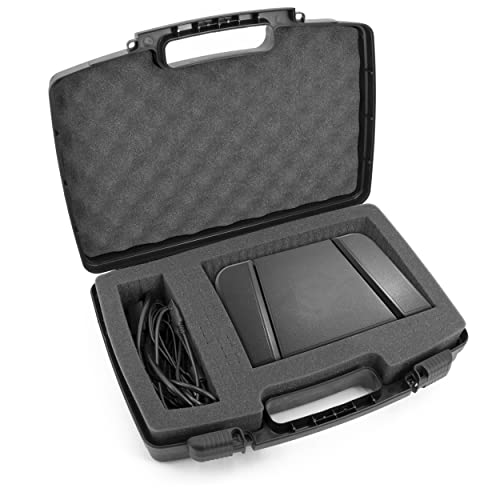
- Hard shell exterior for travel and storage protection.
- 2.25-inch pre-diced foam for custom compartments.
- Padlock rings and latches add security.
Best For: Traveling Stream Deck Pedal owners who want secure storage.
Creator Control
Elgato Stream Deck MK.2 15-Key Studio Controller

- 15 customizable LCD keys for one-touch control.
- Visual feedback shows when commands execute.
- Wide plugin support for streaming and creator apps.
Best For: Creators who want a configurable desktop workflow controller.
Live Content Controller
Elgato Stream Deck MK.2 AMZ Model

- 15-key layout for fast live workflow control.
- Works with OBS, Twitch, YouTube, and more.
- Includes desktop stand, USB-C cable, and guide.
Best For: Creators wanting a compact, app-friendly desktop controller.
Compact Macro Control
Elgato Stream Deck Mini, 6 Customizable LCD Keys

- 6 customizable LCD keys
- Drag-and-drop setup
- Multi-action sequencing
Best For: Small desks and simple shortcut automation
Mid-Size Workflow Deck
SOOMFON Stream Controller Studio Control Deck

- 15 customizable LCD keys
- Supports OBS, Twitch, YouTube, Spotify
- Removable stand and rubber feet
Best For: Creators who want more buttons and broad software support
Pro Audio Console
Elgato Stream Deck + Audio Mixer Controller

- LCD keys, dials, and touch strip
- Works with Wave Link, OBS, Twitch, Spotify
- Smart profiles and multi-actions
Best For: Streamers who want tactile audio and studio controls
Hands-Free Macro Control – Elgato Stream Deck Pedal, 3 Customizable Footswitches
The Elgato Stream Deck Pedal is a practical stream deck pedal for creators who want dependable hands-free control over live production tasks. With three customizable footswitches, it can trigger single or multiple actions, letting you mute a mic, switch cameras, or launch app commands without reaching for the keyboard.
Best For: Streamers, podcasters, and studio users who want a durable foot-controlled shortcut system.
Pros:
- Three customizable pedals for app, tool, and platform control
- Hands-free one-touch actions for tasks like going live, muting, and camera toggles
- Interchangeable springs help adjust pedal pressure
- Heavy-duty chassis is built for confident tapping
Cons:
- No display, so it relies on software setup and memory
- Focused on foot control rather than on-device visual feedback
Overall, this is a straightforward choice if you want a dedicated pedal controller for Elgato’s plugin ecosystem and hands-free workflow control. It suits users who value durability, simple activation, and broad app support over extra hardware features.
Silent Wireless Control – AirTurn DUO500 Bluetooth Pedal Controller
The AirTurn DUO500 is a versatile stream deck pedal alternative for users who need silent foot control across phones, tablets, and computers. Its Bluetooth connection, long wireless range, and app compatibility make it useful for turning pages, triggering backing tracks, sending MIDI commands, and handling live-stream tasks.
Best For: Performers and multitaskers who want a quiet, wireless foot controller with broad app support.
Pros:
- Bluetooth control with over 200 feet of wireless range
- Silent-tactile operation for quiet performances and studio use
- Works with hundreds of compatible apps for streaming, music, teleprompting, and more
- Removable handheld remote adds flexibility
Cons:
- Requires Bluetooth 4 or higher on compatible devices
- App-based setup may take some configuration
This is a strong option if you want a foot controller that reaches beyond streaming into music, teleprompting, and general device control. The silent switches and long battery life make it especially appealing for live or studio environments where noise matters.
Desktop Shortcut Hub – Elgato Stream Deck Neo with 8 Custom Keys
The Elgato Stream Deck Neo is a compact stream deck pedal-style control option for users who want quick desktop shortcuts in a small footprint. With eight customizable keys and two touch points, it helps automate repetitive tasks and manage common apps, smart-home devices, and creative software from one interface.
Best For: Office users, streamers, and creators who want compact shortcut control for everyday workflows.
Pros:
- Eight customizable keys for streamlined shortcut access
- Easy drag-and-drop setup with the free Stream Deck app
- Works with Zoom, Teams, Office apps, Adobe apps, Spotify, and more
- Can also control smart lights, plugs, and audio
Cons:
- Uses a micro USB connection instead of newer USB-C
- Not a foot pedal, so it’s a different control style than a true stream deck pedal
This model makes sense if your priority is fast, button-based workflow automation rather than hands-free foot control. It is especially useful for desks with limited space and for users who want a simple way to manage software and smart devices.
Renewed Hands-Free Control – Elgato Stream Deck Pedal Renewed
The renewed Elgato Stream Deck Pedal delivers the same hands-free studio controller concept for users looking to save money on a foot-based workflow tool. It offers three customizable pedals, adjustable spring pressure, and support for actions in apps like OBS, Twitch, and YouTube.
Best For: Budget-minded buyers who want Elgato’s pedal workflow in a renewed unit.
Pros:
- Three customizable pedals for hands-free app control
- Interchangeable springs and heavy-duty chassis
- Works with Mac and PC
- Supports plugins and actions for OBS, Twitch, YouTube, and more
Cons:
- Renewed unit includes a 90-day limited warranty
- May not suit users who want a new-in-box product
If you want the Stream Deck Pedal experience but are comfortable with a renewed item, this version keeps the core features intact. It remains a solid fit for streaming and studio work where hands-free triggering is the main goal.
Travel Protection – CASEMATIX Hard Shell Case for Stream Deck Pedal
If you use a stream deck pedal on the move or want safer storage between sessions, this CASEMATIX case is built around protection and organization. The hard shell exterior, customizable foam, and padlock rings make it a practical pick for carrying the pedal and a few small accessories.
Best For: Stream Deck Pedal owners who travel often or want a more secure storage solution.
Pros:
- Hard shell exterior helps protect the pedal during travel and storage.
- 2.25-inch pre-diced foam lets you create custom compartments.
- Includes a carry handle and heavy-duty latches for easier transport.
- Padlock rings add an extra layer of security if you want to use locks.
Cons:
- Case only, so the pedal and padlocks are not included.
- Maximum usable space is limited to the listed interior dimensions.
For users who prioritize protection over portability in a soft bag, this is a straightforward storage and travel case with useful customization options. It is especially appealing if you want one place for the pedal, cables, and small adapters.
Creator Control – Elgato Stream Deck MK.2 15-Key Studio Controller
The Elgato Stream Deck MK.2 is a versatile stream deck pedal alternative if you want fingertip control with visual feedback and broad app support. Its 15 customizable LCD keys are designed to trigger actions in OBS, Twitch, YouTube, and other supported tools with one touch.
Best For: Streamers and creators who want a configurable desktop controller for live workflows.
Pros:
- 15 customizable LCD keys for one-touch control.
- Visual feedback confirms that commands have executed.
- Supports plugins for OBS, Twitch, YouTube, Discord, Spotify, Philips Hue, and more.
- Works with Mac and PC over USB-C.
Cons:
- It is a button controller, not an actual foot pedal.
- Some users may not need the full plugin ecosystem.
This is a strong choice if you want a highly configurable control surface for streaming, editing, or production tasks. The MK.2 focuses on speed, visibility, and workflow customization rather than pedal-style hands-free control.
Live Content Controller – Elgato Stream Deck MK.2 AMZ Model
This stream deck pedal keyword match is really a desktop controller option: the Elgato Stream Deck MK.2 offers a 15-key layout for live content workflows, with quick access to tools, audio, and platform actions. It’s built for creators who want one-touch control and compatibility with popular streaming and production apps.
Best For: Streamers and editors who want a compact controller with broad app support.
Pros:
- 15 customizable LCD keys for fast workflow control.
- One-touch actions can handle posts, audio adjustments, and mic mute.
- Compatible with OBS, Twitch, YouTube, Twitter, Discord, Spotify, Philips Hue, and more.
- Includes desktop stand, USB-C cable, and quick start guide.
Cons:
- Like the other MK.2, it is not a foot pedal.
- Limited product notes compared with the standard model description.
If you want Elgato’s familiar 15-key control layout with included essentials, this version delivers the same core creator workflow benefits. It is best viewed as a compact live-production controller rather than a pedal-style input device.
Compact Macro Control – Elgato Stream Deck Mini, 6 Customizable LCD Keys
If you want a small but capable stream deck pedal-style control surface for desk workflows, the Stream Deck Mini is a simple way to put frequent actions on dedicated keys. It turns repeat shortcuts into one-tap commands and works with apps like Zoom, Teams, Microsoft Office, Adobe Creative Apps, Spotify, and more.
Best For: Users who want an ultra-compact shortcut deck for everyday productivity, streaming, and app control.
Pros:
- 6 customizable LCD keys make commands easy to identify and trigger.
- Drag-and-drop setup keeps configuration straightforward.
- Multi-action sequencing can run several commands in order.
- Compatible with Mac and PC, plus common work and creative apps.
Cons:
- Only 6 keys, so heavier workflows may feel limited.
- Micro USB connection is less convenient than newer USB-C setups.
Overall, this is the most compact option here, best suited to simple automation rather than complex multi-control workflows. If you mainly need a dependable shortcut pad for core tasks, it delivers the essentials in a tiny footprint.
Mid-Size Workflow Deck – SOOMFON Stream Controller Studio Control Deck
The SOOMFON Stream Controller is a practical stream deck pedal alternative for creators who want more buttons to trigger actions quickly. With 15 customizable LCD keys, it can launch social posts, adjust audio, mute a microphone, control lights, and support workflows for streaming, editing, music production, and photography.
Best For: Creators and streamers who want a larger macro deck with broad app support and a desktop-friendly design.
Pros:
- 15 customizable LCD keys provide more room for shortcuts and actions.
- Works with PC and Mac, plus OBS Studio, Twitch, YouTube, Spotify, and Philips Hue.
- One-touch controls can handle audio, lighting, social posts, and more.
- Includes a removable stand and rubber feet for desktop use.
Cons:
- Some integrations require specific software versions or a Spotify Premium account.
- Setup depends on downloading drivers and updating firmware.
This deck stands out if you want more control points than a compact unit can offer. It balances stream-focused features with broader creative workflow support, making it a flexible mid-tier pick.
Pro Audio Console – Elgato Stream Deck + Audio Mixer Controller
If your stream deck pedal search is really about a more hands-on control surface, the Stream Deck + adds dials and a touch strip to the familiar LCD key format. It is designed for audio, video, lighting, and other production tasks, with support for multi-actions, smart profiles, and plugins like Wave Link, OBS, Twitch, Spotify, and Philips Hue.
Best For: Streamers and creators who want tactile control for audio mixing and studio-style workflow switching.
Pros:
- LCD keys, dials, and a touch strip give you tactile control and visual feedback.
- Fully customizable for mixing, production, and general studio control.
- Multi-actions and smart profiles help automate app-specific setups.
- Large plugin ecosystem includes Wave Link, OBS, Twitch, Discord, and more.
Cons:
- More expensive and larger than a basic shortcut pad.
- Best value comes from using its advanced controls, not just simple hotkeys.
This is the strongest choice if you want more than button presses and need precise control over multiple parts of your setup. The extra tactile controls make it better suited to serious streaming and production work.
How We Picked the Best Stream Deck Pedal
We looked for products that offer useful hands-free control, dependable build quality, and clear compatibility with popular creator tools. For a Stream Deck Pedal, that means steady foot response, low-latency actions, and software support that fits real workflows.
We also considered whether a product is a true foot pedal controller or a related accessory, since buyers often need both the controller and a way to protect or transport it.
Quick Comparison
If you want the simplest setup, a three-pedal controller is usually the easiest way to start. If you need more on-screen actions, a key-based stream deck may be the better fit. If you already use audio or production tools heavily, a more advanced controller with dials or extra inputs can offer more flexibility.
Accessories like a hard case matter most for mobile creators or anyone traveling between home, studio, and event spaces.
Key Buying Factors for a Stream Deck Pedal
Pedal Layout and Action Type
Check how many pedals you need and whether you want momentary, toggle, or multi-action behavior. A three-pedal layout works well for common tasks like muting, switching scenes, or advancing pages.
Software and App Compatibility
Make sure the controller works with the apps you actually use, such as OBS, Zoom, Teams, teleprompter software, or streaming platforms. Good software support usually matters more than raw button count.
Build Quality and Feel
Foot controllers should feel stable under pressure and stay in place during use. Adjustable springs, durable housings, and silent operation can all improve comfort during long sessions.
Setup Flexibility
Look for drag-and-drop configuration, profile switching, and support for custom actions. These features make a Stream Deck Pedal much more useful across different jobs, from live streaming to office work.
Portability and Protection
If you travel, consider size, cable management, and whether you need a fitted carrying case. A sturdy case can be the difference between a controller that lasts and one that gets damaged in transit.
Who Should Buy Which Stream Deck Pedal?
Choose a dedicated pedal controller if you want hands-free triggers for streaming, recording, presentations, or editing. Choose a key-based Stream Deck if you need more on-screen shortcuts and broader app control. Choose a hybrid or advanced controller if you want both quick macro access and more detailed workflow control.
If you are unsure, start with the simplest model that matches your main use case. It is usually better to buy for the actions you perform every day than to overbuy for features you may never use.