Finding the right microcontroller kit can make the difference between an engaging first project and a box of parts that sits unused. The best options include a compatible board, useful components, clear lessons, and enough flexibility to support multiple builds.
We compared 10 microcontroller starter kits under $100 for beginners, students, hobbyists, and makers. This lineup covers Arduino UNO, Mega, Nano, and ESP32 platforms, with choices for classic electronics, robotics, programming, and connected projects.
Best 10 Microcontroller Starter Kits Under 100 Picks for 2026
Best All-Around Beginner Kit
ELEGOO UNO R3 Super Starter Kit

- 22+ guided Arduino projects
- Sensors, displays, motors, and input modules
- Solderless setup with pre-soldered LCD
Best For: Families, homeschool, clubs, and STEM classrooms
Best Organized Learning Value
Miuzei Arduino-Compatible Starter Kit

- More than 28 lesson links
- Includes 9V 1A power supply
- Organized box with pre-soldered modules
Best For: First-time Arduino learners and hobbyists
Best for Advanced Arduino Builds

- 35+ guided electronics projects
- Mega board with 54 digital I/O pins
- 200+ components including RFID and motion sensors
Best For: Older students, clubs, and makers building complex projects
Best Video-Guided Option
Horizon Uno Electronics Starter Kit

- Lifetime access to video lessons
- Arduino-compatible board with sensors and servos
- Course includes labs, projects, and problem sets
Best For: Students, educators, and video-based self-learners
Versatile Arduino Learning Pick
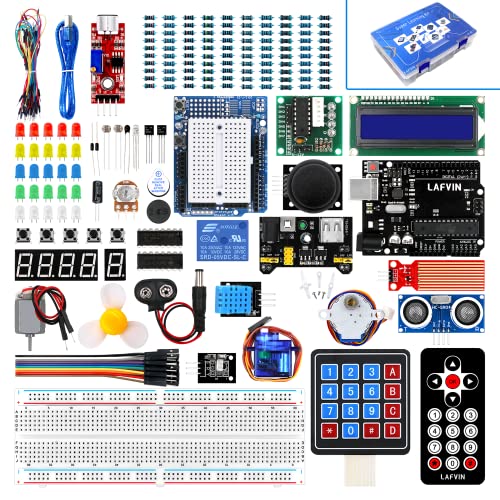
- 20+ guided lessons with code and reference materials
- Includes motors, LCDs, displays, and sensors
- Compatible with several Arduino board formats
Best For: Beginners exploring varied Arduino-compatible projects
Most Complete Project Bundle

- 200+ components across 63 types
- 30+ guided projects with PDF tutorial
- Solderless setup with storage and power accessories
Best For: Structured STEM learning and broad Arduino project practice
Connected IoT Learning Choice
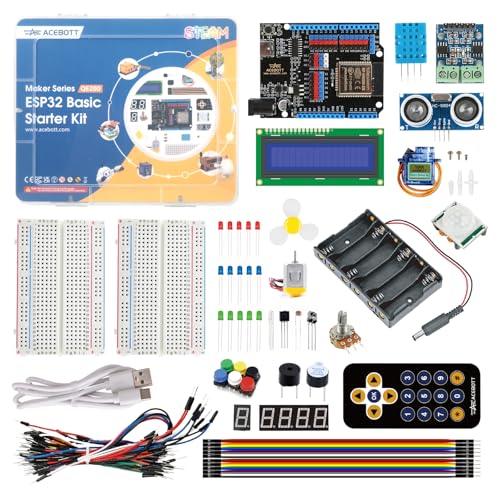
- ESP32 board with built-in Wi-Fi and Bluetooth
- 40+ tutorials and practical projects
- Supports Scratch, Arduino IDE, and Python
Best For: Beginners exploring wireless and IoT electronics
Best Budget Arduino Pick
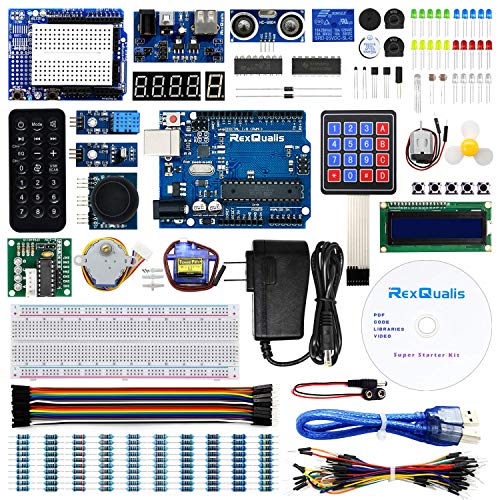
- 120 Arduino-compatible components
- Includes 9V power adapter
- Labeled storage case and PDF tutorial
Best For: Beginners seeking an economical Arduino-style learning kit
Best for Guided Mega Projects
ELEGOO Mega 2560 R3 Starter Kit

- Includes 16 guided electronics projects
- 54 digital I/O pins on the MEGA board
- Includes breadboard, LCD, motors, relay, and sensors
Best For: Learners building larger guided Arduino projects
Best for IoT Learning
ELEGOO ESP-32 Super Starter Kit

- ESP-32 with Wi-Fi and Bluetooth 4.2
- Includes 35+ modules and components
- 30+ guided IoT projects with code
Best For: Makers developing wireless and connected-device projects
Best All-Around Beginner Kit – ELEGOO UNO R3 Super Starter Kit
If you want microcontroller starter kits under 100 that cover a broad range of beginner projects, this ELEGOO UNO R3 kit is a practical choice. Its 22+ guided lessons introduce sensors, displays, lights, buttons, motors, and basic Arduino programming without requiring soldering.
Best For: Families, homeschool learners, coding clubs, and STEM classrooms starting with Arduino-compatible projects.
Pros:
- Includes 22+ guided lessons and example code.
- Offers varied components, including an LCD, ultrasonic sensor, DHT11, joystick, motors, servo, and relay.
- Solderless breadboard and pre-soldered LCD simplify setup.
- Organized component list helps beginners identify parts.
Cons:
- The UNO R3 has only 2 KB of installed RAM, limiting larger programs.
- Beginners need to observe the power module’s 9V maximum and component-polarity guidance.
This is a well-rounded learning kit for progressing from simple LED and input exercises to sensor, display, and motor projects. It is especially appealing when project variety and structured instruction matter more than advanced board capacity.
Best Organized Learning Value – Miuzei Arduino-Compatible Starter Kit
Among microcontroller starter kits under 100, the Miuzei kit stands out for its lesson count, included power supply, and organized storage. It is designed for beginners and hobbyists who want to complete projects through USB while learning Arduino programming step by step.
Best For: First-time Arduino learners who value guided lessons, pre-soldered modules, and a neatly arranged component set.
Pros:
- Provides more than 28 lesson links with English instructions.
- Includes a 9V 1A power supply and components that are already soldered.
- Offers a broad selection of modules, sensors, LEDs, jumper wires, and an LCD1602.
- Comes in a storage box with electrostatic bags for organization.
Cons:
- The supplied notes do not specify the exact component count or detailed project list.
- Some instruction access relies on online or cloud-based tutorials.
The Miuzei is a sensible option for learners who want a complete, ready-to-connect setup rather than sourcing individual parts. Its organized packaging and online lesson library can make repeated practice easier.
Best for Advanced Arduino Builds – ELEGOO Mega 2560 Complete Kit
For shoppers comparing microcontroller starter kits under 100 for more ambitious builds, this ELEGOO Mega 2560 kit provides substantially more I/O and memory than a basic UNO setup. Its 35+ guided projects and 200+ components support RFID, clocks, motion sensing, environmental monitoring, motor control, and interactive displays.
Best For: Older students, coding clubs, and makers ready to combine multiple sensors, displays, controls, and motors.
Pros:
- Mega 2560 board includes 54 digital I/O pins, 15 PWM outputs, 16 analog inputs, and 4 hardware serial ports.
- Provides 256 KB of flash for larger projects.
- Includes more than 200 components, including RFID, RTC, PIR, water-level, motion, and distance sensors.
- Offers 35+ guided lessons with a storage case and small-parts box.
Cons:
- Its larger component set may be more than a complete beginner needs.
- The manufacturer recommends ages 13 and up.
- At 2.2 pounds and with larger dimensions, it is less compact than a basic starter kit.
This is the strongest fit when a starter kit needs room to grow. The Mega board and extensive module selection make it better suited to complex, multi-device projects than entry-level UNO packages.
Best Video-Guided Option – Horizon Uno Electronics Starter Kit
If video instruction is your preferred way to learn, the Horizon Uno kit offers an Arduino-compatible board, electronics components, and lifetime access to an online course. It is a useful contender among microcontroller starter kits under 100 for beginners who want lessons, labs, projects, and problem sets in one learning path.
Best For: Students, educators, and self-learners who prefer step-by-step video instruction for electronics and coding.
Pros:
- Includes lifetime access to a video course created by robotics engineers.
- Course materials include lectures, labs, projects, and problem sets.
- Combines an Arduino-compatible Horizon Uno board with LEDs, sensors, servos, and specialty components.
- Supports Windows, macOS, and Linux.
Cons:
- The supplied notes do not list the complete component inventory or project count.
- Course access requires using the unique code supplied with the kit.
- Its learning approach depends on online video content.
The Horizon Uno is most compelling for buyers who want structured multimedia instruction rather than only a printed tutorial. The cross-platform compatibility also makes it flexible for classrooms and home learning environments.
Versatile Arduino Learning Pick – LAFVIN Super Starter Kit
For shoppers comparing microcontroller starter kits under 100, the LAFVIN Super Starter Kit offers a broad Arduino-compatible component mix and a tutorial-led introduction to electronics and programming. Its included motors, displays, sensors, and more than 20 lessons support hands-on experimentation across many project types.
Best For: Beginners who want guided Arduino-compatible electronics projects with motors, LCDs, and sensors.
Pros:
- Includes a tutorial manual with more than 20 lessons, code, libraries, and datasheets.
- Supports Arduino-compatible boards including R3, Mega2560, Mega328, and Nano.
- Offers varied project hardware, including servo, stepper, and DC motors, LCDs, displays, and sensors.
- The LCD1602 module includes a pin header, so it does not require soldering first.
Cons:
- The extensive component selection may feel overwhelming for a first-time learner.
- Its wireless compatibility is limited to infrared rather than Wi-Fi or Bluetooth.
The LAFVIN kit is a practical choice when variety and traditional Arduino-compatible learning are more important than wireless connectivity. The included documentation and ready-to-use LCD module help reduce setup friction for beginners.
Most Complete Project Bundle – ELEGOO UNO R3 Starter Kit
Among microcontroller starter kits under 100, the ELEGOO UNO R3 Most Complete Starter Kit stands out for its 200-plus components, 63 component types, and more than 30 guided projects. It is designed to take beginners from simple LED circuits to displays, sensors, RFID, motors, and environmental monitoring.
Best For: STEM learners, classrooms, coding clubs, and beginners who want a large, structured Arduino-compatible project bundle.
Pros:
- Provides more than 30 guided projects with a PDF tutorial and example code.
- Includes over 200 components across 63 types, including RFID, RTC, PIR, ultrasonic, DHT11, motor, and display modules.
- Pre-soldered modules and a solderless breadboard help beginners start without soldering.
- Includes a storage case, power supply, battery, USB cable, and breadboard power module.
Cons:
- The large number of parts can require careful organization and inventory management.
- The included power supply warning says not to use voltage higher than 9V.
This is a strong all-around option for learners who want a complete, organized path through foundational electronics and Arduino programming. Its unusually broad component selection also leaves room to modify guided projects into original builds.
Connected IoT Learning Choice – ACEBOTT ESP32 Electronics Kit
For those seeking microcontroller starter kits under 100 with modern connectivity, the ACEBOTT ESP32 Electronics Kit combines Wi-Fi and Bluetooth with 96 components and more than 40 tutorials. Its staged lessons support a progression from basic circuits to Arduino IDE, Scratch, Python, and IoT-oriented projects.
Best For: Beginners and STEM learners interested in wireless projects, smart-home concepts, and multiple programming approaches.
Pros:
- Uses an ESP32 development board with built-in Wi-Fi and Bluetooth.
- Includes more than 40 step-by-step lessons and projects.
- Supports graphical coding, Arduino IDE programming, and Python.
- Provides 96 labeled components, including an ultrasonic sensor, PIR sensor, motors, RGB LEDs, buttons, and a breadboard.
Cons:
- The ESP32-focused platform may be less straightforward for learners expecting an UNO-based kit.
- Its broad progression from beginner coding to IoT can require more learning time than a basic circuit kit.
The ACEBOTT kit is the most connectivity-focused choice in this group. Wi-Fi, Bluetooth, multiple programming methods, and structured tutorials make it a compelling starting point for learners who want to move beyond basic LED and sensor exercises.
Best Budget Arduino Pick – REXQualis Super Starter Kit
For shoppers comparing microcontroller starter kits under 100, this REXQualis set is an economical Arduino-compatible option with a broad selection of components. It includes an UNO R3-compatible board, sensors, motors, an LCD1602 module, a 9V power adapter, and a labeled storage case.
Best For: Beginners who want an affordable Arduino-style kit with many parts and downloadable learning materials.
Pros:
- Includes 120 items, including sensors, servo and motor components, LCDs, and a ULN2003 driver board.
- Comes with a 9V 1A power adapter instead of relying only on a battery.
- LCD1602 module includes a preinstalled pin header, reducing setup work.
- Components are individually packaged and labeled in a roomy plastic box.
Cons:
- The kit is based on an Arduino UNO R3-compatible board rather than an official Arduino board.
- Its materials are aimed primarily at beginner-level Arduino projects.
This is a practical value choice for learning basic programming, wiring, and robotics projects. The included tutorial and datasheets add useful guidance, while the power adapter and organized case make the kit easier to start using.
Best for Guided Mega Projects – ELEGOO Mega 2560 R3 Starter Kit
This ELEGOO Mega 2560 kit stands out among microcontroller starter kits under 100 for its guided project structure and expanded board capacity. The MEGA 2560 R3 provides 54 digital I/O pins, 15 PWM outputs, 16 analog inputs, and four hardware serial ports for larger breadboard builds.
Best For: Learners who want step-by-step Arduino lessons and more pins for multi-module or larger electronics projects.
Pros:
- Includes 16 guided projects covering displays, motors, relays, sensors, tilt reactions, and output expansion.
- MEGA 2560 R3 offers substantially more I/O than a basic UNO-style board.
- Provides core parts such as an LCD1602, 830-point breadboard, 65 jumper wires, motor, fan, relay, and sensors.
- USB cable, 9V battery, DC connector, and organized storage help reduce setup time.
Cons:
- The larger MEGA board may be more capability than beginners need for simple circuits.
- The component selection is focused on the 16 included lessons rather than a very broad 120-item assortment.
Choose this kit when structured learning and extra I/O matter more than maximum component count. Its project sequence offers a clear path from simple LED and button exercises to basic automation and sensor builds.
Best for IoT Learning – ELEGOO ESP-32 Super Starter Kit
For buyers seeking microcontroller starter kits under 100 with built-in wireless capability, the ELEGOO ESP-32 Super Starter Kit is designed for connected electronics. Its dual-core ESP-32 board includes Wi-Fi and Bluetooth 4.2, works with the Arduino IDE, and comes with more than 35 modules and components.
Best For: Students, makers, and hobbyists progressing from basic circuits to IoT, smart-home, and wireless projects.
Pros:
- Built-in Wi-Fi and Bluetooth 4.2 support connected-device projects.
- Includes more than 35 modules and components, including an OLED screen, servo motor, keypad, sensors, and input devices.
- Online tutorial provides more than 30 projects with code, circuit diagrams, and step-by-step instructions.
- Supports Arduino IDE and includes a USB-C development board with a CP2102 chip.
Cons:
- The ESP-32’s wireless and IoT features may add complexity for someone seeking only basic Arduino practice.
- The kit contains fewer listed items than broad 120-piece beginner assortments.
This is the strongest fit of the three for connected-device experimentation. The combination of wireless hardware, a progressive tutorial, and modules for displays, motors, and input makes it suitable for moving beyond introductory circuits.
How We Picked the Best Microcontroller Starter Kits Under 100
We focused on kits priced below $100 that offer a practical starting point rather than a board alone. Our comparison considered the included controller, component variety, documentation, software compatibility, expansion potential, and suitability for first-time users.
Because kit contents can vary by seller and package version, check the current listing before buying. Pay particular attention to whether the board, USB cable, power supply, sensors, servos, and tutorials are included.
Quick Comparison
| Kit Type | Best For | Typical Strength |
|---|---|---|
| Arduino UNO | First electronics projects | Simple lessons and broad accessory support |
| Arduino Mega | Larger builds | More pins and memory for complex projects |
| ESP32 | Connected and advanced projects | Wireless features and stronger processing |
| Nano-based | Compact builds | Small footprint for portable projects |
Key Buying Factors for Microcontroller Starter Kits Under $100
Board and Software Compatibility
Arduino UNO boards are usually the easiest entry point because tutorials, libraries, and community support are extensive. Mega boards provide additional pins for displays, motors, and multiple sensors. ESP32 kits are better suited to Wi-Fi, Bluetooth, IoT, and Python-enabled learning, but may require a steeper initial setup.
Component Selection
Look for a balanced mix of essentials: a breadboard, jumper wires, LEDs, resistors, buttons, sensors, a buzzer, displays, and at least one servo or motor. A large component count is less useful if the kit lacks clear wiring diagrams or includes many duplicate low-value parts.
Learning Materials
Beginners benefit from step-by-step PDFs, video lessons, example code, and instructions that explain both wiring and programming. Confirm that tutorials match the exact board and kit revision, especially when choosing a Mega or ESP32 package.
Room to Grow
Choose a kit that supports your likely next project. UNO kits work well for alarms, environmental monitors, and basic robots; Mega kits suit projects needing many inputs and outputs; ESP32 kits offer a path toward connected sensors and remote control.
Who Should Buy Which Microcontroller Starter Kits Under 100?
Choose an UNO kit if you are new to electronics or want the widest range of beginner tutorials. Choose a Mega kit for robotics, control panels, or builds using many simultaneous components. Choose an ESP32 kit if wireless connectivity, IoT, Scratch, or Python is a priority. Choose a Nano-oriented kit when a compact project matters more than maximum expansion.
For most first-time buyers, prioritize documentation and a well-rounded component selection over the highest advertised part count. A smaller, clearly organized kit is often easier to learn with and more useful than a larger package without dependable instructions.