Robot arms with AI features are making advanced automation more accessible to students, makers, developers, and robotics researchers. The best kits combine programmable motion with tools such as computer vision, voice control, imitation learning, or open-source software.
We compared 10 promising options across hardware, control methods, software compatibility, expandability, and learning potential to help you choose a robot arm that matches your experience level and project goals.
Best 10 Robot Arms with AI Features Picks for 2026
Top Open-Source Pick
Hiwonder SO-ARM101 Advanced Kit

- LeRobot-compatible imitation learning platform
- Dual-camera vision for manipulation and awareness
- 12 high-torque magnetic-feedback bus servos
Best For: AI research, prototyping, and advanced hobby projects
Best Learning Platform
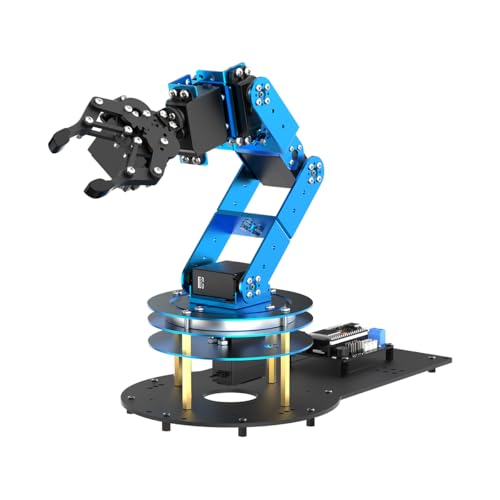
- ESP32 and Arduino-compatible controller
- Inverse kinematics with six smart servos
- 200+ tutorials and expandable sensor support
Best For: STEM education, programming practice, and custom projects
Best for VLA Development
Hiwonder SO-ARM101 Starter Kit

- LeRobot integration for imitation-learning workflows
- Leader-follower teleoperation for dataset capture
- Dual cameras and high-voltage magnetic-feedback servos
Best For: VLA research, teleoperation, and vision-action dataset building
Best for Vision and Voice Projects

- Arduino- and ESP32-based open-source platform
- Supports AI vision, voice, and multiple sensors
- Six bus servos with inverse kinematics
Best For: Interactive STEM projects involving vision, voice, and robotics
Best Open-Source Starter

- 6-DOF arm kit for LeRobot and Hugging Face
- Supports imitation and reinforcement learning
- 3D-printed parts are not included
Best For: DIY AI robotics development and Jetson-compatible projects
Best Mobile AI Platform

- Pairs a 6-DOF arm with a mobile robot car
- Supports ROS2, SLAM, vision, and navigation
- Raspberry Pi is not included
Best For: Advanced mobile manipulation and embodied-AI projects
Best for Embodied AI

- 500mm reach and 500g payload
- 6 TOPS vision module with 30+ features
- Supports LeRobot, ACT, and VLA models
Best For: University labs and vision-guided AI manipulation
Best Expandable Starter Kit
MaxArm Arduino and Python Robot Arm

- Python and Arduino programming support
- ESP32 Wi-Fi and Bluetooth connectivity
- Sensor ports for custom AI experiments
Best For: Students and makers building programmable robotics projects
Best Complete AI Platform
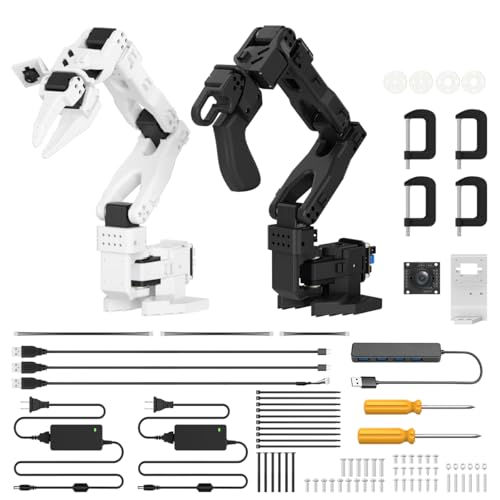
- LeRobot-compatible imitation learning platform
- Dual cameras for manipulation and awareness
- 12 high-torque feedback servos
Best For: AI research and advanced robotics experimentation
Best Value AI Learning Kit
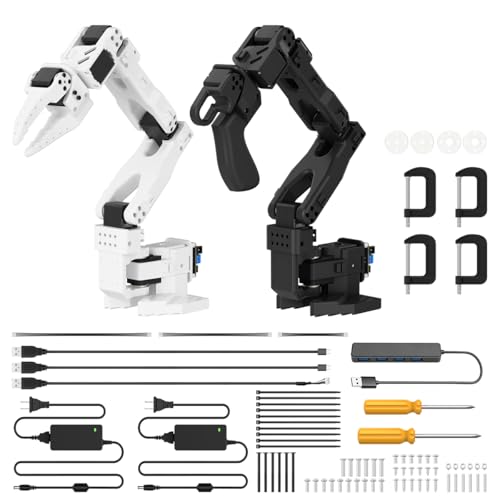
- Open-source imitation-learning support
- Dual-camera AI vision system
- Assembled arm with included 3D-printed parts
Best For: Students and hobbyists learning AI robotics
Top Open-Source Pick – Hiwonder SO-ARM101 Advanced Kit
For builders exploring robot arms with AI features, the Hiwonder SO-ARM101 Advanced Kit combines a six-axis arm, dual-camera vision, and compatibility with the LeRobot framework. Its assembled 3D-printed parts make it a practical choice for research, prototyping, and hands-on AI development.
Best For: Adult researchers, hobbyists, and programmers working with imitation learning and AI vision.
Pros:
- Supports end-to-end imitation learning through the LeRobot ecosystem.
- Dual cameras provide gripper-level precision and broader environmental awareness.
- Includes 12 high-torque bus servos with magnetic feedback for smooth motion.
- BusLinker V3.0 software supports servo scanning, monitoring, calibration, and trajectory control.
Cons:
- Recommended for users age 16 and up, so it is not aimed at young beginners.
- The advanced feature set may require programming and robotics experience.
Choose this kit if open-source AI experimentation and camera-guided manipulation are higher priorities than a simple introductory build. The assembled format also reduces setup work while preserving access to professional debugging tools.
Best Learning Platform – LeArm Open Source 6DOF Kit
The LeArm Open Source kit is a flexible starting point for anyone comparing robot arms with AI features for STEM or engineering projects. Its ESP32 controller, Arduino compatibility, inverse-kinematics support, and extensive tutorial library create a broad path from basic control to sensor-based experiments.
Best For: Students, educators, engineers, and beginners who want to assemble and program a customizable robot arm.
Pros:
- ESP32, Bluetooth, Arduino compatibility, and expansion ports support secondary development.
- Six smart PWM servos and inverse kinematics enable planned, smooth movements.
- Can be controlled through an app, PC software, or wireless controller.
- Supports AI vision, voice, ultrasonic, and acceleration sensor expansions, with 200+ tutorials.
Cons:
- Sensor-based AI functions require compatible expansions rather than being presented as an integrated vision system.
- Its assembly and programming focus may involve more setup than an assembled arm.
This is a strong educational option when flexibility matters. It offers a clear progression from manual control and Arduino programming to experiments involving recognition, tracking, voice control, and distance measurement.
Best for VLA Development – Hiwonder SO-ARM101 Starter Kit
For advanced users seeking robot arms with AI features aimed at vision-language-action work, this Hiwonder SO-ARM101 Starter Kit emphasizes teleoperation, dataset creation, and LeRobot integration. It pairs dual-camera capture with leader-follower control for collecting synchronized video and trajectory data.
Best For: Developers and researchers building imitation-learning or VLA datasets with an open-source robotic platform.
Pros:
- Integrates with LeRobot models, datasets, simulations, and end-to-end algorithms.
- Leader-follower teleoperation supports synchronized trajectory and HD video capture.
- Dual cameras support close-up manipulation and environmental perception.
- Uses 30KG, 12V high-voltage bus servos with magnetic feedback for stable movement.
Cons:
- Its VLA and dataset-creation focus may be excessive for basic robotic-arm practice.
- The advanced capabilities are intended for users comfortable with AI and robotics workflows.
This model stands out when the goal is to collect data and develop embodied-AI behaviors rather than simply operate a desktop arm. The visual PC software and assembled format help streamline control, monitoring, and debugging.
Best for Vision and Voice Projects – LeArm AI Advanced Kit
The LeArm AI Advanced Kit is a versatile option for exploring robot arms with AI features through Arduino and ESP32 development. It supports AI vision and voice modules alongside other sensors, giving learners a practical platform for experiments such as color recognition, target tracking, face detection, and voice control.
Best For: Programmers and STEM learners who want to combine robotic-arm motion with vision, voice, and sensor projects.
Pros:
- ESP32 controller, Bluetooth, Arduino programming, and expansion ports support customization.
- Six smart bus servos and inverse kinematics provide planned, efficient movement.
- Supports AI vision, voice, ultrasonic, and acceleration sensor modules.
- Includes app, PC, and wireless-controller operation plus 200+ tutorials and sample projects.
Cons:
- Many AI interactions depend on adding or configuring supported sensor modules.
- Its 16-and-up recommendation and programming focus may not suit casual users.
Select this kit if you want one platform for a wide range of interactive experiments. Compared with a vision-focused arm, its main advantage is the breadth of supported modules and learning resources for Arduino-based development.
Best Open-Source Starter – LeRobot SO-ARM101 AI Arm Kit
If you want robot arms with ai features for hands-on experimentation, the LeRobot SO-ARM101 is a practical low-cost platform for developers and robotics enthusiasts. Its 6-DOF design supports imitation learning and reinforcement learning through LeRobot and Hugging Face, though the 3D-printed parts are not included.
Best For: DIY builders, AI robotics learners, and developers using LeRobot, Hugging Face, PyTorch, or compatible NVIDIA Jetson hardware.
Pros:
- Supports imitation learning and reinforcement learning workflows.
- Improved wiring helps reduce joint 3 disconnections and range-of-motion limitations.
- Real-time leader-follower tracking supports human correction during training.
- Includes open-source assembly, calibration, testing, and deployment resources.
Cons:
- 3D-printed structural parts are not included.
- Designed primarily for builders and developers rather than plug-and-play users.
- A compatible computer or edge device, such as an NVIDIA Jetson, may be needed for advanced AI work.
This kit is a strong entry point for learning how AI models interact with a physical arm. Its open ecosystem and leader-follower mode are especially useful for training and prototyping, but plan for assembly and sourcing the missing printed components.
Best Mobile AI Platform – LanderPi ROS2 Robot Car
For buyers seeking robot arms with ai features in a broader mobile robotics platform, the LanderPi Advanced Kit combines a 6-DOF arm with ROS2, mapping, navigation, vision, and voice interaction. This version does not include a Raspberry Pi, so the required computing hardware must be supplied separately.
Best For: Advanced students, educators, and developers exploring mobile manipulation, SLAM, autonomous navigation, and multimodal human-robot interaction.
Pros:
- Combines a 6-DOF robotic arm with a mobile robot car.
- Includes TOF lidar, a 3D depth camera, and encoder-equipped motors.
- Supports ROS2, Python programming, SLAM mapping, path planning, and target tracking.
- Integrates ChatGPT-centered multimodal models with voice interaction and scene understanding.
Cons:
- Raspberry Pi is not included in this Advanced Kit.
- Its broad feature set may be more complex than needed for a stationary arm project.
- Recommended for users age 16 and up, making it less suitable for young children.
The LanderPi is best viewed as an embodied-AI learning platform rather than an arm-only kit. It offers substantial room for experimentation with perception and autonomy, but budget for the Raspberry Pi and expect a steeper development setup.
Best for Embodied AI – NexArm 6-Axis Robotic Arm
The NexArm is a capable choice among robot arms with ai features for labs, educators, and developers who want a more substantial hardware platform. Its full-metal 6-axis arm combines magnetic encoder servos, inverse kinematics, a K230 vision module, and compatibility with LeRobot and VLA-style development.
Best For: University labs, embodied-AI education, and developers building vision-guided manipulation or multimodal control systems.
Pros:
- Offers a 500mm reach, 500g payload, and ±2mm repeatability.
- Supports LeRobot, imitation learning, ACT, and VLA model deployment.
- Includes a 6 TOPS K230 vision module with more than 30 built-in vision features.
- Provides open-source code, schematics, tutorials, and multiple control methods.
Cons:
- The Standard Kit may require additional hardware for expanded mobile or conveyor-based setups.
- Its advanced AI and programming capabilities can involve a substantial learning curve.
- Recommended for users age 15 and up rather than young children.
With its metal construction, stated repeatability, and integrated vision hardware, NexArm is suited to serious educational and research work. It is a stronger fit for users who want to develop complete embodied-AI workflows than for casual hobbyists seeking a simple programmable arm.
Best Expandable Starter Kit – MaxArm Arduino and Python Robot Arm
For shoppers comparing robot arms with ai features, the LewanSoul MaxArm is a practical programming-focused starter kit. Its ESP32 controller, Python and Arduino support, wireless connectivity, and sensor expansion ports create a flexible platform for building and testing custom robotic applications.
Best For: Students, hobbyists, and makers learning robotics, programming, inverse kinematics, and sensor-based experimentation.
Pros:
- Uses link mechanics and inverse kinematics for movement across the x, y, and z axes.
- Supports Python, Arduino, app, PC, wireless controller, and mouse-based control.
- Includes ESP32 Wi-Fi and Bluetooth connectivity plus multiple expansion interfaces.
- Three precision bus servos and trajectory planning support accurate programmed movement.
Cons:
- Its AI capabilities depend on added sensors and user-written program code.
- The 16-plus educational design may be less suitable for young children.
- It is intended for indoor tabletop use rather than industrial automation.
The MaxArm is best viewed as an open-ended learning platform rather than a ready-made autonomous system. Choose it when hands-on coding, wireless development, and future sensor expansion matter more than built-in computer vision.
Best Complete AI Platform – SO-ARM101 Standard Kit
The Hiwonder SO-ARM101 Standard Kit is a strong option among robot arms with ai features for users interested in embodied imitation learning. It combines LeRobot compatibility, dual-camera vision, 12 high-torque bus servos, and an assembled design for a more research-oriented setup.
Best For: AI researchers, advanced hobbyists, and learners exploring imitation learning, computer vision, and open-source robotic control.
Pros:
- Compatible with the LeRobot open-source framework and related models, code, and templates.
- Dual cameras support gripper-level manipulation and broader environmental awareness.
- Twelve high-torque bus servos use magnetic feedback for smooth, stable movement.
- Includes a BusLinker V3.0 board and PC software for calibration and debugging.
Cons:
- The feature set is more advanced than necessary for basic programming practice.
- Its AI workflow requires interaction with open-source software and setup tools.
- The supplied notes do not specify a payload or autonomous operation details.
With its assembled 3D-printed parts and integrated vision hardware, this standard kit offers a focused route into imitation-learning experiments. It is the better pick for buyers who want a complete AI development platform rather than a simple servo arm.
Best Value AI Learning Kit – SO-ARM101 Starter Kit
For buyers seeking robot arms with ai features in a learning-oriented package, the Hiwonder SO-ARM101 Starter Kit delivers the same core embodied-learning architecture as the standard version. It includes dual-camera vision, LeRobot compatibility, 12 bus servos, and assembled 3D-printed parts.
Best For: Hobbyists and students who want to practice imitation learning, vision recognition, calibration, and open-source robot programming.
Pros:
- Supports end-to-end imitation learning through the LeRobot open-source framework.
- Combines a gripper-mounted camera with an external camera for two perspectives.
- High-torque servos with magnetic feedback are designed for smooth, stable motion.
- BusLinker software supports servo scanning, monitoring, trajectory control, and debugging.
Cons:
- It still requires software configuration and programming for AI-based projects.
- The advanced vision and servo system may be more than beginners need.
- The supplied information does not identify payload capacity or a specific operating system.
This starter configuration is a capable entry point for hands-on AI robotics, especially if you want an assembled arm and included 3D-printed parts. Compare the included kit contents with the standard version before choosing between the two closely related packages.
How We Picked These Robot Arms with AI Features
We focused on kits that offer more than basic servo movement. Each option was assessed for degrees of freedom, actuator quality, control interfaces, programming support, AI or vision capabilities, documentation, and suitability for real projects. Open-source compatibility was also important because access to source code, tutorials, and community examples can significantly affect the learning experience.
Because these products serve different audiences, we included beginner-friendly Arduino platforms alongside more advanced systems designed for LeRobot, ROS2, imitation learning, visual-language-action models, and embodied AI experimentation.
Quick Comparison
| Best For | Look For | Typical Strength |
|---|---|---|
| Beginners and students | Arduino or app control, tutorials, and included hardware | Accessible setup and guided learning |
| AI experimentation | Camera support, imitation learning, and open-source software | Training and testing intelligent behaviors |
| Advanced developers | ROS2, Python, Linux, and API access | Integration with larger robotics projects |
| Makers and engineers | Metal construction, modular parts, and expansion options | Durability and customization |
Key Buying Factors for Robot Arms with AI Features
Degrees of Freedom and Reach
Six-axis arms provide greater flexibility for positioning and orientation, but they may require more careful calibration. Check the arm’s reach, payload, workspace, and table footprint before buying, especially if you plan to use grippers, suction tools, or cameras.
AI, Vision, and Learning Support
“AI-enabled” can mean anything from camera-based object recognition to full imitation-learning workflows. Confirm which features are included and which require a separate camera, computer, software package, or subscription. For advanced training, look for support for Python, LeRobot, ROS2, or compatible machine-learning frameworks.
Programming and Connectivity
Arduino and app control are useful for beginners, while Python, Wi-Fi, serial communication, and ROS2 provide more flexibility. Review operating-system requirements, API documentation, and whether the kit works with your existing computer or microcontroller.
Build Quality and Included Parts
Metal frames and bus servos can improve rigidity and repeatability, but they may increase cost and assembly difficulty. Check whether the package includes the controller, power supply, gripper, camera, 3D-printed parts, and required cables.
Documentation and Safety
Clear tutorials matter as much as hardware. Also allow space around moving joints, use the recommended power supply, and avoid placing hands or fragile objects in the arm’s operating area during testing.
Who Should Buy Which Robot Arms with AI Features?
Choose an Arduino-focused six-axis kit if you are learning robotics, building a STEM project, or want straightforward programming exercises. Choose a SO-ARM101 or similar open-source platform if imitation learning, AI vision, and embodied-AI development are your main goals. Developers already working with Linux or robotics middleware should prioritize ROS2, Python, and API support. For makers who value durability and customization, a full-metal arm with modular end-effectors is often the better long-term investment.