An OLED screen can make games look striking, but display quality alone does not make a great gaming laptop. GPU performance, cooling, portability, and price matter just as much.
These seven options range from a compact 14-inch model to high-refresh 16-inch systems. Use the guide below to narrow your choice by the games you play and where you play them.
Best 7 Oled Gaming Laptop Picks for 2026
Balanced 15-Inch Pick
Lenovo Legion 5 Core i9 with RTX 5070

- 15.1-inch WQXGA OLED at 165Hz
- Core i9-14900HX and RTX 5070
- 32GB RAM and 1TB SSD
Best For: High-refresh OLED gaming and multitasking
Compact Power Pick
ASUS ROG Zephyrus G14 with RTX 5080
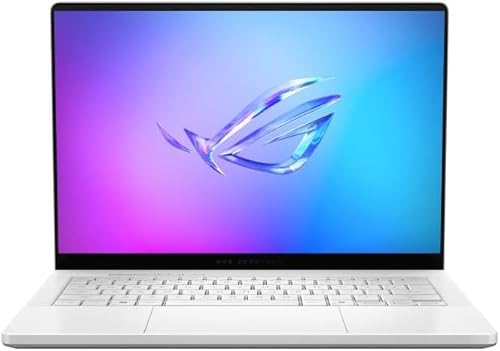
- 14-inch 3K OLED with G-SYNC
- Ryzen AI 9 HX 370 and RTX 5080
- 32GB RAM and 2TB SSD
Best For: Compact gaming and creative work
Port-Rich Legion Pick
Legion 5 Core Ultra 9 with RTX 5070

- 165Hz QHD+ OLED display
- Core Ultra 9 and RTX 5070
- Verify conflicting size and storage details
Best For: Peripheral-heavy gaming setups
Keypad-Focused Pick
Lenovo Legion 5 Core Ultra 9 OLED

- 165Hz QHD+ OLED display
- Core Ultra 9, RTX 5070, 32GB RAM
- RGB numeric keypad and ample ports
Best For: Gaming alongside number-heavy work
High-End Pick
GIGABYTE AORUS Master 16 Gen 2

- Ryzen 9 9955HX3D and RTX 5080 Laptop GPU
- 16-inch 240Hz, 2560 x 1600 OLED
- Up to 175W GPU TGP and vapor-chamber cooling
Best For: High-end gaming and color-focused creative work
Connectivity Pick
Acer Predator Helios Neo 16S AI

- 16-inch 240Hz WQXGA OLED with G-SYNC
- Core Ultra 9 275HX and RTX 5060
- Thunderbolt 4, HDMI 2.1, and Ethernet
Best For: Gaming with external displays and wired peripherals
Balanced Pick

- 15.3-inch 165Hz WQXGA OLED
- RTX 5060 with 32GB RAM and 1TB SSD
- Wi-Fi 7, USB4, and HDMI 2.1
Best For: Gaming, school, and multitasking with ample supplied memory
Balanced 15-Inch Pick – Lenovo Legion 5 Core i9 with RTX 5070
This oled gaming laptop pairs a 2560 × 1600, 165Hz display with an Intel Core i9-14900HX and RTX 5070. Its 32GB of DDR5 RAM and 1TB SSD make it a well-equipped choice for gaming and everyday multitasking.
Best For: Gamers who want a high-refresh OLED screen and generous memory in a 15-inch laptop.
Pros:
- 165Hz WQXGA OLED display rated at up to 500 nits.
- 32GB DDR5-5600 RAM and 1TB PCIe Gen4 SSD.
- Wi-Fi 7, Gigabit Ethernet, and Bluetooth 5.4.
Cons:
- Glossy screen may show reflections.
- RTX 5070 has 8GB of graphics memory.
The combination of a fast OLED panel and strong core specifications makes this a straightforward all-rounder. If reflections are a concern, consider where you usually play.
Compact Power Pick – ASUS ROG Zephyrus G14 with RTX 5080
For buyers seeking a smaller oled gaming laptop, the 14-inch Zephyrus G14 combines a 2880 × 1800, 120Hz panel with an RTX 5080 Laptop GPU and Ryzen AI 9 HX 370 processor. Its 2TB SSD also leaves substantial room for games and creative files.
Best For: Gamers and creators who prefer a compact 14-inch machine without giving up a high-end GPU.
Pros:
- 3K OLED display with 120Hz refresh rate and NVIDIA G-SYNC.
- RTX 5080 Laptop GPU and 12-core Ryzen AI 9 HX 370.
- 32GB LPDDR5X RAM and 2TB PCIe 4.0 SSD.
Cons:
- 120Hz refresh rate is lower than the 165Hz Legion models listed here.
- 14-inch screen offers less viewing area than the larger options.
Choose the G14 if a smaller chassis and the listed RTX 5080 matter more to you than maximum screen size or refresh rate. Its G-SYNC OLED panel is a notable fit for gaming in a compact format.
Port-Rich Legion Pick – Legion 5 Core Ultra 9 with RTX 5070
This oled gaming laptop listing combines a Core Ultra 9 275HX, RTX 5070, and a 165Hz OLED display. It also calls out three USB-A ports, two USB-C ports, HDMI, Ethernet, and Wi-Fi 7—useful if your setup includes several peripherals.
Best For: Gamers who connect multiple accessories and want an OLED Legion with a numeric keypad.
Pros:
- 2560 × 1600 OLED display listed at 165Hz.
- Core Ultra 9 275HX and RTX 5070 with 8GB GDDR7.
- 24-zone RGB numeric keypad and a broad port selection.
Cons:
- Listing disagrees on screen size: the bullets say 15.3 inches, while the details say 15.1 inches.
- Storage is listed as both 1TB and 2TB; verify the configuration before ordering.
The connectivity and keyboard are practical advantages, but the conflicting display-size and storage details make the exact configuration worth checking with the seller.
Keypad-Focused Pick – Lenovo Legion 5 Core Ultra 9 OLED
This Lenovo oled gaming laptop lists a Core Ultra 9 275HX, RTX 5070, 32GB DDR5 RAM, and a 165Hz OLED screen. A 24-zone RGB keyboard with a numeric keypad gives it a practical edge for users who split time between games and number-heavy tasks.
Best For: Gamers who also want a numeric keypad, ample ports, and 32GB of RAM.
Pros:
- 2560 × 1600 OLED display listed at 165Hz.
- RTX 5070 with 8GB GDDR7 and Core Ultra 9 275HX.
- Three USB-A ports, two USB-C ports, HDMI, Ethernet, and Wi-Fi 7.
Cons:
- Screen size conflicts within the listing: 15.3 inches in the bullets and 15.1 inches in the details.
- The supplied notes do not establish how this configuration differs in performance from the other Core Ultra 9 Legion 5 listed here.
It is a sensible configuration on paper if the keypad and connectivity match your needs. Confirm the screen size and included bundle before buying, since the listing details are not fully consistent.
High-End Pick – GIGABYTE AORUS Master 16 Gen 2
If you want an OLED gaming laptop built around top-tier components, the AORUS Master 16 Gen 2 pairs a Ryzen 9 9955HX3D with an RTX 5080 Laptop GPU. Its 16-inch, 2560 x 1600 OLED display runs at 240Hz, making this a compelling option for gaming and color-focused creative work.
Best For: Buyers who want high-end graphics power and a fast, color-accurate OLED screen in one laptop.
Pros:
- RTX 5080 Laptop GPU is specified at up to 175W Max TGP.
- 240Hz OLED panel has 100% DCI-P3 coverage and DisplayHDR True Black 1000 certification.
- Vapor-chamber cooling and a MUX switch support demanding gaming and flexible graphics modes.
Cons:
- At approximately 2.3kg, it is not the lightest choice for frequent travel.
- The title lists Windows 11 Home, while the supplied product notes mention Windows 11 Pro; confirm the installed edition before ordering.
The combination of a high-power GPU and a carefully specified OLED panel is its main draw. Check the exact configuration, particularly the Windows edition, before buying.
Connectivity Pick – Acer Predator Helios Neo 16S AI
The Predator Helios Neo 16S AI is an OLED gaming laptop for buyers who want a fast 16-inch screen and plenty of wired connections. It combines a Core Ultra 9 275HX, RTX 5060, and 240Hz, 2560 x 1600 OLED panel in a chassis listed at 4.4 pounds.
Best For: Gamers who use external displays and peripherals but still want a relatively portable 240Hz OLED setup.
Pros:
- 240Hz OLED display lists G-SYNC, 100% DCI-P3 coverage, and True Black HDR500 certification.
- Thunderbolt 4, HDMI 2.1, Ethernet, and multiple USB ports offer flexible desk connectivity.
- Dual-fan cooling includes an AeroBlade 3D metal fan and liquid-metal thermal compound.
Cons:
- The included 512GB SSD may fill quickly with a large game library.
- 16GB of installed RAM is less than the 32GB supplied with the other two configurations here.
Its display and port selection make it especially appealing as a gaming laptop that also docks into a full desktop setup. Consider your storage needs before choosing this configuration.
Balanced Pick – Lenovo Legion 5a
The Legion 5a is an OLED gaming laptop with a practical mix of gaming hardware, memory, and storage. This configuration pairs a Ryzen 7 250 and RTX 5060 with 32GB of DDR5 RAM, a 1TB SSD, and a 15.3-inch, 2560 x 1600 OLED display running at 165Hz.
Best For: Gamers and students who want a capable OLED system with 32GB of RAM and 1TB of internal storage.
Pros:
- 165Hz OLED display lists G-SYNC, 100% DCI-P3 coverage, and DisplayHDR True Black 1000.
- 32GB of installed RAM and a 1TB SSD give this configuration room for multitasking and games.
- Wi-Fi 7, USB4, HDMI 2.1, and Ethernet provide versatile connectivity.
Cons:
- Its 165Hz refresh rate is lower than the 240Hz displays on the other two laptops here.
- At approximately 5 pounds, it is worth considering whether the weight suits your commute.
This is the straightforward choice if you value the supplied memory and storage alongside OLED visuals more than the fastest refresh rate in the group. The listing also includes a portable 500GB drive; check its details if that accessory matters to you.
How We Picked These Oled Gaming Laptops
We compared the listed display specifications, GPUs, processors, memory, storage, and screen sizes, then considered how those combinations serve different buyers. A powerful GPU matters for demanding games at native resolution; a faster refresh rate is most useful when the hardware can deliver high frame rates. We did not treat specifications as measured benchmarks. Prices, cooling performance, battery life, and exact port configurations should be checked against the current listing and independent tests before purchase.
Quick Comparison
For a portable, high-end option, start with the 14-inch ASUS ROG Zephyrus G14: it pairs an RTX 5080 with a 120Hz 3K OLED display and 2TB SSD. The 16-inch GIGABYTE AORUS Master 16 Gen 2 also lists an RTX 5080, but emphasizes a larger 240Hz OLED screen. The RTX 5070 Lenovo Legion 5 configurations sit between those models and the RTX 5060 options. Compare the two similarly named Core Ultra 9 Legion listings carefully; their titles alone do not establish a meaningful difference. For an RTX 5060 system, the Acer Predator Helios Neo 16S AI lists a 240Hz display, while the Lenovo Legion 5a lists 32GB of RAM and a 1TB SSD.
Key Buying Factors for an Oled Gaming Laptop
GPU and Display Balance
Match the GPU to your games and settings, not just the screen’s resolution. An RTX 5080 offers more headroom than an RTX 5060 on paper, but actual frame rates depend on power limits, cooling, and the game. A 240Hz panel benefits competitive play most when frame rates are high; a 120Hz or 165Hz panel can still feel responsive for mixed gaming.
Size, Memory, and Storage
A 14-inch laptop is easier to carry; a 16-inch screen gives you more room to play and work. If you keep several large games installed, compare SSD capacities closely: these listings range from 512GB to 2TB. The Acer listing specifies 16GB of RAM, while several others specify 32GB. Check whether memory and storage can be upgraded if you expect your needs to grow.
OLED Ownership Considerations
OLED delivers deep blacks and strong contrast, but it can carry a risk of image retention or burn-in with prolonged static content. Check warranty coverage and available panel-care settings. For any Oled Gaming Laptop you plan to use away from an outlet, seek independent battery-life and brightness testing; the supplied specifications do not answer either question.
Who Should Buy Which Oled Gaming Laptop?
Choose the Zephyrus G14 if portability and an RTX 5080 are your priorities. Consider the AORUS Master 16 Gen 2 if you want an RTX 5080 with a larger, 240Hz display. Look at an RTX 5070 Legion 5 for a middle-ground GPU choice, but verify the exact configuration before paying. The Legion 5a is worth a look if you want an RTX 5060 paired with 32GB of RAM and 1TB of storage; consider the Acer if its 240Hz screen is more important to you. Compare current prices before deciding: the best Oled Gaming Laptop is the one whose complete configuration fits your workload and budget.