A high-end gaming laptop should deliver the frame rates you want without making you compromise on the screen, storage, or size you need. The best choice is not automatically the one with the most powerful GPU.
These 10 picks span 15.6- to 18-inch designs, from RTX 5070 configurations to an RTX 5090 option. Use the guide below to narrow them down by how and where you play.
Best 10 High End Gaming Laptop Picks for 2026
Best OLED All-Rounder

- 16-inch 240Hz OLED display
- RTX 5080 with 16GB graphics memory
- 32GB DDR5 RAM and 1TB SSD
Best For: OLED-focused gamers who want a 240Hz screen
Best Anti-Glare Pick

- 165Hz anti-glare WUXGA display
- 140W RTX 5070 Ti with 12GB GDDR7
- MUX switch and 2.5G Ethernet
Best For: Gaming in bright rooms with wired networking
Best Loaded Configuration
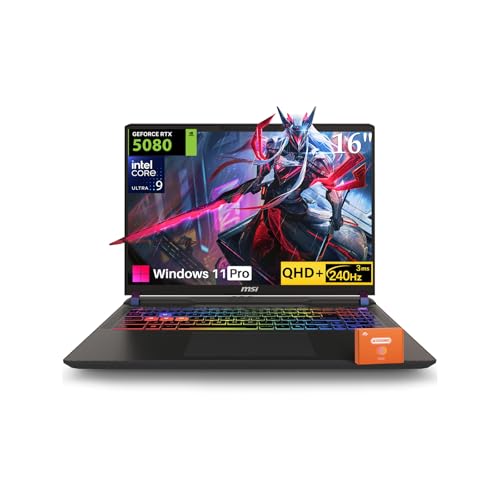
- RTX 5080 with 16GB GDDR7
- 64GB RAM and 2TB SSD
- 240Hz QHD+ matte display
Best For: Buyers wanting ample RAM and storage upfront
Best RTX 5090 Option
GIGABYTE AORUS Master 16 Gen 2

- RTX 5090 with 24GB graphics memory listed
- 240Hz 2560 x 1600 OLED display
- 32GB DDR5 RAM and 2TB SSD
Best For: Buyers seeking RTX 5090 graphics and OLED
Big-Screen All-Rounder

- 18-inch, 144Hz display
- Core i9-14900HX and 32GB DDR5
- Verify conflicting GPU and resolution details
Best For: Desk-first gaming on a large screen
High-Refresh 18-Inch Pick

- 18-inch QHD+ IPS display at 240Hz
- RTX 5070 and 32GB RAM
- 2TB SSD; listed weight is 13.1 pounds
Best For: Large-screen gaming and content work
RTX 5080 Power Pick

- RTX 5080 with listed 16GB GDDR7
- 16-inch 2560×1600 HDR display
- Tool-free access; verify refresh rate
Best For: RTX 5080 gaming with upgrade access
Best 18-Inch Desktop Replacement

- 18-inch QHD+ 165Hz display
- Core i9-14900HX and RTX 4080
- Four M.2 SSD slots; 9.3 pounds
Best For: Desk-focused gaming on a large built-in screen
Best Fast-Refresh 16-Inch Pick

- 16-inch 2.5K 240Hz display
- RTX 5080 and Core Ultra 9 275HX
- 32GB DDR5 and 1TB SSD
Best For: Fast-refresh gaming in a 16-inch format
Best Lighter QHD Gaming Pick

- 15.6-inch 165Hz QHD display
- Core i9-14900HX and RTX 5070
- 5 pounds; USB-C and Ethernet
Best For: QHD gaming with useful ports in a smaller laptop
Best OLED All-Rounder – Lenovo Legion Pro 7i Gen 10
The Lenovo Legion Pro 7i is a high end gaming laptop for buyers who want RTX 5080 graphics and a fast OLED screen in one machine. Its 16-inch, 2560 x 1600 display runs at 240Hz, while the Core Ultra 9 275HX, 32GB of DDR5 memory, and 1TB SSD round out the configuration.
Best For: Gamers who prioritize OLED image quality alongside high-refresh-rate play.
Pros:
- 240Hz OLED display rated at 500 nits.
- RTX 5080 graphics with 16GB of dedicated memory.
- Core Ultra 9 275HX processor and 32GB of DDR5 RAM.
Cons:
- 1TB of included storage may be limiting for a large game library.
- At 6 pounds, it is not the lightest option for frequent travel.
The OLED panel is the standout reason to choose this Legion. Check the listing’s warranty terms before buying, as the supplied details describe both courier or carry-in coverage and Legion Ultimate Support.
Best Anti-Glare Pick – ASUS ROG Strix G16
The ASUS ROG Strix G16 is a high end gaming laptop worth considering if you favor a fast, glare-reducing screen over OLED. This configuration pairs a Ryzen 9 8940HX with a 140W RTX 5070 Ti, 32GB of DDR5 memory, and a 1TB SSD.
Best For: Gamers who want a 165Hz anti-glare display and dedicated GPU controls.
Pros:
- RTX 5070 Ti with 12GB of GDDR7 memory and a stated 140W TGP.
- 16-inch, 165Hz display with a 3ms stated response time and 100% sRGB coverage.
- MUX switch and Advanced Optimus for choosing between graphics modes.
- USB-C 4, HDMI 2.1, and 2.5G Ethernet connections.
Cons:
- WUXGA resolution is lower than the 2560 x 1600 panels on several alternatives here.
- The included 1TB SSD offers less space than the 2TB configurations in this roundup.
Choose the Strix if its display finish and connectivity suit your setup; buyers seeking a sharper built-in screen should weigh the higher-resolution options.
Best Loaded Configuration – MSI Vector 16 HX AI
The MSI Vector 16 HX AI is a high end gaming laptop configured for buyers who need substantial memory and storage from the start. It combines an RTX 5080, Core Ultra 9 275HX, 64GB of DDR5 RAM, and a 2TB SSD with a 16-inch, 2560 x 1600, 240Hz display.
Best For: Gamers and creators who want 64GB of RAM, 2TB of storage, and high-end graphics in one configuration.
Pros:
- RTX 5080 with 16GB of GDDR7 graphics memory.
- 240Hz QHD+ matte display.
- 64GB RAM and 2TB SSD included.
- Dual Thunderbolt 5 ports, HDMI 2.1, Ethernet, and an SD card slot are listed.
Cons:
- The listing gives conflicting wireless specifications: Wi-Fi 7 in the title and details, but Wi-Fi 6E in a bullet.
- The stated 49.8-pound item weight appears inconsistent with the laptop form factor; verify shipping and device weights.
The generous included memory and storage distinguish this Vector. Confirm the conflicting listing specifications with the seller if wireless support or portability matters to your purchase.
Best RTX 5090 Option – GIGABYTE AORUS Master 16 Gen 2
The GIGABYTE AORUS Master 16 Gen 2 is a high end gaming laptop aimed at buyers seeking the listed RTX 5090 Laptop GPU and Ryzen 9 9955HX3D processor. The supplied specifications also describe a 16-inch, 2560 x 1600 OLED display at 240Hz, plus 32GB of DDR5 RAM and a 2TB SSD.
Best For: Buyers prioritizing RTX 5090 graphics and a high-refresh OLED display.
Pros:
- RTX 5090 Laptop GPU with 24GB of graphics memory listed.
- Ryzen 9 9955HX3D with 16 cores and 32 threads.
- 240Hz, 2560 x 1600 OLED display.
- 2TB SSD provides more included storage than the 1TB models here.
Cons:
- The supplied details conflict on the processor, also naming a Ryzen AI 9 465; confirm the exact CPU before ordering.
- A 5.1-pound listed weight still makes it a substantial travel companion.
Its GPU, OLED screen, and storage make a compelling combination on paper. Because the processor information is inconsistent, verify the exact configuration rather than relying on the title alone.
Big-Screen All-Rounder – ASUS ROG Strix G18
The ASUS ROG Strix G18 is a high end gaming laptop for players who want an expansive 18-inch screen, an Intel Core i9-14900HX, and 32GB of DDR5 memory. Its listed 144Hz display and 1TB SSD make it a practical choice for gaming and everyday multitasking.
Best For: Gamers who prioritize a large display and substantial memory over portability.
Pros:
- 18-inch, 144Hz display provides plenty of screen space.
- 32GB DDR5-5600 memory and a 1TB PCIe Gen 4 SSD.
- Vapor chamber, three fans, and liquid metal are listed among its cooling features.
Cons:
- Listed at 10 pounds, making it less convenient to carry.
- Product details conflict on the GPU and display resolution; confirm the exact configuration before buying.
This is a compelling desk-first option, but the listing names an RTX 5070 in its title and an RTX 5060 in its details. Verify the graphics card and screen specification with the seller before ordering.
High-Refresh 18-Inch Pick – MSI Crosshair 18 HX AI
The MSI Crosshair 18 HX AI pairs an 18-inch 2560×1600 IPS display with a 240Hz refresh rate, making it a high end gaming laptop worth considering if screen smoothness matters. It also lists a Core Ultra 9 275HX, RTX 5070 graphics, 32GB of RAM, and a roomy 2TB SSD.
Best For: Gamers and creators who want a large, fast display and ample built-in storage.
Pros:
- 18-inch QHD+ IPS panel with a 240Hz refresh rate and listed 100% DCI-P3 coverage.
- 2TB NVMe SSD offers more storage than the other listed models.
- Includes a webcam privacy shutter and a four-speaker audio setup.
Cons:
- Listed at 13.1 pounds, so it is better suited to a stationary setup.
- 720p webcam is modest for a premium laptop.
Choose this Crosshair if display speed, color coverage, and storage are your priorities. Its weight is the clearest trade-off for anyone planning to travel with it regularly.
RTX 5080 Power Pick – ASUS ROG Strix G16
The ASUS ROG Strix G16 stands out as a high end gaming laptop with an RTX 5080, 16GB of listed graphics memory, and a Core Ultra 9 290HX Plus. Its 16-inch 2560×1600 ROG Nebula HDR display and 32GB of DDR5 RAM round out a performance-focused configuration.
Best For: Buyers seeking RTX 5080 graphics in a 16-inch gaming laptop with accessible upgrades.
Pros:
- RTX 5080 graphics with 16GB of listed GDDR7 memory.
- 2560×1600 display with Dolby Vision HDR and glare-reducing film.
- Tool-free access is described for RAM, SSD, and fans.
- MUX Switch and Advanced Optimus are listed for graphics switching.
Cons:
- 1TB SSD may require an upgrade if you keep a large game library installed.
- Title and product details disagree on the display refresh rate: 240Hz versus 300Hz.
This is the graphics-focused choice of the three, particularly if you value upgrade access. Confirm whether the screen is 240Hz or 300Hz before purchase, since the supplied specifications conflict.
Best 18-Inch Desktop Replacement – Alienware M18 R2
The Alienware M18 R2 is a high end gaming laptop for buyers who want a large screen and substantial graphics power more than easy portability. It pairs an Intel Core i9-14900HX with an RTX 4080 and an 18-inch, 2560 × 1600 display at 165Hz.
Best For: Gaming at a desk on a spacious built-in display, with room to expand storage later.
Pros:
- RTX 4080 with 12GB of graphics memory and a Core i9-14900HX.
- 18-inch, 16:10 QHD+ display with a 165Hz refresh rate and 100% DCI-P3 coverage.
- Four M.2 SSD slots on RTX 4080 configurations support storage expansion.
Cons:
- At 9.3 pounds, it is cumbersome to carry regularly.
- The included 1TB SSD may fill quickly; additional storage requires a separate purchase and may require a bracket kit.
Choose the M18 R2 if screen size and upgrade room matter most. Its weight makes it a better desk-focused choice than a daily travel companion.
Best Fast-Refresh 16-Inch Pick – ASUS ROG Strix G16 (2025)
The ASUS ROG Strix G16 (2025) is a high end gaming laptop that combines an RTX 5080 Laptop GPU and Core Ultra 9 275HX with a 16-inch, 2560 × 1600 ROG Nebula display running at 240Hz. It suits buyers who prioritize a fast screen without moving up to an 18-inch machine.
Best For: Players seeking a 240Hz display and current-generation graphics in a 16-inch laptop.
Pros:
- RTX 5080 Laptop GPU, Core Ultra 9 275HX, and 32GB of DDR5 memory.
- 16-inch, 16:10 ROG Nebula display with 240Hz refresh rate and glare-reducing ACR film.
- End-to-end vapor chamber, tri-fan cooling, and Wi-Fi 7.
Cons:
- The 1TB SSD may be limiting for a large installed game library.
- At 6 pounds, it is not an especially light 16-inch option.
The Strix G16 stands out for its display and hardware combination. Its RGB light bar can be turned off with Stealth Mode when you want a less conspicuous look.
Best Lighter QHD Gaming Pick – MSI Katana 15 HX
The MSI Katana 15 HX is a high end gaming laptop option for buyers who want a Core i9-14900HX and RTX 5070 in a 5-pound machine. Its 15.6-inch, 165Hz QHD display offers a sharper gaming workspace than a typical 1080p panel.
Best For: Gamers who want QHD visuals, a full set of useful ports, and a laptop that is easier to carry than larger alternatives.
Pros:
- Core i9-14900HX, RTX 5070, and 32GB of DDR5 memory.
- 165Hz QHD display with stated 100% DCI-P3 color coverage.
- USB-C, multiple USB-A ports, HDMI, Ethernet, and Wi-Fi 6E.
Cons:
- The RTX 5070 has 8GB of graphics memory, less than the other GPUs in this roundup.
- Its 165Hz refresh rate is below the Strix G16’s 240Hz.
The Katana 15 HX makes sense if you value its smaller size and broad connectivity. Note that the supplied specifications conflict on native resolution, so verify the exact display specification before buying.
How We Picked the Best High End Gaming Laptop
We compared the listed GPU and CPU configurations, display resolution and refresh rate, memory, storage, and chassis size. Those specifications help identify which laptops suit fast competitive games, demanding single-player titles, or a desk-based setup. They do not, however, establish real-world frame rates, fan noise, battery life, or thermal performance. Check independent tests for the exact configuration before buying, and confirm the retailer’s listing: similarly named laptops can ship with different screens, GPUs, and memory.
Quick Comparison: Start with the GPU and Screen
The AORUS Master 16 Gen 2 is the RTX 5090 option for buyers seeking the strongest listed GPU. RTX 5080 configurations include the Lenovo Legion Pro 7i Gen 10, MSI Vector 16 HX AI, and two ASUS ROG Strix G16 models. The RTX 5070 Ti ROG Strix G16 sits between those and the RTX 5070 laptops from ASUS and MSI. The Alienware m18 R2 uses an older RTX 4080; compare tested game performance and price rather than judging it by model number alone.
Screen choice may settle the decision faster. The Legion lists an OLED display, while several 16-inch models offer QHD-class, 240Hz panels. The 18-inch ROG Strix G18, MSI Crosshair 18 HX AI, and Alienware m18 R2 offer more screen space but demand more desk and bag space. Check the exact panel specifications for the configuration you select.
Key Buying Factors for a High-End Gaming Laptop
GPU Power and Display Match
Prioritize the GPU if you play demanding games at high settings or use an external high-resolution monitor. Compare laptop-GPU power limits and independent benchmarks, since the same GPU name can perform differently across chassis. A high-refresh QHD-class screen is a versatile target; a lower-resolution panel may make more sense if maximum competitive-game frame rates matter most.
Size, Memory, and Storage
A 16-inch laptop generally offers an easier balance between workspace and portability than an 18-inch model. If the laptop will rarely leave your desk, the larger screen may be worth the bulk. The listed configurations include 32GB and 64GB memory options, though some listings need verification. Consider 1TB a practical starting point for a game library; 2TB gives you more room before you need to manage installs or add storage. Confirm upgrade options, port selection, charger size, and warranty terms before checkout.
Who Should Buy Which High End Gaming Laptop?
Choose an RTX 5090 or RTX 5080 configuration if your budget prioritizes demanding games and higher-resolution settings; compare tested performance before paying a premium. Consider the RTX 5070 Ti ROG Strix G16 for a middle ground, or an RTX 5070 model when its price, screen, and features make more sense than stepping up a GPU tier. Pick an 18-inch laptop if screen space matters more than easy travel. If display quality is your priority, compare the Legion’s OLED and the listed Nebula HDR configuration in person or through credible screen tests. The right High End Gaming Laptop is the one whose GPU, panel, and size fit how you actually play.