The right case fans can lower temperatures, reduce noise, and help a gaming PC maintain consistent performance during demanding sessions. However, fan size, airflow, static pressure, control method, and lighting compatibility all matter.
We compared 10 popular 120 mm options across premium, budget, quiet, and RGB categories to help you choose a cooling setup that fits your case, components, and build style.
Best 10 Computer Cooling Fans for Gaming PCs Picks for 2026
High-Pressure RGB Pick

- High static pressure for restrictive airflow paths
- 600–3000 RPM PWM control with 0 RPM mode
- Three-pack with fluid dynamic bearing and digital RGB
Best For: Radiators, restrictive panels, and RGB gaming builds
Quiet RGB Case Upgrade

- Up to 1600 RPM with PWM control
- Rated at up to 21 dB(A) and 58 CFM
- Dual-sided lighting from 20 ARGB LEDs per fan
Best For: Quiet, Aura Sync-compatible gaming PC case builds
Quiet Performance Favorite

- Pressure-optimized for coolers, radiators, and cases
- 4-pin PWM control up to 1700 RPM
- 25.1 dB(A) rating and six-year warranty
Best For: Quiet, targeted cooling upgrades
Budget Three-Fan Value

- Three 120mm fans for affordable case airflow
- 1200 RPM, 47.8 CFM, and 3-pin connections
- Silicone vibration cushions and hydraulic bearings
Best For: Basic, budget-conscious case ventilation
Versatile 12V Replacement
120mm Dual-Ball Cooling Fan 2-Pack

- Two 120mm 1,800 RPM fans
- 66 CFM airflow rating
- 2-pin XH2.54 connector
Best For: 12V replacement and ventilation projects
ARGB Airflow Expansion

- Four forward and three reverse fans
- 4-pin PWM, up to 1,550 RPM
- 28 ARGB LEDs with infinity-mirror lighting
Best For: Gaming PCs needing complete fan coverage and ARGB
Quiet PWM Upgrade
Thermalright TL-C12C-S ARGB 5-Pack

- Five 120mm PWM fans
- 66.17 CFM airflow at up to 1,550 RPM
- S-FDB bearings and ARGB lighting
Best For: Case, radiator, and CPU-cooler fan upgrades
Immersive RGB Value
DARKROCK Black F120 3in1 120mm Fans

- Infinity-mirror ARGB effects
- 800–1600 RPM PWM control
- Three 120mm fans with quiet hydraulic bearings
Best For: RGB-focused gaming PC builds
Radiator-Ready Performance
CORSAIR RS120 ARGB Triple Pack
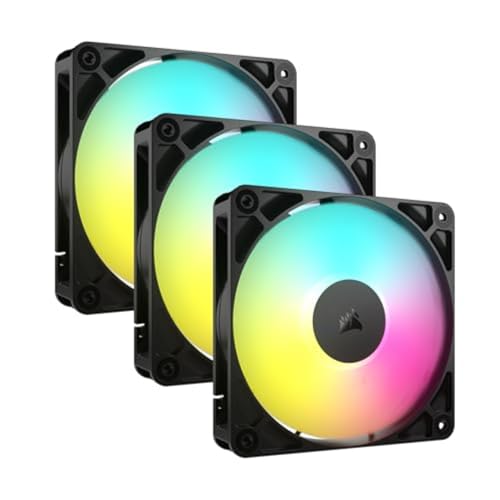
- Up to 72.8 CFM airflow
- 2.8mm-H2O static pressure
- Daisy-chain PWM and ARGB connections
Best For: Radiators, heatsinks, and high-airflow builds
Quiet Smart Cooling
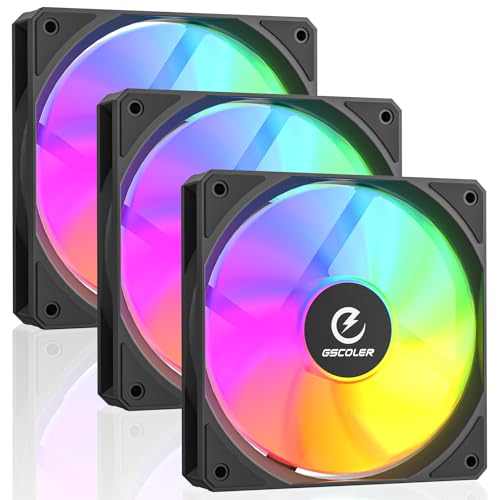
- 58.06 CFM airflow
- 25.6 dBA stated noise level
- PWM and daisy-chain ARGB setup
Best For: Quiet, versatile gaming and workstation builds
High-Pressure RGB Pick – ARCTIC P12 Pro A-RGB 3-Pack
For gaming PCs that need strong airflow through radiators, mesh panels, or restrictive vents, the ARCTIC P12 Pro A-RGB 3-pack is a performance-focused option. Its 4-pin PWM control spans up to 3000 RPM, while the fluid dynamic bearing and redesigned blades support efficient operation across a broad speed range.
Best For: Gamers who want high-static-pressure cooling fans for gaming PCs with addressable RGB lighting.
Pros:
- High static pressure for radiators and restrictive panels
- Wide 600–3000 RPM PWM range with a 0 RPM mode below 5% PWM
- Fluid dynamic bearing and precision balancing support smooth operation
- Three-fan pack includes 5V digital RGB lighting
Cons:
- High maximum speed may be unnecessary for basic case ventilation
- Requires compatible 4-pin PWM and 5V ARGB connections
This is the strongest choice here for demanding airflow setups, particularly when a radiator or restrictive intake calls for high static pressure. The three-pack also makes coordinated cooling and lighting easier.
Quiet RGB Case Upgrade – ASUS Prime MR120 ARGB 3-Pack
The ASUS Prime MR120 ARGB triple pack suits builders seeking balanced, quiet computer cooling fans for gaming PCs. These 120mm PWM fans reach 1600 RPM, produce up to 58 CFM of airflow, and add dual-sided lighting from 20 addressable RGB LEDs per fan.
Best For: Gaming PC builders who prioritize quiet case airflow and coordinated Aura Sync lighting.
Pros:
- Up to 21 dB(A) operating noise according to the supplied specifications
- 28mm-thick frame is designed for cooling performance
- 20 addressable RGB LEDs provide circular, dual-sided illumination
- PWM control supports speeds up to 1600 RPM
Cons:
- Lower maximum speed than performance-focused 3000 RPM fans
- Requires separate 4-pin PWM and 3-pin ARGB connections
The MR120 is a well-rounded case-fan package for a quieter, visually coordinated build. Its moderate speed ceiling favors everyday chassis cooling over aggressive radiator performance.
Quiet Performance Favorite – Noctua NF-P12 redux-1700 PWM
The Noctua NF-P12 redux-1700 PWM is a single 120mm fan for builders who want dependable, quiet computer cooling fans for gaming PCs. Its pressure-optimized blade design is intended for CPU coolers, water-cooling radiators, and chassis ventilation, with automatic motherboard control through a 4-pin PWM connector.
Best For: Quiet gaming builds that need a versatile fan for a cooler, radiator, or case.
Pros:
- Pressure-optimized design supports radiators and CPU coolers
- 4-pin PWM control adjusts up to 1700 RPM
- Rated noise level is 25.1 dB(A)
- Includes a stated six-year manufacturer warranty
Cons:
- Sold as a single fan rather than a multipack
- No RGB lighting is listed
This is the practical pick when acoustic balance and broad compatibility matter more than lighting or maximum speed. The single-fan format works well for targeted upgrades, while its pressure-focused design keeps it suitable for both air and liquid cooling applications.
Budget Three-Fan Value – DARKROCK 120mm Case Fans
The DARKROCK three-pack offers a straightforward way to add computer cooling fans for gaming PCs on a budget. Each 120mm fan uses a 3-pin connection, reaches 1200 RPM, and includes silicone cushions intended to reduce vibration during case ventilation.
Best For: Affordable multi-fan case airflow upgrades using standard 3-pin motherboard connections.
Pros:
- Three 120mm fans are included in the pack
- Silicone cushions help absorb vibration
- Hydraulic bearings are designed for stable rotation and up to 30,000 hours of use
- Simple 3-pin installation is compatible with standard desktop cases
Cons:
- 3-pin connection does not provide the supplied 4-pin PWM control features
- 1200 RPM and 47.8 CFM are modest compared with higher-performance options
- Noise is rated at up to 32.1 dB(A)
Choose the DARKROCK pack for basic front, rear, or top-case ventilation when low cost and quantity are the priorities. It is less suited to users seeking advanced speed control, RGB lighting, or maximum radiator pressure.
Versatile 12V Replacement – 120mm Dual-Ball Cooling Fan 2-Pack
For builders who need computer cooling fans for gaming PCs or other 12V equipment, this two-pack offers straightforward air cooling at 1,800 RPM. Check your wiring first: its 2-pin XH2.54 connector is not designed for standard PC fan headers.
Best For: 12V devices, replacement ventilation, and projects that specifically support a 2-pin XH2.54 connection.
Pros:
- Two 120mm fans with dual-ball bearings and a rated 1,800 RPM speed.
- Supplies up to 66 CFM of airflow with listed noise below 33 dB.
- Mesh protective covers help prevent blade contact and block dust.
Cons:
- Only compatible with devices supporting a 2-pin XH2.54 connector.
- Does not use a standard 4-pin PWM PC fan connection.
This is a practical replacement set for compatible 12V cooling applications, but standard gaming PC builds may need an adapter or a different fan interface.
ARGB Airflow Expansion – 7-Pack 120mm PWM PC Fans
This seven-fan kit is aimed at gaming PC builders who want computer cooling fans for gaming PCs with coordinated ARGB lighting and mixed airflow. It includes four forward-blade fans and three reverse-blade fans, allowing more flexible case placement.
Best For: Desktop gaming builds needing multiple 120mm PWM fans, reverse-blade airflow options, and ARGB lighting.
Pros:
- Includes four forward fans and three reverse fans for flexible airflow planning.
- 4-pin PWM control supports motherboard-based speed management.
- 28 ARGB LEDs provide infinity-mirror lighting, with a listed 1,550 RPM maximum speed.
- Listed noise level is 19 dB.
Cons:
- The seven-fan quantity may be more than smaller cases require.
- ARGB compatibility and synchronization depend on the available motherboard connection.
With its balanced 1,550 RPM operating target and mixed blade layout, this kit suits larger cases or complete airflow refreshes where lighting is part of the build plan.
Quiet PWM Upgrade – Thermalright TL-C12C-S ARGB 5-Pack
For a coordinated case or CPU-cooling refresh, these Thermalright fans provide five 120mm computer cooling fans for gaming PCs with 4-pin PWM control and ARGB lighting. Their S-FDB bearings, 66.17 CFM airflow rating, and up to 1,550 RPM speed target cooling with controlled noise.
Best For: Desktop builders outfitting a case, radiator, or CPU cooler with PWM control and synchronized ARGB lighting.
Pros:
- Five 120mm fans provide a convenient multi-fan upgrade set.
- 4-pin PWM control can adjust fan speed according to motherboard temperature.
- S-FDB bearings are designed to reduce blade shake and noise.
- Offers 66.17 CFM airflow, 1.53 mm H2O air pressure, and up to 1,550 RPM.
Cons:
- ARGB effects require a compatible motherboard connection for synchronization.
- Five fans may exceed the needs of compact or minimally ventilated cases.
This is a well-rounded option for a larger gaming build, especially when you want one fan family across the case and CPU cooling system rather than mixing models.
Immersive RGB Value – DARKROCK Black F120 3in1 120mm Fans
For builders shopping for computer cooling fans for gaming PCs, the DARKROCK Black F120 3-in-1 kit combines 120mm compatibility with layered infinity-mirror ARGB effects. Its nine-blade design, PWM speed control, and hydraulic bearing make it a practical choice for everyday chassis cooling.
Best For: Gaming PC builds that prioritize distinctive lighting and broadly compatible 120mm cooling.
Pros:
- Infinity-mirror lighting creates multi-layered visual effects.
- PWM control adjusts fan speed from 800 to 1600 RPM.
- Hydraulic bearing and rubber pads support quieter operation.
- Three fans suit many cases, air coolers, and water-cooling systems.
Cons:
- Listed airflow is 46.7 CFM, lower than some alternatives in this roundup.
- The listed power connector is 3-pin, so buyers should confirm motherboard compatibility.
The F120 3-in-1 stands out when appearance matters as much as basic cooling. Check your case clearance and lighting-header requirements before buying.
Radiator-Ready Performance – CORSAIR RS120 ARGB Triple Pack
The CORSAIR RS120 ARGB triple pack is a strong option among computer cooling fans for gaming PCs, especially when you need airflow through a radiator or heatsink. Daisy-chain wiring simplifies installation while PWM control allows speeds up to 2,100 RPM.
Best For: Gaming PCs using radiators or heatsinks and builders who want high airflow with simplified fan cabling.
Pros:
- Produces up to 72.8 CFM airflow at speeds up to 2,100 RPM.
- High static pressure of 2.8mm-H2O helps push air through obstructions.
- Daisy-chain design reduces the number of motherboard connections required.
- Eight LEDs per fan provide customizable motherboard-controlled ARGB lighting.
Cons:
- Listed noise level is 36 dB, so maximum-speed operation may be noticeable.
- Customizable lighting requires a compatible motherboard ARGB connection.
With high airflow, AirGuide vanes, and radiator-friendly static pressure, the RS120 is geared toward performance-oriented cooling layouts. Its five-year manufacturer warranty is an additional benefit for long-term ownership.
Quiet Smart Cooling – FA120B ARGB 120mm Fan 3 Pack
The FA120B 3-pack offers a balanced approach to computer cooling fans for gaming PCs, pairing 58.06 CFM airflow with PWM speed adjustment and a stated 25.6 dBA noise level. Its 5V 3-pin ARGB and daisy-chain design also help keep a multifan build organized.
Best For: Quiet gaming, workstation, or mixed-use builds needing versatile case, CPU-cooler, or radiator fans.
Pros:
- Delivers 58.06 CFM airflow for chassis, cooler, and radiator use.
- PWM control adjusts speed according to system temperature.
- Eight silicone pads help reduce vibration transfer.
- Daisy-chain setup and broad ARGB motherboard compatibility simplify installation.
Cons:
- Its maximum listed speed is lower than the CORSAIR option in this roundup.
- ARGB lighting requires a compatible 5V 3-pin motherboard header or controller.
The FA120B is a sensible value-oriented pick when low reported noise and flexible installation are priorities. Its moderate speed range makes it better suited to balanced cooling than maximum-performance tuning.
How We Picked the Best Computer Cooling Fans for Gaming PCs
We focused on practical features that affect real-world PC cooling: fan size, rated speed range, PWM control, airflow design, bearing type, noise considerations, included accessories, and the number of fans in each pack. We also considered whether each model suits intake, exhaust, radiator, or general case use.
Because specifications and included hardware vary, confirm the manufacturer’s current details and your case’s compatibility before ordering. RGB fans may also require a compatible motherboard header, controller, or adapter.
Quick Comparison
| Best For | What to Look For | Recommended Type |
|---|---|---|
| Maximum airflow | High RPM range and strong airflow rating | Performance-focused PWM fans |
| Quiet gaming PCs | Low-speed control and quality bearings | Quiet PWM fans with broad speed ranges |
| RGB builds | 5V addressable RGB and synchronization | ARGB multi-packs |
| Large upgrades | Several matching fans at a low per-fan cost | Five- or seven-fan bundles |
| Simple replacement | Basic power connection and standard sizing | Non-RGB 120 mm case fans |
Key Buying Factors for Computer Cooling Fans for Gaming PCs
Airflow, Static Pressure, and Placement
Airflow-focused fans work well as unrestricted front or bottom intakes, while static-pressure designs are better suited to radiators, dust filters, and tight front panels. A balanced setup usually places intake fans at the front or bottom and exhaust fans at the rear or top.
PWM Control and Speed Range
Four-pin PWM fans let the motherboard adjust speed based on temperature, making it easier to balance cooling and noise. A wide RPM range is useful because the fan can run quietly at idle and increase speed during gaming. Zero-RPM or very low minimum-speed operation can reduce idle noise, but motherboard support and fan-curve settings still matter.
Size, Connectors, and Compatibility
Most options here are 120 mm, but check your case’s mounting points, radiator clearance, cable length, and available headers. ARGB uses a 5V, three-pin connection and is not interchangeable with 12V, four-pin RGB. Daisy-chain connectors or included splitters can simplify multi-fan installations, while basic two-pin DC fans may require different control hardware.
Noise, Bearings, and Lighting
Bearing design affects longevity and operating sound, but perceived noise also depends on fan speed, case panels, vibration, and airflow restrictions. RGB adds visual appeal but can increase cable complexity. If lighting is unimportant, a non-RGB model may deliver a cleaner and simpler build.
Who Should Buy Which Computer Cooling Fans for Gaming PCs?
Choose a premium high-speed PWM fan if you have a powerful CPU or GPU, restrictive filters, or a compact case where cooling headroom matters. Choose a quiet fan for an office-bedroom setup or a system that spends substantial time at low loads.
Choose an ARGB triple pack if you want coordinated lighting with fewer separate purchases. Choose a five- or seven-fan bundle for a new full-size build or a multi-zone airflow layout, provided your motherboard or controller has enough connections. Choose a basic non-RGB replacement when reliability, low cost, and straightforward installation are more important than customization.