A quieter PC starts with the right airflow strategy. The best quiet computer cooling fans reduce distracting motor and bearing noise while moving enough air to protect components from heat.
This roundup covers 120mm and 140mm case fans, compact 80mm and 92mm options, laptop cooling pads, and USB-powered fan systems for different builds and workloads.
Best 10 Quiet Computer Cooling Fans Picks for 2026
Best Multi-Fan Value

- Five 120mm fans for multi-fan setups
- Pressure-optimised for cases, heatsinks, and radiators
- Fluid Dynamic Bearings and 0.3-sone noise rating
Best For: Quiet desktop airflow on a budget
Best Laptop Cooling Stand

- Five quiet fans with selectable fan groups
- Six adjustable height settings for ergonomic use
- Fits 12- to 17-inch laptops and includes two USB ports
Best For: Adjustable laptop cooling for work or gaming
Best USB Electronics Cooler

- Two 120mm USB-powered fans
- Multi-speed controller with 19 dBA total noise
- Dual-ball bearings support flat or upright placement
Best For: Quiet cooling for consoles, AV gear, and cabinets
Best PWM RGB Trio
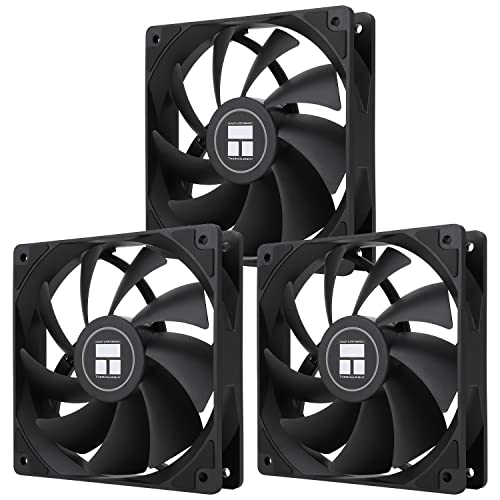
- Three 120mm fans with 4-pin PWM control
- Up to 66.17 CFM per fan at 1550 RPM
- ARGB lighting with up to 17 supported effects
Best For: PWM-controlled airflow for RGB desktop builds
Best Overall Airflow

- 4-pin PWM control for automatic speed adjustment
- Pressure-optimized 120mm design
- 25.1 dB(A) maximum noise rating
Best For: Quiet, versatile cooling for cases, heatsinks, and radiators
Best Low-Speed Control
be quiet! Pure Wings 3 120mm PWM

- 4-pin PWM speed control
- Very low minimum RPM for quiet operation
- 49.9 CFM airflow with radiator-focused frame
Best For: Gaming PCs and radiator setups needing quiet PWM control
High-Airflow Premium Pick

- Up to 97.4 CFM airflow
- Selectable PWM speed modes
- Fluid-dynamic bearing for smooth operation
Best For: Performance PCs, radiators, and heatsinks
Compact Budget Quiet Pick
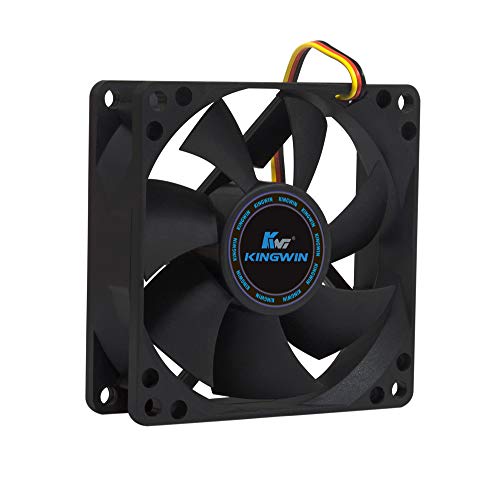
- 25 dB noise specification
- Standard 80mm mounting fit
- 30 CFM airflow with long-life bearing
Best For: Compact cases, desktops, and home servers
Best Small PWM Value
Thermalright TL-P9 92mm PWM Fan

- 4-pin PWM temperature control
- 23.85 dB noise specification
- 32.77 CFM airflow at up to 2200 RPM
Best For: Compact cases, radiators, and CPU coolers
Best Multi-Fan Value – ARCTIC P12 120mm 5-Pack
The ARCTIC P12 5-pack is a practical choice for building a quieter desktop airflow setup on a budget. These 120mm quiet computer cooling fans use a pressure-optimised design, making them suitable for case ventilation as well as heatsinks and radiators.
Best For: Desktop builders who need several quiet 120mm fans for case airflow, radiators, or heatsinks.
Pros:
- Five fans provide broad coverage for a multi-fan installation.
- Pressure-optimised blades deliver up to 56.3 CFM and 2.2 mmH₂O of static pressure.
- Fluid Dynamic Bearings are designed for quiet operation and extended service life.
- Rated noise level is 0.3 sone, with a six-year warranty.
Cons:
- Uses a 3-pin connector rather than PWM speed control.
- Runs at up to 1800 RPM, so it may be more audible at maximum speed than slower fans.
Choose the P12 if you want dependable airflow and multiple matching fans in one package. Its 3-pin connection is worth checking against your motherboard or fan controller before buying.
Best Laptop Cooling Stand – Kootek 5-Fan Laptop Cooler
The Kootek cooling pad combines five quiet fans with an adjustable laptop stand, giving portable computers extra airflow without requiring an internal upgrade. Its selectable fan groups and broad 12- to 17-inch compatibility make it a flexible option for work, gaming, or media use.
Best For: Laptop users who want adjustable cooling, ergonomic height settings, and USB connectivity in one stand.
Pros:
- Five fans offer configurable operation: one, four, or all five can run.
- Six height settings help adjust the viewing and typing angle.
- Supports laptops from 12 to 17 inches and includes front stoppers to help prevent slipping.
- Built-in dual USB hub adds connectivity for peripherals.
Cons:
- The blue LED lighting cannot be described as a no-light design.
- For best performance, the supplied cable should connect to a 5V 1A adapter; otherwise fans may run slowly or fail to spin.
- Its 1.16 kg weight makes it less portable than a simple laptop stand.
This is a useful all-in-one cooling and positioning accessory rather than a replacement for internal laptop cooling. The selectable fan controls let you balance airflow and noise for different tasks.
Best USB Electronics Cooler – AC Infinity MULTIFAN S7
The AC Infinity MULTIFAN S7 is a convenient pair of quiet computer cooling fans for electronics, consoles, cabinets, and other equipment with a USB port. A multi-speed controller lets you tune airflow and noise, while the dual-fan design can move up to 104 CFM in total.
Best For: Cooling AV equipment, game consoles, receivers, DVRs, cabinets, or computers through USB power.
Pros:
- Dual 120mm fans provide up to 104 CFM of combined airflow.
- Multi-speed control helps balance cooling performance and the 19 dBA total noise rating.
- USB power works with ports commonly found on AV electronics and game consoles.
- Dual-ball bearings support flat or upright placement and are rated for a 67,000-hour lifespan.
Cons:
- This is an external USB cooling solution, not a standard internal PC case-fan replacement.
- The fans are supplied as a pair rather than a larger multi-fan pack.
- Its 12V, 2-pin design may require compatibility checking for non-USB applications.
The MULTIFAN S7 stands out when flexible placement and simple USB installation matter more than motherboard integration. Its controller is especially useful for reducing unnecessary fan speed during lighter workloads.
Best PWM RGB Trio – Thermalright TL-C12C X3
The Thermalright TL-C12C X3 combines three 120mm fans with 4-pin PWM control, allowing a compatible motherboard to adjust speed according to temperature. These quiet computer cooling fans also add addressable RGB lighting, making them suitable for performance-focused builds where airflow and appearance both matter.
Best For: Desktop builders who want three PWM-controlled 120mm fans with integrated ARGB lighting.
Pros:
- 4-pin PWM control enables automatic motherboard-based speed adjustment.
- Three fans provide up to 66.17 CFM each at a maximum 1550 RPM.
- S-FDB bearings are designed to reduce blade shake, noise, and wear.
- ARGB lighting supports up to 17 effects and motherboard synchronisation.
Cons:
- Noise is rated at up to 25.6 dBA, so it is not the quietest option at full speed.
- ARGB features require compatible motherboard support and connections.
- Static pressure is listed at 1.53 mmH₂O, lower than the ARCTIC P12’s supplied rating.
This trio is a strong fit for a modern gaming or showcase PC that can use PWM and ARGB headers. Its temperature-based control should help avoid unnecessary noise during lighter workloads.
Best Overall Airflow – Noctua NF-P12 redux-1700 PWM
The Noctua NF-P12 redux-1700 PWM is a strong choice when you want quiet computer cooling fans that can also handle demanding airflow tasks. Its pressure-optimized design suits CPU coolers, radiators, and case ventilation, while 4-pin PWM control allows the motherboard to reduce speed at idle.
Best For: Quiet, adaptable cooling for CPU heatsinks, radiators, and desktop cases.
Pros:
- 4-pin PWM control supports automatic speed adjustment.
- Pressure-optimized 120mm design provides strong airflow and static pressure.
- 1700 RPM maximum speed balances cooling performance and noise.
- Includes a 6-year manufacturer warranty and a stated MTTF above 150,000 hours.
Cons:
- Its 25.1 dB(A) rating is not the lowest among all fan designs.
- The 120mm frame requires compatible mounting space.
Choose this model if you want one fan that can move substantial air when needed but remain very quiet when controlled by a compatible motherboard.
Best Compact Quiet Option – ARCTIC P9 Silent 92mm
The ARCTIC P9 Silent is a practical pick for smaller desktops that need quiet computer cooling fans in a 92mm format. Its fixed 1900 RPM speed, voltage-control compatibility, and static-pressure-focused design make it suitable for cases, heatsinks, and radiators with increased air resistance.
Best For: Compact desktop builds and replacement cooling where a 92mm fan is required.
Pros:
- Compact 92mm size fits smaller mounting locations.
- High static pressure supports cooling through heatsinks and radiators.
- Alloy-and-lubricant bearing design is intended to reduce friction and heat buildup.
- Speed can be adjusted through voltage control despite its 1900 RPM rated speed.
Cons:
- Uses a 3-pin connector rather than 4-pin PWM control.
- Its 1900 RPM speed is listed as fixed unless voltage control is used.
- Airflow and fit are more limited than a larger 120mm fan.
This fan makes the most sense when space is limited and your system supports voltage-based fan control rather than requiring PWM adjustment.
Best Low-Speed Control – be quiet! Pure Wings 3 120mm PWM
The be quiet! Pure Wings 3 is designed for users seeking quiet computer cooling fans with useful low-speed control and strong top-end airflow. Its 4-pin PWM connector, low minimum RPM capability, and radiator-oriented frame make it a flexible option for gaming PCs and demanding case configurations.
Best For: Gaming PCs and radiator or case setups that benefit from quiet low-speed operation.
Pros:
- 4-pin PWM connection supports a broad speed-control range.
- Very low minimum RPM enables quiet operation.
- Seven airflow-optimized blades are designed to reduce noise while maintaining performance.
- Radiator-optimized frame and 49.9 CFM airflow suit demanding configurations.
Cons:
- Its listed maximum noise level is 25.5 dB.
- The included warranty is two years, shorter than some competing options.
- Requires a compatible 120mm mounting position.
Consider this model when PWM flexibility matters most: it can run quietly at low speeds yet still provide useful airflow for higher-demand cooling situations.
High-Airflow Premium Pick – Silent Wings Pro 4 140mm
The be quiet! Silent Wings Pro 4 is a strong choice for quiet computer cooling fans when you need substantial airflow for a radiator, heatsink, or performance-focused PC. Its PWM control, fluid-dynamic bearing, and selectable speed modes let you prioritize low noise or higher cooling output.
Best For: High-performance gaming PCs, radiators, and heatsinks where quiet regular-speed operation and strong airflow matter.
Pros:
- Moves up to 97.4 CFM of air.
- Speed switch offers medium, high, and ultra-high-speed settings.
- Fluid-dynamic bearing and six-pole motor support smooth, low-vibration operation.
- Funnel-shaped air outlet and small tip clearance help produce high air pressure.
Cons:
- Its maximum listed noise level is 36.8 dB.
- Only one fan is included.
- It is a 140mm fan, so case compatibility must be checked.
This is the most performance-oriented option in the group. It is particularly appealing when you want quiet computer cooling fans during normal use but still need the option to increase speed for demanding workloads.
Compact Budget Quiet Pick – Kingwin 80mm Silent Fan
The Kingwin 80mm Silent Fan is a practical option for quiet computer cooling fans in smaller cases, office desktops, and home servers. Its 3-pin connection, 25 dB noise rating, and 30 CFM airflow make it suited to straightforward replacement and case-ventilation duties.
Best For: Standard 80mm mounts, compact desktop cases, CPU coolers, home servers, and mining-rig ventilation.
Pros:
- Quiet 25 dB operating specification.
- Compatible with standard 80mm mounts.
- 30 CFM airflow helps reduce heat buildup.
- Long-life bearing is designed for extended use.
Cons:
- Its 3-pin connector does not provide the PWM control described for the other 4-pin models.
- 80mm size and 30 CFM airflow are more limited than larger, higher-output fans.
- Only one fan is included.
Choose this model when you need an uncomplicated, compact replacement fan rather than maximum airflow. It offers a low-noise specification and broad use across standard 80mm mounting locations.
Best Small PWM Value – Thermalright TL-P9 92mm PWM Fan
The Thermalright TL-P9 combines a compact 92mm format with 4-pin PWM control, making it a flexible choice among quiet computer cooling fans. Its 23.85 dB noise specification, vibration-damping pads, and S-FDB bearing are designed to balance low-noise operation with useful cooling performance.
Best For: Cases, radiators, CPU coolers, and compact systems that need automatic motherboard-controlled fan speed.
Pros:
- 4-pin PWM control can adjust speed according to motherboard temperature.
- 23.85 dB noise specification supports quiet operation.
- Up to 32.77 CFM airflow at 2200 RPM.
- Soft silicone feet and an S-FDB bearing help reduce vibration and noise.
Cons:
- Its 92mm size may not fit cases designed for 80mm or 140mm fans.
- Only one fan is included.
- Maximum airflow is lower than the larger Silent Wings Pro 4.
The TL-P9 is a sensible middle ground for compact builds. PWM automation and vibration-reducing construction make it a good fit when you want quiet computer cooling fans without giving up the ability to ramp cooling during heavier use.
How We Picked These Quiet Computer Cooling Fans
We selected these models for their balance of acoustic performance, airflow, compatibility, control options, and value. The list includes common 120mm fans for mainstream cases, larger 140mm fans for high airflow at lower speeds, compact fans for restricted spaces, and external cooling solutions for laptops or small work areas.
We also considered useful features such as PWM speed control, pressure-optimized blade designs, fluid or dynamic bearings, included accessories, and multi-pack pricing. A fan advertised as quiet is not automatically silent, so the best choice depends on how fast it must run and where it will be installed.
Quick Comparison
| Best For | Recommended Type | What to Look For |
|---|---|---|
| Typical desktop case | 120mm PWM fan | Good airflow, low minimum speed, four-pin control |
| High-airflow gaming PC | 140mm PWM fan | Large blades, strong airflow, adjustable curve |
| Radiator or restrictive filter | Static-pressure fan | Pressure-optimized design and durable bearing |
| Small case or older hardware | 80mm or 92mm fan | Exact mounting size and connector compatibility |
| Laptop or USB setup | Cooling pad or USB fan | Adjustable speed and stable positioning |
Key Buying Factors for Quiet Computer Cooling Fans
Size and Mounting Compatibility
Check the case, cooler, or laptop dimensions before buying. A 120mm fan is a common desktop standard, while 140mm models can deliver more airflow at lower rotational speeds. Compact 80mm and 92mm fans are useful only when the mounting holes and clearance match.
PWM Control and Speed Range
A four-pin PWM fan can respond to motherboard temperature settings and slow down during light workloads. This is often more important than the maximum RPM because lower speeds usually produce less audible noise. Three-pin fans may still work, but control depends on the motherboard or controller.
Airflow Versus Static Pressure
Choose an airflow-focused fan for unobstructed case intake or exhaust positions. For dust filters, tight vents, heatsinks, or radiators, a pressure-optimized model is generally better suited to pushing air through resistance.
Bearing Quality and Acoustic Character
Fluid-dynamic, sleeve, and other long-life bearing designs can affect both durability and sound. Listen for tonal hum, clicking, or rattling—not just the published decibel figure. Fan placement, vibration, and the case panel can also change perceived noise.
Connector, Accessories, and Value
Confirm whether the fan includes a controller, splitter, screws, vibration pads, or USB power cable. Multi-packs can be economical for a complete build, while premium single fans may be worthwhile when refined acoustics and long-term reliability matter most.
Who Should Buy Which Quiet Computer Cooling Fans?
For most desktop builders, a 120mm PWM fan is the safest starting point. A multi-pack makes sense when replacing several stock fans, while a pressure-optimized option is better for filtered intakes or radiator cooling. Choose a 140mm model when your case supports it and you want high airflow with fewer RPMs.
Small-form-factor builders should prioritize exact 80mm or 92mm compatibility rather than forcing a larger fan. Laptop users should consider a cooling pad or USB fan system, especially when the computer frequently runs hot on a desk. Finally, anyone sensitive to noise should use motherboard fan curves to keep idle speeds low and increase cooling only when temperatures demand it.