The best quiet computer liquid coolers balance low fan noise with dependable thermal performance, making them useful for gaming PCs, workstations, and overclocked systems.
This roundup compares 10 current 240mm and 360mm all-in-one coolers, focusing on acoustics, radiator size, compatibility, installation features, and value.
Best 10 Quiet Computer Liquid Coolers Picks for 2026
Quiet Performance Pick

- Three-chamber pump targets lower turbulence and noise
- Three Silent Wings 4 PWM fans included
- Supports Intel, AMD, and Threadripper sockets
Best For: High-performance overclocking builds
Low-Noise 240mm Value

- Pump rated at a quiet 20 dBA
- Daisy-chainable RS120 fans simplify wiring
- Pre-applied thermal paste aids installation
Best For: Compact, quiet desktop builds
Quiet Non-RGB Cooling
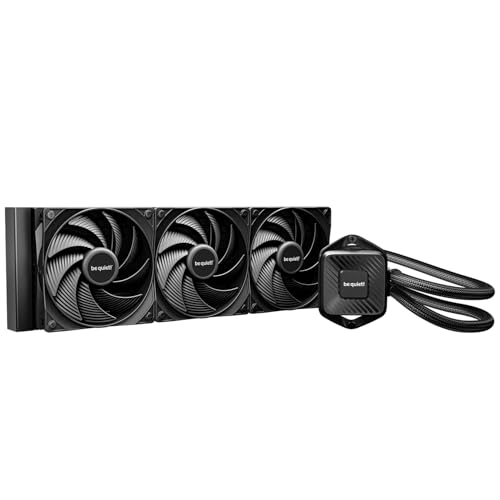
- Six-pole pump targets smooth, quiet operation
- Three Pure Wings 3 fans rated at 30.9 dB(A) maximum
- Daisy-chained fans and refill port improve practicality
Best For: Non-RGB demanding and lightly overclocked systems
ARGB Cooling Alternative

- 360mm radiator with three 120mm ARGB PWM fans
- Large copper base plate supports heat transfer
- Broad Intel and AMD socket compatibility
Best For: ARGB-focused 360mm desktop builds
Best RGB Performance
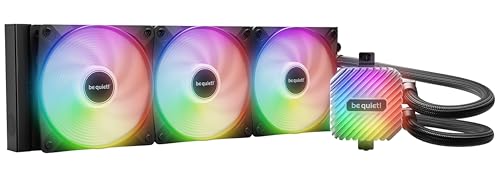
- 360mm cooler for high-performance CPUs
- Three PWM ARGB fans included
- Hub supports six PWM and six ARGB devices
Best For: Overclocked systems with customizable lighting
Best Integrated Design
Liquid Freezer III Pro 360 A-RGB

- P12 PRO fans target low-speed efficiency
- Offset mounting improves hotspot contact
- Integrated VRM fan and cable management
Best For: High-load Intel or AMD desktop builds
Best for Near-Silent Builds

- 22.5 dB listed noise level
- Pump noise absorber reduces vibration
- Three premium NF-A12x25 G2 fans
Best For: Near-silent gaming PCs and workstations
Quiet Value Pick

- Integrated pump helps reduce motor resonance
- Supports AM4, AM5, LGA 1700, and LGA 1851
- 240mm radiator with dual ARGB PWM fans
Best For: Mainstream desktop builds seeking quiet, compact liquid cooling
Quiet Performance Pick – be quiet! Silent Loop 3 360mm
For demanding CPUs and overclocking, the be quiet! Silent Loop 3 360mm is one of the more compelling quiet computer liquid coolers. Its three-chamber pump, dampening, and three Silent Wings 4 high-speed fans are designed to reduce turbulence and operating noise while providing strong cooling.
Best For: Overclocking-focused builds that need high cooling capacity and broad Intel, AMD, or Threadripper compatibility.
Pros:
- Three-chamber, adjustable pump is designed to reduce turbulence and noise
- Includes three Silent Wings 4 PWM high-speed fans with radiator-corner damping
- Wide CPU plate coverage supports Threadripper platforms
- Accessible refill port and 3-year warranty are useful for long-term ownership
Cons:
- Reported noise level is 38.8 dB, so it is not the quietest listed option
- Its 360mm radiator requires a compatible case
- ARGB lighting may not suit an understated, non-RGB build
The Silent Loop 3 stands out when cooling headroom matters as much as acoustics. Verify your case supports a 360mm radiator and your motherboard supports the listed socket before buying.
Low-Noise 240mm Value – CORSAIR Nautilus 240 RS
The CORSAIR Nautilus 240 RS is a practical choice among quiet computer liquid coolers for mainstream desktop builds. Its pump is rated at 20 dBA, while the included RS120 fans combine high static pressure with AirGuide technology for radiator airflow.
Best For: Users who want a compact 240mm AIO with low reported pump noise and simple motherboard connections.
Pros:
- 20 dBA pump rating supports a low-noise setup
- Pre-applied thermal paste speeds installation
- RS120 fans can be daisy-chained to reduce cable clutter
- Supports Intel LGA 1851 and 1700 plus AMD AM5 and AM4
Cons:
- 240mm radiator provides less surface area than the listed 360mm models
- Included configuration is non-RGB
- Designed for desktop compatibility rather than the broader platform coverage of some alternatives
Choose the Nautilus 240 RS when a 240mm radiator fits your case and straightforward wiring is important. Its low pump-noise specification makes it especially appealing for quieter everyday systems.
Quiet Non-RGB Cooling – be quiet! Pure Loop 3 360mm
The be quiet! Pure Loop 3 360mm focuses on quiet, high-capacity cooling without RGB lighting. Its six-pole, three-phase pump is designed for smooth operation, and the three Pure Wings 3 fans use high static pressure and daisy-chaining to cool the radiator efficiently.
Best For: Non-RGB systems needing 360mm cooling for demanding applications or slight overclocking.
Pros:
- Six-pole, three-phase pump is designed for smooth, quiet operation
- Three Pure Wings 3 fans are rated at 30.9 dB(A) at maximum speed
- Daisy-chain function reduces cable clutter and header requirements
- Flexible tubes and an accessible refill port simplify maintenance
Cons:
- Reported overall noise level is 37.2 dB
- 360mm radiator needs sufficient case clearance
- Socket support does not include Threadripper in the supplied specifications
Pure Loop 3 is a strong fit for buyers who want substantial radiator capacity and a clean, non-RGB presentation. Its refill port and fan daisy-chaining add practical convenience beyond basic cooling performance.
ARGB Cooling Alternative – Antec Ultra 360 ARGB
The Antec Ultra 360 ARGB combines a large 360mm radiator with ARGB lighting and a reported 33.05 dB noise level. Its high-efficiency pump, large copper base plate, and three 120mm PWM fans make it a suitable option for builders who want performance and visual effects in the same cooler.
Best For: ARGB-equipped desktop builds that need broad Intel and AMD socket support.
Pros:
- 360mm radiator provides a substantial cooling platform
- Three 120mm ARGB PWM fans deliver strong airflow through the radiator
- Large copper base plate is designed to improve thermal conductivity
- Supports Intel LGA 115X, 1200, 1366, 1700, 1851, 20XX and AMD AM4/AM5
Cons:
- 33.05 dB reported noise level is higher than the CORSAIR Nautilus pump rating
- ARGB pump and fan connections add lighting-related wiring
- Two-year warranty is shorter than the CORSAIR model’s listed five years
The Ultra 360 ARGB is best suited to a visual showcase build where lighting matters alongside cooling. Confirm that your case supports a 360mm radiator and that your motherboard or controller accommodates the separate pump and LED connectors.
Best RGB Performance – Light Loop 360mm Black
For demanding systems that need strong thermal headroom without abandoning visual customization, the be quiet! Light Loop 360mm Black is a compelling option among quiet computer liquid coolers. Its 360mm radiator, three PWM fans, and performance-focused pump design are supported by an ARGB-PWM hub for cleaner component control.
Best For: Overclocked or high-performance systems where cooling capacity, addressable lighting, and centralized fan control all matter.
Pros:
- 360mm all-in-one design with a high-density cold-plate fin stack for modern high-end CPUs.
- Three Light Wings LX 120mm PWM high-speed fans with airflow-optimized blades.
- Includes an ARGB-PWM hub supporting up to six PWM fans and six ARGB components.
- Progressive motor IC is designed to reduce pump switching noise.
Cons:
- Listed noise level reaches 36.8 dB, so it may not suit users prioritizing the lowest possible noise.
- Its extensive ARGB lighting may be unnecessary for understated builds.
The Light Loop 360mm Black balances substantial cooling hardware with extensive lighting control. It is especially attractive when high-load performance and a customizable appearance are more important than achieving the quietest listed operating profile.
Best Integrated Design – Liquid Freezer III Pro 360 A-RGB
The ARCTIC Liquid Freezer III Pro 360 A-RGB combines a 360mm liquid cooler with several design choices aimed at efficient heat transfer and controlled acoustics. Its P12 PRO fans, native offset mounting, integrated VRM fan, and concealed fan cabling make it a practical contender among quiet computer liquid coolers.
Best For: Intel or AMD desktop builders who want strong high-load cooling, integrated VRM airflow, and a cleaner installation.
Pros:
- P12 PRO fans are designed to deliver more power at low speeds while remaining quieter than the P12.
- Native offset mounting targets the CPU hotspot for more efficient heat transfer.
- Integrated PWM-controlled VRM fan helps cool voltage converters.
- Fan cables are integrated into the hose sheathing, leaving one visible motherboard connection.
Cons:
- The cooler weighs 2020 g, making it a substantial installation.
- Its maximum rotational speed of 3000 rpm may appeal more to performance-focused users than silence purists.
- The feature-rich design may be more than needed for modest systems.
With hotspot-oriented mounting and integrated VRM cooling, the Liquid Freezer III Pro 360 A-RGB focuses on sustained performance and installation tidiness. It is a strong fit for users who want efficient cooling features without adding separate VRM airflow hardware.
Best for Near-Silent Builds – Noctua NL-LC1-36
The Noctua NL-LC1-36 is built around acoustic refinement rather than flashy extras. Its Asetek Emma V2 platform, pump noise absorber, 30mm slim radiator, and three NF-A12x25 G2 PWM fans make it one of the most purpose-built quiet computer liquid coolers in this group.
Best For: Near-silent gaming PCs and workstations where low pump noise, vibration control, and premium fan performance take priority.
Pros:
- Listed noise level is 22.5 dB, supported by a three-layer pump soundproofing structure.
- Includes three Noctua NF-A12x25 G2 PWM fans with speed-offset acoustic optimization.
- SecuFirm2 mounting supports Intel and AMD sockets with offset options for hotspot optimization.
- Includes NT-H2 thermal paste and an AM5 thermal paste guard.
Cons:
- The 30mm slim radiator may offer less physical mass than thicker radiator designs.
- It has a premium-focused accessory and mounting package that may exceed basic cooling needs.
- The optional auxiliary VRM fan is sold separately.
The NL-LC1-36 is the clearest choice here for buyers who measure a cooler by acoustic performance. Its listed noise level and dedicated pump damping make it particularly suitable for quiet workspaces and gaming systems where vibration and fan character matter.
Quiet Value Pick – MSI MAG Coreliquid A13 240
The MSI MAG Coreliquid A13 240 is a practical choice for buyers seeking quiet computer liquid coolers in a compact 240mm format. Its integrated three-phase pump is designed to reduce motor resonance, while the dual 120mm ARGB PWM fans provide adjustable airflow for compatible Intel and AMD systems.
Best For: Mainstream desktop builds using AM4, AM5, LGA 1700, or LGA 1851 processors.
Pros:
- Integrated pump and split-flow radiator design help balance cooling with quieter operation.
- Supports AMD AM4/AM5 and Intel LGA 1700/LGA 1851 sockets.
- 390mm evaporation-resistant tubing and included thermal paste simplify installation.
Cons:
- Uses a 240mm radiator rather than the larger 360mm format of some alternatives.
- ARGB lighting may not suit minimalist, non-RGB builds.
With a listed 14.4 dB noise level, the A13 240 stands out as a quiet-focused option for everyday desktop cooling. It is a sensible fit when compatibility, compact radiator sizing, and reduced pump resonance matter more than maximum radiator capacity.
Quiet High-Performance Pick – Cooler Master Atmos Stealth 360
The Cooler Master Atmos Stealth 360 is built for buyers who want quiet computer liquid coolers with a larger 360mm radiator. Its dual-chamber pump targets CPU hotspot cooling, while the pre-installed Mobius fans use PWM control to balance airflow and noise.
Best For: High-performance AMD Ryzen 9 and Intel Core i9 systems that have room for a 360mm radiator.
Pros:
- 360mm radiator and dual-chamber pump are designed for demanding CPUs.
- Pre-installed Mobius fans simplify installation and provide adjustable speeds up to 2,400 RPM.
- Ring Blade fan construction is designed to minimize vibration.
- Supports AMD AM4/AM5 and Intel LGA 1700/LGA 1851 sockets.
Cons:
- Requires more case space than a 240mm liquid cooler.
- Its listed 25 dB noise level is higher than the MSI model’s listed rating.
The Atmos Stealth 360 combines a large radiator with vibration-conscious Mobius fans and adjustable PWM control. It is a strong choice for powerful processors, provided your case supports the larger radiator and you prioritize thermal headroom alongside quiet operation.
Quiet Efficiency Pick – ARCTIC Liquid Freezer III Pro 240
The ARCTIC Liquid Freezer III Pro 240 is a feature-rich option for shoppers comparing quiet computer liquid coolers in a 240mm design. Its P12 PRO fans are engineered for strong airflow at lower speeds, while the integrated VRM fan and offset mounting support targeted cooling around the processor and voltage converters.
Best For: Intel or AMD users who want efficient 240mm cooling with integrated cable management and VRM airflow.
Pros:
- P12 PRO fans are designed to deliver more power and quieter operation, especially at low speeds.
- Offset mounting directs the cold plate toward the CPU hotspot for more efficient heat transfer.
- Integrated VRM fan adds PWM-controlled cooling for motherboard voltage converters.
- Supports AM4, AM5, LGA 1700, and LGA 1851, with a six-year warranty.
Cons:
- The 240mm radiator offers less surface area than a 360mm cooler.
- The integrated VRM fan and offset mounting may make installation less familiar for some builders.
ARCTIC gives this cooler a well-rounded design focused on efficient heat transfer, lower-speed acoustics, and cleaner wiring. It is especially appealing for builders who want a compact radiator while still gaining dedicated VRM cooling and broad socket support.
How We Picked the Best Quiet Computer Liquid Coolers
We selected coolers with a practical combination of low-noise design, effective heat dissipation, current Intel and AMD socket support, and useful installation features. The list includes 240mm models for compact cases and 360mm models for higher sustained loads. We also considered pump and fan design, included controls or lighting, radiator clearance, and whether each cooler is better suited to quiet everyday use, gaming, or overclocking.
Noise performance depends heavily on fan curves, case airflow, CPU power limits, and mounting quality. A cooler that is quiet at idle may become audible under a heavy all-core workload, so the most suitable choice depends on your case and performance target.
Quick Comparison
- Best for high-performance overclocking: 360mm models with robust pumps and three 120mm fans.
- Best for smaller cases: 240mm coolers, provided your chassis supports a two-fan radiator.
- Best for low-noise builds: Models with quiet-focused fans, broad speed control, and a well-tuned pump.
- Best for RGB systems: ARGB-equipped coolers that connect to your motherboard or compatible controller.
- Best for straightforward builds: Units with clear mounting hardware and minimal cable complexity.
Key Buying Factors for Quiet Computer Liquid Coolers
Radiator Size and Case Fit
A 360mm radiator generally offers more cooling capacity and can run its fans at lower speeds, but it requires substantial top or front-panel clearance. A 240mm radiator is easier to install and often works better in mid-tower or compact cases. Check radiator thickness, fan clearance, tube placement, and RAM or motherboard heatsink interference before buying.
Fan and Pump Noise
Look for PWM fans with a wide controllable speed range and a pump that can operate quietly at lower loads. Fan bearings, blade design, and the quality of the included fan curve matter as much as headline RPM figures. A motherboard with adjustable fan and pump headers can help you tune noise without sacrificing peak cooling.
CPU Compatibility and Workload
Confirm support for your exact Intel or AMD socket, particularly if you are using a newer platform. For high-wattage CPUs, rendering, compiling, or sustained overclocking, a 360mm cooler provides more thermal headroom. Gaming-focused systems can often use a well-tuned 240mm model successfully.
Installation, Maintenance, and Features
All-in-one coolers are sealed and require less routine maintenance than custom loops, but radiator dust still affects performance. Consider mounting access, tube flexibility, included controllers, ARGB wiring, warranty coverage, and software requirements before choosing a model.
Who Should Buy Which Quiet Computer Liquid Coolers?
Choose a 360mm cooler if you use a powerful processor, run demanding workloads, or want lower fan speeds during sustained heat output. Select a 240mm model for a smaller case, a moderate-power CPU, or a simpler and often less expensive installation. Buyers prioritizing a quiet office or living-room PC should favor controllable fans and conservative power settings. Enthusiasts who want lighting should verify ARGB header compatibility, while buyers seeking the least complicated setup may prefer a non-RGB configuration with fewer cables. Finally, prioritize exact socket support and case clearance over appearance; the quietest cooler is only useful if it fits correctly and can maintain stable temperatures in your system.