The best RGB computer cooling fans do more than add color to a PC build. They can improve airflow, reduce heat, and give your case a cleaner, more coordinated look.
This roundup compares 10 fan kits and configurations, including affordable multi-packs, premium linkable systems, high-static-pressure options, and reverse-blade designs for showcase builds.
Best 10 RGB Computer Cooling Fans Picks for 2026
Best Value Five-Pack
Thermalright TL-C12C-S ARGB Fans

- Five 120mm fans for broad airflow coverage
- 4-pin PWM control up to 1,550 RPM
- ARGB lighting with S-FDB bearings
Best For: Budget-conscious multi-fan builds
Best Premium LINK System
CORSAIR iCUE LINK LX120 RGB Fans
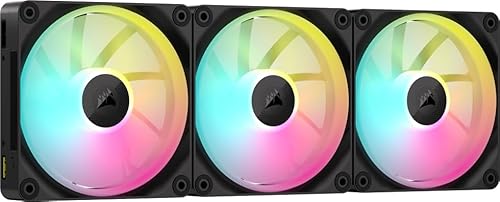
- Dual light loops with 18 LEDs per fan
- Up to 2,400 RPM and 69.9 CFM airflow
- Bridge connectors simplify LINK installation
Best For: Enthusiast iCUE LINK builds
Best 140mm Lighting
Cooler Master MasterFan MF140 Halo
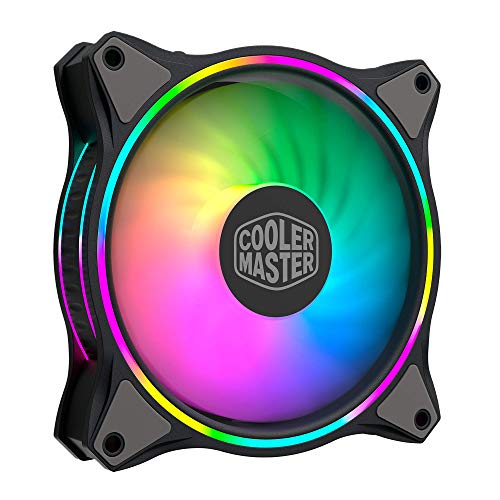
- 140mm PWM fan with duo-ring ARGB
- 24 individually controlled LEDs
- Hybrid blades support case and radiator use
Best For: 140mm ARGB case and cooler layouts
Best Daisy-Chain Value
CORSAIR RS120 ARGB Triple Pack
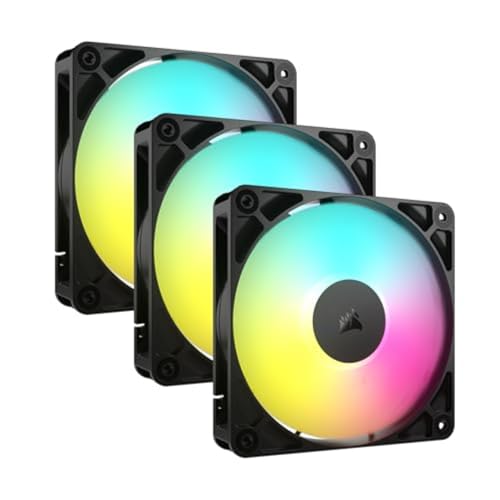
- Daisy-chain fans through shared PWM and ARGB connections
- Up to 2,100 RPM and 72.8 CFM
- 2.8mm-H2O static pressure for radiators
Best For: Neat three-fan radiator or case setups
Best RGB Fan Value Pack
120mm ARGB PWM 5-Pack with Hub

- Includes five 120mm fans
- Hub and remote included
- Up to 53 CFM at 1,300 RPM
Best For: Affordable multi-fan case setups
Best High-Airflow RGB Fans
Thermalright TL-C12C-S X3 ARGB
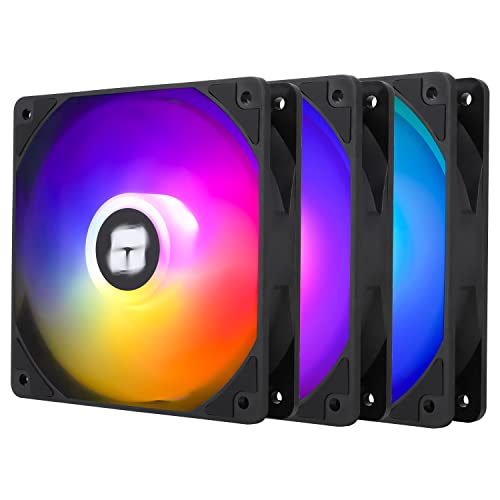
- Up to 66.17 CFM airflow
- PWM control with 1,550 RPM maximum
- S-FDB bearings and motherboard-sync ARGB
Best For: Quiet, airflow-focused PC builds
Reverse-Flow RGB Performance
Corsair RS120-R ARGB Triple Pack

- Reverse rotor keeps intake lighting visible
- Up to 2,100 RPM and 65.82 CFM
- High static pressure for radiators
Best For: RGB-focused intake and radiator setups
Quiet Five-Fan Value
Thermalright TL-C12CW-S ARGB 5-Pack
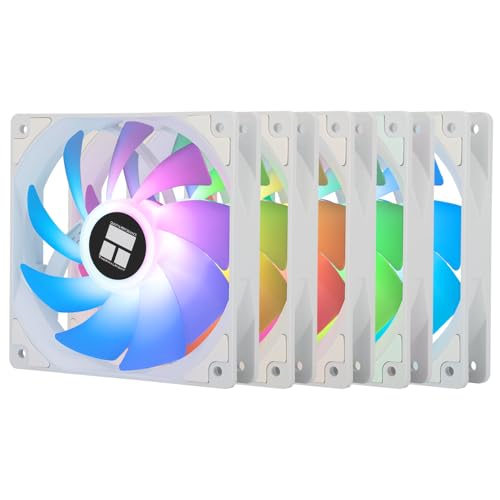
- Five 120mm PWM fans for broad coverage
- Quiet 25.6 dBA S-FDB bearing design
- Up to 66.17 CFM airflow
Best For: Quiet white multi-fan PC builds
Complete Airflow Kit
6-Pack ARGB PWM Forward-Reverse Fans

- Four forward and two reverse fans
- Includes combined ARGB/PWM controller
- 28 LEDs per fan with PWM control
Best For: Full-case airflow layouts with centralized control
Best Value Five-Pack – Thermalright TL-C12C-S ARGB Fans
If you need several RGB computer cooling fans for a new build or airflow upgrade, this five-pack offers practical coverage at once. The 120mm fans use 4-pin PWM control, reach up to 1,550 RPM, and provide up to 66.17 CFM of airflow while keeping rated noise at or below 25.6 dBA.
Best For: Budget-conscious builders outfitting multiple case, radiator, or CPU-cooler positions.
Pros:
- Five 120mm fans provide broad case coverage.
- 4-pin PWM supports automatic motherboard speed control.
- ARGB lighting offers up to 17 effects and motherboard synchronization.
- S-FDB bearings are designed to reduce noise and extend fan life.
Cons:
- Maximum speed is lower than some performance-focused alternatives.
- Requires compatible ARGB motherboard control for synchronized lighting.
Thermalright’s main advantage is quantity: it is a sensible way to populate a case without mixing fan models. Its moderate speed and low rated noise also suit builders prioritizing balanced everyday cooling.
Best Premium LINK System – CORSAIR iCUE LINK LX120 RGB Fans
For a high-end RGB computer cooling fans setup, the iCUE LINK LX120 triple pack emphasizes both lighting and streamlined installation. Each 120mm fan reaches up to 2,400 RPM, moves up to 69.9 CFM, and uses iCUE LINK bridge connectors to connect fans into a single system.
Best For: Enthusiasts building a synchronized CORSAIR iCUE LINK ecosystem or cooling radiators and high-heat components.
Pros:
- Dual light loops with 18 LEDs per fan create customizable illumination.
- High speed, airflow, and 5.22mmH2O static pressure suit demanding cooling setups.
- Included bridge connectors simplify fan-to-fan linking.
- AirGuide vanes focus airflow toward hot components.
Cons:
- Rated noise is higher than quieter-focused options at 36 dB.
- Its LINK-focused design is most useful within the CORSAIR iCUE ecosystem.
This is the performance-oriented choice in the group, with strong radiator capability and especially elaborate lighting. Choose it when the iCUE LINK connection system and premium control features matter as much as airflow.
Best 140mm Lighting – Cooler Master MasterFan MF140 Halo
The Cooler Master MF140 Halo is a 140mm option for shoppers who want RGB computer cooling fans with a larger frame and distinctive illumination. Its duo-ring design uses 24 individually controlled ARGB LEDs, while PWM control adjusts speed from 650 to 1,500 RPM.
Best For: Builds with 140mm mounting positions that need customizable lighting and flexible case or cooler airflow.
Pros:
- 140mm size can provide broad ventilation in compatible mounts.
- Duo-ring lighting uses 24 individually controlled ARGB LEDs.
- Hybrid static-pressure blades suit radiators and mesh chassis.
- Compatible with major motherboard ARGB systems including Aura, Mystic Light, and Polychrome Sync.
Cons:
- This listing includes one fan rather than a multi-pack.
- It requires a compatible 140mm mounting position.
- Its listed airflow is 55 CFM, below some 120mm alternatives.
The MF140 Halo stands out for combining a larger 140mm footprint with highly visible duo-ring lighting. Verify case clearance and motherboard ARGB compatibility before choosing it for a mixed-size fan layout.
Best Daisy-Chain Value – CORSAIR RS120 ARGB Triple Pack
The CORSAIR RS120 ARGB triple pack is designed for a tidy RGB computer cooling fans installation. Its fans can be daisy-chained through one 4-pin PWM connector and one +5V ARGB connector, while speeds reach up to 2,100 RPM and airflow reaches up to 72.8 CFM.
Best For: Builders who want three 120mm fans with simplified cabling and strong radiator-oriented airflow.
Pros:
- Daisy-chain design reduces the number of fan and lighting connections.
- Up to 2,100 RPM and 72.8 CFM provide substantial airflow.
- 2.8mm-H2O static pressure supports radiator and heatsink installation.
- AirGuide vanes concentrate airflow toward targeted components.
Cons:
- Lighting requires a compatible motherboard with built-in ARGB control.
- The supplied notes do not specify a noise rating.
- Eight LEDs per fan provide less lighting hardware than the premium LX120 option.
RS120 is a practical middle ground for a three-fan setup: it combines high stated airflow with simple daisy-chain wiring. It is particularly appealing for radiator or heatsink positions where static pressure is important.
Best Modular RGB Fans – Thermaltake SWAFAN EX 12 ARGB 3-Pack
The Thermaltake SWAFAN EX 12 is a flexible choice among RGB computer cooling fans, combining swappable fan blades with magnetic connections. Its three 120mm PWM fans support up to 2,000 RPM and can deliver up to 57 CFM of airflow.
Best For: Builders who want modular fan installation, reversible airflow options, and motherboard-controlled ARGB lighting.
Pros:
- Swappable standard and reverse fan blades support flexible airflow layouts.
- Neodymium magnetic connections let multiple fans connect with one cable.
- Includes three 120mm PWM fans, reversible blades, cables, and accessories.
- ARGB effects can sync through compatible motherboard software.
Cons:
- Its 32.5 dB noise rating is higher than some quieter fan options.
- Motherboard synchronization requires compatible ARGB software and connections.
Choose this kit when clean cable management and reversible fan direction matter as much as lighting. The 2,000 RPM ceiling also gives it useful headroom for airflow-focused builds.
Best RGB Fan Value Pack – 120mm ARGB PWM 5-Pack with Hub
This five-pack offers a practical way to populate a case with RGB computer cooling fans while including a hub and remote. The 120mm PWM fans run up to 1,300 RPM, produce up to 53 CFM of airflow, and are designed for cases, radiators, and CPU coolers.
Best For: Budget-conscious builders who need several coordinated fans and convenient hub-based speed or lighting control.
Pros:
- Five fans provide broad coverage for a case or cooling setup.
- Includes a fan hub and remote for control.
- Supports 5V 3-pin ARGB and 4-pin PWM interfaces.
- Rated noise is approximately 25 dBA with up to 53 CFM airflow.
Cons:
- The 1,300 RPM maximum is lower than faster performance-oriented kits.
- Compatibility depends on available motherboard, hub, and power connections.
This is a sensible pick when quantity and included controls are priorities. Its moderate speed and airflow make it suited to general case ventilation and compatible radiator or CPU-cooler installations.
Best High-Airflow RGB Fans – Thermalright TL-C12C-S X3 ARGB
The Thermalright TL-C12C-S X3 set is a strong option for buyers comparing RGB computer cooling fans for both airflow and noise control. Its three 120mm PWM fans deliver up to 66.17 CFM at 1,550 RPM, with S-FDB bearings and ARGB lighting that can sync through a motherboard.
Best For: Quiet-focused gaming PCs and builds that need higher airflow for cases, CPU coolers, or compatible radiators.
Pros:
- Up to 66.17 CFM provides the highest listed airflow in this roundup.
- 4-pin PWM control allows motherboard-based automatic speed adjustment.
- S-FDB bearings are designed to reduce blade shake and extend fan life.
- ARGB lighting offers up to 17 modes and motherboard synchronization.
Cons:
- The three-fan kit does not list a separate lighting hub or remote.
- Its 1,550 RPM maximum is below the fastest fan in this selection.
Pick this kit when airflow efficiency and a stated noise level of no more than 25.6 dBA are more important than maximum rotational speed. The included long PWM cables also help with series fan control.
Reverse-Flow RGB Performance – Corsair RS120-R ARGB Triple Pack
The Corsair RS120-R ARGB is a strong choice for builders seeking rgb computer cooling fans with visible lighting on intake positions. Its reverse rotor keeps the illuminated side facing outward, while PWM control, high static pressure, and a zero-RPM mode support flexible cooling setups.
Best For: RGB-focused builds using intake fans, radiators, or high-airflow desktop cooling.
Pros:
- Reverse-rotor design keeps RGB lighting visible when mounted as intake.
- Reaches up to 2,100 RPM and 65.82 CFM of airflow.
- High static pressure of 2.81 mm H2O suits radiator cooling.
- Three-fan pack includes PWM, ARGB, daisy-chain, and zero-RPM capabilities.
Cons:
- ARGB lighting requires a compatible motherboard.
- Rated noise reaches 34.6 dB at maximum operation.
Choose this pack when intake-side aesthetics matter as much as cooling performance. It offers more speed and static pressure than many quieter, lower-RPM options, making it especially practical for radiator or obstruction-heavy layouts.
Quiet Five-Fan Value – Thermalright TL-C12CW-S ARGB 5-Pack
The Thermalright TL-C12CW-S five-pack is aimed at builders who want affordable rgb computer cooling fans for a complete case or cooler refresh. These white 120mm fans combine 4-pin PWM control, S-FDB bearings, soft ARGB illumination, and a relatively low 25.6 dBA noise rating.
Best For: Quiet white builds needing several fans for cases, CPU coolers, or radiators.
Pros:
- Five-fan pack helps equip a multi-fan system at once.
- PWM control automatically adjusts speed based on motherboard temperature.
- S-FDB bearings are designed to reduce blade shake and noise.
- Provides up to 66.17 CFM airflow at 1,550 RPM.
Cons:
- Maximum speed is lower than some performance-focused alternatives.
- ARGB synchronization requires a compatible motherboard connection.
This pack is a practical fit when low noise, coordinated lighting, and quantity are higher priorities than maximum rotational speed. Its standard 120mm format also makes it versatile for case, cooler, and radiator installations.
Complete Airflow Kit – 6-Pack ARGB PWM Forward-Reverse Fans
This six-pack provides a coordinated way to build rgb computer cooling fans into a full desktop airflow layout. With four forward fans, two reverse fans, a combined ARGB/PWM controller, and 28 LEDs per fan, it is designed for visually consistent intake and exhaust positioning.
Best For: Multi-fan cases needing reverse-blade intake lighting and centralized control.
Pros:
- Includes four forward and two reverse 120mm fans for flexible airflow planning.
- Combined ARGB and PWM controller reduces cable clutter.
- Each fan has 28 ARGB LEDs for vivid, even illumination.
- HDB bearings and PWM control support quiet operation at idle.
Cons:
- The controller adds another component to mount and connect.
- Maximum speed is limited to 1,550 RPM.
- Supplied notes do not specify airflow capacity or static-pressure figures.
For builders planning a complete six-fan arrangement, this kit emphasizes installation convenience and consistent lighting. The forward/reverse combination is particularly useful when side or bottom intakes would otherwise show the less attractive side of a fan.
How We Picked the Best RGB Computer Cooling Fans
We compared these fans by cooling-focused specifications, control options, installation practicality, lighting compatibility, and overall kit value. Important considerations included fan size, PWM speed control, bearing design, static pressure, airflow potential, included hubs or controllers, and whether the fans support daisy-chaining.
We also considered the needs of different PC builders. A basic five-pack may be ideal for a budget airflow upgrade, while a premium connected system can make cable management and synchronized lighting much easier. Reverse-blade models were included because they can show the attractive side of the fan when used as intake fans in glass-front or panoramic cases.
Quick Comparison
- Best for affordable coverage: Thermalright five-pack and similar multi-fan kits provide several fans for comparatively little cost.
- Best for premium cable management: CORSAIR iCUE LINK and other daisy-chain systems reduce the number of separate cables and connections.
- Best for larger cases: 140mm options can move substantial air at lower rotational speeds, provided the case supports them.
- Best for showcase builds: Reverse-blade fans keep the visible fan side facing outward while maintaining an intake layout.
- Best for flexible aesthetics: ARGB models with motherboard synchronization offer broad lighting customization.
Key Buying Factors for RGB Computer Cooling Fans
Size, Airflow, and Static Pressure
Most of these products use the common 120mm format, but confirm your case mounting locations before ordering. A 140mm fan may offer quieter airflow in a compatible mount. For unrestricted case intake or exhaust, prioritize airflow; for radiators, dust filters, or restrictive front panels, static pressure matters more.
PWM and Speed Control
Four-pin PWM fans can adjust speed through the motherboard or a compatible controller. This helps balance cooling and noise instead of running every fan at full speed. Check the advertised RPM range, but remember that noise also depends on blade design, bearing quality, and the case itself.
ARGB Compatibility and Connections
Addressable RGB generally uses a 5V, three-pin ARGB connection, which is different from a 12V four-pin RGB header. Verify your motherboard headers, controller requirements, connector direction, and software support before buying. A hub can simplify installation, but proprietary ecosystems may limit compatibility.
Included Accessories and Cable Management
Check whether the package includes screws, splitters, a hub, or a dedicated controller. Daisy-chain and magnetic connection systems can reduce cable clutter, while conventional fans may be easier to replace or mix with other brands.
Who Should Buy Which RGB Computer Cooling Fans?
Choose a budget multi-pack if you need to populate several case positions without overspending. Choose a premium linked kit if clean wiring, unified control, and polished lighting are priorities. Choose a 140mm model for a compatible case focused on quieter high-volume airflow. Choose reverse-blade fans when the fan face will be visible through a glass panel. For radiator use or restrictive intakes, prioritize PWM control and static pressure over lighting features.