Compact PC cases leave little room for airflow hardware, so the right fan must balance physical clearance, cooling performance, noise, and power compatibility. A slim 92mm or 120mm model may fit where a standard fan cannot, while USB-powered options work well for consoles, routers, external enclosures, and DIY projects.
We selected 10 computer cooling fans for compact builds across several sizes, connection types, speed controls, and noise profiles. Use the guide below to narrow the list by fit, installation needs, and the type of cooling your system actually requires.
Best 10 Computer Cooling Fans for Compact Builds Picks for 2026
Proven Airflow

- 120mm pressure-optimised design
- 1700 RPM 4-pin PWM control
- Up to 25.1 dB(A) with six-year warranty
Best For: Conventional compact cases, CPU coolers, and radiators
Slim RGB Cooling
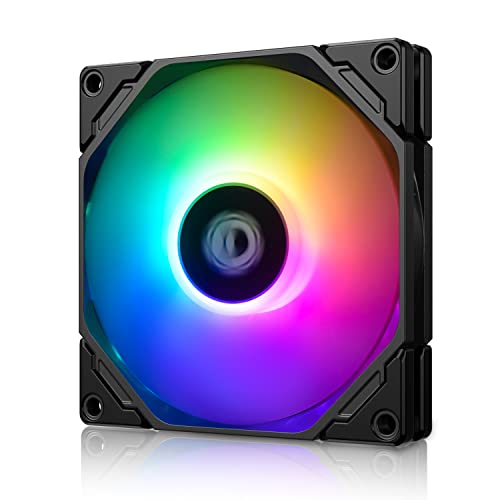
- Slim 15mm 92mm format
- 800–2,500 RPM PWM range
- 5V 3-pin ARGB synchronization
Best For: ITX, HTPC, and other space-restricted systems
Flexible USB Cooling

- 80mm USB-powered design
- Multi-speed controller included
- 17 dBA and up to 26 CFM
Best For: USB cooling for compact computers and electronics
Best Tiny USB Dual Fan
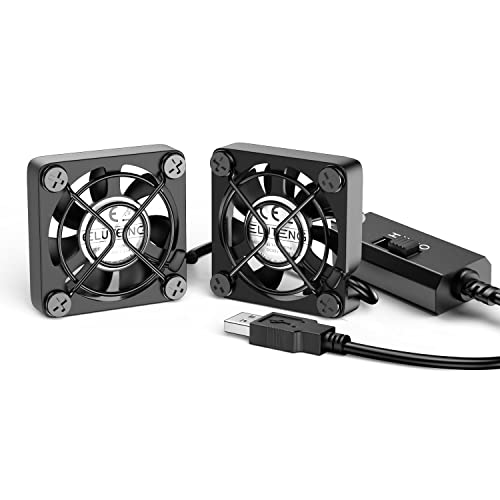
- Dual 40mm design for narrow spaces
- Three-speed USB control
- Metal frames with finger protection
Best For: Targeted cooling for compact electronics and tight PC spaces
Best Quiet 80mm PWM Fan

- Quiet operation up to 17.7 dB(A)
- 4-pin PWM control from 450–2200 RPM
- Includes mounting and low-noise accessories
Best For: Quiet airflow in ITX, HTPC, NAS, and small-form-factor cases
Best High-Airflow USB Fan

- Up to 56.7 CFM airflow
- Simple 5V USB installation
- Includes guard and mounting hardware
Best For: USB cooling for mini PCs, routers, consoles, and media equipment
Ultra-Slim Quiet Pick
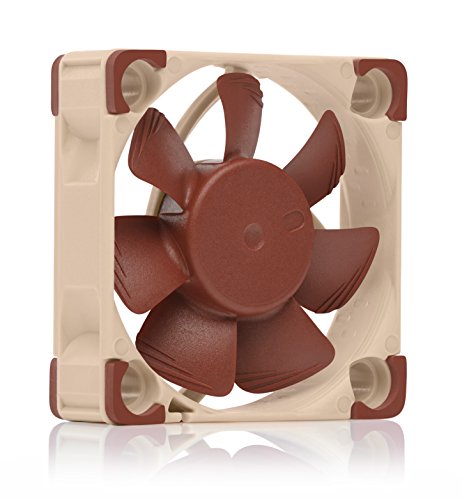
- 40 x 40 x 10 mm slim profile
- Up to 4500 RPM with 17.9 dB(A) max noise
- Includes adaptors and anti-vibration mounting hardware
Best For: Quiet cooling in tight 12V electronics enclosures
Simple USB Twin-Pack

- Two 80 mm fans with USB plugs
- 5V operation and up to 30 CFM airflow
- Hydraulic bearings rated up to 40,000 hours
Best For: DIY USB-powered cooling with flexible two-fan placement
Adjustable Console Cooler
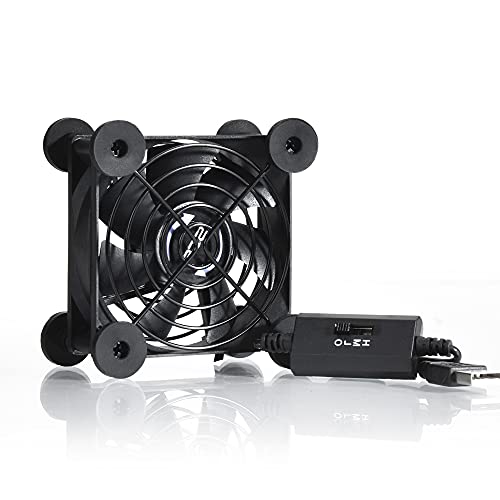
- Three speeds with 21 dB low-speed rating
- USB-powered 80 mm fan for external placement
- Protective grilles and flat-or-upright positioning
Best For: Adjustable cooling for consoles, routers, and compact cabinets
Proven Airflow – Noctua NF-P12 redux-1700 PWM
For computer cooling fans for compact builds that need strong airflow without excessive noise, the Noctua NF-P12 redux-1700 PWM combines a pressure-optimised 120mm design with motherboard-controlled speed adjustment. Its standard 25mm thickness suits many conventional compact cases, CPU coolers, and radiators.
Best For: Compact desktop builds needing dependable 120mm cooling for a CPU cooler, radiator, or chassis.
Pros:
- 1700 RPM 4-pin PWM control supports automatic speed adjustment.
- Pressure-optimised design provides strong airflow and static pressure.
- Rated at up to 25.1 dB(A), with a stated MTTF above 150,000 hours.
- Backed by a six-year manufacturer’s warranty.
Cons:
- At 25mm thick, it is less suitable where a 15mm slim fan is required.
- It has no integrated RGB lighting.
This is a practical choice when cooling performance and established reliability matter more than ultra-slim dimensions or lighting effects.
Slim RGB Cooling – ID-COOLING TF-9215 ARGB
The ID-COOLING TF-9215 ARGB is a useful option among computer cooling fans for compact builds when a 92mm mounting size, 15mm profile, and addressable lighting are all important. PWM control lets you prioritize quieter operation or higher airflow as needed.
Best For: Small-form-factor, HTPC, and ITX systems using a slim 92mm fan with 5V 3-pin ARGB support.
Pros:
- 15mm thickness helps preserve clearance in space-restricted systems.
- PWM range of 800 to 2,500 RPM supports flexible cooling control.
- Provides up to 44.3 CFM of airflow.
- 5V 3-pin ARGB can synchronize with a compatible motherboard.
Cons:
- Its 92mm size is not a replacement for a 120mm mounting position.
- Noise is listed up to 33.4 dB(A) at maximum operation.
- ARGB synchronization requires a compatible 5V 3-pin connection.
Choose this model when tight vertical clearance and coordinated lighting are more valuable than the broader compatibility of a standard 120mm fan.
Flexible USB Cooling – AC Infinity MULTIFAN S1
For computer cooling fans for compact builds or electronics that lack a standard motherboard fan header, the AC Infinity MULTIFAN S1 offers USB power and a separate multi-speed controller. Its 80mm frame can stand upright or lie flat, making placement especially flexible.
Best For: USB-powered cooling around compact computers, game consoles, receivers, cabinets, and other electronics.
Pros:
- USB connection works with available USB ports on many electronics.
- Multi-speed controller lets you balance airflow and noise.
- Dual-ball bearings support upright or flat placement.
- Produces up to 26 CFM at a listed 17 dBA.
Cons:
- It is an 80mm USB fan rather than a standard 120mm case fan.
- It does not offer motherboard PWM control or ARGB synchronization.
- Its 26 CFM airflow is lower than the larger fans in this roundup.
This is a convenient add-on when installation flexibility and USB power matter more than integration with a desktop motherboard’s fan-control system.
Ultra-Slim 120mm RGB – ID-COOLING NO-12015-XT-ARGB
The ID-COOLING NO-12015-XT-ARGB is designed for computer cooling fans for compact builds that need a full 120mm footprint without the usual 25mm depth. Its 15mm frame, PWM control, and ARGB lighting make it suitable for low-profile cases, coolers, and radiators.
Best For: ITX and other space-constrained systems needing slim 120mm cooling with 5V 3-pin ARGB.
Pros:
- 15mm thickness saves space compared with a conventional 120mm fan.
- PWM speed range of 500 to 2,000 RPM supports adjustable cooling.
- Provides up to 54.6 CFM of airflow.
- 5V 3-pin ARGB lighting can sync with a compatible motherboard.
Cons:
- Maximum listed noise reaches 31.2 dB(A).
- ARGB synchronization requires a compatible 5V 3-pin header.
- The slim profile may not suit builds specifically requiring a standard 25mm fan.
Its combination of a 120mm footprint and 15mm depth makes it a strong fit when clearance is limited but you still want substantial airflow and addressable lighting.
Best Tiny USB Dual Fan – ELUTENG Dual 40mm USB Fan
For computer cooling fans for compact builds, the ELUTENG Dual 40mm USB Fan is a practical choice when space is extremely limited. Its two 40mm fans fit narrow areas around PCs, routers, hard-drive enclosures, and other electronics, while the three-speed controller lets you adjust airflow to suit the setup.
Best For: Tight spaces, USB-powered electronics, routers, HDD enclosures, and small PC cooling projects.
Pros:
- Compact 40 x 40 x 25mm fan size fits narrow spaces.
- Dual-fan design can cool from two angles simultaneously.
- Three speed settings provide adjustable cooling.
- Metal frames and finger guards add protection during use.
Cons:
- The small, high-speed fans can produce noticeable noise.
- USB 5V power may not suit standard 12V motherboard fan headers without appropriate power equipment.
This ELUTENG kit prioritizes flexible placement and easy USB power over silent operation. It is especially useful for targeted cooling in cramped builds or around individual hot-running devices.
Best Quiet 80mm PWM Fan – Noctua NF-A8 PWM 80mm Fan
The Noctua NF-A8 PWM is a strong option among computer cooling fans for compact builds when you want controlled airflow without excessive noise. Its 80mm format suits HTPC, ITX, and small-form-factor cases, and the 4-pin PWM connection supports automatic speed control from a compatible motherboard header.
Best For: Quiet intake or exhaust cooling in compact PCs, NAS enclosures, HTPCs, and small-form-factor cases.
Pros:
- Quiet operation rated at up to 17.7 dB(A).
- Broad 450–2200 RPM PWM speed range.
- Includes anti-vibration mounts, screws, extension cable, Y-cable, and a low-noise adapter.
- Backed by a six-year manufacturer warranty.
Cons:
- Requires a compatible 12V 4-pin PWM fan header for automatic speed control.
- Its 80mm size may not fit cases designed for 40mm or 120mm fans.
Choose the NF-A8 PWM when acoustic performance and motherboard-controlled cooling matter more than USB convenience. The included accessories also make it easier to install in varied compact-case layouts.
Best High-Airflow USB Fan – 120mm 5V USB Cooling Fan
For computer cooling fans for compact builds that need broad airflow without a dedicated fan header, this 120mm USB model offers a simple installation path. It connects to a 5V USB port, moves up to 56.7 CFM, and includes a protective net, mounting hardware, and foot columns for placement around PCs and other electronics.
Best For: USB-powered cooling for mini PCs, routers, media equipment, consoles, and enclosed electronics spaces.
Pros:
- 120mm fan provides up to 56.7 CFM of airflow.
- USB connection simplifies installation and power delivery.
- 23 dBA noise rating is suitable for many home-office and entertainment setups.
- Includes protective net, feet, screws, and nuts.
Cons:
- The 120 x 120 x 25mm footprint needs more room than miniature fans.
- Sleeve bearing life is listed at 35,000 hours, below the service-life claims of some premium fan designs.
- It uses fixed 5V USB power rather than a standard motherboard PWM connection.
This fan is a sensible choice when you have room for a full 120mm frame and want straightforward external or internal cooling. Its USB setup works well for devices such as routers, TV boxes, and mini PCs that lack convenient fan headers.
Ultra-Slim Quiet Pick – Noctua NF-A4x10 FLX 40mm Fan
For computer cooling fans for compact builds, the Noctua NF-A4x10 FLX is a strong choice when space and noise matter. Its 40 x 40 x 10 mm profile fits tight enclosures, while the included low-noise adaptors let you select 4500 or 3700 RPM operation.
Best For: Quiet cooling in compact PCs, NAS devices, routers, switches, DVRs, and other electronics using a 12V 4cm fan.
Pros:
- Very slim 10 mm design for space-constrained builds
- Quiet operation rated at up to 17.9 dB(A)
- Includes anti-vibration mounts, screws, extension cable, adaptors, and a six-year warranty
- Two speed options support airflow or quieter operation
Cons:
- Uses a 3-pin 12V connection, so compatibility should be checked before purchase
- Its 40 mm size is intended for small-device cooling rather than large case airflow
The NF-A4x10 FLX stands out when a compact build needs dependable, low-noise airflow without sacrificing installation flexibility. Its included mounting and connection accessories also make it useful for replacing proprietary or aging 4cm fans.
Simple USB Twin-Pack – AITRIP 80mm USB Cooling Fans
If you need computer cooling fans for compact builds with convenient USB power, the AITRIP 80mm set provides two fans for flexible placement. Each 80 x 80 x 25 mm fan runs at 5V through a USB plug and delivers up to 30 CFM of airflow.
Best For: DIY cooling for computer cases, routers, 3D printers, radiators, and other equipment with an accessible USB port.
Pros:
- Two-fan package supports multiple cooling positions
- USB-powered 5V design is easy to connect
- Rated for 2600 RPM and up to 30 CFM airflow per fan
- Hydraulic bearing with stated working life of up to 40,000 hours
Cons:
- The 25 mm thickness may be too large for ultra-thin enclosures
- At 26 dBA, it is not the quietest option in this roundup
- USB power limits installation to locations with a suitable USB port or adapter
This AITRIP kit is practical when straightforward USB power and two fans are more important than the thinnest possible profile. Measure the available 80 mm mounting space and confirm that a 25 mm depth will fit.
Adjustable Console Cooler – Quiet 80mm USB Fan
For computer cooling fans for compact builds that need simple external placement, this quiet 80mm USB fan combines three speed settings with a protective grille. Its flat-or-upright design and USB power make it convenient for cabinets, consoles, routers, and small computer setups.
Best For: Adjustable cooling for game consoles, routers, DVRs, receivers, computer cabinets, and other USB-equipped electronics.
Pros:
- Three speed settings help balance airflow and noise
- Low-speed operation is rated at 21 dB
- Double ball bearing is rated for a 65,000-hour service life
- Protective iron grilles and shockproof foot pads support flexible placement
Cons:
- Its 3.64 x 3.64 x 1.81 inch housing is thicker than slim internal fans
- It is a standalone USB fan rather than a dedicated internal case-fan replacement
- Only one fan is included
This model is best when you want a ready-to-use cooler that can sit outside or beside a compact device. The speed controller and positioning options make it easier to tailor airflow without installing a fan inside the enclosure.
How We Picked the Best Computer Cooling Fans for Compact Builds
We compared these fans by size, thickness, power connection, speed control, intended use, and installation flexibility. The selection includes standard PC case fans, slim models for restricted clearances, compact 40mm and 80mm fans, and USB-powered choices for electronics that do not use a conventional motherboard fan header.
Priority goes to practical fit and compatibility rather than maximum advertised speed alone. A fan is only useful if it matches the available mounting space, connector, voltage, and airflow path in your build.
Quick Comparison
| Fan type | Best suited to | Key advantage |
|---|---|---|
| 120mm PWM | Small cases with standard mounts | Strong airflow with motherboard control |
| 120mm or 92mm slim | Tight CPU cooler or side-panel clearances | Reduced thickness |
| 80mm PWM or USB | Compact desktops and enclosures | Good balance of size and availability |
| 40mm USB or FLX | Small hotspots and narrow spaces | Minimal footprint |
| USB cooling fan | Routers, consoles, receivers, and DIY projects | Simple external power |
Key Buying Factors for Computer Cooling Fans for Compact Builds
Measure Clearance First
Check the mounting hole pattern and available thickness before choosing a fan. Standard fans are commonly 25mm thick, while slim 15mm models can solve clearance problems around graphics cards, radiators, drive cages, and side panels. Also confirm whether the case supports the selected diameter.
Match the Connector and Voltage
PWM fans generally use a four-pin motherboard or fan-controller connection and allow automatic speed adjustment. Three-pin models may use voltage control instead. USB fans are typically powered from 5V USB ports and are better for standalone devices, but they may not integrate with motherboard fan curves.
Balance Airflow and Noise
Larger fans can often move useful air at lower rotational speeds, making them preferable when a 120mm mount is available. Small 40mm and 80mm fans can be effective in localized areas, but their higher-pitched sound may be more noticeable. Look for adjustable speed control when noise matters.
Consider the Airflow Target
For a hot CPU or GPU area, prioritize a fan with suitable static pressure and a direct intake or exhaust route. For a sealed electronics enclosure, a USB fan may provide enough general ventilation. Avoid adding fans without an exit path, since recirculating air offers limited benefit.
Who Should Buy Which Computer Cooling Fans for Compact Builds?
Choose the Noctua NF-P12 redux-1700 PWM when your compact case accepts a standard 120mm fan and you want motherboard-controlled cooling. The slim 120mm ID-COOLING options are better when thickness is the main restriction, while the 92mm slim model suits smaller mounting points.
For compact desktops requiring an 80mm fan, the Noctua NF-A8 PWM is the most natural fit for PWM-based control. The AC Infinity MULTIFAN S1 and other 80mm USB options make more sense for routers, consoles, receivers, cabinets, and projects powered from USB.
Use the Noctua NF-A4x10 FLX or ELUTENG dual 40mm fan when space is extremely limited or when targeted cooling is needed. For simple, low-cost ventilation of a 5V device, a USB 120mm or portable USB fan offers the easiest setup.