The best computer cooling fans help manage heat without adding unnecessary noise, complexity, or cost. This roundup covers quiet case fans, high-airflow options, laptop cooling pads, USB fans, and multi-packs for different setups.
Whether you are upgrading a gaming PC, improving laptop airflow, or cooling a compact device, compare fan size, control method, noise, installation, and compatibility before buying.
Best 10 Computer Cooling Fans Picks for 2026
Best Quiet 120mm Fan

- 1700 RPM 4-pin PWM control
- Strong static pressure and airflow
- Up to 25.1 dB(A) noise rating
Best For: Quiet desktop cooling and radiators
Best Portable Laptop Pad

- Three quiet USB-powered fans
- Fits 15.6- to 17-inch laptops
- Two height settings and extra USB port
Best For: Portable laptop cooling and comfort
Best External Electronics Cooling

- Dual 120mm USB fans
- 104 CFM combined airflow
- Speed controller and 19 dBA rating
Best For: Consoles, AV gear, cabinets, and electronics
Best Multi-Fan Laptop Stand
Kootek Cooling Pad with 5 Fans

- Five fans for 360-degree coverage
- Six adjustable height settings
- Two USB hubs and selectable fan control
Best For: Adjustable cooling for 12- to 17-inch laptops
Premium Quiet Pick
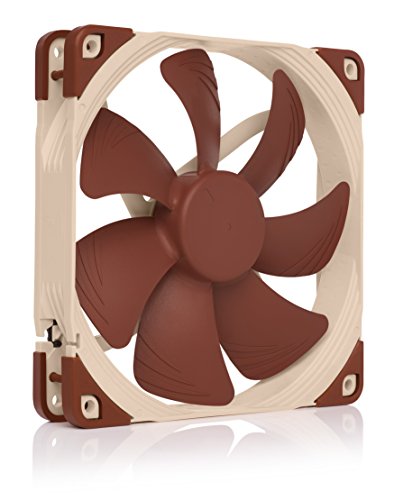
- 140mm PWM fan with 300–1500 RPM range
- Up to 140.2 m³/h airflow at 24.6 dB(A)
- Includes vibration mounts, adapters, cables, and screws
Best For: Quiet-focused desktop builds, radiators, and case ventilation
Best Multi-Fan Value

- Five 120mm 4-pin PWM fans included
- Up to 1550 RPM and 66.17 CFM airflow per fan
- ARGB lighting with up to 17 effects
Best For: Complete case airflow upgrades and RGB desktop builds
Best USB Convenience
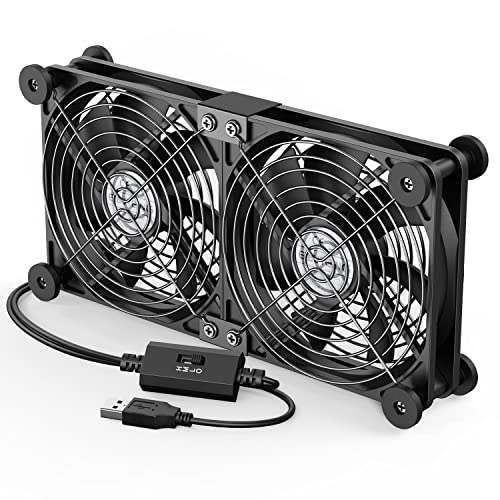
- Dual 120mm fans powered from one USB port
- Three speeds from 900 to 1500 RPM
- Protective grilles and horizontal or vertical placement
Best For: External cooling for consoles, routers, laptops, and AV devices
Best Value Triple Pack
Thermalright TL-C12C X3 120mm PWM Fans
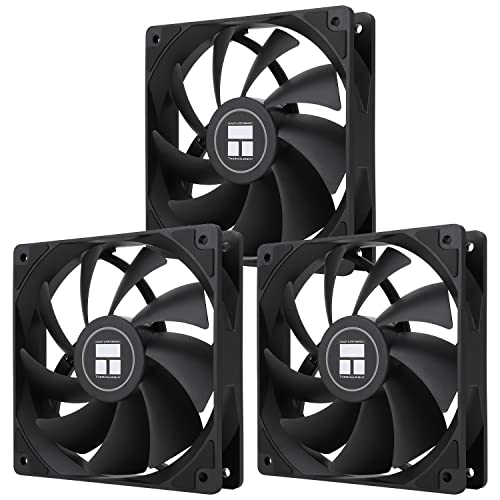
- Three 120mm fans for multi-mount setups
- PWM speed control up to 1,550 RPM
- ARGB lighting with up to 17 effects
Best For: Desktop builds needing multiple matching fans
Best Single-Fan Upgrade
Cooler Master MF120 Lite 120mm PWM Fan

- 120mm fit for cases and cooling solutions
- PWM range from 650 to 1,750 RPM
- Curved blades target improved airflow
Best For: Single-fan replacements or supplemental cooling
Best for Specialty 12V Devices
120mm 2-Pin DC Cooling Fan 2-Pack

- Two 120mm fans rated for 12V operation
- Dual-ball bearings and up to 1,800 RPM
- Includes protective mesh covers
Best For: Compatible equipment with a 2-pin XH2.54 connector
Best Quiet 120mm Fan – Noctua NF-P12 redux-1700 PWM
For desktop builders comparing computer cooling fans, the Noctua NF-P12 redux-1700 PWM is a practical choice when you need strong airflow without excessive noise. Its pressure-optimized design suits CPU air coolers, water-cooling radiators, and case ventilation, while the 4-pin PWM connector enables automatic motherboard speed control.
Best For: Desktop PCs, CPU coolers, radiators, and quiet case ventilation.
Pros:
- 120mm PWM fan reaches up to 1700 RPM with 120.2 m³/h airflow.
- Pressure-optimized blades provide strong cooling performance.
- Rated noise level is up to 25.1 dB(A), with a six-year manufacturer warranty.
Cons:
- It is a single-fan pack.
- Its 25mm thickness requires standard case or radiator clearance.
The NF-P12 redux-1700 PWM offers a strong balance of cooling capacity, motherboard-controlled operation, and established Noctua design at a streamlined price point.
Best Portable Laptop Pad – havit HV-F2056 Cooling Pad
The havit HV-F2056 is a straightforward option for shoppers seeking computer cooling fans for a 15.6- to 17-inch laptop. Three USB-powered fans circulate air beneath the computer, while the slim design, metal-mesh surface, and two adjustable height settings make it useful for mobile work or more comfortable desk use.
Best For: 15.6- to 17-inch laptops, portable cooling, and ergonomic desk setups.
Pros:
- Three ultra-quiet fans provide airflow below the laptop.
- Slim, lightweight design is easier to carry.
- Includes two height settings, an extra USB port, and a power switch.
Cons:
- Power is supplied through a USB-to-USB cable.
- Type-C devices require a separate Type-C-to-USB adapter.
- It is designed for laptops rather than desktop components.
With basic fan cooling, adjustable elevation, and added USB connectivity, the HV-F2056 is a convenient laptop pad for users who value portability and quiet operation.
Best External Electronics Cooling – AC Infinity MULTIFAN S7
The AC Infinity MULTIFAN S7 is a flexible pair of computer cooling fans for electronics, consoles, cabinets, and other equipment. Its two 120mm USB fans include a multi-speed controller, noise-absorption pads, and dual-ball bearings, allowing them to operate flat or upright while balancing airflow and noise.
Best For: Computers, gaming consoles, AV equipment, receivers, DVRs, and cabinets.
Pros:
- Two 120mm fans provide a combined 104 CFM airflow.
- Multi-speed controller helps adjust noise and cooling.
- Dual-ball bearings support flat or upright placement and a 67,000-hour lifespan rating.
Cons:
- USB power may require an available USB port near the equipment.
- Its 2-pin connection is less typical for internal PC motherboard fan headers.
The MULTIFAN S7 stands out when you need adjustable, externally positioned cooling rather than a conventional case-fan installation.
Best Multi-Fan Laptop Stand – Kootek Cooling Pad with 5 Fans
The Kootek laptop cooling pad is a versatile computer cooling fans solution for 12- to 17-inch laptops. Five USB-powered fans provide broad underside coverage, while separate controls let you run one, four, or all five fans. Six height settings and front stoppers also make it useful as an adjustable laptop stand.
Best For: Larger laptops, adjustable desk setups, and users who want selectable fan coverage.
Pros:
- Five fans offer broad cooling coverage, including one larger 4.72-inch fan.
- Two switches control fan and blue LED operation in selectable combinations.
- Six height settings, two USB hubs, and front stoppers add convenience.
Cons:
- Best performance requires connection to a 5V 1A adapter.
- The 1.16 kg stand is less portable than slimmer cooling pads.
- Blue LEDs may not suit every workspace.
The Kootek combines substantial fan coverage with useful stand features, making it a good fit for laptop users who want adjustable cooling and positioning rather than a minimal travel pad.
Premium Quiet Pick – Noctua NF-A14 PWM
If you want a high-quality computer cooling fan for a desktop case, radiator, or ventilation project, the Noctua NF-A14 PWM combines a 140mm format with automatic speed control and a strong quiet-cooling focus. Its 4-pin PWM connection supports a broad 300–1500 RPM range.
Best For: Desktop builders prioritizing quiet, premium cooling performance and broad installation flexibility.
Pros:
- 140mm square-frame design suits PC cases, radiators, and intake or exhaust use.
- 4-pin PWM control automatically adjusts speed from 300 to 1500 RPM.
- Includes anti-vibration mounts, screws, extension cable, Y-cable, and a Low-Noise Adaptor.
- Rated for up to 140.2 m³/h airflow with a 24.6 dB(A) maximum noise level.
Cons:
- Only one fan is included.
- The 140mm size may not fit cases designed for 120mm fans.
- Its premium feature set may be more than basic builds require.
The NF-A14 PWM is a strong choice when dependable construction, accessory coverage, and quiet operation matter more than buying a multi-fan bundle. Check your case or radiator compatibility before choosing its larger 140mm frame.
Best Multi-Fan Value – Thermalright TL-C12C-S 5-Pack
For builders outfitting an entire case, this five-pack offers multiple 120mm computer cooling fans with 4-pin PWM control and ARGB lighting. Each fan reaches up to 1550 RPM and is designed for case, radiator, or CPU-cooler airflow.
Best For: Desktop builders who need several 120mm fans with PWM control and synchronized ARGB lighting.
Pros:
- Five 120mm fans provide a convenient way to equip multiple mounting positions.
- 4-pin PWM control adjusts fan speed according to motherboard temperature.
- ARGB lighting supports up to 17 effects and motherboard synchronization.
- S-FDB bearings, up to 66.17 CFM airflow, and noise rated at 25.6 dBA or lower.
Cons:
- Requires compatible 4-pin PWM and ARGB motherboard connections for full functionality.
- 120mm sizing may not suit systems built for 140mm fans.
- Lighting may be unnecessary for understated builds.
This Thermalright bundle is especially practical for new builds or airflow upgrades requiring several matching fans. Confirm your motherboard has the appropriate ARGB connection and enough fan-header or series-control capacity.
Best USB Convenience – ELUTENG Dual 120mm USB Fan
If you need flexible cooling without rewiring a desktop, the ELUTENG dual USB unit provides two connected 120mm computer cooling fans that plug into a USB port. A three-speed controller makes it suitable for laptops, routers, consoles, receivers, and other USB-equipped devices.
Best For: External cooling for laptops, game consoles, routers, hard-drive enclosures, and AV equipment.
Pros:
- USB-powered, plug-and-play design avoids motherboard wiring.
- Two fans run together and can be positioned horizontally or vertically.
- Three speed settings offer 900, 1200, or 1500 RPM operation.
- Includes protective metal grilles, rubber shock absorbers, and a 1m cable.
Cons:
- USB power limits it to external cooling rather than standard internal PC installation.
- Maximum noise is listed at 32.5 dB.
- The connected dual-fan design may not fit every mounting location.
The ELUTENG is a convenient choice when you want adjustable airflow for equipment with an available USB port. Its portable, upright-or-flat design makes it more versatile for external devices than traditional motherboard-connected case fans.
Best Value Triple Pack – Thermalright TL-C12C X3 120mm PWM Fans
The Thermalright TL-C12C X3 is a practical option for shoppers seeking computer cooling fans in a three-pack. Its 4-pin PWM connection supports automatic speed adjustment, while the 120mm format and 66.17 CFM airflow suit compatible desktop cases and CPU coolers.
Best For: Building or refreshing a desktop with multiple 120mm fan mounts and ARGB support.
Pros:
- Three 120mm fans provide convenient multi-fan coverage.
- 4-pin PWM control supports motherboard-based speed adjustment up to 1,550 RPM.
- S-FDB bearings and a rated noise level of up to 25.6 dBA support quieter operation.
- ARGB lighting offers up to 17 effects and motherboard synchronization.
Cons:
- Requires compatible 4-pin PWM and ARGB connections for the listed controls and lighting.
- Its 1.53 mm H2O air pressure may be less suited to especially restrictive airflow setups.
Choose this pack when you need several matching fans, PWM control, and customizable lighting without purchasing each fan separately.
Best Single-Fan Upgrade – Cooler Master MF120 Lite 120mm PWM Fan
The Cooler Master MF120 Lite is a straightforward 120mm choice for replacing or adding one of the computer cooling fans in a compatible desktop, air cooler, or liquid cooler. Its 4-pin PWM header adjusts speed from 650 to 1,750 RPM, balancing airflow and noise according to system needs.
Best For: Users who need one black 120mm replacement or supplemental fan.
Pros:
- Compatible with cases, air coolers, and liquid coolers using a 120mm fan.
- PWM range from 650 to 1,750 RPM enables adjustable operation.
- Curved blades are designed to improve airflow and cooling efficiency.
- Hybrid frame is designed for airflow, stability, and simplified installation.
Cons:
- Sold as a single fan rather than a multi-fan pack.
- Rated noise level is 30 dB, higher than some quieter-focused alternatives.
This is a sensible pick for a targeted upgrade, especially when you want a minimalist black finish and broad 120mm compatibility.
Best for Specialty 12V Devices – 120mm 2-Pin DC Cooling Fan 2-Pack
This two-pack is a specialty option among computer cooling fans, using a 2-pin XH2.54 connector rather than a standard PC fan interface. The 120mm, 12V fans run at up to 1,800 RPM and include protective mesh covers, making them suitable for compatible amplifiers, refrigerators, camper fridges, servers, and other equipment.
Best For: Replacing 12V fans in devices that specifically accept a 2-pin XH2.54 connector.
Pros:
- Two 120mm fans provide a useful replacement set.
- Dual-ball bearings and 1,800 RPM operation support high-speed ventilation.
- Protective mesh covers help prevent contact with blades and block dust.
- Broad stated use cases include amplifiers, refrigerators, servers, and solar equipment.
Cons:
- 2-pin XH2.54 connector is not compatible with standard computer fan interfaces.
- Requires correct polarity: red connects positive and black connects negative.
- Noise is listed below 33 dB in the product notes, so it is not the quietest option on this list.
Verify the connector, voltage, and polarity before buying. For compatible equipment, this pack offers a fast 12V ventilation replacement with added blade protection.
How We Picked These Computer Cooling Fans
We selected these 10 models to cover the most common cooling needs rather than focus on one type of computer. The lineup includes 120mm and 140mm case fans, PWM-controlled upgrades, affordable multi-packs, USB-powered fans, laptop cooling pads, and standalone 12V options.
Our comparison emphasizes practical factors: airflow potential, noise control, power connection, installation requirements, fan size, durability, and overall value. A premium quiet fan may suit a workstation or gaming PC, while a USB model or cooling pad can be more convenient for laptops and external devices.
Quick Comparison
| Best For | Recommended Type | What to Prioritize |
|---|---|---|
| Quiet desktop upgrades | Premium PWM fan | Low-noise operation, speed control, reliable bearings |
| Gaming PC airflow | 120mm or 140mm case fan | Airflow, static pressure, motherboard compatibility |
| Multiple case positions | Fan multi-pack | Quantity, included hardware, PWM or ARGB support |
| Laptop cooling | Cooling pad | Screen-size fit, USB power, fan placement, stand design |
| Receivers and compact devices | USB cooling fan | Power source, adjustable speed, mounting flexibility |
Key Buying Factors for Computer Cooling Fans
Size and Compatibility
Check the available mounting space before choosing a fan. The 120mm format is widely supported, while 140mm fans can move more air at lower speeds when the case has room. For laptop pads, confirm the supported screen-size range and measure the device if it is unusually large or compact.
Airflow, Static Pressure, and Speed
Case-intake and exhaust fans generally benefit from strong airflow. Fans mounted on radiator or dense-filter positions need stronger static pressure. Higher maximum RPM can improve cooling, but it may also increase noise, so adjustable speed is valuable for balancing temperature and acoustics.
Power and Controls
PWM fans typically use a four-pin motherboard header and allow automatic speed control. Two-pin DC fans are simpler but offer less precise control. USB fans and laptop pads are convenient for portable or external use, although they may not integrate with motherboard fan software.
Noise, Bearings, and Lighting
Look for a low-noise design and a bearing type suited to your expected usage. Fluid-dynamic or similar durable bearings are common in quieter premium fans, while dual-ball-bearing models can be useful where longevity and higher-speed operation matter. ARGB lighting is an appearance feature, not a cooling requirement, and may require compatible headers or controllers.
Who Should Buy Which Computer Cooling Fans?
Choose a premium PWM fan if you want dependable, quiet cooling and have compatible motherboard headers. Choose a multi-pack when outfitting several case positions on a budget. Choose a 140mm model if your case supports it and you prefer lower-speed airflow. Choose a laptop cooling pad for a notebook that runs hot during gaming or demanding work. Choose a USB fan for flexible cooling of laptops, receivers, DVRs, and other equipment without opening the device. For basic, low-cost replacements, a standard 12V fan can be practical if its connector, voltage, and mounting dimensions match your system.