Sharing one keyboard, mouse, printer, scanner, or other USB accessory between several computers is much easier with the right USB switch box. These devices reduce cable swapping and help keep busy desks, home offices, and workstations organized.
We selected 10 options covering two- and four-computer setups, USB 2.0 and USB 3.x speeds, USB-A and USB-C connectivity, and different port layouts. Use the guide below to match the switch to your equipment and workflow.
Best 10 USB Switch Boxes for Multiple Computers Picks for 2026
Fast USB 3.0 Sharing
Sabrent 2-Computer USB 3.0 Switch
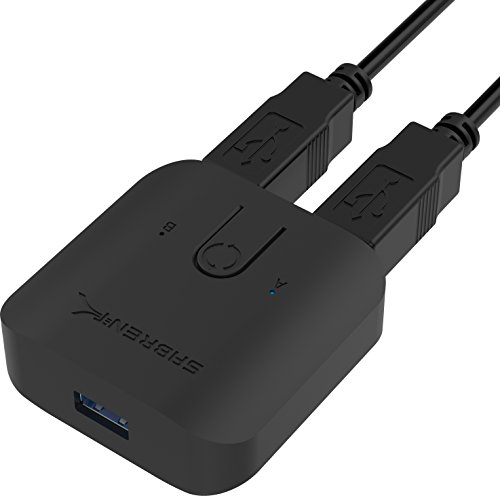
- Shares USB peripherals between two computers
- Up to 5Gbps USB 3.0 transfer speeds
- Push-button control with LED indicators
Best For: Simple two-computer peripheral sharing
Four-Computer USB Sharing

- Shares four devices across four computers
- Panel buttons and wired desktop controller
- Plug-and-play across major operating systems
Best For: Multi-computer offices and classrooms
Four-Way Peripheral Sharing
Sabrent 4-Computer USB 2.0 Switch

- Shares up to four USB devices with four computers
- Push-button selection and LED indicators
- Supports expansion through USB hubs
Best For: Standard peripheral sharing across four computers
High-Speed Two-PC Sharing
UGREEN 2-Computer USB 3.0 Switch
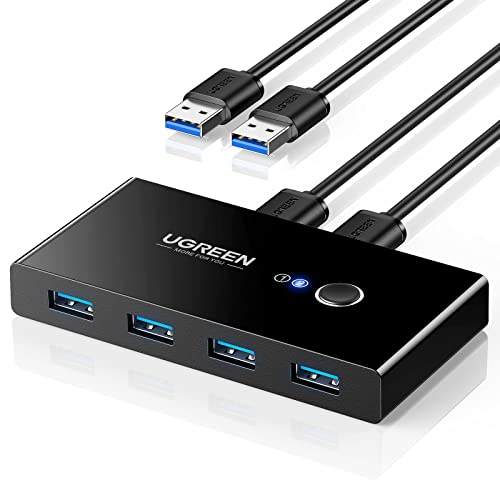
- Four shared USB 3.0 ports reach 5Gbps
- One-button switching with LED status
- Optional USB-C power input for high-power devices
Best For: Fast two-computer sharing with multiple peripherals
Four-Computer Peripheral Hub

- Shares four USB devices between four computers
- USB 3.0 speeds up to 5Gbps
- Includes cables, selector button, and hot-plug support
Best For: Small offices sharing multiple peripherals across four computers
Seven-Device Desktop Switch

- Connects two computers to up to seven USB devices
- Combines four USB-A and three USB-C ports
- Includes adapter and external switching controller
Best For: Mixed USB-A and USB-C peripherals shared between two computers
Remote-Controlled Triple-PC Switch

- Shares four USB-A devices among three computers
- Offers button and IR remote switching
- Includes three input cables and Micro USB power cable
Best For: Three-computer setups using USB-A peripherals and remote switching
Versatile USB Sharing
UGREEN 2-Computer 4-Port USB 2.0 Switch

- Shares four USB peripherals between two computers
- Driver-free support for major operating systems
- Button switching with optional external power
Best For: Two-computer workstations using USB 2.0 peripherals
Faster Peripheral Sharing
ABLEWE 2-Computer USB 3.0 Switch

- Shares four USB devices between two computers
- USB 3.0 connectivity with USB 2.0 backward compatibility
- Includes cables and micro-USB power support
Best For: Two-computer setups needing faster USB peripheral sharing
Four-Computer Flexibility
USB 3.2 A/C Switch with Remote

- Shares three USB-A and one USB-C device among four computers
- Supports up to 10Gbps transfer speeds
- Offers button or remote-control switching
Best For: Four-computer setups with mixed USB-A and USB-C peripherals
Fast USB 3.0 Sharing – Sabrent 2-Computer USB 3.0 Switch
The Sabrent USB-SW30 is a compact choice among usb switch boxes for multiple computers when you need to share USB peripherals between two systems. Its plug-and-play setup, push-button control, LED indicators, and USB 3.0 speeds keep switching straightforward.
Best For: Users sharing a keyboard, mouse, or other hub-connected USB peripherals between two computers.
Pros:
- USB 3.0 data transfer speeds up to 5Gbps.
- Simple one-button switching between two computers.
- Plug-and-play operation requires no additional drivers.
- LED indicators help identify the active computer.
Cons:
- Supports two computer positions rather than four.
- Its USB 3.0 sharing design does not indicate monitor or video switching.
Choose this model if you want a small, uncomplicated switch with faster USB 3.0 performance. It is especially practical for a basic desk setup centered on shared peripherals.
Four-Computer USB Sharing – DGODRT 4-Port USB 2.0 Switch
The DGODRT UH404 is a flexible option among usb switch boxes for multiple computers, allowing four USB 2.0 devices to be shared across four computers. Front-panel buttons or the included wired desktop controller provide convenient switching, while LEDs show the active computer.
Best For: Offices, classrooms, or home workspaces that need to share several USB peripherals among four computers.
Pros:
- Supports four computers and four shared USB devices.
- Includes both panel-button and wired-controller switching.
- Plug-and-play compatibility with Windows, Mac OS, Linux, and Chrome OS.
- Includes four USB cables and a desktop controller.
Cons:
- USB 2.0 limits data transfer to up to 480Mbps.
- An external 5V/1A adapter may be needed for high-power USB devices, and it is not included.
This is the most capable choice here for four-computer sharing, particularly when convenience matters. Its USB 2.0 performance is better suited to everyday peripherals than demanding high-speed storage transfers.
Four-Way Peripheral Sharing – Sabrent 4-Computer USB 2.0 Switch
The Sabrent USB-USS4 is designed for users comparing usb switch boxes for multiple computers and needing to share up to four USB devices with as many as four computers. A push button selects the computer, and LED indicators make the active connection easy to distinguish.
Best For: Sharing several standard USB peripherals among up to four computers in a manual, driver-free setup.
Pros:
- Supports up to four computers and four USB devices.
- Push-button switching is simple to operate.
- LED indicators identify the selected computer.
- Additional USB hubs can expand the number of shared devices.
Cons:
- USB 2.0 supports speeds up to 480Mbps.
- It is intended for manual USB peripheral switching rather than monitor sharing.
This Sabrent model makes sense when four-way sharing is more important than USB 3.0 speed. Its hub-expandable design also gives a little extra flexibility for a growing peripheral setup.
High-Speed Two-PC Sharing – UGREEN 2-Computer USB 3.0 Switch
The UGREEN 30768 is a strong fit for usb switch boxes for multiple computers when two systems need access to several USB 3.0 peripherals. It provides four shared USB ports, one-button switching, LED status indication, and transfer speeds up to 5Gbps.
Best For: Users switching keyboards, storage devices, printers, scanners, cameras, or other USB peripherals between two computers.
Pros:
- Four USB 3.0 ports support speeds up to 5Gbps.
- One-button switching and an LED indicate the active computer.
- Works without drivers on Windows, macOS, Chrome OS, and Linux.
- USB-C power input can improve stability with high-power devices.
Cons:
- Supports two computers, not four.
- It is not a KVM switch and does not support monitor or video transmission.
- The power adapter for the USB-C input is not included.
Pick the UGREEN when faster data handling and broad operating-system compatibility are priorities. The extra power input is useful for demanding peripherals, though a separate adapter may be required.
Four-Computer Peripheral Hub – IOGEAR 4×4 USB 3.0 Switch
For shoppers comparing usb switch boxes for multiple computers, the IOGEAR GUS434 is built to share four USB peripherals among four computers. Its USB 3.0 support, included cables, selector button, LED indicators, and optional supplemental power make it a practical choice for a small office or multi-system workspace.
Best For: Small offices and users who need to share several USB devices among up to four computers.
Pros:
- Shares four USB devices between four computers.
- USB 3.0 supports data transfer rates up to 5Gbps.
- Includes four USB 3.0 cables and a selector button.
- Supports hot-plugging and offers over-current protection.
Cons:
- It switches USB peripherals only; monitor or video connections are not listed.
- Higher-power devices may require the optional Micro USB power connection.
With four-to-four sharing and broad support for Windows, macOS, Linux, and Chrome OS, this model is a strong fit when capacity matters more than a compact two-computer setup.
Seven-Device Desktop Switch – UGREEN 2-in 7-Out USB 3.0
Among usb switch boxes for multiple computers, the UGREEN 2-in 7-Out model stands out for its large mix of USB-A and USB-C ports. It lets two computers share up to seven data peripherals and includes a USB-C-to-USB-A adapter for mixed computer setups.
Best For: Users with two computers and a mix of USB-A and USB-C keyboards, mice, printers, storage devices, or other peripherals.
Pros:
- Shares up to seven devices: four USB-A and three USB-C.
- Four USB 3.0 ports support data transfer up to 5Gbps.
- Includes a USB-C-to-USB-A adapter for flexible computer connections.
- Offers onboard and external-controller switching with LED status indication.
Cons:
- It is not a KVM switch and does not transmit video.
- USB ports are intended primarily for data transfer and are not recommended for charging.
- It supports two computers rather than three or four.
This is a convenient choice for a crowded desk, especially when port variety and device capacity are more important than display switching or charging support.
Remote-Controlled Triple-PC Switch – THXCDBID USB 3.0 Selector
The THXCDBID USB 3.0 selector is a useful option when comparing usb switch boxes for multiple computers and wanting remote control. It shares four USB-A peripherals among three computers, supports up to 5Gbps, and includes three input cables, a Micro USB power cable, and an IR remote.
Best For: Three-computer workspaces that need remote or button-based sharing of keyboards, mice, printers, scanners, and similar USB-A devices.
Pros:
- Shares four USB-A ports among three computers.
- USB 3.0 supports data transfer speeds up to 5Gbps.
- Provides both device-button and IR remote switching.
- Includes three USB-A input cables and a Micro USB power cable.
Cons:
- It is not a KVM switch and does not support monitor connections.
- High-power USB devices may need separate power.
- The remote does not include batteries, and hotkey switching is not supported.
Its remote adds convenience for a three-PC setup, while the included power cable can help maintain stable operation with demanding peripherals. Choose it when USB-A connectivity is sufficient.
Versatile USB Sharing – UGREEN 2-Computer 4-Port USB 2.0 Switch
For shoppers comparing usb switch boxes for multiple computers, this UGREEN model provides a straightforward way to share four USB peripherals between two computers. Its push-button switching, LED indicator, included cables, and driver-free setup make it practical for keyboards, mice, printers, scanners, and similar devices.
Best For: Home offices or workstations that need to share several USB 2.0 peripherals between two computers.
Pros:
- Shares up to four USB devices between two computers with one-button switching.
- Works with Windows, macOS, Linux, and Chrome OS without additional drivers.
- Includes two USB A-to-A cables and offers optional micro-USB power for demanding devices.
Cons:
- USB 2.0 is slower than newer USB 3.x standards.
- Does not support monitors or video transmission, so it is not a KVM switch.
- A charger and power cable are not included, and high-power devices may require separate power.
This is a sensible choice when peripheral sharing matters more than transfer speed or display control. Its broad operating-system compatibility and simple physical button keep everyday switching uncomplicated.
Faster Peripheral Sharing – ABLEWE 2-Computer USB 3.0 Switch
This ABLEWE switch is a strong option among usb switch boxes for multiple computers when faster USB connectivity is useful. It lets two computers share four peripherals, including printers, scanners, keyboards, mice, webcams, and storage devices, with a single button press.
Best For: Users who want four-port USB 3.0 sharing between two computers with included power support for higher-demand devices.
Pros:
- Provides four-port USB 3.0 sharing and is backward compatible with USB 2.0.
- Uses an LED indicator to show which computer is active.
- Includes two USB 3.0 cables and a micro-USB power cable.
- Supports Windows, macOS, Linux, and Chrome OS without drivers.
Cons:
- It switches USB peripherals only and does not provide monitor or video switching.
- High-power devices may need the included power cable connected for stable operation.
- It supports two computers, not four.
Compared with USB 2.0 alternatives, this model is better suited to users moving data through compatible USB 3.0 devices. It remains focused on peripheral sharing rather than full desktop KVM functionality.
Four-Computer Flexibility – USB 3.2 A/C Switch with Remote
For buyers seeking usb switch boxes for multiple computers with broader connectivity, this USB 3.2 switch supports four computers and combines USB-A and USB-C peripheral ports. Its 10Gbps-rated interface, button control, remote switching, and included adapter make it the most flexible option here for mixed-device setups.
Best For: Multi-computer workstations that need to share USB-A and USB-C peripherals among four computers.
Pros:
- Supports switching among four computers.
- Combines three USB-A 3.2 ports with one USB-C 3.2 port.
- Offers data transfer speeds up to 10Gbps for compatible devices.
- Allows switching from the device or with the included remote control.
Cons:
- It does not support monitors or video transmission and is not a KVM switch.
- High-power devices require an independent power source for reliable operation.
- The remote control requires batteries, which are not included; hot-key switching is not supported.
This model stands out when four-computer support and mixed USB-C/USB-A connections are priorities. It costs some convenience in setup details, but remote switching can help keep a busy desk cleaner and easier to manage.
How We Picked the Best USB Switch Boxes for Multiple Computers
We focused on the features that matter most when sharing peripherals: the number of computers and USB devices supported, USB version and transfer speed, connector types, switching controls, included cables, indicator lights, and compatibility with common accessories. The selection includes simple two-computer boxes, larger four-computer sharing systems, and models with USB-C support.
Because a USB switch does not automatically replace a full video KVM, we also considered whether each design is best suited to peripherals such as keyboards, mice, printers, scanners, storage devices, or other USB accessories. Buyers should confirm power and operating-system requirements before ordering.
Quick Comparison
| Setup type | Best suited for | What to look for |
|---|---|---|
| 2 computers, 4 ports | Home offices and everyday desk sharing | One-button switching and USB 3.0 support |
| 3 computers, 4 ports | Multi-device workstations | Included host cables and clear status indicators |
| 4 computers, 4 ports | Labs, offices, and shared peripherals | Independent computer selection and reliable power |
| 2 computers, 7 ports | Many accessories or mixed USB-A/USB-C setups | Port count, power requirements, and connector mix |
| 4 computers, 4 devices | Fast professional storage or data workflows | USB 3.2 or 10Gbps support on compatible hardware |
Key Buying Factors for USB Switch Boxes for Multiple Computers
Computer and Device Capacity
Start by counting both sides of the setup. A “2-in, 4-out” switch typically connects two computers to four shared USB devices, while a four-computer model is better for a lab or office. Leave some capacity if you expect to add a printer, webcam, drive, or other accessory later.
USB Speed and Compatibility
USB 2.0 is usually adequate for keyboards, mice, and basic printers, but USB 3.0 or faster is preferable for external drives and large file transfers. The actual speed is limited by the slowest cable, port, device, or computer connection. USB-C ports can improve convenience, but verify whether they support data rather than charging only.
Switching Method and Power
Physical buttons are simple and dependable; desktop controllers or remote switches are useful when the main box is hidden under a desk. LED indicators help confirm the active computer. Some high-demand devices may require an external power supply, especially when several accessories or storage devices are connected.
Peripheral and Operating-System Support
Most switches work with standard USB input devices and printers, but specialized webcams, audio interfaces, security keys, and storage enclosures can be more sensitive. Check the manufacturer’s compatibility notes and use quality host cables for stable connections.
Who Should Buy Which USB Switch Boxes for Multiple Computers?
Choose a compact two-computer USB 3.0 switch for a typical home office or gaming-and-work setup. Pick a USB 2.0 model when you only need basic input devices and want to minimize cost. A three- or four-computer switch makes more sense for shared office equipment or a multi-system workstation. Select a seven-port or USB-C model when you have many peripherals or newer laptops. For demanding storage transfers, prioritize USB 3.2 or 10Gbps support, while remembering that a USB peripheral switch does not provide monitor switching unless explicitly designed as a video KVM.