If you want to turn an old SSD into fast portable storage, the right enclosure makes all the difference. The best picks balance speed, heat control, and broad device compatibility.
Below, we focus on 10 options that work well for everyday backups, content transfers, gaming libraries, and travel-ready external drives.
Best 10 USB C SSD Enclosures Picks for 2026
Tool-Free NVMe Pick
SABRENT USB-C NVMe Enclosure & Reader

- Flip-open, tool-free SSD install
- Aluminum cooling with thermal pad contact
- NVMe sizes 2230-2280, up to 8TB
Best For: Frequent drive swaps and portable NVMe storage
2.5-Inch SATA Value
Cable Matters Aluminum 10Gbps USB C Enclosure

- Works with 2.5-inch SATA SSDs and HDDs
- Tool-free aluminum housing
- UASP, TRIM, and S.M.A.R.T support
Best For: Reusing a 2.5-inch SATA SSD or HDD
Balanced NVMe Choice
UGREEN SSD Enclosure Tool-Free USB C External 10Gbps

- Tool-free NVMe install with plug-and-play use
- Supports M/B&M key drives up to 8TB
- Includes silicone case and two USB cables
Best For: Portable NVMe use with extra protection
High-Speed Upgrade
UGREEN 40Gbps M.2 NVMe Enclosure

- Up to 3600MB/s on compatible setups
- USB4 and Thunderbolt 3/4 support
- Fanless double-sided fin cooling design
Best For: Maximum-speed NVMe transfers on modern ports
Tool-Free 2.5-Inch SATA Pick
BENFEI 2.5 Inch SATA to USB Tool Free Enclosure

- Tool-free installation with hot-swapping
- USB Type-C and Type-A plug design
- Up to 5 Gbps with UASP support
Best For: Simple 2.5-inch SATA SSD/HDD use with flexible USB-C or USB-A connections
Fast M.2 Multi-Drive Pick
SABRENT Tool-Free NVMe & SATA M.2 SSD Enclosure

- Supports NVMe and SATA M.2 SSDs
- USB 3.2 Type-C up to 10Gbps
- Tool-free aluminum design with thermal pad
Best For: Fast, portable M.2 storage for either NVMe or SATA SSDs
Balanced Aluminum SATA Pick
UGREEN USB C 2.5-inch SATA SSD/HDD Enclosure

- 6Gbps SATA with UASP acceleration
- Aluminum body with built-in chipset
- Tool-free, plug-and-play setup
Best For: Reliable 2.5-inch SATA SSD/HDD storage with a durable aluminum build
Cooling-Focused NVMe Pick
Tool-Free Aluminum 10Gbps NVMe Enclosure

- USB 3.2 Gen 2 with up to 10Gbps transfer speeds
- Dual cooling system with fan plus aluminum shell
- Tool-free installation for M.2 NVMe drives
Best For: Users who want a cooler-running NVMe enclosure for sustained transfers
Slim SATA Upgrade
Slim 2.5-Inch USB-C SATA Enclosure
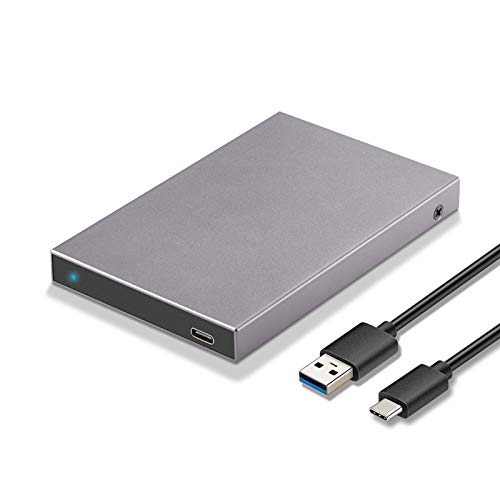
- USB-C 3.2 Gen 2 with up to 6Gbps transfer rates
- Fits 2.5-inch SATA HDDs and SSDs up to 10TB
- Aluminum shell with tool-free installation
Best For: Users needing a compact enclosure for a 2.5-inch SATA drive
Clear and Simple SATA Case
Sliding Clear 2.5-Inch USB-C Enclosure

- USB 3.1 Gen 2 with up to 6Gbps transfer rates
- Sliding tool-free design for quick drive swaps
- Clear shell with EVA sponge for added stability
Best For: People who want an easy-to-use clear enclosure for a 2.5-inch SATA drive
Tool-Free NVMe Pick – SABRENT USB-C NVMe Enclosure & Reader
If you want one of the more practical usb c ssd enclosures for an NVMe drive, this SABRENT model focuses on easy swaps and stable 10Gbps performance. The flip-open, tool-free design makes it simple to install an M.2 NVMe SSD, while the aluminum top and thermal pad help move heat away during longer transfers.
Best For: Creators, gamers, and anyone who wants a fast, tool-free portable NVMe enclosure for frequent drive changes.
Pros:
- Tool-free flip-open design for quick SSD installation
- Aluminum top with direct thermal pad contact for better cooling
- Supports M.2 NVMe sizes 2230, 2242, 2260, and 2280 up to at least 8TB
- USB-C plug-and-play with no drivers or external power required
Cons:
- NVMe only; not compatible with M.2 SATA SSDs
- 10Gbps speed is solid, but not as fast as USB4/Thunderbolt options
This is a strong fit if convenience matters as much as speed. It is built for easy upgrades, cloning, troubleshooting, and everyday portable storage, but buyers with SATA drives or a need for top-end throughput should look elsewhere.
2.5-Inch SATA Value – Cable Matters Aluminum 10Gbps USB C Enclosure
Among usb c ssd enclosures for 2.5-inch drives, this Cable Matters enclosure is a straightforward way to reuse a SATA SSD or HDD over USB-C. Its aluminum housing helps with protection and heat dissipation, and the tool-free design keeps setup quick for backups, drive testing, or extra storage.
Best For: Users who need a simple USB-C enclosure for a 2.5-inch SATA SSD or HDD.
Pros:
- Supports 2.5-inch SATA SSDs and HDDs up to 9.5mm thick
- Tool-free design for easy installation
- Up to 10Gbps transfer rate with a compatible computer
- UASP, TRIM, and S.M.A.R.T support with compatible systems
Cons:
- Not for M.2 NVMe drives
- Actual SATA drives are limited to SATA III speeds, not the full 10Gbps ceiling
This enclosure makes sense when you already have a 2.5-inch SATA drive and want a cost-effective USB-C external option. It is a practical pick for backups and drive recovery, but it is not the right choice if you need an NVMe enclosure.
Balanced NVMe Choice – UGREEN SSD Enclosure Tool-Free USB C External 10Gbps
If you want usb c ssd enclosures with a good mix of portability, protection, and compatibility, this UGREEN NVMe model is easy to recommend. It supports 10Gbps transfers over USB 3.2 Gen 2, uses a tool-free buckle design, and includes a silicone case plus thermal pad for a more travel-friendly setup.
Best For: People who want a compact, tool-free NVMe enclosure with broad device support and added protection.
Pros:
- Tool-free NVMe installation with plug-and-play use
- Supports M and B&M key NVMe drives in 2230/2242/2260/2280 sizes up to 8TB
- Includes silicone case, thermal pad, and both USB-C to USB-C and USB-C to USB-A cables
- RTL9210 chip with short-circuit and over-current protection, plus UASP/TRIM support
Cons:
- Does not support SATA NGFF or mSATA SSDs
- 10Gbps performance depends on using a USB-C 3.2 Gen 2 data cable
This is a versatile middle-ground enclosure if you need NVMe support without stepping up to a premium high-speed model. The included accessories and protective design make it especially appealing for mobile use.
High-Speed Upgrade – UGREEN 40Gbps M.2 NVMe Enclosure
For buyers comparing usb c ssd enclosures and wanting the fastest option in this group, this UGREEN 40Gbps enclosure stands out with USB4 and Thunderbolt support. It is built around the ASM2464PD chip and can reach up to 3600MB/s, while the double-sided fin design is meant to improve heat dissipation without a fan.
Best For: Users who need very high transfer speeds for demanding work, gaming, or large media files.
Pros:
- Up to 3600MB/s with compatible USB4 or Thunderbolt 4 setups
- Compatible with USB4, USB 3.x, and Thunderbolt 3/4
- Double-sided fin cooling design for quieter heat management
- Supports 2230/2242/2260/2280 NVMe drives up to 8TB
Cons:
- NVMe only; does not support SATA NGFF or mSATA drives
- Needs Thunderbolt 4 cables and devices to reach top speed
This is the best fit when speed is the priority and your computer can actually take advantage of USB4 or Thunderbolt bandwidth. If you mainly need a basic portable enclosure, it may be more than you need.
Tool-Free 2.5-Inch SATA Pick – BENFEI 2.5 Inch SATA to USB Tool Free Enclosure
If you want a straightforward pick among usb c ssd enclosures for a 2.5-inch SATA drive, this BENFEI model keeps the focus on ease and compatibility. It supports SATA I/II/III drives, works with both USB Type-C and Type-A connections, and adds UASP support for faster transfers than basic USB 3.0 enclosures.
Best For: Anyone who wants a tool-free, portable enclosure for a 2.5-inch SATA SSD or HDD with both USB-C and USB-A compatibility.
Pros:
- Tool-free, plug-and-play setup with hot-swapping and no driver needed.
- Supports up to 5 Gbps with UASP and backward compatibility for older USB ports.
- Works with 7mm and 9.5mm 2.5-inch drives up to 6TB.
- USB Type-C/Type-A plug design adds flexible connection options.
Cons:
- Built for 2.5-inch SATA drives only, not M.2 SSDs.
- Transfer speed is capped at 5 Gbps, below faster NVMe enclosures.
For users upgrading a spare SATA SSD or reusing an older drive, this is a practical enclosure that prioritizes simplicity and broad device support over cutting-edge speed.
Fast M.2 Multi-Drive Pick – SABRENT Tool-Free NVMe & SATA M.2 SSD Enclosure
For shoppers comparing usb c ssd enclosures for an M.2 drive, this SABRENT enclosure stands out because it supports both NVMe and SATA M.2 SSDs in common lengths. The tool-free design, 10Gbps USB 3.2 Type-C interface, and slim aluminum body make it a strong option for fast portable storage.
Best For: Users who need a compact, tool-free M.2 enclosure for either NVMe or SATA SSDs.
Pros:
- Supports both M.2 PCIe NVMe and M.2 SATA drives.
- Tool-free installation makes drive swaps quick and easy.
- USB 3.2 Type-C runs up to 10Gbps and is bus powered.
- Slim aluminum build includes a thermal pad for heat management.
Cons:
- Does not fit 2.5-inch SATA drives or mSATA drives.
- No room for M.2 drives with a pre-installed heatsink.
If you want one enclosure that covers both major M.2 formats, this SABRENT model is the most versatile performance-focused choice in this group.
Balanced Aluminum SATA Pick – UGREEN USB C 2.5-inch SATA SSD/HDD Enclosure
Among usb c ssd enclosures for 2.5-inch SATA drives, this UGREEN model offers a balanced mix of speed, build quality, and compatibility. It supports UASP, uses an aluminum body with an ASM235CM chipset for heat dissipation, and includes a USB-C to USB-C cable for convenient setup.
Best For: Anyone who wants a durable 2.5-inch SATA SSD/HDD enclosure for everyday backup, recovery, or portable storage.
Pros:
- Supports up to 6Gbps SATA transfer speed with UASP acceleration.
- Aluminum alloy body and built-in chipset help with heat dissipation.
- Tool-free, plug-and-play installation with no driver needed.
- Works with Windows, macOS, Linux, and several game consoles and devices.
Cons:
- Limited to 2.5-inch SATA SSDs and HDDs, not M.2 drives.
- Top speed is based on SATA limits rather than NVMe-class performance.
This is a sensible all-around enclosure if you want dependable SATA storage in a sturdy metal shell without extra setup complexity.
Cooling-Focused NVMe Pick – Tool-Free Aluminum 10Gbps NVMe Enclosure
If you’re comparing usb c ssd enclosures for an NVMe drive, this Plugable model is built for users who want fast transfers without worrying about heat. It supports M.2 NVMe M Key and B+M Key drives in 2242, 2260, and 2280 sizes, and pairs USB 3.2 Gen 2 speeds with TRIM and UASP for steadier performance.
Best For: NVMe users who want a tool-free enclosure with active and passive cooling for sustained 10Gbps transfers.
Pros:
- 10Gbps USB 3.2 Gen 2 connection with UASP and TRIM support
- Tool-free, driver-free setup makes SSD swaps quick
- Dual cooling design combines an intelligent fan with aluminum heat dissipation
- Includes both USB-C and USB-A cables for broader compatibility
Cons:
- Does not support NGFF SATA SSDs
- Designed only for NVMe M.2 drives, not 2.5-inch SATA drives
This is a strong pick if your main concern is keeping NVMe speeds stable during larger transfers. The cooling setup and RTL9210 chipset make it a practical choice for workloads where temperature control matters as much as raw throughput.
Slim SATA Upgrade – Slim 2.5-Inch USB-C SATA Enclosure
For buyers shopping usb c ssd enclosures for a 2.5-inch SATA drive, this SSK case keeps things simple and practical. It supports 7mm and 9.5mm SATA HDDs and SSDs, uses USB 3.2 Gen 2 with UASP acceleration, and is designed for quick plug-and-play use.
Best For: Anyone who wants a slim, aluminum 2.5-inch SATA enclosure with easy setup and broad OS support.
Pros:
- USB-C 3.2 Gen 2 interface with up to 6Gbps transfer rates
- UASP support for faster performance than traditional USB 3.0
- Aluminum shell helps with heat dispersion and adds sturdiness
- Tool-free, hot-swap, plug-and-play setup
Cons:
- Limited to 2.5-inch SATA drives, not NVMe M.2 SSDs
- Supports drives up to 10TB, but only 7mm and 9.5mm thicknesses
This enclosure is a sensible pick if you want straightforward SATA storage over flashy extras. The slim aluminum body and UASP support give it a solid balance of portability and everyday speed.
Clear and Simple SATA Case – Sliding Clear 2.5-Inch USB-C Enclosure
If you want usb c ssd enclosures with a simple design and visible internals, this POSUGEAR model is aimed at 2.5-inch SATA drives. It supports 7mm and 9mm drives, offers USB 3.1 Gen 2 speeds with UASP and TRIM, and uses a sliding, tool-free housing for easy setup.
Best For: Users who want a clear, easy-to-install 2.5-inch SATA enclosure with basic protection features.
Pros:
- USB 3.1 Gen 2 with up to 6Gbps transfer rates
- UASP and TRIM support for more efficient data handling
- Sliding tool-less design makes installation straightforward
- Built-in EVA sponge and protective chip features for stability and safety
Cons:
- Limited to 2.5-inch SATA drives, not NVMe M.2 SSDs
- Maximum supported capacity is 4TB
- Only supports 7mm/9mm drive thickness
This enclosure makes sense if you value convenience and a quick visual check of the drive inside. It is less about premium materials and more about easy handling, decent speed, and broad device support.
How We Picked These USB C SSD Enclosures
We prioritized real-world usefulness: interface speed, SSD type support, build quality, thermal design, and ease of installation. We also looked for models that cover the most common use cases, from simple 2.5-inch SATA drives to faster M.2 NVMe builds.
Because USB C SSD Enclosures vary a lot in performance, we favored clear specs, reliable chipsets, and designs that reduce guesswork for buyers.
Quick Comparison
If you need basic external storage, 2.5-inch SATA enclosures are the simplest and most affordable choice. If you want higher transfer speeds, M.2 NVMe enclosures are the better fit. For the fastest workflows, a 40Gbps model is the premium option, but only worth it if your SSD and computer both support that speed.
Best Fit by Use Case
Choose SATA enclosures for backups and media storage. Choose 10Gbps NVMe enclosures for balanced speed and value. Choose 40Gbps if you move large files often and already have a Thunderbolt or USB4-capable setup.
Key Buying Factors for USB C SSD Enclosures
Drive type: Make sure the enclosure matches your SSD. 2.5-inch SATA drives and M.2 NVMe drives are not interchangeable, and M.2 SATA is different from M.2 NVMe.
Speed rating: A 6Gbps SATA enclosure is fine for older drives. A 10Gbps USB-C enclosure is a strong all-around choice for most users. Higher-end 40Gbps models are only beneficial with compatible hardware.
Thermals: Aluminum bodies, thermal pads, and venting help control heat during sustained transfers. That matters most with NVMe drives, which can throttle if they run hot.
Tool-free design: If you swap drives often, tool-free access saves time and reduces hassle.
Compatibility: Check support for Windows, macOS, Linux, game consoles, and tablets if you plan to use the enclosure across multiple devices.
Who Should Buy Which USB C SSD Enclosures?
Casual users: A 2.5-inch SATA enclosure is usually the cheapest and easiest way to reuse an old SSD.
Power users and creators: A 10Gbps NVMe enclosure offers the best mix of speed, portability, and price.
Advanced users: Pick a 40Gbps model only if you need maximum throughput and have compatible ports and drives.
Frequent drive swappers: Tool-free USB C SSD Enclosures are the most convenient choice for testing, cloning, and moving projects between systems.