If you manage large photo libraries, the right enclosure can make backups faster, transfers smoother, and travel storage far more dependable.
This roundup of the best SSD enclosures for photo storage focuses on compatibility, speed, heat control, and ease of use for real-world editing and archiving.
Best 10 SSD Enclosures for Photo Storage Picks for 2026
Tool-Free 2.5-Inch SATA Pick

- Tool-free setup for 2.5-inch SATA SSDs
- Up to 5 Gbps with UASP support
- USB-C and USB-A connection options
Best For: simple, tool-free enclosure for a 2.5-inch SATA SSD or HDD
Fast NVMe Transfer Choice
ORICO M.2 NVMe 10Gbps Enclosure

- Up to 10Gbps with UASP support
- Fits PCIe NVMe M.2 SSDs in 2230-2280 sizes
- Includes USB-C to C and USB-C to A cables
Best For: users who want a compact NVMe enclosure for fast photo backups and offloading
Reliable SATA Backup Option
BENFEI 2.5" SATA Enclosure 6Gbps

- Up to 6 Gbps with UASP support
- Tool-free setup for 2.5-inch SATA drives
- USB Type-C/Type-A cable included
Best For: anyone needing a dependable 2.5-inch SATA enclosure for photo archives and backups
Compact Retro NVMe Pick
Hagibis Floppy-Style M.2 Enclosure

- 10Gbps USB 3.2 Gen 2 transfer speed
- Supports 2230/2242 NVMe SSDs
- Ultra-compact and lightweight design
Best For: creators who want a tiny NVMe enclosure for on-the-go photo and video storage
Budget-Friendly 2.5-Inch Pick
ORICO 2.5 inch External Hard Drive Enclosure USB 3.0

- Tool-free 2.5-inch SATA enclosure
- USB 3.0 with UASP support
- Lightweight ABS, portable design
Best For: Affordable portable photo storage from a spare 2.5-inch SATA SSD
Best USB-C Build
UGREEN USB C Hard Drive Enclosure for 2.5" SATA SSD HDD

- USB-C enclosure with up to 6Gbps SATA support
- Aluminum shell with good heat dissipation
- Tool-free, plug-and-play installation
Best For: Mac and USB-C photo backups in a durable enclosure
Optimized for SSDs
SABRENT 2.5in SATA to USB 3.0 Tool-Free Enclosure

- UASP support optimized for SSD use
- USB 3.0 up to 5Gbps
- Tool-free, plug-and-play setup
Best For: Simple, everyday photo backup and transfer
Budget-Friendly SATA Expansion
MAIWO 2.5" Tool-Free 5Gbps Enclosure
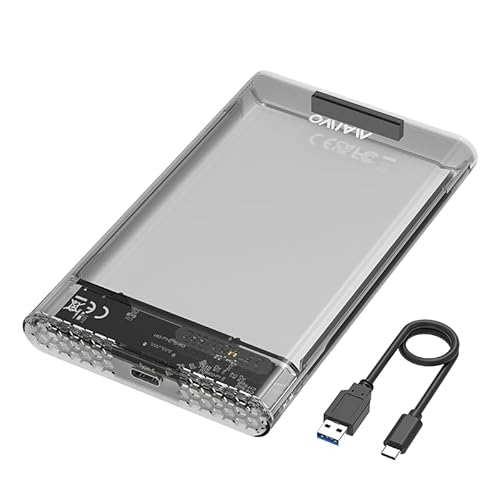
- Tool-free setup with plug-and-play use
- Up to 5Gbps USB-C transfer with UASP
- Supports 2.5-inch SATA SSD/HDD up to 6TB
Best For: Photographers who need an easy, tool-free enclosure for standard 2.5-inch SATA drives
Fast Portable Backup Pick
WEETOTUNG 6Gbps Tool-Free USB-C Case

- USB-C 3.0 with up to 6Gbps and UASP
- Compact, travel-friendly 5" x 3.15" x 0.5" size
- Supports 2.5-inch SATA drives up to 6TB
Best For: Users who want a compact enclosure for fast photo backups and travel
Clear Everyday Backup Enclosure
ORICO 2.5" Transparent USB-C Case

- Transparent PC design makes drive identification easy
- USB-C with up to 5Gbps plus UASP/TRIM
- Tool-free, hot-swappable support for 2.5-inch SATA drives
Best For: Photographers and everyday users who want a clear, tool-free enclosure for reliable backups
Tool-Free 2.5-Inch SATA Pick – BENFEI 2.5" SATA Enclosure
If you need one of the simplest ssd enclosures for photo storage, this BENFEI 2.5-inch SATA enclosure keeps the workflow straightforward. It is built for 7mm and 9.5mm SATA SSDs, supports UASP, and offers plug-and-play use with USB Type-C and Type-A connections for moving photo libraries between computers or backing up a drive.
Best For: photographers who want a simple, tool-free enclosure for a 2.5-inch SATA SSD or HDD
Pros:
- Tool-free design makes drive swaps quick and easy.
- Supports UASP and up to 5 Gbps transfer speeds.
- USB-C/USB-A plug design adds flexible host compatibility.
- Works with Windows, Linux, and macOS 8.0 and above.
Cons:
- Only supports 2.5-inch SATA drives, not M.2 NVMe SSDs.
- Designed for a single drive at a time.
This is a practical pick if your photo storage drive is a standard 2.5-inch SATA SSD and you want an easy enclosure with broad device support. It focuses on convenience rather than advanced features, which suits straightforward backup and transfer use.
Fast NVMe Transfer Choice – ORICO M.2 NVMe 10Gbps Enclosure
For ssd enclosures for photo storage where speed matters, this ORICO NVMe case is aimed at fast transfers and easy portability. It supports PCIe NVMe M-Key drives in 2230, 2242, 2260, and 2280 sizes, uses USB 3.1 Gen 2 with UASP, and can reach up to 10Gbps with high-performance media.
Best For: users who want a compact NVMe enclosure for fast photo backups and offloading
Pros:
- Supports up to 10Gbps transfer speed with UASP.
- Works with 2230/2242/2260/2280 PCIe NVMe M.2 SSDs up to 8TB.
- Includes USB-C to C and USB-C to A cable options.
- Aluminum top helps with portability and heat dissipation.
Cons:
- Does not support M.2 SATA SSDs.
- Not compatible with any SSD from Mac, per the notes.
This enclosure makes sense when photo files are large and you want a faster external NVMe setup. Its size and cable flexibility add convenience, but the compatibility limits mean it is best matched to the right type of M.2 drive.
Reliable SATA Backup Option – BENFEI 2.5" SATA Enclosure 6Gbps
This BENFEI option is another straightforward pick among ssd enclosures for photo storage, especially if you want a stable 2.5-inch SATA setup. It supports SATA I/II/III drives up to 6TB, uses the JMS580 chipset, and adds UASP support for faster, more efficient transfers than basic USB 3.0 use.
Best For: anyone needing a dependable 2.5-inch SATA enclosure for photo archives and backups
Pros:
- Supports up to 6 Gbps transfer speed with UASP.
- Tool-free installation makes setup simple.
- USB Type-C/Type-A cable is included.
- Compatible with Windows, Linux, and macOS 8.0 and above.
Cons:
- Only supports 2.5-inch SATA drives.
- Single-drive design with no extra expansion features.
If your photo storage plan is centered on a standard SATA SSD, this enclosure offers the basics without unnecessary complexity. The included cable and broad OS support make it easy to drop into a backup routine.
Compact Retro NVMe Pick – Hagibis Floppy-Style M.2 Enclosure
If you want an enclosure that is as portable as it is distinctive, this Hagibis model stands out among ssd enclosures for photo storage. It supports 2230 and 2242 NVMe M.2 drives, connects over USB 3.2 Gen 2, and is designed for fast transfers up to 10Gbps with support for direct external storage use on compatible iPhone Pro models.
Best For: creators who want a tiny NVMe enclosure for on-the-go photo and video storage
Pros:
- 10Gbps USB 3.2 Gen 2 performance for quick transfers.
- Very compact and lightweight at 3.3 ounces.
- Supports 2230/2242 NVMe SSDs for mobile-friendly builds.
- Can be used for direct external storage on compatible iPhone Pro devices.
Cons:
- Only supports 2230/2242 NVMe SSDs, not larger M.2 sizes.
- Requires a single-sided drive under 2.5mm thick, per the notes.
This is a strong fit if your priority is portability and a fast, pocketable backup drive for photos. The unique design is a bonus, but the narrower SSD compatibility means it is best for smaller NVMe builds.
Budget-Friendly 2.5-Inch Pick – ORICO 2.5 inch External Hard Drive Enclosure USB 3.0
If you want a simple SSD enclosure for photo storage, the ORICO 2.5-inch case is a practical, low-friction option. It supports 2.5-inch SATA SSDs and HDDs, offers tool-free installation, and uses USB 3.0 with UASP support for faster transfers when paired with a compatible computer.
Best For: Budget-minded users who want an easy way to turn a spare 2.5-inch SATA SSD into portable photo storage.
Pros:
- Tool-free setup makes drive installation quick and easy
- Supports 2.5-inch SATA SSDs and HDDs up to 7mm and 9.5mm
- USB 3.0 with UASP can improve transfer speed on compatible systems
- Slim ABS body keeps it lightweight and portable
Cons:
- Plastic enclosure, not aluminum
- Limited to 2.5-inch SATA drives only
- Top speed is tied to USB 3.0 and host-device UASP support
For basic photo backups and everyday file moving, this ORICO enclosure covers the essentials without adding complexity. It is a straightforward choice if you value portability and tool-free convenience over premium materials or extra features.
Best USB-C Build – UGREEN USB C Hard Drive Enclosure for 2.5" SATA SSD HDD
For ssd enclosures for photo storage, the UGREEN USB-C model stands out as a tidy option for users who want faster transfers and a more durable build. It supports 2.5-inch SATA SSDs and HDDs, includes USB-C to USB-C connectivity, and uses an aluminum shell with UASP and a built-in chipset for efficient operation.
Best For: Mac and USB-C users who want a sturdy enclosure for moving and backing up photo libraries.
Pros:
- USB 3.1 Gen 2 Type-C interface with up to 6Gbps SATA support
- UASP support and ASM235CM chipset for efficient data handling
- Aluminum body helps with heat dissipation
- Tool-free, plug-and-play setup with no extra power supply needed
Cons:
- Only supports one 2.5-inch drive
- Maximum drive capacity listed is 6TB
- Best speeds depend on USB-C and compatible host hardware
If your photo workflow involves frequent transfers from a laptop or MacBook, this enclosure offers a solid mix of speed, portability, and build quality. It is a sensible pick when you want your storage adapter to feel a little more premium.
Optimized for SSDs – SABRENT 2.5in SATA to USB 3.0 Tool-Free Enclosure
The SABRENT EC-UASP is a straightforward SSD enclosure for photo storage if you want a simple, tool-free way to repurpose a 2.5-inch SATA drive. It supports SATA SSDs and HDDs, includes UASP support for SSD use, and connects over USB 3.0 for up to 5Gbps transfer rates.
Best For: Users who want an uncomplicated external enclosure for everyday photo backups and file transfers.
Pros:
- Optimized for SSDs with UASP SATA III support
- Tool-free, plug-and-play design keeps setup easy
- USB 3.0 supports up to 5Gbps transfers
- Compact and lightweight for travel or desktop use
Cons:
- Plastic enclosure rather than metal
- Designed for 2.5-inch drives only
- Top speed depends on USB 3.0 and compatible systems
This is a practical choice if you mainly need dependable, no-hassle storage for photo libraries. It does the core job well: mount a 2.5-inch drive, connect it, and start moving files.
Budget-Friendly SATA Expansion – MAIWO 2.5" Tool-Free 5Gbps Enclosure
If you want a straightforward pick among SSD enclosures for photo storage, the MAIWO 2.5-inch case focuses on simple setup and dependable everyday transfers. It supports 7mm and 9.5mm SATA SSDs/HDDs, includes USB-C connectivity, and offers up to 5Gbps speeds with UASP support for faster file movement.
Best For: Photographers who need an easy, tool-free enclosure for backing up and moving standard 2.5-inch SATA drives.
Pros:
- Tool-free, plug-and-play setup keeps installation quick
- USB-C interface with up to 5Gbps transfer speed and UASP support
- Supports 2.5-inch 7mm/9.5mm SATA SSDs/HDDs up to 6TB
- Includes anti-shock pads and an LED indicator
Cons:
- Only supports 2.5-inch SATA drives, not larger formats
- Speed is limited to 5Gbps rather than faster USB standards
- Uses a USB-C to USB-A cable in the box, so accessory matching may vary
For a budget-conscious storage shell, the MAIWO covers the basics well and is easy to use for photo archives, transfers, and backup drives. Its transparent black build also makes the drive easy to identify if you keep several enclosures on hand.
Fast Portable Backup Pick – WEETOTUNG 6Gbps Tool-Free USB-C Case
Among SSD enclosures for photo storage, the WEETOTUNG case stands out for its 6Gbps transfer rating and compact, travel-friendly design. It supports 2.5-inch SATA HDDs/SSDs in 7mm to 9.5mm thickness, uses USB-C with UASP support, and is positioned for quick file transfers and backup workflows.
Best For: Users who want a compact enclosure for fast photo backups, travel, and general media transfers.
Pros:
- 6Gbps transfer rate with USB-C 3.0 and UASP support
- Tool-free, 3-step installation makes setup simple
- Compact 5″ x 3.15″ x 0.5″ design for portability
- Supports up to 6TB and is described as ideal for large photo libraries
Cons:
- Designed for a single 2.5-inch drive only
- Uses an ABS build rather than a metal enclosure
- Best speed claims depend on a compatible USB-C/UASP setup
If your priority is moving image files quickly, this enclosure offers a strong mix of speed and portability. It is a practical option for photographers who want a lightweight case that can handle backups, transfers, and everyday storage expansion.
Clear Everyday Backup Enclosure – ORICO 2.5" Transparent USB-C Case
If you prefer a clean, easy-to-check option for SSD enclosures for photo storage, the ORICO transparent case makes it simple to see the drive inside without opening the enclosure. It supports 2.5-inch SATA SSDs/HDDs up to 6TB, uses USB-C with up to 5Gbps transfer speed, and includes UASP and TRIM support for modern storage workflows.
Best For: Photographers and everyday users who want a clear, tool-free enclosure for reliable external photo backups.
Pros:
- Transparent PC shell lets you see the installed drive at a glance
- USB-C with up to 5Gbps transfer speed and UASP/TRIM support
- Tool-free, plug-and-play setup with hot-swappable use
- Includes a blue LED indicator and 10-minute sleep mode
Cons:
- Only supports 2.5-inch SATA drives
- Transfer ceiling is 5Gbps, not the faster 6Gbps tier
- Plastic construction may not feel as rugged as premium metal alternatives
The ORICO is a well-rounded enclosure for users who want visibility, convenience, and broad compatibility with common 2.5-inch drives. For photo libraries, it offers the essentials without adding extra setup friction.
How We Picked the Best SSD Enclosures for Photo Storage
We looked for SSD Enclosures for Photo Storage that balance speed, drive compatibility, and everyday convenience. Priority went to models with UASP support, USB-C or dual-interface connectivity, tool-free access, and support for common 2.5-inch SATA and M.2 NVMe drives. We also considered build quality, portability, and whether an enclosure is better suited to active working files or long-term backups.
Quick Comparison
For simple photo archives and backup drives, a 2.5-inch SATA enclosure is usually the most affordable and broadly compatible choice. If you edit large RAW files or move high-volume catalogs frequently, an NVMe enclosure is the faster option. The best pick depends on whether your priority is value, speed, or maximum convenience.
Key Buying Factors for SSD Enclosures for Photo Storage
Drive Type and Compatibility
Match the enclosure to your drive first. SATA enclosures work with standard 2.5-inch SSDs and many older laptop drives. NVMe enclosures are for M.2 PCIe drives and deliver much higher performance. Check supported sizes, thickness, and capacity limits before buying.
Transfer Speed
For photo libraries, faster speeds matter most when importing, exporting, or backing up large batches. USB 3.0/USB 3.2 Gen 1 is fine for many SATA SSDs, while 10Gbps USB 3.2 Gen 2 enclosures help NVMe drives perform closer to their potential. UASP support can also improve responsiveness.
Heat Management
Photo storage may involve long transfers, so thermal design matters. Aluminum housings usually dissipate heat better than thin plastic cases, which can help maintain stable performance during longer sessions.
Ease of Use
Tool-free designs are helpful if you swap drives often, while secure screw-based designs may feel more stable for a drive that stays mounted in a bag or desk setup. USB-C is the most flexible port choice for modern laptops and desktops.
Who Should Buy Which SSD Enclosures for Photo Storage?
If you want a simple, low-cost archive drive, choose a 2.5-inch SATA model. If you work with high-resolution RAW files or use your enclosure as a working scratch drive, go with an NVMe option. If you travel frequently, prioritize a compact enclosure with sturdy construction and good heat control. For most photographers, the best SSD Enclosures for Photo Storage are the ones that match the drive you already own and the speed you actually need.