If your edits involve large camera files, proxy workflows, or fast project transfers, the right enclosure can make a real difference. The best options deliver high sustained speeds, strong thermal control, and dependable compatibility.
This roundup focuses on SSD enclosures for video editing that suit 4K and 8K timelines, on-set recording, and portable post-production storage.
Best 10 SSD Enclosures for Video Editing Picks for 2026
Ultra-Fast 40Gbps Pick
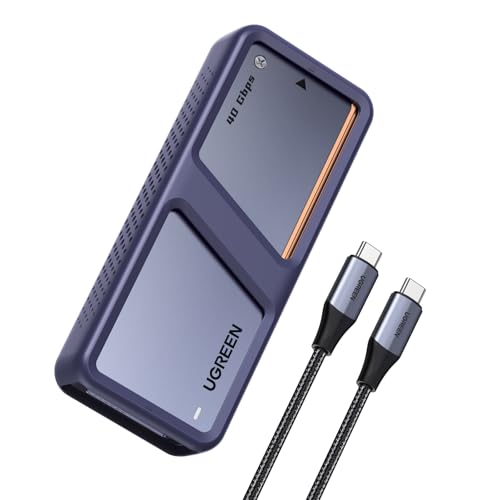
- Dual-chip design helps control heat under load.
- Up to 3600MB/s with USB4/Thunderbolt 4 setups.
- Supports up to 8TB NVMe SSDs for large projects.
Best For: Editors who need fast, cooled external NVMe storage
Multi-Drive Capacity Pick

- Four-bay design supports up to 32TB total capacity.
- USB 4.0 with 40Gbps bandwidth for fast transfers.
- Built-in fan and vents help with sustained workloads.
Best For: High-capacity media workflows and on-set DIT use
Mobile Recording Pick
ACASIS Magnetic 10Gbps NVMe Enclosure

- Magnetic attachment helps keep it secure on a phone.
- Supports 4K@60 ProRes recording on compatible iPhones.
- Silent fan and aluminum body aid heat dissipation.
Best For: iPhone creators recording ProRes video to external SSD
Premium Speed Pick
OWC Express 1M2 40Gb/s Portable NVMe SSD

- Up to 3836MB/s real-world performance
- USB4, Thunderbolt, and USB-C compatible
- Heat-dissipating, bus-powered portable design
Best For: Fast, portable editing work with broad host compatibility
Cooling-Focused Choice
ACASIS 40Gbps M.2 NVMe SSD Enclosure with Cooling Fan

- Built-in fan for active heat control
- 40Gbps USB4 with Thunderbolt support
- Supports 2280/2260/2242/2230 drives
Best For: Long editing sessions where cooling and sustained performance matter
Value Performance Pick
UGREEN 40Gbps M.2 NVMe Enclosure

- Up to 3600MB/s with ASM2464PD chip
- Quiet fanless cooling design
- Supports up to 8TB NVMe drives
Best For: Quiet, fast storage for editors who travel or work across devices
Quiet Cooling Pick
Plugable 10Gbps Tool-Free NVMe Enclosure

- 10Gbps NVMe enclosure with TRIM and UASP
- Auto-on fan plus aluminum cooling
- Tool-free setup with USB-C and USB-A cables
Best For: Editors who want quiet, stable 10Gbps transfers
Speed Leader
ACASIS 40Gbps USB4 NVMe Enclosure

- 40Gbps USB4 enclosure with Thunderbolt support
- Fanless aluminum fins for silent cooling
- Up to 2805/2734 MB/s tested speeds
Best For: Professional editors needing top-end transfer speed
Transparent Performance Pick
Yottamaster 40Gbps USB4 NVMe Enclosure

- 40Gbps support over USB4 and Thunderbolt 4
- Tool-free clear design with fan visibility
- ASM2464PD controller for stable transfers
Best For: Users who want fast, tool-free storage with active cooling
Ultra-Fast 40Gbps Pick – UGREEN 40Gbps NVMe Enclosure
For SSD enclosures for video editing, this UGREEN model is built for creators who want fast transfers and dependable cooling during heavy workloads. Its USB4 and Thunderbolt 3/4 support, dual-chip design, and active fan make it a strong fit for moving large footage libraries and working from an external NVMe drive.
Best For: Editors moving large video files who want a high-speed, well-cooled NVMe enclosure for USB4 or Thunderbolt setups.
Pros:
- Dual-chip design helps maintain high speed while reducing heat generation.
- Up to 3600MB/s performance with USB4 or Thunderbolt 4-compatible setups.
- Aluminum housing plus smart fan cooling for heavy editing sessions.
- Supports up to 8TB NVMe SSDs for large project storage and backups.
Cons:
- To reach maximum speed, you need Thunderbolt 4 cables and compatible devices.
- Not compatible with SATA SSDs or PCIe 5.0 SSDs.
This is a practical pick if you need fast external storage for editing, backups, and large file transfers. The cooling and health-monitoring features add peace of mind when the drive is under sustained use.
Multi-Drive Capacity Pick – ORICO 4-Bay 40Gbps NVMe Dock
If you’re shopping for SSD enclosures for video editing and need more than a single-drive setup, this ORICO enclosure focuses on capacity and workflow efficiency. It supports four NVMe drives, uses a USB 4.0 interface, and adds active cooling and vents for stable long-session performance.
Best For: DITs and editors who need a portable multi-drive NVMe enclosure for high-capacity media handling and fast imports.
Pros:
- Supports four M.2 NVMe SSDs for up to 32TB total capacity.
- USB 4.0 and 40Gbps bandwidth for high-speed data transfer.
- All-aluminum housing with built-in fan and front/rear vents for heat dissipation.
- Solid-state design is compact, lightweight, and shock resistant for travel.
Cons:
- Per-disk speed note is capped at up to 10Gbps in the supplied details.
- SSD drives are not included.
This enclosure makes sense when your editing workflow depends on storing or moving a lot of footage at once. The four-bay design is the standout feature, especially for on-set work and large media libraries.
Best Tool-Free Option – SABRENT USB4 NVMe Enclosure
Among SSD enclosures for video editing, this SABRENT model is a strong fit if you want speed without fuss. It offers tool-free installation, USB4 performance, and active cooling, making it a convenient external NVMe enclosure for creators who move between editing stations.
Best For: Editors and mobile creators who want a fast, tool-free NVMe enclosure for portable post-production work.
Pros:
- Up to 3,900MB/s over USB4 and 2,700MB/s over Thunderbolt 3/4.
- Tool-free installation works with 2230/2242/2260/2280 PCIe NVMe SSDs.
- Active cooling fan plus aluminum/ABS build for stable transfers.
- Compatible with Thunderbolt 3, Thunderbolt 4, USB4, and USB-C on Windows and macOS.
Cons:
- Does not support SATA M.2 SSDs.
- Maximum performance depends on a compatible USB4 or Thunderbolt connection.
This is a straightforward choice for editors who value speed and convenience in one enclosure. Tool-free setup and wide host compatibility make it especially easy to use across different systems.
Mobile Recording Pick – ACASIS Magnetic 10Gbps NVMe Enclosure
This ACASIS option stands out in SSD enclosures for video editing because it is designed for mobile recording as well as file transfers. The magnetic attachment, 4K@60 HDMI support, and iPhone ProRes recording compatibility make it especially relevant for creators who shoot and edit on the go.
Best For: iPhone creators and mobile video editors who want magnetic SSD storage for 4K ProRes recording.
Pros:
- Supports 4K@60 ProRes recording on compatible iPhone 15/16/17 Pro and Pro Max models.
- Built-in magnetic structure helps keep the enclosure attached securely.
- Silent cooling fan, aluminum alloy body, and thermal pad support heat dissipation.
- Portable 2230-size design is compact for travel and event work.
Cons:
- 10Gbps speed is much slower than the 40Gbps options in this roundup.
- For larger SSDs over 1TB or multiple devices, external power is recommended.
If your workflow includes direct recording to SSD from a compatible iPhone, this enclosure is highly specialized in the right direction. It trades raw speed for practical mobile capture features and a secure magnetic design.
Premium Speed Pick – OWC Express 1M2 40Gb/s Portable NVMe SSD
If you want one of the fastest SSD enclosures for video editing, the OWC Express 1M2 is built for high-bitrate workflows and portable speed. Its 40Gb/s connection, claimed real-world performance up to 3836MB/s, and bus-powered design make it a strong fit for moving large media files, editing proxies, or working directly off external NVMe storage.
Best For: Editors who want a very fast, portable NVMe enclosure for demanding Thunderbolt or USB4 workflows.
Pros:
- Up to 3836MB/s real-world performance for fast media transfers
- Compatible with USB4, Thunderbolt, and USB-C computers and devices
- Patented heat-dissipating design helps keep the SSD cool and stable
- Supports NVMe M.2 2280, 2242, and 2230 drives
Cons:
- Performance depends on a compatible 40Gb/s host connection
- Sold as an enclosure solution, so you provide the NVMe SSD
For editors who value top-tier speed and broad compatibility, this OWC enclosure is an easy premium choice. It pairs rugged portability with thermal design focused on sustained performance, which matters when long transfers or editing sessions put more load on the drive.
Cooling-Focused Choice – ACASIS 40Gbps M.2 NVMe SSD Enclosure with Cooling Fan
For SSD enclosures for video editing where sustained speed matters, the ACASIS TBU405 Pro stands out with active cooling. The built-in fan, aluminum body, and heat-dissipation holes are designed to reduce throttling during heavy transfers, while the 40Gbps USB4/Thunderbolt connection is aimed at demanding creative workflows.
Best For: Editors who need active cooling to help maintain performance during long renders and large file transfers.
Pros:
- Built-in cooling fan helps manage heat during heavy workloads
- 40Gbps USB4 enclosure with Intel JHL7440 chip
- Compatible with Thunderbolt 4, Thunderbolt 3, and USB 3.x
- Supports 2280/2260/2242/2230 drive sizes
Cons:
- Fan must be switched on manually
- Top speed depends on a compatible high-end host and SSD
This is a practical pick if your editing sessions run long enough for heat to become a problem. The active cooling design is the main reason to choose it, especially when you want steady performance rather than just headline speed.
Value Performance Pick – UGREEN 40Gbps M.2 NVMe Enclosure
If you need a straightforward option among SSD enclosures for video editing, the UGREEN 40Gbps M.2 NVMe Enclosure delivers strong speed and broad compatibility. Its ASM2464PD chip, up to 3600MB/s claimed speed, and silent fanless design make it a sensible choice for transferring footage, editing projects, and carrying drives between systems.
Best For: Editors who want a fast, quiet NVMe enclosure with wide device compatibility and no fan noise.
Pros:
- Up to 3600MB/s maximum speed with ASM2464PD chip
- Quiet fanless heat dissipation design
- Compatible with USB4 and Thunderbolt 3/4 connections
- Supports 2230/2242/2260/2280 drives up to 8TB
Cons:
- Thunderbolt 4 cables and devices are required for top speed
- Not compatible with SATA NGFF or mSATA drives
This enclosure balances speed, portability, and quiet operation in a simple package. For editors who want a compact drive case without a fan, it offers a strong mix of performance and practical compatibility.
Quiet Cooling Pick – Plugable 10Gbps Tool-Free NVMe Enclosure
If you want an SSD enclosure for video editing that stays cool during long transfers, this Plugable model focuses on stable 10Gbps performance and easy drive swaps. Its aluminum body and intelligent fan are built to reduce thermal throttling, which matters when moving large project files or working with sustained reads and writes.
Best For: Editors who need a quiet, tool-free enclosure for fast 10Gbps NVMe transfers and large file handling.
Pros:
- Dual cooling system combines an auto-on fan with aluminum heat dissipation
- Supports TRIM and UASP for more stable data transmission
- Tool-free, driver-free setup makes SSD swaps quick
- Includes both USB-C and USB-A cables for flexible use
Cons:
- Limited to 10Gbps, so it is slower than USB4/Thunderbolt options
- Does not support NGFF SATA SSDs
- Designed for NVMe M.2 drives only
For creators who value a simple setup and reliable sustained speeds, this enclosure is a practical fit. It is especially appealing if you want a cooler-running drive shell without the noise and complexity of a more advanced high-speed enclosure.
Speed Leader – ACASIS 40Gbps USB4 NVMe Enclosure
For video editing workflows that move huge files, this ACASIS enclosure is built around 40Gbps USB4 performance and fanless aluminum cooling. It is positioned for users who want an SSD enclosure for video editing with strong sustained throughput, especially on USB4 and Thunderbolt systems.
Best For: Professional editors and Mac/PC users who need maximum 40Gbps transfer speed for large video files and backups.
Pros:
- USB4 support with Thunderbolt 5/4/3 compatibility
- Fanless dual-sided aluminum fins for silent cooling
- Real-world speeds quoted up to 2700MB/s and tested up to 2805/2734 MB/s
- Supports up to 8TB NVMe SSDs
Cons:
- Full performance depends on a 40Gbps USB4 or Thunderbolt host
- More expensive-class hardware than basic 10Gbps enclosures
- Best results require the right cable and SSD pairing
This is the most performance-focused option in the group, making it a strong choice for creators working with 4K footage or frequent large-file transfers. If your system can take advantage of USB4, it offers a serious speed upgrade over standard 10Gbps enclosures.
Transparent Performance Pick – Yottamaster 40Gbps USB4 NVMe Enclosure
This Yottamaster enclosure targets creators who want a fast, easy-to-use SSD enclosure for video editing with a bit of visual flair. It supports 40Gbps connections over Thunderbolt 4 and USB4, and its clear shell lets you see the LED and fan status while you work.
Best For: Users who want a 40Gbps enclosure with tool-free setup, active cooling, and a transparent design.
Pros:
- USB4/Thunderbolt 4 compatibility for fast host connections
- ASM2464PD controller for stable transfers and protection features
- Tool-free installation with a transparent cover
- Supports 2230, 2242, 2260, and 2280 NVMe drives up to 8TB
Cons:
- Peak speeds depend on using a 40Gbps-rated cable and compatible host
- Windows is the only hardware platform listed in the supplied details
- Warranty is shorter than some competing options
If you want fast transfers and an enclosure that is straightforward to install, this model checks the main boxes. It is a good middle ground between high-end throughput and a more approachable, tool-free design.
How We Picked These SSD Enclosures for Video Editing
We prioritized real-world editing needs over raw spec sheets. That means sustained transfer performance, thermal design, host interface support, tool-free access where it helps, and compatibility with modern NVMe drives. For SSD Enclosures for Video Editing, stable speed under load matters more than a peak number that only appears in short benchmarks.
We also looked at practical factors like bus-powered convenience, enclosure build quality, and whether a model is better suited to editing media files, running scratch disks, or recording directly from a camera or recorder.
Quick Comparison
In general, 40Gbps USB4 and Thunderbolt-class enclosures are the best fit for demanding 4K and 8K projects. 10Gbps models are still useful for lighter editing, secondary storage, or budget-minded setups. Cooling features such as fans, fins, or thicker aluminum bodies are especially important if you move large files for long sessions.
If your workflow depends on maximum responsiveness, choose a premium USB4 or Thunderbolt enclosure. If you want a lower-cost portable drive for file offloading and proxy work, a solid 10Gbps option may be enough.
Key Buying Factors for SSD Enclosures for Video Editing
Interface Speed
Match the enclosure to your workflow and port type. USB4 and Thunderbolt 4 enclosures offer the best headroom for high-bitrate footage, while USB 3.2 Gen 2 models are more limited but still practical for many editors.
Thermal Design
Video editing creates long, sustained writes. Look for active cooling, heat-dissipating fins, or a solid aluminum shell that helps prevent throttling during large exports or media transfers.
Drive Compatibility
Make sure the enclosure supports the NVMe form factor and the drive size you plan to use. Some models also support higher-capacity SSDs, which is useful if you keep multiple camera originals on one drive.
Workflow Fit
Consider whether you need a portable edit drive, a scratch disk, or an enclosure for direct camera recording. Features like tool-free installation, magnetic mounts, and compact design can be helpful on set.
Who Should Buy Which SSD Enclosures for Video Editing?
Choose a premium 40Gbps or Thunderbolt option if you regularly edit 4K or 8K media, use high-bit-rate codecs, or want the best chance of sustained performance. Choose a 10Gbps enclosure if your work centers on proxy editing, backups, or lighter projects and you value lower cost over top-end throughput.
For creators who travel often, compact aluminum enclosures with strong cooling are the best balance of speed and durability. For desktop editors, larger enclosures with active thermal management may be worth it if you move very large media libraries or export often.
In short, the best choice depends on your port speed, your footage size, and how hard you plan to push the drive. Matching those three factors will help you get the most from your SSD enclosure.