Choosing the right enclosure can make an old Mac SSD useful again, or turn a spare NVMe drive into fast external storage. The best options balance Mac compatibility, speed, cooling, and build quality.
This roundup covers 10 SSD enclosures for Mac, from Apple-specific MacBook SSD adapters to modern USB-C NVMe cases, so you can match the enclosure to your drive and workflow.
Best 10 SSD Enclosures for Mac Picks for 2026
Fastest NVMe Upgrade
UGREEN 40Gbps M.2 NVMe Enclosure

- USB4 and Thunderbolt 3/4 support.
- Up to 3600MB/s with the right setup.
- Fits NVMe drives up to 8TB.
Best For: Speed-first Mac users with NVMe drives and USB4/Thunderbolt.
Legacy Mac Drive Adapter
cablecc 7+17Pin SSD to USB-C Case for 2012 Macs
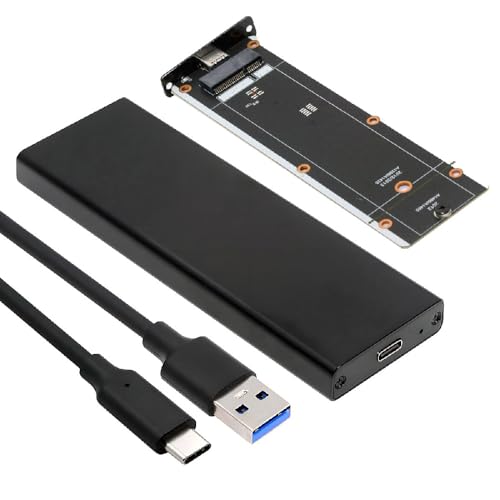
- Designed for 2012 Mac Air and Mac Pro SSDs.
- USB-C with 5Gbps transfer support.
- Requires a 7+17 pin compatible SSD.
Best For: Owners of compatible 2012 Mac SSDs needing a recovery adapter.
Best Cooling Pick
Plugable 10Gbps M.2 NVMe SSD Enclosure

- Tool-free setup with USB-C and USB-A cables.
- Dual cooling with fan plus aluminum body.
- Supports TRIM and UASP for stable transfers.
Best For: Mac users wanting a cool-running, easy-to-use 10Gbps NVMe case.
Legacy Mac SSD Adapter
7+17 Pin Mac SSD to USB-C Enclosure

- For specific 2012 MacBook Air/Pro SSDs
- USB-C with up to 5Gbps support
- SSD not included; connector match required
Best For: Owners of compatible 2012 Apple SSDs
Fast NVMe Enclosure
Tool-Free USB-C NVMe Enclosure 10Gbps

- Supports NVMe drives in 2230-2280 sizes
- Tool-free flip-open installation
- Not for M.2 SATA SSDs
Best For: Mac users who want a fast NVMe enclosure
Modern Mac SSD Reader
12+16 Pin MacBook SSD USB-C Enclosure

- Built for 12+16 pin MacBook SSDs
- Up to 20Gbps with compatible gear
- Not for SATA or 1TB wide SSDs
Best For: Owners of 2013-2017 MacBook SSDs
Portable Mac SSD reader
Jorkar 12+16 Pin USB-C Enclosure

- Fits select 2013–2017 MacBook SSDs
- USB-C 3.2 with up to 20Gbps support
- Includes cable, tool, adapter, and pad
Best For: People reusing a compatible MacBook SSD as external storage
Compact indicator enclosure
Jorkar 12+16 Pin Indicator Case

- Made for select 2013–2017 Mac SSDs
- Compact aluminum body with indicator
- Up to 20Gbps on compatible setups
Best For: Users who want a compact enclosure with a status light
Mac SSD Recovery Pick – ACASIS USB-C Enclosure for Apple 12+16 Pin SSDs
If you need ssd enclosures for mac that are tailored to older Apple drives, this ACASIS model is built around original 12+16 pin SSDs from select 2013–2017 Macs. It also adds an M.2 NVMe adapter, so it can serve as a practical recovery or reuse option if you have the right Apple SSD or want a separate NVMe path.
Best For: Owners of compatible 2013–2017 MacBook Air, MacBook Pro Retina, iMac, or Mac Pro drives who want Apple-SSD-focused support.
Pros:
- Supports original Apple 12+16 pin SSDs from select 2013–2017 Macs.
- Includes an M.2 NVMe adapter for added flexibility.
- USB 3.2 Gen 2 support reaches up to 10Gbps, with up to 20Gbps on compatible Gen 2×2 systems.
- Aluminum alloy case is designed for heat dissipation.
Cons:
- Does not support Toshiba 12+16 pin SSDs.
- Not compatible with SATA SSDs or third-party Apple-replacement SSDs.
- macOS support is for direct read use, and Windows may require reformatting.
This is a specialized enclosure, so compatibility matters more than broad versatility. If your drive matches the supported Apple SSD types, it’s a focused way to bring an old Mac SSD back into service.
Fastest NVMe Upgrade – UGREEN 40Gbps M.2 NVMe Enclosure
For buyers comparing ssd enclosures for mac, this UGREEN option is the speed-focused pick for M.2 NVMe drives. Its USB4 and Thunderbolt 3/4 compatibility, plus a claimed 3600MB/s ceiling with the right setup, make it well suited to large file transfers and high-performance workflows.
Best For: Mac users who want a high-speed NVMe enclosure for large transfers and Thunderbolt/USB4 setups.
Pros:
- Supports USB4 and Thunderbolt 3/4, with up to 3600MB/s on the right connection.
- Fits M.2 2230, 2242, 2260, and 2280 NVMe drives up to 8TB.
- Uses a double-sided fin cooling design and three-dimensional cooling system.
- Works across Mac OS, Windows, Linux, and Android.
Cons:
- NVMe only; SATA NGFF and mSATA drives are not supported.
- Thunderbolt 4 cables and devices are required to reach the top speed.
- SSD is not included.
If your priority is maximum throughput rather than broad legacy compatibility, this is a strong premium enclosure. Just make sure your drive is NVMe and your Mac has the right USB4 or Thunderbolt setup to match it.
Legacy Mac Drive Adapter – cablecc 7+17Pin SSD to USB-C Case for 2012 Macs
If you’re shopping for ssd enclosures for mac and need support for a very specific older Apple drive, this cablecc adapter is aimed at 2012 Mac Air and 2012 Mac Pro SSDs with a 7+17 pin connector. It’s a straightforward recovery-style enclosure for reviving compatible legacy SSDs rather than a general-purpose NVMe case.
Best For: Users with compatible 2012 Mac Air or Mac Pro SSDs who want a simple USB-C adapter enclosure.
Pros:
- Targets 2012 Mac Air and 2012 Mac Pro SSD form factors.
- USB 3.0 Type-C connection with 5Gbps transfer support.
- JMS580 bridge chipset for SATA Gen3 conversion.
- Mac-formatted SSDs are readable on macOS, with Windows reformat options noted.
Cons:
- Requires a 7+17 pin connector; other SSD types will not work.
- SSD is not included.
- Not suitable for drives that are 3.1A or higher.
This is a niche adapter, but that can be a plus if you’re trying to reuse a matching older Apple SSD. For the right drive, it’s a practical and simple way to access data or extend the life of legacy storage.
Best Cooling Pick – Plugable 10Gbps M.2 NVMe SSD Enclosure
Among ssd enclosures for mac, this Plugable model stands out for combining tool-free convenience with active and passive cooling. It’s built for M.2 NVMe drives and keeps speeds stable with TRIM and UASP support, which is useful if you move large files often or want a dependable everyday external drive.
Best For: Mac users who want a 10Gbps NVMe enclosure with strong cooling and simple tool-free setup.
Pros:
- Tool-free, driver-free installation makes swaps quick.
- Dual cooling system pairs a temperature-controlled fan with aluminum heat dissipation.
- Supports TRIM and UASP for more stable data transfer.
- Includes both USB-C and USB-A cables for wider compatibility.
Cons:
- Does not support NGFF SATA SSDs.
- Limited to M-Key and B+M Key NVMe drives in 2242, 2260, and 2280 sizes.
- Max speed is 10Gbps, so it’s not a Thunderbolt/USB4 class enclosure.
This is a balanced choice if you want a well-cooled, easy-to-use enclosure instead of chasing the highest possible speed. It’s especially appealing for Mac users who want a reliable NVMe case without a complicated setup.
Legacy Mac SSD Adapter – 7+17 Pin Mac SSD to USB-C Enclosure
If you need one of the more specialized SSD enclosures for mac, this chenyang adapter is built specifically for certain 2012 MacBook Air and MacBook Pro SSDs with the 7+17 pin connector. It’s a practical pick when you want to reuse an original Apple SSD over USB-C, but it only makes sense if your drive matches the exact pin and model requirements.
Best For: Owners of compatible 2012 MacBook Air or MacBook Pro SSDs who want a simple USB-C enclosure.
Pros:
- Made for specific 7+17 pin 2012 Mac SSDs.
- USB 3.0 Type-C connection with up to 5Gbps transfer support.
- Very lightweight, compact enclosure for portable reuse.
- Supports compatible 2012 Mac Air and Mac Pro SSD form factors listed in the notes.
Cons:
- SSD is not included.
- Only works with the exact 7+17 pin connector type.
- Not compatible with SSDs that require 3.1A or higher.
For the right legacy drive, this is a focused and affordable way to turn an old Mac SSD into external storage. The tradeoff is that compatibility is very narrow, so it’s best for users who have already confirmed their drive’s connector and model.
Fast NVMe Enclosure – Tool-Free USB-C NVMe Enclosure 10Gbps
Among SSD enclosures for mac, this SABRENT model is the straightforward choice if you’re using an M.2 NVMe drive and want a fast, tool-free USB-C setup. It supports common NVMe sizes, handles up to 10Gbps, and uses an aluminum design that helps move heat away from the drive during longer transfers.
Best For: Mac users with M.2 NVMe SSDs who want a quick, tool-free external enclosure.
Pros:
- Tool-free flip-open design for fast SSD installs.
- Supports NVMe SSDs in 2230, 2242, 2260, and 2280 sizes.
- USB-C with up to 10Gbps performance.
- Aluminum top and thermal pad design for better heat transfer.
Cons:
- Not compatible with M.2 SATA SSDs.
- Only supports one drive at a time.
- Performance depends on both the SSD and the connected device.
This is a strong all-around enclosure if you already know you need NVMe rather than SATA. The tool-free build and cooling-focused construction make it especially appealing for frequent swapping, cloning, or portable work.
Modern Mac SSD Reader – 12+16 Pin MacBook SSD USB-C Enclosure
If you’re shopping for SSD enclosures for mac and need something aimed at later Apple drives, this Jorkar enclosure is designed for 12+16 pin MacBook SSDs from mid-2013 to 2017. It’s a compact CNC aluminum case built for those specific Apple SSDs, with USB-C 3.2 support that can reach up to 20Gbps when the drive and host both support it.
Best For: Users with compatible 12+16 pin MacBook Air or Pro SSDs from 2013 to 2017.
Pros:
- Designed for 12+16 pin MacBook Air and Pro SSDs.
- Supports up to 20Gbps when both device and SSD are compatible.
- CNC aluminum alloy case for better heat dissipation.
- Compact and lightweight portable design.
Cons:
- Not compatible with all SATA SSDs or third-party SSDs.
- Does not support 1TB wide SSDs.
- SSD is not included.
This is a targeted enclosure for users trying to reuse a later-generation Mac SSD rather than a standard M.2 drive. Its real value comes from matching the exact Apple connector and getting a clean USB-C external setup in a small form factor.
Apple SSD-only enclosure – MacBook 12+16 Pin Enclosure
If you need one of the more targeted ssd enclosures for mac, this JEYI model is built specifically for original 2013–2017 Apple SSDs with the 12+16 pin layout. It’s a good fit when compatibility matters more than universal support, and the aluminum shell plus USB-C 3.2 interface make it a practical way to reuse an older MacBook drive as external storage.
Best For: Owners of 2013–2017 MacBook Air/Pro models who want to repurpose a compatible Apple SSD in a compact USB-C enclosure.
Pros:
- Supports 2013–2017 Apple SSDs with 12+16 pin connectors
- USB 3.2 Gen 2 interface with up to 10Gbps, or 20Gbps on compatible devices
- Full aluminum alloy body with a thermal silicone pad for cooling
- Includes screws and screwdriver tools for installation
Cons:
- Not compatible with M.2, SATA, or standard SSDs
- Does not support 2018+ MacBook SSDs with T2 chip
- Also excludes 2010–2012 Apple SSDs
This is a niche enclosure, but that’s also its strength: if your drive matches the required Apple connector, it’s a straightforward and portable reuse solution. Just verify the SSD generation before buying, because the compatibility window is narrow.
Portable Mac SSD reader – Jorkar 12+16 Pin USB-C Enclosure
Among ssd enclosures for mac, this Jorkar option is aimed at people who want a portable USB-C case for specific 12+16 pin MacBook SSDs from mid-2013 to 2017. It’s positioned as a simple external reader for compatible Apple drives, with an aluminum alloy body for heat dissipation and support for faster transfers when both the SSD and host device can handle them.
Best For: Users with compatible 12+16 pin MacBook Air or Pro SSDs who want a lightweight enclosure for external use.
Pros:
- Designed for MacBook Air A1466/A1465 and Pro A1502/A1398 SSDs
- USB-C 3.2 Gen2x2 support with up to 20Gbps when hardware allows
- Aluminum alloy construction for quicker heat dissipation
- Includes cable, screwdriver, adapter, thermal pad, and manual
Cons:
- Not compatible with SATA SSDs or third-party SSDs
- Requires the SSD to be formatted first for Windows use
- Some USB ports may need extra power support or a hub
This enclosure makes sense if you already know your Mac SSD matches the exact connector and model range. The included accessories and 2-year warranty add value, but the compatibility limits are strict and worth double-checking before purchase.
Compact indicator enclosure – Jorkar 12+16 Pin Indicator Case
This Jorkar enclosure is another focused choice in ssd enclosures for mac, made for 12+16 pin SSDs from mid-2013 to 2017 MacBook Air and Pro models. It adds a few practical touches, including an indicator light and a compact aluminum body, while staying centered on the same narrow Apple SSD compatibility range.
Best For: Mac users with compatible 12+16 pin SSDs who want a compact enclosure with a status indicator.
Pros:
- Supports specific MacBook Air/Pro SSDs from 2013–2017
- USB-C 3.2 interface with up to 20Gbps on supported hardware
- Compact aluminum case with an indicator light
- Includes USB cable, screwdriver, adapter, thermal pad, and manual
Cons:
- Not compatible with SATA SSDs or third-party SSDs
- Does not support 1TB wide SSDs
- Requires the correct 12+16 pin size and SSD dimensions
If you want a small, straightforward way to reuse a matching MacBook SSD, this model covers the basics well. The indicator and compact form factor are helpful, but the fit is still very specific, so confirm your drive type and size before ordering.
How We Picked the Best SSD Enclosures for Mac
We focused on compatibility first, then practical performance. For SSD Enclosures for Mac, that means matching the enclosure to the correct connector type, supporting the expected speed tier, and using materials that help with heat management. We also favored products with clear Mac model support, USB-C convenience, and designs that are easy to install and travel with.
Quick Comparison
The list splits into two main categories: Apple SSD adapters for older MacBook Air and MacBook Pro drives, and modern M.2 NVMe enclosures for users who want a reusable external drive. Apple-specific models are best if you are salvaging an internal Mac SSD. NVMe enclosures are better if you already own an M.2 drive or want the fastest broadly compatible external setup.
Key Buying Factors for SSD Enclosures for Mac
Connector Compatibility
Start with the drive you own. Older MacBook SSDs use proprietary 12+16 pin or 7+17 pin connectors, while standard M.2 NVMe drives need a PCIe NVMe enclosure. Buying the wrong interface is the most common mistake.
Speed and USB Version
USB 3.2 Gen 1, Gen 2, and higher-tier 20Gbps or 40Gbps options can make a real difference, but only if your Mac and cable support them. If you are using an older Mac, a premium enclosure will still work, but peak speeds may be limited by the system.
Thermals and Build Quality
Aluminum enclosures usually handle sustained transfers better than thin plastic cases. Good thermal design matters more for faster NVMe drives, which can throttle when they get hot. A snug fit, secure internal mount, and stable chipset also help reliability.
Tool-Free Vs. Screw-In Designs
Tool-free cases are convenient for frequent swaps. Screw-in models can feel more secure and are often better for drives you plan to leave installed. Choose based on how often you expect to open the enclosure.
Who Should Buy Which SSD Enclosures for Mac?
If you need to reuse an original MacBook SSD, choose one of the Mac-specific 12+16 pin or 7+17 pin adapters. If you want the best all-around external storage upgrade, pick a USB-C M.2 NVMe enclosure. Power users moving large video or photo files should prioritize higher-speed models with solid aluminum housing. Casual users, students, and office users may be better served by a simpler 10Gbps enclosure that is easy to set up and widely compatible.