Portable SSD enclosures make it easy to turn a spare M.2 drive into fast, reusable storage for laptops, desktops, and handhelds.
From 10Gbps USB options to premium USB4 picks, the right enclosure depends on the drive you already own and the speeds you want.
Best 10 Portable SSD Enclosures Picks for 2026
Rugged Gaming Choice
ASUS TUF Gaming A1 External SSD Enclosure
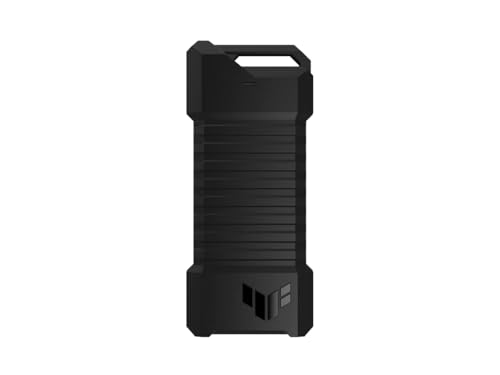
- Supports both NVMe PCIe and SATA M.2 drives
- IP68 water/dust resistance and MIL-STD-810H drop resistance
- Q-latch makes installation easier
Best For: Gamers and travelers wanting a rugged, versatile enclosure
Premium Portable Workhorse
OWC Express 1M2 40Gb/s Portable NVMe SSD

- Up to 3836 MB/s real-world performance
- USB4, Thunderbolt, and USB-C compatibility
- Heat-dissipating metal design
Best For: Professionals who want fast, reliable portable NVMe storage
Budget-Friendly Pocket Pick

- Supports 2230-2280 M.2 NVMe SSDs
- Tool-free sandwich design
- USB 3.2 Gen 2 with UASP up to 10Gbps
Best For: Compact everyday NVMe storage with easy installation
RGB Aluminum NVMe Pick

- 10Gbps USB 3.2 Gen 2 NVMe enclosure
- Fits 2230/2242/2260/2280 drives
- Includes USB-C to C and USB-C to A cables
Best For: Style-conscious NVMe users who want cooling and cable flexibility
Tool-Free Dual-Format Choice

- Works with both NVMe and SATA M.2 drives
- Tool-free install and removal
- 10Gbps USB 3.2 Type-C with aluminum body
Best For: Users who need a simple enclosure for either NVMe or SATA M.2 SSDs
Pocket 2230 NVMe Option

- Made only for 2230 NVMe SSDs
- 10Gbps USB-C, bus-powered design
- Wire-free magnetic cover and aluminum body
Best For: Owners of 2230 NVMe drives who want the smallest possible enclosure
Portable NVMe Starter

- 10Gbps USB 3.1 Gen 2 with UASP support
- Fits NVMe M.2 drives up to 8TB
- Includes USB-C to C and USB-C to A cables
Best For: Portable NVMe users who want simple cross-device compatibility
Tool-Free Upgrade Pick

- Flip-open design needs no tools or screws
- Aluminum build and thermal pad improve heat transfer
- USB-C plug-and-play with 10Gbps support
Best For: People who swap NVMe drives often and want simple, fast setup
Cooling-First Choice

- Active fan plus aluminum body for dual cooling
- Supports TRIM and UASP for steadier transfers
- Tool-free design with USB-C and USB-A cables
Best For: Users moving large NVMe files who want better temperature control
Ultra-High-Speed Creator Pick – SABRENT USB4 NVMe SSD Enclosure
If you want a portable SSD enclosure built for top-end transfer speeds, this SABRENT USB4 model is aimed squarely at demanding workflows. It supports PCIe NVMe drives only, works across USB4, Thunderbolt 3/4, and USB-C systems, and adds active cooling to help keep performance steady during large file moves.
Best For: Creators, editors, and mobile power users who need very fast external NVMe storage.
Pros:
- Up to 3,900 MB/s over USB4, with up to 2,700 MB/s on Thunderbolt 3/4
- Tool-free installation for 2230/2242/2260/2280 PCIe NVMe drives
- Integrated active cooling fan helps maintain stability during heavy transfers
- Compatible with Windows and macOS over Thunderbolt, USB4, and USB-C
Cons:
- Does not support SATA M.2 SSDs
- Performance depends on having a fast enough host port and NVMe drive
This is one of the stronger portable SSD enclosures if speed and thermal control matter more than versatility. If you already own a PCIe NVMe SSD and want a fast, well-cooled external setup, it’s a very practical choice.
Rugged Gaming Choice – ASUS TUF Gaming A1 External SSD Enclosure
This ASUS TUF Gaming A1 is a practical option if you want portable SSD enclosures with more durability than the average shell. It supports both NVMe PCIe and SATA M.2 drives, uses a Q-latch for easier installation, and is designed for use with PCs, mobile devices, and current gaming consoles.
Best For: Gamers and travelers who want a tough enclosure for NVMe or SATA M.2 drives.
Pros:
- Supports both M.2 NVMe PCIe and SATA SSDs in 2242/2260/2280 sizes
- USB-C 3.2 Gen 2×1 interface delivers up to 10 Gbps transfer speeds
- MIL-STD-810H drop resistance plus IP68 water and dust resistance
- Q-latch mechanism simplifies drive installation
Cons:
- Slower than USB4 or Thunderbolt-class enclosures
- Bulkier and heavier than minimalist pocket-sized designs
For users who care more about toughness and wide drive compatibility than absolute peak speed, this enclosure stands out. It’s a sensible pick for gaming storage, field use, or anyone likely to move their drive around often.
Premium Portable Workhorse – OWC Express 1M2 40Gb/s Portable NVMe SSD
If you’re comparing portable SSD enclosures for speed and reliability, the OWC Express 1M2 is built for serious everyday use. It supports NVMe M.2 2280, 2242, and 2230 drives, runs over USB4, Thunderbolt, and USB-C, and uses a heat-dissipating metal design to keep performance consistent.
Best For: Professionals who want a fast, bus-powered NVMe enclosure with a premium thermal design.
Pros:
- Up to 3836 MB/s real-world performance
- Works with USB4, Thunderbolt, and USB-C systems
- Patented heat-dissipating design helps keep the SSD cool
- Includes 40Gb/s USB-C cable and screwdriver
Cons:
- Requires a compatible NVMe M.2 SSD; not a SATA enclosure
- Premium feature set may be more than casual users need
This enclosure is a strong fit when you want portable performance without giving up build quality. It’s especially appealing if you value a bus-powered setup with broad compatibility and a design focused on thermal consistency.
Budget-Friendly Pocket Pick – FIDECO M.2 NVMe SSD Enclosure
The FIDECO M.2 NVMe SSD Enclosure is a straightforward choice for portable SSD enclosures when you want speed and simplicity without extra frills. It supports M.2 NVMe drives in 2230 through 2280 sizes, uses a tool-free sandwich design, and connects over USB 3.2 Gen 2 for up to 10Gbps transfers.
Best For: Users who want a compact, easy-to-use NVMe enclosure for everyday portable storage.
Pros:
- Supports M.2 NVMe SSDs in 2230/2242/2260/2280 sizes
- Tool-free sandwich design makes installation quick
- USB 3.2 Gen 2 with UASP supports up to 10Gbps speeds
- Includes a USB-C to USB-C cable with USB-A adapter
Cons:
- Does not support M.2 SATA SSDs
- Performance is limited compared with USB4 or Thunderbolt options
This is a practical no-nonsense enclosure for users who mainly need a compact drive reader and decent 10Gbps performance. It’s a good fit for mixed-platform use, especially if you want something simple to pack and carry.
RGB Aluminum NVMe Pick – ASUS ROG Strix Arion
If you want portable SSD enclosures with a more premium feel, the ASUS ROG Strix Arion is built around an aluminum alloy body, thermal pads, and 10Gbps USB 3.2 Gen 2 performance. It is designed for M.2 NVMe drives in 2230, 2242, 2260, and 2280 sizes, and it ships with both USB-C to C and USB-C to A cables for wider compatibility.
Best For: Users who want a stylish NVMe enclosure with cooling-focused aluminum construction and included USB-C / USB-A cable options.
Pros:
- Supports M.2 PCIe NVMe SSDs in 2230/2242/2260/2280 sizes
- 10Gbps USB 3.2 Gen 2 connection for fast transfers
- Aluminum alloy case with thermal pads helps pull heat away from the drive
- Includes both USB-C to C and USB-C to A cables
Cons:
- M.2 NVMe SSD is not included
- Only fits M Key / B+M Key supported drives
- RGB lighting may be unnecessary for users who want a simpler enclosure
This is a strong pick if you want a portable SSD enclosure that balances speed, cooling, and accessory value. The ROG styling and Aura Sync support make it stand out, while the included cables and broad NVMe size support keep it practical.
Tool-Free Dual-Format Choice – SABRENT EC-SNVE
Among portable SSD enclosures, the SABRENT EC-SNVE is a practical all-rounder because it works with both M.2 NVMe and M.2 SATA drives. The tool-free design makes installation quick, and its 10Gbps USB 3.2 Type-C interface is paired with an aluminum build and thermal pad to help manage heat.
Best For: Anyone who wants one enclosure that can handle both NVMe and SATA M.2 drives without needing tools.
Pros:
- Supports both M.2 NVMe and M.2 SATA SSDs
- Tool-free installation and removal
- 10Gbps USB 3.2 Type-C connection
- Slim aluminum case with thermal pad for heat transfer
Cons:
- Does not support 2.5-inch SATA drives or mSATA
- No room for an SSD with a pre-installed heatsink
- Enclosure only; storage drive must be supplied separately
This is a versatile enclosure if you move drives between systems or are not sure whether your SSD is NVMe or SATA. The tool-free setup and wide compatibility make it especially easy to use, while the slim metal body keeps it travel-friendly.
Pocket 2230 NVMe Option – JEYI Wire-Free 2230
If you are shopping for portable SSD enclosures specifically for tiny 2230 NVMe drives, the JEYI Wire-Free model is purpose-built for that size. It uses a USB-C 10Gbps connection, a wire-free magnetic cover design, and a pocket-sized aluminum shell with ventilation and a thermal pad to help keep the drive cooler during use.
Best For: People who need a very compact enclosure for 2230 NVMe SSDs and want a cable-free, pocketable setup.
Pros:
- Supports only 2230 NVMe M.2 SSDs for a tight, focused fit
- USB-C 10Gbps interface with USB-powered operation
- Wire-free magnetic cover makes connecting quick and simple
- Aluminum build with ventilation and thermal pad for heat dissipation
Cons:
- Only compatible with 2230 NVMe drives
- No external power adapter support is needed, but that also means it is bus-powered only
- Less flexible than larger enclosures that support multiple M.2 lengths
This is a niche but appealing option if you already own a 2230 NVMe SSD and want the smallest practical enclosure possible. Its cable-free design and compact aluminum body make it easy to carry, while the 10Gbps USB-C interface keeps it performance-focused.
Portable NVMe Starter – 10Gbps Portable NVMe Case
If you want one of the more straightforward portable SSD enclosures for an NVMe drive, the ORICO M.2 NVMe SSD Enclosure is built around speed, broad device support, and a compact aluminum-and-plastic shell. It supports PCIe NVMe M.2 drives in 2230, 2242, 2260, and 2280 sizes, and the included USB-C to USB-C plus USB-C to USB-A cables make it easier to use with different hosts.
Best For: Users who want a compact 10Gbps NVMe enclosure for everyday portable storage and cross-device use.
Pros:
- Supports up to 10Gbps transfer speeds with UASP and a Realtek RTL9210 chipset.
- Works with NVMe M.2 drives up to 8TB in 2230/2240/2260/2280 sizes.
- Includes USB-C to USB-C and USB-C to USB-A cable support for wider compatibility.
- Aluminum top helps with heat dissipation in a portable 108 mm-sized body.
Cons:
- Does not support M.2 SATA SSDs or M.2 PCIe AHCI SSDs.
- New SSDs must be formatted before first use.
- Tool-based installation is less convenient than true tool-free designs.
This is a practical pick if you already know you need NVMe-only support and want a simple enclosure that travels well. It focuses on broad OS compatibility and solid real-world portability rather than extra features.
Tool-Free Upgrade Pick – Flip-Open 10Gbps NVMe Reader
The SABRENT USB-C NVMe Enclosure & Reader is aimed at buyers who want a clean, fast setup for portable SSD enclosures without dealing with screws or tools. Its flip-open design makes SSD swaps quick, while the aluminum top and thermal pad setup are designed to improve heat transfer during longer transfers.
Best For: Anyone who wants a fast, tool-free NVMe enclosure for upgrades, cloning, and portable work.
Pros:
- Tool-free flip-open design makes installation fast and easy.
- Aluminum enclosure presses the thermal pad directly against the SSD for better cooling.
- Supports NVMe M.2 drives in 2230, 2242, 2260, and 2280 sizes up to at least 8TB.
- USB-C plug-and-play with up to 10Gbps performance and no external power needed.
Cons:
- Not compatible with M.2 SATA SSDs.
- Designed for a single drive only.
- Best value comes if you need frequent drive swaps or hands-on portability.
Overall, this SABRENT model is a strong fit for users who prioritize convenience and cooler sustained performance. It keeps the feature set focused on speed, portability, and easier SSD changes.
Cooling-First Choice – Fan-Cooled 10Gbps NVMe Case
If your priority is sustained performance, this Plugable option stands out among portable SSD enclosures because it combines passive aluminum cooling with an intelligent temperature-controlled fan. It is designed for M.2 NVMe PCIe drives and supports TRIM and UASP, making it a practical choice for longer transfers and heavier workloads.
Best For: Users who want an NVMe enclosure with active cooling for more stable long-file transfers.
Pros:
- Dual cooling system pairs an aluminum body with an auto-on fan for heat control.
- Supports up to 10Gbps transfers with RTL9210 chipset, TRIM, and UASP.
- Tool-free, driver-free design makes SSD swaps quick and convenient.
- Includes both USB-C and USB-A cables plus broad OS support, including Android.
Cons:
- Does not support NGFF SATA SSDs.
- Fan adds complexity compared with simpler passive enclosures.
- Best suited to users who value thermal consistency over absolute minimalism.
This is the most cooling-focused choice in the group, which makes sense if you move large files regularly or want steadier performance under load. It keeps the usual 10Gbps NVMe basics, but adds active thermal management for a more work-ready package.
How We Picked the Best Portable SSD Enclosures
We focused on enclosure models that balance real-world transfer speeds, broad SSD compatibility, thermal design, and ease of installation. For portable use, a strong enclosure should support the right M.2 form factors, offer a stable bridge chipset, and include thermal features such as aluminum construction or pads to help maintain performance during long transfers.
We also favored options with practical extras like tool-free assembly, USB-C cables, and support for UASP, since those details improve everyday usability. For this roundup, portability and reliability mattered as much as headline speed.
Quick Comparison: What Matters Most
Not all Portable SSD Enclosures are built for the same job. USB 3.2 Gen 2 models are a solid fit for budget-friendly 10Gbps performance, while USB4 and 40Gb/s options are better suited to users who want near-internal SSD speeds on supported systems. Enclosures for 2230 drives are especially useful for compact builds and handheld gaming devices, while 2280-ready designs cover the most common NVMe drives.
Best Match by Use Case
If you want maximum speed, look at USB4 or 40Gb/s enclosures. If you want value and broad compatibility, 10Gbps USB-C models are usually the sweet spot. If you need durability for travel, prioritize rugged housings and better thermal control. If you swap drives often, tool-free designs save time.
Key Buying Factors for Portable SSD Enclosures
Drive compatibility: Check M.2 size support first. Most buyers need 2280, but some enclosures also support 2230, 2242, or 2260. Confirm whether the unit supports NVMe, SATA, or both, because many are NVMe-only.
Connection speed: Match the enclosure to your computer’s ports. A 10Gbps enclosure is fast and affordable, but it will not perform like a USB4 model on a capable system. Faster enclosures only pay off when the host device supports those higher bandwidth standards.
Thermals: NVMe drives can throttle under heat. Aluminum shells, thermal pads, and internal layout all help maintain consistent speeds, especially for large file transfers, backups, and game libraries.
Portability and durability: If you travel often, look for compact designs, solid cable fit, and protective features. Ruggedized models are especially appealing for field work or mobile creators.
Installation style: Tool-free enclosures are more convenient, while screw-based designs may feel slightly more secure. For frequent drive swaps, tool-free is usually the better choice.
Who Should Buy Which Portable SSD Enclosures?
Choose a premium USB4 or 40Gb/s enclosure if you edit video, move large project files, or want the highest performance from a modern laptop. Choose a 10Gbps model if you want dependable everyday storage, game loading, or backup duty without overspending.
If you need a rugged option for travel or outdoor use, prioritize durable builds and better ingress protection. If you only need a compact enclosure for a 2230 SSD or handheld device, buy a size-specific model rather than a larger all-purpose case. For most buyers, the best Portable SSD Enclosures are the ones that match the drive you already own, the port on your device, and the speed level you can actually use.