The best USB-C cables for desktop setups do more than charge a laptop. They can connect monitors, docks, storage drives, and peripherals while keeping your workspace reliable and uncluttered.
This roundup compares 10 practical options by data speed, video support, charging capacity, length, and desktop-friendly design so you can choose the right cable for your equipment.
Best 10 USB C Cables for Desktop Setups Picks for 2026
Best Long-Run Value

- Two 6.6-foot cables
- 20Gbps data and 4K60 video
- 100W charging support
Best For: Workstations needing flexible cable routing
Best for Maximum Bandwidth

- 80Gbps USB4 Gen4 transfer
- 240W PD 3.1 charging
- Up to 16K60 display support
Best For: High-performance storage and multi-monitor workstations
Best Two-Pack for Monitors
Cable Matters 20Gbps USB-C Monitor Cable

- Two 6-foot cables
- 20Gbps data and up to 240W PD
- Up to 8K30 or 4K120 video
Best For: USB-C monitor and dock setups
Best Balanced USB4 Pick

- 40Gbps USB4 transfer
- Up to 8K60 video
- 240W charging capability
Best For: Compact laptop-to-monitor or dock connections
Best Right-Angle Cable
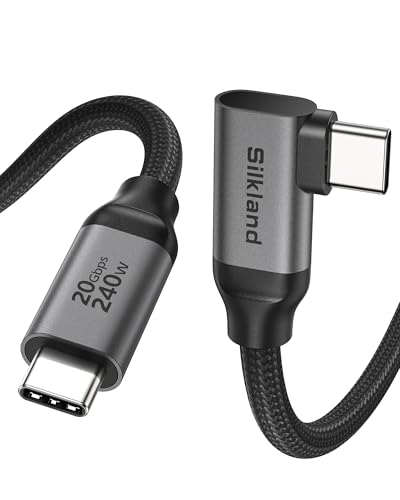
- Up to 8K/30Hz video support
- 20Gbps data and up to 240W charging
- 90-degree connector helps reduce port strain
Best For: USB-C monitor desks and tight cable layouts
Best Short Charging Pair

- Two 2-foot cables reduce desktop slack
- Up to 240W USB PD 3.1 charging
- Braided build with E-Marker chip
Best For: Minimalist charging stations and power banks
Best Versatile Pair

- Includes 3-foot and 6-foot lengths
- 20Gbps data and 4K/60Hz video
- 100W PD charging with E-Marker
Best For: Mixed monitor, storage, and charging setups
Reliable Everyday Pair

- 60W Power Delivery charging
- 480Mbps data transfer
- Reinforced nylon, 5,000-bend rating
Best For: Basic desktop charging stations needing two durable USB-C cables
Flexible Monitor-and-Charging Pick

- 240W PD 3.1 charging support
- 10Gbps data transfer
- 4K 60Hz video on compatible devices
Best For: Extended laptop, SSD, and 4K monitor desktop connections
High-Bandwidth Workstation Choice

- 240W PD 3.1 charging
- 40Gbps USB4 data transfer
- Up to 8K 60Hz video output
Best For: USB4 and Thunderbolt workstations with fast storage and compatible displays
Best Long-Run Value – USB-C 3.2 20Gbps Cable 2-Pack
For desktop setups that need extra reach, this two-pack of 6.6-foot USB-C cables combines 20Gbps data transfer, 100W charging, and 4K at 60Hz video support. It is a practical choice for connecting laptops, monitors, docks, hubs, SSDs, and other USB-C equipment without keeping the computer right beside the accessory.
Best For: Workstations needing two long USB-C cables for monitors, docks, storage, and everyday charging.
Pros:
- 20Gbps USB 3.2 Gen 2×2 data transfer for compatible storage devices
- Supports 100W charging and 4K at 60Hz video output
- Two 6.6-foot cables provide flexible desktop routing
- Nylon-braided construction is designed to resist everyday tangles and pulling
Cons:
- USB 3.2 Gen 2×2 performance depends on compatible host and peripheral ports
- 100W charging and 4K video require compatible devices and chargers
This is a well-rounded option for desktop users who want length and versatility in one package. It does not match the headline bandwidth of newer USB4 cables, but its two-cable format and broad charging, data, and display support make it useful for a conventional workstation.
Best for Maximum Bandwidth – UGREEN USB4 Gen4 80Gbps Cable
Among USB C cables for desktop setups, this 3.3-foot UGREEN cable is aimed at demanding workstations. It combines USB4 Gen4 80Gbps data transfer, up to 240W PD 3.1 charging, and DisplayPort 2.1 support for high-resolution monitor configurations.
Best For: High-performance desktops moving large files or driving advanced multi-monitor displays.
Pros:
- 80Gbps USB4 Gen4 bandwidth for large transfers between compatible devices
- Supports up to 240W PD 3.1 charging
- DisplayPort 2.1 support reaches up to 16K at 60Hz, with listed multi-display modes
- Braided design and reinforced connectors are rated for up to 10,000 bends
Cons:
- Its 3.3-foot length may be limiting in larger desk layouts
- Maximum speed, charging, and display modes require compatible hardware
This is the most future-focused cable in the group, especially for users with USB4 Gen4 equipment, high-end storage, or demanding displays. For ordinary peripherals, its extra bandwidth may be more capability than necessary, but it offers considerable headroom for an advanced setup.
Best Two-Pack for Monitors – Cable Matters 20Gbps USB-C Monitor Cable
This Cable Matters two-pack is designed for desktop users who connect USB-C computers to monitors or docks. Each 6-foot cable supports 20Gbps data transfer, up to 240W Power Delivery, and video output up to 8K at 30Hz or 4K at 120Hz when the connected hardware supports those modes.
Best For: Dual-monitor desks, USB-C docks, and users who want a spare cable for a second display or workstation.
Pros:
- Two 6-foot cables suit monitor and dock connections
- Supports 20Gbps data transfer for compatible external storage
- Up to 240W Power Delivery supports compatible laptops and accessories
- Designed for USB-C monitors, docks, and Thunderbolt 4-compatible computers
Cons:
- Listed 8K and 4K high-refresh modes depend on the computer, monitor, and port
- The PVC outer material may be less flexible than a braided cable
For a desktop setup built around USB-C displays or docking stations, this is a sensible value-oriented package. The two longer cables are particularly useful when one connection runs to a monitor and another to a dock or storage device.
Best Balanced USB4 Pick – Anker 515 USB4 40Gbps Cable
The Anker 515 is a compact 3.3-foot choice for USB C cables for desktop setups, offering a balance of high-speed connectivity and power support. It handles USB4 data at up to 40Gbps, supports external displays up to 8K at 60Hz, and can deliver up to 240W with a compatible charger.
Best For: Compact desks connecting a laptop to a fast monitor, dock, or USB4 storage device.
Pros:
- 40Gbps USB4 data transfer for fast file movement
- Supports up to 8K at 60Hz or 4K at 144Hz display output
- Up to 240W charging capability covers compatible laptops and devices
- Tested for up to 5,000 bends and includes an 18-month warranty
Cons:
- At 3.3 feet, it may be short for widely spaced desktop components
- Maximum performance requires compatible USB4, display, and charging hardware
This cable is a strong middle ground for users who want USB4 performance without stepping up to the newer 80Gbps standard. Its shorter length works well for tidy laptop-to-dock or laptop-to-monitor connections, while the high charging and display specifications leave room for demanding upgrades.
Best Right-Angle Cable – High-Resolution Monitor Cable
For desktop setups where ports sit close to a monitor or wall, this right-angle option is a practical pick among USB C cables for desktop setups. It combines monitor support, 20Gbps data transfer, and up to 240W charging in a 5-foot cable, while the angled connector helps reduce bending and cable clutter.
Best For: USB-C monitor users who need high-resolution video, fast data transfers, and a space-saving connector.
Pros:
- Supports up to 8K at 30Hz, 5K at 60Hz, or 4K at 144Hz when the connected devices support those modes.
- USB 3.2 Gen 2 data transfer reaches up to 20Gbps for hubs, docks, and SSDs.
- Supports up to 240W charging and uses a braided design rated for 45,000 bends.
- Right-angle construction helps reduce port strain in tight spaces.
Cons:
- Video output requires a USB-C port with DisplayPort Alt Mode.
- The notes caution that excessive cable movement can interrupt data transmission.
- For charging through a phone case, the case must be no thicker than 2.5 mm.
This is the most feature-rich choice here for a monitor-centered workstation. Choose it when the right-angle design and high-resolution display support matter more than keeping the cable as short as possible.
Best Short Charging Pair – Tidy Desktop USB-C Cables
This two-pack is designed for clean, compact charging stations. At 2 feet, these USB C cables for desktop setups provide enough reach to use a phone from a laptop or desktop charger without the excess slack of a longer cord, and they support up to 240W charging.
Best For: Minimalist desks, dedicated charging points, power banks, and users who want a spare short cable.
Pros:
- Two 24-inch cables help limit clutter on a desktop.
- Supports USB PD 3.1 charging up to 240W with backward compatibility for lower power levels.
- An E-Marker chip manages power delivery, according to the product notes.
- 48-strand braided construction is rated for 175 pounds of tensile strength.
Cons:
- USB 2.0 data speeds are limited to 480Mbps.
- It does not support video output or high-speed SSD data transfer.
- The short length may not suit setups where the charger is far from the device.
These cables make the most sense when charging is the priority and your desk benefits from shorter runs. They are not the right choice for connecting a monitor, dock, or fast external SSD.
Best Versatile Pair – 20Gbps USB-C Monitor Cables
This 3-foot and 6-foot pair gives a desktop setup two useful cable lengths for different layouts. Among USB C cables for desktop setups, it stands out as a balanced option with 20Gbps data transfer, 4K at 60Hz video output, and 100W USB Power Delivery.
Best For: Desks that connect laptops to USB-C monitors, portable displays, external drives, and chargers.
Pros:
- The 3-foot and 6-foot lengths accommodate both compact and spread-out workstations.
- Supports up to 20Gbps data transfer for compatible drives and devices.
- Provides 4K at 60Hz video output for compatible USB-C displays.
- Supports up to 100W PD charging and includes an E-Marker chip.
Cons:
- Maximum charging is 100W, below the 240W rating of some newer USB-C cables.
- Video and 20Gbps performance depend on compatible ports and devices.
- The longer cable may add more slack to a compact desk.
For most mixed-use workstations, this is the easiest pair to recommend because it covers monitor, storage, and charging duties. The two lengths also make it more adaptable than a single fixed-size cable.
Reliable Everyday Pair – Anker 60W USB-C Cable 2-Pack
For desktop setups that mainly need dependable charging and occasional file transfers, the Anker USB C to USB C Cable 2-Pack is a practical choice. Its reinforced nylon construction, 60W Power Delivery support, and 3.3-foot length suit everyday connections between USB-C chargers, laptops, tablets, and phones.
Best For: Basic desktop charging stations and users who want two durable USB-C-to-USB-C cables.
Pros:
- Supports up to 60W Power Delivery charging.
- Provides 480Mbps data transfer for routine file syncing.
- Reinforced nylon design is rated for up to 5,000 bends.
- Includes a hook-and-loop cable tie for organization.
Cons:
- Does not support media display.
- USB-C connectors do not work with Lightning devices or USB-A chargers.
- The 3.3-foot length may be limiting for larger desks.
This is a straightforward option when your desktop setup prioritizes charging over display connectivity or high-speed storage transfers. The two-pack also makes it easier to keep one cable at the desk and another in reserve.
Flexible Monitor-and-Charging Pick – UGREEN 240W 10Gbps Cable
The UGREEN 240W USB C Cable is a strong fit for desktop setups that combine laptop charging, fast storage transfers, and monitor connectivity. At 6.6 feet, it offers more reach than a typical short cable, while USB 3.2 Gen 2 support enables 10Gbps data transfer and compatible devices can output 4K at 60Hz.
Best For: Extended desktop connections involving USB-C laptops, SSDs, and a compatible 4K monitor.
Pros:
- Supports up to 240W PD 3.1 charging at 48V/5A.
- Delivers 10Gbps USB 3.2 Gen 2 data transfer.
- Supports 4K 60Hz video when the connected device supports DP Alt Mode.
- 6.6-foot braided cable provides useful desk-placement flexibility.
Cons:
- Video output requires USB-C DP Alt Mode support on the device.
- It is sold as a single cable.
- Its capabilities may exceed the needs of simple charging setups.
For a desktop workstation where one cable may need to handle power, data, and display duties, this UGREEN model is more versatile than a basic charging cable. Check your computer and monitor specifications before relying on its video function.
High-Bandwidth Workstation Choice – UGREEN USB4 40Gbps Cable
For demanding desktop setups, the UGREEN USB4 240W Cable combines high-power charging, fast storage transfers, and high-resolution display support in a compact 3.3-foot design. Its USB4 40Gbps bandwidth is suited to users moving large files between SSDs, NAS devices, or computers.
Best For: High-performance workstations using USB4 or Thunderbolt devices, fast storage, and compatible high-resolution displays.
Pros:
- Supports up to 240W PD 3.1 charging.
- Provides up to 40Gbps data transfer for large files.
- Supports up to 8K at 60Hz video output on compatible equipment.
- Nylon braiding and reinforced connectors are designed for frequent use.
Cons:
- The 3.3-foot length may not suit wide or deeply arranged desks.
- Full 40Gbps and 8K performance depends on compatible host, device, and display ports.
- It is sold as a single cable.
This is the most capable option of the three for a performance-focused desktop. Its short length keeps connections tidy, while USB4 bandwidth and 240W charging support leave room for demanding storage and laptop workflows.
How We Picked the Best USB C Cables for Desktop Setups
We focused on cables that solve common desktop problems: connecting a laptop to a monitor or dock, transferring files quickly, delivering dependable USB Power Delivery, and managing excess cable length. The selection includes USB 3.2, USB4, and Thunderbolt-compatible models, along with short, long, right-angle, and multipack options.
Advertised performance depends on the connected devices, ports, charger, monitor, and protocol. A USB-C cable cannot add features that your computer or accessory does not support, so we prioritized clearly stated specifications and useful form factors.
Quick Comparison
| Best For | Look For | Typical Picks |
|---|---|---|
| Fast external storage | 20Gbps or 40Gbps data | USB 3.2 Gen 2×2, USB4, or Thunderbolt models |
| High-power laptop charging | 100W or 240W USB PD | 240W USB-C cables for current and future devices |
| Monitor connections | Display support and suitable resolution | Monitor-rated cables with 4K, 5K, or 8K claims |
| Clean cable management | Short length or angled connector | 2ft cables and right-angle designs |
Key Buying Factors for USB-C Cables for Desktop Setups
Data Speed
For docks, SSDs, and large file transfers, check the data rating rather than the connector shape. USB 3.2 Gen 2 reaches 10Gbps, Gen 2×2 reaches 20Gbps, and USB4 or Thunderbolt models can support higher speeds when both connected devices are compatible.
Charging Capacity
Choose a cable rated for at least the wattage your laptop charger requires. A 100W cable suits many laptops, while a 240W USB PD cable provides more headroom. The charger and computer must also support the advertised power level.
Video Support
USB-C video output depends on the source port and display protocol. If you are connecting a monitor, verify resolution and refresh-rate support, such as 4K at 60Hz, before buying. Higher-resolution claims may require compatible DisplayPort, USB4, or Thunderbolt hardware.
Length and Layout
Measure the distance between your laptop, dock, monitor, and power source. Short cables reduce clutter behind a monitor, while 5ft- or 6.6ft options work better for floor-level outlets and larger desks. Right-angle connectors can reduce strain when ports face sideways or sit close to a surface.
Who Should Buy Which USB C Cables for Desktop Setups?
Choose a USB4 or Thunderbolt-compatible cable if you use a high-speed dock, professional monitor, or fast external SSD. A 20Gbps USB 3.2 cable is a practical middle ground for many desktop storage and monitor accessories. For basic charging and everyday peripherals, a 60W cable is often sufficient and can cost less.
Buy a 240W model if you want maximum charging headroom or a cable that is less likely to become outdated. Pick a multipack when several desk connections need replacement, and choose a short or right-angle cable when neat routing matters more than reach. Before ordering, match the cable’s speed, video, and wattage ratings to the lowest-rated device in your setup.