Optical disc drives remain useful for playing DVDs and CDs, installing legacy software, creating physical backups, and accessing media that is not stored online. This roundup compares 10 options for modern laptops, desktop PCs, and Mac or Windows systems.
Our selections include slim external drives, USB-C-friendly models, versatile hub-style designs, and an internal SATA burner. Use the guide below to match connection type, disc support, portability, and intended workload to the right drive.
Best 10 Optical Disc Drives Picks for 2026
Best All-Around Pick
ASUS ZenDrive External DVD Burner

- Slim 13mm external design
- USB-A and USB-C cables included
- M-Disc and encryption support
Best For: Portable Mac and Windows DVD burning
Best Internal Upgrade

- Internal 5.25-inch half-height design
- SATA connectivity for desktop PCs
- Up to 24x media speed
Best For: Desktop PC optical-drive installation
Best Simple External Option

- External PC and Mac compatibility
- USB 3.0 interface support
- Noise reduction and error correction
Best For: Basic external DVD reading and burning
Best USB 3.0 Travel Drive
PeroBuno Ultra-Slim CD/DVD Drive

- 13mm portable external design
- Built-in USB-A and USB-C cables
- Up to 24x CD and 8x DVD speeds
Best For: Traveling laptop users needing CD/DVD access
Reliable USB Performer
- Plug-and-play USB 3.0 connectivity
- Reads and burns CDs and DVDs
- Built-in cable and physical eject button
Best For: Portable disc use with Windows, Mac, or Linux computers
All-in-One Connectivity Hub
External CD/DVD Drive with USB Ports
- Includes USB ports plus SD and TF slots
- Reads and burns common CD/DVD formats
- Slim, portable, plug-and-play design
Best For: Laptops needing optical media and extra connectivity
Flexible Dual-Port Choice

- Provides USB-A and USB-C connections
- Reads, writes, and burns CDs and DVDs
- Slim design with built-in cable
Best For: Users switching between USB-A and USB-C computers
Reliable Slim Pick
LG GP65NB78 Portable DVD Writer

- 14 mm ultra-slim portable design
- M-DISC support for archival media
- Up to 8x DVD and 24x CD writing
Best For: Compact PC-based disc writing and M-DISC archiving
Most Versatile Hub

- Adds USB-A, USB-C, and card-reader ports
- Reads and burns CDs and DVDs
- Supports Windows, Mac, and Linux
Best For: Laptop users needing disc and peripheral connectivity
Simple Travel Option

- Slim, lightweight design with concealed cable
- USB 3.0 plug-and-play operation
- Supports Windows and Mac computers
Best For: Portable everyday CD and DVD playback or burning
Best All-Around Pick – ASUS ZenDrive External DVD Burner
The ASUS ZenDrive is a practical choice among optical disc drives for Mac and Windows users who want a slim external DVD burner with broad cable compatibility. It supports DVD writing at up to 8x, CD speeds up to 24x, and includes M-Disc support for compatible archival media.
Best For: Mac and Windows users who need a portable DVD burner with USB-A and USB-C connectivity.
Pros:
- Ultra-slim 13mm design is easy to carry.
- Includes both USB 2.0 and Type-C cables.
- Supports M-Disc and disc encryption features.
- Works with Windows and Mac OS X 10.6 or later.
Cons:
- DVD write speed is limited to 8x.
- USB 2.0 hardware may not provide the fastest transfer speeds.
Choose the ZenDrive if portability, Mac/PC compatibility, and added disc-protection features matter more than maximum interface speed.
Best Internal Upgrade – Lite-On 24X SATA DVD±RW Drive
The Lite-On IHAS124-14 is an internal optical disc drive for desktop PCs with a 5.25-inch half-height bay and SATA connectivity. Its 24x media speed makes it a suitable option for users replacing or adding a DVD writer inside a compatible computer.
Best For: Desktop PC owners installing an internal SATA DVD±RW drive.
Pros:
- Supports up to 24x media speed.
- Uses a standard 5.25-inch half-height form factor.
- Designed for internal desktop installation.
- Includes a SATA cable and manual.
Cons:
- Not suitable for laptops or computers without an available 5.25-inch bay.
- Requires an internal SATA connection and installation.
This Lite-On drive makes sense for a compatible desktop build, especially when you prefer an internal installation over an external optical disc drive.
Best Simple External Option – HP USB External DVD±RW Drive
The HP USB External DVDRW Drive offers a straightforward way to add optical disc access to a PC or Mac. It reads and writes DVDs at up to 8x and includes noise-reduction and error-correction features for routine disc playback, burning, and data access.
Best For: Users seeking a compact, basic external DVD drive for compatible computers.
Pros:
- External design works with PCs and Macs.
- Supports USB and USB 3.0 interfaces.
- Includes noise-reduction technology and error correction.
- Lightweight at approximately 200 grams.
Cons:
- DVD read and write speeds are limited to 8x.
- The supplied specifications do not indicate USB-C connectivity.
The HP drive is a sensible basic pick when you want branded external optical disc functionality without needing higher DVD speeds or specialized archival features.
Best USB 3.0 Travel Drive – PeroBuno Ultra-Slim CD/DVD Drive
The PeroBuno ultra-slim optical disc drive is built for portable CD and DVD reading and burning, with USB 3.0, USB-A, and USB-C connectivity. It offers up to 8x DVD and 24x CD speeds, while its built-in dual-interface cables reduce the need to carry separate cables.
Best For: Travelers and laptop users who need a portable USB-A/USB-C CD and DVD drive.
Pros:
- 13mm ultra-slim design is convenient for travel.
- Built-in USB-A and USB-C cables are included.
- Supports up to 8x DVD and 24x CD read/write speeds.
- Compatible with Windows, Mac OS, and many PCs and laptops.
Cons:
- Does not support Blu-ray discs.
- Not compatible with TVs, tablets, phones, game consoles, or Ubuntu according to the notes.
- Mac users must eject discs through the operating system rather than the tray button.
This is a versatile travel-oriented choice, but verify your device and operating-system compatibility before buying, particularly if you need Blu-ray or Ubuntu support.
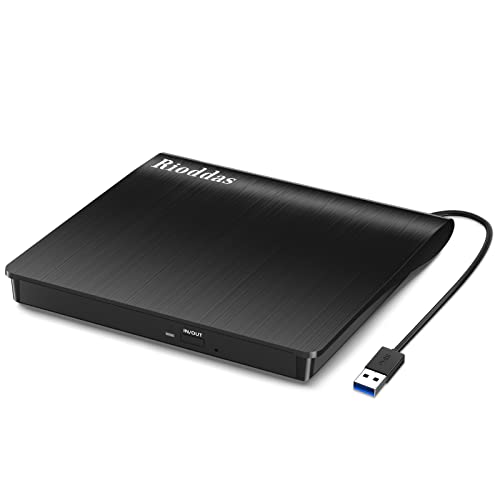
Reliable USB Performer – Rioddas External CD/DVD Drive
For shoppers comparing optical disc drives, the Rioddas is a straightforward portable option for reading, writing, and burning CDs and DVDs. Its USB 3.0 connection, plug-and-play setup, and broad Windows, macOS, and Linux compatibility make it practical for everyday computer use.
Best For: Laptop and desktop users who want a simple, portable CD/DVD burner with a built-in cable.
Pros:
- Plug-and-play operation requires no external driver or power adapter.
- USB 3.0 supports transfer speeds up to 5Gbps and is backward compatible with USB 2.0.
- Reads and writes CDs and DVDs at up to 24x CD and 8x DVD speeds.
- Built-in cable storage and a physical eject button improve portability and convenience.
Cons:
- Not compatible with ChromeOS, smartphones, tablets, TVs, vehicles, or Blu-ray and 4K discs.
- Desktop users may need to connect directly to a high-power rear USB port for best performance.
The Rioddas focuses on dependable core optical-drive functions rather than extra ports. It is a sensible choice for computer owners who need occasional disc playback, backups, or burning in a compact package.
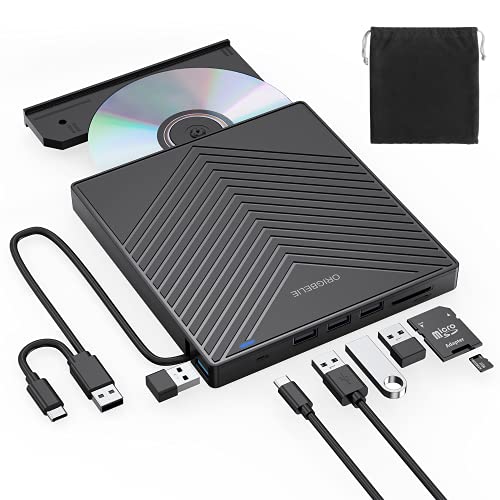
All-in-One Connectivity Hub – External CD/DVD Drive with USB Ports
This optical disc drive is designed for users who need more than CD/DVD access. Along with USB 3.0 reading and burning, it adds USB expansion and SD/TF card slots, making it useful when a modern laptop has limited ports.
Best For: Laptop users who want a portable disc burner combined with USB accessories and memory-card connectivity.
Pros:
- Combines CD/DVD reading and burning with one USB 3.0 port, three USB 2.0 ports, USB-C, and SD/TF slots.
- Supports CD and DVD formats including CD±R/RW, DVD±R/RW, DVD-RAM, VCD, and SVCD.
- Plug-and-play setup works with Windows, Linux, and macOS systems.
- Slim design, embedded cable, and anti-skid pads support portable use.
Cons:
- SD and TF card slots cannot be used at the same time.
- Not compatible with cars, TVs, tablets, smartphones, projectors, or Blu-ray discs.
- Windows 11 requires a media player and network connection.
The added hub functionality sets this model apart from basic optical disc drives. It is a strong fit for compact workstations, especially when transferring camera files and using USB peripherals alongside physical media.
Flexible Dual-Port Choice – Amicool External DVD Drive
The Amicool is a versatile option among optical disc drives, offering both USB-A and USB-C connections for newer and older computers. It supports CD/DVD reading and burning in a slim body, with compatibility across Windows, macOS, and Linux.
Best For: Computer users who need USB-A and USB-C flexibility in a lightweight external DVD burner.
Pros:
- Dual USB 3.0 and Type-C interfaces support up to 5Gbps transfer speeds.
- Plug-and-play setup generally requires no additional drivers.
- Supports CD/DVD reading, writing, and burning, with up to 24x CD and 8x DVD speeds.
- Integrated cable, matte finish, and lightweight design make it easy to carry.
Cons:
- Does not support DVD-RAM, Blu-ray discs, iPad, iPhone, Apple TV, ChromeOS, TVs, tablets, consoles, or car stereos.
- May need a direct computer connection or powered USB-C hub when USB power is insufficient.
- Mac users need compatible playback software such as VLC Player.
The Amicool’s dual-interface design gives it an advantage for mixed-device households. Its limitations are clearly computer-focused, but for supported systems it provides convenient disc access without sacrificing portability.
Reliable Slim Pick – LG GP65NB78 Portable DVD Writer
The LG GP65NB78 is a straightforward choice for shoppers seeking optical disc drives for reading and writing CDs and DVDs. Its 14 mm ultra-slim design, USB connectivity, and M-DISC support make it suitable for everyday media access and longer-term disc archiving.
Best For: Users who want a compact, name-brand DVD writer with M-DISC support.
Pros:
- Ultra-slim 14 mm portable design
- Supports M-DISC for archival media
- Writes DVDs at up to 8x and CDs at up to 24x
- USB 2.0 interface is compatible with USB 3.0 ports
Cons:
- USB 2.0 limits transfer rates compared with USB 3.0 drives
- Listed as compatible with PCs rather than a broad range of platforms
The GP65NB78 prioritizes portability and dependable disc-writing essentials over extra connectivity. It is a sensible pick when M-DISC support and LG branding matter more than a built-in hub or the faster interface of newer optical disc drives.
Most Versatile Hub – 8-in-1 USB 3.0 CD/DVD Drive
This 8-in-1 external drive stands out among optical disc drives by combining CD/DVD reading and burning with USB-A, USB-C, additional USB ports, and SD/TF card access. USB 3.0 connectivity and broad Windows, Mac, and Linux support make it useful for mixed-device households.
Best For: Users who need an optical drive plus hub and memory-card functionality.
Pros:
- Combines optical drive, USB hub, and SD/TF card reader
- Includes USB 3.0 and USB-C connectivity
- Supports CD/DVD reading and writing, including DVD-RAM
- Works with Windows, Mac OS 10.6 or later, and Linux
Cons:
- May require the included extra power cable if a laptop supplies insufficient power
- SD and TF cards cannot be used simultaneously
- Not compatible with Blu-ray discs, TVs, tablets, or smartphones
Its broad feature set makes this drive more than a basic disc reader, particularly for laptops with limited ports. Buyers should account for the possible power requirement and the stated device limitations, but the combination of optical and card-transfer functions is unusually practical.
Simple Travel Option – Antika Slim USB 3.0 DVD Drive
The Antika external drive is a practical option for shoppers comparing optical disc drives for basic playback, software installation, backups, and disc burning. Its slim, shock-resistant body, concealed cable, and USB-powered plug-and-play operation suit both desks and travel bags.
Best For: Users seeking a portable USB 3.0 drive for everyday CD and DVD tasks.
Pros:
- USB 3.0 supports transfer speeds up to 5 Gbps and works with USB 2.0 and 1.0
- Slim, lightweight, shock-resistant design with hidden data cable
- Plug-and-play operation without a driver or additional power supply in typical use
- Compatible with Windows and Mac computers
Cons:
- May need an external power source if the computer’s USB port has low power
- Not compatible with TVs, tablets, or car audio players
- Warranty information is inconsistent in the supplied listing, citing both one year and 30-day refund/replacement coverage
The Antika emphasizes convenience rather than expanded features. It is a good fit for straightforward computer-based disc use, provided your system supplies enough USB power and you do not need compatibility with non-computer devices.
How We Picked These Optical Disc Drives
We focused on practical compatibility, connection options, portability, disc-format support, and the features that matter most for everyday playback and burning. The selection includes external drives for computers without built-in optical hardware, as well as an internal SATA model for desktop upgrades.
We also considered useful extras such as M-DISC support, USB 3.0 or USB-C connectivity, integrated card slots, included backup software, and compact designs. Because operating systems and bundled applications can change, confirm current compatibility and software requirements before buying.
Quick Comparison
| Type | Best For | What to Look For |
|---|---|---|
| Portable external DVD drive | Laptops and occasional use | USB-A or USB-C, slim build, bus-powered operation |
| External drive with hub features | Expanding laptop connectivity | Extra USB ports, SD or TF slots, cable compatibility |
| Internal SATA DVD burner | Desktop upgrades and frequent use | Available drive bay, SATA power and data connections |
| M-DISC-compatible drive | Long-term physical archiving | Compatible media and suitable disc-burning software |
Key Buying Factors for Optical Disc Drives
Connection and Compatibility
External models commonly use USB 2.0, USB 3.0, USB-C, or an adapter. USB 3.0 can provide faster data transfer than USB 2.0, but the drive still depends on the disc’s read or write speed. Check your computer’s ports, operating system, and whether the included cable reaches comfortably.
Disc Formats and Speed
For broad support, choose a drive that handles CD-R/RW and DVD±R/RW formats. Maximum ratings such as 8X or 24X describe supported disc operations, not guaranteed real-world performance. If you need to read or burn Blu-ray discs, these DVD drives are not sufficient; look for a dedicated Blu-ray model instead.
Portability and Power
Slim external drives are convenient for travel and usually draw power from the computer. A stable USB connection is important during burning, so avoid loose hubs or underpowered adapters. An internal drive is less portable but can be a better fit for a permanent desktop setup.
Archiving and Software
M-DISC support can be valuable for compatible long-term archives, but it requires M-DISC media and a reliable burning workflow. Also verify whether your preferred operating system includes playback and burning tools or whether third-party software is needed.
Who Should Buy Which Optical Disc Drives?
- Choose the ASUS, LG, or another slim external model if you want straightforward CD/DVD playback and burning for a laptop or Mac.
- Choose a hub-style external drive if you need extra USB ports or SD/TF card access alongside optical media support.
- Choose the Lite-On internal drive for a desktop with an available SATA bay and a preference for a permanent installation.
- Choose an M-DISC-compatible option if physical archiving and backup longevity are priorities.
- Choose the simplest budget external drive for occasional disc reading, software installation, or basic DVD burning without added features.