The best high-speed optical disc drives make it easier to read, burn, archive, and back up CDs, DVDs, and Blu-ray discs without relying on an aging built-in drive. This roundup includes fast internal burners, slim USB models, and versatile options for modern USB-C laptops.
Whether you need dependable Blu-ray authoring, routine DVD burning, M-DISC support, or a compact drive for occasional use, the right choice depends on format compatibility, connection speed, operating-system support, and portability.
Best 10 High Speed Optical Disc Drives Picks for 2026
Best High-Speed Blu-ray Drive
ASUS BW-16D1HT 16X Blu-ray Burner

- 16X Blu-ray writing and reading
- M-DISC archival support
- BDXL capacity up to 128GB
Best For: Fast PC Blu-ray backups and long-term archiving
Best Fast Internal DVD Drive

- 24X DVD media speed
- Internal half-height design
- SATA connection with cable included
Best For: Basic desktop DVD and CD burning
Best Portable Blu-ray Drive
ASUS SBW-06D5H-U External Blu-ray Burner

- Slim external Blu-ray burner
- USB 3.1 Type-A and Type-C
- M-DISC and BDXL support
Best For: Portable Blu-ray burning for laptops and desktops
Best Plug-and-Play DVD Drive

- 24X DVD and CD operation
- Plug-and-play USB 2.0
- Slim 200-gram external design
Best For: Notebook DVD and CD burning on the go
Best Apple-Compatible Pick
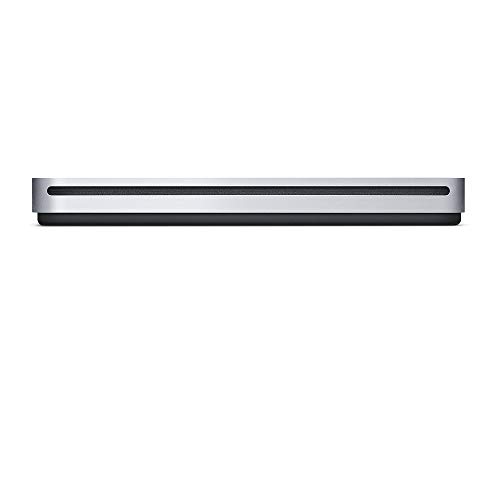
- Plays and burns CDs and DVDs
- Compact, travel-friendly design
- Built-in USB cable and no power adapter
Best For: Compatible Mac users without a built-in optical drive
Best Ultra-Slim DVD Rewriter

- 8x DVD read and write speed
- Ultra-slim 14mm, 7.04-ounce design
- M-Disc support and Mac OS X compatibility
Best For: Portable DVD burning and playback
Best USB-C Portable Drive

- USB-C connection with built-in cable storage
- Up to 8x DVD and 24x CD read speeds
- Windows/macOS support and M-DISC compatibility
Best For: Modern Windows and Mac laptops
Best Plug-and-Play Value
Amicool USB 3.0/USB-C DVD Drive

- USB 3.0 and USB-C connectivity
- Up to 8x DVD and 24x CD speeds
- Slim, portable CD/DVD burner
Best For: Computer users needing versatile USB-A and USB-C disc access
Best Slim Premium Option
ASUS ZenDrive 8X External DVD Burner

- Ultra-slim 13mm design
- M-Disc and disc-encryption support
- USB 2.0 and Type-C cables included
Best For: Portable Mac and Windows archiving and secure disc burning
Best Multiport Workstation Drive

- Integrated USB, USB-C, SD, and TF ports
- Up to 8x DVD and 24x CD speeds
- Supports Windows, Mac, and Linux
Best For: Laptop users needing disc access plus extra connectivity
Best High-Speed Blu-ray Drive – ASUS BW-16D1HT 16X Blu-ray Burner
ASUS BW-16D1HT - Ultra-Fast 16X Blu-ray Burner with M-DISC Support, Black, 1 Year Warranty
Check Price On AmazonThe ASUS BW-16D1HT is a strong choice among high speed optical disc drives for PC users who need fast Blu-ray writing, large-capacity media support, and long-term archival storage. Its 16X write and read speeds, M-DISC compatibility, and BDXL support make it suited to demanding personal backup tasks.
Best For: PC users creating fast Blu-ray backups, archiving important files on M-DISC media, and storing up to 128GB on compatible BDXL discs.
Pros:
- 16X Blu-ray write and read speeds.
- M-DISC support for long-term data and memory preservation.
- BDXL support for up to 128GB on one disc.
- SATA 6.0 Gb/s interface for internal PC installation.
Cons:
- Designed for a 5.25-inch internal drive bay.
- Compatibility is focused on PC and Windows platforms listed in the specifications.
Choose this model if speed and archival capacity matter more than portability. It is especially appealing for users with a compatible desktop case and a substantial Blu-ray backup workload.
Best Fast Internal DVD Drive – Lite-On 24X SATA DVD Writer
The Lite-On IHAS124-14 is a straightforward internal DVD writer for desktop users seeking high speed optical disc drives for everyday DVD and CD burning. Its 24X media speed and SATA connection make it a practical option for routine personal use.
Best For: Desktop owners who need a basic internal SATA drive for DVD and CD writing and reading.
Pros:
- 24X media speed for DVD operations.
- Internal half-height form factor for desktop installation.
- SATA connectivity and included SATA cable.
- Compact, lightweight 399-gram design.
Cons:
- Supports DVD and CD media rather than Blu-ray.
- Intended for desktop installation, not notebook use.
- Specifications list a relatively small 2MB cache.
This drive keeps things simple: it is a sensible fit when you need fast DVD performance without Blu-ray features. Confirm that your desktop has the required internal bay and SATA connection before buying.
Best Portable Blu-ray Drive – ASUS SBW-06D5H-U External Blu-ray Burner
ASUS SBW-06D5H-U BDXL External Ultra Slim Blu-ray and MDisc Burner USB 3.1 USB-C 2 Cables Black
Check Price On AmazonThe ASUS SBW-06D5H-U brings high speed optical disc drives performance to laptops and desktops through USB 3.1 connectivity. This ultra-slim external burner supports Blu-ray, BDXL, and M-DISC media, while two included USB cable types improve connection flexibility.
Best For: Laptop and desktop users who want a portable external Blu-ray burner with M-DISC and BDXL support.
Pros:
- Ultra-slim 0.58-inch profile and 240-gram weight.
- USB 3.1 Type-A and Type-C interfaces.
- Supports Blu-ray, BDXL, and M-DISC media.
- Includes both USB connection options according to the product title.
Cons:
- Listed optical read speed is 8X, with another specification showing 6X.
- External USB design requires a compatible port and cable connection.
- Listed operating-system information is limited and includes macOS.
This is the more flexible choice for users who move between computers or lack an internal optical bay. Its slim build and USB-C compatibility make it convenient, while its archival formats add capability beyond a basic DVD drive.
Best Plug-and-Play DVD Drive – Dell DW316 USB DVD Burner
The Dell DW316 is a compact external DVD±RW drive for notebook users who need high speed optical disc drives without installing an internal component. Its USB 2.0 plug-and-play design supports DVD and CD reading and writing at up to 24X.
Best For: Notebook users and business environments needing a lightweight external DVD burner for routine disc tasks.
Pros:
- Plug-and-play USB 2.0 operation.
- 24X CD and optical write speed specifications.
- Compact 0.55-inch profile and 200-gram weight.
- Tray-loading design with a black enclosure.
Cons:
- USB 2.0 is slower than newer USB interfaces.
- Does not provide Blu-ray support.
- Compatibility details primarily target listed Dell notebooks and Windows systems.
The DW316 is a practical, space-saving option for DVD and CD access on laptops. It makes the most sense when portability and simple plug-and-play use are more important than Blu-ray capability or the fastest modern interface.
Best Apple-Compatible Pick – Apple USB SuperDrive
The Apple USB SuperDrive is a compact choice for Mac users who need a dependable high speed optical disc drive for playing or burning CDs and DVDs. Its built-in USB Type-A cable and bus-powered design make it convenient for travel, desk use, software installation, backups, and DVD playback.
Best For: Mac users with compatible models from 2008 onward that lack a built-in optical drive.
Pros:
- Plays and burns both CDs and DVDs.
- Compact design fits easily in a travel bag or small workspace.
- Built-in USB Type-A cable avoids separate cable storage.
- No separate power adapter is required, including when the Mac runs on battery power.
Cons:
- Designed for compatible Mac models and uses USB Type-A connectivity.
- The supplied notes do not specify an optical read or write speed.
Choose the SuperDrive for straightforward Mac compatibility and portability rather than speed-focused specifications. It is especially practical if you want a simple external drive for occasional CD and DVD use.
Best Ultra-Slim DVD Rewriter – Samsung TSST Ultra-Slim 8X
The Samsung TSST SE-218GN/RSBD is an ultra-slim external DVD rewriter for users seeking a portable high speed optical disc drive with clearly listed 8x read and write speeds. Its USB connection, Mac OS X compatibility, tray loading, and M-Disc support suit everyday disc playback, burning, and archival tasks.
Best For: Users who want a lightweight, portable 8x DVD burner with Mac OS X compatibility.
Pros:
- Supports DVD reading and writing at up to 8x.
- Ultra-slim 14mm drive height and lightweight 7.04-ounce design.
- M-Disc support adds an option for long-term data storage.
- Includes USB connectivity and Mac OS X compatibility.
Cons:
- Uses a USB 2.0 interface, although it is listed as USB 3.0 compatible.
- The supplied notes do not list a separate power adapter or cable-storage feature.
This Samsung drive is a sensible fit when portability and defined DVD speed matter more than newer USB-C connectivity. Its slim body and 8x specification make it easy to position as a compact everyday rewriter.
Best USB-C Portable Drive – ASUS ZenDrive V1M
The ASUS ZenDrive V1M is a versatile external DVD writer for modern laptops, combining a USB-C interface, built-in cable storage, and Windows and macOS compatibility. It offers DVD read speeds up to 8x, CD speeds up to 24x, M-DISC support, and a compact design for users comparing high speed optical disc drives.
Best For: Windows 11 and macOS laptop users who want USB-C connectivity and portable DVD writing.
Pros:
- Built-in 24cm cable storage helps prevent cable loss.
- USB-C interface suits newer ultraslim laptops.
- Supports M-DISC and DVD reading up to 8x, with CD reading up to 24x.
- Works with Windows and macOS and includes a one-year warranty.
Cons:
- DVD write speed is listed at 6x, below its up-to-8x DVD read speed.
- Drag-and-burn software is specified for Windows only.
- The supplied notes describe USB-C connectivity but do not mention an included power adapter.
The ZenDrive V1M is the strongest match here for newer USB-C laptops and cross-platform use. Its cable-storage design and M-DISC support add practical convenience, while the 6x DVD writing speed keeps expectations realistic.
Best Plug-and-Play Value – Amicool USB 3.0/USB-C DVD Drive
For shoppers comparing high speed optical disc drives, the Amicool stands out with USB 3.0 and USB-C connectivity, plug-and-play setup, and a compact design. It reads DVDs at up to 8x and reads or writes CDs at up to 24x, though it is intended for computer use rather than Blu-ray playback.
Best For: Laptop and desktop users who want a portable CD/DVD reader and burner with both USB-A and USB-C connections.
Pros:
- USB 3.0 and USB-C interfaces support data transfer rates up to 5Gbps.
- Supports reading, writing, and burning common CD and DVD formats.
- Works with Windows, Linux, and Intel or Apple Silicon Macs.
- Built-in cable, slim construction, error correction, and anti-shock features improve portability.
Cons:
- Does not support Blu-ray, DVD-RAM, ChromeOS, tablets, TVs, game consoles, or car stereos.
- Direct computer connection is recommended; some systems may need extra power through a powered hub.
- Mac users need VLC Player rather than Apple DVD Player for media playback.
The Amicool is a practical choice when broad computer compatibility and modern USB connectivity matter more than Blu-ray support. Use a direct USB port for the most reliable recognition and performance.
Best Slim Premium Option – ASUS ZenDrive 8X External DVD Burner
The ASUS ZenDrive is a slim external DVD burner for Mac and Windows computers. Among high speed optical disc drives, it offers up to 8x DVD and 24x CD performance, includes both USB 2.0 and Type-C cables, and adds M-Disc support plus disc-encryption features.
Best For: Mac and Windows users who prioritize a slim design, included cable options, archival M-Disc support, and protected disc content.
Pros:
- Ultra-slim 13mm form factor is easy to carry.
- Supports DVD writing at up to 8x and CD reading or writing at up to 24x.
- Includes USB 2.0 and Type-C cables for flexible computer connectivity.
- M-Disc support and Disc Encryption II add archival and privacy-oriented functionality.
Cons:
- Uses USB 2.0 rather than USB 3.0.
- Designed for computers and does not offer Blu-ray capability.
- Its listed operating-system compatibility is centered on Windows and Mac platforms.
The ZenDrive is a refined option for users who value portability and extra disc features over the fastest interface standard. Its M-Disc and encryption support make it especially appealing for archiving and controlled data storage.
Best Multiport Workstation Drive – 8-in-1 USB 3.0 CD/DVD Drive
This 8-in-1 external drive combines high speed optical disc drives functionality with useful expansion ports. It supports up to 8x DVD and 24x CD speeds while adding a USB 3.0 hub, three USB 2.0 ports, a USB-C port, and SD/TF card readers for laptop and desktop workflows.
Best For: Users who want one portable accessory for CD/DVD burning, card transfers, and connecting several USB devices.
Pros:
- Combines CD/DVD reading and burning with USB, USB-C, SD, and TF connectivity.
- USB 3.0 supports advertised transfer rates up to 5Gbps and is backward compatible with USB 2.0.
- Supports common CD/DVD formats, including DVD-RAM, and works with Windows, Mac, and Linux.
- Portable design includes error correction, anti-skid features, and quiet operation.
Cons:
- SD and TF cards cannot be used simultaneously.
- Some Windows 10/11 systems may require the extra power cable if the drive is not recognized.
- Not compatible with cars, TVs, tablets, smartphones, projectors, or Blu-ray discs.
The main advantage here is versatility: it is more than a disc drive, serving as a compact connectivity hub for compatible computers. Choose it if the added ports are useful, but plan for the extra power connection if your laptop supplies insufficient USB power.
How We Picked the Best High Speed Optical Disc Drives
We selected drives across the main use cases: high-speed Blu-ray burning, everyday DVD and CD writing, portable laptop use, and Mac compatibility. We compared advertised read and write speeds, supported disc formats, interface types, physical design, power requirements, and useful features such as M-DISC support, BDXL compatibility, bundled cables, and backup software.
Speed was not the only criterion. A drive that supports more formats may be more useful for long-term archiving, while a compact USB model can be the better choice for a thin laptop. We also included both internal SATA drives and external USB drives so buyers can match the hardware to their computer.
Quick Comparison
| Best For | Drive Type | Typical Strength |
|---|---|---|
| Fast Blu-ray burning | Internal Blu-ray burner | High-capacity discs and faster authoring |
| Routine DVD and CD tasks | Internal DVD writer | Simple, affordable desktop installation |
| Modern laptops | External USB-C drive | Portable connection without SATA installation |
| Mac users | External USB optical drive | Broad compatibility and simple setup |
| Archiving | M-DISC-compatible drive | Support for long-life archival media |
Key Buying Factors for High-Speed Optical Disc Drives
Disc Formats and Writing Speed
Confirm whether you need CD, DVD, Blu-ray, dual-layer, or BDXL support. DVD drives are sufficient for music CDs, software discs, and standard DVD backups, while Blu-ray models are necessary for high-capacity media. Advertised maximum speeds can vary by disc type, so use them as a performance guide rather than a guarantee for every blank disc.
Connection and Installation
Internal SATA drives suit desktop PCs with an available bay and SATA data and power connections. External drives are easier to move between computers, but check whether the model uses USB-A, USB-C, or an adapter. USB 3.0 or newer is preferable for faster transfers, while USB 2.0 can still handle basic DVD playback and burning.
Operating-System Compatibility and Power
Windows and macOS support can differ, particularly for bundled burning software. Check the manufacturer’s compatibility details before buying. Slim external drives may draw power from one USB port, although some computers may require a second cable or powered hub.
Durability and Portability
For frequent travel, prioritize a slim enclosure, built-in cable storage, and a secure tray or slot-loading mechanism. For stationary use, a larger internal drive may offer better cooling and easier access. M-DISC support is valuable when archival longevity matters, but it does not replace multiple backups.
Who Should Buy Which High Speed Optical Disc Drives?
Choose an internal ASUS Blu-ray burner if you need fast Blu-ray creation, BDXL support, or a permanent desktop installation. A Lite-On or similar internal DVD writer is a practical, lower-cost option for routine CD and DVD work.
Choose an external ASUS Blu-ray model for laptop-based Blu-ray burning and M-DISC archiving. For everyday DVD and CD use, compact ASUS, Samsung, Dell, Apple, Amicool, and generic USB drives are more convenient. Mac owners should favor models that explicitly list macOS compatibility, while USB-C laptop users should look for a native USB-C connector or a clearly included adapter.