If you want to stream or record without sacrificing your gameplay experience, a capture card with passthrough is the easiest way to keep your monitor feed smooth while sending video to your PC.
The best options balance capture quality, latency, passthrough resolution, and compatibility with your console or camera setup.
Best 10 Capture Card with Passthrough Picks for 2026
Premium 4K Passthrough Pick
Elgato 4K S for PS5, Xbox, Switch 2

- 4K60 capture with near-zero latency
- 1440p120 or 1080p240 passthrough
- HDR10 support and analog audio input
Best For: Players who want premium capture and very high-refresh passthrough
Budget-Friendly 4K Passthrough
Papeaso USB 3.0 HDMI Capture Card
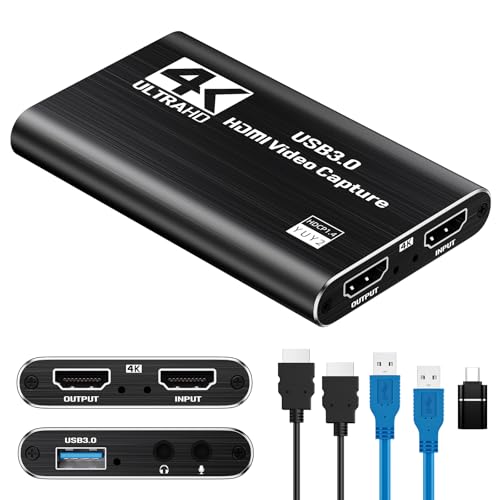
- 2K30 or 1080p60 capture
- 4K pass-through with low latency
- Mic input and wide OS support
Best For: Budget streamers who need easy capture and 4K passthrough
High-Refresh Passthrough Choice
NearStream CCD10 USB-C Capture Card

- 4K60, 2K120, or 1080p240 passthrough
- 1080p60 low-latency capture
- Mic input plus headset jack
Best For: Gamers who want smooth high-refresh passthrough and 1080p capture
Durable Everyday Pass-Through
CENMATE Aluminum HDMI Capture Card

- 4K@30Hz input and loop-out
- 1080p60 capture with low latency
- Aluminum shell and audio I/O
Best For: Everyday streamers who want simple 1080p60 capture and 4K30 passthrough
AVerMedia Streamline MINI+
4K60 HDR passthrough for smooth streaming

- 4K60 HDR pass-through with ultra-low latency
- 1080p60 capture with plug-and-play USB setup
- Works with OBS, Streaming Center, and more
Best For: Streamers who want easy, low-lag console capture
Guermok USB 3.0 HDMI Capture Card
1080p60 capture with 4K60 passthrough

- 1080p60 capture plus 2K30 support
- 4K60 HDMI pass-through with low latency
- Mic in, audio in, and monitoring ports
Best For: Creators who want flexible audio and console pass-through
Portta HDMI Video Capture
Budget-friendly 1080p60 passthrough capture

- 1080p60 capture with 4K60 loop-out
- Plug-and-play setup with broad software support
- Includes cables, adapter, and manual
Best For: Budget buyers who want simple plug-and-play capture
Editor Pick
1080p60 capture with low-latency HDMI loop-out

- 1080p 60fps capture with low latency
- HDMI loop-out for real-time gameplay viewing
- Mic-in support and plug-and-play setup
Best For: Streamers and gamers wanting simple 1080p60 capture with pass-through
Zero-Lag Pick
Zero-latency pass-through with 1080p60 capture
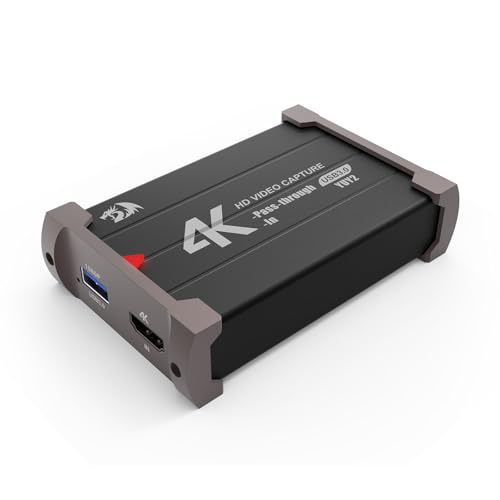
- 4K 30FPS input and 1080p 60FPS capture
- Zero-latency HDMI pass-through
- Plug-and-play for Windows and Mac
Best For: Users who want zero-lag pass-through and easy full-HD capture
Best Versatility
2K capture with 4K input and USB-A/C support

- Up to 2K 30fps capture
- 4K 30Hz input with local loop-out
- USB-A/C dual interface and broad compatibility
Best For: Multi-platform streamers who want flexible connections and 2K recording
Premium 4K Passthrough Pick – Elgato 4K S for PS5, Xbox, Switch 2
If you want a capture card with passthrough that can handle modern consoles cleanly, the Elgato 4K S is built for high-resolution capture and high-frame-rate gameplay. It records up to 4K60 and supports passthrough up to 1440p120 or 1080p240, with HDR10 support on Windows and near-zero latency for smooth monitoring.
Best For: Console players and creators who want 4K60 capture plus high-refresh passthrough.
Pros:
- 4K60 capture for crisp recording quality
- Supports 1440p120 or 1080p240 passthrough
- HDR10 support on Windows
- 3.5mm analog audio input for chat or commentary
Cons:
- HDR tone mapping is listed for Windows
- Video capture resolution is listed as 1080p in the details, despite 4K60 capture being highlighted
Overall, this is the strongest option here if passthrough performance matters as much as capture quality. It is aimed at users who want a premium, low-latency setup for PS5, Xbox Series X/S, Switch 2, or a PC workflow.
Budget-Friendly 4K Passthrough – Papeaso USB 3.0 HDMI Capture Card
The Papeaso is a practical capture card with passthrough for streamers who want an easy setup without spending much. It offers up to 2K30 capture or 1080p60 capture, plus 4K pass-through and ultra-low latency for monitoring gameplay or camera feeds in real time.
Best For: Budget buyers who want simple recording with 4K passthrough.
Pros:
- 4K pass-through with ultra-low latency
- Up to 2K30 or 1080p60 capture
- Mic input for live commentary
- Wide compatibility with Windows, macOS, Linux, Android, and iPadOS 17+
Cons:
- Capture tops out at 1080p60 or 2K30, not 4K recording
- Mic input supports TRS standard microphone headsets only
This is a straightforward pick for users who mainly need a reliable pass-through display and basic streaming capture. It keeps the feature set useful and approachable for consoles, PCs, and cameras.
High-Refresh Passthrough Choice – NearStream CCD10 USB-C Capture Card
If you need a capture card with passthrough that supports very high refresh rates, the NearStream CCD10 is an appealing middle ground. It captures up to 1080p60 while offering passthrough at 4K60, 2K120, or 1080p240, so you can keep your gameplay smooth while recording or streaming.
Best For: Streamers and gamers who want 1080p capture with 240Hz passthrough.
Pros:
- Passthrough up to 4K60, 2K120, or 1080p240
- 1080p60 capture with low-latency performance
- Works with Windows, macOS, and Linux
- Includes mic input and headset jack
Cons:
- Capture resolution is limited to 1080p60
- Best desktop capture formats have system requirements on Windows
This model makes sense if you care more about smooth gameplay monitoring than high-res recording. It is especially useful for console players and creators who want flexible passthrough and simple plug-and-play setup.
Durable Everyday Pass-Through – CENMATE Aluminum HDMI Capture Card
The CENMATE is a sensible capture card with passthrough for users who want solid everyday streaming features in a durable aluminum shell. It supports up to 4K@30Hz input and loop-out, while delivering 1080p60 capture over USB-C 3.0 with ultra-low latency and no-driver setup.
Best For: Casual streamers and gamers who want dependable 1080p60 capture with 4K30 passthrough.
Pros:
- 4K@30Hz input and loop-out
- 1080p60 capture with ultra-low latency
- Aluminum-alloy shell for longer sessions
- 3.5mm audio and microphone input/output support
Cons:
- Passthrough is limited to 4K@30Hz, not 4K60
- Capture is capped at 1080p60
For most general streaming and console recording setups, this card covers the essentials without extra complexity. It is a good match if you want stable performance, broad device compatibility, and simple plug-and-play operation.
AVerMedia Streamline MINI+ – 4K60 HDR passthrough for smooth streaming
If you want a capture card with passthrough that keeps gameplay looking sharp while you stream, the AVerMedia StreamLine MINI+ is built for exactly that. It supports 4K60 HDR pass-through, records in 1080p60, and promises ultra-low latency for more responsive play on Switch 2, Xbox, PS5, and PC setups.
Best For: Streamers who want simple plug-and-play capture with 4K passthrough and low-latency gaming.
Pros:
- 4K60 HDR pass-through with near-instant response
- Records in 1080p60 and supports flexible formats like NV12, YUY2, and MJPEG
- No drivers needed, with beginner-friendly setup in AVerMedia Streaming Center
- Works with OBS, CameraFi, Camo Studio, and more
Cons:
- Capture resolution is 1080p rather than 4K recording
- Higher system requirements for some Windows and macOS setups
- Best fit for supported OS versions only, including newer Windows, macOS, and iPadOS
Overall, this is a strong choice if your priority is easy streaming with reliable passthrough and a low-lag feel. It is especially appealing for players who want a compact USB capture card that can handle modern consoles without adding setup complexity.
Guermok USB 3.0 HDMI Capture Card – 1080p60 capture with 4K60 passthrough
This capture card with passthrough is a practical pick if you want smooth 1080p60 recording without losing the option to play through an external display. The Guermok USB 3.0 HDMI capture card supports 4K60 HDMI pass-through, 2K30 capture, and a range of audio connections for more flexible streaming and recording setups.
Best For: Gamers and creators who want flexible audio inputs plus 4K pass-through in an affordable USB capture card.
Pros:
- Supports 1080p60 capture and up to 2K30 recording
- 4K60 HDMI pass-through with ultra-low latency
- Mic in, audio in, headphone monitoring, and speaker output ports
- Works with OBS, Streamlabs, Zoom, Teams, and other UVC/UAC software
Cons:
- Mic input is limited to standard 3.5mm TRS microphones
- Pass-through resolution depends on signal mode and may drop below 4K60 in some formats
- Requires capture software for display and recording functions
For users who care about audio routing as much as video capture, this model stands out with more ports than many basic cards. It is a solid all-around choice for streaming, classes, meetings, and gameplay if you want straightforward USB 3.0 performance.
Portta HDMI Video Capture – Budget-friendly 1080p60 passthrough capture
If you need a capture card with passthrough for streaming or recording, the Portta HDMI Video Capture keeps the formula simple: 1080p60 capture over USB 3.0, 4K60 HDMI input and loop-out, and broad software compatibility. It is a straightforward option for console players and creators who want plug-and-play operation without driver installation.
Best For: Users who want a simple, widely compatible capture card for 1080p60 streaming with 4K loop-out.
Pros:
- 1080p60 capture with 4K60 HDMI input and loop-out
- Plug-and-play with no driver installation needed
- Compatible with OBS Studio and other UVC/UAC applications
- Includes HDMI cable, USB cables, adapter, and user manual
Cons:
- Does not support HDR or CEC
- HDMI out and headphones cannot receive microphone audio
- Best performance depends on meeting the listed PC and storage requirements
This Portta model is best viewed as a no-frills capture solution with the core features most people need. If you want dependable 1080p60 recording and a clean passthrough path for gaming displays, it covers the essentials well.
Editor Pick – 1080p60 capture with low-latency HDMI loop-out
If you want a capture card with passthrough that keeps gameplay smooth while recording at full HD, the Newhope USB 3.0 model is built for the basics done well. It captures at 1080p 60fps, offers low-latency HDMI loop-out, and works with common streaming tools for gaming, teaching, or conferencing.
Best For: Streamers and gamers who want 1080p60 capture, HDMI loop-out, and simple plug-and-play setup across multiple devices.
Pros:
- 1080p 60fps capture with low latency
- HDMI loop-out for real-time external display viewing
- Mic-in support for adding commentary
- Plug-and-play with no drivers or external power
Cons:
- Uses 3.5mm TRS microphone headset input only
- Capture resolution tops out at 1080p
Overall, this is a practical, wide-compatibility option for anyone who needs straightforward capture and pass-through without extra setup. It is especially appealing if you want to stream from consoles or cameras on Windows, macOS, Linux, or iPadOS 17+.
Zero-Lag Pick – Zero-latency pass-through with 1080p60 capture
The Redragon VC321 is a capture card with passthrough aimed at users who want zero-latency monitoring and reliable 1080p60 recording. It supports 4K 30FPS input, works plug and play, and covers the usual gaming and camera setups without needing extra power.
Best For: Gamers and creators who want zero-latency HDMI pass-through with straightforward 1080p60 capture on Windows or Mac.
Pros:
- 4K 30FPS input with 1080p 60FPS capture
- Zero-latency HDMI pass-through for real-time play
- Plug-and-play design with no drivers or external power
- Works with Windows and macOS plus consoles and cameras
Cons:
- Capture resolution is 1080p rather than 4K
- Mac support starts at macOS 10.15 and newer
This is a strong pick if your priority is smooth monitoring while recording in full HD. It fits well for PS5, Xbox, Switch, DSLR, and OBS-based setups where ease of use matters more than ultra-high capture resolution.
Best Versatility – 2K capture with 4K input and USB-A/C support
If you need a capture card with passthrough that balances sharp recording with broad device support, the UGREEN 25773 is a flexible choice. It captures up to 2K 30fps, accepts 4K 30Hz input, and includes local loop-out for real-time preview and zero-latency monitoring.
Best For: Multi-platform users who want 2K capture, 4K input, and USB-A/C flexibility for streaming or recording.
Pros:
- Up to 2K 30fps capture with 4K 30Hz input
- Local loop-out for real-time preview and zero-latency monitoring
- USB-A and USB-C dual interface support
- Works with Windows, macOS, Linux, and Android
Cons:
- 4K capture is not supported
- PS4 and PS5 require HDCP to be turned off
This model makes sense if you want a durable, plug-and-play capture solution that handles a lot of devices and software. Its aluminum shell and broad compatibility make it especially useful for users switching between consoles, laptops, and mobile-friendly workflows.
How We Picked the Best Capture Card with Passthrough
We focused on cards that deliver reliable passthrough, low-latency monitoring, and practical capture quality for real-world use. Priority went to models with clear specs for input, output, and recording resolution, plus broad compatibility with popular consoles, PCs, and cameras.
We also weighed ease of setup, audio support, USB connection type, and whether the card makes sense for beginners, competitive players, or creators who need higher-end features like HDR or higher refresh-rate passthrough.
Quick Comparison
At a glance, budget cards typically cover 1080p60 capture with 4K passthrough, which is enough for casual streaming and simple recording. Midrange models may add cleaner latency performance, mic input, or better build quality. Premium options are the best fit if you want higher capture fidelity, stronger passthrough support, and better performance for fast-paced games.
What Stands Out Most
If your top priority is gameplay feel, look for the lowest-latency passthrough and the refresh rate your display can actually use. If your priority is content quality, focus on capture resolution and whether the card handles HDR or high-frame-rate passthrough well.
Key Buying Factors for Capture Card with Passthrough
Passthrough resolution and refresh rate: Make sure the card supports the resolution and frame rate you play at. For many gamers, 4K60 passthrough is the baseline, while competitive players may want 1440p120 or 1080p240 passthrough.
Capture resolution: If you plan to stream on Twitch or record YouTube videos, 1080p60 is usually sufficient. Choose higher capture quality only if your editing workflow or audience needs it.
Latency: Ultra-low latency matters if you rely on passthrough for live gameplay. Avoid cards that add noticeable delay between your console and monitor.
HDR and audio support: HDR passthrough can be important for modern consoles, and audio features like mic input or clean line-out can make streaming much easier.
Connection and compatibility: USB 3.0 or USB-C models are generally better for stable performance. Confirm support for your device, whether that is PS5, Xbox Series X/S, Switch, PC, or a DSLR camera.
Who Should Buy Which Capture Card with Passthrough?
Competitive gamers: Choose a Capture Card with Passthrough that supports high refresh rates and near-zero latency so you can play on your main display without compromise.
Console streamers: A 1080p60 capture card with 4K passthrough is often the best value for straightforward live streaming.
Creators and hybrid users: If you use a DSLR or want better overall flexibility, look for stronger input/output support and dependable USB performance.
Budget shoppers: A basic 1080p60 capture setup with 4K loop-through is usually enough if you want simple recording and streaming without paying for extra headroom you will not use.