Building a capable gaming or productivity PC does not require an expensive enclosure. The best computer cases under $100 can deliver strong airflow, attractive tempered-glass designs, useful front-panel connectivity, and several included fans.
This roundup compares 10 budget-friendly cases across ATX and Micro ATX formats, with attention to cooling potential, component compatibility, installation convenience, and overall value.
Best 10 Computer Cases Under 100 Picks for 2026
Showcase Airflow
MONTECH TG3 Panoramic ATX Case

- Tiered interior for displaying collectibles and accents
- Four ARGB fans included with up to nine fan positions
- 430mm GPU and 180mm cooler clearance
Best For: Visible ATX gaming builds with strong airflow and showcase styling
Practical Legacy Build
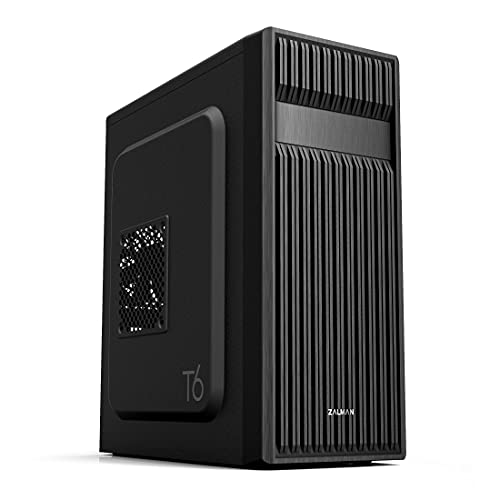
- Supports ATX, Micro-ATX, and Mini-ITX boards
- Includes a 5.25-inch optical-drive bay
- Patterned mesh and a pre-installed 120mm fan
Best For: Affordable workstations and gaming PCs needing an optical drive
Compact ARGB Value
MONTECH AIR 100 ARGB Micro ATX Case
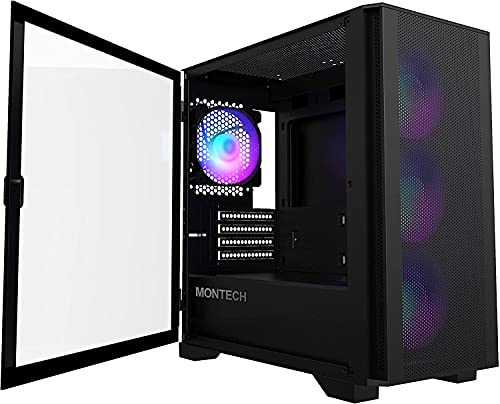
- Compact Micro-ATX and Mini-ITX chassis
- Four ARGB fans and controller included
- Swivel glass panel and mesh front simplify access and airflow
Best For: Small gaming builds with built-in lighting and practical cooling
Type-C Gaming Flexibility
DARKROCK EC2 ATX Mid-Tower Case

- Supports ATX, Micro-ATX, and Mini-ITX boards
- Room for eight 120mm fans or a 360mm front radiator
- Mesh front, tempered glass, dust filters, and Type-C readiness
Best For: Expandable gaming systems needing flexible cooling and hardware support
Feature-Rich Airflow Pick

- Four PWM-controlled 120mm ARGB fans included
- Supports GPUs up to 420mm and 360mm radiators
- Tool-less panels and broad motherboard compatibility
Best For: Performance-focused builders wanting airflow, clearance, and lighting
Airflow Gaming Value

- Mesh front panel with four included 120mm ARGB fans
- Supports ATX, Micro-ATX, and Mini-ITX boards
- Fits 340mm GPUs and 360mm radiators
Best For: Mainstream gaming builds with ready-to-use cooling
Showcase Dual-Chamber Design

- 270-degree tempered-glass viewing area
- Four included non-LED 120mm fans
- Supports 410mm GPUs and 360mm liquid cooling
Best For: Clean showcase builds with Type-C connectivity
Best Airflow Value

- Six PWM ARGB fans included
- Opening tempered-glass side panel
- Supports ATX, Micro-ATX, and Mini-ITX
Best For: Gamers wanting included cooling and easy hardware access
Best Style-Focused Pick

- Oak-wood and mesh front design
- Four 120mm fans included
- Type-C 3.2 Gen 2 connectivity
Best For: ATX builders who value design and modern front-panel ports
Best for High-End Builds

- Seven PWM ARGB fans included
- Supports GPUs up to 400mm
- 270-degree dual-glass view
Best For: Showcase gaming builds with large components and strong cooling needs
Showcase Airflow – MONTECH TG3 Panoramic ATX Case
For computer cases under 100, the MONTECH TG3 stands out when you want a display-focused ATX build with cooling hardware included. Its tiered interior, panoramic presentation, four ARGB fans, and support for back-connect motherboards make it a strong choice for a visible gaming setup.
Best For: ATX builders who want showcase styling, broad hardware clearance, and included ARGB airflow.
Pros:
- Tiered interior platform gives collectibles and custom accents dedicated display space.
- Includes a GF360 U REV side intake and GF120 U rear exhaust.
- Supports GPUs up to 430mm, CPU coolers up to 180mm, and up to nine fan positions.
- Supports standard and compatible back-connect ATX, Micro-ATX, and Mini-ITX motherboards.
Cons:
- Its larger mid-tower footprint may not suit compact desks.
- Only a one-year warranty is listed.
The TG3 is a feature-rich option for builders prioritizing presentation without giving up component clearance. Verify radiator, motherboard, and back-connect compatibility before buying.
Practical Legacy Build – Zalman T6 ATX Mid-Tower Case
Among computer cases under 100, the Zalman T6 is a straightforward ATX mid-tower for home, office, or gaming systems. It combines patterned mesh ventilation, a pre-installed 120mm rear fan, flexible motherboard support, and a useful 5.25-inch optical-drive bay.
Best For: Budget-conscious builders who need ATX compatibility and 5.25-inch optical-drive support.
Pros:
- Supports ATX, Micro-ATX, and Mini-ITX motherboards.
- Includes a 120mm rear fan and supports up to four fans total.
- Provides two 2.5-inch bays, two 3.5/2.5-inch bays, and an external 5.25-inch bay.
- Includes USB 3.0, two USB 2.0 ports, dust filtering, and a powder-coated steel chassis.
Cons:
- It will not fit ATX motherboards with side-facing SATA ports.
- Only one fan is pre-installed.
- Front connectivity lacks USB Type-C.
The T6 favors practical expansion and legacy-device support over modern showcase features. Check your motherboard’s SATA-port orientation and plan for additional fans if your components need more airflow.
Compact ARGB Value – MONTECH AIR 100 ARGB Micro ATX Case
The MONTECH AIR 100 ARGB is a useful pick among computer cases under 100 when desk space is limited. This compact Micro-ATX case includes four 120mm ARGB fans, a controller, mesh ventilation, a swivel tempered-glass panel, and room for capable gaming hardware.
Best For: Compact Micro-ATX or Mini-ITX gaming builds with included lighting and easy component access.
Pros:
- Compact 405 x 210 x 425mm chassis supports Micro-ATX and Mini-ITX boards.
- Includes four 120mm ARGB DC fans and a lighting controller.
- Supports GPUs up to 330mm, CPU coolers up to 161mm, and front radiators up to 280mm.
- Quick-release mesh, swivel glass, cable loops, Velcro straps, and dust filters simplify maintenance.
Cons:
- It does not support full-size ATX motherboards.
- GPU, cooler, and PSU clearances are more limited than larger mid-towers.
- Only a one-year warranty is listed.
The AIR 100 ARGB balances a small footprint with strong out-of-box cooling and convenient access. Confirm your GPU, CPU cooler, radiator, and ATX PSU dimensions before selecting it for a compact build.
Type-C Gaming Flexibility – DARKROCK EC2 ATX Mid-Tower Case
For computer cases under 100, the DARKROCK EC2 offers a modern mid-tower foundation with a mesh front, tempered-glass side panel, Type-C readiness, and support for ATX through Mini-ITX motherboards. Its interior accommodates up to eight 120mm fans and a 360mm front radiator.
Best For: Gaming builders who want broad motherboard support, tempered-glass styling, and room for extensive cooling.
Pros:
- Supports ATX, Micro-ATX, and Mini-ITX motherboards.
- Supports up to eight 120mm fans and one 360mm front radiator.
- Provides clearance for GPUs up to 340mm and power supplies up to 200mm.
- Includes a mesh front, magnetic top and bottom dust filters, tempered glass, and Type-C readiness.
Cons:
- Only one fan is pre-installed.
- The supplied details do not specify the full front I/O configuration.
- Its 340mm GPU limit requires checking larger graphics cards carefully.
The EC2 is a flexible platform for airflow-focused gaming systems, but its cooling potential depends on adding more fans beyond the included unit. Measure your graphics card and PSU before installation.
Feature-Rich Airflow Pick – Lian Li V100RX
The Lian Li V100RX is a strong option for shoppers comparing computer cases under 100 who want generous component clearance and built-in lighting. It includes four PWM-controlled 120mm ARGB fans, supports GPUs up to 420mm, and accommodates a top radiator up to 360mm.
Best For: Builders who want flexible motherboard support, high-end hardware clearance, and integrated ARGB lighting.
Pros:
- Includes four PWM-controlled 120mm ARGB fans with daisy-chain connectivity.
- Supports ATX, Micro-ATX, Mini-ITX, and back-connect ATX or Micro-ATX motherboards.
- Fits GPUs up to 420mm, CPU coolers up to 178mm, and top radiators up to 360mm.
- Tool-less side panels and an integrated 26-LED ARGB strip simplify access and customization.
Cons:
- Its feature set may be more than needed for a basic office or budget build.
- The case weighs about 8.2 kg, making it less convenient to move than lighter options.
With extensive clearance, multiple motherboard options, and four included fans, the V100RX is well suited to performance-focused builds where cooling and presentation both matter.
Airflow Gaming Value – GAMDIAS AURA GC1 ELITE
The GAMDIAS AURA GC1 ELITE is a practical choice among computer cases under 100 for a gaming build that prioritizes front-panel airflow and included accessories. Its mesh front panel and four pre-installed 120mm ARGB fans provide a ready-made cooling foundation.
Best For: Budget-conscious gaming builders who want tempered glass, ARGB fans, and support for standard ATX components.
Pros:
- Mesh front panel is designed for airflow and comes equipped with four ARGB fans.
- Supports ATX, Micro-ATX, and Mini-ITX motherboards with seven PCIe slots.
- Provides clearance for GPUs up to 340mm, 360mm radiators, and 160mm CPU coolers.
- Includes a tempered-glass side panel, PSU shroud, magnetic dust filter, and tool-free installation.
Cons:
- GPU clearance is lower than some larger mid-tower alternatives.
- Storage capacity is focused on a combination of 3.5-inch and 2.5-inch drives rather than extensive drive expansion.
The AURA GC1 ELITE balances airflow, visual appeal, and included fans, making it a sensible starting point for a mainstream gaming PC without requiring extensive case upgrades.
Showcase Dual-Chamber Design – MUSETEX Y6
The MUSETEX Y6 stands out among computer cases under 100 with dual tempered-glass panels, a dual-chamber layout, and a front USB Type-C port. It arrives with four non-LED 120mm fans, making it a useful foundation for a clean ATX gaming or display build.
Best For: Builders who want a wide internal view, organized component layout, and included non-LED cooling fans.
Pros:
- 270-degree full-view tempered glass panels showcase internal components.
- Supports ATX, Micro-ATX, and Mini-ITX motherboards, GPUs up to 410mm, and top radiators up to 360mm.
- Includes four 120mm non-LED fans and magnetic dust filters on the top and bottom.
- Provides a Type-C port alongside USB 3.0, USB 2.0, and audio connections.
Cons:
- The included fans are non-LED, so builders seeking illuminated cooling will need compatible replacements.
- CPU cooler clearance is limited to 160mm.
The Y6 is a compelling choice when presentation and organized airflow matter more than built-in RGB. Its spacious GPU and radiator support also leave room for a capable upgrade path.
Best Airflow Value – MUSETEX NN8 ATX Case
For shoppers comparing computer cases under 100, the MUSETEX NN8 stands out by including six pre-installed PWM ARGB fans. Its mesh front, opening tempered-glass side panel, and ATX mid-tower layout make it a practical choice for builders who want airflow, lighting, and convenient hardware access.
Best For: Gamers who want a feature-rich ATX case with included fans and easy interior access.
Pros:
- Includes six adjustable-speed PWM ARGB fans.
- Opening glass side panel simplifies cleaning and component installation.
- Supports ATX, Micro-ATX, and Mini-ITX motherboards.
- Offers room for multiple SSDs and HDDs, plus top-mounted 280mm liquid cooling.
Cons:
- Motherboard must have a 3-pin ARGB header for motherboard lighting control.
- Power supply, radiator, motherboard, and graphics card are not included.
- The case’s maximum CPU cooler and graphics-card clearance should be verified before buying.
The NN8 is a strong value-oriented option when included cooling and a showcase-style design matter more than a minimalist build. Check your component clearances and motherboard lighting connections before ordering.
Best Style-Focused Pick – Okinos Cypress 5 AIR Case
Among computer cases under 100, the Okinos Cypress 5 AIR offers a distinctive oak-wood front accent without abandoning practical airflow features. Four pre-installed 120mm fans, a mesh intake, tempered glass, and a fast Type-C port give it a balanced feature set for a modern ATX build.
Best For: Builders who want a decorative wood-and-mesh design with basic included cooling and modern connectivity.
Pros:
- Combines an oak-wood front panel with a 1.5mm mesh intake.
- Includes four pre-installed 120mm 3-pin fans.
- Provides a Type-C 3.2 Gen 2 port alongside two USB 3.0 ports.
- Supports GPUs up to 345mm with front fans installed and CPU coolers up to 160mm.
Cons:
- Included fans are 3-pin non-PWM models, so speed control is more limited than with PWM fans.
- It is listed for air cooling, while other cases may offer broader liquid-cooling flexibility.
- GPU clearance decreases to 320mm when a rear fan is installed.
The Cypress 5 AIR is a good match for a clean workstation or gaming setup where appearance and front-panel connectivity are priorities. Confirm cooler and graphics-card dimensions, especially if using a rear fan.
Best for High-End Builds – MUSETEX K2 Panoramic Case
For buyers seeking computer cases under 100 with expansive cooling and display potential, the MUSETEX K2 is built around seven pre-installed PWM ARGB fans and a 270-degree dual-glass view. Its spacious interior supports long graphics cards, a 360mm top radiator, and several motherboard formats.
Best For: Gaming PCs using powerful components that need generous clearance, strong airflow, and panoramic hardware visibility.
Pros:
- Includes seven adjustable-speed PWM ARGB fans and supports up to ten total.
- 270-degree dual tempered-glass design provides a broad component view.
- Supports graphics cards up to 400mm and CPU coolers up to 165mm.
- Includes Type-C, two USB 3.0 ports, dust filtering, and RGB lighting.
Cons:
- Power-supply clearance varies depending on whether the hard-drive cage is installed.
- Dual tempered-glass panels may require more care during installation and maintenance.
- Motherboard, graphics card, power supply, and radiator are not included.
The K2 is the most suitable choice here for a high-performance, showcase-oriented build. Its generous clearances and included fan array reduce the need for immediate cooling upgrades, but measure the power supply and other components carefully.
How We Picked the Best Computer Cases Under 100
We evaluated these cases by focusing on the features that matter most in an affordable build: motherboard support, ventilation, included fans, radiator and graphics-card clearance, storage options, front-panel ports, and ease of assembly. We also considered whether each design suits a specific type of buyer, from first-time builders to users who want a compact or visually distinctive setup.
Included fans can improve value, but fan quantity is not the only measure of cooling performance. Mesh intake panels, unobstructed airflow paths, dust-filter access, and sensible cable-routing space are equally important.
Quick Comparison
| What to Compare | Why It Matters |
|---|---|
| Form factor | Confirms compatibility with ATX, Micro ATX, or other motherboards. |
| Airflow design | Mesh fronts and multiple fan mounts help manage heat. |
| Included fans | Reduces the cost and effort of completing the build. |
| Front-panel connectivity | USB-C and accessible USB ports improve daily usability. |
| Interior clearance | Determines whether your graphics card, cooler, radiator, and power supply will fit. |
Key Buying Factors for Computer Cases Under 100
Check Motherboard and Component Compatibility
Most options here support ATX, while the MONTECH AIR 100 is aimed at Micro ATX builds. Before buying, verify motherboard format, graphics-card length, CPU-cooler height, power-supply location, and radiator support against the manufacturer’s specifications.
Prioritize Airflow Over Appearance
Tempered glass and panoramic panels look appealing, but a well-ventilated mesh intake is usually better for sustained gaming workloads. If a case includes several fans, check their size, placement, connector type, and whether they are PWM-controlled or fixed-speed.
Consider Expansion and Maintenance
Look for removable side panels, accessible dust filters, practical cable channels, and enough fan or radiator mounts for future upgrades. A front USB-C port is especially useful if you regularly connect modern storage devices or peripherals.
Account for the Complete Budget
A low case price can be less attractive if you must immediately add fans, a hub, or adapters. Conversely, preinstalled fans may offer excellent value if their airflow and noise characteristics fit your needs.
Who Should Buy Which Computer Cases Under 100?
Choose the MONTECH AIR 100 if you want a compact Micro ATX system with a mesh front. The MONTECH TG3, GAMDIAS, and MUSETEX models are better suited to builders who want a showcase-style gaming case with lighting and included fans. The Zalman T6 is a practical choice for straightforward ATX builds and users who value a traditional layout or optical-drive support.
Consider the DARKROCK EC2 or Lian Li V100 when a simpler mid-tower design and upgrade flexibility matter most. The MUSETEX Y6 and dual-glass models suit buyers prioritizing panoramic visibility, while the Okinos Oak Wood is the distinctive option for anyone who wants a more decorative finish without abandoning standard ATX compatibility.