If you're building a clean, reliable gaming setup, the right power strip does more than add outlets. It can protect expensive gear, reduce cable clutter, and keep controllers, phones, and accessories charged.
This roundup of the best power strip with usb c for gaming options highlights models that fit modern desks, multi-device loads, and fast USB-C charging needs without wasting space.
Best 10 Power Strip with USB C for Gaming Picks for 2026
Desk-Clamp Charging Hub
Jgstkcity 40W USB-C Desk Edge Power Strip

- Clamp mount keeps the strip secure on desk edges
- 4 USB-C ports deliver up to PD 20W each
- 5 outlets plus 1200J surge protection
Best For: Gamers and desk users who want mounted USB-C charging
Compact All-in-One

- 11 AC outlets plus 6 USB ports in one compact body
- Flat plug and 6 ft cord suit tight setups
- 8-point safety system with surge protection
Best For: High-port-count setups that need compact convenience
Clamp-Mounted Power Bar
Anker Nano 70W Desk Power Strip

- 70W USB-C charging for laptops and accessories
- Clamp-on design keeps gaming desks tidy
- 6 AC outlets plus 2 USB-C and 2 USB-A ports
Best For: Gamers who want a premium clamp-on USB-C power strip
Heavy-Duty Wall Mount
TROND 13-Outlet USB-C Surge Strip

- 13 wide-spaced AC outlets for big setups
- USB-C PD up to 20W with 4 total USB ports
- 4000J surge protection and wall-mount support
Best For: Large gaming setups needing maximum outlet capacity
RGB Gaming Surge Protector
4000J Surge Protector with USB-C and 6 Outlets

- 4000J surge protection and 15A overload protection
- 2 USB-C ports rated up to 20W max
- RGB lighting with adjustable modes and brightness
Best For: Gaming desks that want style, USB-C charging, and extra protection
High-Power Desktop Charger
9-in-1 Anker Power Strip with 100W USB-C

- Two USB-C ports can each reach 100W individually
- 9-in-1 design with 3 AC, 4 USB-C, and 2 USB-A
- 8-point safety system for added device protection
Best For: Desk setups that prioritize fast USB-C charging and a premium build
Multi-Outlet Flat Plug Strip

- 16 widely spaced AC outlets for crowded setups
- 3 USB-C ports among 6 total USB ports
- 2400J surge protection with overload and short-circuit safety
Best For: Large gaming or office desks that need maximum outlet capacity
Best Overall for Outlet Count
Anker 12-Outlet USB-C Surge Strip

- 12 AC outlets with 3 USB ports
- 20W USB-C fast charges iPhone 15
- 2100J surge protection and safety system
Best For: Gaming desks needing lots of AC outlets and one USB-C charger
Best Space-Saving Tower
TenTrend 230W USB-C Power Tower
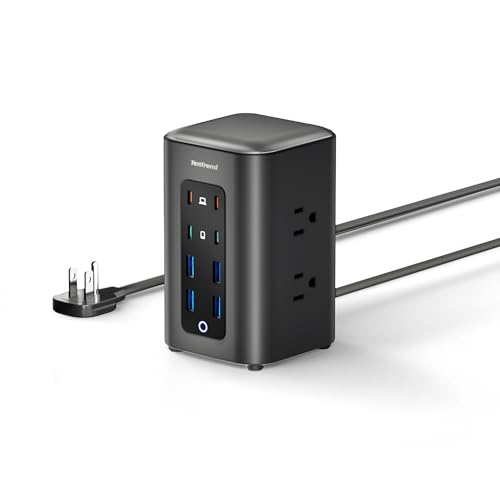
- 4 USB-C ports, including 2 at 65W
- 6 AC outlets in a compact tower
- Flat plug and 5 ft cord simplify placement
Best For: Compact gaming desks that need multiple USB-C charging ports
Best for Large Gaming Setups
SUPERDANNY 22-Outlet Gaming Power Strip

- 22 AC outlets and 6 USB ports
- 2-inch wide spacing fits bulky plugs
- Mountable with flat plug and 2100J protection
Best For: Large gaming rooms that need maximum outlet capacity
Desk-Clamp Charging Hub – Jgstkcity 40W USB-C Desk Edge Power Strip
If you want a power strip with usb c for gaming that mounts cleanly to the desk, this Jgstkcity unit is built for a tidy setup. It combines 5 AC outlets with 4 USB-C ports and 2 USB-A ports, plus a clamp-on design that keeps the strip secure and off the floor.
Best For: Gamers, office desks, and dorm setups that need mounted charging with USB-C and surge protection.
Pros:
- Desk-clamp mount helps keep cables organized and the strip stable on the tabletop edge.
- Four USB-C ports each support up to PD 20W, with 2 USB-A ports for extra device coverage.
- 5 widely spaced outlets and 1200J surge protection add practical everyday protection.
- 6 ft cord and flat plug make placement easier near a desk or wall.
Cons:
- Clamp only fits desktops up to 1.96″ thick.
- The desk must sit 0.4″ to 0.5″ away from the wall for the mount to work properly.
- Total USB output is 40W, so it is not aimed at high-wattage laptop charging from every port at once.
This is a strong pick if your priority is a mounted charging hub that reduces desk clutter while giving you multiple USB-C ports for accessories and smaller devices.
Compact All-in-One – JouleLoom 17-in-1 Power Strip
If you need a power strip with usb c for gaming in a compact, travel-friendly shape, this JouleLoom model focuses on sheer port count. It packs 11 AC outlets, 4 USB-A ports, and 2 USB-C ports into a slim body with a flat plug and a one-touch switch.
Best For: Users who want maximum outlet count in a small footprint for gaming rooms, travel, or multipurpose desks.
Pros:
- 17-in-1 layout includes 11 AC outlets, 4 USB-A ports, and 2 USB-C ports.
- Compact 6.5″ x 4.3″ x 1″ design is easy to fit in tight spaces.
- Flat plug and 6 ft cord help with placement behind furniture or at a workstation.
- 8-point safety system includes surge protection, overload protection, fire resistance, and temperature control.
Cons:
- USB-C charging tops out at 12W/2.4A, so it is not a fast-charging option.
- It is not a clamp or desk-mounted design, so cable management depends on placement.
- Maximum current is 10A, which is lower than heavy-duty units.
For a crowded setup that needs lots of plugs more than high-power USB-C output, this strip is practical and flexible.
Clamp-Mounted Power Bar – Anker Nano 70W Desk Power Strip
For a premium power strip with usb c for gaming, the Anker Nano Power Strip emphasizes desk organization and higher USB-C output. Its clamp design, dual-zone port layout, and 70W USB-C charging make it well suited to cleaner gaming desks and mixed-device charging.
Best For: Gaming desks that need a stable clamp-on strip with stronger USB-C charging for laptops and accessories.
Pros:
- 70W USB-C output supports laptops, tablets, and other power-hungry devices.
- Clamp mount holds securely and lets you plug or unplug with one hand.
- Dual-zone layout separates 6 AC outlets, 2 USB-C ports, and 2 USB-A ports to reduce clutter.
- 1500J surge protection adds a solid layer of protection for desk gear.
Cons:
- Clamp only fits tabletop edges from 0.6″ to 1.8″ thick.
- It is pricier-positioned by design, so it may be more than a basic outlet expander.
- The cord is 5 ft, which may be short for some room layouts.
If you want a more polished desk setup with real USB-C charging strength, this Anker is one of the most capable options here.
Heavy-Duty Wall Mount – TROND 13-Outlet USB-C Surge Strip
If your priority is a power strip with usb c for gaming that also covers a full entertainment setup, this TROND model leans into capacity and protection. It offers 13 wide-spaced AC outlets, 4 USB ports including USB-C, and a heavy-duty cord for more demanding desk or media-room layouts.
Best For: Large gaming, office, or entertainment setups that need many outlets and strong surge protection.
Pros:
- 13 wide-spaced AC outlets help accommodate larger plugs without crowding adjacent sockets.
- USB-C PD up to 20W and QC 3.0 USB-A up to 18W provide useful everyday charging.
- 4000J surge protection is the highest rating in this group and adds strong protection.
- Wall-mount and under-desk mounting options make it versatile for permanent installs.
Cons:
- It is larger and more installation-focused than compact desktop strips.
- USB-C output is useful, but not designed for high-wattage laptop charging.
- The 5 ft cord may limit placement in larger rooms.
This is the most outlet-heavy and protection-focused option, making it a smart choice when your gaming area has lots of hardware to plug in.
RGB Gaming Surge Protector – 4000J Surge Protector with USB-C and 6 Outlets
If you want a power strip with usb c for gaming, this model leans hard into the setup-friendly extras: RGB lighting, wide-spaced outlets, and built-in surge protection. It’s designed to keep a gaming PC area powered and organized while also adding fast USB-C charging for phones and accessories.
Best For: Gamers who want a desktop-friendly strip with lighting, USB-C charging, and stronger protection.
Pros:
- 4000J surge protection plus 15A overload protection for added peace of mind
- 2 USB-C ports with up to 20W max charging, plus 1 USB-A port
- 6 wide-spaced AC outlets with a 10° angled layout for easier plug access
- RGB ambient lighting with multiple modes and brightness levels
Cons:
- Only one USB-A port, so USB charging is not as flexible as the AC side
- RGB lighting may be unnecessary if you want a plain utility strip
- Best suited to desktop setups rather than ultra-compact spaces
Overall, this is a practical gaming-focused option if you want visible style plus real electrical protection. The USB-C ports are handy for everyday charging, while the outlet spacing and angled cord make it easier to build a clean desk setup.
High-Power Desktop Charger – 9-in-1 Anker Power Strip with 100W USB-C
For buyers comparing a power strip with usb c for gaming, this Anker desktop charger stands out for sheer charging strength. It combines AC outlets with multiple USB-C ports, and its two main USB-C ports can each deliver up to 100W when used individually, making it a strong desk power hub for mixed-device setups.
Best For: Users who want a premium desktop power strip with high-output USB-C charging and a compact all-in-one layout.
Pros:
- Two USB-C ports support up to 100W each when used on their own
- 9-in-1 layout with 3 AC outlets, 4 USB-C ports, and 2 USB-A ports
- 8-point safety system helps protect against overvoltage and short circuits
- Stable desktop design built for 100W 9-in-1 use
Cons:
- Only 3 AC outlets if you need lots of plug-in gear
- Surge protection is 300J, so it is less robust than heavier-duty surge strips
- May be more than you need if you only want basic charging
This is the most charging-forward option in the group, especially if USB-C matters more than outlet count. It works best as a desk centerpiece for people who want fast top-tier USB-C power in a tidy, all-in-one format.
Multi-Outlet Flat Plug Strip – 16 Outlets with 3 USB-C Ports
If your priority is a power strip with usb c for gaming that also handles a crowded desk, this Chiefway model is built for volume. It pairs 16 widely spaced AC outlets with 6 USB ports, including 3 USB-C ports, so it can reduce adapter clutter while supporting a larger setup.
Best For: Bigger home-office or gaming setups that need lots of outlets and convenient USB-C charging.
Pros:
- 16 widely spaced outlets help prevent bulky plugs from blocking each other
- 6 USB ports total, including 3 USB-C ports for modern devices
- 2400J surge protection with overload, short-circuit, and fire-resistant safety features
- 6ft flat plug cord with a low-profile right-angle design for tight spaces
Cons:
- USB-C output is limited to 5V/3.1A total, so it is not a high-wattage charger
- Larger footprint than simpler strips because of the 4-sided outlet layout
- May be overkill if you only need a few plugs and one charging port
This is the most capacity-focused pick here, especially if your gaming desk also powers monitors, peripherals, and charging gear. It trades high-speed USB-C output for convenience, spacing, and sheer outlet count.
Best Overall for Outlet Count – Anker 12-Outlet USB-C Surge Strip
If you want a power strip with usb c for gaming that also handles a busy desk, this Anker model is built for volume and convenience. It combines 12 AC outlets with 1 USB-C and 2 USB-A ports, plus 2100J surge protection, so it can support a monitor-heavy setup while still giving you a fast-charge option for your phone.
Best For: Gaming desks, home offices, or dorm setups that need lots of AC outlets and a simple USB-C charging option.
Pros:
- 12 AC outlets provide plenty of room for consoles, chargers, and desk accessories.
- 20W USB-C port can charge an iPhone 15 from 0-50% in about 26 minutes.
- 2100J surge protection and an 8-point safety system add useful protection.
- Extra spacing between outlets helps accommodate larger plugs.
Cons:
- Only one USB-C port, so it is less flexible than multi-USB-C models.
- Designed as a horizontal strip, which may take up more desk length.
- Best suited to standard AC devices rather than a USB-heavy charging station.
This is a practical choice if your gaming area needs a lot of outlets and you still want one reliable USB-C port built in. It is more about dependable expansion and protection than high-powered multi-device USB charging.
Best Space-Saving Tower – TenTrend 230W USB-C Power Tower
For a power strip with usb c for gaming that also keeps a compact footprint, this TenTrend tower stands out for its charging mix. It packs 6 AC outlets and 8 USB ports, including 4 USB-C ports, with two USB-C ports rated up to 65W for faster laptop charging and two more at 20W for everyday devices.
Best For: Gamers or desk users who want a vertical, space-saving charging station with multiple USB-C ports.
Pros:
- 4 USB-C ports make it more versatile than single-port USB-C strips.
- Two 65W USB-C ports can handle faster laptop charging.
- Flat plug and 5 ft cord help with neat, low-profile placement.
- Compact tower design keeps the desk organized.
Cons:
- Only 6 AC outlets, so it has less standard outlet capacity than larger strips.
- 10A/1250W AC rating is lower than some bigger surge strips.
- Tower shape may not suit every gaming desk layout.
If your priority is USB-C charging flexibility and a cleaner footprint, this tower is a strong fit. It is especially appealing for setups that need charging speed and organization more than maximum AC outlet count.
Best for Large Gaming Setups – SUPERDANNY 22-Outlet Gaming Power Strip
If you need a power strip with usb c for gaming and a lot of room for gear, this SUPERDANNY surge protector is built for large setups. It offers 22 AC outlets, 2 USB-C ports, and 4 USB-A ports, along with 2100J surge protection and wide socket spacing that helps bulky adapters fit without crowding each other.
Best For: Big gaming rooms, PC desks, or dorm setups with many plugs and wide adapters.
Pros:
- 22 AC outlets plus 6 USB ports support very large device counts.
- 2-inch extra-wide outlet spacing helps reduce plug blockage.
- Mountable design works behind a desk, on a wall, or under furniture.
- Flat plug and 2100J surge protection add practical convenience and safety.
Cons:
- Large physical size may be more than some desks need.
- USB-C output is limited to 5V/3A, so it is not the fastest charging option available.
- Built-in metal body may make it less compact than smaller strips.
This is the strongest pick when your setup has many components and you need generous outlet spacing. It makes sense for users who want capacity, mounting flexibility, and USB-C ports in one heavy-duty strip.
How We Picked the Best Power Strip with USB C for Gaming
We focused on features that matter in a gaming setup: surge protection, enough AC outlets for a PC, monitor, console, and speakers, plus USB-C charging for everyday accessories. Desk-friendly designs, flat plugs, wall-mount or clamp options, and cord length also mattered.
We favored models that make cable management easier and avoid blocking large adapters. For a Power Strip with USB C for Gaming, spacing and layout are often just as important as total port count.
Quick Comparison
Think of these options in three groups: compact desk-mounted strips for clean setups, high-outlet models for multiple peripherals, and higher-wattage USB-C chargers for users who want to power phones, tablets, handhelds, or accessories from the same hub.
If you run a full battlestation, prioritize outlet count and spacing. If you want a minimalist desk, choose a clamp or flat-plug design with enough USB-C to cover small-device charging.
Key Buying Factors for a Power Strip with USB C for Gaming
Surge Protection
Gaming hardware is expensive, so surge rating should be a top filter. Higher joule ratings generally offer more protection against spikes, especially for PCs, consoles, and monitors.
USB-C Output
Not all USB-C ports are equal. Check the total wattage and per-port output if you plan to charge phones, earbuds, controllers, or a tablet while gaming. Faster USB-C helps reduce the need for separate wall chargers.
Outlet Spacing
Wide spacing matters when plugging in bulky adapters. A power strip that looks good on paper can still be frustrating if wall warts cover neighboring sockets.
Form Factor
Clamp, flat plug, tower, and desktop styles each solve different problems. Desk clamp models save surface space, towers fit vertical layouts, and flat plugs work well behind tight furniture.
Cord Length and Load Capacity
Make sure the cord length reaches your setup comfortably, and confirm the overall electrical rating matches your region and device load. This is especially important if you run a PC, console, monitor, and charging accessories from one strip.
Who Should Buy Which Power Strip with USB C for Gaming?
Choose a compact clamp-style strip if you want a tidy gaming desk with easy access to charging. Pick a higher-outlet model if your setup includes multiple consoles, a monitor, speakers, and accessories. If USB-C charging is a priority, go for a higher-wattage option that can handle everyday devices without slowing down.
For most users, the best Power Strip with USB C for Gaming is the one that balances protection, spacing, and charging in a layout that matches the way you actually use your desk.