When it comes to enhancing your gaming setup, choosing the right handheld gaming dock can make a significant difference. These docks not only improve performance but also offer essential features like rapid charging and multiple connectivity options. As you explore the best options available, you’ll find that each dock has its unique advantages. Ready to find the perfect match for your gaming style? Let’s plunge into the top contenders.
Anker Steam Deck Dock, 6-in-1 USB C Hub

If you’re a dedicated gamer looking to enhance your handheld experience, the Anker Steam Deck Dock is an ideal choice. This 6-in-1 USB-C hub elevates your gaming setup with features like 4K HDMI output and ultra-speed 1Gbps Ethernet, ensuring smooth online gameplay. With two USB-A ports and one USB-C port, you can easily connect your favorite peripherals, including mice and keyboards. The 100W PD-IN port allows for fast charging, keeping your devices powered during intense sessions. Enjoy peace of mind with an 18-month warranty and strong customer ratings, making this dock a reliable addition to your gaming arsenal.
Best For: Gamers looking to enhance their handheld gaming experience with versatile connectivity options and fast charging capabilities.
Pros:
- 4K HDMI output provides high-resolution gaming visuals.
- Fast charging with a 100W PD-IN port ensures devices stay powered during long gaming sessions.
- Multiple USB ports allow for easy connection of various peripherals like keyboards and mice.
Cons:
- Not compatible with ROG Ally X, limiting its versatility for some users.
- The built-in USB-C cable may not be long enough for certain setups.
- Limited to 6 ports, which may not suffice for users with multiple devices.
Razer Handheld Dock Chroma for Mobile Gaming & Tablets

The Razer Handheld Dock Chroma is an ideal choice for mobile gamers and tablet users seeking seamless connectivity and charging capabilities. With six ports, including HDMI 2.0, three USB A, and a gigabit Ethernet port, you can easily connect your devices. The adjustable hinge allows you to set your smartphone or tablet at the perfect angle for gaming. Plus, with 100W power delivery, you can charge while you play. The customizable Razer Chroma RGB lighting adds a vibrant touch to your setup. Backed by a 2-year warranty and a 30-day return policy, it’s a solid investment for any gamer.
Best For: Mobile gamers and tablet users looking for enhanced connectivity and charging solutions.
Pros:
- Versatile Connectivity: Offers six ports including HDMI, USB A, and Ethernet for various device connections.
- Adjustable Viewing Angles: The hinge design allows for optimal positioning of devices during gameplay.
- Powerful Charging Capability: 100W power delivery enables charging while using the dock.
Cons:
- Limited Device Compatibility: May not support all mobile devices or tablets on the market.
- Price Point: Could be considered expensive compared to simpler charging docks.
- Weight: While lightweight, it may still be bulkier than other portable options.
JSAUX 6-in-1 Docking Station for ROG Xbox Ally X and Steam Deck

For gamers looking to enhance their handheld experience, the JSAUX 6-in-1 Docking Station serves as an ideal solution. Compatible with devices like the ROG Xbox Ally X and Steam Deck, this compact dock offers six ports, including HDMI for stunning 4K@120Hz output. You’ll appreciate the 100W power delivery for fast charging, ensuring you stay in the game longer. Its modular design allows for both docked and standalone use, while the customizable card feature adds a personal touch. Weighing just 0.27 kg, it’s perfect for portability, making your gaming setup both efficient and stylish.
Best For: Gamers seeking a versatile and portable docking solution for their handheld devices like the ROG Xbox Ally X and Steam Deck.
Pros:
- Supports 4K@120Hz HDMI output for high-quality visuals.
- 100W power delivery ensures fast charging while gaming.
- Modular design allows for flexible use as a dock or standalone stand.
Cons:
- Using a 65W or lower charger may trigger power warnings.
- Custom cards for personalization are not included.
- Weighing 0.27 kg, it may still be heavier than some minimalistic options.
JSAUX Upgraded Docking Station for Steam Deck and ROG Ally X (6-in-1)

Designed for avid gamers seeking seamless connectivity and performance, the JSAUX Upgraded Docking Station offers an impressive HDMI 2.1 output that supports 4K@120Hz visuals. This 6-in-1 dock is compatible with Steam Deck, ROG Ally, and more, ensuring you can enjoy ultra-smooth gameplay. With 100W Power Delivery charging, it keeps your devices powered during long sessions. Plus, three USB 3.0 ports and gigabit Ethernet enhance your gaming experience by providing fast connections and minimal latency. Weighing just 170 grams, this compact dock is a must-have for serious gamers looking to elevate their setup effortlessly.
Best For: Avid gamers looking for seamless connectivity and enhanced performance for their Steam Deck or ROG Ally devices.
Pros:
- 4K@120Hz HDMI output for ultra-smooth visuals and reduced screen tearing.
- 100W Power Delivery ensures extended playtime by keeping devices charged.
- Gigabit Ethernet provides fast online play with minimal latency.
Cons:
- Not compatible with ROG XBOX Ally / XBOX Ally X.
- Limited to a total of 4 USB ports, which may not suffice for all peripherals.
- May require additional setup for optimal performance with certain devices.
JSAUX 4-in-1 USB C Dock for Handheld Gaming

Looking for a versatile docking solution that enhances your handheld gaming experience? The JSAUX 4-in-1 USB C Dock is your answer. Compatible with popular devices like the Steam Deck, ROG Xbox Ally, and Legion Go, it supports HDMI 2.0 output at 4K@60Hz and 2K@120Hz for stunning visuals. With two USB 2.0 ports, you can easily connect wired controllers or keyboards. Plus, its 100W Power Delivery guarantees your device stays charged during intense gaming sessions. Compact and designed for devices with grips, this dock transforms any space into a big-screen gaming station, making it a must-have for serious gamers.
Best For: Serious gamers looking for a reliable and versatile docking solution to enhance their handheld gaming experience.
Pros:
- Supports high-quality display output with HDMI 2.0 at 4K@60Hz and 2K@120Hz for stunning visuals.
- Includes two USB 2.0 ports for convenient connections to wired controllers, keyboards, or mice.
- 100W Power Delivery ensures devices stay charged during extended gaming sessions.
Cons:
- Not compatible with Nintendo Switch 2, limiting its usability for some gamers.
- Requires a 100W charger for optimal performance, which may not be included with all devices.
- Compact design may limit space for larger devices with extensive grips or accessories.
UGREEN Steam Deck Dock 6-in-1 4K HDMI Dock

The UGREEN Steam Deck Dock 6-in-1 4K HDMI Dock stands out with its impressive 4K@120Hz HDMI 2.1 support, making it the perfect choice for gamers who crave stunning visual fidelity. With VRR, FreeSync, and G-Sync compatibility, you’ll enjoy a smooth, tear-free experience during intense gaming sessions. This dock also features a powerful 100W PD charging capability, ensuring your device stays charged while you play. Its compact, foldable design makes it portable, perfect for gaming on the go. Plus, the multiple connectivity options, including USB-A, USB-C, and Gigabit Ethernet, enhance your gaming setup effortlessly.
Best For: Gamers and professionals seeking a high-performance docking solution with 4K visual fidelity and multiple connectivity options.
Pros:
- Ultimate visual experience with 4K@120Hz support and advanced gaming technologies like VRR, FreeSync, and G-Sync.
- Powerful charging capability with 100W PD, allowing simultaneous charging of the host device and dock.
- Compact and portable design makes it easy to carry and ideal for on-the-go use.
Cons:
- Limited to specific devices, mainly compatible with Steam Deck and similar gaming consoles.
- Potential overheating during extended use, as with many high-powered docks.
- Price point may be higher compared to simpler docking solutions without advanced features.
JSAUX Upgraded Docking Station for Steam Deck and ROG Ally X
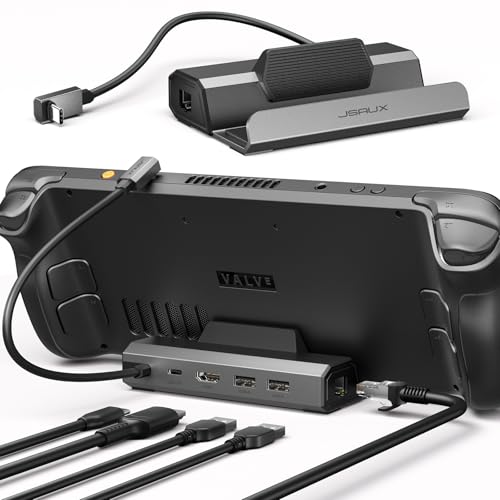
If you’re a dedicated gamer using a Steam Deck or ROG Ally X, the JSAUX Upgraded Docking Station is an excellent choice for enhancing your gaming experience. This 5-in-1 dock offers stunning 4K@120Hz visuals, doubling your refresh rate for smoother gameplay. With 100W PD charging, you can game without interruptions, while the built-in RJ45 Ethernet port guarantees stable, low-latency connections for online play. Weighing just 141 grams and measuring 4.45L x 2.64W x 1.1H inches, it’s compact yet powerful. Plus, backed by an 18-month warranty and solid customer reviews, you can game with assurance.
Best For: Gamers seeking a reliable and high-performance docking station for their Steam Deck or ROG Ally X to enhance their gaming experience.
Pros:
- Supports 4K@120Hz output, delivering ultra-smooth visuals for an immersive gaming experience.
- 100W PD charging capability ensures uninterrupted gameplay without worrying about battery life.
- Built-in RJ45 Ethernet port provides stable and low-latency internet connections for online gaming.
Cons:
- Limited compatibility as it does not work with ROG XBOX Ally or XBOX Ally X.
- Only offers USB 2.0 ports, which may limit data transfer speeds for connected devices.
- Some users may prefer additional USB ports for more peripherals or accessories.
Logitech G Cloud Gaming Handheld Portable Gaming Console

For gamers who crave portability without sacrificing performance, the Logitech G Cloud Gaming Handheld Portable Gaming Console delivers an impressive experience. Weighing just 463 grams, this lightweight device features a stunning 7-inch Full HD touchscreen, supporting cloud gaming at 1080p and 60fps. With over 12 hours of battery life, you can game on the go without worrying about charging. Its gaming-grade controls, equipped with haptics and a gyroscope, enhance your gameplay. Plus, access popular services like Xbox Cloud Gaming and NVIDIA GeForce NOW through the Google Play store. Just verify you have a stable internet connection for the best experience.
Best For: Gamers seeking a portable gaming solution that combines performance with long battery life for cloud gaming on the go.
Pros:
- Lightweight design at just 463 grams for easy portability.
- Impressive 12+ hours of battery life for extended gaming sessions.
- Access to multiple cloud gaming services including Xbox Cloud Gaming and NVIDIA GeForce NOW.
Cons:
- Requires a stable internet connection and a cloud gaming subscription to function effectively.
- May not support local gaming without an internet connection.
- Limited internal storage may necessitate external storage solutions for larger game libraries.
Zotac Game Console Docking Station (W129023129)
Designed for gamers on the go, the Zotac Game Console Docking Station (W129023129) is an ideal solution for those who want to enhance their gaming experience. This 7-in-1 docking station offers compatibility with ZOTAC GAMING ZONE handheld consoles, tablets, and smartphones equipped with USB-C DP capability. With multiple ports, including USB 3.2 and HDMI output for up to 4K@60Hz, you can easily expand your connectivity. Fast charging with PD 3.0 and an adjustable dock angle add ergonomic convenience. Weighing just 0.34 kg, it’s compact and travel-friendly, making it perfect for gaming anywhere.
Best For: Gamers who need a portable docking solution to enhance connectivity and charging capabilities for their handheld consoles and devices.
Pros:
- Versatile Connectivity: Offers multiple USB ports and an HDMI output for seamless connection to various devices.
- Fast Charging: Supports PD 3.0 for quick charging of compatible devices.
- Compact Design: Lightweight and travel-friendly, making it easy to carry for gaming on the go.
Cons:
- Limited Compatibility: Primarily designed for ZOTAC GAMING ZONE consoles and devices with USB-C DP capability.
- Material Quality: Constructed from plastic, which may not be as durable as metal alternatives.
- Weight Limitations: The docking station may not support larger or heavier devices securely due to its compact design.
6-in-1 Gaming Docking Station for Steam Deck and ROG Ally

The 6-in-1 Gaming Docking Station stands out as the ideal choice for gamers who own a Steam Deck or ROG Ally, thanks to its robust connectivity options and impressive visuals. With 12 ports, including HDMI and multiple USB-A 3.0 connections, you can easily connect to various devices. The HDMI output supports stunning 4K@60Hz resolution, ensuring smooth gaming experiences. Plus, the built-in dual fan cooling system prevents overheating, while the dynamic RGB lighting adds flair. Its ergonomic design and adjustable stand let you find the perfect viewing angle, making it perfect for long gaming marathons. Enjoy seamless gameplay and stunning graphics!
Best For: Gamers who own a Steam Deck or ROG Ally and seek a versatile docking station with high-performance features.
Pros:
- Supports stunning visuals with HDMI output up to 4K@60Hz, enhancing gaming and streaming experiences.
- Includes a built-in dual fan cooling system to prevent overheating during extended sessions.
- Ergonomic design with an adjustable stand for optimal viewing angles and comfort.
Cons:
- Limited to specific gaming devices, which may not appeal to all users.
- Best Sellers Rank indicates it may not be as widely recognized compared to other docking stations.
- RGB lighting may not be preferred by all users, adding unnecessary aesthetics for some.
Factors to Consider When Choosing a Handheld Gaming Dock
When choosing a handheld gaming dock, it’s important to take into account compatibility with your devices and the types of ports available. Think about charging speed and power, as well as video output quality for the best gaming experience. Finally, don’t overlook design and build quality, which can impact both functionality and durability.
Compatibility With Devices
Choosing a handheld gaming dock requires careful consideration of compatibility with your specific device. Some docks are designed exclusively for certain models or brands, so make certain to check this detail. Many docks support a variety of devices, including popular handheld consoles like the Steam Deck and ROG Ally, as well as smartphones and tablets. Pay attention to the dock’s specifications regarding supported HDMI resolutions and refresh rates, which can vary, especially with 4K outputs. Additionally, consider the types and number of ports available, like USB-A, USB-C, and Ethernet, to guarantee they meet your connectivity needs. Finally, verify the model year of your handheld device against the dock’s compatibility list to avoid issues with newer models.
Port Selection and Types
Selecting the right ports can make all the difference in enhancing your handheld gaming experience. You’ll want to take into account the total number of ports available, as more ports mean you can connect multiple peripherals simultaneously. Look for high-speed USB-A and USB-C ports, ideally with speeds of 5Gbps or higher, to guarantee quick data transfers for controllers, keyboards, and mice. HDMI output resolution is also essential; choose a dock that supports 4K@60Hz or higher for sharper visuals. If online gaming is your focus, a gigabit Ethernet port can greatly reduce latency and improve stability. Finally, confirm the dock supports Power Delivery (PD) charging, preferably at 100W, to keep your device powered during extended gaming sessions.
Charging Speed and Power
To maximize your gaming experience, it is crucial to take into account the charging speed and power capabilities of your handheld gaming dock. Look for docks with a wattage range from 65W to 100W; higher wattage allows for faster charging during gameplay. Opt for docks that support Power Delivery 3.0 for efficient charging of both the dock and connected devices. Using a 100W charger is often recommended for demanding gaming sessions. Some docks also feature Turbo Mode, enhancing charging speed for compatible devices, ensuring uninterrupted gameplay. Keep in mind that charging capability can vary based on the number of peripherals connected; multiple devices may reduce available power to your handheld, potentially slowing charging speeds.
Video Output Quality
When it comes to enhancing your gaming experience, video output quality plays an essential role in how immersive and enjoyable your sessions are. Look for handheld gaming docks that support high resolutions like 4K at 60Hz or even 120Hz for a smoother experience. Higher-end docks may offer HDMI 2.1, which enables ultra-high-definition output and features like Variable Refresh Rate (VRR) and FreeSync, greatly boosting visual performance. This is especially important when connecting to larger displays, where clarity and fluid motion are key. For fast-paced games, prioritize docks with higher refresh rates—120Hz can make all the difference. Always check the supported video output formats to verify compatibility with your display and maximize your gaming’s visual fidelity.
Design and Build Quality
Video output quality enhances your gaming experience, but the design and build quality of a handheld gaming dock can greatly impact usability and comfort. When choosing a dock, prioritize portability; look for lightweight, durable materials like aluminum that make travel easy. An adjustable hinge or stand is essential for setting ideal viewing angles, ensuring you’re comfortable during long gaming sessions. Compact designs save desktop space while providing stable support for your device, keeping it secure. Don’t overlook ergonomic features, such as precision damping technology, which aids in proper device positioning for extended play. Finally, consider aesthetics; customizable RGB lighting can reflect your personal style and enhance the overall gaming vibe.
Cooling Features and Efficiency
While you might focus on design and portability when selecting a handheld gaming dock, effective cooling features are equally essential for maintaining peak performance. Overheating during extended gaming sessions can lead to throttling, negatively impacting your experience. Look for docks with active cooling mechanisms, like built-in fans that operate at high RPMs, as they dissipate heat more efficiently than passive solutions. Additionally, adjustable stands can improve airflow around your device, enhancing thermal management. Many high-performance docks are crafted from materials that promote heat dissipation, ensuring your connected devices maintain ideal operating temperatures. Prioritizing these cooling features will help prolong your device’s lifespan and keep your gaming sessions smooth and enjoyable.
Warranty and Support Options
Choosing a handheld gaming dock isn’t just about features and performance; warranty and support options play an essential role in your decision. First, check the warranty duration—some manufacturers offer up to two years, giving you added peace of mind. Also, pay attention to the return policy; many brands provide a 30-day guarantee for damaged or defective products. It’s vital to know what the warranty covers, such as electrical malfunctions or component failures, to grasp your protection level. Customer feedback can reveal insights into the reliability of warranty claims and support services, so consider ratings carefully. Finally, guarantee warranty information is readily available; transparency is key for guiding support options when issues arise.
Price and Value Assessment
When it comes to selecting a handheld gaming dock, price and value assessment are just as important as warranty and support options. You’ll find docks typically range from $30 to $100, so it’s essential to choose one that fits your budget and needs. Evaluate the number of ports and compatibility; higher-priced models often offer more versatility for multiple devices. Don’t overlook power delivery capabilities—docks with higher wattage, like 100W, can provide fast charging during gameplay. Check customer ratings and feedback for insights on reliability and performance; products with better ratings generally deliver greater value. Finally, consider the warranty and return policy; a longer warranty might reflect the manufacturer’s confidence in their product’s durability.