If you’re looking to elevate your flight simulation experience, choosing the right controls is essential. Various options cater to different needs, from customizable yokes to realistic rudder pedals. Each piece of equipment offers unique features that can enhance your flying precision and comfort. But with so many choices available, how do you decide which ones are best for you? Explore the top contenders that might just transform your virtual flying adventures.
Turtle Beach VelocityOne Flight Universal Control System for Xbox and Windows PCs

If you’re looking for a flight simulator control system that seamlessly integrates with both Xbox and Windows PCs, the Turtle Beach VelocityOne Flight Universal Control System is your best bet. This all-in-one setup features a yoke handle with a true-to-life 180° rotation, a modular throttle quadrant, and dedicated rudder controls. Its customizable lever handles and buttons let you tailor the experience to your liking. Plus, the full-color flight management display helps you learn and configure the system effortlessly. Designed for popular titles like Microsoft Flight Simulator 2020 and 2024, it brings your flight experience to a whole new level of immersion.
Best For: Flight simulation enthusiasts looking for a comprehensive control system compatible with both Xbox and Windows PCs.
Pros:
- All-in-one design simplifies setup with integrated throttle quadrant, trim wheel, and yoke.
- Customizable controls allow for a tailored flying experience to suit individual preferences.
- Full-color flight management display enhances ease of use for learning and configuration.
Cons:
- May be expensive compared to standard flight controllers, limiting accessibility for casual gamers.
- Compatibility is primarily limited to specific flight simulation titles, which may not appeal to all gamers.
- Bulky design may not fit easily in smaller gaming setups or desks.
Logitech G PRO Flight Yoke System for PC

The Logitech G PRO Flight Yoke System is perfect for both novice and seasoned pilots looking to enhance their flight simulation experience. With its robust stainless steel design, you’ll enjoy smooth, accurate control over your virtual aircraft. This system features 75 programmable controls, including a POV hat and 14 buttons, ensuring you have everything at your fingertips. Its versatile mounting allows for secure attachment to various desk types. Compatible with Windows 11 through 7, it seamlessly integrates with popular flight simulators. Plus, a 2-year warranty gives you peace of mind as you set out on your flying adventures.
Best For: The Logitech G PRO Flight Yoke System is best for both novice and experienced flight simulation enthusiasts seeking realistic control and customizable features.
Pros:
- Robust construction with a stainless steel yoke shaft ensures durability and smooth operation.
- Extensive programmability with 75 controls allows for a highly customizable flight experience.
- Versatile mounting options enable secure attachment to various desk types for user convenience.
Cons:
- Higher price point compared to basic flight controllers may not fit all budgets.
- Optional software download required for compatibility with certain flight simulators might be inconvenient for some users.
- Weight of 6.17 pounds may limit portability for those looking to travel with their setup.
Logitech G X56 H.O.T.A.S Flight Simulator Game Controller
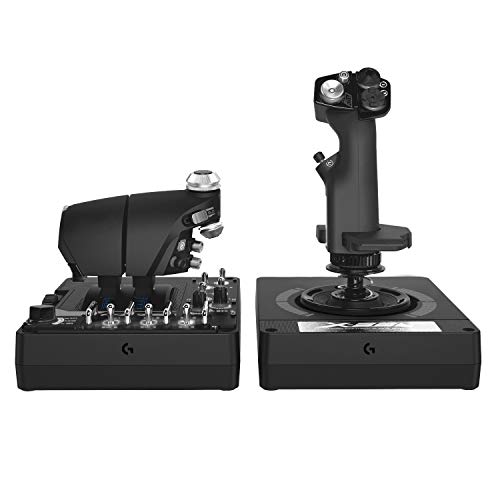
For serious flight simulation enthusiasts seeking precision and control, the Logitech G X56 H.O.T.A.S Flight Simulator Game Controller stands out with its military-grade accuracy. Weighing 6.92 pounds, it features over 189 customizable controls, allowing you to tailor your experience. The dual throttles come with a friction adjuster for fine-tuning, while the new mini analog stick enhances pitch, roll, and yaw control. With 16-bit non-contact sensors, you’ll enjoy exceptional responsiveness. Plus, its RGB backlighting integrates seamlessly into your gaming rig. Compatible with PC and various VR setups, this controller elevates your flight experience to new heights.
Best For: Serious flight simulation enthusiasts who demand precision and control in their gaming experience.
Pros:
- Military-grade accuracy ensures exceptional responsiveness and precision in flight simulations.
- Over 189 customizable controls allow for a highly personalized gaming experience.
- RGB backlighting enhances the aesthetic integration with your gaming setup.
Cons:
- Weighty design may be less portable for users who prefer a lighter controller.
- Limited compatibility primarily focused on PC and certain VR setups.
- Higher price point compared to standard flight controllers may deter budget-conscious gamers.
Thrustmaster TFRP Flight Rudder Pedals for Flight Simulator

Designed specifically for serious flight simulation enthusiasts, the Thrustmaster TFRP Flight Rudder Pedals deliver exceptional precision and control. Weighing just under 5 pounds, they feature an ergonomic design with removable heel rests, ensuring comfort during long sessions. The S.M.A.R.T. Rail System provides friction-free motion, while the self-centering rudder axis allows for smooth maneuvering. With a long travel range and differential brake pedals, you gain precise handling for coordinated flight. Plugging in is easy with USB and RJ12 connectivity, and you can customize settings through T.A.R.G.E.T software. With a solid 4.4-star rating, these pedals are a must-have for any flight enthusiast.
Best For: Serious flight simulation enthusiasts seeking precision and comfort in their controls.
Pros:
- Ergonomic design with removable heel rests for customizable comfort.
- S.M.A.R.T. Rail System for friction-free motion and enhanced stability.
- Long travel range and differential brake pedals for accurate handling and coordinated flight.
Cons:
- Limited external testing certification may raise concerns for some users.
- Not suitable for casual gamers who may not require advanced features.
- May require adjustment period for users new to flight simulation controls.
Logitech G Pro Flight Rudder Pedals

Experience unparalleled realism in flight simulation with the Logitech G Pro Flight Rudder Pedals. These self-centering pedals enhance your control, featuring an adjustable tension dial that lets you customize the response for light aircraft or heavy jets. With differential toe brakes, you’ll have full command during landings, just like a real pilot. They connect easily via USB 2.0 and are compatible with Windows 7 through 10. The ergonomic design and adjustable footrests guarantee comfort, while non-slip materials provide stability. Rated 4.6 out of 5 stars by over 2,800 users, these pedals are a must-have for any serious flight enthusiast.
Best For: Flight simulation enthusiasts seeking realistic control and enhanced performance with customizable features.
Pros:
- High realism with self-centering pedals and differential toe brakes that mimic real pilot operations.
- Customizable response through an adjustable tension dial suitable for various aircraft types.
- Ergonomic design and adjustable footrests provide comfort during extended use.
Cons:
- Limited compatibility with non-Windows operating systems may restrict use for some users.
- Weight of 2.3 kg (5.07 lbs) may not be ideal for portability.
- Return policy is only valid for 30 days, which may be limiting for some customers.
Logitech G Saitek X52 Pro Flight Control System

The Logitech G Saitek X52 Pro Flight Control System stands out with its advanced LCD multi-function display, making it an ideal choice for serious flight simulation enthusiasts. Weighing 5.1 pounds, it combines a joystick and throttle in a sleek black and silver design. You’ll love the illuminated buttons and 16 precise combat action buttons that enhance your control. With a progressive throttle and customizable settings through smart technology software, you can tailor your experience. The soft-touch grip guarantees comfort during long sessions, while the five position handle adjustment accommodates all hand sizes, making it perfect for every pilot.
Best For: Serious flight simulation enthusiasts looking for an advanced and customizable flight control system.
Pros:
- Advanced LCD multi-function display for enhanced information access.
- Customizable settings through smart technology software for tailored gameplay.
- Comfortable soft-touch grip and adjustable handle for various hand sizes.
Cons:
- Limited to PC compatibility, excluding console users.
- Requires two USB 2.0 ports, which may be a drawback for users with limited ports.
- 90-day warranty may be shorter than some users expect for high-end equipment.
Thrustmaster T-Flight Hotas X Flight Throttle and Joystick

For those seeking an immersive flight simulation experience, the Thrustmaster T-Flight Hotas X Flight Throttle and Joystick stands out with its ergonomic design and customizable controls. Weighing just 2.2 kg, it features a comfortable HOTAS layout that reduces fatigue during long sessions. You can detach the throttle for a flexible setup or connect it for compact use. With 12 programmable buttons and 5 axes, you can easily tailor your controls to suit your preferences. The precision joystick and dual rudder control guarantee smooth maneuvers, while the weighted base provides stability. Plug and play functionality means you’ll be flying in no time!
Best For: Flight simulation enthusiasts looking for a comfortable and customizable joystick and throttle setup.
Pros:
- Ergonomic HOTAS design reduces fatigue during extended use.
- 12 programmable buttons and 5 axes allow for extensive customization to suit individual flight preferences.
- Plug and play functionality ensures easy setup and immediate use.
Cons:
- Limited compatibility as it is only designed for PC.
- Some users may find the joystick resistance adjustment not sufficient for their preferences.
- The weight of 2.2 kg may be cumbersome for those looking for a more portable option.
Thrustmaster T-Flight Hotas One Flight Stick Controller for PC & Xbox Series X|S

Designed specifically for both PC and Xbox Series X|S, the Thrustmaster T-Flight Hotas One Flight Stick Controller is perfect for anyone looking to enhance their flight simulation experience. Its ergonomic design features a precision joystick with adjustable resistance and a detachable throttle, giving you smooth, responsive control. With 14 programmable buttons and an integrated dual rudder control, you’ll find it easy to maneuver various aircraft, from commercial jets to military fighters. Plus, the plug-and-play USB connection means you can jump into your favorite flight sims like Microsoft Flight Simulator right away. Get ready for an immersive flying adventure!
Best For: Casual pilots and serious flight simulation enthusiasts looking for an immersive experience on PC and Xbox Series X|S.
Pros:
- Ergonomic design with adjustable resistance for personalized comfort and control.
- Detachable throttle allows for flexible setup options, enhancing user experience.
- Plug-and-play USB connection ensures instant compatibility with popular flight simulator titles.
Cons:
- Limited compatibility with non-flight simulation games.
- Some users may find the joystick size too small for larger hands.
- Additional accessories, like rudder pedals, are sold separately, which may increase overall cost.
Thrustmaster TCA Yoke PACK Boeing Edition for Xbox Series X|S & PC

If you’re a flight simulation enthusiast seeking an authentic Boeing flying experience, the Thrustmaster TCA Yoke PACK Boeing Edition is an excellent choice. This yoke and throttle quadrant bundle features a 1:1 scale replica inspired by the Boeing 787, enhancing your cockpit setup. The PENDUL_R mechanism provides smooth, precise control with an 8.3-inch range, and adjustable spring tension guarantees fluid operation. With a durable metal structure, it includes 35 action buttons and two additional axes, perfect for complex maneuvers. Compatible with Xbox Series X|S and PC, it connects via USB, making it a versatile tool for any flight sim enthusiast.
Best For: Flight simulation enthusiasts looking for an authentic and immersive Boeing flying experience.
Pros:
- Realistic Design: 1:1 scale replica of the Boeing 787 enhances cockpit authenticity.
- Smooth Control: PENDUL_R mechanism with adjustable spring tension ensures precise handling.
- Durable Build: 100% metal internal structure provides long-lasting performance and a premium feel.
Cons:
- Weight: Weighs 5.4 pounds, which may be cumbersome for some users.
- Price Point: As a specialized flight simulation tool, it may be more expensive than standard yokes.
- Rudder Pedals Sold Separately: Requires additional purchase of compatible pedals for full functionality.
Thrustmaster HOTAS Warthog Flight Stick and Throttle Controller

Serious flight simulation enthusiasts and professionals will find the Thrustmaster HOTAS Warthog Flight Stick and Throttle Controller to be an exceptional choice, thanks to its authentic metal dual throttle system that replicates the controls of the U.S. Air Force A-10C. Built almost entirely from metal, it offers durability and realism. The detachable flight stick features Hall Effect AccuRate Technology for ultra-precise accuracy. With 55 programmable buttons and independent engine control, you can customize your setup for any mission. Designed for PC, it integrates smoothly with leading flight simulation software, transforming your desk into an immersive cockpit experience.
Best For: Serious flight simulation enthusiasts and professionals seeking an authentic and immersive flying experience.
Pros:
- Built almost entirely from metal for enhanced durability and realism.
- Features 55 fully programmable action buttons for deep customization.
- Equipped with Hall Effect AccuRate Technology for ultra-precise control and accuracy.
Cons:
- Heavier than some competing flight sticks, weighing 13.2 pounds.
- Limited to PC compatibility, which may not suit all users.
- Higher price point compared to entry-level flight controllers.
Factors to Consider When Choosing Flight Simulator Controls
When choosing flight simulator controls, you should think about several key factors. Compatibility with your simulator, control design and ergonomics, and programmable features can greatly impact your experience. Additionally, consider build quality, durability, price, and overall value to guarantee you make a smart investment.
Compatibility With Flight Simulators
Choosing the right flight simulator controls is essential to guarantee a seamless and enjoyable flying experience. First, make certain the control system is compatible with your specific flight simulator software, like Microsoft Flight Simulator 2020 or 2024, to maximize functionality. Check the operating system compatibility, as many controllers work best with Windows platforms ranging from Windows 7 to Windows 11. If you plan on using other devices, look for controllers that support consoles like Xbox for added versatility. Also, consider the number and type of programmable controls, as this can enhance your customization options. Finally, verify the connectivity options, such as USB ports, to ensure a smooth integration with your gaming setup.
Control Design and Ergonomics
To enhance your flight simulation experience, you need to contemplate the design and ergonomics of the controls you’ll be using. An ergonomic design is essential for long sessions, reducing fatigue and boosting comfort. Look for controls with adjustable tension and resistance, allowing you to tailor them to your flying style. Features like detachable throttles and customizable layouts give you the flexibility to create a personal cockpit that fits your space. Full-size replicas of real aircraft controls enhance realism, helping you build muscle memory for actual flying. Additionally, consider rudder pedals with non-slip materials and adjustable footrests, ensuring stability and comfort for different foot sizes, which ultimately improves your control during simulations.
Programmable Features and Customization
While exploring flight simulator controls, you’ll find that programmable features and customization options greatly enhance your experience. Many control systems offer over 75 programmable buttons and knobs, allowing you to tailor commands to your flight preferences. You can re-map buttons, adjust control sensitivity, and save multiple profiles for different aircraft or flying styles. This flexibility guarantees your setup meets your unique needs, whether you’re simulating combat or commercial flying. Advanced features, like LCD displays, provide real-time feedback, making configuration management more intuitive. The ability to program controls for various scenarios increases the versatility of your flight simulation, assuring you can fully immerse yourself in any flying experience you choose.
Build Quality and Durability
When selecting flight simulator controls, build quality and durability play a considerable role in your overall experience. Opt for controls made from materials like metal, as they provide far greater durability compared to plastic alternatives. A robust design guarantees long-lasting performance, especially during extended sessions, which reduces mechanical wear and tear. Look for ergonomic features that enhance comfort, allowing you to fly for longer without discomfort. Additionally, controls with a heavy base or secure clamping systems offer stability, preventing unwanted movement during dynamic actions. Finally, consider controls that incorporate premium internal components, such as Hall Effect sensors, as these can greatly enhance accuracy and responsiveness over time, making your flight experience even more immersive.
Price and Value Assessment
Choosing flight simulator controls involves more than just picking a price range; you need to assess the value they offer. Flight simulator controls can range from $50 for entry-level options to over $500 for high-end systems, so it’s essential to establish your budget first. Look for factors like build quality, functionality, and compatibility with different flight simulation software, as these greatly impact your long-term satisfaction. A higher price often means advanced features like programmable buttons and ergonomic designs that enhance your experience. Don’t forget to check customer reviews to see if the price matches the quality. Finally, consider warranty periods and return policies, which can provide added value and peace of mind for your investment.