If you’re serious about flight simulation, having the right instrument panel can transform your experience. With options like the Logitech G Pro Flight Multi Panel and the Thrustmaster Viper Panel, you can achieve a level of realism that enhances your immersion. Each panel offers unique features and ergonomic designs, but choosing the best one for your setup can be challenging. Let’s explore what makes these panels stand out and how they can elevate your simulation sessions.
Logitech G USB G Pro Flight Multi Panel

The Logitech G USB G Pro Flight Multi Panel is perfect for serious flight simulation enthusiasts who want to enhance their experience with realistic controls. This full autopilot LED display connects via USB and works seamlessly with popular software like Microsoft Flight Simulator and X-Plane. Measuring 11.1 x 2.24 x 3.31 inches and weighing just 14.78 ounces, it’s compact yet functional. You’ll appreciate the integrated dial for quick altitude adjustments and fingertip control over throttle, flaps, and elevator trim. Mount it on a Pro Flight Yoke System or your custom cockpit setup for the ultimate flying experience.
Best For: Serious flight simulation enthusiasts seeking to enhance their flying experience with realistic controls and easy access to autopilot functions.
Pros:
- Seamless compatibility with popular flight simulation software, including Microsoft Flight Simulator and X-Plane.
- Compact design that allows for easy mounting on existing flight setups.
- User-friendly controls for altitude, throttle, flaps, and elevator trim, providing a more immersive experience.
Cons:
- Limited warranty period of just 90 days may not provide enough coverage for heavy users.
- Requires additional hardware (Pro Flight Yoke System) for optimal use, which is sold separately.
- May not be compatible with all flight simulation software, limiting its versatility.
Logitech G USB G Pro Flight Radio Panel

For avid flight simulation enthusiasts looking to enhance their experience, the Logitech G USB G Pro Flight Radio Panel stands out with its twin concentric adjustment dials for seamless frequency selection. This sleek black panel features real-time LED displays for COM1/2, NAV1/2, DME, ADF, and XPDR functions, making it easy to stay on top of your flight communications. With a standby switch for quick frequency activation, you’ll never miss a beat. Compatible with various flight simulators, including Microsoft Flight Simulator and X-Plane, this reliable panel weighs just 14.78 ounces, ensuring it won’t weigh down your setup.
Best For: Avid flight simulation enthusiasts seeking to enhance their experience with precise frequency management and easy-to-read displays.
Pros:
- Real-time LED displays for various flight functions allow for quick reference during simulations.
- Twin concentric adjustment dials facilitate seamless frequency selection, improving user experience.
- Compatible with popular flight simulators such as Microsoft Flight Simulator and X-Plane, ensuring broad usability.
Cons:
- Limited warranty period of only 90 days may not satisfy all users.
- May require additional setup with certain flight simulators, which could be a hurdle for beginners.
- Connectivity technology may limit compatibility with non-Windows operating systems.
Logitech G PRO Flight Yoke System for PC

Ideal for both budding aviation enthusiasts and seasoned pilots, the Logitech G PRO Flight Yoke System offers a realistic control experience that helps build muscle memory essential for flight simulation. With 75 programmable controls, including a POV hat and 14 buttons, you can customize your setup to suit any flight situation. The stainless steel shaft guarantees smooth maneuverability, making your virtual flights feel authentic. Plus, its two-position desk clamp assures stability on various surfaces. Compatible with Windows 11 through 7, the yoke is perfect for popular simulators like Microsoft Flight Simulator and X-Plane. Enjoy a two-year warranty for peace of mind.
Best For: The Logitech G PRO Flight Yoke System is best for both budding aviation enthusiasts and seasoned pilots looking for a realistic flight simulation experience.
Pros:
- 75 programmable controls allow for extensive customization to suit various flight scenarios.
- Robust design with a stainless steel shaft ensures smooth and accurate control.
- Compatible with popular flight simulators, making it versatile for different users.
Cons:
- Requires optional software download for full compatibility with some flight simulators.
- The weight may be cumbersome for some users during transport or setup.
- Limited to corded electric power, which may restrict placement options.
Thrustmaster Viper Panel Control Panel (Compatible with PC)

Designed specifically for flight simulation enthusiasts, the Thrustmaster Viper Panel Control Panel enhances your experience with its realistic features and ergonomic design. This backlit control panel, licensed by the U.S. Air Force, boasts 43 metal action buttons, including essential functions like landing gear and weapon launch. With adjustable backlit lights and a premium feel, it immerses you in intense flight scenarios. Simply plug it into your PC via USB, and you’re ready to go—no setup required. Expand your experience further by pairing it with the Viper TQS. Get ready to elevate your flight simulations!
Best For: Flight simulation enthusiasts seeking an immersive and realistic control experience.
Pros:
- Premium metal buttons provide a realistic feel and durability.
- Plug and play functionality allows for easy setup with no additional configuration.
- Adjustable backlit indicator lights enhance visibility and immersion during flights.
Cons:
- Only compatible with PC, limiting use for console gamers.
- Requires additional purchase of Viper TQS for a complete experience.
- Some users may find the weight (1.56 kg) cumbersome for portability.
Logitech G Pro Flight Rudder Pedals

The Logitech G Pro Flight Rudder Pedals elevate your flight simulation experience with their self-centering mechanism and adjustable tension dial, making them perfect for both novice and seasoned pilots. You’ll appreciate the realistic foot control, allowing you to manage the rudder and toe brakes like a pro. With adjustable footrests and non-slip materials, these pedals provide comfort and stability during extended sessions. Weighing just 2.3 kg and compatible with various Windows platforms, they’re easy to set up via USB. With a stellar rating of 4.6 out of 5 stars, you can trust you’re investing in quality and performance.
Best For: Flight simulation enthusiasts seeking realistic control and comfort during their gaming experience.
Pros:
- Realistic Foot Control: Provides authentic rudder and toe brake operations, enhancing the flight simulation experience.
- Adjustable Features: Customizable tension dial and footrests accommodate different preferences and foot sizes.
- High Compatibility: Easily connects via USB and supports multiple Windows operating systems.
Cons:
- Weight: At 2.3 kg, they may be less portable compared to lighter alternatives.
- Limited Return Period: Returns are only accepted within 30 days, which may be restrictive for some buyers.
- Price Competitiveness: While rated highly, some customers may find lower prices elsewhere.
AltMot Flight Simulator Instrument Panel Six Pack

For flight simulation enthusiasts seeking a realistic experience, the AltMot Flight Simulator Instrument Panel Six Pack stands out with its full-sized steam gauges and easy plug-and-play setup. This panel integrates software and a monitor, ensuring seamless compatibility with popular simulators like X-Plane 11, FS2020, and FS2024. You’ll appreciate the six essential gauges, including an airspeed indicator and altimeter, complete with operational knobs for precise adjustments. Installation is a breeze—just connect via HDMI and USB. With a 4.6-star rating from 24 reviews, it’s a solid choice for anyone wanting to enhance their flight simulation experience.
Best For: Flight simulation enthusiasts seeking a realistic experience with essential gauges and easy setup.
Pros:
- Full-sized steam gauges provide an authentic flying experience.
- Plug-and-play setup makes installation simple and quick.
- Compatible with popular flight simulators like X-Plane and Microsoft FS.
Cons:
- Requires HDMI output and USB connection, limiting compatibility with certain setups.
- May not include advanced features found in more expensive simulator panels.
- Limited to specific flight simulators, which could restrict versatility for some users.
Logitech G X56 H.O.T.A.S Flight Simulator Game Controller
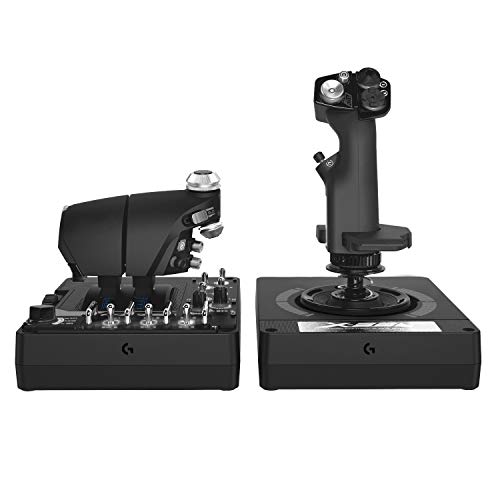
If you’re a flight simulation enthusiast seeking unparalleled precision, the Logitech G X56 H.O.T.A.S Flight Simulator Game Controller is an excellent choice. Weighing in at 6.92 pounds, this joystick and throttle combo offers military-grade accuracy with over 189 customizable controls. Its new mini analog stick enhances your pitch, roll, and yaw control, while 16-bit non-contact sensors guarantee precision. The twin throttles feature a friction adjuster and lock for added convenience. With customizable RGB lighting, it seamlessly fits into your gaming setup. Compatible with various devices, including VR, this controller elevates your flight simulation experience to new heights.
Best For: Flight simulation enthusiasts who demand high precision and customizable controls for an immersive experience.
Pros:
- Over 189 customizable controls allow for personalized gameplay.
- Military-grade accuracy with 16-bit non-contact sensors enhances flight simulation.
- Ergonomic design and VR compatibility make it ideal for extended use and virtual reality gaming.
Cons:
- Heavier design at 6.92 pounds may be cumbersome for some users.
- Requires two USB 2.0 ports, which may limit connectivity options on some systems.
- Higher price point compared to standard flight controllers may not suit all budgets.
Meza Flight Simulator Cockpit Kit – Compatible with Logitech, Saitek & Honeycomb

Looking to elevate your flight simulation experience? The Meza Flight Simulator Cockpit Kit might be just what you need. This sturdy aluminum alloy cockpit is compatible with Logitech, Saitek, and Honeycomb flight yokes, ensuring a seamless fit. With its pre-cut flight sim mounting set, you can quickly set up your instruments like radios and speed indicators. The adjustable light bar enhances visibility, while rubber-tipped clamps securely attach to desks of varying thickness. Enjoy the satisfaction guarantee from a reliable brand, and rest easy knowing you can reach out if anything doesn’t meet your expectations. Get ready for an immersive flight experience!
Best For: Flight simulation enthusiasts looking for a sturdy and compatible cockpit setup for Logitech, Saitek, or Honeycomb equipment.
Pros:
- Sturdy aluminum alloy construction provides durability and resistance to bending and flexing.
- Quick and easy installation with pre-cut mounting set allows for immediate configuration of instruments.
- Adjustable light bar enhances visibility of flight sim instruments during use.
Cons:
- Compatibility limited to specific brands (Logitech, Saitek, Honeycomb), which may not suit all users.
- Size may be cumbersome for smaller desks or setups, measuring 30”x20”.
- Rubber-tipped clamps may not securely fit all desk thicknesses, potentially limiting mounting options.
Thrustmaster T-Flight Hotas X Flight Throttle and Joystick

The Thrustmaster T-Flight Hotas X Flight Throttle and Joystick stands out as the ideal choice for both novice and seasoned flight simulation enthusiasts who crave an immersive experience. With its ergonomic design and detachable throttle, you can customize your setup for comfort or space. Enjoy precision control with adjustable joystick resistance and dual rudder options for smooth maneuvers. You’ll appreciate the 12 programmable buttons and built-in memory that save your custom settings. Plus, the weighted base guarantees stability during intense sessions. Plug and play features mean you’re ready to fly without a complicated setup, enhancing your overall experience!
Best For: The Thrustmaster T-Flight Hotas X is best for both novice and experienced flight simulation enthusiasts seeking an immersive and customizable flying experience.
Pros:
- Ergonomic design reduces fatigue during long gaming sessions, enhancing comfort.
- 12 programmable buttons and built-in memory allow for personalized control setups.
- Plug and play functionality enables quick setup, readying users for immediate flight experience.
Cons:
- Limited compatibility as it is only designed for PC use.
- Weight of 2.2 kg may not be ideal for those seeking a lightweight joystick.
- Some users may find the learning curve steep when customizing controls for the first time.
MiYee WINGFLEX A320 EFIS Flight Simulator Electronic Flight Instrument System

For aspiring pilots and flight simulation enthusiasts, the MiYee WINGFLEX A320 EFIS Flight Simulator offers an unparalleled experience with its realistic design and functionality. This Electronic Flight Instrument System features a dual-color LCD warning panel, ensuring you stay informed during your flights. Its plug-and-play USB connectivity makes setup a breeze. The user-friendly design, complete with an inclined stand, optimizes your viewing experience. You’ll appreciate the thorough brightness synchronization and precise font matching to real aircraft. Weighing just 2.2 pounds, it’s compact yet packed with features, making it ideal for both training and immersive simulations.
Best For: Aspiring pilots and flight simulation enthusiasts seeking a realistic and immersive flying experience.
Pros:
- User-friendly design with an inclined stand for optimal viewing.
- Plug-and-play USB connectivity allows for easy setup.
- Comprehensive brightness synchronization and accurate font matching to real aircraft.
Cons:
- Limited compatibility as it is only compatible with Windows devices.
- Weighs 2.2 pounds, which may be heavier compared to some other flight instruments.
- Customer reviews indicate a moderate rating of 4.3 out of 5 stars, suggesting some room for improvement.
Factors to Consider When Choosing a Flight Simulator Instrument Panel
When choosing a flight simulator instrument panel, you need to take into account several key factors. Compatibility with your flight simulator guarantees seamless integration, while control precision and responsiveness can greatly enhance your experience. Don’t forget to think about ease of installation, design ergonomics, and the level of programmability and customization you desire.
Compatibility With Flight Simulators
Choosing an instrument panel that fits your flight simulator setup can greatly enhance your flying experience, so you’ll want to guarantee compatibility with popular software like Microsoft Flight Simulator, X-Plane, and Prepar3D. First, check if the panel supports the specific version of the software you plan to use, as compatibility can vary. Don’t forget to look for any additional software or drivers needed for seamless integration. Opt for panels with plug-and-play functionality for easy setup and immediate use without complex configurations. Finally, consider whether the panel can mount on your current flight controls or cockpit setup, ensuring it aligns with your existing equipment arrangement for the best immersive experience.
Control Precision and Responsiveness
Control precision and responsiveness play an important role in enhancing your flight simulation experience. They allow you to replicate real aircraft handling, improving your piloting skills effectively. When you choose a flight simulator instrument panel, look for high-quality sensors and customizable settings that boost accuracy in your control inputs. This leads to better performance during your sessions. Adjustable tension in control systems is essential, as it lets you fine-tune your setup according to the aircraft type you’re simulating, whether it’s a light plane or a heavy jet. Additionally, ergonomic controls are significant; they reduce fatigue during extended use, ensuring that you maintain consistent responsiveness and precision throughout your flight simulations.
Ease of Installation
Finding the right flight simulator instrument panel goes beyond just control precision; ease of installation is also key to a smooth setup experience. Look for panels that offer plug-and-play operation, allowing you to get started without extensive configuration. Verify compatibility with your existing flight simulator software to avoid frustrating installation issues. Consider models that come with pre-cut mounting options, simplifying integration with various yokes and throttle systems. Additionally, check if the panel requires extra software downloads or drivers, as this can complicate the installation process. Finally, opt for products that include a detailed user manual or access to online support resources, making it easier to tackle any challenges you might encounter during setup.
Design and Ergonomics
How can the design and ergonomics of a flight simulator instrument panel enhance your flying experience? A well-designed panel prioritizes your comfort, featuring ergonomic layouts that minimize fatigue during long sessions. Look for adjustable knobs and buttons that let you customize your controls for ideal access. The size and spacing of these controls are essential; they should be easily reachable without blocking your view of important instruments. Backlighting is another key feature, offering visibility in low-light conditions while adding to the panel’s aesthetic appeal. Finally, confirm the panel is made from durable materials with robust construction to withstand frequent use, assuring long-term reliability and performance. These factors will greatly improve your overall flying experience.
Programmability and Customization Options
When selecting a flight simulator instrument panel, consider the importance of programmability and customization options to enhance your flying experience. Look for panels that offer a wide range of programmable controls; more options give you greater flexibility and realism during your flights. Some panels come with built-in memory, allowing you to save your custom programming even when disconnected, which adds convenience. Advanced panels often feature multiple rotary selectors and customizable button mappings, giving you quick access to critical functions. Don’t overlook the number of multi-use buttons available; having more buttons can greatly improve your operational efficiency in complex simulations. Evaluate these features to guarantee your instrument panel meets your unique flying needs.
Connectivity and Power Source
Programmability and customization are just the beginning when it comes to selecting the right flight simulator instrument panel; connectivity and power source play a significant role too. Start by checking connectivity options, as most panels use USB for easy plug-and-play integration with your computer. Make sure the power source aligns with your setup; some panels need corded electric connections, while others can run solely on USB power. It’s essential to select panels that support multiple operating systems, ensuring compatibility with various flight simulation software. Additionally, consider the physical dimensions and weight, as these factors affect installation and usability in your cockpit. Look for extra features like additional USB ports or HDMI outputs to enhance connectivity with other peripherals.
Warranty and Support Availability
While selecting a flight simulator instrument panel, warranty and support availability can greatly impact your purchase decision. Warranty periods vary considerably, with some panels offering as little as 90 days and others extending up to 2 years. It’s essential to confirm if the manufacturer provides reliable customer support for product issues, as this can enhance your overall experience. Additionally, check for a return policy, typically allowing returns within 30 days for damaged or dead-on-arrival items. Some manufacturers might offer extended warranties upon request, so don’t hesitate to ask if it’s not clearly stated. Finally, customer reviews can give you insight into the effectiveness of warranty and support services, often indicating better assistance when ratings are high.