If you’re looking to enhance your flight simulation experience in 2026, you might want to contemplate the best HOTAS flight sticks available. These controllers not only offer precision and comfort but also cater to various skill levels. From customizable controls to robust build quality, there’s a lot to explore. Let’s take a closer look at the top models that could transform your virtual flying adventures.
Thrustmaster T-Flight Hotas One Flight Stick Controller for PC & Xbox Series X|S

If you’re looking for a flight stick that caters to both casual gamers and serious flight simulation enthusiasts, the Thrustmaster T-Flight Hotas One is an excellent choice. This controller features a precision joystick with a detachable throttle, enhancing your immersive experience. Its ergonomic design includes adjustable resistance, a responsive trigger, and 14 programmable buttons, ensuring smooth control over various aircraft. You can easily set it up on your desk or lap thanks to its modular throttle. Plus, the plug-and-play USB connection guarantees instant compatibility with Windows PCs and Xbox Series X|S, making it perfect for popular flight simulator titles.
Best For: The Thrustmaster T-Flight Hotas One is best for both casual pilots and serious flight simulation enthusiasts looking for an immersive flying experience.
Pros:
- Ergonomic design with adjustable resistance and responsive controls for comfortable gameplay.
- Detachable throttle allows for versatile setup options, enhancing user convenience.
- Plug-and-play compatibility with Windows PCs and Xbox Series X|S ensures easy connectivity with popular flight simulators.
Cons:
- Limited compatibility with certain gaming titles outside of flight simulation genres.
- Rudder pedals are sold separately, which may require additional investment for a complete setup.
- Build quality may not match higher-end models, potentially affecting durability for intensive use.
Thrustmaster T-Flight Hotas X Flight Throttle and Joystick

The Thrustmaster T-Flight Hotas X Flight Throttle and Joystick stands out as an excellent choice for both novice and experienced flight simulation enthusiasts. Weighing 2.2 kg, its ergonomic design guarantees comfort during long sessions, while the detachable throttle lets you customize your cockpit layout. With 12 programmable buttons and 5 axes, you can tailor controls to your liking, and the built-in memory retains your settings even when disconnected. Enjoy high precision with adjustable stick resistance and dual rudder control, all in a plug-and-play package. Rated 4.4 out of 5 stars, it’s a reliable option for immersive flying experiences.
Best For: The Thrustmaster T-Flight Hotas X is best for both novice and experienced flight simulation enthusiasts seeking an immersive flying experience.
Pros:
- Ergonomic design ensures comfort during extended gaming sessions.
- Customizable controls with 12 programmable buttons and 5 axes for personalized setups.
- Plug-and-play functionality allows for immediate use without complicated setup.
Cons:
- Limited compatibility as it is designed specifically for PC.
- May take some time for users to adjust to the dual rudder control options.
- The weight may not be ideal for those seeking a more portable setup.
Logitech G X56 H.O.T.A.S Flight Simulator Game Controller
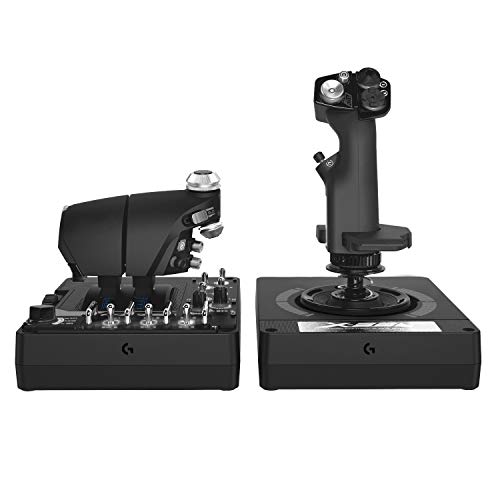
For avid flight simulation enthusiasts seeking precision and versatility, the Logitech G X56 H.O.T.A.S Flight Simulator Game Controller stands out as a top choice. Weighing 6.92 pounds and measuring 7.28 x 8.86 x 3.54 inches, it offers military-grade accuracy with over 189 customizable controls. You’ll appreciate the new mini analog stick for pitch, roll, and yaw, as well as twin throttles with adjustable friction. With 16-bit non-contact sensors, you get enhanced precision, while customizable RGB lighting adds flair to your gaming setup. Plus, its ergonomic design guarantees comfortable navigation, perfect for immersive virtual reality experiences.
Best For: Avid flight simulation enthusiasts seeking precision and versatility in their gaming experience.
Pros:
- Military-grade accuracy ensures high performance in space and flight simulations.
- Over 189 customizable controls allow for extensive personalization to suit individual preferences.
- Ergonomic design enhances comfort, making it ideal for long gaming sessions, especially in virtual reality.
Cons:
- Weight of 6.92 pounds may be cumbersome for some users to handle.
- Requires two USB 2.0 ports, which may limit compatibility with certain setups.
- Price point may be higher than basic flight controllers, making it less accessible for casual gamers.
Thrustmaster HOTAS Warthog Flight Stick for Flight Sim Controller Setup
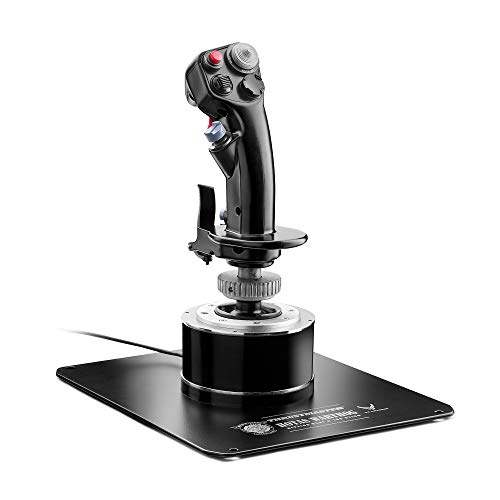
Designed for serious flight simulation enthusiasts, the Thrustmaster HOTAS Warthog Flight Stick replicates the feel of the U.S. Air Force A-10C attack aircraft, providing an authentic experience. Its all-metal detachable handle weighs over 6 lbs, ensuring stability during intense maneuvers. With H.E.A.R.T. hall effect sensors, you get 16-bit resolution per axis, offering surgical accuracy. The stick features 19 action buttons, three 8-way hats, and a dual trigger, allowing you to easily map critical functions without relying on the keyboard. Plus, Thrustmaster’s T.A.R.G.E.T. software offers customizable configurations, making it a top choice for your flight sim setup.
Best For: Serious flight simulation enthusiasts looking for an authentic experience with high precision and customizable controls.
Pros:
- All-metal construction provides stability and durability during intense maneuvers.
- H.E.A.R.T. hall effect sensors ensure zero drift and long-lasting accuracy, enhancing the realism of flight simulations.
- Customizable with T.A.R.G.E.T. software, allowing for personalized control configurations to suit individual preferences.
Cons:
- Heavy weight may be cumbersome for some users, especially during prolonged use.
- Price point may be higher compared to other flight sticks, which could deter casual users.
- Limited compatibility with non-PC systems, restricting use for gamers on different platforms.
Logitech G Saitek X52 Pro Flight Control System

With its LCD multi-function display and customizable controls, the Logitech G Saitek X52 Pro Flight Control System stands out as an excellent choice for flight simulation enthusiasts. Weighing in at 5.1 pounds, its soft-touch, contoured grip guarantees comfort during long sessions. The 16 illuminated combat sim buttons and progressive throttle with adjustable resistance enhance your experience. Plus, the precision centering mechanism and no-contact technology provide smooth control. Compatible with Windows 7, 8.1, and 10, it requires just two USB 2.0 ports. Overall, this system’s versatility and user-friendly design make it a top contender for your cockpit setup.
Best For: The Logitech G Saitek X52 Pro Flight Control System is best for flight simulation enthusiasts seeking a high-quality, customizable controller experience.
Pros:
- High level of customization with programmable settings via smart technology software.
- Comfortable design with soft-touch, contoured grip and adjustable handle for various hand sizes.
- Equipped with an LCD multi-function display and illuminated buttons for easy visibility during gameplay.
Cons:
- Limited to PC compatibility, requiring Windows 7, 8.1, or 10.
- Heavier compared to some other flight controllers, which may affect portability.
- The warranty is only 90 days, which may be shorter than some users prefer.
Turtle Beach VelocityOne Flightstick Universal Simulation Controller

The Turtle Beach VelocityOne Flightstick Universal Simulation Controller stands out for its high-precision sensors, making it an excellent choice for serious flight simulation enthusiasts. Weighing in at 1.8 pounds, it features customizable throttle and flap levers, 27 programmable buttons, and an OLED Flight Management Display for quick adjustments. The ambidextrous design guarantees comfort for everyone, and with RGB lighting, you can personalize your setup. Plus, it connects easily via USB-C and supports Xbox and PC platforms. The Bluetooth companion app allows you to fine-tune performance settings, enhancing your simulation experience. This is a must-have for dedicated pilots!
Best For: The Turtle Beach VelocityOne Flightstick is best for serious flight simulation enthusiasts seeking precision and customizable controls for an immersive experience.
Pros:
- High-precision sensors provide excellent response and durability.
- Customizable throttle and flap levers enhance control and functionality.
- Ambidextrous design and RGB lighting allow for personalized comfort and aesthetics.
Cons:
- The weight may be cumbersome for some users during extended sessions.
- Limited to specific simulation games for optimal performance.
- The initial setup may require some adjustment for new users.
Thrustmaster Sol-R1 Flight Joystick for PC

For space flight simulation enthusiasts and combat gamers seeking an immersive experience, the Thrustmaster Sol-R1 Flight Joystick stands out with its Hall Effect Technology and 44 programmable actions. You’ll appreciate the 21 action buttons, including dual triggers and a ministick, providing quick access to essential controls. With H.E.A.R.T. AccuRate Technology, you’ll enjoy 16-bit accuracy across all axes, ensuring smooth, precise movements. The ergonomic design accommodates both left and right-handed users, promoting comfort during long sessions. Plus, its striking sci-fi aesthetic enhances your gaming atmosphere, while compatibility with the Thrustmaster ecosystem allows for easy expansion of your flight setup.
Best For: The Thrustmaster Sol-R1 Flight Joystick is best for space flight simulation enthusiasts and combat gamers looking for an immersive and precise gaming experience.
Pros:
- Offers 44 programmable actions for customizable gameplay.
- Features H.E.A.R.T. HallEffect AccuRate Technology for 16-bit accuracy.
- Ergonomic design with interchangeable wrist and thumb rests for comfort.
Cons:
- Heavier at 1270 grams, which may require more desk space.
- Limited to PC compatibility, excluding other gaming platforms.
- Some users may find the learning curve steep for advanced features.
Thrustmaster T16000M FCS Flight Stick

Engineered for precision enthusiasts, the Thrustmaster T16000M FCS Flight Stick stands out with its patented H.E.A.R.T magnetic sensor technology, delivering unmatched accuracy that remains consistent over time. Weighing 2.6 pounds and featuring a fully ambidextrous design, it’s comfortable for long sessions. You’ll appreciate the four independent axes and 16 action buttons, ensuring extensive control and situational awareness. With Thrustmaster’s T.A.R.G.E.T software, you can easily customize button mappings for various flight simulations. Its versatility makes it perfect for combat, space exploration, or civilian aviation, earning a solid 4.4-star rating from users. Get ready for an immersive flying experience!
Best For: Flight simulation enthusiasts seeking a highly precise and customizable joystick for various types of flying experiences.
Pros:
- Unmatched Accuracy: Patented H.E.A.R.T magnetic sensor technology provides drift-free precision that doesn’t degrade over time.
- Extensive Control Options: Four independent axes and 16 action buttons allow for comprehensive maneuverability and situational awareness.
- Customizable Profiles: Thrustmaster’s T.A.R.G.E.T software enables easy button mapping adjustments for different flight simulator titles.
Cons:
- Weight: At 2.6 pounds, it may be heavier than some users prefer for prolonged use.
- PC Compatibility Only: Limited to PC gaming, which may exclude console users.
- Ambidextrous Design: While it caters to both left and right-handed users, some may find the ergonomic design not perfectly suited for their personal grip preferences.
Thrustmaster TCA Sidestick Airbus Edition Flight Joystick

Designed for aspiring pilots and flight simulation enthusiasts, the Thrustmaster TCA Sidestick Airbus Edition offers an authentic cockpit experience with its 1:1 scale replica of the Airbus A320 sidestick. Weighing just 7.68 ounces, it features contactless magnetic sensor technology for drift-free precision and an unlimited lifespan. You’ll enjoy 17 action buttons, 12 fully remappable options, and integrated throttle control, enhancing your flying experience. Plug and play USB connectivity makes setup a breeze, and it’s compatible with popular simulators like Microsoft Flight Simulator. Expand your setup easily with additional Thrustmaster accessories for a complete HOTAS system.
Best For: Aspiring pilots and flight simulation enthusiasts looking for an authentic and immersive flying experience.
Pros:
- Authentic Design: 1:1 scale replica of the Airbus A320 sidestick enhances realism.
- Precision Technology: Contactless magnetic sensor ensures drift-free accuracy and unlimited lifespan.
- Customizable Controls: 17 action buttons with remapping options provide flexibility for various flight simulations.
Cons:
- PC Only: Limited compatibility as it only works with PC systems.
- Weight: At 7.68 ounces, it may feel lighter than some users prefer for stability.
- Additional Accessories Required: To achieve a complete HOTAS system, users may need to purchase additional Thrustmaster accessories separately.
THRUSTMASTER Viper TQS Mission Pack: Metal Throttle Quadrant System & HOTAS Warthog Flight Stick for Flight Simulation

The THRUSTMASTER Viper TQS Mission Pack stands out as the ultimate choice for serious flight simulation enthusiasts, especially those who crave an authentic experience with its official replica of the U.S. Air Force A-10C aircraft. Featuring a metal throttle quadrant system, you’ll enjoy 21 action buttons and 5 axes for unparalleled control. The realistic THRUSTMASTER HOTAS Warthog Flight Stick offers 19 action buttons and 3D magnetic sensors for precision. With adjustable friction and ergonomic design, it’s plug-and-play compatible with PC. Experience immersive flying like never before, making each mission feel like you’re truly in the cockpit of a fighter jet.
Best For: Serious flight simulation enthusiasts seeking an authentic U.S. Air Force A-10C cockpit experience.
Pros:
- Realistic replica design enhances immersion and authenticity during flight simulations.
- Extensive control options with 21 action buttons and 5 axes for the throttle quadrant, and 19 action buttons for the flight stick.
- Plug-and-play compatibility with PC and automatic recognition in DCS World makes setup quick and easy.
Cons:
- The metal construction may make the product heavier and less portable.
- Higher price point compared to standard flight simulation controllers may not fit all budgets.
- May require a learning curve for users unfamiliar with advanced flight simulation controls.
Factors to Consider When Choosing a Hotas Flight Stick
When you’re choosing a HOTAS flight stick, several key factors come into play. You’ll want to take into account compatibility with your gaming system, ergonomic design for comfort during long sessions, and precision for accurate control. Additionally, think about programmable control options and the overall build quality to guarantee your investment lasts.
Compatibility With Gaming Systems
Choosing a HOTAS flight stick means considering its compatibility with your gaming system, whether you’re on a PC or a console like the Xbox Series X|S. Many flight sticks offer plug-and-play USB connections for immediate compatibility with Windows PCs, so you won’t need extra software. However, some sticks are tailored for specific flight simulation titles, making it crucial to check if they work with the games you want to play. Also, think about whether you need a controller that supports multiple platforms; some only connect to PCs, while others work with both PCs and consoles. Finally, verify the system requirements, such as USB port availability and operating system versions, to guarantee everything integrates smoothly.
Ergonomic Design Features
Compatibility with your gaming system is just the beginning; how a HOTAS flight stick feels in your hands can greatly impact your experience. Look for ergonomic designs that feature comfortable grips and contours, allowing for extended use without fatigue. A wide hand rest and adjustable resistance can enhance comfort and control, letting you personalize your setup. Consider options with ambidextrous designs or swappable components to accommodate both left and right-handed users. Additionally, an adjustable handle position system caters to various hand sizes, ensuring everyone finds their ideal fit. Finally, pay attention to weight distribution in the base; a stable flight stick during intense maneuvers prevents unwanted movement and enhances your overall flying experience.
Precision and Accuracy
Precision is key for an immersive flight simulation experience, and selecting the right HOTAS flight stick can make all the difference. Look for flight sticks featuring Hall Effect sensors, which provide up to 16-bit accuracy without drift, ensuring consistent performance. A quality stick should offer multiple axes of control—typically four or more—allowing you to manage pitch, roll, yaw, and throttle with ease. Consider a fully ambidextrous design for comfortable grip, which helps maintain accuracy during long sessions. Stability is also essential; a weighted base can reduce unintended movements, keeping your inputs precise during intense maneuvers. With these factors in mind, you’ll enjoy a more realistic and enjoyable flying experience.
Programmable Controls Options
When you’re immersed in a flight simulation, having the right programmable controls can greatly enhance your experience. Look for flight sticks that offer a high number of programmable buttons—some models have over 27 customizable controls. This lets you tailor your setup to your specific needs. Built-in memory is another essential feature; it saves your custom settings even when you disconnect, ensuring they’re ready for your next session. Some flight sticks also provide exclusive mapping buttons for instant function switching mid-flight, boosting your efficiency. Evaluate the compatibility of programming software that allows drag-and-drop configuration, making it easy to customize layouts for different titles. Finally, ergonomic design elements like illuminated buttons and tactile feedback improve usability during intense gameplay.
Build Quality and Durability
Build quality and durability are essential when you’re choosing a HOTAS flight stick, as they directly impact your gaming experience. A well-built stick uses durable materials, like metal or high-quality plastics, ensuring it lasts through extensive use. Weight and stability matter too; a heavier base keeps the stick grounded during intense sessions, enhancing immersion. Look for components designed to withstand wear, such as high-quality buttons and switches that tolerate thousands of presses without degrading. Joysticks featuring advanced sensor technologies, like Hall Effect sensors, provide precision and reliability over time, preventing drift. Finally, ergonomic design elements, including a comfortable grip and adjustable resistance, enhance your experience, reducing fatigue during long simulation sessions.
Throttle and Rudder Functionality
Throttle and rudder functionality is essential for achieving realistic flight control in your simulations. A responsive throttle lets you manage engine power effectively, ensuring smooth acceleration and deceleration during maneuvers. Look for HOTAS setups with detachable throttle units that you can position for comfort, especially during long gaming sessions. Integrated rudder control, whether through handle rotation or a tilting lever, enhances your maneuverability for taxiing, takeoff, and landing. Customizable controls improve realism, allowing you to replicate specific aircraft handling. Features like friction adjusters are vital, as they let you fine-tune resistance for precise control. Investing in a HOTAS with these functionalities will elevate your flying experience, making it more immersive and enjoyable.
Expandability and Accessories Support
Choosing a HOTAS flight stick that offers expandability and accessories support can greatly enhance your simulation experience. Look for compatible accessories like rudder pedals, throttle quadrants, and additional grips to customize your setup. Modular designs allow you to separate the throttle and joystick, giving you flexibility as your needs evolve. It’s crucial to find a system that supports programmable features and software for easy integration of new accessories or layout adjustments for different flying scenarios. Confirm the flight stick can work with existing or future hardware, as proprietary ecosystems often simplify upgrades. Finally, opt for a model backed by a strong community and manufacturer support, ensuring you’ll have access to updates, accessories, and long-term enhancements.