If you’re serious about sim racing, you know that the right dashboard display can make all the difference. Each option out there brings unique features and tech that can enhance your overall experience. From vibrant screens to customizable settings, these displays can elevate your gaming like never before. But with so many choices, which ones truly stand out? Let’s explore the top contenders that can transform your racing setup.
MOZA CM2 HD Racing Dash Sim Racing Dashboard Display

If you’re an avid sim racer looking for a high-quality display to enhance your racing experience, the MOZA CM2 HD Racing Dash is an excellent choice. This 5″ HD touchscreen boasts a customizable user interface, 10 RGB shift indicators, and 6 flag lights, ensuring you stay informed during races. It connects seamlessly to all MOZA wheelbases via an RJ11 port, but you can also use USB for setups outside the MOZA ecosystem, including PCs and Xbox Series X. With a solid customer rating of 4.6 stars, this dashboard is a reliable companion for your racing adventures.
Best For: Avid sim racers seeking an advanced and customizable dashboard display to enhance their racing experience.
Pros:
- High-resolution 5″ HD touchscreen for clear visibility and interaction.
- Customizable user interface with RGB shift indicators and flag lights for real-time racing feedback.
- Compatible with various setups, including MOZA wheelbases, PCs, and Xbox Series X.
Cons:
- Limited to wired connectivity, which may restrict placement options.
- May require additional setup time for users unfamiliar with racing dashboards.
- Not the most affordable option on the market for sim racing displays.
DV480 Pro V5 SimRacing Dashboard with 5″ Screen & RGB LEDs

The DV480 Pro V5 SimRacing Dashboard is an ideal choice for serious sim racers seeking a high-quality display that enhances their racing experience. With a vibrant 5-inch touchscreen, 60Hz refresh rate, and over 160° viewing angle, you’ll enjoy crisp visuals. The customizable 16 RGB LEDs let you personalize your setup, while compatibility with all DD bases guarantees seamless integration. It connects via USB 2.0 or Type-C, supporting over 87 racing games. Crafted from durable CNC machined aluminum, it’s built to last. With adjustable height and a solid warranty, this dashboard is a worthy investment for any avid racer.
Best For: Serious sim racers looking for a high-quality, customizable display to enhance their racing experience.
Pros:
- Customizable 16 RGB LEDs for a personalized setup.
- Compatible with all DD bases and supports over 87 main racing games.
- Durable construction from CNC machined aluminum ensures longevity.
Cons:
- Requires simulator software to display content, which may not be ideal for all users.
- Limited to a 5-inch screen, which may be small for some racers.
- Adjustable height may not suit every mounting preference.
Logitech G920 Driving Force Racing Wheel and Floor Pedals for Xbox and PC

For gamers seeking an authentic racing experience, the Logitech G920 Driving Force Racing Wheel and Floor Pedals offer an unparalleled level of immersion. Designed for Xbox and PC, this wheel features real force feedback, stainless steel paddle shifters, and a hand-stitched leather cover. You’ll enjoy precision steering and responsive, pressure-sensitive pedals that enhance control. With a 900-degree rotation, maneuvering through tight corners feels just like an F1 car. Plus, the sturdy base and adjustable pedal faces provide customization for your racing style. Made with sustainable materials, it’s an eco-friendly choice that elevates your sim racing experience.
Best For: Gamers looking for a realistic racing simulation experience on Xbox and PC.
Pros:
- Immersive Real Force Feedback: Provides a detailed simulation that enhances the driving experience.
- Customizable Pedal Setup: Adjustable pedal faces and pressure-sensitive brake pedals allow for personalized control.
- Sustainable Construction: Made with 52% certified post-consumer recycled plastic, making it an eco-friendly choice.
Cons:
- Not Compatible with PlayStation: Exclusively designed for Xbox and PC, limiting its use for PlayStation users.
- Weight: The overall weight of the wheel and pedals may require a stable setup to prevent movement during use.
- Price Point: May be considered expensive for casual gamers compared to simpler controllers.
Retox Sim Racing Universal 5″ OLED Dashboard Display

Designed specifically for PC gamers, the Retox Sim Racing Universal 5″ OLED Dashboard Display offers unparalleled compatibility with all major racing wheel bases, including MOZA, Logitech, Thrustmaster, and FANATEC. With a stunning 5-inch OLED screen and a lightning-fast 1ms response time, you’ll experience vibrant visuals and smooth performance. This display supports over 50 racing simulators through SimHub, enhancing your gaming experience. You can customize your dashboard with the included designer tool, featuring unlimited layouts and 22 programmable RGB LEDs. Plus, the easy ball joint mount allows you to position it at any angle, ensuring ideal visibility during intense races.
Best For: PC gamers looking for a customizable and high-performance dashboard display to enhance their sim racing experience.
Pros:
- Supports compatibility with all major racing wheel bases, providing versatility for various setups.
- Features a fast 1ms response time and vibrant 5-inch OLED screen for an immersive visual experience.
- Customizable dashboard layouts and RGB LEDs allow for personalized branding and themes.
Cons:
- Not compatible with console systems such as PS4, PS5, or Xbox, limiting its use to PC gamers only.
- Requires SimHub software for full functionality, which may be an additional step for some users.
- The adhesive base may not be suitable for all mounting surfaces, potentially affecting installation options.
Retox Sim Racing Triple Module Dashboard (RH-0001)

Elevate your sim racing experience with the Retox Sim Racing Triple Module Dashboard (RH-0001), perfect for those who crave real-time telemetry and performance data. This dashboard features a 1.8″ high-speed LCD that displays your speed, RPM, gear position, and essential telemetry data. The 8×8 LED matrix provides programmable shift lights and alerts, while the 8-digit numerical display shows lap times and fuel levels. Designed for universal compatibility with racing wheel bases and protected by a durable acrylic cover, it’s exclusively for PC users. Weighing just 4.52 ounces, it’s a compact yet powerful addition to your sim racing setup.
Best For: Sim racers looking for a compact and high-performance dashboard to enhance their gaming experience with real-time data.
Pros:
- Real-Time Data Display: Offers essential telemetry information like speed, RPM, and gear position for improved racing performance.
- Customizable Visuals: The 8×8 LED matrix allows for programmable shift lights and alerts, enhancing user experience.
- Durable Design: Features a protective acrylic cover, ensuring longevity and resilience in intense racing environments.
Cons:
- PC Only Compatibility: Not compatible with consoles like PS4/PS5 or Xbox, limiting its user base.
- Small Display Size: The 1.8″ LCD may be too small for some users, potentially making it hard to read at a glance.
- Limited Warranty Information: Warranty details are available only upon request, which may be inconvenient for some buyers.
Thermaltake GR300 Racing Simulator Monitor Stand (GSC-R3M-MDSLBB-01)

If you’re looking to enhance your sim racing experience, the Thermaltake GR300 Racing Simulator Monitor Stand (GSC-R3M-MDSLBB-01) is an excellent choice. This sturdy stand supports screens from 32″ to 50″, whether flat or curved, with a maximum load capacity of 77 lbs. Its adjustable height allows you to customize your viewing angle for ultimate immersion. The simple setup process features contoured brace mounts for easy installation. Plus, the VESA compatibility guarantees it fits a variety of mounts. With a solid 4.1-star rating, this stand is a great addition to your racing simulator cockpit.
Best For: Sim racing enthusiasts seeking a sturdy and adjustable monitor stand for their cockpit setup.
Pros:
- Supports a wide range of screen sizes from 32″ to 50″, accommodating both flat and curved displays.
- Adjustable height provides customizable viewing angles for enhanced immersion during racing.
- Easy setup process with contoured brace mounts simplifies installation and ensures a solid fit.
Cons:
- Limited to VESA compatible sizes, which may not fit all monitor types.
- Maximum load capacity of 77 lbs may limit options for heavier monitors or additional equipment.
- Relatively heavy at 8.6 lbs, which could make moving or adjusting the stand more cumbersome.
Logitech G923 Racing Wheel and Pedals for PS5, PS4, PC, Mac

The Logitech G923 Racing Wheel and Pedals stand out for serious racing enthusiasts who crave a realistic experience on PS5, PS4, PC, and Mac. With its TRUEFORCE technology, you’ll enjoy high-definition force feedback, processing at 4000 times per second. The genuine leather cover and polished metal pedals enhance the premium feel. You can customize your settings using on-wheel controls via Logitech G Hub, while the progressive brake pedal mimics real-world braking for better control. Compatible with popular titles like Forza and F1, this racing setup is designed to elevate your gaming experience and immerse you in the thrill of racing.
Best For: Serious racing enthusiasts seeking a realistic and immersive gaming experience on multiple platforms.
Pros:
- TRUEFORCE Technology provides high-definition force feedback, enhancing the realism of racing games.
- The genuine leather cover and polished metal pedals add a premium look and feel to the racing setup.
- Programmable controls via Logitech G Hub allow for extensive customization to suit individual preferences.
Cons:
- The weight of 5.4 kg may make it less portable for users who wish to move it frequently.
- Limited compatibility with some older racing titles that may not support the advanced features.
- The price point may be higher compared to entry-level racing wheels, making it less accessible for casual gamers.
DEJUN Digital Racing Dashboard for 12V Cars
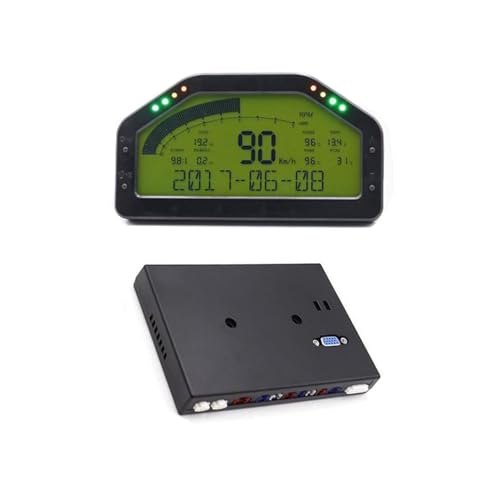
For racing enthusiasts looking to enhance their driving experience, the DEJUN Digital Racing Dashboard is an ideal choice for 12V vehicles. This 6.5-inch multifunctional instrument cluster displays nine essential metrics like RPM, speed, oil pressure, and water temperature. You can easily customize settings through its user-friendly system menu, including language options and unit selections. With features like low power consumption, a 0-100km/h timing function, and alert reminders, it keeps you informed on the go. Plus, the package includes everything you need for installation, ensuring you’re ready to hit the track with confidence.
Best For: Racing enthusiasts seeking a comprehensive digital dashboard solution for their 12V vehicles.
Pros:
- Multifunctional Display: Offers nine essential metrics such as RPM, speed, and oil pressure for enhanced driving awareness.
- Customizable Settings: User-friendly system menu allows for easy adjustments to language, units, and alerts.
- Low Power Consumption: Efficient design ensures minimal energy usage while providing vital information.
Cons:
- No Touch Screen: Lacks touch functionality, which may limit user interaction compared to modern dashboards.
- Limited Vehicle Compatibility: Specifically designed for 12V vehicles, restricting its use with other voltage systems.
- Single Review Rating: Only one customer review available, making it difficult to gauge overall satisfaction and reliability.
Logitech G29 Driving Force Racing Wheel and Floor Pedals
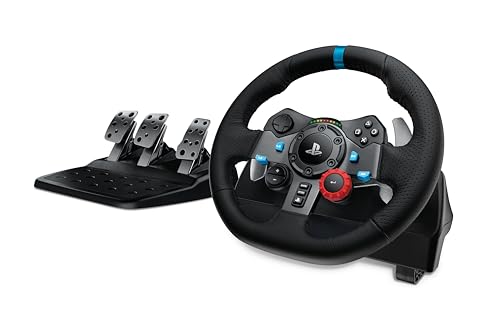
Designed with serious sim racers in mind, the Logitech G29 Driving Force Racing Wheel and Floor Pedals deliver an unparalleled driving experience on PlayStation and PC. You’ll enjoy immersive gameplay with real force feedback and a hand-stitched leather cover. The 900-degree rotation lets you perform realistic hand-over-hand turns, just like in F1 racing. With customizable pedals, including a pressure-sensitive nonlinear brake, you’ll achieve precise control. Plus, the G HUB Gaming Software allows you to tweak wheel sensitivity and force feedback. Made from recycled materials, this gear is both eco-friendly and performance-driven, making it a top choice for serious gamers.
Best For: The Logitech G29 Driving Force Racing Wheel and Floor Pedals are best for serious sim racers looking for an immersive and realistic driving experience on PlayStation and PC.
Pros:
- Realistic Experience: Offers true-to-life force feedback and 900-degree rotation for authentic racing simulation.
- Customizable Controls: Features adjustable pedals and customizable settings through G HUB Gaming Software.
- Eco-Friendly Design: Made with 52% certified post-consumer recycled plastic and certified carbon neutral.
Cons:
- Limited Compatibility: Not compatible with Xbox consoles, restricting use to PlayStation and PC gamers.
- Weight: The combination of wheel and pedals can be heavy, making setup and transport more challenging.
- Price Point: Higher price compared to entry-level racing wheels, which may be a barrier for some gamers.
Garmin Catalyst Driving Performance Optimizer (010-02345-00)
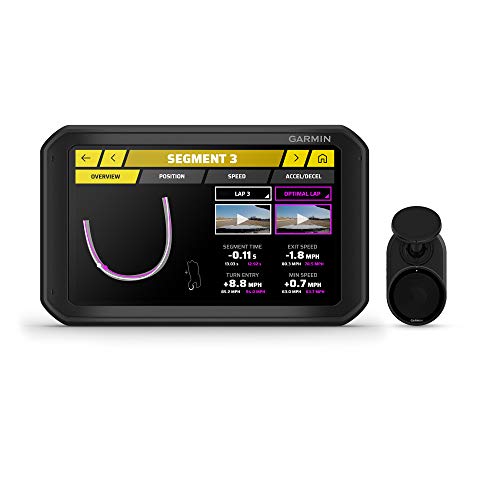
Elevate your racing game with the Garmin Catalyst Driving Performance Enhancer (010-02345-00), an essential tool for motorsports enthusiasts seeking immediate feedback and coaching. This 6.95-inch device provides real-time coaching cues and analyzes your performance during sessions. With True Track Positioning Technology, it generates ideal racing lines, while True Ideal Lap Technology shows your best achievable lap time. Bluetooth connectivity allows you to hear coaching through headsets or your car stereo. Its robust design features a suction cup or screw-down mount for secure positioning, making it perfect for serious racers. Improve your skills and dominate the track with this cutting-edge enhancer.
Best For: Motorsports enthusiasts looking for real-time coaching and performance analysis to enhance their racing skills.
Pros:
- Real-time audible coaching helps improve driving techniques instantly.
- True Track Positioning Technology generates optimal racing lines for better performance.
- Bluetooth connectivity allows for seamless audio feedback through headsets or car stereo.
Cons:
- Battery life averages only 2 hours, which may not last through extended racing sessions.
- Not intended for public roadway use, limiting its versatility outside of motorsports.
- Requires secure mounting and setup, which may be cumbersome for some users.
Factors to Consider When Choosing a Sim Racing Dashboard Display
When choosing a sim racing dashboard display, you need to take into account several key factors. Display size and resolution can greatly affect your viewing experience, while customization options let you tailor the interface to your preferences. Additionally, verify the display is compatible with your equipment and offers the right connectivity features for peak performance.
Display Size and Resolution
Choosing the right display size and resolution for your sim racing dashboard can greatly enhance your racing experience. A display size between 5 to 6.5 inches is common, providing ideal visibility and usability for various setups. Higher resolutions, like 720P HD, deliver clearer visuals, making it easier to read telemetry data during intense sessions. A larger screen can further immerse you in the experience by showing more information simultaneously, essential for real-time decision-making. Don’t overlook viewing angles; screens with over 160° guarantee you can see the data no matter your seating position. Finally, consider the refresh rate, typically around 60Hz, as it affects how smoothly data updates, helping you react quickly to track changes.
Customization Options Available
Customization options for sim racing dashboard displays can greatly enhance your overall experience, allowing you to tailor the interface to your specific needs and preferences. Many displays let you design your own layouts, so you can choose the information you want front and center. Some models even support programmable RGB LEDs, letting you set color schemes that match your gaming setup. With tools for detailed customization, you can use drag-and-drop functionality to arrange data and add personal branding. Certain displays also allow multiple configurations, so you can switch layouts based on different racing scenarios. Plus, you can select which telemetry data—like RPM, speed, or fuel levels—matters most to you, ensuring your dashboard is as unique as your racing style.
Compatibility With Equipment
Finding the right sim racing dashboard display means considering how well it integrates with your existing equipment. First, make certain the display is compatible with your specific racing wheelbase, as some only work with certain brands or models. Check for USB connectivity options, since many displays need direct connections to your PC or other devices. It’s also important to see if the display supports third-party setups, which can broaden compatibility with various racing simulators and hardware. Verify how many racing games and simulators it supports; some dashboards cater to specific titles while others offer wider compatibility. Finally, look for customizable mounting options to fit your racing setup, as this can enhance installation ease and your overall gaming experience.
Connectivity Features Offered
When considering a sim racing dashboard display, it’s essential to pay close attention to its connectivity features, as they greatly impact your overall experience. Look for models that offer USB direct connections to your PC, ensuring broad compatibility with various setups. Multiple input ports, like USB 2.0 and Type-C, can make integration with different racing hardware a breeze. You’ll also want a dashboard that supports third-party setups, giving you the flexibility to connect to various racing wheelbases. Certain displays may use specific communication protocols, like RJ11, for seamless data transmission. Finally, many dashboards require simulator software that doesn’t hog your graphics resources, allowing for smooth performance during your racing sessions.
Build Quality and Materials
While connectivity features lay the groundwork for an effective sim racing experience, the build quality and materials of your dashboard display play a significant role in its long-term performance. Look for options like CNC machined aluminum alloy, which offers enhanced durability and resistance to wear. Anodized finishes can protect against corrosion, contributing to the dashboard’s longevity. Displays with protective acrylic covers safeguard against impacts and scratches, keeping your screen functional over time. Additionally, premium screws, such as rust-free electroplated ones, enhance structural integrity and prevent loosening during intense racing sessions. Finally, consider adjustable mounting options made from sturdy materials, allowing you to customize your setup for improved user experience and accessibility in different racing environments.
Response Time and Refresh Rate
Choosing the right response time and refresh rate for your sim racing dashboard display can greatly enhance your racing experience. A lower response time, ideally around 1ms, guarantees smoother shifts and reduces motion blur during those intense moments on the track. This is essential for competitive gaming, as it minimizes ghosting effects, allowing for clearer visuals when you need them most. Meanwhile, a higher refresh rate—aim for 120Hz or 144Hz—offers a more fluid experience, especially during rapid movements. While 60Hz is common, higher rates can make a significant difference in responsiveness. Remember, pairing a high refresh rate with a poor response time can still lead to visual artifacts, hindering your performance. Prioritize both factors for the best results.
User Interface Design
A well-designed user interface (UI) can make all the difference in your sim racing experience, as it guarantees you have quick access to essential data without distracting you from the track. Look for customizable layouts that let you tailor the dashboard to your preferences. A touchscreen interface enhances interactivity, enabling you to navigate through settings and make real-time adjustments effortlessly. Features like RGB shift indicators and flag lights improve visual alerts for critical metrics, boosting your situational awareness. Additionally, verify the UI supports multiple racing games, so it adapts to various gameplay styles. Ultimately, an intuitive design with easy readability allows you to focus on driving performance, keeping your experience seamless and enjoyable.
Price and Warranty Options
When considering a sim racing dashboard display, you’ll want to pay close attention to both price and warranty options, as these factors can greatly influence your decision. Prices can vary considerably, impacting both your budget and the features available. Always check the warranty options offered by manufacturers, as a good warranty assures product quality and longevity. Compare customer reviews and ratings to assess reliability and performance within your chosen price range. It’s also essential to determine if the price includes necessary components or if you’ll need to buy additional items like mounting hardware or software. Finally, keep an eye out for special promotions or discounts, which can save you money on high-quality dashboard displays.