Choosing the right desktop gaming microphone can make your voice sound clearer, louder, and more professional in every match, stream, or Discord call.
Below, we’ve narrowed the field to 10 strong picks for different budgets, setups, and feature priorities so you can find the best fit faster.
Best 10 Desktop Gaming Microphone Picks for 2026
Hybrid RGB XLR/USB Kit

- USB and XLR support for flexible setup
- Includes boom arm, mute, gain, and monitoring
- Customizable RGB lighting for gaming rigs
Best For: gamers and streamers who want an expandable all-in-one kit
Compact Noise-Reducing USB Mic

- Built-in suspension and foam pop filter
- Plug and play USB-C to USB-A connection
- Cardioid pickup with software filters
Best For: PC gamers who want a compact, easy-to-use mic
Feature-Packed RGB Boom Arm Mic

- One-click noise cancellation and cardioid pickup
- Includes boom arm, shock mount, and pop filter
- Tap-to-mute, gain control, and monitoring built in
Best For: streamers and gamers who want a full accessory bundle
Simple LIGHTSYNC USB Mic
- USB plug and play setup
- Cardioid condenser capsule for focused voice capture
- LIGHTSYNC RGB with G HUB control
Best For: PC and Mac users who want an easy RGB gaming mic
Hybrid USB/XLR Pick
FIFINE AmpliGame AM8 USB/XLR Dynamic Microphone

- USB plug-and-play with XLR upgrade flexibility
- Cardioid dynamic design helps reject off-axis noise
- USB mode adds mute, RGB, gain, and monitoring
Best For: Streamers who want an easy desktop mic now and more advanced options later
Versatile USB All-Rounder
Logitech Blue Yeti USB Microphone

- Custom three-capsule array for clear sound
- Four pickup patterns add recording flexibility
- Onboard mute, gain, pattern, and headphone controls
Best For: Creators who want a proven USB mic with flexible pickup modes
Complete Boom Arm Bundle
FIFINE AmpliGame A6T USB Microphone Kit

- Includes boom arm, shock mount, pop filter, and cable
- USB plug-and-play works with PC, Mac, and PS5/PS4
- Touch mute and gain knob are easy to use mid-game
Best For: Desk gamers who want an all-in-one mic kit with accessories included
RGB Boom-Arm Starter
TONOR TC310+ USB Gaming Mic Kit

- Includes boom arm, pop filter, and shock mount
- Tap-to-mute and gain control are built in
- RGB lighting with multiple lighting modes
Best For: Streamers and gamers wanting an easy all-in-one USB mic kit
Award-Winning Compact Pick
FIFINE AmpliGame A6V USB Gaming Microphone

- Quick mute button and gain knob on the mic
- Includes shock mount, pop filter, and tripod stand
- USB plug-and-play for PC, PS4, PS5, and Mac
Best For: Gamers and creators who want a compact USB mic with easy controls
Noise-Canceling Boom Setup
InnoGear CM38X USB Gaming Microphone

- Noise cancellation aims to cut background noise
- Boom arm kit includes pop filter and shock mount
- Touch mute, gain knob, and zero-latency monitoring
Best For: Gamers wanting a boom-arm USB mic with noise reduction and monitoring
Hybrid RGB XLR/USB Kit – FIFINE AmpliGame AM8T
If you want a desktop gaming microphone that can grow with your setup, the FIFINE AmpliGame AM8T is built around flexibility. It works over USB for quick plug-and-play use on PC, but also supports XLR if you later want to connect to a mixer or audio interface. The included boom arm, mute button, gain knob, headphone jack, and RGB lighting make it a feature-rich choice for streaming and recording.
Best For: Gamers and streamers who want a starter kit with both USB convenience and XLR upgrade potential.
Pros:
- USB and XLR connectivity for simple setup now and more advanced routing later
- Cardioid pattern and -50dB sensitivity help reduce background noise
- Includes boom arm, mute button, gain control, and headphone monitoring
- Customizable RGB lighting adds a gaming-focused look
Cons:
- XLR cable is not included
- Desk clamp is limited to desktops under 2 inches thick
Overall, the AM8T is a practical desktop gaming microphone if you want an all-in-one kit with room to expand into XLR later. It focuses on usability and control rather than minimalism, which makes it especially appealing for streamers setting up a dedicated desk rig.
Compact Noise-Reducing USB Mic – HyperX SoloCast 2
The HyperX SoloCast 2 is a straightforward desktop gaming microphone for players who want clear voice capture without a bulky setup. Its built-in suspension system, foam pop filter, and tiltable weighted stand are all designed to keep the mic simple while reducing unwanted noise. USB-C to USB-A plug and play connectivity makes it easy to start recording or streaming right away.
Best For: PC gamers and streamers who want a compact USB mic with built-in noise reduction features.
Pros:
- Built-in suspension system helps reduce vibration and handling noise
- Foam pop filter and cardioid pickup support focused vocal capture
- USB plug and play setup keeps installation simple
- Compact stand includes tilt adjustment and mounting threads for mic arms
Cons:
- Designed as a compact single-mic solution rather than a full accessory kit
- Advanced sound shaping depends on HyperX NGENUITY software
For a clean desktop gaming microphone with a small footprint, the SoloCast 2 keeps the formula simple and practical. It is a good fit if you want solid voice capture, built-in filtering, and minimal desk clutter.
Feature-Packed RGB Boom Arm Mic – MAONO DGM20S
The MAONO DGM20S is a desktop gaming microphone aimed at users who want voice clarity, onboard controls, and a full accessory bundle. It includes one-click noise cancellation, a cardioid pickup pattern, RGB lighting, tap-to-mute, gain control, and zero-latency monitoring. The included boom arm, shock mount, and pop filter make it a strong all-in-one option for gaming, streaming, and Discord use.
Best For: Streamers and gamers who want a full-featured USB mic kit with strong noise control.
Pros:
- One-click noise cancellation helps cut background noise
- Cardioid pickup focuses on the front of the mic for clearer voice capture
- Includes boom arm, shock mount, pop filter, and desktop clamp
- Tap-to-mute, gain control, and monitoring are built in
Cons:
- RGB lighting may be more than some minimal setups need
- Not compatible with Xbox
The DGM20S stands out as a feature-rich desktop gaming microphone for people who want control and convenience in one package. It is especially appealing if you want a ready-made setup with accessories included instead of buying pieces separately.
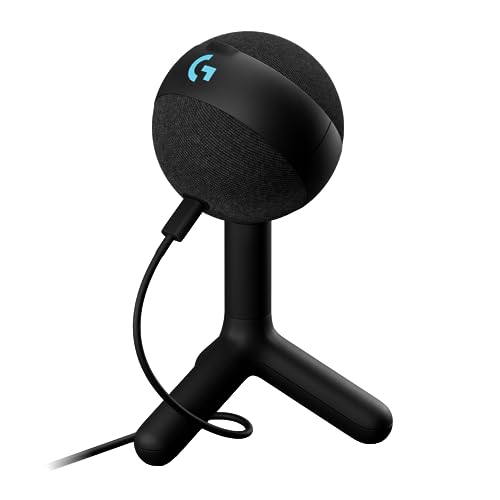
Simple LIGHTSYNC USB Mic – Logitech G Yeti Orb
The Logitech G Yeti Orb is a desktop gaming microphone made for quick setup and clean voice capture. It uses a condenser capsule with a cardioid pickup pattern to focus on your voice while helping ignore key clicks and other noise. With USB plug and play support and LIGHTSYNC RGB effects controlled through G HUB, it suits gamers who want an easy mic with a polished look.
Best For: PC and Mac users who want an easy USB gaming mic with RGB styling.
Pros:
- USB plug and play makes setup fast and simple
- Cardioid condenser capsule focuses on voice and reduces side noise
- LIGHTSYNC RGB adds customizable visual effects
- G HUB software provides centralized control for Logitech G gear
Cons:
- Only includes a basic stand-style design
- Fewer onboard controls than more feature-heavy streaming mics
The Yeti Orb is a good fit if you want a desktop gaming microphone that stays easy to use while still offering RGB flair. It leans toward simplicity and ecosystem integration rather than a long list of physical controls.
Hybrid USB/XLR Pick – FIFINE AmpliGame AM8 USB/XLR Dynamic Microphone
If you want a desktop gaming microphone that can grow with your setup, the FIFINE AmpliGame AM8 is built around flexibility. Use USB for quick plug-and-play streaming or switch to XLR when you want to pair it with an interface or mixer for more advanced recording control. Its cardioid dynamic design is aimed at keeping your voice clear while rejecting off-axis noise during gaming and live chat.
Best For: Streamers and gamers who want an easy USB mic now, with an upgrade path to XLR later.
Pros:
- USB and XLR connectivity offers simple use or more advanced expansion
- Cardioid dynamic pickup helps reduce unwanted room noise
- Tap-to-mute, RGB lighting, gain control, and headphone monitoring are available in USB mode
- Desktop stand and included windsreen-style cover support everyday use
Cons:
- RGB and onboard function keys do not work in XLR mode
- XLR cable is not included
- Suggested speaking distance is fairly close for best results
For buyers comparing desktop gaming microphones, the AM8 stands out because it covers both beginner convenience and future audio upgrades. It is a practical pick if you want one mic that can handle gaming, streaming, podcasting, and other voice work without locking you into a single connection type.
Versatile USB All-Rounder – Logitech Blue Yeti USB Microphone
The Blue Yeti remains a familiar choice for anyone shopping for a desktop gaming microphone with a straightforward USB setup and a polished sound profile. It uses a custom three-capsule array and offers multiple pickup patterns, so it can adapt to streaming, voice recording, meetings, and music without changing hardware. The onboard controls also make it easy to manage levels directly from the mic.
Best For: Gamers and creators who want a versatile USB desktop mic with built-in controls.
Pros:
- Custom three-capsule array is designed for clear, broadcast-style sound
- Four pickup patterns add flexibility for different recording setups
- Onboard gain, mute, pattern selection, and headphone volume controls simplify use
- Plug-and-play USB design works with Mac or PC
Cons:
- It is a condenser mic, so it may capture more room sound than a dynamic mic
- Best results depend on positioning it carefully with the adjustable stand
- It is a larger desktop mic than compact travel-focused options
If you want one of the most established desktop gaming microphones for streaming and voice capture, the Blue Yeti is easy to recommend. It is best viewed as a versatile all-rounder: simple to start using, but still packed with controls and pickup options for more deliberate recording.
Complete Boom Arm Bundle – FIFINE AmpliGame A6T USB Microphone Kit
The FIFINE AmpliGame A6T is a strong desktop gaming microphone kit if you want the mic and accessories bundled together from the start. It comes as a USB condenser setup with a boom arm, shock mount, pop filter, and long cable, making it practical for desks that need better positioning and less clutter. The cardioid pickup is tuned for front-facing voice capture during gaming and streaming.
Best For: Gamers who want a complete USB desk setup with arm-mounted placement and included accessories.
Pros:
- Includes boom arm, shock mount, pop filter, and long USB cable
- USB plug-and-play setup is compatible with Windows, Mac, and PS4/PS5
- Touch mute and large gain knob are easy to reach while gaming
- Cardioid condenser capsule focuses on voice from the front
Cons:
- RGB lighting is mainly a style feature rather than an audio benefit
- Best suited to desk use rather than portable recording
- The boom arm requires some desk space and clamp setup
Among desktop gaming microphones, the A6T is appealing because it solves several setup problems at once. If you want a mic kit that is ready for streaming, Discord, and gaming chat without buying accessories separately, this bundle offers a practical starting point.
RGB Boom-Arm Starter – TONOR TC310+ USB Gaming Mic Kit
If you want a desktop gaming microphone that is ready to go out of the box, the TONOR TC310+ is built for simple USB use and a complete desk setup. It combines a condenser mic, boom arm, pop filter, shock mount, and onboard controls, making it a practical pick for streaming, Discord chat, and casual recording.
Best For: Streamers and gamers who want an all-in-one USB mic kit with RGB and a boom arm.
Pros:
- Includes a metal boom arm, sturdy clamp, pop filter, and shock mount
- Top tap-to-mute plus easy gain control on the mic
- RGB lighting with multiple modes and brightness control
- USB plug-and-play compatibility for PC, Mac, PS4, and PS5
Cons:
- Clamp fits desks up to 2.36 inches thick
- USB-A connection may not suit every modern setup without an adapter
This is a strong choice if you value convenience and desk-ready accessories more than advanced audio customization. The TC310+ keeps the focus on straightforward operation, making it easy to add voice chat and streaming features to a gaming setup quickly.
Award-Winning Compact Pick – FIFINE AmpliGame A6V USB Gaming Microphone
The FIFINE AmpliGame A6V is a desktop gaming microphone aimed at players and creators who want clear voice capture without a complicated setup. With USB plug-and-play, a cardioid pattern, and included accessories, it is a solid fit for Discord, Twitch, YouTube, and everyday PC or console chat.
Best For: Gamers and creators who want a compact USB mic with quick mute, RGB, and useful desk accessories.
Pros:
- Quick mute button and gain knob for fast level control
- Cardioid pattern and 70 dB SNR help reduce background noise
- Includes shock mount, pop filter, tripod stand, and USB cable
- Compatible with PC, PS4, PS5, Windows, and Mac OS
Cons:
- Tripod stand is less flexible than a boom-arm setup
- RGB is fixed to gradient-style lighting rather than fully customizable effects
The A6V stands out as a practical pick if you want a tidy desktop microphone with built-in controls and a straightforward accessory bundle. Its focus on easy installation and voice clarity makes it especially appealing for first-time streamers or chat-heavy gaming setups.
Noise-Canceling Boom Setup – InnoGear CM38X USB Gaming Microphone
The InnoGear CM38X is a desktop gaming microphone designed for clearer voice pickup in noisy spaces. It adds noise cancellation, a touch mute button, gain control, zero-latency monitoring, and a boom arm stand, giving it a more adjustable feel for streaming, podcasting, and team chat.
Best For: Gamers who want a boom-arm USB mic with noise cancellation and monitoring control.
Pros:
- Advanced noise cancellation for better voice clarity
- Touch-sensitive mute and large gain knob for easy control
- Zero-latency monitoring helps you hear your output in real time
- Includes boom arm stand, pop filter, shock mount, and USB cable
Cons:
- Not compatible with Xbox
- RGB options are limited to four modes rather than extensive customization
If you want a more controlled desktop setup, the CM38X offers a useful mix of voice isolation and hands-on adjustment. It is a strong fit for users who want a boom-arm microphone that handles gaming chat and content creation with minimal setup friction.
How We Picked the Best Desktop Gaming Microphone
We focused on microphones that are easy to use on a desk, offer dependable voice clarity, and include practical features gamers actually want, such as mute controls, gain adjustment, monitoring, and USB convenience. We also considered whether a mic comes as a complete kit, how flexible it is for future upgrades, and whether it suits both casual play and content creation.
Quick Comparison
For most buyers, USB models are the simplest choice because they plug in and work quickly. Dynamic mics are usually better at rejecting room noise, while condenser mics can capture a brighter, more detailed sound. Kits with boom arms can improve desk space and mic placement, while stand-based options are easier to set up and move around.
Key Buying Factors for Desktop Gaming Microphone
Connection Type
USB is the easiest route for most gamers. If you want more upgrade flexibility or plan to use an audio interface later, look for USB/XLR support.
Pickup Pattern and Noise Rejection
A cardioid pattern is usually best for a Desktop Gaming Microphone because it focuses on your voice and reduces sound from the sides and rear. If your room is noisy, dynamic mics can be a smart choice.
Controls and Monitoring
Useful onboard features include tap-to-mute, gain knobs, headphone monitoring, and low-latency audio playback. These make it easier to adjust sound without leaving your game or stream.
Desk Setup and Accessories
Consider whether you need a boom arm, tripod, shock mount, or pop filter. A fuller kit can save money and time, but a simpler mic may be better if you already own accessories.
Lighting and Software
RGB lighting is mostly cosmetic, but it can match a gaming setup nicely. Software features like voice effects or EQ can help, but sound quality and placement matter more than visual extras.
Who Should Buy Which Desktop Gaming Microphone?
If you want the simplest setup, choose a plug-and-play USB mic with clear voice pickup and easy controls. If you stream regularly or share a room, prioritize noise reduction and monitoring. If you want a future-proof option, look for USB/XLR support. And if your desk is crowded, a compact stand-based model may be the most practical choice.