The best robot arms for hobbyists make robotics easier to explore through hands-on assembly, coding, and automation. The right kit can turn an Arduino, ESP32, or Python project into a useful desktop learning platform.
This roundup compares 10 options across build style, degrees of freedom, software support, servo systems, and expansion potential so you can choose a kit that matches your experience and goals.
Best 10 Robot Arms for Hobbyists Picks for 2026
Best Open-Source Starter
miniArm 5DOF Arduino Robot Arm

- Arduino-compatible and open source
- App, knob, and offline controls
- Expansion ports for sensors and modules
Best For: Adult beginners learning robotic-arm programming
Best for Expansion
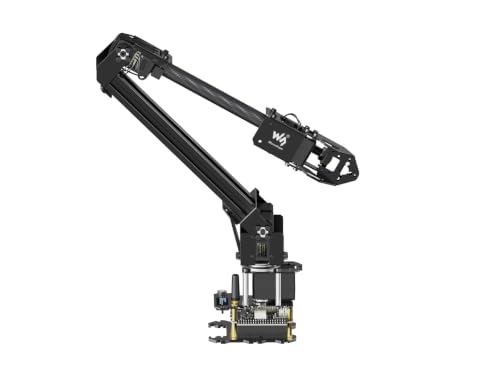
- ESP32 with wireless control options
- Open source with ROS2 support
- Customizable expansion plate and tooling
Best For: Makers building connected or mobile robotics projects
Best Hands-On Build
VANLINNY All-Metal RC Robot Arm

- All-metal body and four-axis gripper
- Mecanum wheels drive in multiple directions
- About two-hour STEM assembly project
Best For: Kids ages 8–14 who enjoy building and driving robots
Best for AI Learning
Hiwonder SO-ARM101 6-Axis AI Kit

- LeRobot-compatible open-source platform
- Dual-camera vision system
- 12 high-torque bus servos with feedback
Best For: Advanced hobbyists exploring AI and imitation learning
Best DIY Starter
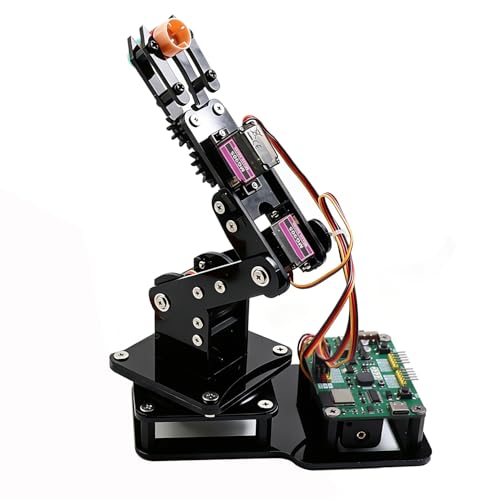
- Buildable 4DOF ESP32 platform
- Joystick and web-app control
- Arduino and MicroPython support
Best For: Beginners and DIY makers learning robotics
Best for AI Robotics

- LeRobot and Hugging Face compatible
- Python SDK and ROS1/ROS2 support
- Leader-follower AI training features
Best For: Developers and researchers building AI robotics projects
Best Metal Desktop Arm
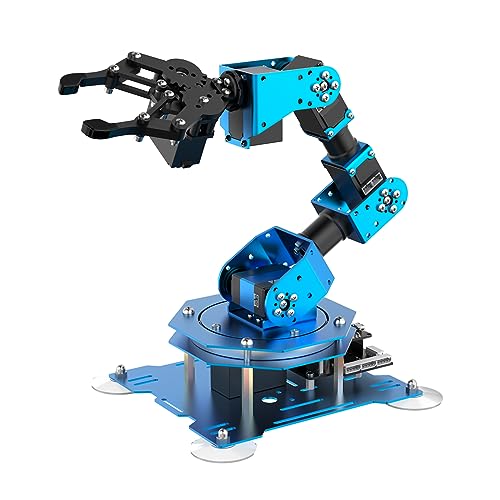
- Six-axis assembled arm
- Aluminum structure with smart servos
- PC, app, mouse, and wireless control
Best For: STEM learners wanting a sturdy, versatile desktop arm
Best with Extra Features

- Arduino and Python programming with multiple control methods
- ESP32 WiFi/Bluetooth and broad sensor expansion
- Inverse kinematics with aluminum construction and smart bus servos
Best For: Beginners learning programming, mechanics, and tabletop robotics
Best AI Learning Platform

- Six smart bus servos with inverse-kinematics path planning
- ESP32, Arduino, Bluetooth, and multiple expansion ports
- Supports vision, voice, ultrasonic, and acceleration projects
Best For: Intermediate hobbyists building AI-enabled sensor projects
Best Simple Pick
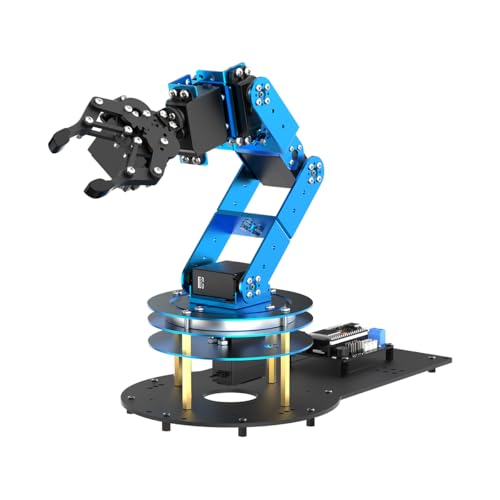
- 6DOF design with six servos, mechanical claw, and ESP32
- Arduino-compatible with app, PC, and wireless control
- Includes 200+ tutorials, experiments, code, and schematics
Best For: Makers who want to assemble, program, and expand a robot arm
Best Open-Source Starter – miniArm 5DOF Arduino Robot Arm
For hobbyists looking for robot arms for hobbyists that support hands-on coding, the miniArm combines a 5-axis aluminum arm with Arduino compatibility and open-source examples. Its expansion ports and app-based controls make it a practical platform for learning and experimenting.
Best For: Adult beginners and STEM learners who want to program and expand a compact robotic arm.
Pros:
- Compatible with Arduino programming on the Atmega328 platform.
- Open-source programs, tutorials, and secondary-development examples are available.
- Supports app control, knob-based control, and offline action editing.
- Provides expansion ports for optional sensors and modules.
Cons:
- The Starter Kit does not include the listed optional sensors or ESP32 Cam module.
- Its recommended age is 17 years and up, so it is not aimed at young children.
The miniArm is a strong choice when programming access and future expansion matter more than a turnkey AI system. Check the kit contents carefully if you want the additional sensors included with the Standard Kit.
Best for Expansion – Waveshare RoArm-M2-S 4DOF Kit
The Waveshare RoArm-M2-S is one of the more development-focused robot arms for hobbyists, pairing an ESP32 controller with open-source interfaces, wireless control, and a customizable expansion plate. Its visual web application can help newcomers get started while leaving room for more advanced projects.
Best For: Makers who want wireless control, host-computer compatibility, and a platform for custom end-of-arm tooling.
Pros:
- Includes a visual cross-platform web application with coordinate control.
- Supports ROS2, multiple host computers, and wired or wireless communication.
- Open-source control code and communication documentation support secondary development.
- Offers a 360-degree workspace with a stated 1-meter diameter and 0.5 kg payload at 0.5 m.
Cons:
- At 4 DOF, it offers fewer axes than some more advanced robotic arms.
- Custom end-of-arm tooling may require additional design or components.
This kit stands out for hobbyists who want to connect a desktop arm to broader robotics software or build custom tools. Its lightweight structure also makes it suitable for mounting on mobile platforms, within the stated payload limits.
Best Hands-On Build – VANLINNY All-Metal RC Robot Arm
For families comparing robot arms for hobbyists and young builders, the VANLINNY JK01 emphasizes mechanical assembly and remote-controlled play rather than advanced programming. Its all-metal frame, gripping arm, and mecanum wheels create a substantial STEM project for indoor use.
Best For: Kids ages 8–14 who want to build, drive, and operate a physical robot with adult supervision nearby.
Pros:
- All-metal body, alloy panels, and metal gears provide a sturdier build than hollow plastic kits.
- Four mecanum wheels allow sideways movement, spinning, and diagonal-style maneuvering.
- Four-axis arm can grip light objects, with a stated capacity of about 3 lb.
- Includes numbered parts, tools, illustrated instructions, rechargeable battery, and USB cable.
Cons:
- The remote requires four AA batteries, which are not included.
- Assembly takes about two hours and may need adult assistance.
- Forcing oversized loads can wear the arm’s gears.
The JK01 is best viewed as an engaging build-and-drive STEM toy, not a computer-vision or open-source development platform. Its metal construction and unusual mecanum drive make it especially appealing for active tabletop play.
Best for AI Learning – Hiwonder SO-ARM101 6-Axis AI Kit
The Hiwonder SO-ARM101 is aimed at advanced robot arms for hobbyists, developers, and researchers exploring imitation learning. Its six-axis design, dual-camera vision system, bus servos, and compatibility with the LeRobot open-source framework provide a more sophisticated foundation than basic educational kits.
Best For: Experienced hobbyists and adult learners working on AI vision, imitation learning, calibration, and robotic manipulation.
Pros:
- Compatible with the LeRobot open-source framework and shared learning resources.
- Dual cameras support gripper-level manipulation and broader environmental awareness.
- Twelve high-torque bus servos use magnetic feedback for smooth, stable motion.
- Includes a BusLinker debugging board and PC software for monitoring and calibration.
Cons:
- Its adult-oriented feature set may be excessive for casual beginners.
- The advanced kit is a larger investment in time and complexity than a simple coding arm.
- The supplied configuration includes 3D-printed parts and is assembled, limiting the build experience.
The SO-ARM101 is the strongest fit here for AI-focused experimentation, especially if you want to work with vision and imitation-learning workflows. Choose it over a simpler arm when open-source robotics research and debugging tools are priorities.
Best DIY Starter – ESP32 4DOF Robot Arm Kit
For hobbyists looking for approachable robot arms, this 4DOF ESP32 kit combines hands-on assembly with ready-to-use controls. It supports joystick operation, a browser-based web app, motion recording, Arduino, and MicroPython, making it a flexible entry point for coding and robotics projects.
Best For: Beginners, teens, students, and DIY makers who want to build and program a tabletop robot arm.
Pros:
- Includes the hardware needed to build a 4DOF arm with four MG90S servos.
- Offers joystick and no-install web-app control.
- Supports motion recording, loop playback, Arduino, and MicroPython.
- Open-source code, tutorials, and expandable hardware support encourage continued learning.
Cons:
- Batteries are not included.
- Its 4DOF design is intended for lightweight objects rather than demanding manipulation.
This is a practical choice when the building and learning process matters as much as operation. The pre-programmed ESP32-C3 board reduces setup friction, while the open platform leaves room for more advanced experiments.
Best for AI Robotics – reBot B601-DM Open-Source Arm
Among robot arms for hobbyists, the reBot B601-DM is aimed at users who want to move beyond basic remote control into AI robotics development. Its open-source ecosystem, Python SDK, ROS1/ROS2 compatibility, and LeRobot and Hugging Face integration make it a development-focused option.
Best For: Experienced makers, developers, and researchers working on imitation learning, reinforcement learning, and grasping projects.
Pros:
- Designed for LeRobot and Hugging Face AI robotics projects.
- Supports Python, ROS1, ROS2, and multiple operating systems and connection methods.
- Real-time leader-follower functionality supports human correction during reinforcement-learning work.
- Includes open-source assembly, calibration, testing, and deployment guidance.
Cons:
- 3D-printed parts are not included.
- The software and AI-focused workflow may be more complex than necessary for casual users.
This assembled arm is best viewed as a robotics development platform rather than a simple desktop toy. Its compatibility with Nvidia Jetson devices and open-source training tools gives technically capable hobbyists a path from setup to AI experimentation.
Best Metal Desktop Arm – LewanSoul 6DOF xArm1S
This assembled 6DOF arm offers a more capable mechanical platform for hobbyists who want versatile control without starting from a kit. Its aluminum-alloy construction, intelligent servos, wireless controller, PC, app, mouse, and PS2 control options support both programming practice and hands-on object handling.
Best For: Hobbyists and STEM learners seeking a sturdy assembled arm for coding, remote-control grasping, and action editing.
Pros:
- Six-axis design provides broader movement flexibility than simpler 4DOF arms.
- High-precision servos provide position, voltage, and temperature feedback.
- Aluminum construction, high-torque servos, and industrial-grade bearings support stability.
- Offers PC, phone app, mouse, PS2 wireless, and offline manual control methods.
Cons:
- This is the assembled version, so it offers less of a build-from-scratch experience.
- It requires a DC power supply.
- Its recommended age is 14 years and up.
The xArm1S suits users who value mechanical reach and multiple control methods over kit assembly. With support for custom action editing and grasping objects up to 500g, it can serve as both a STEM learning tool and a platform for demonstrations.
Best with Extra Features – MaxArm Arduino Robot Arm Kit
For hobbyists looking for robot arms for hobbyists projects, the LewanSoul MaxArm offers a compact aluminum platform for learning programming, inverse kinematics, and wireless control. Its ESP32 controller supports Arduino and Python, while the included suction nozzle adds practical end-effector experimentation.
Best For: Beginners and STEM learners who want a versatile, expandable tabletop arm for Arduino, Python, and wireless programming practice.
Pros:
- Supports Python and Arduino programming with app, PC, mouse, and wireless-controller operation.
- Uses inverse kinematics and trajectory planning for movement across the x, y, and z axes.
- Includes ESP32 WiFi and Bluetooth connectivity plus ports for sensors and other modules.
- Aluminum construction and smart bus servos support precision and payload-focused experimentation.
Cons:
- The manufacturer recommends it for ages 16 and up.
- Its compact tabletop size may limit larger-object handling.
MaxArm is a strong entry point for hands-on robotics because it combines approachable programming options with room for sensor and wireless expansion. Choose it when learning flexibility matters more than advanced AI features.
Best AI Learning Platform – LeArmAI 6DOF Intermediate Kit
The LeArmAI is a capable choice for hobbyists exploring robot arms for hobbyists applications that extend into AI and sensing. Its six smart bus servos, ESP32 controller, and inverse-kinematics software provide a foundation for precise movement, while compatible vision and voice modules support more advanced experiments.
Best For: Intermediate learners who want to combine Arduino programming with AI vision, voice interaction, and sensor-based robotics projects.
Pros:
- Six smart bus servos and inverse kinematics enable planned, smooth arm movement.
- Supports Arduino programming through an ESP32 controller with built-in Bluetooth.
- Can be expanded with AI vision, voice, ultrasonic, and acceleration sensors.
- Includes more than 200 tutorials, sample experiments, open-source code, and schematics.
Cons:
- The intermediate kit weighs about 2.92 kg and has a larger tabletop footprint.
- The manufacturer recommends it for ages 16 and up.
LeArmAI stands out when a hobby project needs a clear path from basic motion control to recognition, tracking, and voice-enabled experiments. Its extensive learning materials also make the higher-complexity platform easier to approach.
Best Simple Pick – LeArm 6DOF Open-Source Kit
For makers who enjoy assembling and programming robot arms for hobbyists projects, the LeArm Open Source kit combines a 6DOF structure with six servos, a mechanical claw, and an ESP32 controller. It offers app, PC, and wireless control before you move into Arduino coding and sensor expansion.
Best For: Students, engineers, and hobbyists who want an open-source build with extensive tutorials and room for mechanical and programming experimentation.
Pros:
- Six servos and inverse kinematics support smooth, planned movement.
- Compatible with Arduino and equipped with ESP32, Bluetooth, and expansion ports.
- Includes app, PC software, and wireless-controller options for accessible operation.
- Provides more than 200 tutorials, experiments, code examples, schematics, and programs.
Cons:
- The manufacturer recommends it for ages 16 and up.
- Its 18-inch height requires more tabletop space than a compact arm.
- The listed operation mode is manual, so automated behavior may require programming.
This kit is particularly appealing if the building process is part of the hobby. It offers a broad educational ecosystem and flexible controls, making it a practical platform for progressing from assembly to custom robotic-arm projects.
How We Picked the Best Robot Arms for Hobbyists
We focused on the features that matter most in a desktop robotics project: programmable control, mechanical construction, degrees of freedom, documentation, included accessories, and compatibility with common development platforms. The selection spans simple STEM kits, wireless ESP32 designs, full-metal arms, open-source platforms, and advanced systems with AI vision or ROS support.
Because specifications and included components can vary by seller, confirm the current package contents, software version, power requirements, and operating system support before ordering.
Quick Comparison
| Best For | Look For |
|---|---|
| First robotics project | Arduino support, tutorials, joystick control, and straightforward assembly |
| Programming practice | Python, MicroPython, SDK access, or a documented web app |
| Mechanical experimentation | Metal construction, replaceable servos, expansion ports, and interchangeable end effectors |
| AI and computer vision | Camera compatibility, high-torque bus servos, open-source software, and adequate processing hardware |
| Advanced automation | Six or more axes, ROS compatibility, reliable APIs, and an assembled or serviceable design |
Key Buying Factors for Robot Arms for Hobbyists
Degrees of Freedom and Reach
Four-axis arms are often easier to assemble and control, while six-axis models provide more natural positioning and orientation. Check the arm’s reach, payload, joint range, and workspace rather than judging capability by axis count alone.
Controller and Software Ecosystem
Arduino remains a practical choice for learning electronics and servo control. ESP32 platforms add Wi-Fi and Bluetooth, while Python, MicroPython, SDKs, and ROS are better suited to software-heavy projects. Look for usable examples and downloadable documentation.
Build Quality and Power
Metal frames generally resist wear better than lightweight educational construction, but they can require stronger power supplies and more careful assembly. High-torque servos are useful for heavier grippers, though they may draw substantial current. A stable, properly rated power source is essential.
End Effectors and Expansion
A basic claw is enough for sorting and pick-and-place experiments, while suction nozzles and interchangeable tools support more varied projects. Expansion headers, replacement parts, and open mounting points can extend a kit’s useful life.
Who Should Buy Which Robot Arms for Hobbyists?
Choose a basic Arduino or joystick-controlled arm if you are learning robotics, teaching STEM concepts, or want an approachable build. An ESP32 model is a better fit for wireless control and web-based interfaces. Select a full-metal six-axis kit if durability, repeatable movement, and mechanical customization matter most.
For machine-learning experiments, imitation learning, or camera-guided tasks, prioritize an open-source AI platform with vision support and high-torque bus servos. Developers planning larger automation projects should favor Python or ROS compatibility, an SDK, and an assembled design that reduces setup time. Whichever model you choose, verify payload claims, software documentation, power accessories, and replacement-part availability before buying.