Finding the right microcontroller starter kit can make the difference between a rewarding first project and a box of unused components. These kits cover approachable Arduino Uno boards, higher-capacity Mega options, and Wi-Fi-capable ESP32 platforms.
We selected options for different skill levels and project goals, from guided beginner experiments to IoT prototypes and more component-heavy builds. Use the buying guide below to narrow the list by board, included hardware, documentation, and long-term usefulness.
Best 10 Microcontroller Starter Kits Under 300 Picks for 2026
Best Hands-On Value
ELEGOO UNO R3 Super Starter Kit

- 22+ guided beginner projects
- Sensors, displays, motors, and inputs included
- Solderless setup with pre-soldered LCD
Best For: Structured Arduino learning at home, in clubs, or in classrooms
Best Budget Basics

- Basic R3 board and 400-point breadboard
- Sensors, LEDs, buzzers, and switches included
- Storage box keeps components organized
Best For: Low-cost introductory Arduino experiments
Best for Larger Projects

- 54 digital I/O pins and 256 KB flash
- 35+ projects with 200+ components
- RFID, RTC, motion, motor, and display modules
Best For: Expanding builds that need more pins, memory, and modules
Best Connected Learning Kit
SunFounder Uno R4 WiFi Explorer

- Original Uno R4 WiFi with WiFi and Bluetooth
- 300+ components and 50+ projects
- 60+ video lessons plus IoT tutorials
Best For: Guided Arduino learning with wireless and IoT projects
Most Complete Arduino Kit

- 200+ components across 63 types
- 30+ guided electronics projects
- Includes motors, displays, RFID, and sensors
Best For: Beginners and classrooms needing broad Arduino project coverage
Wireless IoT Pick
LAFVIN ESP32 Basic Starter Kit

- ESP32 board with Wi-Fi and Bluetooth
- Includes OLED, DHT11, PIR, and relay modules
- Tutorial includes lessons and example code
Best For: Beginners exploring connected ESP32 projects
Motor Project Value
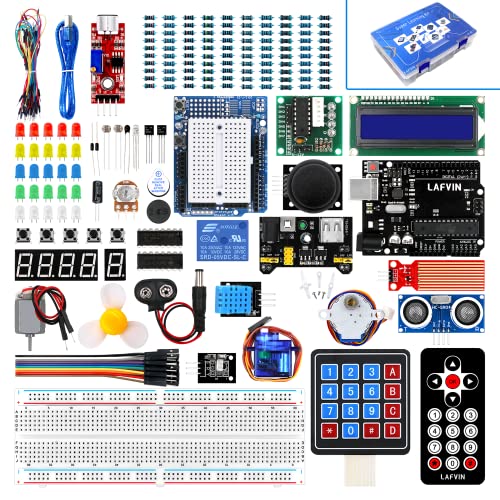
- Supports R3, Mega2560, and Nano platforms
- Includes 20+ lessons, code, libraries, and datasheets
- Features servo, stepper, and DC motors
Best For: Learners building Arduino motor and display projects
Best All-in-One Pick
DFRobot UNO Electronics Starter Kit

- 83 labeled components and UNO R3-compatible board
- 12 guided projects with code and wiring diagrams
- Includes USB cable and thick jumper wires
Best For: College STEM students and first-time electronics learners
Best for IoT Projects
ELEGOO ESP-32 Super Starter Kit

- Dual-core ESP-32 with Wi-Fi and Bluetooth 4.2
- 35-plus modules for sensors, displays, motors, and input
- 30-plus guided Arduino IDE projects
Best For: Wireless electronics and connected-device experiments
Best Budget Foundation
ELEGOO UNO R3 Basic Starter Kit

- UNO-compatible board with breadboard and USB cable
- Includes LEDs, sensors, buzzer, and shift register
- PDF tutorial supports solderless beginner projects
Best For: Classrooms, homeschool learners, and Arduino beginners
Best Hands-On Value – ELEGOO UNO R3 Super Starter Kit
For shoppers comparing microcontroller starter kits under 300, the ELEGOO UNO R3 Super Starter Kit is a practical beginner option centered on guided, no-solder projects. Its 22+ lessons cover LEDs, sensors, displays, motors, and simple input devices, making it suitable for structured learning at home or in a classroom.
Best For: Beginners, homeschool projects, coding clubs, family builds, and STEM classrooms.
Pros:
- Includes 22+ guided projects with example code and tutorial support.
- Broad selection of sensors, displays, motors, and input modules.
- Solderless breadboard and pre-soldered LCD help reduce setup difficulty.
- Organized component list and storage-friendly assortment support repeat projects.
Cons:
- The UNO R3 has limited memory and processing capability for larger builds.
- The breadboard power module should not be supplied with more than 9V.
- Some first-time builders may need adult guidance with wiring and polarity.
This kit offers a strong balance of project variety and beginner-friendly instruction. It is especially appealing when the goal is to learn core Arduino concepts before creating custom sensor, display, or motor projects.
Best Budget Basics – LAFVIN R3 CH340 Starter Kit
LAFVIN Basic Starter Kit with R3 CH340,Breadboard + Retail Box Compatible with Arduino IDE
Check Price On AmazonAmong microcontroller starter kits under 300, the LAFVIN R3 CH340 kit focuses on inexpensive entry-level experimentation. It includes an R3 controller board, breadboard, sensors, LEDs, buzzers, switches, and other components compatible with the Arduino IDE, plus a plastic box for storage.
Best For: Budget-conscious beginners who want a compact collection of foundational Arduino components.
Pros:
- Provides a broad mix of basic sensors, switches, LEDs, and sound modules.
- Components are intended for direct use with the Arduino IDE.
- Includes a 400-tie-point breadboard for introductory circuit building.
- Plastic packaging box helps keep the small parts together.
Cons:
- The supplied notes do not specify a project count or detailed tutorial coverage.
- It uses a basic R3 CH340 configuration rather than a more advanced controller.
- The kit may require more self-directed learning than heavily guided alternatives.
The LAFVIN kit is a sensible starting point for users who want essential parts without prioritizing an extensive curriculum. Its component range supports simple input, output, sensing, and breadboard exercises.
Best for Larger Projects – ELEGOO Mega 2560 Complete Kit
For buyers seeking microcontroller starter kits under 300 with room to expand, the ELEGOO Mega 2560 Complete Kit offers more I/O and memory than a typical UNO-based set. Its 35+ guided projects and 200+ components cover RFID, clocks, motion sensing, environmental monitoring, motors, keypads, and displays.
Best For: Older students, makers, coding clubs, and learners ready to combine many sensors and controls in one project.
Pros:
- MEGA 2560 provides 54 digital I/O pins, 15 PWM outputs, 16 analog inputs, and four hardware serial ports.
- Includes 256 KB of flash for more involved programs.
- Offers 35+ guided lessons and more than 200 components.
- Includes advanced modules such as RFID, RTC, PIR, keypad, GY-521, and MAX7219.
Cons:
- The larger component assortment can feel overwhelming to absolute beginners.
- Its recommended age is 13 years and up.
- The MEGA board may be more capability than needed for simple LED and sensor exercises.
This is the strongest choice in the group for projects that outgrow an UNO’s pin count or memory. The structured tutorials make its extensive parts collection more approachable while leaving room for increasingly complex builds.
Best Connected Learning Kit – SunFounder Uno R4 WiFi Explorer
For shoppers comparing microcontroller starter kits under 300, the SunFounder Elite Explorer Kit stands out for combining the original Arduino Uno R4 WiFi with 300+ components and online instruction. Built-in WiFi and Bluetooth support IoT-oriented projects, while 60+ video lessons and 50+ projects provide a guided path from basic circuits to connected applications.
Best For: Beginners, students, teachers, and engineers interested in Arduino, wireless projects, and IoT learning.
Pros:
- Includes an original Arduino Uno R4 WiFi board with built-in WiFi and Bluetooth.
- Offers 300+ components and more than 50 projects across basic, fun, and IoT topics.
- Provides 60+ free video lessons, online tutorials, open-source code, and support resources.
- RoHS compliance and a stated one-year guarantee add reassurance for learners.
Cons:
- Its extensive component set may be more than needed for simple starter exercises.
- Wireless and IoT features can introduce additional setup complexity.
- The supplied notes do not list every included component individually.
This kit is a compelling choice when wireless connectivity and video-led instruction matter as much as traditional breadboard practice. The Uno R4 WiFi gives learners a modern platform for moving from basic Arduino C++ projects toward connected devices.
Most Complete Arduino Kit – UNO R3 Project Starter Kit
For shoppers comparing microcontroller starter kits under 300, this ELEGOO UNO R3 set stands out for its unusually broad component selection and structured learning path. It includes more than 200 components across 63 types, plus tutorials for over 30 guided electronics projects.
Best For: Beginners, classrooms, coding clubs, and hobbyists who want a large Arduino-compatible parts collection for projects involving displays, sensors, RFID, motors, and basic automation.
Pros:
- Includes 30+ guided projects covering LEDs, LCDs, RFID, motion sensing, motors, and environmental monitoring.
- Offers a wide range of modules, including an UNO R3 board, LCD1602, RC522 RFID, DHT11, ultrasonic sensor, relay, servo, and stepper motor.
- Solderless breadboard, pre-soldered modules, organized storage, PDF tutorial, USB cable, and power accessories help reduce setup friction.
Cons:
- The large component count may feel overwhelming for someone seeking only a small introductory set.
- The included power supply should not be used above 9V.
This is the strongest choice of the three for breadth and project variety. Its organized storage and guided lessons make the extensive parts list more approachable, while the UNO R3 platform leaves room for modifying examples and building original projects.
Wireless IoT Pick – LAFVIN ESP32 Basic Starter Kit
Among microcontroller starter kits under 300, this LAFVIN ESP32 package is a practical entry point for learning connected projects. The ESP32 development board supports Wi-Fi and Bluetooth, while the included modules cover introductory sensor, display, and control exercises.
Best For: Beginners who want to learn Arduino IDE programming while experimenting with Wi-Fi- and Bluetooth-capable ESP32 projects.
Pros:
- Uses an ESP32 development board with Wi-Fi and Bluetooth connectivity.
- Includes useful starter modules such as a 0.96-inch OLED, DHT11, PIR sensor, obstacle avoidance module, relay, and buzzer.
- Tutorial includes lessons and code, and the kit includes a breadboard, resistors, switches, LEDs, and a Micro USB cable.
Cons:
- The supplied notes describe a basic introductory kit rather than a large, project-heavy component assortment.
- The tutorial must be downloaded after receiving the kit.
This kit makes the most sense when wireless capability is more important than having dozens of different modules. Its ESP32 platform and compact selection support approachable IoT, sensor, and display experiments without requiring a separate board.
Motor Project Value – LAFVIN R3 Mega2560 Nano Kit
This LAFVIN set is a flexible option among microcontroller starter kits under 300 for learners who want to go beyond simple LED and button exercises. It supports R3, Mega2560, and Nano platforms and pairs a tutorial with motors, displays, and common Arduino-compatible components.
Best For: Beginners and makers who want guided lessons involving Arduino-compatible boards, LCDs, servo and stepper motors, DC motors, and basic sensors.
Pros:
- Supports R3, Mega2560, and Nano boards for a broader range of Arduino-compatible projects.
- Tutorial includes more than 20 lessons, code, libraries, and datasheets.
- Includes servo, stepper, and DC motors alongside LCD1602, seven-segment display, sensors, LEDs, buttons, and switches.
Cons:
- The supplied notes do not provide a complete component count or detailed inventory.
- This is a USB-connected Arduino-focused kit and does not list Wi-Fi or Bluetooth capability.
Choose this kit if hands-on motion and display projects are your priority. Its multi-board compatibility and lesson-based documentation provide a useful foundation, especially for learners who want to progress from basic circuits to motor-driven builds.
Best All-in-One Pick – DFRobot UNO Electronics Starter Kit
For shoppers comparing microcontroller starter kits under 300, the DFRobot Basic Electronics Starter Kit is a practical choice for structured beginner learning. It combines an UNO R3-compatible board, 83 labeled components, a USB cable, and 12 progressive projects, so most users can begin without buying additional parts.
Best For: College STEM students, first-time electronics learners, and makers who want clearly labeled parts and guided projects.
Pros:
- Includes 83 components, an UNO R3-compatible board, sensors, LEDs, resistors, jumper wires, and USB cable.
- Individually labeled parts make sorting and identification easier for beginners.
- Provides 12 tutorials with wiring diagrams, sample code, and explanations of operating principles.
- Uses thick 22-gauge jumper wires and includes technical support from DFRobot.
Cons:
- The projects are centered on the UNO R3 platform rather than a Wi-Fi-enabled controller.
- Its emphasis on foundational electronics may be limiting for advanced IoT projects.
This kit stands out when convenience and progressive instruction matter most. The labeled components and detailed tutorials reduce setup friction, while the UNO-compatible platform provides a familiar starting point for Arduino IDE projects.
Best for IoT Projects – ELEGOO ESP-32 Super Starter Kit
Among microcontroller starter kits under 300, the ELEGOO ESP-32 Super Starter Kit is designed for learners ready to explore connected devices. Its dual-core ESP-32 board includes Wi-Fi and Bluetooth 4.2, while the kit adds more than 35 modules and components for progressively harder Arduino IDE projects.
Best For: Students, makers, and hobbyists interested in IoT, wireless projects, and expanding beyond basic circuits.
Pros:
- ESP-32 board provides dual-core processing plus integrated Wi-Fi and Bluetooth 4.2.
- Includes more than 35 modules and components, including an OLED display, servo motor, sensors, and keypad.
- Offers 30-plus guided projects with code, circuit diagrams, and step-by-step instructions.
- Supports Arduino IDE and includes technical support and a one-year manufacturer warranty.
Cons:
- Its larger feature set may be more complex than necessary for someone learning basic LEDs and buttons.
- The kit includes one USB port, according to the supplied specifications.
The ESP-32 platform makes this the strongest option here for wireless experimentation. Buyers who want to progress from introductory circuits to weather stations, smart-home controls, or other connected builds get a broad project path in one kit.
Best Budget Foundation – ELEGOO UNO R3 Basic Starter Kit
For beginners seeking microcontroller starter kits under 300, the ELEGOO UNO R3 Basic Starter Kit offers a focused introduction to breadboard electronics and Arduino IDE programming. It includes the essential controller board, prototyping hardware, common components, and a tutorial for practicing inputs, outputs, sensing, and basic coding.
Best For: Youth ages 13 and up, homeschool learners, classrooms, and DIY beginners building foundational electronics skills.
Pros:
- Includes an UNO R3-compatible board, breadboard, USB cable, LEDs, buttons, resistors, and jumper wires.
- Demonstrates practical concepts with a photoresistor, tilt switch, buzzer, and 74HC595 shift register.
- Supports solderless circuit building, making it easy to test and modify projects.
- Includes a PDF tutorial with wiring guidance and example code.
Cons:
- The included component selection is more basic than the broader DFRobot and ESP-32 kits.
- It does not provide built-in Wi-Fi or Bluetooth features in the supplied specifications.
- The listed manufacturer warranty is six months.
This is a sensible starting point for learning core Arduino-style concepts without an overwhelming assortment of modules. Its solderless breadboard setup and familiar components make it especially suitable for guided classroom or home practice.
How We Picked the Best Microcontroller Starter Kits Under 300
We focused on kits that provide a practical starting point for electronics and programming without requiring extensive parts purchases immediately. Our criteria included the included development board, component variety, compatibility with common Arduino software and tutorials, documentation quality, and the kit’s usefulness beyond a single introductory project.
Because “starter kit” can mean very different things, this selection includes simple Uno packages, more expansive Mega kits, and ESP32-based options with wireless capabilities. The goal is to match each kit’s strengths with a realistic use case rather than rank every board by the same standard.
Quick Comparison
| Best For | Recommended Board Type | What to Look For |
|---|---|---|
| First-time learners | Arduino Uno R3 | Clear tutorials, labeled parts, and a breadboard |
| Larger wiring projects | Arduino Mega 2560 | More pins, expanded component selection, and project guidance |
| Wireless experiments | ESP32 or Uno R4 WiFi | Wi-Fi/Bluetooth support and compatible libraries |
| Structured electronics practice | Uno-based complete kits | Sensors, displays, motors, LEDs, and organized components |
Key Buying Factors
Board and Connectivity
Arduino Uno R3 boards are usually the easiest starting point because tutorials, examples, shields, and troubleshooting resources are widely available. Mega 2560 boards are better when a project needs many input/output pins or several connected modules. ESP32 kits add Wi-Fi and Bluetooth, making them more suitable for dashboards, remote sensors, and IoT experiments, though their setup can be slightly less beginner-friendly.
Included Components
Count the practical essentials, not just the number of pieces. A useful kit should include a breadboard, jumper wires, resistors, LEDs, buttons, sensors, and a reliable USB connection. Displays, motors, servos, buzzers, and remote controls can expand project variety, while labeled components make learning and replacement easier.
Tutorials and Software Support
Look for a current PDF or online tutorial with wiring diagrams and working code. Compatibility with the Arduino IDE is valuable, but confirm whether the board uses a common USB interface and whether drivers are required. ESP32 kits may need additional board support installed in the IDE.
Build Quality and Expandability
For beginners, clear labeling and consistent connectors reduce frustration. Also consider whether the board supports standard shields and modules you may want later. A smaller kit can be a better value than a larger one if its parts are organized and its documentation is easier to follow.
Who Should Buy Which Microcontroller Starter Kits Under 300?
Choose an Uno R3 kit if you are new to coding, electronics, or breadboard projects and want the broadest beginner support. Choose a Mega 2560 kit for projects involving multiple sensors, displays, or motors at once. Select an ESP32 kit if wireless connectivity is central to your plans or you want to move toward connected devices.
For classroom use or family learning, prioritize labeled components and step-by-step lessons. For hobbyists who already understand basic circuits, a more complete kit with varied sensors and actuators offers better room to experiment. Whichever option you choose, verify the board version, included accessories, and tutorial availability before ordering.