If you want a more realistic home cockpit, the right yoke can make a huge difference in comfort, control, and immersion.
These picks focus on flight simulator yokes under 1000 that balance build quality, features, platform support, and overall value for PC and console flyers.
Best 10 Flight Simulator Yokes Under 1000 Picks for 2026
Classic Starter Yoke
Logitech G PRO Flight Yoke System

- Realistic yoke controls for muscle memory
- 54+ programmable controls on hand
- Includes throttle quadrant and desk clamps
Best For: PC sim pilots wanting a familiar, feature-rich yoke setup
Force-Feedback Premium Pick
MOZA AY210 Force Feedback Yoke Bundle

- 9Nm force feedback for immersion
- Steel-reinforced chassis for stability
- Up to 34 inputs with software control
Best For: PC pilots seeking advanced realism and adjustable force feedback
Premium All-In-One Yoke
Honeycomb Alpha Flight Controls Yoke & Switch Panel

- 180° yoke with steel shaft and bearings
- Integrated switch panel adds cockpit realism
- Clamp or micro-suction mounting options
Best For: PC pilots wanting an integrated, durable cockpit-style control setup
Boeing Replica Flight Pack
Thrustmaster TCA Yoke & Quadrant Boeing Edition

- Official Boeing-licensed 1:1 design
- Pendular motion with adjustable spring tension
- Throttle quadrant adds autopilot functions and buttons
Best For: Boeing-style sim pilots on PC or Xbox
Pro-Grade Starter Bundle
Logitech G Pro Flight Yoke System + Rudder Pedals

- Yoke plus self-centering rudder pedals
- Up to 54 programmable controls on the yoke
- Adjustable foot rests with non-slip materials
Best For: Sim pilots wanting a complete yoke-and-pedals package
Entry-Level Sim Control

- 180° rotation with self-centering mechanism
- Simple, essential control layout
- Compatible with MSFS 20 and 24 on PC
Best For: Entry-level users who want a focused PC yoke
Force-Feedback Upgrade Pick

- 4.2 Nm roll torque with force feedback
- 180° roll rotation and 95 mm pitch travel
- USB-connected yoke base for PC
Best For: PC users who want active force-feedback controls
Bundle Pick
Thrustmaster Boeing Yoke + MSFS 2024 Bundle
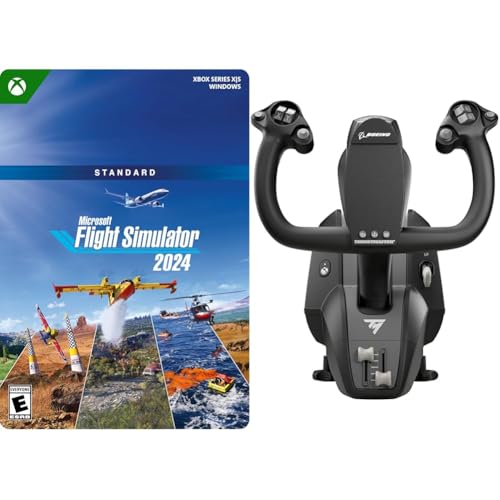
- Officially licensed Boeing-style 1:1 yoke
- Pendular mechanism with 8.3-inch travel
- Includes Microsoft Flight Simulator 2024 Standard code
Best For: Boeing fans who want a realistic yoke bundle
Force Feedback Upgrade
MOZA AY210 Force Feedback Yoke Base

- Dual high-torque servo motors with force feedback
- 9Nm torque, 210N push force, 150mm travel
- Aircraft-grade aluminum body with quick-release
Best For: PC sim pilots who want high-end force feedback
All-in-One Console Choice
Turtle Beach VelocityOne Flight Control System

- Yoke, throttle quadrant, trim wheel, and rudder controls
- 180° rotation with hall effect sensor
- Works with Xbox Series X|S, Xbox One, and PC
Best For: Xbox and PC users who want a full control system in one box
Classic Starter Yoke – Logitech G PRO Flight Yoke System
If you want a practical entry point into flight simulator yokes under 1000, the Logitech G PRO Flight Yoke System delivers a familiar layout with plenty of programmable controls. It’s aimed at sim pilots who want realistic yoke handling, a separate throttle quadrant, and easy desk mounting without overcomplicating the setup.
Best For: New pilots and experienced sim users who want a straightforward yoke-and-throttle setup with strong programmability.
Pros:
- Realistic yoke controls that help build muscle memory
- 54+ programmable controls via POV hat, buttons, and mode switch
- Includes a separate throttle quadrant and two desk clamps
- Compatible with Windows 11/10/8.1/7 and major flight sims
Cons:
- Requires optional software download for some simulators
- Designed for Windows PCs only
This is a solid all-around choice if you want a recognizable flight-sim control layout and a lot of inputs at your fingertips. It focuses on usability and control depth rather than premium force feedback or a highly specialized airframe replica.
Force-Feedback Premium Pick – MOZA AY210 Force Feedback Yoke Bundle
For flight simulator yokes under 1000 that lean into realism, the MOZA AY210 stands out with force feedback and a commercial-grade feel. Its 9Nm force feedback, steel-reinforced chassis, and software-driven control mapping make it a strong pick for pilots who want a more immersive, mechanically robust yoke.
Best For: Sim pilots who want force feedback, strong structural rigidity, and advanced control customization.
Pros:
- 9Nm force feedback for more immersive control feel
- Reinforced high-strength steel chassis for rigidity and durability
- Supports up to 34 inputs, including axis-to-button mapping
- MOZA Cockpit software adds mode switching and RGB customization
Cons:
- PC only, so it is not for console setups
- More advanced than a basic starter yoke
This is the most high-tech option in the group, especially if you value immersion and software control as much as hardware feel. It’s built for users who want a serious sim cockpit upgrade rather than a simple plug-and-fly yoke.
Premium All-In-One Yoke – Honeycomb Alpha Flight Controls Yoke & Switch Panel
If you’re comparing flight simulator yokes under 1000 and want an all-in-one control hub, the Honeycomb Alpha Flight Controls Yoke & Switch Panel is a standout. It combines a smooth 180° yoke with an integrated switch panel, giving you a more complete cockpit feel without needing a lot of add-ons.
Best For: PC sim pilots who want a durable yoke with built-in switches and a cockpit-style layout.
Pros:
- 180° rotation with a solid steel shaft and linear ball bearings
- Self-centering design with minimal deadzone for accurate control
- Integrated switch panel with ignition, avionics, lights, and more
- Dual mounting options: heavy-duty clamps or micro-suction pad
Cons:
- PC only
- Switch-panel style setup may be more than some casual users need
This is a strong pick if you want a polished, cockpit-like experience and appreciate having core switches built in. It’s especially appealing for sim pilots who value smooth handling, durable construction, and fewer separate accessories.
Boeing Replica Flight Pack – Thrustmaster TCA Yoke & Quadrant Boeing Edition
For buyers narrowing down flight simulator yokes under 1000, the Thrustmaster TCA Yoke & Quadrant Boeing Edition is the most airliner-specific option here. Its 1:1 Boeing 787-inspired design, pendular motion, and bundled throttle quadrant make it a compelling fit for anyone building a Boeing-style cockpit.
Best For: Boeing fans and MSFS users who want a licensed airliner-inspired yoke and throttle bundle.
Pros:
- Officially licensed Boeing design with 1:1 scale styling
- Pendul_R mechanism with an 8.3-inch range for smooth motion
- Adjustable spring tension for more precise control feel
- Includes throttle quadrant with autopilot functions and 35 action buttons
Cons:
- Best suited to Boeing-style airline setups rather than general-purpose use
- Rudder pedals are sold separately
This bundle is especially attractive if you want your controls to match the look and workflow of a Boeing airliner cockpit. It blends realism, extras, and compatibility with PC and Xbox, making it a flexible choice for serious airline-sim sessions.
Pro-Grade Starter Bundle – Logitech G Pro Flight Yoke System + Rudder Pedals
For buyers comparing flight simulator yokes under 1000, this Logitech G Pro bundle covers the core controls many setups need in one package. You get a realistic yoke plus self-centering rudder pedals, making it a practical way to add more complete aircraft control without piecing together separate components.
Best For: Sim pilots who want a ready-to-use yoke-and-pedals setup with plenty of programmable controls.
Pros:
- Includes both the G PRO Flight Yoke System and G Pro Flight Rudder Pedals.
- Yoke offers a POV hat, 14 buttons, and a 3-position mode switch for up to 54 programmable controls.
- Rudder pedals are self-centering and include differential toe brakes for runway handling.
- Adjustable foot rests with non-slip materials help fit a wide range of sizes.
Cons:
- It is a bundle, so it may be more than you need if you only want a yoke.
- Designed for Windows, which narrows platform flexibility.
This is a strong practical pick if you want a more complete desktop flight control setup rather than a standalone yoke. The mix of realism, button count, and pedal control makes it well suited to training muscle memory and handling basic sim flying with more precision.
Entry-Level Sim Control – Honeycomb Alpha LITE
The Honeycomb Alpha LITE is aimed at buyers looking for flight simulator yokes under 1000 with a simpler, more focused control layout. Its 180° yoke rotation, self-centering mechanism, and minimal dead zone make it a straightforward option for PC sim users who want realistic basics without a crowded control panel.
Best For: Entry-level sim pilots who want an approachable yoke for MSFS 20 and 24 on PC.
Pros:
- 180° yoke rotation with self-centering control and minimal dead zone.
- Essential inputs are easy to reach, including POV and rocker switches plus programmable buttons.
- Built with high-quality materials and precision components for a smooth-running feel.
- Compatible with MSFS 20 and 24 for PC.
Cons:
- It focuses on the essentials, so advanced control options are limited.
- PC-only compatibility may not suit multi-platform shoppers.
If you want a clean, uncomplicated yoke to start flying right away, the Alpha LITE fits that job well. It keeps the control set lean while still emphasizing realistic movement and solid build quality for long-term use.
Force-Feedback Upgrade Pick – MOZA AY90 FFB Yoke Base
Among flight simulator yokes under 1000, the MOZA AY90 stands out for buyers who specifically want force feedback rather than a traditional passive yoke base. It delivers 4.2 Nm of roll torque, up to 90 N of push-pull force, 180° of roll rotation, and 95 mm of pitch travel, giving PC sim users a much more active control feel.
Best For: PC sim pilots who want a force-feedback yoke base with realistic resistance and motion.
Pros:
- Force feedback design adds active resistance and a more immersive control feel.
- Provides 4.2 Nm of roll torque and up to 90 N of push-pull force.
- 180° roll rotation and 95 mm of pitch travel support precise control.
- USB connectivity and corded power keep the setup straightforward for PC use.
Cons:
- It is a yoke base only, so it is not a full control system on its own.
- PC compatibility limits it to desktop sim setups.
This is the most specialized option in the group and makes sense if you want the tactile feedback to be the headline feature. For PC users building a serious sim rig, the AY90 offers the most advanced control experience here.
Bundle Pick – Thrustmaster Boeing Yoke + MSFS 2024 Bundle
If you’re comparing flight simulator yokes under 1000, this bundle combines an officially licensed Boeing-style yoke with Microsoft Flight Simulator 2024 Standard. The yoke uses a 1:1 replica design inspired by the Boeing 787 and a pendular mechanism for smooth, aircraft-like motion, while the sim code adds over 65 aircraft and 150 handcrafted airports.
Best For: Boeing fans who want a realistic yoke bundle and also need the sim included.
Pros:
- Officially licensed Boeing yoke with 1:1 ergonomic replica styling
- Pendular mechanism provides an 8.3-inch / 21-cm range of travel
- Suspended mechanism with adjustable springs for smoother, more controlled motion
- Includes Microsoft Flight Simulator 2024 Standard digital code
Cons:
- Bundle includes a digital code, not a separate physical game disc
- Focuses on Boeing-style controls, so it may not suit every cockpit preference
This is a strong pick if you want a themed setup that feels purpose-built for Boeing-style flying. The metal internal structure also adds durability, making it a practical long-term choice in this price range.
Force Feedback Upgrade – MOZA AY210 Force Feedback Yoke Base
For flight simulator yokes under 1000, the MOZA AY210 stands out if you want force feedback instead of a traditional spring-only feel. Its dual high-torque servo motors, 9Nm torque, and 210N push force are designed to deliver highly detailed feedback, while the 150mm travel distance gives you extra control and precision.
Best For: PC sim pilots who want high-end force feedback and customizable controls.
Pros:
- Dual high-torque servo motors for smooth force feedback
- 9Nm torque and 210N push force for detailed response
- 150mm travel distance for greater control and precision
- Aircraft-grade aluminum body with quick-release system
Cons:
- Listed as PC compatible, so it is not the broadest console option here
- Sold as a yoke base, so you’ll want to factor in the rest of your setup
This is the most advanced control base in the group and is aimed at users who care about feel as much as features. If you want a more immersive, highly adjustable desktop setup, it is the most performance-focused option here.
All-in-One Console Choice – Turtle Beach VelocityOne Flight Control System
If you want flight simulator yokes under 1000 with fewer add-ons to buy, the Turtle Beach VelocityOne Flight is the most complete all-in-one system here. It combines the yoke, throttle quadrant, trim wheel, and rudder controls, plus a full-color flight management display and a status indicator panel for PC.
Best For: Xbox and PC users who want a full control system in one box.
Pros:
- Includes yoke, throttle quadrant, trim wheel, and rudder controls
- True-to-life 180° yoke rotation with hall effect sensor
- 12 analog axes plus multiple switches and HAT controls
- Designed for Xbox Series X|S, Xbox One, and Windows 10/11 PCs
Cons:
- Large footprint may take more desk space than a simpler yoke
- Built-in complexity may be more than casual flyers need
This is the easiest recommendation for players who want a single, feature-rich cockpit control set. It offers broad platform support and enough controls to handle a serious sim setup without piecing everything together separately.
How We Picked These Flight Simulator Yokes Under 1000
We focused on yokes that offer the strongest mix of realism, durability, and usability without pushing past the budget ceiling. Priority went to smooth control feel, reliable construction, broad simulator compatibility, and included extras such as throttle quadrants or switch panels when they improved overall value.
For this roundup, we also considered whether each system is a better fit for casual sim pilots, serious home cockpit builders, or users who want an upgrade path over time.
Quick Comparison: What Matters Most
When comparing Flight Simulator Yokes Under 1000, the biggest differences usually come down to force feedback versus standard spring tension, bundled controls, and platform support. Some products are simple and dependable, while others are designed to deliver a more premium, immersive feel with more advanced hardware.
Standard Yoke Vs Force Feedback
Standard yokes tend to be simpler, more affordable, and easier to set up. Force feedback models can add a more dynamic and realistic response, but they often require more careful setup and may be better suited to dedicated PC sim users.
Bundles Vs Standalone Yokes
Bundles can be the better value if you still need throttle controls or rudder pedals. Standalone yokes may be smarter if you already own peripherals or want to build your setup piece by piece.
Key Buying Factors for Flight Simulator Yokes Under 1000
Compatibility: Check whether the yoke works with your platform, especially if you fly on Xbox, PC, or both. Not every model supports every sim setup equally well.
Control layout: Look for the switches, hats, and buttons you actually use in flight. A well-placed control set can reduce the need to reach for the keyboard or mouse.
Build quality: Metal internals, firm mounting, and a stable base can improve long-term reliability and help the yoke feel more precise.
Included accessories: Bundles with throttles, pedals, or switch panels can save money and simplify your first cockpit build.
Desk space and mounting: Measure before buying. Some yokes need more depth or a stronger clamp setup than you might expect.
Who Should Buy Which Flight Simulator Yokes Under 1000?
If you want the easiest all-in-one upgrade, choose a bundle that includes the controls you still need. If realism is your top priority, a force feedback option may be worth the extra complexity. If you fly on console, prioritize confirmed compatibility first. If you are building a more advanced cockpit over time, a dependable standalone yoke with room to expand is often the best long-term choice.
In short, the best Flight Simulator Yokes Under 1000 depend on whether you value immersion, platform flexibility, or all-in-one convenience most. Start with your sim platform and control needs, then choose the setup that matches how you actually fly.