A mini PC with a neural processing unit (NPU) can run supported AI features locally while keeping your desk clear. But an NPU alone does not determine how well a system handles your apps, games, or multitasking.
These 10 picks span Intel and AMD platforms, with different strengths in memory, connectivity, graphics, and business features. Use the guide below to narrow the field before comparing the individual models.
Best 10 Mini PC with Npu Picks for 2026
Best for Modern Office Setups

- Core Ultra 7 255H with NPU
- 32GB RAM and 1TB SSD
- Dual Thunderbolt 4 and Wi-Fi 7
Best For: Compact, connected office workstations
Best for eGPU Expansion

- Core Ultra 5 125U with Intel AI Boost
- OCuLink for compatible eGPU setups
- Three M.2 slots and dual 2.5GbE
Best For: Expandable eGPU and networking setups
Best for Creative Multitasking

- Core Ultra 9 185H with NPU
- 1TB SSD; 16GB RAM included
- Dual USB4 and three-year limited warranty
Best For: Multi-display creative and AI-assisted work
Everyday AI Value

- Core Ultra 5 with Intel AI Boost NPU
- 16GB onboard LPDDR5 and 512GB SSD
- Three display connections; 2.5GbE and WiFi 6
Best For: Everyday office work and multi-monitor desks
Expandable AI Workstation

- Ryzen AI 9 HX 470 with up to 55-TOPS NPU
- 32GB DDR5, 1TB SSD, and three M.2 slots
- OCuLink, dual 2.5GbE, and WiFi 7
Best For: Local AI development and expandable workstation setups
Creator-Focused Intel Pick

- Core Ultra 9 with 13-TOPS dedicated NPU
- 32GB upgradeable DDR5 and 1TB SSD
- Four-display support and three-year warranty
Best For: Intel-based creative work and multi-display productivity
Compact All-Rounder

- Ryzen 7 8845HS with integrated NPU
- 16GB DDR5 and 1TB PCIe 4.0 SSD
- USB4 and three-display support
Best For: Space-saving home offices and multimonitor desks
Business Connectivity Pick
- XDNA2 NPU rated up to 50 TOPS
- Up to four 4K displays
- Dual 2.5G LAN and Wi-Fi 7
Best For: Business desks needing strong connectivity and multiple displays
Ports and Networking Pick

- Ryzen AI NPU rated up to 16 TOPS
- Dual USB4 and dual 2.5Gbps LAN
- 16GB single-module DDR5 and 1TB SSD
Best For: Wired-network-heavy, multimonitor workstations
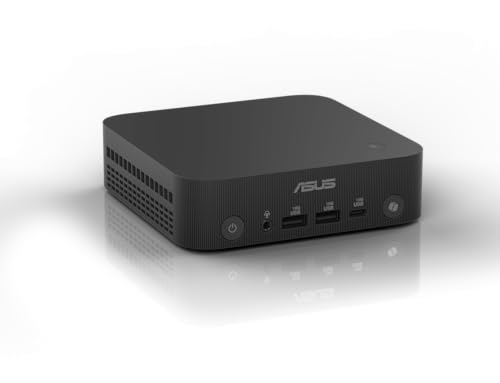
Best for Modern Office Setups – ASUS NUC 15 Pro AI
If you want a mini pc with npu for a space-conscious workstation, the ASUS NUC 15 Pro AI pairs a Core Ultra 7 255H with 32GB of DDR5 memory and a 1TB SSD. Its compact chassis and broad connectivity suit a desk with several peripherals.
Best For: Office users who want a compact, well-connected PC for multitasking and compatible AI-assisted applications.
Pros:
- Core Ultra 7 255H includes a dedicated NPU for supported AI workloads.
- Two Thunderbolt 4 ports, HDMI 2.1, 2.5GbE, and Wi-Fi 7 offer versatile connectivity.
- 32GB of RAM and a 1TB SSD are included; the chassis supports VESA mounting.
Cons:
- Just one HDMI port, so additional display connections rely on Thunderbolt 4.
- Check the configuration and upgrade limits before buying; the supplied memory and storage descriptions are not entirely clear.
This is the tidy-workstation pick: prioritize its ports, included memory, and small footprint rather than assuming every AI app will use the NPU.
Best for eGPU Expansion – GMKtec K15 512GB
The GMKtec K15 is a mini pc with npu for buyers who also want an OCuLink connection for a compatible external-GPU setup. This configuration combines a Core Ultra 5 125U, 32GB of DDR5 memory, and a 512GB PCIe 4.0 SSD.
Best For: Tinkerers building an expandable compact PC with external-GPU and multi-drive options.
Pros:
- Core Ultra 5 125U includes Intel AI Boost for compatible NPU-accelerated tasks.
- OCuLink offers a dedicated connection for a compatible eGPU setup.
- Three M.2 2280 slots, dual 2.5GbE ports, and Wi-Fi 6E add expansion and networking flexibility.
Cons:
- The included 512GB SSD may fill quickly if you keep large games or media projects locally.
- External-GPU use requires additional compatible hardware.
Choose this version when OCuLink and dual networking matter more than generous storage out of the box. Confirm your intended eGPU hardware before committing to the setup.
Best for Creative Multitasking – GEEKOM GT13 MAX
The GEEKOM GT13 MAX is a mini pc with npu aimed at buyers who need strong processor performance alongside AI-assisted workflows. Its Core Ultra 9 185H includes an Intel AI Boost NPU, while the listed configuration supplies 16GB of DDR5 memory and a 1TB SSD.
Best For: Creators and office users running compatible AI features, multiple displays, and demanding everyday applications.
Pros:
- Core Ultra 9 185H combines 16 cores with an NPU rated at up to 11 TOPS.
- Dual USB4, dual HDMI, and Mini DisplayPort support flexible multi-display setups.
- Wi-Fi 7, dual 2.5G LAN, a 1TB SSD, and a three-year limited warranty.
Cons:
- The included 16GB of RAM is less than the 32GB supplied with the other PCs here.
- Local AI model capability depends on software and memory needs; the NPU alone does not guarantee support.
Its processor and port selection make a strong case for a compact creative workstation. Budget for a memory upgrade if your projects routinely exceed the included 16GB.
Best for Larger Included Storage – GMKtec K15 1TB
This GMKtec K15 configuration is a mini pc with npu that includes 32GB of DDR5 memory and a 1TB PCIe 4.0 SSD. The Core Ultra 5 125U brings Intel AI Boost, while OCuLink and multiple M.2 slots leave room for a more elaborate setup.
Best For: Buyers who want a 1TB starting drive plus room to explore compatible eGPU or storage expansion.
Pros:
- Intel AI Boost NPU supports compatible accelerated AI tasks.
- 32GB RAM and a 1TB SSD provide a practical starting configuration.
- OCuLink, three listed M.2 slots, and multi-display connections support expansion.
Cons:
- An OCuLink eGPU requires separately purchased compatible hardware.
- The listing gives conflicting graphics, networking, cooling, and maximum-storage details; verify the exact configuration before purchase.
Compared with the 512GB K15 listed here, this version’s clearest advantage is its larger included SSD. Treat the more ambitious specifications as items to confirm with the seller.
Everyday AI Value – Bmax B11 Pro Core Ultra 5
The Bmax B11 Pro is a mini pc with npu acceleration aimed at everyday office work and light creative tasks. Its Core Ultra 5 115U, 16GB of onboard LPDDR5 memory, and 512GB SSD make it a compact option for a multi-monitor desk.
Best For: Office users who want local AI features and extensive display connectivity in a small desktop.
Pros:
- Intel AI Boost NPU supports compatible on-device AI tasks.
- HDMI 2.1, DisplayPort 2.1, and full-function USB-C support three display connections.
- Includes Windows 11 Pro, 2.5GbE, and WiFi 6.
Cons:
- Onboard memory is soldered, limiting RAM upgrade options.
- Integrated graphics are better suited to productivity and light creative work than demanding gaming.
Choose this model for a tidy productivity setup, particularly if three screens matter more than gaming performance or memory expandability.
The BOSGAME VTA-439 is a mini pc with npu hardware for buyers planning local AI workflows alongside development or creative work. Its Ryzen AI 9 HX 470 includes a dedicated NPU rated up to 55 TOPS, while 32GB of DDR5 and a 1TB PCIe 4.0 SSD provide a substantial starting configuration.
Best For: Developers and power users who need local AI acceleration, storage expansion, and flexible networking.
Pros:
- Dedicated XDNA 2 NPU and 12-core processor target demanding AI and multitasking workloads.
- Three PCIe 4.0 M.2 slots and upgradeable DDR5 offer room to expand.
- OCuLink supports an external GPU; dual 2.5GbE and WiFi 7 suit advanced network setups.
Cons:
- Higher-end graphics through OCuLink require a separate external GPU setup.
- Real-world local AI capability depends on software support and available system resources.
This is the strongest fit of the three for buyers prioritizing an upgrade path, especially if an eGPU or additional SSDs may be added later.
The GEEKOM IT15 is a mini pc with npu acceleration built around the Intel Core Ultra 9 285H. It pairs 32GB of upgradeable DDR5 memory with a 1TB NVMe Gen 4 SSD, making it a practical starting point for coding, content creation, and busy office workflows.
Best For: Creators and professionals who want a compact Intel workstation with four-display support.
Pros:
- Intel Core Ultra 9 combines CPU, Arc graphics, and a dedicated NPU for compatible AI workflows.
- 32GB DDR5 is upgradeable, and the included SSD offers 1TB of storage.
- Dual HDMI and dual USB4 support up to four displays; WiFi 7 and 2.5GbE add fast connectivity.
- Backed by a three-year warranty.
Cons:
- The stated 99 TOPS is combined CPU, GPU, and NPU performance; the NPU itself is rated at 13 TOPS.
- Demanding games or GPU-heavy work may call for an external GPU.
The IT15 makes sense when Intel-based creative productivity and a broad display setup are priorities; compare the dedicated NPU rating, rather than the combined TOPS figure, when judging AI hardware.
Compact All-Rounder – LTC Ryzen 7 8845HS Mini PC
If you want a mini pc with npu capability without giving up everyday desktop flexibility, the LTC pairs a Ryzen 7 8845HS with Radeon 780M graphics, 16GB of DDR5 memory, and a 1TB PCIe 4.0 SSD. Its 0.5L chassis is especially appealing where desk space is tight.
Best For: Home offices and compact workstations that need local AI acceleration, multiple displays, and fast external-device connections.
Pros:
- Ryzen 7 8845HS includes an integrated NPU and eight CPU cores.
- USB4, HDMI 2.1, and DisplayPort 1.4 support a three-monitor setup.
- Includes Wi-Fi 6, 2.5Gbps Ethernet, a 1TB SSD, and 16GB DDR5 RAM.
Cons:
- The supplied specifications conflict on maximum RAM: the bullets say 32GB, while the details list 16GB.
- NPU performance is not quantified in the supplied notes.
The LTC is a practical choice if a small footprint and varied display connections matter most. Confirm the supported memory upgrade limit before buying if expansion is part of your plan.
Business Connectivity Pick – ASUS ExpertCenter PN54
The ASUS ExpertCenter PN54 is a mini pc with npu features aimed at business setups: its Ryzen AI 300-series platform lists an XDNA2 NPU rated up to 50 TOPS. A 0.6L chassis and support for up to four 4K displays make it well suited to a crowded desk.
Best For: Business users who prioritize AI capability, multiple monitors, and extensive wired networking.
Pros:
- XDNA2 NPU is listed at up to 50 TOPS.
- Supports up to four 4K displays and includes six USB ports.
- Dual 2.5G LAN, Wi-Fi 7, and Bluetooth 5.4 offer flexible connectivity.
- Includes a three-year manufacturer warranty and a tool-free chassis design.
Cons:
- The supplied listing conflicts on processor identity: the title says Ryzen AI 7, while the details identify a Ryzen AI 5 340.
- Memory and storage specifications in the supplied details are inconsistent; confirm the exact configuration before ordering.
The PN54 stands out for its networking and display options, but the configuration discrepancies matter. Verify the CPU, installed RAM, and storage with the seller rather than relying on the headline specifications alone.
Ports and Networking Pick – Glorlin Ryzen 7 Pro 8845HS
For buyers seeking a mini pc with npu hardware and plenty of physical connections, the Glorlin combines a Ryzen 7 Pro 8845HS with a Ryzen AI NPU listed at up to 16 TOPS. It also ships with 16GB DDR5 memory and a 1TB PCIe 4.0 SSD.
Best For: Workstations that need two wired network ports, USB4 peripherals, and several monitors alongside local AI acceleration.
Pros:
- Dedicated Ryzen AI NPU is listed at up to 16 TOPS.
- Two USB4 Type-C ports, HDMI 2.1, and DisplayPort 1.4 support up to four 4K displays.
- Dual 2.5Gbps Ethernet ports suit wired-network-heavy setups.
- Includes Wi-Fi 6, Bluetooth 5.3, and a 1TB SSD.
Cons:
- The included 16GB RAM is a single module, so it does not arrive in a dual-channel configuration.
- The notes do not clearly name the preinstalled operating system in the product bullets.
The Glorlin makes the most sense when its unusually broad port selection will be put to use. If memory bandwidth matters to your workload, account for the single-module starting configuration.
How We Picked the Best Mini PC with Npu
We focused on compact desktops with a listed NPU and compared their processors, installed RAM and storage, graphics, connectivity, and intended use. The selection includes mainstream work PCs, business-oriented systems, and options with faster graphics or external expansion. Listed AI performance figures can use different measurement methods, so we did not treat a higher TOPS number as a stand-alone ranking of overall speed.
Quick Comparison: Where to Start
For a business-focused setup, start with the ASUS ExpertCenter PN54; confirm its exact configuration before ordering. The ASUS NUC 15 Pro AI, GEEKOM IT15, and GEEKOM GT13 MAX are worth comparing if you want an Intel-based productivity PC and are weighing processor and memory options. The BOSGAME VTA-439 offers a Ryzen AI platform for buyers interested in AMD’s newer AI features.
For flexible connectivity, check the GMKtec K15 OCuLink model if an external GPU is part of your plan; do not assume the other K15 listing has the same port. The LTC and Glorlin systems pair Ryzen 7 8845HS processors with Radeon 780M graphics, making them alternatives for everyday work and lighter graphics tasks. The Bmax is another option to compare on price, but verify its exact processor, graphics, and memory specifications with the seller.
Key Buying Factors for a Mini PC with Npu
Software Compatibility Comes First
An NPU helps only when the feature or application supports that accelerator. If you need a specific Windows AI feature, check its current hardware and operating-system requirements rather than assuming every AI-labeled PC qualifies. Likewise, confirm that your editing, conferencing, or development tools can use the installed NPU.
Look Beyond AI Performance Claims
CPU performance still affects responsiveness and sustained workloads, while the integrated GPU matters for displays, creative apps, and games. TOPS claims may refer to the NPU alone or combine processing components. Compare like-for-like figures only, and check independent benchmarks for the tasks you actually run.
Check Memory, Ports, and Upgrade Paths
For heavier multitasking, 32GB of RAM offers more headroom than 16GB; also check whether memory is expandable. Confirm the number of display outputs, USB4 or other high-speed ports, wired networking, and wireless connectivity against your peripherals. If you plan to add an external GPU, verify the exact model’s OCuLink support and the separate hardware it requires. Review SSD capacity, available storage slots, cooling, and warranty terms before paying.
Who Should Buy Which Mini PC with Npu?
Choose a business-oriented model if manageability, deployment, and vendor support outweigh graphics performance. Pick a well-equipped Intel or AMD productivity system if you mainly want a responsive, space-saving desktop with room for supported local AI tools. Consider Radeon 780M-based options for lighter graphics use, or an OCuLink-equipped K15 if you are deliberately building around an external GPU. In every case, buy for the software and ports you need today—not an unverified promise that an NPU will accelerate every AI task.