Choosing the right flight sim yoke can make flying feel far more intuitive, accurate, and enjoyable. If you are shopping for flight simulator yokes under 200, the best options balance realistic control feel, solid build quality, and broad compatibility.
This roundup focuses on the most practical picks for home cockpits, desk setups, and mixed-platform simmers who want better immersion without overspending.
Best 10 Flight Simulator Yokes Under 200 Picks for 2026
Entry-Level Pick

- 180° rotation with self-centering control
- Essential switches and programmable buttons
- Built for PC and MSFS 20/24
Best For: New sim pilots who want a straightforward yoke setup
Feature-Rich Pick
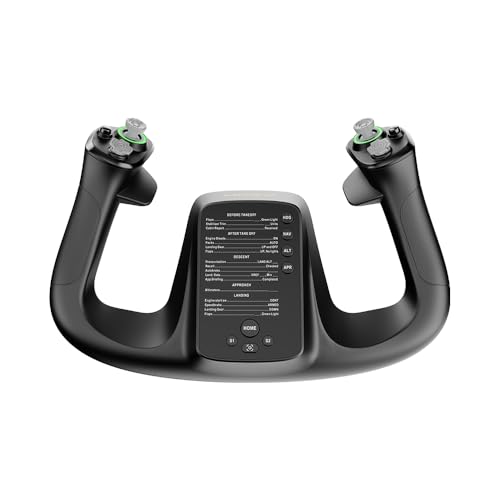
- 34 configurable inputs for detailed mapping
- Drift-free control with durable materials
- Customizable RGB lighting and quick-release design
Best For: PC pilots who want lots of controls in a compact yoke
Bundle Value Pick
Logitech G Pro Yoke & Rudder Bundle

- Yoke plus rudder pedals in one bundle
- 54+ programmable controls for flexibility
- Self-centering pedals with toe brakes
Best For: Pilots who want a fuller sim setup without buying parts separately
Premium Traditional Pick
Honeycomb Alpha Flight Controls

- 180° yoke with steel shaft and smooth bearings
- Built-in switch panel for cockpit-style control
- Clamp or micro-suction mounting options
Best For: PC flyers who want a sturdy yoke with integrated switches
Traditional Yoke Bundle
Logitech G PRO Flight Yoke System

- Realistic yoke controls for muscle memory training
- Includes throttle quadrant and desk clamps
- 54 programmable controls with mode switch and POV hat
Best For: Sim pilots wanting a full desktop yoke setup
Cockpit Frame Upgrade
Meza Simulator Panel Frame Kit

- Compatible with Logitech and Honeycomb yokes
- Pre-drilled frame supports organized cockpit builds
- Dimmable LED lighting and stable support legs
Best For: Builders wanting a cockpit frame around existing gear
All-in-One Control System
Turtle Beach VelocityOne Flight

- Yoke, throttle, trim wheel, and rudder controls in one unit
- 180° rotation with hall effect sensor
- 12 analog axes and multiple hat switches
Best For: Xbox and PC users who want an integrated control system
Premium Tech-Forward Pick

- Carbon fiber reinforced composite build
- 4.3-inch touchscreen and 26 inputs
- Hall effect thumbsticks with RGB lighting
Best For: Sim pilots wanting a modern, customizable yoke
Best Renewed Pro Setup
Logitech G PRO Flight Yoke System (Renewed)

- Renewed yoke with throttle quadrant included
- Steel shaft and secure desk clamp
- 14 buttons plus POV hat and mode switch
Best For: PC simmers building a serious cockpit setup
Best Complete Starter Bundle
Logitech G PRO Flight Yoke System

- Yoke and three-axis throttle quadrant included
- Steel shaft with two-position clamp
- Integrated USB hub and 14-button control layout
Best For: Buyers wanting a complete PC flight control bundle
Entry-Level Pick – Honeycomb Alpha LITE
If you want flight simulator yokes under 200 and prefer a simpler setup, the Honeycomb Alpha LITE focuses on the essentials. It keeps the core yoke feel with 180° rotation, self-centering action, and minimal dead zone, so it suits new sim pilots who want realistic control without extra complexity.
Best For: Entry-level PC sim pilots who want an easy-to-learn yoke with the most important controls built in.
Pros:
- 180° yoke rotation with self-centering and minimal dead zone
- Essential controls on both sides, including POV, rocker switches, and programmable buttons
- High-quality materials and precision components for smooth operation
- Compatible with MSFS 20 & 24 for PC
Cons:
- Fewer controls than more advanced yoke systems
- Designed for PC flight simulators, so platform support is limited
As a budget-minded first yoke, the Alpha LITE keeps the setup focused on what matters most for basic flying and smooth practice. It is a practical choice if you want a clean upgrade path into serious sim use without loading up on extra switches.
Feature-Rich Pick – MOZA MFY Yoke
Among flight simulator yokes under 200, the MOZA MFY stands out if you want a compact, modern control layout with lots of inputs. Its PA66 composite construction, aluminum alloy quick-release design, and drift-free control aim at users who want precision and customization on PC.
Best For: PC sim pilots who want a lightweight, highly configurable yoke with a premium feel.
Pros:
- 34 configurable inputs for a wide range of flight functions
- Drift-free control for precise and accurate handling
- PA66 composite and aluminum alloy build for durability and comfort
- Customizable RGB lighting for a personalized setup
Cons:
- PC-only compatibility limits broader platform use
- Lacks the larger, traditional yoke-and-panel style of some alternatives
The MFY is a strong fit if you value adjustability and a cleaner desktop footprint over a more traditional cockpit module. It gives you plenty of controls to map, while keeping the overall package simple to use and easy to handle.
Bundle Value Pick – Logitech G Pro Yoke & Rudder Bundle
If you are comparing flight simulator yokes under 200 and want more than just a yoke, this Logitech bundle adds rudder pedals to the mix. The yoke offers realistic control with 14 buttons, a POV hat, and a 3-position mode switch, while the pedals add self-centering movement and differential toe brakes for more complete flight handling.
Best For: Sim pilots who want a more complete PC setup with yoke and pedals in one package.
Pros:
- Includes both the PRO Flight Yoke System and Pro Flight Rudder Pedals
- 54+ programmable controls across the setup
- Self-centering pedals with differential toe brakes
- Adjustable foot rests with non-slip materials
Cons:
- Bulkier setup than a standalone yoke
- Designed for Windows, so compatibility is narrower than universal USB gear
This bundle makes sense if you want to build a more realistic cockpit feel without piecing together separate components. It is especially appealing for users who value control depth and rudder precision right from the start.
Premium Traditional Pick – Honeycomb Alpha Flight Controls
For buyers searching for flight simulator yokes under 200, the Honeycomb Alpha Flight Controls remains a strong traditional option thanks to its 180° rotation, steel shaft, and smooth self-centering feel. It also adds an integrated switch panel, which makes it a good choice if you want yoke and cockpit-style toggles in one unit.
Best For: PC sim enthusiasts who want a classic yoke with built-in switches and broad cockpit-style control.
Pros:
- 180° rotation with a steel shaft and linear ball bearings
- Integrated switch panel with main, alternator, avionics, light, and ignition controls
- 33 buttons and switches, including an 8-way POV and multiple rockers
- Includes clamps and a micro-suction mounting option
Cons:
- Larger and heavier than simpler entry-level yokes
- More features may be more than casual users need
This is the most cockpit-like option in the group, with enough built-in switching to reduce reliance on keyboard commands. It is a smart pick if you want a sturdy, all-in-one yoke setup and are comfortable with a fuller desktop footprint.
Traditional Yoke Bundle – Logitech G PRO Flight Yoke System
If you’re shopping for flight simulator yokes under 200, this Logitech setup is built around realistic control feel and a surprisingly broad control layout. It includes both a yoke and throttle quadrant, plus a 3-position mode switch, POV hat, and 14 buttons for mapping more functions without reaching for the keyboard.
Best For: Sim pilots who want a more realistic, full-featured desktop yoke setup for training muscle memory.
Pros:
- Realistic yoke controls help new pilots and experienced simmers build muscle memory.
- Includes a throttle quadrant, giving you a more complete flight control layout.
- Up to 54 programmable controls with POV hat, 14 buttons, and 3-position mode switch.
- Desk clamps are included for secure mounting on a range of desks.
Cons:
- Requires optional software download for Microsoft Flight Simulator, FSX, X-Plane 10, and Prepar3D.
- It is a corded setup, so cable management matters on smaller desks.
Overall, this is the most traditional yoke-first option here, with enough built-in controls to keep most flight functions close at hand. For buyers who want a familiar simulation layout rather than an all-in-one console-style system, it’s a strong pick.
Cockpit Frame Upgrade – Meza Simulator Panel Frame Kit
For buyers comparing flight simulator yokes under 200, this Meza panel is less about flight controls and more about organizing a cockpit-style setup around the gear you already own. It’s a pre-cut mounting frame compatible with Logitech yokes, throttle quadrants, and Honeycomb yokes, with space for up to two throttle quadrants.
Best For: Flight sim users who want a sturdier, cleaner cockpit frame for existing compatible controls.
Pros:
- Compatible with Logitech flight simulator yokes, throttle quadrants, flight panels, and Honeycomb yokes.
- Integrated dimmable LED ambient lighting adds cockpit-style visibility.
- Pre-drilled mounting positions help organize instruments and controls.
- Rubber-tipped clamps and supporting legs are designed for stable placement.
Cons:
- Frame only; yokes, throttle quadrants, and instruments are not included.
- Best suited to buyers building a cockpit rather than replacing a yoke itself.
If you already own compatible hardware and want a cleaner layout, this kit can improve the overall experience without changing your controls. It’s a niche buy, but a practical one for cockpit builders.
All-in-One Control System – Turtle Beach VelocityOne Flight
If you want flight simulator yokes under 200-style value in a single unit, the Turtle Beach VelocityOne Flight stands out as an all-in-one control system. It combines a yoke, throttle quadrant, trim wheel, and rudder/brake controls, along with a full-color display and multiple hats and analog axes for detailed setup.
Best For: Xbox and Windows sim pilots who want an integrated yoke system with lots of built-in controls.
Pros:
- All-in-one design includes yoke, throttle quadrant, trim wheel, and rudder controls.
- 180° yoke rotation with a non-contact hall effect sensor for true-to-life movement.
- 12 analog axes, two POV switches, and two 4-way HAT switches offer deep control mapping.
- Built for Xbox and Windows titles, with a secure clamping system for home setups.
Cons:
- Large, feature-rich design may take more desk space than simpler yokes.
- Its control density may be more than casual flyers need.
This is the most feature-packed option in the group, especially if you play on Xbox as well as PC. For simmers who want fewer add-ons and more controls in one package, it’s easy to recommend.
Premium Tech-Forward Pick – MOZA MFY Pro Yoke Handle
If you want flight simulator yokes under 200 that feel more like a modern cockpit upgrade than a basic input device, the MOZA MFY Pro stands out for its feature set. It combines a carbon fiber reinforced composite body, a 4.3-inch touchscreen, and 26 programmable inputs, making it a strong choice for sim pilots who want immersion and customization in one controller.
Best For: Sim pilots who want a feature-rich yoke with a touchscreen and lots of programmable controls.
Pros:
- Carbon fiber reinforced composite construction with a comfortable, secure grip
- 4.3-inch integrated touchscreen for flight info, shortcuts, and checklists
- 26 programmable inputs plus configurable thumbsticks for flexible setups
- Hall effect thumbsticks and customizable RGB lighting add precision and personalization
Cons:
- PC only, so it is not a cross-platform option
- Advanced features may be more than casual users need
- Future firmware updates are mentioned for some interface enhancements
Overall, the MFY Pro is the most modern and feature-packed option here, especially if you value cockpit-style immersion and control customization. It is best suited to users who will actually use the touchscreen and extra inputs rather than just basic pitch-and-roll control.
Best Renewed Pro Setup – Logitech G PRO Flight Yoke System (Renewed)
Among flight simulator yokes under 200, this renewed Logitech G PRO Flight Yoke System is aimed at users who want a more complete control setup without starting from scratch. The package pairs a professional-style yoke with a throttle quadrant, steel shaft, and flexible mounting options, giving it a practical edge for simmers building a serious PC cockpit.
Best For: PC simmers who want a yoke-and-throttle combo with lots of controls and solid mounting flexibility.
Pros:
- Steel yoke shaft for smooth, accurate control
- Includes a throttle quadrant for a more complete flight setup
- 14 buttons, POV hat, and 3-position mode switch for extensive programmability
- Two-position desk clamp helps keep the controls secure
Cons:
- Renewed condition may not appeal to buyers wanting brand-new hardware
- PC-focused compatibility limits flexibility for other platforms
- Bulkier setup than a standalone yoke
This is a strong value option if you want more than a basic yoke and do not mind buying renewed gear. The included throttle quadrant and broad control layout make it a better fit for dedicated sim rigs than for casual, occasional flying.
Best Complete Starter Bundle – Logitech G PRO Flight Yoke System
If you are comparing flight simulator yokes under 200 and want a ready-to-use bundle, the Logitech G PRO Flight Yoke System remains a practical pick. It includes the yoke, a separate three-axis throttle quadrant, a steel shaft, and an integrated USB hub, so you get a fuller control setup without piecing everything together.
Best For: Sim pilots who want a bundled yoke-and-throttle package with straightforward PC compatibility.
Pros:
- Includes both the yoke and a separate three-axis throttle quadrant
- Steel yoke shaft and two-position clamp support stable control
- Integrated USB 2.0 port hub adds convenience
- 14 buttons, POV hat, and 3-position mode switch expand controls
Cons:
- Larger and heavier than a simple standalone yoke
- Older design may feel less premium than newer feature-rich models
- PC-only compatibility narrows its audience
This bundle is a sensible choice if you want a proven yoke setup that covers the basics well and comes with throttle hardware right away. It is especially appealing for buyers who care more about a complete package than flashy extras.
How We Picked These Flight Simulator Yokes Under 200
We focused on value, control feel, platform support, mounting flexibility, and whether each setup makes sense for everyday sim flying. For Flight Simulator Yokes Under 200, the goal is not just finding the cheapest option, but finding the one that gives you reliable pitch and roll control, usable buttons, and a setup that fits your sim space.
We also looked at compatibility with popular PC sim titles, support for Xbox where relevant, and whether the system includes enough controls to reduce keyboard use during flight.
Quick Comparison: What Matters Most
Some yokes emphasize realism and modular expansion, while others focus on convenience and out-of-box usability. In practice, the main trade-offs are build feel, included throttle controls, rudder support, and how much desk space the system needs.
If you want a simple upgrade from a joystick, prioritize a stable yoke with good centering and enough programmable inputs. If you are building a more complete cockpit, look for bundles or accessory options that help you expand later.
Key Buying Factors for Flight Simulator Yokes Under 200
Compatibility
Make sure the yoke works with your platform first. PC users have the widest range of choices, while Xbox compatibility can narrow the field significantly. Also check whether the product supports your preferred simulator and any required drivers or software.
Control Feel and Realism
A good yoke should have smooth travel, predictable centering, and enough resistance to feel stable during approach and landing. More buttons and switches are helpful, but they should not come at the expense of precise movement.
Included Extras
Some Flight Simulator Yokes Under 200 include throttle levers, switch panels, or bundles with rudder pedals. These extras can improve immersion and save money compared with buying each piece separately.
Desk Fit and Mounting
Check dimensions, clamp design, and whether you need a mounting kit or cockpit frame. A great yoke that feels loose on your desk will not perform well in daily use.
Who Should Buy Which Flight Simulator Yokes Under 200?
Beginners should choose the simplest reliable setup with strong compatibility and straightforward controls. PC-focused simmers who want a more complete experience should look for a yoke with a full throttle quadrant or expansion potential. Console players should narrow the list to systems with confirmed Xbox support. If you already have pedals or a cockpit frame, focus on the yoke itself and avoid paying extra for duplicate hardware.
For most buyers, the best choice is the one that fits your sim space, your platform, and your flying style. The right setup will feel natural immediately and still leave room to grow later.