Choosing the right webcam for YouTube gaming can make your stream look more polished without forcing you into a complicated setup or big budget.
Below, we focus on webcams that balance sharp image quality, smooth motion, clear audio, and practical extras that matter for gaming creators.
Best 10 Webcam for Youtube Gaming Picks for 2026
Elite 4K Streamer Pick
EMEET S600 4K Webcam for Streaming

- Sony 1/2.55'' sensor with 4K/30 or 1080P/60
- PDAF autofocus and auto light adjustment
- Dual noise-reducing mics and privacy cover
Best For: Gaming creators who want sharper 4K output and better image control
Creator-Friendly Stream Pick

- 1080p at 60 fps for smooth gaming streams
- Smart autofocus with auto-framing and exposure control
- USB-C and OBS/YouTube-friendly software support
Best For: Streamers who want smooth 1080p video with smart framing tools
Budget Light-Boost Choice

- 1080p at 60FPS for smooth streaming
- Built-in RGB fill light for darker rooms
- Autofocus, noise-canceling mic, and privacy cover
Best For: Budget-minded streamers who need built-in lighting and simple setup
Simple Plug-and-Play Pick
Logitech Brio 101 1080p Webcam

- 1080p with auto-light correction
- Built-in mic and privacy shutter
- USB-A plug-and-play setup
Best For: Gamers and casual streamers who want a simple, reliable 1080p webcam
Budget Lighted Pick
Angetube Webcam with Ring Light
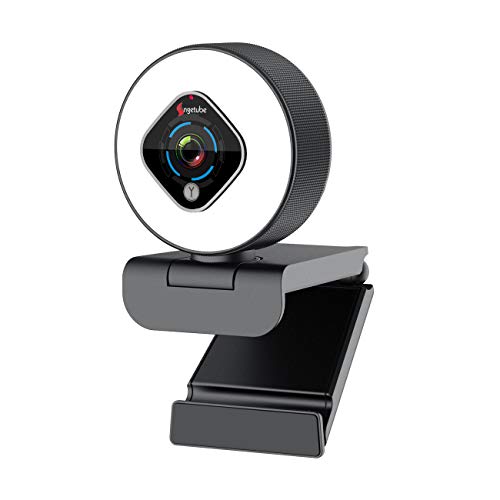
- Built-in 3-level ring light for darker rooms
- 1080p with autofocus and low-light correction
- Dual mics and adjustable base for easier use
Best For: Streamers who want simple lighting help and easy setup
Best Value
NexiGo N60 Privacy Cover Webcam

- 1080p FHD video with USB plug-and-play
- Built-in noise-canceling microphone
- Includes a privacy cover and software control
Best For: Budget buyers who want a simple, dependable streaming webcam
Best with Extra Features
Acer A640 4K Webcam for YouTube Gaming

- Sony sensor with 4K/30fps and 1080p/60fps support
- PDAF autofocus helps prevent focus hunting
- AI noise canceling mic and privacy shutter
Best For: Streamers who want sharper video and faster autofocus
Best Heavy-Duty Pick
EMEET C960 1080P Webcam for YouTube Gaming

- 1080p webcam with fixed focus and auto light adjustment
- Dual omnidirectional mics for clearer voice pickup
- USB-A and USB-C adapter support
Best For: Budget-minded streamers who want simple plug-and-play use
Wide-Angle Choice
AOC 4K Webcam for YouTube Gaming

- 4K video with a 90° wide-angle lens
- 180° tilt and 360° swivel for easier framing
- Privacy cover plus noise-reducing mic
Best For: Gamers and streamers who want a wider, flexible camera view
Elite 4K Streamer Pick – EMEET S600 4K Webcam for Streaming
If you want a webcam for youtube gaming that leans more toward creator-grade image quality, the EMEET S600 is built around a Sony 1/2.55” sensor with 4K at 30FPS or 1080P at 60FPS. It also adds PDAF autofocus, auto light balance, and a 73° field of view in 4K, so it is aimed at streamers who want a cleaner, more polished on-camera look without a complicated setup.
Best For: Gaming creators and live streamers who want sharper 4K output and stronger image tuning options.
Pros:
- 4K at 30FPS or smooth 1080P at 60FPS for flexible streaming quality
- PDAF autofocus and auto light adjustment help keep faces sharp in changing scenes
- Noise-reducing dual mics add clearer voice capture for streams and recordings
- Built-in privacy cover and sturdy design make it practical for everyday use
Cons:
- 4K resolution depends on compatible software or apps like OBS/PotPlayer
- At 4K, the field of view is fixed at 73°
- Advanced tuning through EMEETLINK is optional, but may be needed for customization
Overall, the S600 stands out if your priority is image quality first and plug-and-play convenience second. For gaming creators who want a more premium-looking stream, it offers a strong mix of resolution, autofocus, and audio cleanup.
Creator-Friendly Stream Pick – Logitech StreamCam
The Logitech StreamCam is a strong webcam for youtube gaming if you want reliable 1080p quality with a more creator-focused feature set. It records at 60 fps, uses a premium glass lens with smart autofocus, and includes auto-framing plus intelligent exposure to help keep your shot consistent while you focus on gameplay or commentary.
Best For: Streamers and content creators who want smooth 1080p video with smart framing tools.
Pros:
- Full HD 1080p at 60 fps for smooth gaming streams and videos
- Smart autofocus, auto-framing, and intelligent exposure improve presentation
- Optimized for OBS, XSplit, Streamlabs OBS, Twitch, YouTube, and more
- USB-C connection supports stable HD video delivery
Cons:
- 1080p only, with no 4K capture option
- Best suited to PC/Mac users due to its listed platform support
- Advanced features are more useful for creators than for basic calls
StreamCam is a well-rounded option for gamers who want a dependable camera for streaming and video production. It is especially appealing if you value smooth motion, consistent framing, and broad software support over higher resolution.
Budget Light-Boost Choice – NBPOWER 1080P 60FPS Webcam
If your webcam for youtube gaming needs to perform in darker rooms, the NBPOWER H782 adds a built-in fill RGB light to its 1080p 60FPS camera. It also includes autofocus, a noise-canceling microphone, and plug-and-play USB setup, making it a practical pick for gaming, streaming, and video calls without extra accessories.
Best For: Budget-minded streamers who need built-in lighting and simple setup.
Pros:
- 1080p at 60FPS delivers smooth video for streaming and gaming
- Built-in fill RGB light helps improve image clarity in low light
- Autofocus keeps faces sharp even when you move
- Noise-canceling mic and privacy cover add useful everyday features
Cons:
- Resolution stays at 1080p, so it is not a 4K model
- Built-in light may not replace a dedicated studio lighting setup
- Brand/software features are more basic than premium creator webcams
This is a sensible choice if you want a streaming webcam with helpful extras at the camera itself. The added light makes it especially appealing for rooms where your existing lighting is not ideal.
Simple Plug-and-Play Pick – Logitech Brio 101 1080p Webcam
The Logitech Brio 101 is a straightforward webcam for youtube gaming when you mainly want a clean 1080p image and easy setup. It uses auto-light balance to brighten your picture, includes a built-in mic, and connects through USB-A, so it is aimed at creators who want a dependable camera without extra complexity.
Best For: Gamers and casual streamers who want a simple, reliable 1080p webcam.
Pros:
- Full HD 1080p output with auto-light correction for a cleaner picture
- Built-in mic and privacy shutter add convenience
- USB-A plug-and-play setup keeps installation simple
- Works with Teams, Zoom, Google Meet, and more
Cons:
- Fixed focus design is less flexible than autofocus models
- No 60FPS or 4K recording listed
- Best suited to basic streaming and calls rather than advanced creator workflows
The Brio 101 is the practical pick for users who value reliability and simplicity over extra camera features. It covers the essentials well and is easy to recommend for entry-level streaming setups.
Editor’s Pick – AOC 4K 60FPS Streaming Webcam
If you want a webcam for youtube gaming that can handle both sharp face shots and smooth movement, the AOC AC410 is built for that job. It combines 4K capture with 1080p at 60fps, so it works well for creators who want cleaner detail than a basic 1080p cam while still keeping motion fluid during gameplay commentary and live reactions.
Best For: Streamers and gaming creators who want higher detail, smoother motion, and easy plug-and-play setup.
Pros:
- 4K resolution with a Sony IMX363 sensor for sharper image quality
- 1080p at 60fps helps keep movement smooth during gaming streams
- PDAF autofocus is designed to lock on quickly without focus hunting
- Includes a privacy cover, tripod, and USB A-to-C adapter
Cons:
- 75° field of view may feel narrow if you want a wider room view
- Best motion performance is at 1080p60, not 4K
Overall, this is a strong pick if your priority is a more polished webcam for youtube gaming without a complicated setup. The combination of high-resolution capture, smooth frame rate, and included accessories makes it especially practical for creators who want one camera to cover both streaming and general video calls.
Budget Lighted Pick – Angetube Webcam with Ring Light
For a webcam for youtube gaming in dim rooms, the Angetube streaming webcam stands out because it adds built-in lighting right on the camera. Its 1080p resolution, autofocus, and dual microphones make it a practical all-in-one option for creators who want better visibility and simple controls without extra gear.
Best For: Streamers who need built-in lighting and a straightforward plug-and-play setup.
Pros:
- 3-level ring light helps with brightness in low-light setups
- 1080p/30fps with autofocus and low-light correction
- Dual noise-canceling microphones improve voice pickup
- Digital zoom and adjustable base add framing flexibility
Cons:
- Max video output is 1080p at 30fps, not 60fps
- Digital zoom is limited and cannot zoom at 1080p resolution
That makes it a solid choice if your priority is improving image brightness fast rather than chasing the highest frame rate. The built-in ring light and broad platform compatibility give it a strong value angle for casual streamers and gaming creators.
Best Value – NexiGo N60 Privacy Cover Webcam
If you want a reliable webcam for youtube gaming without paying for extra features, the NexiGo N60 keeps things simple. It delivers 1080p video, a built-in noise-canceling mic, and software control, making it a straightforward choice for streamers who mainly need clear video and easy compatibility.
Best For: Budget-conscious creators who want a dependable 1080p webcam with privacy protection.
Pros:
- 1080p FHD video up to 30fps
- Built-in noise-canceling microphone for voice clarity
- Privacy cover adds peace of mind when the camera is not in use
- Works with USB 2.0/3.0 and many major operating systems
Cons:
- No 60fps mode for smoother fast-motion gameplay
- Fixed focus is less flexible than autofocus models
In practice, this webcam is best for creators who want dependable basics rather than extra streaming extras. If your gaming setup needs a simple, easy-to-use camera that stays compatible across devices, the N60 is an efficient pick.
Best with Extra Features – Acer A640 4K Webcam for YouTube Gaming
If you want a webcam for youtube gaming that can keep up with streams, chats, and face-cam closeups, the Acer A640 is built around image quality and speed. Its Sony sensor, PDAF autofocus, and 4K/60fps support at lower resolutions make it a strong option when you want a sharper, more polished on-camera look.
Best For: Streamers who want a sharper 4K webcam with fast autofocus and cleaner audio.
Pros:
- 4K at 30fps, plus 2K/1080p at 60fps for smoother gaming streams
- Instant PDAF autofocus helps keep your face sharp without focus hunting
- AI noise cancellation is designed to reduce distracting background noise
- Physical privacy shutter adds quick lens protection when you are done
Cons:
- Higher-end resolution may be more than casual callers need
- Best results depend on having solid lighting for your setup
Overall, the Acer A640 is a good fit if your YouTube gaming setup needs a more premium-looking camera image and dependable plug-and-play use. It is especially appealing if you want 4K detail without sacrificing straightforward setup.
Best Heavy-Duty Pick – EMEET C960 1080P Webcam for YouTube Gaming
The EMEET C960 is a practical webcam for youtube gaming if you want something simple, compact, and easy to get running fast. Its 1080p video, dual mics, and automatic light adjustment make it a sensible pick for creators who stream in well-lit rooms and want a clean all-around setup.
Best For: Budget-minded streamers who want an easy plug-and-play 1080p camera.
Pros:
- 1080p video with a fixed-focus design for straightforward use
- Two omnidirectional microphones help capture voice clearly
- Automatic light adjustment improves image stability in normal lighting
- USB-A and USB-C adapter support improves compatibility
Cons:
- Not a 4K webcam, so detail is more basic than premium models
- Fixed focus is best for consistent seating distance
- Not supported for game consoles
For creators who mainly need a reliable face cam for streams and calls, the C960 covers the essentials without extra complexity. It is a practical choice when compatibility, ease of use, and value matter most.
Wide-Angle Choice – AOC 4K Webcam for YouTube Gaming
If your webcam for youtube gaming needs to show more than just a tight headshot, the AOC 4K webcam stands out with its 90° field of view and flexible mounting. It also adds 4K video, a noise-reducing mic, and automatic light correction, making it a versatile option for streamers who want a wider frame.
Best For: Gamers and streamers who want a wide 4K view with flexible positioning.
Pros:
- 4K Ultra HD video provides a sharper look for streaming and calls
- 90° field of view helps fit more of your setup or background in frame
- 180° tilt and 360° swivel make positioning easier
- Sliding privacy cover and plug-and-play USB setup add convenience
Cons:
- Wide view may show more of your room than you want in a messy setup
- Like most webcams, performance still depends on lighting quality
The AOC model is a strong middle ground if you want 4K clarity but also need a broader image for group chats, gaming content, or a more complete desk view. Its combination of wide-angle framing and easy setup makes it easy to recommend for flexible creator setups.
How We Picked the Best Webcam for Youtube Gaming
For a Webcam for Youtube Gaming, we prioritized image quality at 1080p or higher, solid autofocus, decent low-light handling, and features that help in real creator setups. We also looked for wide compatibility, easy USB setup, privacy covers, built-in microphones, and software tools that make it easier to tune framing and exposure.
Because gaming content often mixes face cam, commentary, and fast movement, models with 60 fps support, reliable autofocus, and a balanced field of view earned extra weight. We also considered whether each webcam is better for beginner streamers, console capture setups, or desk-based PC creators.
Quick Comparison
Higher-end options in this roundup are better if you want sharper detail, stronger sensors, and more consistent performance in mixed lighting. More affordable webcams can still be a smart buy if you mainly need a dependable face cam for live streams, Discord, or recorded gameplay commentary.
In general, look at resolution first, then frame rate, then autofocus and microphone quality. A great-looking Webcam for Youtube Gaming is not always the one with the highest resolution; a stable 1080p60 image often beats a shaky 4K feed with weak light handling.
Key Buying Factors for Webcam for Youtube Gaming
Resolution and Frame Rate
For most creators, 1080p at 60 fps is the sweet spot. It keeps motion smooth when you move, gesture, or react on camera. 4K can be useful for cropping and future-proofing, but it is less important than clean, consistent 1080p performance for live streaming.
Autofocus and Low-Light Performance
Autofocus matters if you lean toward the camera, change seats, or use close-up reactions while gaming. Low-light performance matters just as much, because many gaming rooms use monitor light and RGB instead of bright key lights.
Audio and Field of View
Built-in mics are handy for backup, but most streamers still prefer a dedicated mic. Field of view affects how much of your room appears on screen; narrower angles feel more focused, while wider angles work better if you want to show more of your setup.
Software, Privacy, and Mounting
Software controls can help with exposure, zoom, and framing. Privacy covers are useful between streams, and a stable mount matters more than many buyers expect. If the webcam slips, even good video quality feels amateur.
Who Should Buy Which Webcam for Youtube Gaming?
New streamers should choose an easy plug-and-play model with strong 1080p video and simple controls. If you want a more polished on-camera presence, go for a webcam with autofocus, 60 fps, and better light handling. Budget buyers can save money with simpler 1080p options, while creators who want to crop, edit, or reuse footage may benefit from a 4K-capable model.
For most people shopping for a Webcam for Youtube Gaming, the best choice is the one that gives you clean video, dependable framing, and an easy setup you will actually use every day.