Looking for a webcam with privacy cover that keeps your camera secure without making video calls harder? The best options today combine simple plug-and-play setup, solid image quality, and a physical shutter or cover you can trust.
Whether you need one for remote work, online classes, streaming, or everyday Zoom meetings, this roundup highlights the most practical choices for 2026.
Best 10 Webcam with Privacy Cover Picks for 2026
1080P Value Pick
NexiGo N60 Webcam with Privacy Cover

- 1080p video at 30fps
- Built-in noise-cancelling mic
- Physical privacy cover for the lens
Best For: Everyday video calls, online classes, and budget-friendly conferencing
Clean 2K Choice
EMEET C100 Rotating Privacy Cover Webcam

- 2K 30fps video with fixed focus
- Rotating privacy cover and integrated cable
- Metal clip plus tripod thread for flexible mounting
Best For: Home office, classes, and organized desktop setups
Privacy-First Budget Cam

- 1080p video with low-light correction
- Physical slide privacy cover
- 70° field of view for more personal framing
Best For: Private calls, online classes, and compact desk setups
Premium 4K Pick
AOC 4K Webcam with Privacy Cover

- 4K UHD video with automatic light correction
- 90° wide view with 360° swivel and 180° tilt
- Physical sliding lens cover plus USB-C/USB-A support
Best For: Streaming, polished video meetings, and users wanting 4K detail
Editor’s Pick
Logitech Brio 101 1080p Webcam

- Integrated privacy shutter
- 1080p with auto-light correction
- Built-in mic, USB-A plug-and-play
Best For: Remote work and everyday video calls
Budget Friendly
W2N 1080P Webcam with Privacy Cover
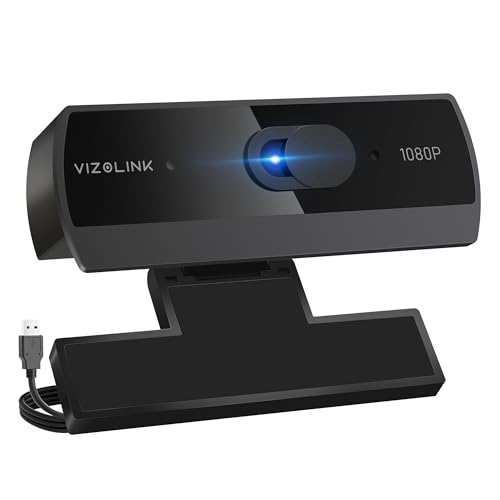
- Slide-on privacy shield included
- 1080p at 30 fps with light correction
- Dual noise-reduction microphones
Best For: Affordable calls, classes, and casual streaming
Value Choice
NIVEOLI 1080P Webcam with Privacy Cover

- Built-in privacy cover
- 1080p video with HDR and auto light correction
- Dual noise-canceling mics, wide compatibility
Best For: Flexible everyday use across multiple devices
Budget-Friendly Streaming Pick
1080P HD Webcam with Privacy Cover and Wide-Angle Lens

- 1080p HD video at 30 fps
- Built-in mic with noise reduction
- Slide privacy shield for lens coverage
Best For: everyday calls, online classes, and casual streaming
Versatile Meeting Upgrade
Acer 1080p Webcam with Privacy Cover

- 1080p video with low-light correction
- Dual noise-reduction microphones
- Includes privacy cover and A-to-C adapter
Best For: remote work, classes, and cross-device use
Privacy-First All-Rounder
LITEPRO 1080P Webcam with Privacy Cover
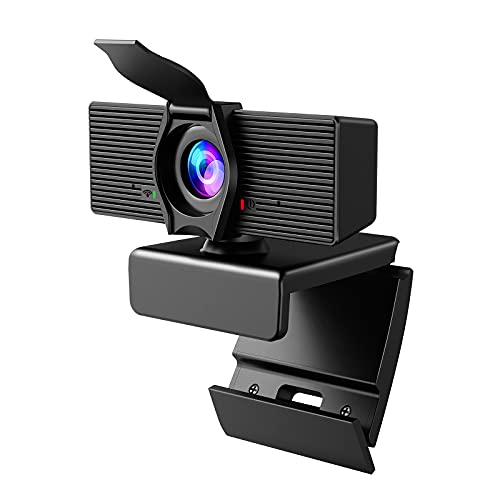
- Built-in privacy cover for quick lens blocking
- 1080p video with auto light correction
- 110-degree wide-angle lens and noise-reduction mic
Best For: conferencing, online school, and streaming
1080P Value Pick – NexiGo N60 Webcam with Privacy Cover
If you want a webcam with privacy cover for everyday calls, the NexiGo N60 focuses on the essentials: sharp 1080p video, easy USB plug-and-play setup, and a built-in mic for routine conferencing. It’s a practical choice for Zoom, Skype, Teams, streaming, and online school without adding setup friction.
Best For: Budget-minded buyers who want a straightforward 1080p webcam for meetings, classes, and video calls.
Pros:
- 1080p/30fps video with a 3.6mm glass lens for clear, fixed-distance image quality
- Privacy cover blocks the lens when not in use for added peace of mind
- Built-in noise-cancelling microphone helps reduce ambient noise during calls
- Wide compatibility with Windows, macOS, Linux, Android, and Chrome OS via USB 2.0/3.0
Cons:
- Not compatible with Xbox, PS4, or PS5
- Fixed-focus design may be less flexible than autofocus models
- Best image performance is described for a specific indoor distance range
The N60 is a solid no-nonsense option if you mainly need dependable video quality and a physical privacy cover. It balances ease of use with broad device support, making it a strong everyday pick.
Clean 2K Choice – EMEET C100 Rotating Privacy Cover Webcam
The EMEET C100 is a webcam with privacy cover aimed at users who want a cleaner desktop setup and sharper-than-basic image quality. Its 2K 30fps video, fixed focus, and software controls make it a good fit for home office calls, learning sessions, and casual streaming.
Best For: Users who want a tidy, secure webcam for work, school, and everyday video chats.
Pros:
- 2K 30fps video with fixed focus to avoid autofocus hunting
- Rotating privacy cover provides physical lens protection and a neat integrated design
- Metal clip and 1/4" thread support flexible mounting options
- EMEETLINK software lets you adjust brightness, exposure, saturation, and anti-flicker settings
Cons:
- Fixed focus is best within the stated close range
- USB-A connection may be less convenient for some newer devices
- Tripod is sold separately if you want that setup
For buyers who care about both privacy and a more polished look on camera, the C100 stands out. It pairs a secure shutter with practical controls, making it a well-rounded daily-use webcam.
Privacy-First Budget Cam – EMEET C950 1080P Webcam
If your priority is a webcam with privacy cover and a narrow, personal framing style, the EMEET C950 is built for that use case. It offers 1080p video, a 70° view, and a built-in mic, making it suitable for online classes, meetings, and private everyday calls.
Best For: Users who want a compact 1080p webcam with a physical cover and a modest field of view.
Pros:
- Physical slide privacy cover blocks the lens when the camera is not in use
- 1080p/30fps video with low-light correction for more dependable image quality
- 70° field of view helps keep the frame focused on the user and limits background exposure
- Built-in omnidirectional microphone supports clear voice pickup for calls
Cons:
- Best results depend on good lighting and the recommended shooting distance
- Chrome OS compatibility is noted as potentially inconsistent
- Not compatible with Windows Hello functions
The C950 is a sensible pick if you want privacy, compact framing, and simple operation without moving up to 2K or 4K. Its small view and physical cover make it especially practical for personal use.
Premium 4K Pick – AOC 4K Webcam with Privacy Cover
The AOC AC310 is a webcam with privacy cover for buyers who want sharper 4K video and a wider, more flexible framing setup. With plug-and-play USB connectivity, a built-in mic, and automatic light correction, it’s built for professional-looking calls, streaming, and video meetings.
Best For: Users who want 4K image quality and a wide-angle webcam for calls, streaming, or hybrid work.
Pros:
- 4K UHD video for highly detailed image quality
- 90° field of view with 180° tilt and 360° swivel for flexible positioning
- Physical sliding lens cover keeps the camera private when not in use
- USB-C and USB-A adapter support broad compatibility across devices
Cons:
- Wide angle may show more of your surroundings than a narrower webcam
- Digital zoom is listed rather than optical zoom
- Best suited for users who can benefit from 4K; may be more than basic callers need
If you want a more premium webcam experience, the AC310 delivers the strongest video spec in this group while still keeping privacy simple with a physical cover. It’s a versatile choice for anyone who values image detail and flexible mounting.
Editor’s Pick – Logitech Brio 101 1080p Webcam
If you want a webcam with privacy cover that keeps setup simple, the Logitech Brio 101 is a practical 1080p option for meetings and everyday streaming. It adds auto-light correction, a built-in mic, and a slide cover for quick privacy when you’re done.
Best For: Remote workers and casual streamers who want a dependable plug-and-play webcam with an integrated shutter.
Pros:
- Integrated privacy shutter for reliable lens coverage
- 1080p video with RightLight auto-light correction
- Built-in microphone and USB-A plug-and-play connection
- Works with Teams, Zoom, Google Meet, and more
Cons:
- Fixed-focus design may not suit users wanting manual control
- USB-A cable is less flexible for USB-C-only setups
The Brio 101 is a straightforward pick if you value convenience, privacy, and broad compatibility over advanced camera controls.
Budget Friendly – W2N 1080P Webcam with Privacy Cover
This webcam with privacy cover is built for basic video calling, teaching, and streaming without extra setup. The W2N offers 1080p video, dual noise-reduction mics, and automatic light correction, plus a slide cover to block the lens when not in use.
Best For: Buyers who want an affordable, easy-to-use webcam for calls and online classes.
Pros:
- Included privacy shield slides over the lens for instant privacy
- 1080p video at 30 fps with automatic light correction
- Dual noise-reduction microphones for clearer voice pickup
- Plug-and-play USB connection with wide OS compatibility
Cons:
- Listed with a fixed-focus design, so it lacks advanced focus control
- Basic feature set is better for everyday use than pro-level production
For a simple webcam that covers the essentials and keeps privacy built in, the W2N is an easy low-friction choice.
Value Choice – NIVEOLI 1080P Webcam with Privacy Cover
If you need a webcam with privacy cover for PC or laptop use, this NIVEOLI model keeps things simple with 1080p video, dual noise-canceling mics, and auto light correction. It also adds a built-in shutter and a rotating head for easier positioning during meetings or streaming.
Best For: Users who want a versatile plug-and-play webcam for meetings, livestreams, and general home office use.
Pros:
- Built-in privacy cover for quick physical lens blocking
- 1080p Full HD video with HDR support and auto light correction
- Dual noise-reducing microphones for clearer audio
- Wide compatibility with Windows, Mac, Linux, and Android
Cons:
- Fixed-focus design may not appeal to users wanting manual adjustment
- Product notes describe it as compact, so it’s more utilitarian than premium
This is a solid all-rounder if you want privacy built in and broad device support without overcomplicating the setup.
Budget-Friendly Streaming Pick – 1080P HD Webcam with Privacy Cover and Wide-Angle Lens
If you want a webcam with privacy cover that keeps setup simple while covering the basics well, this 1080p model is a practical choice. It combines full HD video, a wide-angle lens, a built-in noise-reducing microphone, and automatic light correction for everyday calls, teaching, streaming, and content creation.
Best For: Users who want an easy plug-and-play webcam for video calls, online classes, and casual streaming with basic privacy protection.
Pros:
- 1080p Full HD video at 30 fps with a wide-angle lens
- Built-in noise-canceling microphone for clearer voice pickup
- Automatic light correction helps in dim or bright rooms
- Includes a privacy shield for quick lens coverage when not in use
Cons:
- Privacy cover is a simple shield rather than an advanced security feature
- Fixed-focus design may not suit users who want manual adjustment
- Best suited to general use rather than premium creator setups
Overall, this webcam focuses on convenience and core performance instead of extras. If you want a straightforward webcam with privacy cover for daily video chatting and work-from-home use, it covers the essentials without complicating setup.
Versatile Meeting Upgrade – Acer 1080p Webcam with Privacy Cover
This webcam with privacy cover is built for users who want a simple upgrade for meetings, streaming, and remote work. It delivers 1080p video, dual noise-reduction microphones, automatic low-light correction, and a wide 100-degree view, plus an included A-to-C adapter for broader device compatibility.
Best For: Remote workers, students, and streamers who want a flexible webcam with easy setup and privacy protection.
Pros:
- 1080p Full HD video with automatic low-light correction
- Dual noise-reduction microphones help keep speech clear
- Built-in privacy cover adds security when the camera is not in use
- Includes a Type-A to Type-C adapter for added compatibility
Cons:
- Fixed-focus design may not appeal to users wanting more control
- Wide 100-degree field of view may be more than some users need
- Special feature listing includes a built-in projector, which is not clearly explained in the notes
For a practical webcam with privacy cover, this Acer model offers a strong mix of usability and everyday video quality. It is especially appealing if you need a plug-and-play camera that works across multiple platforms and devices.
Privacy-First All-Rounder – LITEPRO 1080P Webcam with Privacy Cover
If privacy is high on your checklist, this webcam with privacy cover is designed around that need while still handling the basics well. It offers 1080p video, automatic light correction, a 110-degree wide-angle lens, and a noise-reduction microphone for video calls, recording, and streaming.
Best For: Buyers who want a privacy-focused webcam for conferencing, online school, and live streaming.
Pros:
- 1080p Full HD video with 30 fps capture
- Built-in privacy cover for added peace of mind
- Noise-reduction microphone helps cut ambient sound
- 110-degree wide-angle lens suits presentations and group framing
Cons:
- Fixed-focus lens may limit fine-tuning
- Privacy cover is built in, but the design stays fairly basic
- Wide-angle view may capture more of the room than some users want
This model is a solid fit if you want straightforward performance with an emphasis on privacy. It balances easy plug-and-play use with enough video and audio features to handle most daily communication needs.
How We Picked These Webcam with Privacy Cover Models
We focused on webcams that balance everyday usability with privacy protection. That means a physical cover or shutter, dependable mic performance, clear 1080p or better video, and compatibility with common apps and operating systems.
We also favored models that are easy to set up, since most buyers want a Webcam with Privacy Cover that works immediately over USB without extra software or complicated configuration.
Quick Comparison: What Matters Most
For most people, the biggest decision is whether to prioritize image quality, privacy design, or value. If you want the sharpest detail for presentations or content creation, higher-resolution models may be worth it. If you mostly join meetings, a reliable 1080p webcam with a physical cover is usually the better buy.
Pay attention to field of view, microphone quality, and light correction. A wider lens helps if you want more of your space in frame, while a narrower view is better for focused solo calls.
Key Buying Factors for a Webcam with Privacy Cover
Privacy Cover Type
Look for a true physical cover or shutter, not just a software-based privacy mode. A manual cover gives you a clear visual cue that the lens is blocked.
Video Resolution and Light Handling
1080p is the sweet spot for most users, while 2K and 4K can offer extra detail. Auto light correction is helpful if you work in mixed or low lighting.
Microphone Quality
Built-in mics are fine for casual meetings, but noise-canceling microphones improve clarity in busy rooms. If audio matters a lot, consider whether you’ll use a headset instead.
Mounting and Compatibility
Check that the clip fits your monitor, laptop, or desktop setup. USB plug-and-play support is ideal for Windows, Mac, and popular conferencing apps.
Who Should Buy Which Webcam with Privacy Cover?
If you want the best overall value, choose a straightforward 1080p Webcam with Privacy Cover, auto light correction, and a decent mic. Remote workers should prioritize reliability and easy daily use. Students benefit from simple setup and good low-light performance. Streamers and creators may prefer wider angles or higher-resolution models for a more polished look.
In short, the best Webcam with Privacy Cover is the one that fits your lighting, desk setup, and call quality needs without adding friction to your routine.