Choosing among Blu-ray drives for disc ripping requires more than checking whether a drive can read Blu-ray discs. Compatibility, connection type, drive speed, UHD support, software, and reliable operation all affect the experience.
This roundup compares 10 internal and external options for different setups, from compact laptop accessories to more capable drives for home media libraries and archival projects.
Best 10 Blu Ray Drives for Disc Ripping Picks for 2026
Best Slim ASUS Option
SBW-06D5H-U External Blu-ray Burner

- USB-A and USB-C connectivity
- Slim, lightweight 240 g design
- Supports Blu-ray, DVD, CD, and M-Disc
Best For: Portable everyday disc burning and reading
Best Hub-Equipped Pick

- Reads and burns BD, DVD, and CD media
- Adds USB ports and SD/TF card access
- Includes case and disc sleeves
Best For: Laptops needing optical and expansion ports
Best UHD-Capable Option
archgon Aluminum Blu-ray Writer

- Reads UHD Blu-ray discs
- Writes regular Blu-ray, DVD, and CD media
- Premium CNC aluminum enclosure
Best For: Windows users with compatible UHD playback hardware
Best Portable Multiport Pick

- USB 3.0 and Type-C connectivity
- Adds USB ports and SD/TF access
- Slim design with embedded cables
Best For: Portable disc work and basic port expansion
Best Internal UHD Option
BU40N Slim 4K Blu-ray SATA Drive

- Internal 9.5mm SATA design
- Supports BDXL and 3D Blu-ray
- Windows UHD playback support
Best For: Compatible laptops needing an internal Blu-ray writer
Best Portable XL Support
Buffalo Portable USB Blu-ray Drive

- Portable USB Type-A connection
- Supports BD-XL and M-DISC
- Includes cables and software
Best For: Windows or Mac users needing a portable external writer
Best Simple External Choice
LG BP50NB40 USB Blu-ray Rewriter
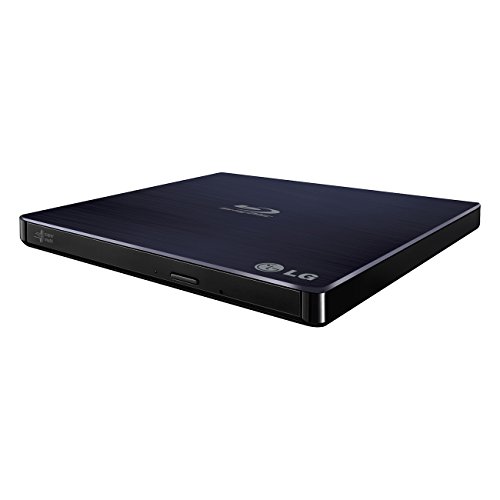
- Slim external USB design
- Supports Windows and Mac PCs
- M-DISC and Blu-ray rewriting support
Best For: Basic external Blu-ray writing and playback
Most Expandable
7-in-1 Blu-ray Drive with USB-C

- USB 3.0 and USB-C connectivity
- Supports BD-XL up to 100GB and M-Disc
- Adds six ports for USB and SD/TF devices
Best For: Disc ripping plus peripheral and card connectivity
Best for 3D Playback
USB 3.0 External Blu-ray Burner

- Built-in USB-A and USB-C cable
- Supports 50GB Blu-ray discs
- Offers near-1080p 3D Blu-ray playback
Best For: Portable Blu-ray ripping and 3D playback on computers
Best for Stable Power
Dual-Cable External Blu-ray Drive

- USB 3.0 and USB-C connectivity
- Additional USB cable helps stabilize power
- Reads and writes Blu-ray, DVD, and CD media
Best For: Laptop and PC disc ripping with dependable USB power
Best Slim ASUS Option – SBW-06D5H-U External Blu-ray Burner
ASUS SBW-06D5H-U BDXL External Ultra Slim Blu-ray and MDisc Burner USB 3.1 USB-C 2 Cables Black
Check Price On AmazonFor shoppers comparing blu ray drives for disc ripping, the ASUS SBW-06D5H-U is a compact external option with USB 3.1 Type-A and Type-C connectivity. It supports Blu-ray, DVD, and CD media, along with M-Disc, in a slim enclosure suited to laptops and desktops.
Best For: Users who want a lightweight ASUS external burner with both USB-A and USB-C cables.
Pros:
- USB 3.1 Type-A and Type-C interfaces support newer and older computers.
- Ultra-slim 0.58-inch form factor and 240 g weight are travel-friendly.
- Supports Blu-ray, DVD, CD, and M-Disc media.
Cons:
- Listed Blu-ray read speed is up to 8x, with a read-speed detail also specifying 6x.
- The supplied notes do not identify included ripping or playback software.
The dual-cable setup and compact design make this a practical general-purpose drive for disc access and backups. Confirm software compatibility before buying if your priority is a specific ripping workflow.
Best Hub-Equipped Pick – 8-in-1 External Blu-ray Drive
Among blu ray drives for disc ripping, this 8-in-1 external model stands out by combining Blu-ray, DVD, and CD support with a USB hub and card reader. It connects through USB-A or USB-C and supports Windows and macOS computers.
Best For: Laptop users who need an optical drive plus extra USB and SD/TF connectivity.
Pros:
- Reads and burns BD, DVD, and CD formats, including M-Disc.
- Built-in hub provides two USB-C ports, USB 3.0, USB 2.0, and an SD/TF slot.
- Includes a carrying case, disc sleeves, and integrated cable storage.
- Supports BD-R burning up to 6x, DVD-R up to 8x, and CD-R up to 24x.
Cons:
- BD-XL is read-only and cannot be recorded; maximum Blu-ray recording capacity is 50GB.
- Does not support 4K Blu-ray playback.
- TF and SD cards cannot be read simultaneously.
This is a versatile choice when desk space and laptop ports are limited. Its format coverage is useful for ripping and backups, but buyers needing BD-XL writing or 4K playback should look elsewhere.
Best UHD-Capable Option – archgon Aluminum Blu-ray Writer
archgon Premium Aluminum External USB 3.0 UHD 4K Blu-Ray Writer Super Drive for PC and Mac
Check Price On AmazonFor buyers seeking blu ray drives for disc ripping with UHD support, the archgon Premium Aluminum drive can read UHD Blu-ray and read or write regular Blu-ray, DVD, and CD media when used with suitable software. Its CNC aluminum enclosure provides a more substantial external design.
Best For: Windows PC users who want UHD Blu-ray reading alongside regular disc writing.
Pros:
- Reads UHD Blu-ray and writes regular Blu-ray, DVD, and CD discs.
- Supports M-DISC BD-R media.
- Aluminum enclosure offers a premium external build.
- Regular Blu-ray writing is listed up to 12x.
Cons:
- UHD playback requires compatible hardware and third-party CyberLink PowerDVD software.
- The supplied notes state that suitable UHD Blu-ray software is not available for Mac.
- UHD playback compatibility should be checked with the Ultra HD Blu-ray Advisor before purchase.
The archgon is the most specialized option here for UHD-capable Windows setups. It can handle regular disc writing more broadly, but software and hardware requirements make it less plug-and-play than standard Blu-ray drives.
Best Portable Multiport Pick – BUNUD 5-in-1 Blu-ray Drive
This BUNUD model is a practical contender among blu ray drives for disc ripping, offering Blu-ray, DVD, and CD reading and writing plus two USB ports and an SD/TF slot. Its USB 3.0 and Type-C cables support Windows PCs and compatible Mac computers without requiring drivers.
Best For: Users who want a slim optical drive with basic port expansion and file-transfer features.
Pros:
- USB 3.0 and Type-C connections work with laptops, desktops, and Mac devices listed by the manufacturer.
- Includes two USB ports and an SD/TF card slot.
- Supports Blu-ray, DVD, and CD playback, burning, backups, and file transfers.
- Embedded cable design improves portability and organization.
Cons:
- Does not play 4K Ultra HD discs.
- BD-ROM video read speed is listed as 2x, although maximum BD read speed is 6x.
- Not compatible with tablets, TVs, Chrome OS, projectors, cars, or smartphones.
The BUNUD is a useful travel-oriented choice when you also need a couple of extra ports. Its broad computer compatibility and included one-year warranty add convenience, while the lack of 4K support limits it to standard Blu-ray use.
Best Internal UHD Option – BU40N Slim 4K Blu-ray SATA Drive
For laptop owners seeking blu ray drives for disc ripping, the BU40N is a slim internal SATA option that reads and writes Blu-ray, DVD, and CD media. It also supports BDXL discs and 4K UHD Blu-ray playback on compatible Windows systems.
Best For: Compatible 9.5mm SATA laptops and Windows users who want UHD playback plus regular disc writing.
Pros:
- Supports Blu-ray, DVD, CD, BDXL, and 3D Blu-ray media.
- Offers 4K UHD Blu-ray playback on Windows with compatible software.
- Supports up to 6x optical writing and includes a three-year warranty.
Cons:
- Requires a compatible 9.5mm SATA tray-loading bay and internal installation.
- UHD playback is not supported on Mac according to the supplied notes.
This drive is a strong fit when your laptop has the required internal bay. Verify the SATA form factor and your operating system before buying, especially if UHD playback is important.
Best Portable XL Support – Buffalo Portable USB Blu-ray Drive
The Buffalo BRXL-PUS6U3-BK/N is a practical external choice for blu ray drives for disc ripping when portability and broad computer compatibility matter. It connects through USB Type-A, supports Windows and Mac systems, and includes software for playback, editing, backup, and burning.
Best For: Windows and Mac users who want a portable Blu-ray writer with BDXL support and included accessories.
Pros:
- Works with USB 3.2 Gen 1, USB 3.0, and USB 2.0 Type-A ports.
- Supports BD-R XL, BD-RE XL, standard Blu-ray, DVD, CD, and M-DISC media.
- Includes USB and power cables plus PowerDVD, Power2Go, and related software.
- Compact, lightweight enclosure with integrated cable storage.
Cons:
- Requires a USB Type-A connection, and external power may be needed.
- Maximum BD-R writing speed is 6x, while XL media writes at up to 4x.
With its portable design, XL media support, and bundled software, this Buffalo drive is a well-rounded option for computers with compatible Type-A ports. Check your system’s software and power requirements before starting a ripping workflow.
Best Simple External Choice – LG BP50NB40 USB Blu-ray Rewriter
LG BP50NB40 6x Blu-ray Rewriter BD-RE/8x DVD±RW DL USB 2.0 Slim External Drive (
Check Price On AmazonThe LG BP50NB40 is a slim external rewriter for users comparing blu ray drives for disc ripping on Windows or Mac computers. Its USB 2.0 connection and compact enclosure make it easy to add Blu-ray, DVD, and CD capabilities without an internal drive bay.
Best For: Users who want a straightforward, quiet external Blu-ray rewriter for compatible Windows or Mac PCs.
Pros:
- External slim design is easy to use with compatible computers.
- Supports Windows and Mac systems according to the supplied notes.
- Supports M-DISC and offers up to 6x Blu-ray writing and 8x reading.
- Includes a USB cable and installation disc.
Cons:
- Uses USB 2.0 with a 480 Mbps interface rather than a faster USB standard.
- The supplied operating-system list names older Windows versions and macOS compatibility should be verified.
This LG model keeps the setup simple and adds Blu-ray rewriting to a desktop or laptop through USB. Its USB 2.0 interface is adequate for basic use, but users prioritizing faster transfers may prefer a newer USB 3.x model.
Most Expandable – 7-in-1 Blu-ray Drive with USB-C
For shoppers comparing blu ray drives for disc ripping, the Dainty 7-in-1 is a versatile external option with USB 3.0 and USB-C connectivity, Blu-ray/DVD/CD reading and writing, and six additional expansion ports. It supports Blu-ray media up to 100GB and offers maximum read speeds of 6x for Blu-ray, 8x for DVD, and 24x for CD.
Best For: Users who want disc ripping and burning alongside a compact USB hub for cards and peripherals.
Pros:
- Supports USB 3.0 and USB-C connections.
- Reads and writes BD-XL, BD-R/RE, DVD, CD, and M-Disc media.
- Six expansion ports support USB devices and SD/TF cards.
- Includes an additional USB power cable for more stable operation.
Cons:
- Maximum Blu-ray write speeds are lower than the listed read speed, reaching 2x on several formats.
- Playback and writing functions may require suitable computer software.
This model stands out when expandability matters as much as optical-disc support. Its broad media compatibility and dual-cable power design make it a practical choice for home, office, or travel use.
Best for 3D Playback – USB 3.0 External Blu-ray Burner
This external Blu-ray burner is a straightforward option among blu ray drives for disc ripping, with a built-in USB-A/USB-C cable, 5Gbps transfer support, and read/write speeds up to 6x for Blu-ray, 8x for DVD, and 24x for CD. It also supports 50GB Blu-ray discs and near-1080p 3D Blu-ray playback.
Best For: Windows, macOS, and Linux users who want a portable Blu-ray reader and writer with 3D playback support.
Pros:
- Built-in 2-in-1 cable works with USB-A and USB-C ports.
- Reads and writes 50GB Blu-ray discs.
- Supports near-1080p 3D Blu-ray playback.
- Works with Windows, macOS, and Linux computers.
Cons:
- 4K Ultra HD Blu-ray discs are not supported.
- Playback and burning software is not included.
- Not compatible with Chromebooks, smartphones, tablets, TVs, or car players.
Its built-in dual-interface cable reduces adapter clutter, while broad computer compatibility makes it easy to move between systems. Just plan to provide compatible playback or burning software separately.
Best for Stable Power – Dual-Cable External Blu-ray Drive
The Dainty external drive is a practical pick among blu ray drives for disc ripping, combining USB 3.0 and USB-C connections with support for Blu-ray, DVD, and CD reading and writing. It reaches maximum read speeds of 6x for Blu-ray, 8x for DVD, and 24x for CD, and includes a second USB power cable to help reduce interruptions during demanding tasks.
Best For: Laptop and PC users who prioritize stable power delivery and broad Windows, macOS, and Linux compatibility.
Pros:
- Includes an additional USB power cable for more consistent operation.
- Supports USB 3.0 and USB-C computer connections.
- Handles BD media up to 100GB, DVDs, and CDs.
- Compact and lightweight for travel.
Cons:
- Required Blu-ray playback and writing software is not included.
- Not compatible with TVs, tablets, PS4, iPads, Chromebooks, projectors, or vehicles.
- Some Blu-ray formats have maximum write speeds of 2x.
The dual-power design is the main reason to consider this model, particularly if a computer’s USB power is inconsistent. It offers useful format support in a portable enclosure, provided you already have suitable disc software.
How We Picked the Best Blu Ray Drives for Disc Ripping
We focused on drives that can read Blu-ray media and provide practical connectivity for modern computers. The selection includes portable USB models, slim internal SATA drives, UHD-capable options, and units that also write Blu-ray, DVD, and CD media.
We also considered connection flexibility, advertised read/write capabilities, operating-system support, portability, included cables or power accessories, and the likelihood that a drive will fit common ripping workflows. Because bundled software and UHD support can vary, buyers should confirm the manufacturer’s specifications before purchase.
Quick Comparison
| Type | Best For | What to Check |
|---|---|---|
| Portable external USB drive | Laptops and multiple computers | USB connector, power requirements, and included cables |
| UHD-capable drive | 4K Blu-ray media and advanced setups | UHD compatibility, firmware, and software support |
| Internal SATA drive | Desktop upgrades and permanent installations | Drive bay size, SATA compatibility, and mounting hardware |
| Multi-function external drive | Disc reading, burning, and media playback | Supported formats and bundled applications |
Key Buying Factors for Blu-Ray Drives for Disc Ripping
Drive and Disc Compatibility
Confirm support for the specific media you plan to use, including standard Blu-ray, BD-R, BD-RE, DVDs, and CDs. UHD Blu-ray is not automatically supported by every Blu-ray drive. A drive advertised as a burner may offer broader write support, while a reader-only model may be simpler and less expensive.
USB, SATA, and Power
External models are usually the easiest choice for laptops, but check whether the drive uses USB-A, USB-C, or an adapter. Some slim drives can run from one USB port, while others may need a supplemental power cable. Internal SATA models are better suited to desktops with an available 5.25-inch bay or compatible slim-drive mounting location.
Ripping Software and Operating-System Support
The drive hardware is only part of the setup. Make sure your computer recognizes the device and that your chosen disc-ripping software supports the operating system and disc type. Included playback or burning software can be useful, but it does not guarantee support for every ripping task.
Speed, Noise, and Reliability
Higher advertised speeds can reduce transfer time, but actual performance depends on the disc, computer, USB connection, and software. For frequent use, prioritize stable operation, good ventilation, a firm tray or slot mechanism, and a reputable warranty over headline speed alone.
Who Should Buy Which Blu Ray Drives for Disc Ripping?
Choose a portable external drive if you use a laptop, move between computers, or want the simplest installation. Choose a UHD-capable model if your library includes 4K Blu-ray discs and your software and system meet the additional requirements. Choose an internal SATA drive for a desktop media server or a permanent ripping station. Choose a multi-format burner if you also want to create Blu-ray, DVD, or CD backups. Before ordering, verify the connector, power arrangement, operating-system compatibility, and exact disc formats supported.