The best compact smart home hubs make it easier to connect, control, and automate devices without giving up valuable shelf or counter space. From voice-first speakers to dedicated multi-protocol controllers, the right hub depends on your devices, ecosystem, and automation goals.
We compared 10 compact smart home hubs across compatibility, connectivity, setup, control options, and expansion potential to help you choose a practical centerpiece for your home.
Best 10 Compact Smart Home Hubs Picks for 2026
Best All-in-One Pick

- Compact speaker with Alexa+ and built-in hub
- Controls thousands of compatible devices
- Supports eero, routines, and multi-room audio
Best For: Alexa households wanting speaker and hub functionality together
Best for Tapo Devices

- Supports up to 64 Tapo devices
- Uses low-power wireless for sensors and controls
- Includes chime and up to 90 dB siren support
Best For: Tapo-based sensor, switch, and home-alert setups
Best for Advanced Automation

- Home Assistant comes preinstalled
- Runs silently with 4GB RAM and 32GB storage
- Supports USB expansion for Zigbee, Z-Wave, and Thread
Best For: Users seeking customizable automation and local data control
Best for Long-Range Sensors

- YoLink range reaches up to 2,034 feet
- Supports Wi-Fi or Ethernet
- Works with IFTTT and Home Assistant
Best For: Long-range YoLink sensor networks and integrations
Best Overall

- 8-inch customizable touchscreen dashboard
- Supports Wi-Fi, Zigbee, Matter, Thread, and more
- Designed for shared home and security control
Best For: Families wanting a visual Alexa smart home control panel
Best for Local Matter Bridging
SONOFF Bridge Max Smart Home Hub
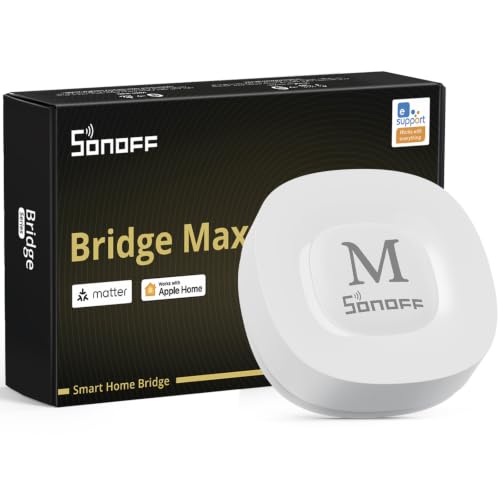
- Bridges Zigbee and other devices to Matter platforms
- Local web console with no cloud required
- Works with Home Assistant, Ethernet, and Wi-Fi
Best For: DIY smart home users building local, cross-platform integrations
Best for Local Automation

- Local processing and no subscription required
- Supports Zigbee, Matter, Thread, and Ethernet
- Homey Flow enables customizable multi-device routines
Best For: Users seeking broad, privacy-focused home automation
Best Matter Bridge
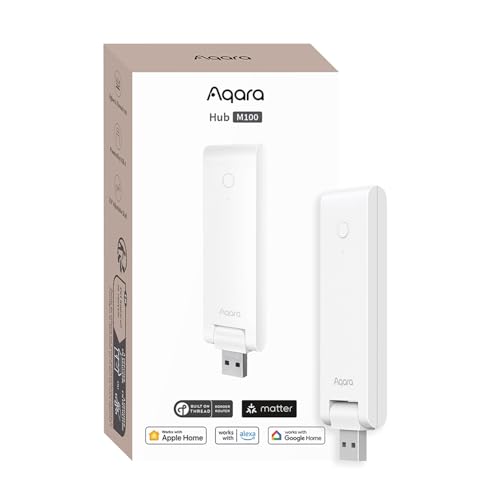
- Matter bridge for Aqara Zigbee devices
- Supports Thread and local automation
- Adjustable design with USB-A power
Best For: Aqara households expanding into Matter and Thread
Best for Lutron Lighting

- Supports up to 75 Caseta devices
- Works with Alexa, Apple HomeKit, and Google
- Uses Clear Connect technology
Best For: Lutron Caseta lighting installations
Best Tuya Value Hub

- Supports Zigbee 3.0 and Bluetooth 5.0
- Works with Tuya Smart and Smart Life
- Alexa and Google Assistant voice control
Best For: Tuya-compatible Zigbee and Bluetooth devices
Best All-in-One Pick – Echo Dot Smart Home Hub
For shoppers comparing compact smart home hubs, the newest Echo Dot combines a small footprint with a speaker, Alexa+ assistance, and built-in smart home control. It is a practical fit for apartments, bedrooms, and home offices where one device needs to handle several everyday tasks.
Best For: Alexa households wanting a compact speaker and smart home hub in one device.
Pros:
- Combines crisp everyday audio, Alexa+ help, and smart home control.
- Acts as a hub for tens of thousands of compatible devices, including lights, locks, and blinds.
- Includes eero built in for extending Wi-Fi and supports multi-room audio pairing.
- Offers a microphone enable/disable button and multiple privacy controls.
Cons:
- Alexa+ access is free with a Prime membership, which may limit the value for non-Prime users.
- Its smart home features are most appealing to shoppers already using compatible Alexa devices.
The Echo Dot is the most versatile option here if you want voice control, music, and hub functionality without adding separate hardware. Choose it for convenience and ecosystem breadth rather than for a dedicated automation platform.
Best for Tapo Devices – Tapo H100 Smart Hub
The Tapo H100 is one of the more focused compact smart home hubs, linking Tapo sensors, switches, and buttons through a low-power wireless protocol. It is designed for reliable coverage and simple app- or voice-triggered actions, but requires a 2.4GHz Wi-Fi connection.
Best For: Tapo users building a sensor- and switch-based home security or automation setup.
Pros:
- Connects up to 64 Tapo devices through one hub.
- Offers a stated maximum range of up to 30 meters, subject to environmental conditions.
- Low-power connectivity can extend compatible device battery life by up to 10 times compared with Wi-Fi devices.
- Built-in chime and siren support can provide alerts for motion or other hazards.
Cons:
- Requires 2.4GHz Wi-Fi during setup and operation.
- It is designed for Tapo sensors, switches, and buttons rather than directly connecting Tapo smart plugs or lighting.
- Its usefulness depends on building within the Tapo ecosystem.
The H100 makes sense when dependable sensor connections and straightforward Tapo automation matter more than broad platform compatibility. Confirm your Wi-Fi band and device mix before buying.
Best for Advanced Automation – Home Assistant Green
Home Assistant Green | Smart Home hub with Advanced Automation | Official Home Assistant Hardware
Check Price On AmazonHome Assistant Green is a compact smart home hub for people who want deeper automation and local data control. Home Assistant comes preinstalled, while its fanless design, included Ethernet connection, and expandable USB ports make it a straightforward starting point for a more customizable system.
Best For: DIY-minded users who want advanced automations and local control of their smart home data.
Pros:
- Arrives with Home Assistant installed and includes a power supply and Ethernet cable.
- Provides a quad-core processor, 4GB of RAM, and 32GB of storage in a small, silent enclosure.
- Can coordinate devices and automations across the home from one interface.
- Supports USB expansion for Z-Wave, Zigbee, and Thread devices.
Cons:
- Ethernet connectivity is required for its included setup, so it is not a wireless-only hub.
- Additional Z-Wave, Zigbee, or Thread connectivity requires compatible USB devices.
- Its advanced automation focus may be more than casual users need.
Home Assistant Green stands out for flexibility, privacy, and automation depth rather than voice-speaker convenience. It is a strong foundation for gradually consolidating a varied smart home, especially if you are comfortable expanding the setup over time.
Best for Long-Range Sensors – YoLink YS1603 Hub
The YoLink YS1603 is a compact smart home hub centered on long-range connectivity and centralized app control. It supports Wi-Fi or Ethernet and uses the YoLink protocol, making it a useful option for homes where sensor reach is a key consideration.
Best For: Users who need long-range YoLink connectivity with app, voice, or automation integrations.
Pros:
- YoLink protocol offers a stated range of up to 2,034 feet.
- Supports either Wi-Fi or Ethernet connectivity.
- Works with IFTTT and Home Assistant for broader automation options.
- Provides central app control and voice control support.
Cons:
- The supplied model is the regular hub without battery backup.
- Its long-range benefits depend on using compatible YoLink devices.
- It is a wired hub rather than a standalone wireless-only setup.
Choose the YS1603 when sensor range and integration matter more than built-in speaker or display features. Its Wi-Fi/Ethernet flexibility and IFTTT or Home Assistant support give it a practical role in a connected, expandable system.
Best Overall – Amazon Echo Hub
The Amazon Echo Hub is a practical choice for anyone comparing compact smart home hubs with a dedicated touchscreen. Its customizable dashboard puts device controls, camera views, routines, and security functions in one place, while built-in support for Wi-Fi, Bluetooth, Zigbee, Matter, Sidewalk, and Thread devices broadens compatibility.
Best For: Families wanting an easy-to-use, wall-mountable smart home control panel with Alexa integration.
Pros:
- Customizable dashboard with resizable sections and quick device controls.
- Built-in hub support for thousands of compatible devices and multiple protocols.
- Supports camera viewing, routines, security controls, and on-screen media management.
- Includes privacy controls such as a microphone-off button.
Cons:
- Wall-mounting accessories, tabletop stands, and cable-management components are sold separately.
- Some Ring camera features require Alexa+ and a compatible Ring subscription.
The Echo Hub stands out when visual control and broad Alexa compatibility matter most. It is a strong fit for households that want a shared interface rather than relying only on phone or voice control.
Best for Local Matter Bridging – SONOFF Bridge Max Smart Home Hub
The SONOFF Bridge Max is a compact smart home hub focused on connecting Zigbee, BTHome, and eWeLink devices to Matter ecosystems. Its local web console, Ethernet connectivity, and support for Home Assistant make it especially useful for shoppers who want flexible integrations without depending entirely on cloud services.
Best For: DIY users bridging Zigbee devices to Apple Home, Alexa, Google Home, Matter platforms, or Home Assistant.
Pros:
- Bridges Zigbee, BTHome, and eWeLink devices to Matter platforms.
- Offers local configuration through a web console without requiring cloud services.
- Supports Ethernet and Wi-Fi connectivity plus Home Assistant integration through MQTT.
- Built-in 90 dB alarm and mobile notifications can support local security setups.
Cons:
- It is a Matter Bridge, not a Matter Controller, so it cannot add Matter devices directly.
- Its setup and integration features may be better suited to technically confident users.
The Bridge Max is a focused networking tool rather than a touchscreen command center. Choose it when local control, Zigbee compatibility, and cross-platform bridging are higher priorities than a polished on-device interface.
Best for Local Automation – Homey Pro mini
The Homey Pro mini is a compact smart home hub for consolidating automation across many brands and protocols. It processes data locally, supports Zigbee, Matter, Thread, and Ethernet out of the box, and uses Homey Flow to create routines ranging from simple one-tap actions to advanced workflows.
Best For: Users who want subscription-free, local automation across a broad mix of smart home brands.
Pros:
- Local processing helps maintain control and reliability when the internet is down.
- Supports Zigbee, Matter, Thread, and Ethernet without extra hardware.
- Works with more than 1,000 brands and integrates with Alexa, Google Assistant, and Siri.
- Homey Flow supports both simple routines and advanced desktop-created workflows.
Cons:
- Z-Wave, Bluetooth, and infrared support require the separately sold Homey Bridge.
- The range of customization may be more than casual users need.
Homey Pro mini is a strong pick for automation enthusiasts who want broad brand support and local processing without a monthly subscription. Its main limitation is that some additional protocols require an optional bridge.
Best Matter Bridge – Aqara M100 Smart Hub
The Aqara Smart Hub M100 is a strong option for shoppers comparing compact smart home hubs that support Matter, Thread, and Aqara Zigbee devices. Its adjustable design, USB-A power, Wi-Fi 6 connectivity, and local automation make it well suited to flexible installations, though its Zigbee support is limited to Aqara devices.
Best For: Aqara owners who want Matter integration, Thread support, and local automation in a small hub.
Pros:
- Bridges Aqara Zigbee devices into Matter ecosystems such as Apple Home, Alexa, and Home Assistant.
- Supports up to 20 Aqara Zigbee devices and 20 Thread devices.
- Local automation can continue operating without Wi-Fi or cloud access for supported functions.
- Adjustable 210-degree shaft and USB-A power support flexible placement.
Cons:
- Zigbee compatibility is limited to Aqara Zigbee devices rather than third-party Zigbee products.
- A 5V/0.5A power adapter is required but not included.
- Some functions, including cloud push notifications, still require cloud connectivity.
The M100 is one of the more versatile compact smart home hubs in this group, especially if you already use Aqara products or need Matter bridging. Check device compatibility carefully before buying, particularly if your existing Zigbee accessories come from other brands.
Best for Lutron Lighting – Caseta Smart Hub
The Lutron Caseta Smart Hub is a focused choice among compact smart home hubs for managing Caseta lighting and connecting it with major platforms. It plugs into an outlet, connects to your router, and uses Clear Connect technology so its device communication does not compete with Wi-Fi traffic.
Best For: Homes centered on Lutron Caseta lighting, shades, and compatible voice or smart-home platforms.
Pros:
- Works with Alexa, Apple HomeKit, Google Assistant, Ring, Serena shades, and Sonos.
- Supports up to 75 Caseta devices for future expansion.
- Clear Connect technology avoids competing with Wi-Fi-connected devices.
- Setup requires plugging in the hub, connecting it to the router, and using the Lutron app.
Cons:
- Caseta dimmers, switches, and other accessories are sold separately.
- It is primarily designed for the Lutron Caseta ecosystem rather than general-purpose device mixing.
- Router connectivity is required during setup.
Choose the Caseta Smart Hub if reliable, scalable lighting control matters more than broad multi-brand protocol support. It is especially practical for households already invested in Caseta switches or planning a larger Lutron installation.
Best Tuya Value Hub – ZigBee and Bluetooth Gateway
This dual-mode gateway is a compact smart home hub for Tuya-based homes that need both Zigbee 3.0 and Bluetooth 5.0 connectivity. It uses 2.4GHz Wi-Fi and the Smart Life or Tuya Smart app for remote control, but buyers should confirm that every intended device uses Tuya protocols before purchasing.
Best For: Tuya Smart or Smart Life users connecting compatible Zigbee and Bluetooth accessories through one gateway.
Pros:
- Combines Zigbee 3.0 and Bluetooth 5.0 in one gateway.
- Supports app-based remote control through Smart Life and Tuya Smart.
- Works with Amazon Alexa and Google Assistant for voice control.
- Connects over 2.4GHz Wi-Fi without requiring a network cable.
Cons:
- Only compatible with Tuya-protocol devices and is not a universal Zigbee hub.
- Notes specifically exclude blinds, Sengled bulbs, and door locks.
- Uses Micro-USB power, so a suitable power source is needed.
This gateway makes sense when your accessories already use Tuya or Smart Life. It offers useful dual-protocol coverage for the price, but its platform restriction means it is a poor fit for mixed-brand smart homes.
How We Picked the Best Compact Smart Home Hubs
We focused on hubs that occupy relatively little space while providing meaningful control over smart lights, sensors, plugs, locks, thermostats, and other connected devices. Our comparison considers supported standards such as Zigbee, Z-Wave, Matter, Thread, Wi-Fi, Bluetooth, and proprietary long-range protocols, along with compatibility with Alexa, Google Home, Apple Home, and other platforms.
We also looked at setup requirements, automation capabilities, app quality, local-control options, voice control, networking needs, and whether each hub can support a growing installation. A compact design is useful, but reliability and device compatibility matter more than the smallest footprint.
Quick Comparison
- Best for voice control: Amazon Echo Dot
- Best for a visual dashboard: Amazon Echo Hub
- Best for advanced local automation: Home Assistant Green
- Best for broad protocol support: Homey Pro mini
- Best for Matter and Aqara devices: Aqara Smart Hub M100
- Best for Lutron lighting: Lutron Caseta Smart Hub
- Best for long-range sensors: YoLink Smart Home Hub
- Best for simple sensor and chime setups: Tapo Smart Hub H100
Key Buying Factors for Compact Smart Home Hubs
Device and Protocol Compatibility
Check the wireless standards your current and planned devices use. A hub with Matter, Thread, Zigbee, or Bluetooth support may provide more flexibility, while a proprietary hub can be the better choice for a specialized product family such as Lutron or YoLink.
Platform Support
Confirm compatibility with your preferred voice assistant and smart home platform. Matter can simplify cross-platform control, but individual device features may still depend on the manufacturer’s app or hub.
Automation and Local Control
Basic hubs handle scenes, schedules, and remote control. Advanced systems support conditional automations, integrations, dashboards, and local processing. Local operation can improve responsiveness and reduce dependence on cloud services, though it may require more setup.
Network and Power Requirements
Review whether the hub requires 2.4GHz Wi-Fi, Ethernet, a dedicated app, or an always-on internet connection. Ethernet may improve stability, while Wi-Fi is usually easier to place in an apartment or smaller home.
Expansion Potential
Choose a hub that fits your likely next step. A simple voice speaker may be enough for a few lights, but a dedicated controller is usually a better long-term choice for sensors, security devices, multi-room automation, or mixed brands.
Who Should Buy Which Compact Smart Home Hubs?
Buy an Echo Dot if you want an inexpensive voice-controlled starting point. Choose the Echo Hub if you prefer touch-based control and an at-a-glance dashboard. Home Assistant Green suits technically confident users who want deep customization and advanced automation.
Homey Pro mini is a strong choice for mixed-brand installations requiring several protocols. Aqara, Tapo, Sonoff, and Tuya hubs make the most sense when most of your devices already belong to their ecosystems. Pick YoLink for long-range sensors, or Lutron Caseta for dependable lighting control. Before buying, prioritize compatibility with the devices you own over feature lists alone.